> ## Documentation Index
> Fetch the complete documentation index at: https://docs.orq.ai/llms.txt
> Use this file to discover all available pages before exploring further.
# Routing Rules
> Use CEL-based routing rules to redirect AI Gateway requests to different models based on request attributes, evaluated in priority order.
Routing Rules are CEL-based conditions that intercept requests to the [**AI Gateway**](/ai-gateway/using-the-router) and redirect them to a different model when matched. Rules are evaluated in priority order and the first matching rule wins. No further rules are evaluated after a match.
## Use cases
Routing rules are most useful when traffic needs to be redirected or distributed at the gateway level based on request attributes, without modifying any calling application.
Intercepts support bot requests addressed to one model and silently redirects them to a cheaper one, so the calling application needs no changes to benefit from the cost saving.
Two rules at the same priority split document traffic by complexity: simple documents go to a lighter model, complex ones go to a more capable model, all based on metadata attached to each request.
Matches requests that include a file attachment and routes them through an ordered list of models that all support native file input, so the request succeeds even if the first model is unavailable.
A low-priority catch-all rule that redirects traffic to an alternative set of models whenever primary providers are unavailable, keeping requests flowing without manual intervention.
Distributes requests in round-robin mode across multiple endpoints serving the same model, balancing inference load across providers without any changes required on the caller side.
## How routing rules work
When a request arrives at the AI Gateway, the **AI Gateway** evaluates all active routing rules in ascending priority order. The first rule whose CEL expression matches the request determines the target model. If no rule matches, the model from the original request payload is used.
**Example:** A request arrives with `model: "openai/gpt-5.6-sol"`. A routing rule with condition `model.contains("gpt-5.6-sol")` and target `openai/gpt-5.4-mini` is the highest-priority matching rule. The **AI Gateway** redirects the request to `gpt-5.4-mini`, regardless of what the caller specified. In CEL expressions, `model` refers to the model value from the request payload.
To distribute traffic across providers at the request level without organization-wide rules, use the `load_balancer` parameter directly in your API calls.
## Visibility
* Visible to workspace administrators only.
## Creating a routing rule
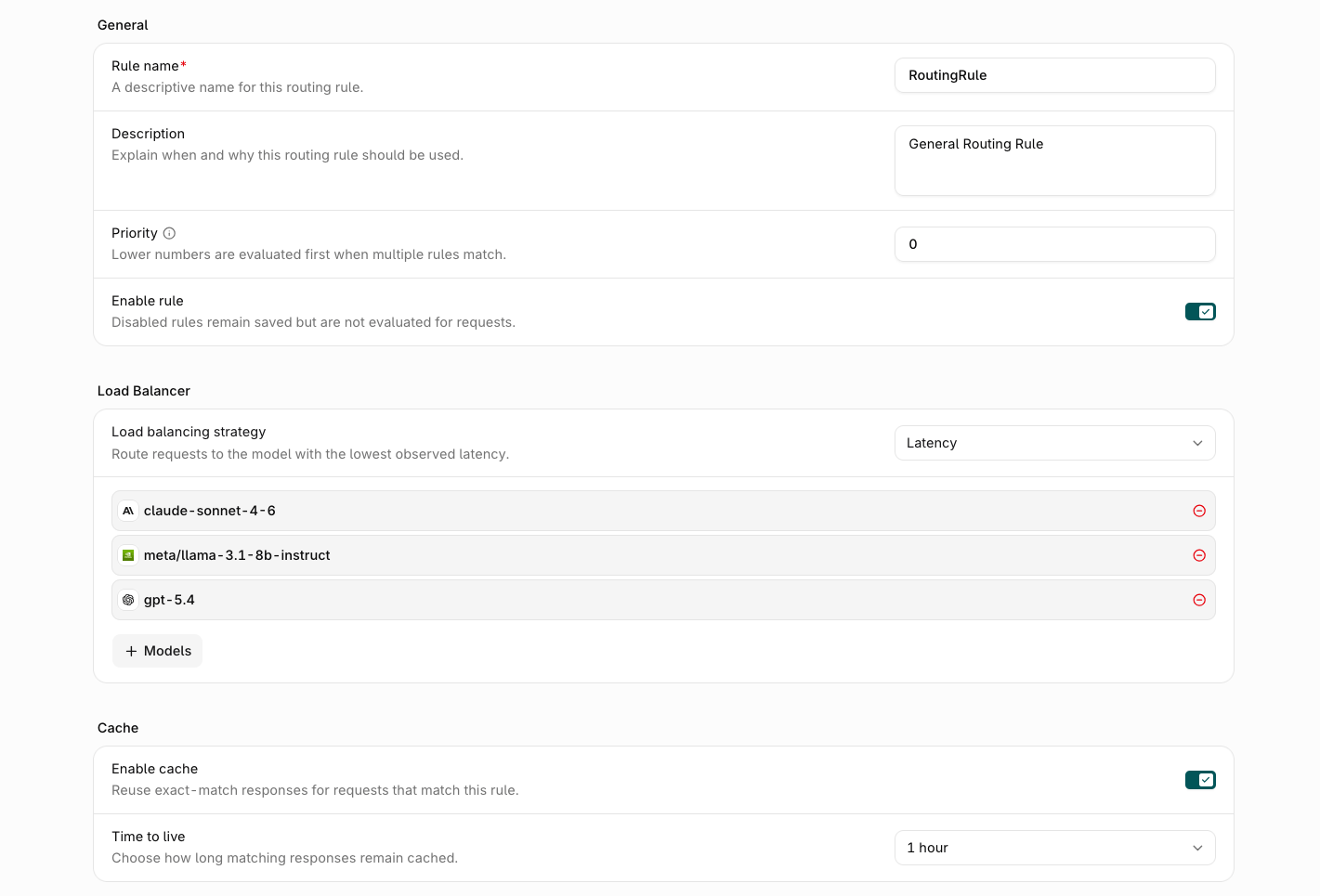
From the **Routing Rules** list, click Add New Rule. A panel opens on the right with the following fields.
 ### General
| Field | Description |
| --------------- | ------------------------------------------------------------------------------------------------------------- |
| **Rule Name** | A display name for the routing rule. |
| **Description** | Optional context for administrators. |
| **Enable Rule** | Toggle to activate or deactivate the rule. When enabled, the rule is active and applied to matching requests. |
### Providers and traffic weight
Optional. Defines the target model or models to route matching requests to. Leave this section empty to build a rule that exists only to apply a [plugin](#plugins) or a [cache](#cache) to matched traffic, with no model routing at all.
**Models** sets the distribution strategy for the target:
* **Fallback**: Route to the primary model. If it fails, try the next in the list.
* **Latency**: Route to the model with the lowest recently observed latency. See [Latency-based routing](/ai-gateway/features/load-balancing#latency-based-routing) for the full selection algorithm.
* **Weighted**: Split traffic across models by percentage weights.
* **Round Robin**: Rotate evenly across all configured models.
Choose **Latency** when minimizing response time matters more than a fixed traffic split. Choose **Weighted** or **Round Robin** when the split itself, such as cost control or A/B testing, is the goal.
Click Add to add a target model.
When a request matches this routing rule, its **Providers and traffic weight** configuration completely replaces the request's own `model`, `load_balancer`, and `fallbacks` values; they are never merged. A request-level [`load_balancer`](/ai-gateway/features/load-balancing) parameter has no effect once a matching routing rule with configured models applies.
### Cache
Optional. Give the rule its own response cache for matching requests. Exact-match requests reuse a cached response instead of hitting a model. Leaving this section disabled adds no cache of its own, so matched requests keep using their request-level [`cache`](/ai-gateway/features/cache) setting.
Set **Enable cache** to turn the cache on, then choose **Time to live** to control how long matching responses stay cached, from 5 minutes up to 3 days. The default is 1 hour.
When a rule has cache enabled, a matching request uses the rule's cache configuration instead of the request's own [`cache`](/ai-gateway/features/cache) parameter; the two are not merged. See [LLM response caching](/ai-gateway/features/cache) for how caching works.
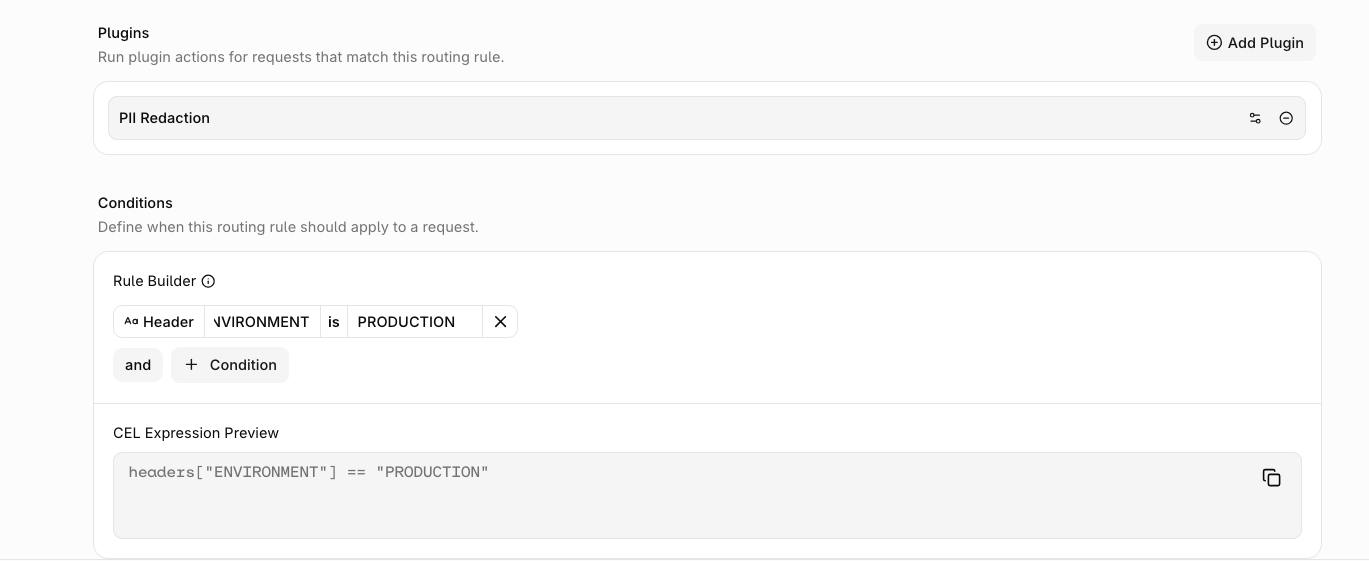
### Plugins
Optional. Attach plugins that run on traffic matching this rule. Plugins can transform the request, the response, or stored traces.
Click Add Plugin to attach one of the following:
| Plugin | What it does |
| -------------------- | -------------------------------------------------------------------------------------------------------------------------------------------------------------------------------------------------------------------------------------------------------------------------------------------------- |
| **PII Redaction** | Replaces personally identifiable information with placeholders before the provider sees it, then restores the original values in the response. Configure the entities to mask, the detection threshold, and the failure behavior. See [PII Redaction](/ai-gateway/features/plugins/pii-redaction). |
| **Response Healing** | Repairs malformed JSON in model output before the response reaches the caller. Takes no configuration. See [Response Healing](/ai-gateway/features/plugins/response-healing). |
| **Trace Scrubbing** | Masks request and response fields in stored traces for matched traffic. Configure which fields to scrub. See [Trace Scrubbing](/ai-gateway/features/plugins/trace-scrubbing). |
### Priority
A numeric value that sets the evaluation order for this rule. Rules are evaluated in ascending order: priority `0` is evaluated before priority `10`. The first matching rule wins.
### Rule Builder
The Rule Builder constructs the CEL expression that determines whether this rule applies to a given request. Conditions are built from values present in the request headers and body.
Clicking Add opens a dropdown with the following condition types:
| Condition | Description |
| ------------ | ---------------------------------------------------- |
| **Header** | Match on a request header name and value. |
| **Model** | Match on the model specified in the request payload. |
| **Identity** | Match on the identity making the request. |
| **Metadata** | Match on metadata attached to the request. |
| **Project** | Match on the project scope of the request. |
You can also click **Add group** to nest conditions into a logical group. Multiple conditions within a group are joined with `and`. Groups themselves can be joined with either `and` or `or`. Select the operator between groups to control how they combine. Each condition can be removed with .
The generated CEL expression is shown read-only in the **CEL Expression Preview** below the builder.
### General
| Field | Description |
| --------------- | ------------------------------------------------------------------------------------------------------------- |
| **Rule Name** | A display name for the routing rule. |
| **Description** | Optional context for administrators. |
| **Enable Rule** | Toggle to activate or deactivate the rule. When enabled, the rule is active and applied to matching requests. |
### Providers and traffic weight
Optional. Defines the target model or models to route matching requests to. Leave this section empty to build a rule that exists only to apply a [plugin](#plugins) or a [cache](#cache) to matched traffic, with no model routing at all.
**Models** sets the distribution strategy for the target:
* **Fallback**: Route to the primary model. If it fails, try the next in the list.
* **Latency**: Route to the model with the lowest recently observed latency. See [Latency-based routing](/ai-gateway/features/load-balancing#latency-based-routing) for the full selection algorithm.
* **Weighted**: Split traffic across models by percentage weights.
* **Round Robin**: Rotate evenly across all configured models.
Choose **Latency** when minimizing response time matters more than a fixed traffic split. Choose **Weighted** or **Round Robin** when the split itself, such as cost control or A/B testing, is the goal.
Click Add to add a target model.
When a request matches this routing rule, its **Providers and traffic weight** configuration completely replaces the request's own `model`, `load_balancer`, and `fallbacks` values; they are never merged. A request-level [`load_balancer`](/ai-gateway/features/load-balancing) parameter has no effect once a matching routing rule with configured models applies.
### Cache
Optional. Give the rule its own response cache for matching requests. Exact-match requests reuse a cached response instead of hitting a model. Leaving this section disabled adds no cache of its own, so matched requests keep using their request-level [`cache`](/ai-gateway/features/cache) setting.
Set **Enable cache** to turn the cache on, then choose **Time to live** to control how long matching responses stay cached, from 5 minutes up to 3 days. The default is 1 hour.
When a rule has cache enabled, a matching request uses the rule's cache configuration instead of the request's own [`cache`](/ai-gateway/features/cache) parameter; the two are not merged. See [LLM response caching](/ai-gateway/features/cache) for how caching works.
### Plugins
Optional. Attach plugins that run on traffic matching this rule. Plugins can transform the request, the response, or stored traces.
Click Add Plugin to attach one of the following:
| Plugin | What it does |
| -------------------- | -------------------------------------------------------------------------------------------------------------------------------------------------------------------------------------------------------------------------------------------------------------------------------------------------- |
| **PII Redaction** | Replaces personally identifiable information with placeholders before the provider sees it, then restores the original values in the response. Configure the entities to mask, the detection threshold, and the failure behavior. See [PII Redaction](/ai-gateway/features/plugins/pii-redaction). |
| **Response Healing** | Repairs malformed JSON in model output before the response reaches the caller. Takes no configuration. See [Response Healing](/ai-gateway/features/plugins/response-healing). |
| **Trace Scrubbing** | Masks request and response fields in stored traces for matched traffic. Configure which fields to scrub. See [Trace Scrubbing](/ai-gateway/features/plugins/trace-scrubbing). |
### Priority
A numeric value that sets the evaluation order for this rule. Rules are evaluated in ascending order: priority `0` is evaluated before priority `10`. The first matching rule wins.
### Rule Builder
The Rule Builder constructs the CEL expression that determines whether this rule applies to a given request. Conditions are built from values present in the request headers and body.
Clicking Add opens a dropdown with the following condition types:
| Condition | Description |
| ------------ | ---------------------------------------------------- |
| **Header** | Match on a request header name and value. |
| **Model** | Match on the model specified in the request payload. |
| **Identity** | Match on the identity making the request. |
| **Metadata** | Match on metadata attached to the request. |
| **Project** | Match on the project scope of the request. |
You can also click **Add group** to nest conditions into a logical group. Multiple conditions within a group are joined with `and`. Groups themselves can be joined with either `and` or `or`. Select the operator between groups to control how they combine. Each condition can be removed with .
The generated CEL expression is shown read-only in the **CEL Expression Preview** below the builder.