> ## Documentation Index
> Fetch the complete documentation index at: https://docs.orq.ai/llms.txt
> Use this file to discover all available pages before exploring further.
# Smart Router
> Automatically route each request to the optimal model in a pool based on task complexity and the chosen mode. Reduce costs without sacrificing quality.
Not every request needs the most capable model. The **Smart Router** routes each request to the optimal model from a configured pool, based on the complexity of the task and the chosen mode.
Instead of pinning an application to a single model, configure a pool of 2 to 50 models and let the router decide per request. Simple requests go to economical models; complex requests escalate to stronger ones. The application calls one stable model reference; the routing happens behind it.
## Use Cases
* Reducing spend on high-volume workloads where most requests do not need the strongest model.
* Customer support assistants: simple FAQs and acknowledgements stay on fast, economical models while nuanced complaints or policy questions escalate automatically.
* Code assistants: autocomplete and boilerplate generation stay cheap; debugging and architecture questions escalate.
* Content generation at scale: templated, high-volume copy uses economical models; long-form or brand-sensitive copy uses stronger ones.
* Getting the best available output for every request without manually picking a model per call.
To choose which models belong in the pool, [**Model Arena**](/ai-gateway/model-arena) ranks candidates head-to-head on real prompts from the workload and maps each rating against its cost.
## How It Works
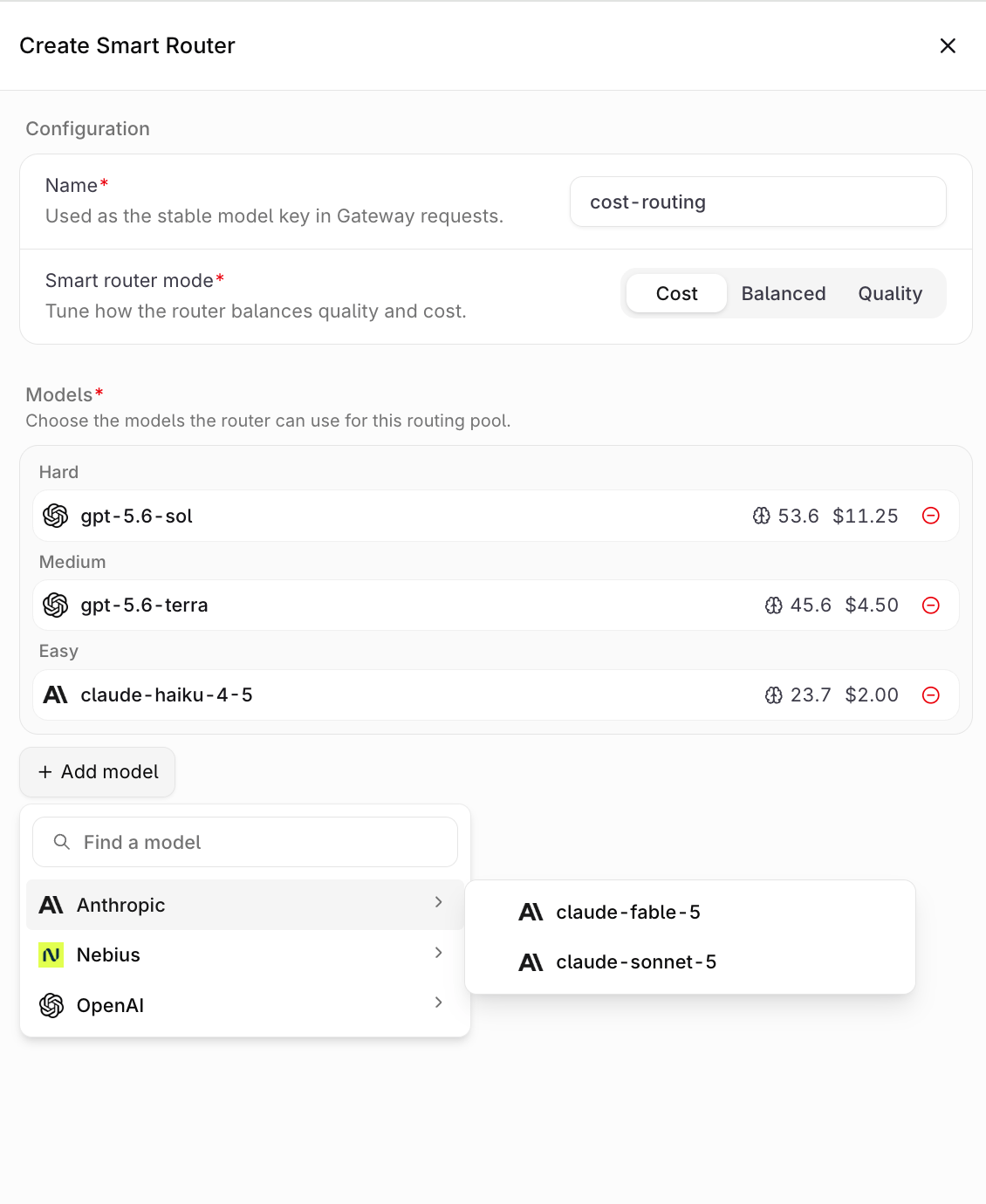
Every eligible model carries an **Intelligence Index** sourced from [Artificial Analysis](https://artificialanalysis.ai). The **Smart Router** ranks the pool by this index and groups the models into complexity bands: **Easy**, **Medium**, and **Hard**. Each incoming request is analyzed for task complexity and routed to a model in the matching band, so the bands adapt automatically to whichever models are in the pool.
The selected mode (**Cost**, **Balanced**, or **Quality**) tunes how aggressively the router prefers economical models over stronger ones. If routing is unavailable, the request falls back to the strongest model in the pool, so requests always complete.
## Set Up the Smart Router
1. Navigate to **Smart Router** in the **AI Gateway** sidebar.
2. Click + Smart Router.
3. Fill in the configuration:
* **Name**: a unique identifier, used as the stable model key in **Gateway** requests (lowercase letters, numbers, and hyphens only). The name cannot be changed after creation.
* **Smart router mode**: choose **Cost**, **Balanced**, or **Quality**.
* **Models**: click Add model and select at least 2 models (up to 50); keeping the pool below 10 models is recommended. Each entry shows the model's Intelligence Index and price, and the list groups the selection into the **Easy**, **Medium**, and **Hard** bands as models are added. See [Understanding the Model Price](#understanding-the-model-price) for what the price figure represents.
4. Click **Create**.
 ## Understanding the Model Price
Each model row in the **Smart Router** form shows an Intelligence Index and a price. The price is a static catalog figure for comparing models in the pool:
* **Basis**: a blended input and output rate in USD per 1M tokens, weighted 3:1 toward input (`(3 × input price + output price) ÷ 4`)
* **Source**: [Artificial Analysis](https://artificialanalysis.ai) pricing data
* **Included**: the list price of input and output tokens only
* **Excluded**: prompt cache reads and writes, separately billed reasoning or thinking tokens, web search fees, extended-context and service-tier pricing, batch rates, provider discounts, and costs added by **Orq.ai**
* **Precision**: displayed in USD with two decimal places
The price does not select the model: the **Smart Router** splits the pool into **Easy**, **Medium**, and **Hard** bands by Intelligence Index and routes each request by task complexity and mode. For per-token list prices, see the [Models page](/ai-gateway/using-the-router) in **AI Gateway**, which shows input and output rates separately.
Actual spend is not derived from this figure. It is computed per request from real token usage and provider rates, and appears in the observability [Traces](/ai-studio/observability/traces) under the `orq.billing.*` attributes, in [Billing & Usage](/ai-studio/organization/billing-usage), and in the [Reporting API](/ai-studio/observability/reporting-api).
## Modes
| Mode | Behavior |
| ------------ | ------------------------------------------------------------------------- |
| **Cost** | Prefers the economical models in the pool more aggressively to save money |
| **Balanced** | Balances cost and quality across simple and complex requests |
| **Quality** | Routes more requests to the stronger models in the pool |
New **Smart Routers** default to **Cost**.
## Eligible Models
Any enabled model in the **AI Gateway** that carries Artificial Analysis intelligence data can join the pool, and models from different providers can be mixed freely in a single pool. See [Supported Models](/ai-gateway/supported-models) for the catalog. Models without an Intelligence Index and other **Smart Routers** cannot be added.
Ensure the models intended for the pool are enabled in the Model list first. Disabled models do not appear in the model picker.
## Use the Smart Router
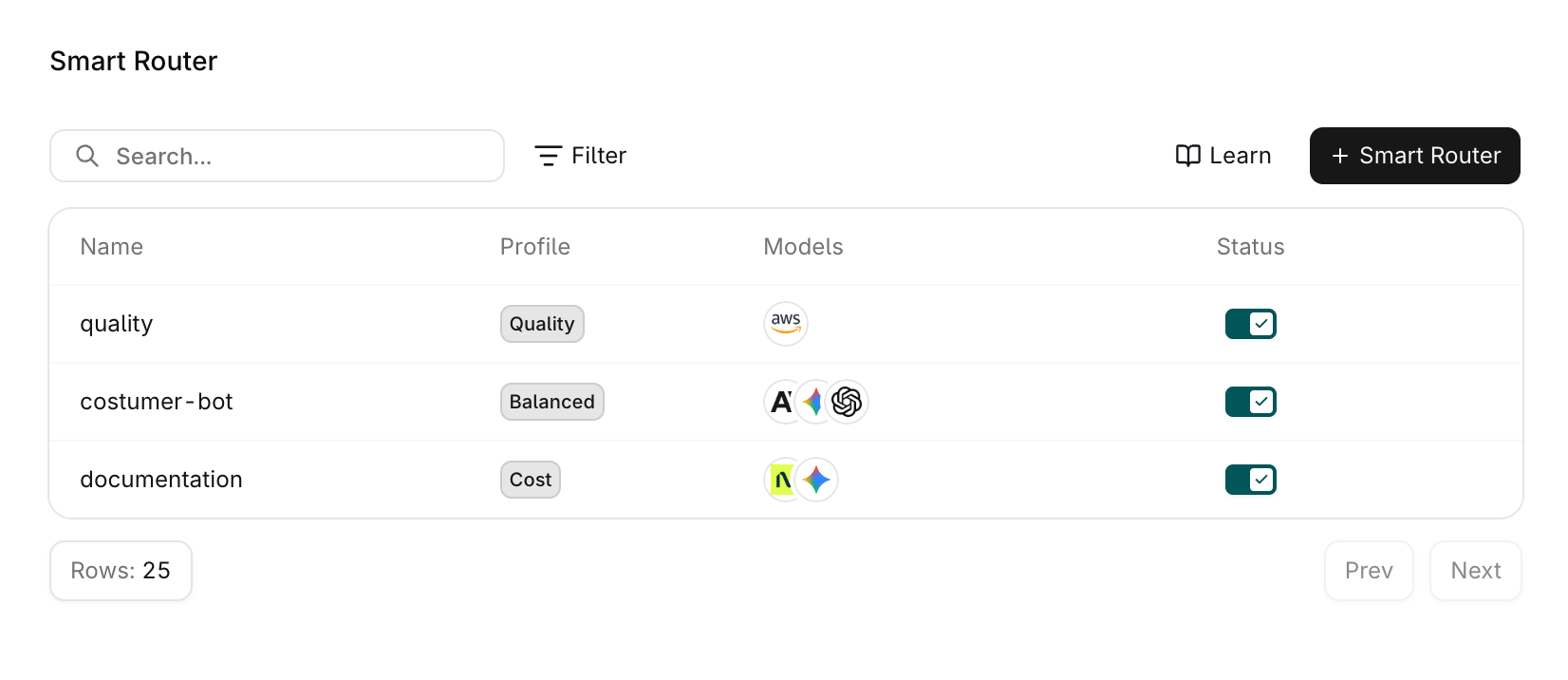
Once created, the **Smart Router** appears in **AI Gateway** and can be referenced anywhere a model is accepted via the API or SDKs.
**Smart Routers** are not yet available for **Agents**: routing happens per request, so it cannot yet be guaranteed that an entire conversation is served by the same model. Support for **Agents** will be added soon.
## Understanding the Model Price
Each model row in the **Smart Router** form shows an Intelligence Index and a price. The price is a static catalog figure for comparing models in the pool:
* **Basis**: a blended input and output rate in USD per 1M tokens, weighted 3:1 toward input (`(3 × input price + output price) ÷ 4`)
* **Source**: [Artificial Analysis](https://artificialanalysis.ai) pricing data
* **Included**: the list price of input and output tokens only
* **Excluded**: prompt cache reads and writes, separately billed reasoning or thinking tokens, web search fees, extended-context and service-tier pricing, batch rates, provider discounts, and costs added by **Orq.ai**
* **Precision**: displayed in USD with two decimal places
The price does not select the model: the **Smart Router** splits the pool into **Easy**, **Medium**, and **Hard** bands by Intelligence Index and routes each request by task complexity and mode. For per-token list prices, see the [Models page](/ai-gateway/using-the-router) in **AI Gateway**, which shows input and output rates separately.
Actual spend is not derived from this figure. It is computed per request from real token usage and provider rates, and appears in the observability [Traces](/ai-studio/observability/traces) under the `orq.billing.*` attributes, in [Billing & Usage](/ai-studio/organization/billing-usage), and in the [Reporting API](/ai-studio/observability/reporting-api).
## Modes
| Mode | Behavior |
| ------------ | ------------------------------------------------------------------------- |
| **Cost** | Prefers the economical models in the pool more aggressively to save money |
| **Balanced** | Balances cost and quality across simple and complex requests |
| **Quality** | Routes more requests to the stronger models in the pool |
New **Smart Routers** default to **Cost**.
## Eligible Models
Any enabled model in the **AI Gateway** that carries Artificial Analysis intelligence data can join the pool, and models from different providers can be mixed freely in a single pool. See [Supported Models](/ai-gateway/supported-models) for the catalog. Models without an Intelligence Index and other **Smart Routers** cannot be added.
Ensure the models intended for the pool are enabled in the Model list first. Disabled models do not appear in the model picker.
## Use the Smart Router
Once created, the **Smart Router** appears in **AI Gateway** and can be referenced anywhere a model is accepted via the API or SDKs.
**Smart Routers** are not yet available for **Agents**: routing happens per request, so it cannot yet be guaranteed that an entire conversation is served by the same model. Support for **Agents** will be added soon.
 ### Reference in code
When using a **Smart Router** through the SDKs, API, or [Supported Libraries](/ai-studio/integrations/frameworks/overview), reference it by the string `@orq/`.
> Example: `acme@orq/my-smart-router`
### Run the Smart Router
Call the **Smart Router** like any other model. The router picks a model from the pool per request; no code changes are needed when the pool or mode changes. Both the Responses endpoint and the Chat Completions endpoint accept a **Smart Router** reference.
```bash cURL theme={"theme":{"light":"github-light","dark":"github-dark"}}
curl -X POST https://my.orq.ai/v3/router/responses \
-H "Authorization: Bearer $ORQ_API_KEY" \
-H "Content-Type: application/json" \
-d '{
"model": "workspace_name@orq/my-smart-router",
"input": "Summarize this support ticket in two sentences."
}'
```
```typescript TypeScript theme={"theme":{"light":"github-light","dark":"github-dark"}}
import OpenAI from "openai";
const client = new OpenAI({
apiKey: process.env.ORQ_API_KEY,
baseURL: "https://my.orq.ai/v3/router",
});
const response = await client.responses.create({
model: "workspace_name@orq/my-smart-router",
input: "Summarize this support ticket in two sentences.",
});
console.log(response.output_text);
```
```python Python theme={"theme":{"light":"github-light","dark":"github-dark"}}
from openai import OpenAI
import os
client = OpenAI(
api_key=os.environ.get("ORQ_API_KEY"),
base_url="https://my.orq.ai/v3/router",
)
response = client.responses.create(
model="workspace_name@orq/my-smart-router",
input="Summarize this support ticket in two sentences.",
)
print(response.output_text)
```
Disabling a **Smart Router** makes it unavailable to the **Gateway**; requests referencing it no longer resolve until it is enabled again.
## Track Usage
Requests served by a **Smart Router** appear in the observability [Logs](/ai-studio/observability/logs) like any other **Gateway** request. Use [App Tracking](/ai-gateway/app-tracking) to attribute cost and latency per application.
### Reference in code
When using a **Smart Router** through the SDKs, API, or [Supported Libraries](/ai-studio/integrations/frameworks/overview), reference it by the string `@orq/`.
> Example: `acme@orq/my-smart-router`
### Run the Smart Router
Call the **Smart Router** like any other model. The router picks a model from the pool per request; no code changes are needed when the pool or mode changes. Both the Responses endpoint and the Chat Completions endpoint accept a **Smart Router** reference.
```bash cURL theme={"theme":{"light":"github-light","dark":"github-dark"}}
curl -X POST https://my.orq.ai/v3/router/responses \
-H "Authorization: Bearer $ORQ_API_KEY" \
-H "Content-Type: application/json" \
-d '{
"model": "workspace_name@orq/my-smart-router",
"input": "Summarize this support ticket in two sentences."
}'
```
```typescript TypeScript theme={"theme":{"light":"github-light","dark":"github-dark"}}
import OpenAI from "openai";
const client = new OpenAI({
apiKey: process.env.ORQ_API_KEY,
baseURL: "https://my.orq.ai/v3/router",
});
const response = await client.responses.create({
model: "workspace_name@orq/my-smart-router",
input: "Summarize this support ticket in two sentences.",
});
console.log(response.output_text);
```
```python Python theme={"theme":{"light":"github-light","dark":"github-dark"}}
from openai import OpenAI
import os
client = OpenAI(
api_key=os.environ.get("ORQ_API_KEY"),
base_url="https://my.orq.ai/v3/router",
)
response = client.responses.create(
model="workspace_name@orq/my-smart-router",
input="Summarize this support ticket in two sentences.",
)
print(response.output_text)
```
Disabling a **Smart Router** makes it unavailable to the **Gateway**; requests referencing it no longer resolve until it is enabled again.
## Track Usage
Requests served by a **Smart Router** appear in the observability [Logs](/ai-studio/observability/logs) like any other **Gateway** request. Use [App Tracking](/ai-gateway/app-tracking) to attribute cost and latency per application.