> ## Documentation Index
> Fetch the complete documentation index at: https://docs.orq.ai/llms.txt
> Use this file to discover all available pages before exploring further.
# Run Agents
> Run AI agents in Orq.ai via the API, AI Studio, or MCP. Send messages, stream responses, attach files, manage task state, and trace every execution.
Execute an agent already configured in the workspace. For building and configuring agents, see [Build Agents](/ai-studio/ai-engineering/build-agents).
## Run Agents
For Python and Node.js client libraries, see [Orq SDKs](/reference/client-libraries).
### Which endpoint should I use?
Use the **Responses API** ([`POST /v3/router/responses`](/reference/responses/create-response)). Legacy `/v2/agents` invoke endpoints (`/v2/agents/run`, `/v2/agents/stream-run`, `/v2/agents/{agent_key}/responses`, `/v2/agents/{key}/task`, and `/v2/agents/{key}/stream-task`) are deprecated. Retrieve a finished response with [`GET /v3/router/responses/{response_id}`](/reference/responses/retrieve-response).
Send a message to an agent using the Responses API:
```bash cURL theme={"theme":{"light":"github-light","dark":"github-dark"}}
curl -X POST https://my.orq.ai/v3/router/responses \
-H "Authorization: Bearer $ORQ_API_KEY" \
-H "Content-Type: application/json" \
-d '{
"model": "agent/my-agent",
"input": "Help me plan a microservices architecture for our e-commerce platform."
}'
```
```python Python theme={"theme":{"light":"github-light","dark":"github-dark"}}
from orq_ai_sdk import Orq
import os
with Orq(api_key=os.getenv("ORQ_API_KEY", "")) as orq:
response = orq.responses.create(
model="agent/my-agent",
input="Help me plan a microservices architecture for our e-commerce platform.",
)
print(response)
```
```typescript TypeScript theme={"theme":{"light":"github-light","dark":"github-dark"}}
import { Orq } from '@orq-ai/node';
const orq = new Orq({ apiKey: process.env['ORQ_API_KEY'] ?? '' });
const response = await orq.responses.create({
model: 'agent/my-agent',
input: 'Help me plan a microservices architecture for our e-commerce platform.',
});
console.log(response);
```
```prompt wrap theme={"theme":{"light":"github-light","dark":"github-dark"}}
Invoke "my-agent" with: Help me plan a microservices architecture for our e-commerce platform.
```
The assistant uses `invoke_agent` with `model: "agent/my-agent"` and returns the completed response.
```bash theme={"theme":{"light":"github-light","dark":"github-dark"}}
orq responses create \
--model agent/my-agent \
--input '"Help me plan a microservices architecture for our e-commerce platform."'
```
See [install and setup](/reference/cli) to get started with the CLI. Run `orq responses create --help` for the full flag reference.
The call waits for the agent to finish and returns a completed response object:
```json theme={"theme":{"light":"github-light","dark":"github-dark"}}
{
"id": "resp_01K6D8QESESZ6SAXQPJPFQXPFT",
"object": "response",
"model": "agent/my-agent",
"status": "completed",
"output": [
{
"type": "message",
"role": "assistant",
"content": [{ "type": "output_text", "text": "Here's a microservices architecture..." }]
}
],
"usage": {
"input_tokens": 120,
"output_tokens": 340,
"total_tokens": 460
},
"created_at": 1727694875
}
```
### Streaming
Set `stream: true` to receive incremental output as server-sent events. The response arrives in chunks as the Agent produces it.
```bash cURL theme={"theme":{"light":"github-light","dark":"github-dark"}}
curl -N -X POST https://my.orq.ai/v3/router/responses \
-H "Authorization: Bearer $ORQ_API_KEY" \
-H "Content-Type: application/json" \
-d '{
"model": "agent/my-agent",
"input": "Help me plan a microservices architecture.",
"stream": true
}'
```
```python Python theme={"theme":{"light":"github-light","dark":"github-dark"}}
from orq_ai_sdk import Orq
import os
with Orq(api_key=os.getenv("ORQ_API_KEY", "")) as orq:
res = orq.responses.create(
model="agent/my-agent",
input="Help me plan a microservices architecture.",
stream=True,
)
with res as event_stream:
for item in event_stream:
event = item.data
if event and event.type == "response.output_text.delta":
print(event.delta, end="", flush=True)
```
```typescript TypeScript theme={"theme":{"light":"github-light","dark":"github-dark"}}
import { Orq } from '@orq-ai/node';
const orq = new Orq({ apiKey: process.env['ORQ_API_KEY'] ?? '' });
const stream = await orq.responses.create({
model: 'agent/my-agent',
input: 'Help me plan a microservices architecture.',
stream: true,
});
for await (const chunk of stream) {
const event = chunk.data;
if (event?.type === 'response.output_text.delta') {
process.stdout.write(event.delta);
} else if (event?.type === 'response.failed') {
console.error('Stream failed:', event.response.error);
}
}
```
The stream emits server-sent events as the agent produces output:
| Event | When | Key field | Notes |
| ---------------------------- | -------------------------- | ---------------- | ----------------------------------------------------------- |
| `response.created` | Stream opens | `id` | Pass as `previous_response_id` to continue the conversation |
| `response.output_text.delta` | Each text chunk | `delta` | Append to build the full output |
| `response.output_text.done` | Text generation complete | `text` | Full accumulated text |
| `response.completed` | Agent finishes | `status` | Value is `"completed"` |
| `response.failed` | Agent encountered an error | `response.error` | Full error details; `response.status` is `"failed"` |
See the full [Create Response API reference](/reference/responses/create-response).
### Pass Variables
Pass variables in the `variables` field of the execution request:
```bash cURL theme={"theme":{"light":"github-light","dark":"github-dark"}}
curl -X POST https://my.orq.ai/v3/router/responses \
-H "Authorization: Bearer $ORQ_API_KEY" \
-H "Content-Type: application/json" \
-d '{
"model": "agent/my-agent",
"input": "I need help with my account.",
"variables": {
"user_name": "John Smith",
"user_role": "admin",
"company_name": "Acme Corp"
}
}'
```
```python Python theme={"theme":{"light":"github-light","dark":"github-dark"}}
from orq_ai_sdk import Orq
import os
with Orq(api_key=os.getenv("ORQ_API_KEY", "")) as orq:
response = orq.responses.create(
model="agent/my-agent",
input="I need help with my account.",
variables={
"user_name": "John Smith",
"user_role": "admin",
"company_name": "Acme Corp",
},
)
print(response.output[0]["content"][0]["text"])
```
```typescript TypeScript theme={"theme":{"light":"github-light","dark":"github-dark"}}
import { Orq } from '@orq-ai/node';
const orq = new Orq({ apiKey: process.env['ORQ_API_KEY'] ?? '' });
const response = await orq.responses.create({
model: 'agent/my-agent',
input: 'I need help with my account.',
variables: {
user_name: 'John Smith',
user_role: 'admin',
company_name: 'Acme Corp',
},
});
console.log(response.output?.[0]?.content?.[0]?.text);
```
To define which variables the agent uses and configure templating, see [Build Agents: Variables and Templates](/ai-studio/ai-engineering/build-agents#variables-and-templates).
### Attach Files
Attach files in the `content` array of an input message item:
* **Images**: Via URL (`image_url`). For base64-encoded images, also set `mime_type` (e.g. `image/jpeg`).
* **PDFs**: Data URI only (`file_data`). Pass the file as `data:application/pdf;base64,`. URL links are not supported for PDFs.
For the file lifecycle and for grounding agents with uploaded documents, see the [Files API](/ai-studio/ai-engineering/files).
Verify the chosen model supports the file types in use. Image support does not imply PDF support, and many models accept one without the other. See [Sending files to models](/ai-gateway/features/files).
**Attach an image via URL:**
```bash cURL theme={"theme":{"light":"github-light","dark":"github-dark"}}
curl -X POST https://my.orq.ai/v3/router/responses \
-H "Authorization: Bearer $ORQ_API_KEY" \
-H "Content-Type: application/json" \
-d '{
"model": "agent/image-classifier",
"input": [
{
"role": "user",
"content": [
{
"type": "input_text",
"text": "What can you see in this image?"
},
{
"type": "input_image",
"image_url": "https://picsum.photos/seed/sample-photo/800/600",
"detail": "auto"
}
]
}
]
}'
```
```python Python theme={"theme":{"light":"github-light","dark":"github-dark"}}
from orq_ai_sdk import Orq
import os
with Orq(api_key=os.getenv("ORQ_API_KEY", "")) as orq:
response = orq.responses.create(
model="agent/image-classifier",
input=[
{
"role": "user",
"content": [
{"type": "input_text", "text": "What can you see in this image?"},
{
"type": "input_image",
"image_url": "https://picsum.photos/seed/sample-photo/800/600",
"detail": "auto",
},
],
}
],
)
print(response)
```
```typescript TypeScript theme={"theme":{"light":"github-light","dark":"github-dark"}}
import { Orq } from '@orq-ai/node';
const orq = new Orq({ apiKey: process.env['ORQ_API_KEY'] ?? '' });
const response = await orq.responses.create({
model: 'agent/image-classifier',
input: [
{
role: 'user',
content: [
{ type: 'input_text', text: 'What can you see in this image?' },
{
type: 'input_image',
imageUrl: 'https://picsum.photos/seed/sample-photo/800/600',
detail: 'auto',
},
],
},
],
});
console.log(response);
```
**Attach a PDF via base64:**
```bash cURL theme={"theme":{"light":"github-light","dark":"github-dark"}}
PDF_B64="data:application/pdf;base64,$(base64 path/to/document.pdf | tr -d '\n')"
curl -X POST https://my.orq.ai/v3/router/responses \
-H "Authorization: Bearer $ORQ_API_KEY" \
-H "Content-Type: application/json" \
-d "{
\"model\": \"agent/my-agent\",
\"input\": [
{
\"role\": \"user\",
\"content\": [
{ \"type\": \"input_text\", \"text\": \"Summarize this document.\" },
{
\"type\": \"input_file\",
\"filename\": \"document.pdf\",
\"file_data\": \"$PDF_B64\"
}
]
}
]
}"
```
```python Python theme={"theme":{"light":"github-light","dark":"github-dark"}}
import base64
from orq_ai_sdk import Orq
import os
with open("path/to/document.pdf", "rb") as f:
pdf_data_uri = "data:application/pdf;base64," + base64.b64encode(f.read()).decode()
with Orq(api_key=os.getenv("ORQ_API_KEY", "")) as orq:
response = orq.responses.create(
model="agent/my-agent",
input=[
{
"role": "user",
"content": [
{"type": "input_text", "text": "Summarize this document."},
{
"type": "input_file",
"filename": "document.pdf",
"file_data": pdf_data_uri,
},
],
}
],
)
print(response)
```
```typescript TypeScript theme={"theme":{"light":"github-light","dark":"github-dark"}}
import { Orq } from '@orq-ai/node';
import { readFileSync } from 'fs';
const pdfDataUri =
'data:application/pdf;base64,' +
readFileSync('path/to/document.pdf').toString('base64');
const orq = new Orq({ apiKey: process.env['ORQ_API_KEY'] ?? '' });
const response = await orq.responses.create({
model: 'agent/my-agent',
input: [
{
role: 'user',
content: [
{ type: 'input_text', text: 'Summarize this document.' },
{
type: 'input_file',
filename: 'document.pdf',
fileData: pdfDataUri,
},
],
},
],
});
console.log(response);
```
See the full [Create Response API reference](/reference/responses/create-response).
### Continue a Conversation
After receiving a response, continue the conversation by passing the previously received response `id` as `previous_response_id` in the next request. The agent maintains full context from previous exchanges.
```bash cURL theme={"theme":{"light":"github-light","dark":"github-dark"}}
curl -X POST https://my.orq.ai/v3/router/responses \
-H "Authorization: Bearer $ORQ_API_KEY" \
-H "Content-Type: application/json" \
-d '{
"model": "agent/my-agent",
"previous_response_id": "resp_01K6D8QESESZ6SAXQPJPFQXPFT",
"input": "Can you expand on the challenges section?"
}'
```
```python Python theme={"theme":{"light":"github-light","dark":"github-dark"}}
from orq_ai_sdk import Orq
import os
with Orq(api_key=os.getenv("ORQ_API_KEY", "")) as orq:
response = orq.responses.create(
model="agent/my-agent",
previous_response_id="resp_01K6D8QESESZ6SAXQPJPFQXPFT",
input="Can you expand on the challenges section?",
)
print(response)
```
```typescript TypeScript theme={"theme":{"light":"github-light","dark":"github-dark"}}
import { Orq } from '@orq-ai/node';
const orq = new Orq({ apiKey: process.env['ORQ_API_KEY'] ?? '' });
const response = await orq.responses.create({
model: 'agent/my-agent',
previousResponseId: 'resp_01K6D8QESESZ6SAXQPJPFQXPFT',
input: 'Can you expand on the challenges section?',
});
console.log(response);
```
The continuation returns a new response `id` for the extended conversation. The agent retains full context from all prior turns.
See the full [Create Response API reference](/reference/responses/create-response).
Pass the response ID from the prior invocation. The assistant uses `invoke_agent` with `previous_response_id` set to that ID:
```prompt wrap theme={"theme":{"light":"github-light","dark":"github-dark"}}
Continue that conversation and ask: Can you expand on the challenges section?
```
The assistant uses `invoke_agent` with `previous_response_id` set to the ID from the prior response.
```bash theme={"theme":{"light":"github-light","dark":"github-dark"}}
orq responses create \
--model agent/my-agent \
--previous-response-id resp_01K6D8QESESZ6SAXQPJPFQXPFT \
--input '"Can you expand on the challenges section?"'
```
See [install and setup](/reference/cli) to get started with the CLI. Run `orq responses create --help` for the full flag reference.
### Use Memory Stores
To call the Agent with a memory store, we'll use the [Responses API](/reference/responses/create-response) with an Embedded message and Linked memory.
```bash cURL theme={"theme":{"light":"github-light","dark":"github-dark"}}
curl -X POST https://my.orq.ai/v3/router/responses \
-H "Authorization: Bearer $ORQ_API_KEY" \
-H "Content-Type: application/json" \
-d '{
"model": "agent/agent-memories",
"memory": {
"entity_id": "customer_456"
},
"input": "Do you remember what is my name?"
}'
```
```python Python theme={"theme":{"light":"github-light","dark":"github-dark"}}
from orq_ai_sdk import Orq
import os
with Orq(api_key=os.getenv("ORQ_API_KEY", "")) as orq:
response = orq.responses.create(
model="agent/agent-memories",
memory={
"entity_id": "customer_456"
},
input="Do you remember what is my name?",
)
print(response)
```
```typescript TypeScript theme={"theme":{"light":"github-light","dark":"github-dark"}}
import { Orq } from '@orq-ai/node';
const orq = new Orq({ apiKey: process.env['ORQ_API_KEY'] ?? '' });
const response = await orq.responses.create({
model: 'agent/agent-memories',
memory: {
entityId: 'customer_456',
},
input: 'Do you remember what is my name?',
});
console.log(response);
```
Multiple memory stores per call are supported. Ensure the `entity_id` sent during the calls maps the same way to all previously declared memory stores during agent creation.
### Attach Metadata
Attach arbitrary key-value pairs to a response using the `metadata` field. Metadata is stored on the response and visible in traces. Use it to tag runs by session, user, environment, or any other dimension useful for filtering in **Observability**. Values must be strings.
```bash cURL theme={"theme":{"light":"github-light","dark":"github-dark"}}
curl -X POST https://my.orq.ai/v3/router/responses \
-H "Authorization: Bearer $ORQ_API_KEY" \
-H "Content-Type: application/json" \
-d '{
"model": "agent/my-agent",
"input": "Summarize the latest product updates.",
"metadata": {
"session_id": "sess_abc123",
"user_id": "user_456",
"environment": "production"
}
}'
```
```python Python theme={"theme":{"light":"github-light","dark":"github-dark"}}
from orq_ai_sdk import Orq
import os
with Orq(api_key=os.getenv("ORQ_API_KEY", "")) as orq:
response = orq.responses.create(
model="agent/my-agent",
input="Summarize the latest product updates.",
metadata={
"session_id": "sess_abc123",
"user_id": "user_456",
"environment": "production",
},
)
print(response.metadata)
```
```typescript TypeScript theme={"theme":{"light":"github-light","dark":"github-dark"}}
import { Orq } from '@orq-ai/node';
const orq = new Orq({ apiKey: process.env['ORQ_API_KEY'] ?? '' });
const response = await orq.responses.create({
model: 'agent/my-agent',
input: 'Summarize the latest product updates.',
metadata: {
session_id: 'sess_abc123',
user_id: 'user_456',
environment: 'production',
},
});
console.log(response.metadata);
```
The metadata is returned on the response object:
```json theme={"theme":{"light":"github-light","dark":"github-dark"}}
{
"metadata": {
"session_id": "sess_abc123",
"user_id": "user_456",
"environment": "production"
}
}
```
### Use Tools
Pass tools in the `tools` array of any Responses API call. Multiple tools of different types can appear in the same request.
| Tool type | What it does |
| -------------- | ------------------------------------------------------------------------------------------------------------ |
| **Function** | Define a custom schema. The model decides when to call it; the application executes and returns the result. |
| **MCP Server** | Connect to an MCP-compatible server. **Orq.ai** fetches the tool catalog and routes calls to the server. |
| **HTTP** | Call an external REST endpoint. **Orq.ai** executes the request; no application-side logic needed. |
| **Built-ins** | Platform-managed tools (`orq:web_search`, `orq:web_fetch`, `orq:datetime`) with no setup or execution logic. |
Each tool type supports **Inline** (definition embedded in the request) or **Pre-saved** (created once in Studio, referenced by ID). HTTP and Built-ins are pre-saved or platform-managed only.
Define a custom function schema. The model decides when to call it, fills the parameters, and returns a `function_call` output item. Choose **Inline** to embed the schema in the request, or **Pre-saved** to reuse a schema stored in Studio.
For when to reach for a Function tool over an HTTP or MCP tool, see [Choosing a tool type](/ai-studio/ai-engineering/create-tools#choosing-a-tool-type).
Define a function schema inline. The model decides when to call it, fills the parameters, and returns a `function_call` output item. The application executes the function and sends the result back.
**Step 1: Send the request with a function tool:**
```bash cURL theme={"theme":{"light":"github-light","dark":"github-dark"}}
curl -X POST https://my.orq.ai/v3/router/responses \
-H "Authorization: Bearer $ORQ_API_KEY" \
-H "Content-Type: application/json" \
-d '{
"model": "agent/my-agent",
"input": "What is the weather in Paris?",
"tools": [{
"type": "function",
"name": "get_weather",
"description": "Returns the current weather for a city.",
"parameters": {
"type": "object",
"properties": {
"city": { "type": "string", "description": "City name" }
},
"required": ["city"]
}
}]
}'
```
```python Python theme={"theme":{"light":"github-light","dark":"github-dark"}}
from orq_ai_sdk import Orq
import os
orq = Orq(api_key=os.environ["ORQ_API_KEY"])
response = orq.responses.create(
model="agent/my-agent",
input="What is the weather in Paris?",
tools=[{
"type": "function",
"name": "get_weather",
"description": "Returns the current weather for a city.",
"parameters": {
"type": "object",
"properties": {
"city": {"type": "string", "description": "City name"},
},
"required": ["city"],
},
}],
)
```
```typescript TypeScript theme={"theme":{"light":"github-light","dark":"github-dark"}}
import { Orq } from "@orq-ai/node";
const orq = new Orq({ apiKey: process.env.ORQ_API_KEY });
const response = await orq.responses.create({
model: "agent/my-agent",
input: "What is the weather in Paris?",
tools: [{
type: "function",
name: "get_weather",
description: "Returns the current weather for a city.",
parameters: {
type: "object",
properties: {
city: { type: "string", description: "City name" },
},
required: ["city"],
},
}],
});
```
The response contains a `function_call` output item when the model decides to use the tool:
```json theme={"theme":{"light":"github-light","dark":"github-dark"}}
{
"id": "resp_abc123",
"status": "completed",
"output": [{
"type": "function_call",
"id": "fc_abc123",
"name": "get_weather",
"arguments": "{\"city\": \"Paris\"}",
"call_id": "call_xyz789",
"status": "completed"
}]
}
```
Match the result to the call with `call_id`, not `id`. `id` identifies the output item; `call_id` is what `function_call_output` is keyed on.
A client-side function call does not change the response status. The response remains `"completed"` even while local execution is pending. Inspect `output` for `function_call` items to decide whether to execute a function and send a continuation request.
The model only emits a `function_call` item when it decides to use the tool. Check `output[0].type === "function_call"` before proceeding to Step 2; if the model answered directly, read the text from `response.output[0].content[0].text` instead. Pass `tool_choice: "required"` to force a tool call.
**Step 2: Execute the function and return the result:**
Pass `previous_response_id` and a `function_call_output` input item with the matching `call_id`. Include the same `tools` array so the model can make additional calls if needed.
```bash cURL theme={"theme":{"light":"github-light","dark":"github-dark"}}
curl -X POST https://my.orq.ai/v3/router/responses \
-H "Authorization: Bearer $ORQ_API_KEY" \
-H "Content-Type: application/json" \
-d '{
"model": "agent/my-agent",
"previous_response_id": "resp_abc123",
"input": [{
"type": "function_call_output",
"call_id": "call_xyz789",
"output": "{\"temperature\": 22, \"unit\": \"celsius\", \"condition\": \"sunny\"}"
}],
"tools": [{
"type": "function",
"name": "get_weather",
"description": "Returns the current weather for a city.",
"parameters": {
"type": "object",
"properties": {
"city": { "type": "string", "description": "City name" }
},
"required": ["city"]
}
}]
}'
```
```python Python theme={"theme":{"light":"github-light","dark":"github-dark"}}
import json
# Execute the function locally
result = {"temperature": 22, "unit": "celsius", "condition": "sunny"}
final = orq.responses.create(
model="agent/my-agent",
previous_response_id=response.id,
input=[{
"type": "function_call_output",
"call_id": response.output[0]["call_id"],
"output": json.dumps(result),
}],
tools=[{
"type": "function",
"name": "get_weather",
"description": "Returns the current weather for a city.",
"parameters": {
"type": "object",
"properties": {
"city": {"type": "string", "description": "City name"},
},
"required": ["city"],
},
}],
)
print(final.output[0]["content"][0]["text"])
```
```typescript TypeScript theme={"theme":{"light":"github-light","dark":"github-dark"}}
// Execute the function locally
const result = { temperature: 22, unit: "celsius", condition: "sunny" };
const final = await orq.responses.create({
model: "agent/my-agent",
previousResponseId: response.id,
input: [{
type: "function_call_output",
callId: (response.output[0] as any).call_id,
output: JSON.stringify(result),
}],
tools: [{
type: "function",
name: "get_weather",
description: "Returns the current weather for a city.",
parameters: {
type: "object",
properties: {
city: { type: "string", description: "City name" },
},
required: ["city"],
},
}],
});
console.log(final.output?.[0]?.content?.[0]?.text);
```
`output` accepts a string, which is the common case for a JSON serialized result. It also accepts an array of content parts (text, image, file, video) when the function returns non-text content.
**Function tool fields:**
| Field | Type | Required | Description |
| ------------- | ------- | -------- | ---------------------------------------------------------------------------------------------------------- |
| `type` | string | yes | `"function"` |
| `name` | string | yes | Function name. Returned in the `function_call` output item so the application knows which function to run. |
| `description` | string | no | What the function does. Helps the model decide when to call it. |
| `parameters` | object | no | JSON Schema object describing the function's parameters. |
| `strict` | boolean | no | Enforce strict parameter validation against the schema. |
**Generate the schema in Python:**
The Python SDK derives a function tool from a plain function, so the schema does not have to be written by hand. Decorate the function with `@tool` and pass it directly in `tools`. The name, description, and parameters come from the function name, docstring, and type hints. The decorated function stays callable, so the same object defines the tool and executes the call in Step 2.
```python Python theme={"theme":{"light":"github-light","dark":"github-dark"}}
from typing import Literal
from orq_ai_sdk.function_tools import tool
@tool
def get_weather(city: str, units: Literal["celsius", "fahrenheit"]) -> str:
"""Returns the current weather for a city."""
return f"20 degrees {units} in {city}"
response = orq.responses.create(
model="agent/my-agent",
input="What is the weather in Paris?",
tools=[get_weather],
)
```
Inspect the generated schema through `get_weather.schema`.
**Decorator options:**
| Option | Default | Description |
| ------------- | ------------- | ------------------------------------------------------------------------------------------------- |
| `name` | Function name | Override the tool name. |
| `description` | Docstring | Override the tool description. |
| `strict` | `True` | Emit a strict schema with `additionalProperties: false` and every parameter listed in `required`. |
Supported parameter types are `str`, `int`, `float`, `bool`, `list[T]`, `Optional[T]`, `Literal`, and `Enum`. Every parameter needs a type annotation, and parameter-level descriptions are not supported. Async functions, `*args`, `**kwargs`, positional-only parameters, bare containers such as `dict`, and nested Pydantic models or dataclasses raise a `ToolSchemaError`.
Under `strict=True` every parameter is required, so Python default values are unreachable: the model must send a value or `null`. Pass `strict=False` to keep defaulted parameters out of `required`.
To build the schema object without the callable wrapper, use `tool_schema(func)` from the same module.
Save the schema once in **Studio** and reference it instead of repeating it in every request. The application still executes the function and sends the result back via `function_call_output`, identical to the Inline tab two-step cycle above.
How to reference the tool depends on what is being called:
| Calling | How the tool is referenced |
| ------------------------------------------------- | ---------------------------------------------------------------------------------------------------------------------------------------- |
| An **Agent** (`model: "agent/"`) | Attach the tool to the **Agent**. Its tools come from the **Agent** configuration, so **Orq.ai** ignores a `tools` array in the request. |
| A model directly (`model: "openai/gpt-5.6-luna"`) | Pass `{"type": "orq:function", "tool_id": "..."}` in the request `tools` array. |
```json theme={"theme":{"light":"github-light","dark":"github-dark"}}
{
"model": "openai/gpt-5.6-luna",
"input": "Can we ship SKU-1180 and SKU-9042 this week?",
"tools": [{ "type": "orq:function", "tool_id": "tool_01ABC..." }]
}
```
For a worked example that creates the tool, attaches it to an **Agent**, and runs the loop end to end, see [Function Tool](/ai-studio/ai-engineering/create-tools#function-tool).
Connect to any [MCP](https://modelcontextprotocol.io/)-compatible server. This lets the agent read from and write to external services like Linear, Slack, or GitHub without writing any integration code. Choose **Inline** to supply the server URL per-request, or **Pre-saved** to reference a saved server by key with credentials stored on the platform.
Supply the MCP server URL directly in the request. The tool catalog is fetched from the server on each call. Use for one-off calls or when the server has not yet been saved under Tools. Provide `server_url` (inline) or `key` (pre-saved), not both.
```bash cURL theme={"theme":{"light":"github-light","dark":"github-dark"}}
curl -X POST https://my.orq.ai/v3/router/responses \
-H "Authorization: Bearer $ORQ_API_KEY" \
-H "Content-Type: application/json" \
-d '{
"model": "agent/my-agent",
"input": "List the teams in Linear",
"tools": [{
"type": "mcp",
"server_url": "https://mcp.linear.app/mcp",
"server_description": "Linear issue tracker",
"headers": {
"Authorization": "Bearer lin_api_..."
}
}]
}'
```
```python Python theme={"theme":{"light":"github-light","dark":"github-dark"}}
from orq_ai_sdk import Orq
import os
orq = Orq(api_key=os.environ["ORQ_API_KEY"])
response = orq.responses.create(
model="agent/my-agent",
input="List the teams in Linear",
tools=[{
"type": "mcp",
"server_url": "https://mcp.linear.app/mcp",
"server_description": "Linear issue tracker",
"headers": {"Authorization": "Bearer lin_api_..."},
}],
)
print(response.output[0]["content"][0]["text"])
```
```typescript TypeScript theme={"theme":{"light":"github-light","dark":"github-dark"}}
import { Orq } from "@orq-ai/node";
const orq = new Orq({ apiKey: process.env.ORQ_API_KEY });
const response = await orq.responses.create({
model: "agent/my-agent",
input: "List the teams in Linear",
tools: [{
type: "mcp",
serverUrl: "https://mcp.linear.app/mcp",
serverDescription: "Linear issue tracker",
headers: { Authorization: "Bearer lin_api_..." },
}],
});
console.log(response.output?.[0]?.content?.[0]?.text);
```
**Per-request credentials**
Use `{{variable}}` placeholders in headers and supply values at call time. The `secret: true` wrapper keeps token values out of traces and logs:
```bash cURL theme={"theme":{"light":"github-light","dark":"github-dark"}}
curl -X POST https://my.orq.ai/v3/router/responses \
-H "Authorization: Bearer $ORQ_API_KEY" \
-H "Content-Type: application/json" \
-d '{
"model": "agent/my-agent",
"input": "List the teams in Linear",
"tools": [{
"type": "mcp",
"server_url": "https://mcp.linear.app/mcp",
"headers": { "Authorization": "Bearer {{linear_token}}" }
}],
"variables": {
"linear_token": { "secret": true, "value": "lin_api_..." }
}
}'
```
```python Python theme={"theme":{"light":"github-light","dark":"github-dark"}}
response = orq.responses.create(
model="agent/my-agent",
input="List the teams in Linear",
tools=[{
"type": "mcp",
"server_url": "https://mcp.linear.app/mcp",
"headers": {"Authorization": "Bearer {{linear_token}}"},
}],
variables={"linear_token": {"secret": True, "value": "lin_api_..."}},
)
print(response.output[0]["content"][0]["text"])
```
```typescript TypeScript theme={"theme":{"light":"github-light","dark":"github-dark"}}
const response = await orq.responses.create({
model: "agent/my-agent",
input: "List the teams in Linear",
tools: [{
type: "mcp",
serverUrl: "https://mcp.linear.app/mcp",
headers: { Authorization: "Bearer {{linear_token}}" },
}],
variables: { linear_token: { secret: true, value: "lin_api_..." } },
});
console.log(response.output?.[0]?.content?.[0]?.text);
```
`server_url` must use `http` or `https` and be reachable from **Orq.ai**. URLs whose host resolves to a loopback, link-local, private (RFC 1918), unspecified, or cloud-metadata address are rejected.
Save the MCP server once in [Studio](/ai-studio/ai-engineering/create-tools) or via the [Create Tool API](/reference/tools/create-tool), then reference it by `key`. The tool catalog is cached at save time: no round-trip to the server on each call.
Replace `my-agent` with the agent key and `linear_mcp` with the key of the MCP tool saved in **Studio**. If either key does not exist in the workspace, the request returns `400`.
```bash cURL theme={"theme":{"light":"github-light","dark":"github-dark"}}
curl -X POST https://my.orq.ai/v3/router/responses \
-H "Authorization: Bearer $ORQ_API_KEY" \
-H "Content-Type: application/json" \
-d '{
"model": "agent/my-agent",
"input": "List the teams in Linear",
"tools": [{ "type": "mcp", "key": "linear_mcp" }]
}'
```
```python Python theme={"theme":{"light":"github-light","dark":"github-dark"}}
from orq_ai_sdk import Orq
import os
orq = Orq(api_key=os.environ["ORQ_API_KEY"])
response = orq.responses.create(
model="agent/my-agent",
input="List the teams in Linear",
tools=[{"type": "mcp", "key": "linear_mcp"}],
)
print(response.output[0]["content"][0]["text"])
```
```typescript TypeScript theme={"theme":{"light":"github-light","dark":"github-dark"}}
import { Orq } from "@orq-ai/node";
const orq = new Orq({ apiKey: process.env.ORQ_API_KEY });
const response = await orq.responses.create({
model: "agent/my-agent",
input: "List the teams in Linear",
tools: [{ type: "mcp", key: "linear_mcp" }],
});
console.log(response.output?.[0]?.content?.[0]?.text);
```
**Encrypted headers**
Mark sensitive headers as `encrypted: true` when creating the tool in **Studio**. Values are stored with workspace-scoped encryption, decrypted on each call, and redacted from traces:
```json theme={"theme":{"light":"github-light","dark":"github-dark"}}
"headers": {
"Authorization": { "value": "Bearer sk-live-...", "encrypted": true }
}
```
**Per-request credentials**
Store a `{{variable}}` placeholder in the tool's headers, then supply the value per call. Use `secret: true` to keep the token out of traces:
```bash cURL theme={"theme":{"light":"github-light","dark":"github-dark"}}
curl -X POST https://my.orq.ai/v3/router/responses \
-H "Authorization: Bearer $ORQ_API_KEY" \
-H "Content-Type: application/json" \
-d '{
"model": "agent/my-agent",
"input": "List the teams in Linear",
"tools": [{ "type": "mcp", "key": "linear_mcp" }],
"variables": {
"linear_token": { "secret": true, "value": "lin_api_..." }
}
}'
```
```python Python theme={"theme":{"light":"github-light","dark":"github-dark"}}
response = orq.responses.create(
model="agent/my-agent",
input="List the teams in Linear",
tools=[{"type": "mcp", "key": "linear_mcp"}],
variables={"linear_token": {"secret": True, "value": "lin_api_..."}},
)
print(response.output[0]["content"][0]["text"])
```
```typescript TypeScript theme={"theme":{"light":"github-light","dark":"github-dark"}}
const response = await orq.responses.create({
model: "agent/my-agent",
input: "List the teams in Linear",
tools: [{ type: "mcp", key: "linear_mcp" }],
variables: { linear_token: { secret: true, value: "lin_api_..." } },
});
console.log(response.output?.[0]?.content?.[0]?.text);
```
**Multiple servers in one call**
Each entry in `tools` is independent. Mix server keys and types freely:
```bash cURL theme={"theme":{"light":"github-light","dark":"github-dark"}}
curl -X POST https://my.orq.ai/v3/router/responses \
-H "Authorization: Bearer $ORQ_API_KEY" \
-H "Content-Type: application/json" \
-d '{
"model": "agent/my-agent",
"input": "Find tickets from yesterday in Linear and the related Slack threads.",
"tools": [
{ "type": "mcp", "key": "linear_mcp" },
{ "type": "mcp", "key": "slack_mcp" }
]
}'
```
```python Python theme={"theme":{"light":"github-light","dark":"github-dark"}}
response = orq.responses.create(
model="agent/my-agent",
input="Find tickets from yesterday in Linear and the related Slack threads.",
tools=[
{"type": "mcp", "key": "linear_mcp"},
{"type": "mcp", "key": "slack_mcp"},
],
)
print(response.output[0]["content"][0]["text"])
```
```typescript TypeScript theme={"theme":{"light":"github-light","dark":"github-dark"}}
const response = await orq.responses.create({
model: "agent/my-agent",
input: "Find tickets from yesterday in Linear and the related Slack threads.",
tools: [
{ type: "mcp", key: "linear_mcp" },
{ type: "mcp", key: "slack_mcp" },
],
});
console.log(response.output?.[0]?.content?.[0]?.text);
```
If the remote server adds new tools, refresh the saved tool in **Studio** to update the cached catalog.
MCP tool calls appear in traces with server hostname, tool name, arguments, and latency. See [MCP Tracing](/ai-studio/observability/mcp-tracing) for details.
Reference an HTTP tool saved in **Studio** using `orq:http` and its `tool_id`. **Orq.ai** executes the HTTP request against the configured endpoint and returns the result to the model. No execution logic needed in the application.
Add `timeout` (seconds, 1 to 600) to the tool reference to override the request timeout configured on the tool for this call. Tool references in agent settings accept the same field to set a per-agent override.
Tool executions are also bounded by the run's `limits.tool_timeout`. Its default is 5 minutes, and a per-tool `timeout` longer than that still gets cut short unless `limits.tool_timeout` is raised for the run. The per-tool `timeout` caps at 10 minutes (600 seconds); `limits.tool_timeout` has no upper bound. See the [Responses API reference](/reference/sdk/responses) for the full `limits` field.
```bash cURL theme={"theme":{"light":"github-light","dark":"github-dark"}}
curl -X POST https://my.orq.ai/v3/router/responses \
-H "Authorization: Bearer $ORQ_API_KEY" \
-H "Content-Type: application/json" \
-d '{
"model": "agent/my-agent",
"input": "Get the latest order status for customer 42.",
"tools": [{
"type": "orq:http",
"tool_id": "tool_01XYZ...",
"timeout": 120
}]
}'
```
```python Python theme={"theme":{"light":"github-light","dark":"github-dark"}}
from orq_ai_sdk import Orq
import os
orq = Orq(api_key=os.environ["ORQ_API_KEY"])
response = orq.responses.create(
model="agent/my-agent",
input="Get the latest order status for customer 42.",
tools=[{"type": "orq:http", "tool_id": "tool_01XYZ...", "timeout": 120}],
)
print(response.output[0]["content"][0]["text"])
```
```typescript TypeScript theme={"theme":{"light":"github-light","dark":"github-dark"}}
import { Orq } from "@orq-ai/node";
const orq = new Orq({ apiKey: process.env.ORQ_API_KEY });
const response = await orq.responses.create({
model: "agent/my-agent",
input: "Get the latest order status for customer 42.",
tools: [{ type: "orq:http", toolId: "tool_01XYZ...", timeout: 120 }],
});
console.log(response.output?.[0]?.content?.[0]?.text);
```
To create and manage HTTP tools, see [Create Tools](/ai-studio/ai-engineering/create-tools).
**Orq.ai** includes platform-managed tools that require no configuration. Reference them by `type` alone. No credentials or execution logic needed in the application.
| `type` | Description |
| ---------------- | ---------------------------------------------------------------------------------------------------------- |
| `orq:datetime` | Returns the current date and time. Accepts a `timezone` parameter for any IANA timezone (defaults to UTC). |
| `orq:web_search` | Performs a web search and returns top results. |
| `orq:web_fetch` | Fetches and extracts text content from a URL. |
```bash cURL theme={"theme":{"light":"github-light","dark":"github-dark"}}
curl -X POST https://my.orq.ai/v3/router/responses \
-H "Authorization: Bearer $ORQ_API_KEY" \
-H "Content-Type: application/json" \
-d '{
"model": "agent/my-agent",
"input": "What are the top AI news stories right now?",
"tools": [
{ "type": "orq:datetime" },
{ "type": "orq:web_search" }
]
}'
```
```python Python theme={"theme":{"light":"github-light","dark":"github-dark"}}
from orq_ai_sdk import Orq
import os
orq = Orq(api_key=os.environ["ORQ_API_KEY"])
response = orq.responses.create(
model="agent/my-agent",
input="What are the top AI news stories right now?",
tools=[
{"type": "orq:datetime"},
{"type": "orq:web_search"},
],
)
print(response.output[0]["content"][0]["text"])
```
```typescript TypeScript theme={"theme":{"light":"github-light","dark":"github-dark"}}
import { Orq } from "@orq-ai/node";
const orq = new Orq({ apiKey: process.env.ORQ_API_KEY });
const response = await orq.responses.create({
model: "agent/my-agent",
input: "What are the top AI news stories right now?",
tools: [
{ type: "orq:datetime" },
{ type: "orq:web_search" },
],
});
console.log(response.output?.[0]?.content?.[0]?.text);
```
Built-in tools execute automatically on **Orq.ai** infrastructure. Results are fed back to the model within the same request; no `function_call_output` round-trip needed.
#### Control Tool Calls
Controls whether and which tool the model calls. Applies to all tool types.
Default when tools are present. The model decides on each turn whether to call a tool or answer directly. Use this for conversational agents where tool use is situational.
```bash cURL theme={"theme":{"light":"github-light","dark":"github-dark"}}
curl -X POST https://my.orq.ai/v3/router/responses \
-H "Authorization: Bearer $ORQ_API_KEY" \
-H "Content-Type: application/json" \
-d '{
"model": "agent/my-agent",
"input": "What is the weather in Paris?",
"tools": [{
"type": "function",
"name": "get_weather",
"description": "Returns the current weather for a city.",
"parameters": {
"type": "object",
"properties": { "city": { "type": "string" } },
"required": ["city"]
}
}],
"tool_choice": "auto"
}'
```
```python Python theme={"theme":{"light":"github-light","dark":"github-dark"}}
response = orq.responses.create(
model="agent/my-agent",
input="What is the weather in Paris?",
tools=[{
"type": "function",
"name": "get_weather",
"description": "Returns the current weather for a city.",
"parameters": {
"type": "object",
"properties": {"city": {"type": "string"}},
"required": ["city"],
},
}],
tool_choice="auto",
)
```
```typescript TypeScript theme={"theme":{"light":"github-light","dark":"github-dark"}}
const response = await orq.responses.create({
model: "agent/my-agent",
input: "What is the weather in Paris?",
tools: [{
type: "function",
name: "get_weather",
description: "Returns the current weather for a city.",
parameters: {
type: "object",
properties: { city: { type: "string" } },
required: ["city"],
},
}],
toolChoice: "auto",
});
```
The model must call at least one tool before producing a final response. Use when a tool call is always necessary: for example, a retrieval step before every answer.
```bash cURL theme={"theme":{"light":"github-light","dark":"github-dark"}}
curl -X POST https://my.orq.ai/v3/router/responses \
-H "Authorization: Bearer $ORQ_API_KEY" \
-H "Content-Type: application/json" \
-d '{
"model": "agent/my-agent",
"input": "What is the weather in Paris?",
"tools": [{
"type": "function",
"name": "get_weather",
"description": "Returns the current weather for a city.",
"parameters": {
"type": "object",
"properties": { "city": { "type": "string" } },
"required": ["city"]
}
}],
"tool_choice": "required"
}'
```
```python Python theme={"theme":{"light":"github-light","dark":"github-dark"}}
response = orq.responses.create(
model="agent/my-agent",
input="What is the weather in Paris?",
tools=[{
"type": "function",
"name": "get_weather",
"description": "Returns the current weather for a city.",
"parameters": {
"type": "object",
"properties": {"city": {"type": "string"}},
"required": ["city"],
},
}],
tool_choice="required",
)
```
```typescript TypeScript theme={"theme":{"light":"github-light","dark":"github-dark"}}
const response = await orq.responses.create({
model: "agent/my-agent",
input: "What is the weather in Paris?",
tools: [{
type: "function",
name: "get_weather",
description: "Returns the current weather for a city.",
parameters: {
type: "object",
properties: { city: { type: "string" } },
required: ["city"],
},
}],
toolChoice: "required",
});
```
The model must not call any tool. Tools remain present in the request (the model can see their schemas) but cannot invoke them. Use to temporarily disable tools without removing them from the request.
```bash cURL theme={"theme":{"light":"github-light","dark":"github-dark"}}
curl -X POST https://my.orq.ai/v3/router/responses \
-H "Authorization: Bearer $ORQ_API_KEY" \
-H "Content-Type: application/json" \
-d '{
"model": "agent/my-agent",
"input": "What is the weather in Paris?",
"tools": [{
"type": "function",
"name": "get_weather",
"description": "Returns the current weather for a city.",
"parameters": {
"type": "object",
"properties": { "city": { "type": "string" } },
"required": ["city"]
}
}],
"tool_choice": "none"
}'
```
```python Python theme={"theme":{"light":"github-light","dark":"github-dark"}}
response = orq.responses.create(
model="agent/my-agent",
input="What is the weather in Paris?",
tools=[{
"type": "function",
"name": "get_weather",
"description": "Returns the current weather for a city.",
"parameters": {
"type": "object",
"properties": {"city": {"type": "string"}},
"required": ["city"],
},
}],
tool_choice="none",
)
```
```typescript TypeScript theme={"theme":{"light":"github-light","dark":"github-dark"}}
const response = await orq.responses.create({
model: "agent/my-agent",
input: "What is the weather in Paris?",
tools: [{
type: "function",
name: "get_weather",
description: "Returns the current weather for a city.",
parameters: {
type: "object",
properties: { city: { type: "string" } },
required: ["city"],
},
}],
toolChoice: "none",
});
```
Force the model to call one named function. Pass `{ "type": "function", "name": "" }`, replacing `` with the exact `name` from the tool definition. Use when the application must extract structured data from a known function schema.
```bash cURL theme={"theme":{"light":"github-light","dark":"github-dark"}}
curl -X POST https://my.orq.ai/v3/router/responses \
-H "Authorization: Bearer $ORQ_API_KEY" \
-H "Content-Type: application/json" \
-d '{
"model": "agent/my-agent",
"input": "What is the weather in Paris?",
"tools": [{
"type": "function",
"name": "get_weather",
"description": "Returns the current weather for a city.",
"parameters": {
"type": "object",
"properties": { "city": { "type": "string" } },
"required": ["city"]
}
}],
"tool_choice": { "type": "function", "name": "get_weather" }
}'
```
```python Python theme={"theme":{"light":"github-light","dark":"github-dark"}}
response = orq.responses.create(
model="agent/my-agent",
input="What is the weather in Paris?",
tools=[{
"type": "function",
"name": "get_weather",
"description": "Returns the current weather for a city.",
"parameters": {
"type": "object",
"properties": {"city": {"type": "string"}},
"required": ["city"],
},
}],
tool_choice={"type": "function", "name": "get_weather"},
)
```
```typescript TypeScript theme={"theme":{"light":"github-light","dark":"github-dark"}}
const response = await orq.responses.create({
model: "agent/my-agent",
input: "What is the weather in Paris?",
tools: [{
type: "function",
name: "get_weather",
description: "Returns the current weather for a city.",
parameters: {
type: "object",
properties: { city: { type: "string" } },
required: ["city"],
},
}],
toolChoice: { type: "function", name: "get_weather" },
});
```
#### Filter Tools
MCP servers can expose dozens of tools. Use `allowed_tools` on any MCP entry (inline or pre-saved) to narrow what the model sees. Tools outside the filter are invisible to the model and cannot be invoked. `allowed_tools` applies only to MCP tools; it has no effect on function, HTTP, or built-in tools.
Expose only the listed tools by name. The model cannot see or call any tool not in the list.
```bash cURL theme={"theme":{"light":"github-light","dark":"github-dark"}}
curl -X POST https://my.orq.ai/v3/router/responses \
-H "Authorization: Bearer $ORQ_API_KEY" \
-H "Content-Type: application/json" \
-d '{
"model": "agent/my-agent",
"input": "List the open Engineering issues.",
"tools": [{
"type": "mcp",
"key": "linear_mcp",
"allowed_tools": { "tool_names": ["list_teams", "list_issues"] }
}]
}'
```
```python Python theme={"theme":{"light":"github-light","dark":"github-dark"}}
response = orq.responses.create(
model="agent/my-agent",
input="List the open Engineering issues.",
tools=[{
"type": "mcp",
"key": "linear_mcp",
"allowed_tools": {"tool_names": ["list_teams", "list_issues"]},
}],
)
print(response.output[0]["content"][0]["text"])
```
```typescript TypeScript theme={"theme":{"light":"github-light","dark":"github-dark"}}
const response = await orq.responses.create({
model: "agent/my-agent",
input: "List the open Engineering issues.",
tools: [{
type: "mcp",
key: "linear_mcp",
allowedTools: { toolNames: ["list_teams", "list_issues"] },
}],
});
console.log(response.output?.[0]?.content?.[0]?.text);
```
Expose only tools the server marks as `readOnlyHint: true`. Use to prevent the model from calling any mutating operations. The server must annotate tools with `readOnlyHint` for this filter to have effect.
```bash cURL theme={"theme":{"light":"github-light","dark":"github-dark"}}
curl -X POST https://my.orq.ai/v3/router/responses \
-H "Authorization: Bearer $ORQ_API_KEY" \
-H "Content-Type: application/json" \
-d '{
"model": "agent/my-agent",
"input": "Summarise the open issues in the Engineering team.",
"tools": [{
"type": "mcp",
"key": "linear_mcp",
"allowed_tools": { "read_only": true }
}]
}'
```
```python Python theme={"theme":{"light":"github-light","dark":"github-dark"}}
response = orq.responses.create(
model="agent/my-agent",
input="Summarise the open issues in the Engineering team.",
tools=[{
"type": "mcp",
"key": "linear_mcp",
"allowed_tools": {"read_only": True},
}],
)
print(response.output[0]["content"][0]["text"])
```
```typescript TypeScript theme={"theme":{"light":"github-light","dark":"github-dark"}}
const response = await orq.responses.create({
model: "agent/my-agent",
input: "Summarise the open issues in the Engineering team.",
tools: [{
type: "mcp",
key: "linear_mcp",
allowedTools: { readOnly: true },
}],
});
console.log(response.output?.[0]?.content?.[0]?.text);
```
Intersection filter: expose only tools that are both read-only AND in the named list.
```bash cURL theme={"theme":{"light":"github-light","dark":"github-dark"}}
curl -X POST https://my.orq.ai/v3/router/responses \
-H "Authorization: Bearer $ORQ_API_KEY" \
-H "Content-Type: application/json" \
-d '{
"model": "agent/my-agent",
"input": "List the open Engineering issues.",
"tools": [{
"type": "mcp",
"key": "linear_mcp",
"allowed_tools": { "read_only": true, "tool_names": ["list_teams", "list_issues"] }
}]
}'
```
```python Python theme={"theme":{"light":"github-light","dark":"github-dark"}}
response = orq.responses.create(
model="agent/my-agent",
input="List the open Engineering issues.",
tools=[{
"type": "mcp",
"key": "linear_mcp",
"allowed_tools": {"read_only": True, "tool_names": ["list_teams", "list_issues"]},
}],
)
print(response.output[0]["content"][0]["text"])
```
```typescript TypeScript theme={"theme":{"light":"github-light","dark":"github-dark"}}
const response = await orq.responses.create({
model: "agent/my-agent",
input: "List the open Engineering issues.",
tools: [{
type: "mcp",
key: "linear_mcp",
allowedTools: { readOnly: true, toolNames: ["list_teams", "list_issues"] },
}],
});
console.log(response.output?.[0]?.content?.[0]?.text);
```
#### Streaming Events
Set `stream: true` on any request with tools. See [Streaming](#streaming) for setup and base event shapes. For function tools, act on `response.output_item.done`: it carries the complete `function_call` item with `arguments` and `call_id` ready for Step 2. MCP server calls also emit three additional events:
| Event | When |
| ------------------------------- | -------------------------------------------------- |
| `response.mcp_call.in_progress` | MCP tool starts executing. |
| `response.mcp_call.completed` | MCP tool returned a result. |
| `response.mcp_call.failed` | MCP tool raised an error or the connection failed. |
MCP output items use `type: "mcp_call"`. Function tool output items use `type: "function_call"`. Match on `type` when processing output on the client.
#### Observability
Every tool invocation appears in traces as a child span of the agent loop.
**All tool spans:**
| Attribute | Description |
| ---------------------------- | ------------------------------------------------------------- |
| `gen_ai.tool.name` | The tool name the model called. |
| `gen_ai.tool.type` | `mcp`, `function`, `http`, or `code`. |
| `gen_ai.tool.call.id` | The call ID matching the output item in the stored response. |
| `gen_ai.tool.call.arguments` | JSON-encoded arguments passed to the tool (secrets redacted). |
**MCP spans only:**
| Attribute | Description |
| ----------------- | ------------------------------------------------------------------ |
| `server.address` | The MCP server URL. |
| `mcp.session.id` | The pre-saved tool key, or the inline server URL for ad-hoc calls. |
| `mcp.method.name` | Always `tools/call`. |
#### Error Reference
HTTP `400`, `type: "invalid_request"`
The `server_url` uses a bad scheme or resolves to a disallowed address (loopback, link-local, private RFC 1918, unspecified, or cloud-metadata).
```text wrap theme={"theme":{"light":"github-light","dark":"github-dark"}}
MCP server URL must not point to loopback, link-local, private, or unspecified addresses
```
HTTP `400`, `type: "invalid_request"`
The `key` passed in the request does not match any tool saved in the workspace.
```text wrap theme={"theme":{"light":"github-light","dark":"github-dark"}}
failed to resolve MCP server "foo": tool not found
```
HTTP `400`, `type: "invalid_request"`
The MCP server rejected the connection during the initialization handshake.
```text wrap theme={"theme":{"light":"github-light","dark":"github-dark"}}
mcp connect to "foo" failed: ...
```
HTTP `400`, `type: "invalid_request"`
The MCP server was not reachable or returned a malformed response during tool discovery.
```text wrap theme={"theme":{"light":"github-light","dark":"github-dark"}}
mcp list tools from "foo" failed: ...
```
HTTP `500`, `type: "internal_error"`
An unexpected error occurred on the **Orq.ai** side. Retry with exponential backoff.
HTTP `200`, output item with `status: "failed"`
The tool call was routed successfully but the tool itself raised an error. The overall HTTP response is `200` because the request succeeded; inspect `output[n].output` for the error detail.
#### Limits
| Limit | Value |
| ------------------------ | --------------------------------------------------------------------------- |
| Supported MCP transports | Streamable HTTP (preferred) and SSE |
| Tool discovery per call | 250 tools across all MCP servers |
| Per-tool call timeout | 10 minutes (maximum; the run's `limits.tool_timeout` defaults to 5 minutes) |
| Encrypted header size | 16 KB per header value |
## Agent and Task States
Agent execution can take a long time. If the agent appears to be hanging, it is most likely still running. Wait and check the panel again later.
**Agent states:**
| State | Description |
| -------- | -------------------------------------------------------------- |
| Active | Execution in progress; continuation requests blocked |
| Inactive | Waiting for user input or tool results; ready for continuation |
| Error | Execution failed; continuation blocked |
**Task states:**
| State | Description |
| -------------- | -------------------------------------- |
| Submitted | Task created and queued for execution |
| Working | Agent actively processing |
| Input Required | Waiting for user input or tool results |
| Completed | Task finished successfully |
| Failed | Task encountered an error |
| Canceled | Task was manually canceled |
**Response status values:**
| Status | Description |
| ------------- | ------------------------------ |
| `in_progress` | Agent is actively processing |
| `completed` | Response finished successfully |
| `failed` | Response encountered an error |
The `status` field is returned on every response object from `POST /v3/router/responses`. See the [Create Response API reference](/reference/responses/create-response) for the full response shape.
**Inspect task states through traces:**
```prompt wrap theme={"theme":{"light":"github-light","dark":"github-dark"}}
Show me the last 10 traces for "support-bot" and summarize their completion states
```
The assistant uses `list_traces` filtered to the agent and surfaces the state distribution.
The `status` field is returned on every response object from `orq responses create`:
```bash theme={"theme":{"light":"github-light","dark":"github-dark"}}
orq responses create --model agent/my-agent --input '"..."' --json -q status
```
See [install and setup](/reference/cli) to get started with the CLI. Run `orq responses create --help` for the full flag reference.
## Multi-Agent Workflows
Multi-agent workflows are configured at the agent level. Each agent in a team is created individually, then the orchestrator references sub-agents through its `team_of_agents` configuration.
The **Description** field on each sub-agent is critical: orchestrators use it to decide when to delegate.
To configure multi-agent setups, see [Build Agents: Instructions](/ai-studio/ai-engineering/build-agents#configure-instructions) for how to write descriptions that enable effective delegation.
Multi-agent workflows use a hierarchical system:
* **Orchestrator**: Main agent that delegates tasks using `call_sub_agent`.
* **Sub-agents**: Specialized agents for specific functions.
* **Delegation**: Automatic routing based on sub-agent descriptions and capabilities.
**Step 1: Create sub-agents.**
Create each specialized agent individually. The `description` field drives orchestrator delegation decisions.
**Step 2: Create the orchestrator.**
Reference sub-agents in the `team_of_agents` array. Include `retrieve_agents` and `call_sub_agent` tools.
```bash cURL theme={"theme":{"light":"github-light","dark":"github-dark"}}
curl -X POST https://my.orq.ai/v2/agents \
-H "Authorization: Bearer $ORQ_API_KEY" \
-H "Content-Type: application/json" \
-d '{
"key": "orchestrator",
"role": "Task Coordinator",
"description": "Coordinates specialized agents to handle diverse user requests",
"instructions": "Answer the user using your sub-agents. Use retrieve_agents to discover available agents, then call_sub_agent to delegate tasks based on their capabilities.",
"settings": {
"max_iterations": 15,
"max_execution_time": 600,
"tools": [
{ "type": "retrieve_agents" },
{ "type": "call_sub_agent" }
]
},
"model": "openai/gpt-5.6-sol",
"path": "Default/agents",
"team_of_agents": [
{ "key": "specialist-a", "role": "Handles domain A" },
{ "key": "specialist-b", "role": "Handles domain B" }
]
}'
```
```python Python theme={"theme":{"light":"github-light","dark":"github-dark"}}
from orq_ai_sdk import Orq
import os
with Orq(api_key=os.getenv("ORQ_API_KEY", "")) as orq:
orchestrator = orq.agents.create(
key="orchestrator",
role="Task Coordinator",
description="Coordinates specialized agents to handle diverse user requests",
instructions="Answer the user using your sub-agents. Use retrieve_agents to discover available agents, then call_sub_agent to delegate tasks based on their capabilities.",
path="Default/agents",
model="openai/gpt-5.6-sol",
settings={
"max_iterations": 15,
"max_execution_time": 600,
"tools": [
{"type": "retrieve_agents"},
{"type": "call_sub_agent"}
]
},
team_of_agents=[
{"key": "specialist-a", "role": "Handles domain A"},
{"key": "specialist-b", "role": "Handles domain B"}
]
)
```
```typescript TypeScript theme={"theme":{"light":"github-light","dark":"github-dark"}}
import { Orq } from '@orq-ai/node';
const orq = new Orq({ apiKey: process.env['ORQ_API_KEY'] ?? '' });
const orchestrator = await orq.agents.create({
key: 'orchestrator',
role: 'Task Coordinator',
description: 'Coordinates specialized agents to handle diverse user requests',
instructions: 'Answer the user using your sub-agents. Use retrieve_agents to discover available agents, then call_sub_agent to delegate tasks based on their capabilities.',
path: 'Default/agents',
model: 'openai/gpt-5.6-sol',
settings: {
maxIterations: 15,
maxExecutionTime: 600,
tools: [
{ type: 'retrieve_agents' },
{ type: 'call_sub_agent' }
]
},
teamOfAgents: [
{ key: 'specialist-a', role: 'Handles domain A' },
{ key: 'specialist-b', role: 'Handles domain B' }
]
});
```
**Step 3: Invoke the orchestrator.**
Invoke the orchestrator the same way as any other agent. It handles delegation internally.
Orchestrator agents must include `retrieve_agents` to discover sub-agents before delegating. Add explicit instructions: "Use `retrieve_agents` to see what specialized agents are available, then `call_sub_agent` to delegate."
Update the orchestrator at any time with [`PATCH /v2/agents/{key}`](/reference/agents/update-agent) to add or remove sub-agents from `team_of_agents`.
**Find all agents available as sub-agents:**
```prompt wrap theme={"theme":{"light":"github-light","dark":"github-dark"}}
Search for all agents in the Default/agents project
```
The assistant uses `search_entities` with `type: "agent"` to list available agents.
***
**Set up an orchestrator:**
```prompt wrap theme={"theme":{"light":"github-light","dark":"github-dark"}}
Create an orchestrator agent that coordinates "youth-agent" and "formal-agent" for tone-matched responses
```
The assistant uses `create_agent` with the `team_of_agents` array and `retrieve_agents` / `call_sub_agent` tools.
```bash theme={"theme":{"light":"github-light","dark":"github-dark"}}
orq agents create \
--key orchestrator \
--role "Task Coordinator" \
--description "Coordinates specialized agents to handle diverse user requests" \
--instructions "Answer the user using your sub-agents. Use retrieve_agents to discover available agents, then call_sub_agent to delegate tasks based on their capabilities." \
--path Default/agents \
--model '{"id": "openai/gpt-5.6-sol"}' \
--settings '{"max_iterations": 15, "max_execution_time": 600, "tools": [{"type": "retrieve_agents"}, {"type": "call_sub_agent"}]}' \
--team-of-agents '[{"key": "specialist-a", "role": "Handles domain A"}, {"key": "specialist-b", "role": "Handles domain B"}]'
```
See [install and setup](/reference/cli) to get started with the CLI. Run `orq agents create --help` for the full flag reference.
## Traces
The **Traces** tab in the agent page shows execution logs filtered to the agent automatically.
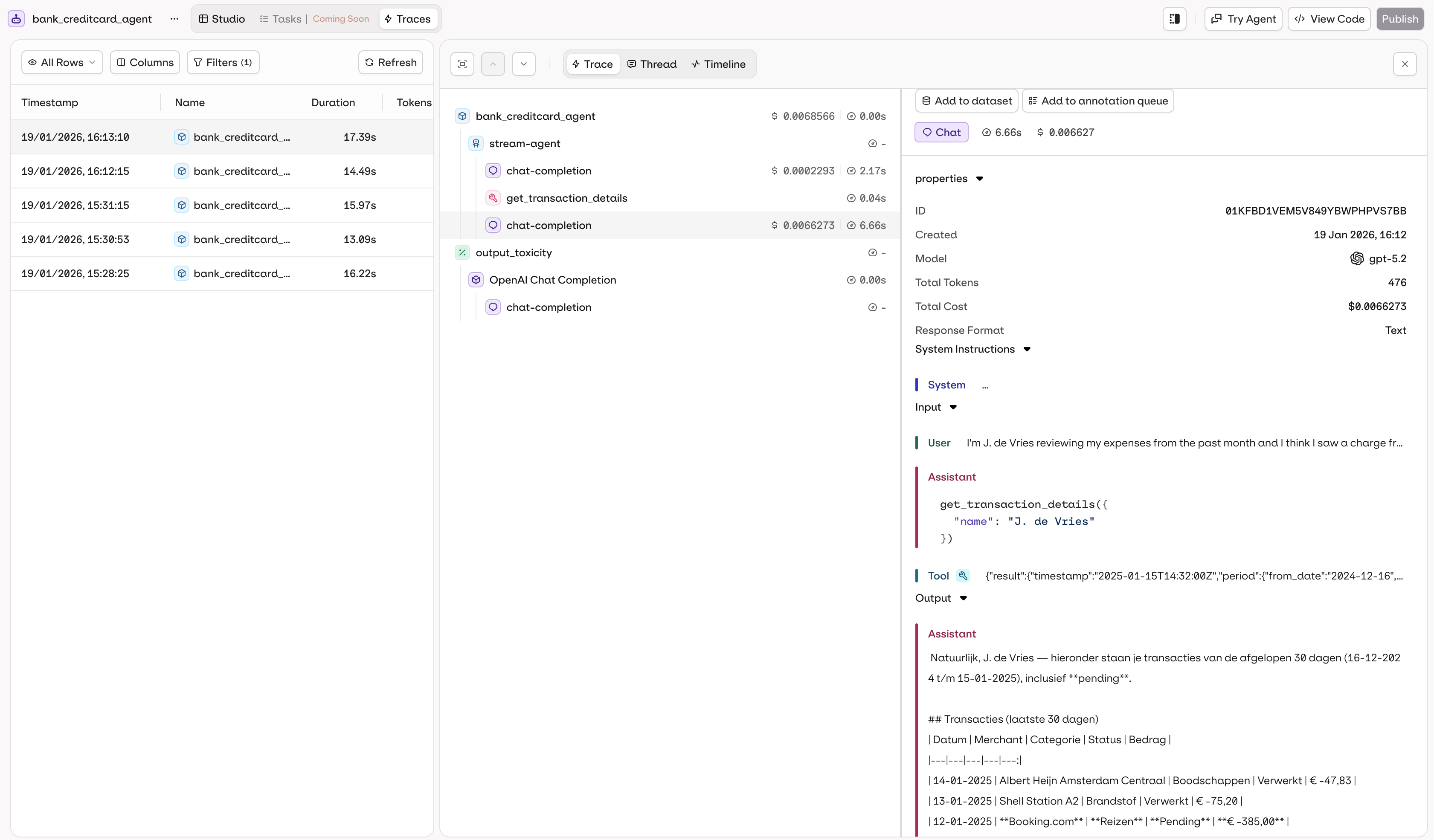 **Trace data includes:**
* Execution history with timestamps
* Input and output for each call
* Token usage and cost per execution
* Execution duration and performance metrics
* Errors and debugging information
* Tool calls executed (function, HTTP, code, or MCP calls)
* Knowledge retrieval results and RAG context
* Memory store interactions
All agent executions are automatically traced. Access traces in the **AI Studio** or via the [Traces API](/ai-studio/observability/traces).
For programmatic trace access, see the [Observability documentation](/ai-studio/observability/traces).
**List recent traces for an agent:**
```prompt wrap theme={"theme":{"light":"github-light","dark":"github-dark"}}
Show me the last 20 traces for "support-bot" sorted by most recent
```
The assistant uses `list_traces` with a filter on the agent key.
***
**Inspect a specific trace:**
```prompt wrap theme={"theme":{"light":"github-light","dark":"github-dark"}}
Show me the full span details for trace ID 01K6D8QESESZ6SAXQPJPFQXPFT
```
The assistant uses `list_spans` to retrieve the full execution tree for that trace.
***
**Debug errors:**
```prompt wrap theme={"theme":{"light":"github-light","dark":"github-dark"}}
Find all failed traces for "support-bot" from the last 24 hours and summarize the errors
```
The assistant uses `list_traces` filtered by `status:=ERROR` and time range, then `get_span` on relevant spans to surface root causes.
```bash theme={"theme":{"light":"github-light","dark":"github-dark"}}
# Search traces in a time range
orq traces search --from 2026-04-20T00:00:00Z --to 2026-04-21T00:00:00Z
```
See [install and setup](/reference/cli) to get started with the CLI. Run `orq traces --help` for the full command reference.
### Trace Views
Each agent run is inspected in the same **Trace**, **Thread**, and **Timeline** views, and reusable **Custom Views** can be saved, described on the [Traces](/ai-studio/observability/traces) page. The agent page adds two conveniences: the **Traces** tab is pre-filtered to the current agent, and trace search is available from the agent's MCP and CLI surfaces (above). See [Traces](/ai-studio/observability/traces) for the full view and filtering reference, plus cross-agent analysis.
To run agents on a recurring cadence, see [Schedule Agents](/ai-studio/ai-engineering/schedule-agents).
**Trace data includes:**
* Execution history with timestamps
* Input and output for each call
* Token usage and cost per execution
* Execution duration and performance metrics
* Errors and debugging information
* Tool calls executed (function, HTTP, code, or MCP calls)
* Knowledge retrieval results and RAG context
* Memory store interactions
All agent executions are automatically traced. Access traces in the **AI Studio** or via the [Traces API](/ai-studio/observability/traces).
For programmatic trace access, see the [Observability documentation](/ai-studio/observability/traces).
**List recent traces for an agent:**
```prompt wrap theme={"theme":{"light":"github-light","dark":"github-dark"}}
Show me the last 20 traces for "support-bot" sorted by most recent
```
The assistant uses `list_traces` with a filter on the agent key.
***
**Inspect a specific trace:**
```prompt wrap theme={"theme":{"light":"github-light","dark":"github-dark"}}
Show me the full span details for trace ID 01K6D8QESESZ6SAXQPJPFQXPFT
```
The assistant uses `list_spans` to retrieve the full execution tree for that trace.
***
**Debug errors:**
```prompt wrap theme={"theme":{"light":"github-light","dark":"github-dark"}}
Find all failed traces for "support-bot" from the last 24 hours and summarize the errors
```
The assistant uses `list_traces` filtered by `status:=ERROR` and time range, then `get_span` on relevant spans to surface root causes.
```bash theme={"theme":{"light":"github-light","dark":"github-dark"}}
# Search traces in a time range
orq traces search --from 2026-04-20T00:00:00Z --to 2026-04-21T00:00:00Z
```
See [install and setup](/reference/cli) to get started with the CLI. Run `orq traces --help` for the full command reference.
### Trace Views
Each agent run is inspected in the same **Trace**, **Thread**, and **Timeline** views, and reusable **Custom Views** can be saved, described on the [Traces](/ai-studio/observability/traces) page. The agent page adds two conveniences: the **Traces** tab is pre-filtered to the current agent, and trace search is available from the agent's MCP and CLI surfaces (above). See [Traces](/ai-studio/observability/traces) for the full view and filtering reference, plus cross-agent analysis.
To run agents on a recurring cadence, see [Schedule Agents](/ai-studio/ai-engineering/schedule-agents).