> ## Documentation Index
> Fetch the complete documentation index at: https://docs.orq.ai/llms.txt
> Use this file to discover all available pages before exploring further.
# Schedule Agents
> Run an agent on a recurring cadence without holding open an HTTP connection, with support for secret variables. Create, list, pause, resume, trigger, and delete agent schedules.
Run an agent on a recurring cadence without holding open an HTTP connection. Each scheduled run follows the same execution path, tracing, and billing as a direct API call.
## Create a Schedule
Open the agent and go to the **Schedules** tab. Click New schedule to open the form.
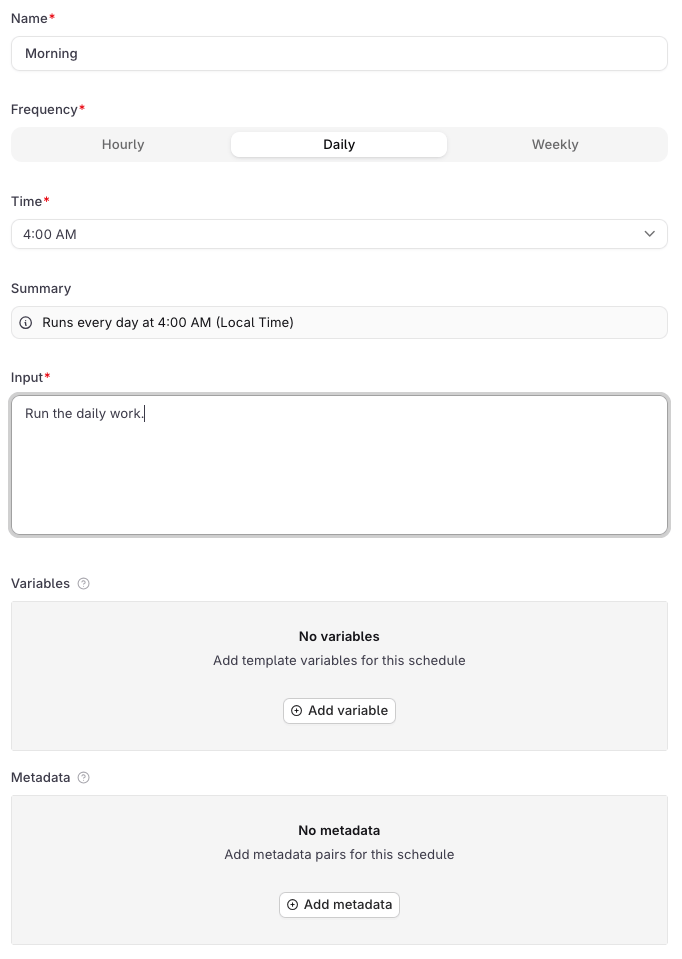 | Field | Description |
| ---------------- | --------------------------------------------------------------------------------------------------------------- |
| **Name** | A display label for the schedule in the UI. Required. Not sent to the agent. |
| **Frequency** | **Hourly**, **Daily**, or **Weekly**. |
| **Time** | The hour the schedule fires, in local time. Shown for Daily and Weekly. |
| **Pick the day** | Day of the week to fire. Shown for Weekly only. |
| **Summary** | Auto-generated human-readable description of the schedule. |
| **Input** | The user message sent to the agent on each firing. Required, since every agent invocation needs a user message. |
| **Variables** | Key-value pairs passed to the agent on each run. See below. |
| **Metadata** | Key-value pairs attached to every response this schedule generates. See below. |
**Variables**
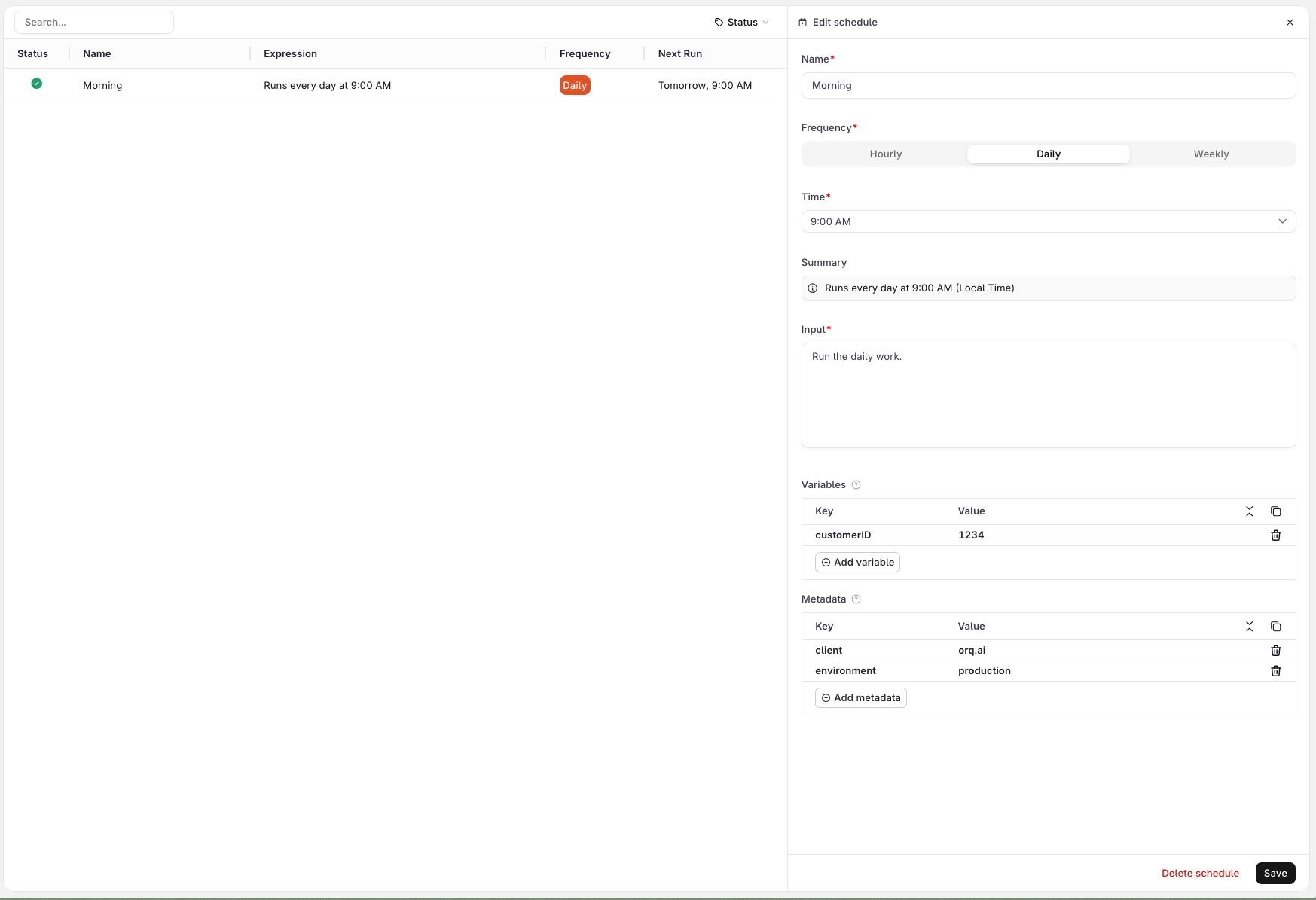
Use the **Variables** section to define values that the agent needs on each run. Variables are sent alongside the input as a distinct payload field, and can be consumed by the agent's instructions, any configured tool, or a subagent wherever the variable is wired up.
For example, a support agent with an HTTP tool that looks up a customer in an external system can receive `customer_id=1234` from the schedule and use it to query the right record on every run. See the screenshot below.
Variables cannot be referenced inside the **Input** field itself. Wire them into the agent's instructions, a tool, or a subagent instead.
**Metadata**
Use the **Metadata** section to attach arbitrary key-value pairs to every response generated by this schedule. Metadata is not passed to the agent: it is stored on the trace and can be used to filter traces in **Observability**, identify which schedule triggered a run, or tag responses for downstream processing.
Click **Create** to activate the schedule. It starts firing at the next matching time.
| Field | Description |
| ---------------- | --------------------------------------------------------------------------------------------------------------- |
| **Name** | A display label for the schedule in the UI. Required. Not sent to the agent. |
| **Frequency** | **Hourly**, **Daily**, or **Weekly**. |
| **Time** | The hour the schedule fires, in local time. Shown for Daily and Weekly. |
| **Pick the day** | Day of the week to fire. Shown for Weekly only. |
| **Summary** | Auto-generated human-readable description of the schedule. |
| **Input** | The user message sent to the agent on each firing. Required, since every agent invocation needs a user message. |
| **Variables** | Key-value pairs passed to the agent on each run. See below. |
| **Metadata** | Key-value pairs attached to every response this schedule generates. See below. |
**Variables**
Use the **Variables** section to define values that the agent needs on each run. Variables are sent alongside the input as a distinct payload field, and can be consumed by the agent's instructions, any configured tool, or a subagent wherever the variable is wired up.
For example, a support agent with an HTTP tool that looks up a customer in an external system can receive `customer_id=1234` from the schedule and use it to query the right record on every run. See the screenshot below.
Variables cannot be referenced inside the **Input** field itself. Wire them into the agent's instructions, a tool, or a subagent instead.
**Metadata**
Use the **Metadata** section to attach arbitrary key-value pairs to every response generated by this schedule. Metadata is not passed to the agent: it is stored on the trace and can be used to filter traces in **Observability**, identify which schedule triggered a run, or tag responses for downstream processing.
Click **Create** to activate the schedule. It starts firing at the next matching time.
 Only `cron` schedules are supported. Expressions use the 6-field format: `sec min hour dom month dow`. Three patterns are accepted:
| Pattern | Expression | Example |
| ------- | ---------------------- | ---------------------------------------- |
| Hourly | `0 0 * * * *` | Fires every hour |
| Daily | `0 0 * * *` | `0 0 9 * * *` (9:00 AM UTC daily) |
| Weekly | `0 0 * * ` | `0 0 9 * * 1` (9:00 AM UTC every Monday) |
`` is `0` (Sunday) through `6` (Saturday). All times are stored in UTC; the UI displays them in the user's local timezone.
Only `cron` is accepted. Seconds and minutes must be `0`, dom and month must be `*`, and the weekday field must be a single integer `0`-`6` or `*` (names like `mon` and ranges like `1-5` are rejected). To run an agent in response to an event rather than a clock, invoke it directly via the [Run API](/ai-studio/ai-engineering/run-agents).
Expressions that do not match a supported pattern return `400` with `"code": "invalid_expression"`. The `message` field describes the specific violation, for example `invalid schedule expression: day-of-month and month fields must be '*'`
```bash cURL theme={"theme":{"light":"github-light","dark":"github-dark"}}
curl -X POST https://my.orq.ai/v3/agents/ops_digest/schedules \
-H "Authorization: Bearer $ORQ_API_KEY" \
-H "Content-Type: application/json" \
-d '{
"type": "cron",
"expression": "0 0 9 * * *",
"display_name": "Morning briefing",
"payload": {
"input": "Generate the morning briefing for {{region}}",
"variables": { "region": "EMEA" }
}
}'
```
```python Python theme={"theme":{"light":"github-light","dark":"github-dark"}}
from orq_ai_sdk import Orq
import os
with Orq(api_key=os.getenv("ORQ_API_KEY", "")) as orq:
schedule = orq.schedules.create(
agent_key="ops_digest",
type_="cron",
expression="0 0 9 * * *",
display_name="Morning briefing",
payload={
"input": "Generate the morning briefing for {{region}}",
"variables": {"region": "EMEA"},
},
)
print(schedule)
```
```typescript TypeScript theme={"theme":{"light":"github-light","dark":"github-dark"}}
import { Orq } from '@orq-ai/node';
const orq = new Orq({ apiKey: process.env['ORQ_API_KEY'] ?? '' });
const schedule = await orq.schedules.create({
agentKey: 'ops_digest',
requestBody: {
type: 'cron',
expression: '0 0 9 * * *',
displayName: 'Morning briefing',
payload: {
input: 'Generate the morning briefing for {{region}}',
variables: { region: 'EMEA' },
},
},
});
console.log(schedule);
```
The TypeScript SDK uses camelCase keys (`agentKey`, `requestBody`) and nests the request body under `requestBody`, while the Python SDK uses flat keyword arguments. Both map to the same wire format.
`payload` is required. Response (schedule records use `_id` rather than `id`):
```json theme={"theme":{"light":"github-light","dark":"github-dark"}}
{
"_id": "01KPN29WWKSK0VDPJNTKZPVNRB",
"agent_key": "ops_digest",
"type": "cron",
"expression": "0 0 9 * * *",
"display_name": "Morning briefing",
"is_active": true,
"generation": 1,
"payload": {
"input": "Generate the morning briefing for {{region}}",
"variables": { "region": "EMEA" }
},
"trigger_count": 0,
"created": "2026-04-20T10:00:00Z",
"updated": "2026-04-20T10:00:00Z"
}
```
**Schedule fields:**
| Field | Type | Description |
| -------------- | ------ | ------------------------------------------------------------------------------------ |
| `display_name` | string | Required. Label shown in the UI Schedules tab. Max 200 characters, cannot be blank. |
| `type` | string | Must be `cron`. |
| `expression` | string | 6-field cron expression matching one of the three supported patterns. |
| `agent_tag` | string | Pin the schedule to a specific agent version. Omit to always run the active version. |
**Payload fields:**
| Field | Type | Description |
| ------------------ | --------------- | -------------------------------------------------------------------------------------------------------------------------------------------------------------------------------------- |
| `input` | string or array | The instruction the agent runs on each firing. Same shape as the `input` field in the [Run API](/ai-studio/ai-engineering/run-agents). Supports template variables via `{{variable}}`. |
| `variables` | object | Template variable substitution. Use `{"secret": true, "value": "..."}` for secret values. |
| `memory_entity_id` | string | Memory store entity to attach on each run. |
| `metadata` | object | Opaque key/value pairs attached to every response this schedule generates. Values must be strings. |
`generation` increments each time `type` or `expression` changes and resets `trigger_count` to 0. Use it to distinguish firings before and after a cadence change.
Use `agent_tag` (string) to pin the schedule to a specific agent version. Omit it to always use the active version:
```json theme={"theme":{"light":"github-light","dark":"github-dark"}}
{
"type": "cron",
"expression": "0 0 9 * * *",
"display_name": "Morning briefing",
"agent_tag": "v2",
"payload": { "input": "Generate the morning briefing for {{region}}" }
}
```
`display_name` is required and is not exposed as a flag on `schedules create`, so pipe the full body via `--stdin`:
```bash theme={"theme":{"light":"github-light","dark":"github-dark"}}
echo '{
"type": "cron",
"expression": "0 0 9 * * *",
"display_name": "Morning briefing",
"payload": {
"input": "Generate the morning briefing for {{region}}",
"variables": { "region": "EMEA" }
}
}' | orq schedules create ops_digest --stdin
```
See [install and setup](/reference/cli) to get started with the CLI. Run `orq schedules create --help` for the full flag reference.
## List & Retrieve
All schedules for the agent are listed in the **Schedules** tab. Click a schedule row to open its details, including trigger count and last fired time.
```bash cURL theme={"theme":{"light":"github-light","dark":"github-dark"}}
# List all schedules
curl https://my.orq.ai/v3/agents/ops_digest/schedules \
-H "Authorization: Bearer $ORQ_API_KEY"
# Get a single schedule
curl https://my.orq.ai/v3/agents/ops_digest/schedules/{schedule_id} \
-H "Authorization: Bearer $ORQ_API_KEY"
```
```python Python theme={"theme":{"light":"github-light","dark":"github-dark"}}
from orq_ai_sdk import Orq
import os
with Orq(api_key=os.getenv("ORQ_API_KEY", "")) as orq:
# List all schedules
result = orq.schedules.list(agent_key="ops_digest")
print(result.schedules)
# Get a single schedule
schedule = orq.schedules.retrieve(
agent_key="ops_digest",
schedule_id="{schedule_id}",
)
print(schedule)
```
```typescript TypeScript theme={"theme":{"light":"github-light","dark":"github-dark"}}
import { Orq } from '@orq-ai/node';
const orq = new Orq({ apiKey: process.env['ORQ_API_KEY'] ?? '' });
// List all schedules
const result = await orq.schedules.list({ agentKey: 'ops_digest' });
console.log(result.schedules);
// Get a single schedule
const schedule = await orq.schedules.retrieve({
agentKey: 'ops_digest',
scheduleId: '{schedule_id}',
});
console.log(schedule);
```
List returns `{ "schedules": [...] }`, most recent first. The single-schedule response includes `trigger_count`, `last_triggered_at` (UTC timestamp string; `null` before the first firing), and `generation`.
```bash theme={"theme":{"light":"github-light","dark":"github-dark"}}
# List schedules for this agent
orq schedules list ops_digest
# Get a single schedule
orq schedules retrieve ops_digest
```
See [install and setup](/reference/cli) to get started with the CLI. Run `orq schedules list --help` for the full flag reference.
## Pause and Resume
Click on the schedule row, then click Enable to toggle the schedule on or off. Field edits saved while paused take effect on the next active run.
```bash cURL theme={"theme":{"light":"github-light","dark":"github-dark"}}
# Pause
curl -X PATCH https://my.orq.ai/v3/agents/ops_digest/schedules/{schedule_id} \
-H "Authorization: Bearer $ORQ_API_KEY" \
-H "Content-Type: application/json" \
-d '{ "is_active": false }'
# Resume
curl -X PATCH https://my.orq.ai/v3/agents/ops_digest/schedules/{schedule_id} \
-H "Authorization: Bearer $ORQ_API_KEY" \
-H "Content-Type: application/json" \
-d '{ "is_active": true }'
```
```python Python theme={"theme":{"light":"github-light","dark":"github-dark"}}
from orq_ai_sdk import Orq
import os
with Orq(api_key=os.getenv("ORQ_API_KEY", "")) as orq:
# Pause
orq.schedules.update(
agent_key="ops_digest",
schedule_id="{schedule_id}",
is_active=False,
)
# Resume
orq.schedules.update(
agent_key="ops_digest",
schedule_id="{schedule_id}",
is_active=True,
)
```
```typescript TypeScript theme={"theme":{"light":"github-light","dark":"github-dark"}}
import { Orq } from '@orq-ai/node';
const orq = new Orq({ apiKey: process.env['ORQ_API_KEY'] ?? '' });
// Pause
await orq.schedules.update({
agentKey: 'ops_digest',
scheduleId: '{schedule_id}',
requestBody: { isActive: false },
});
// Resume
await orq.schedules.update({
agentKey: 'ops_digest',
scheduleId: '{schedule_id}',
requestBody: { isActive: true },
});
```
Payload-only and `agent_tag`-only changes do not reset the firing cadence and apply to the next regular run. Changing `type` or `expression` shifts the cadence from the PATCH time and resets `trigger_count` to 0.
**Lifecycle notes:**
* **Missed firings**: Not replayed. If the service is unavailable when a schedule fires, that firing is lost. The schedule resumes on its next scheduled time once service is restored.
```bash theme={"theme":{"light":"github-light","dark":"github-dark"}}
# Pause
orq schedules update ops_digest --is-active=false
# Resume
orq schedules update ops_digest --is-active=true
```
See [install and setup](/reference/cli) to get started with the CLI. Run `orq schedules update --help` for the full flag reference.
## Trigger On Demand
Runs the schedule's payload immediately without affecting its regular cadence. Useful for smoke-testing a new schedule or manually re-running a missed execution.
```bash cURL theme={"theme":{"light":"github-light","dark":"github-dark"}}
curl -X POST https://my.orq.ai/v3/agents/ops_digest/schedules/{schedule_id}/execution \
-H "Authorization: Bearer $ORQ_API_KEY"
```
```python Python theme={"theme":{"light":"github-light","dark":"github-dark"}}
from orq_ai_sdk import Orq
import os
with Orq(api_key=os.getenv("ORQ_API_KEY", "")) as orq:
orq.schedules.trigger(
agent_key="ops_digest",
schedule_id="{schedule_id}",
)
```
```typescript TypeScript theme={"theme":{"light":"github-light","dark":"github-dark"}}
import { Orq } from '@orq-ai/node';
const orq = new Orq({ apiKey: process.env['ORQ_API_KEY'] ?? '' });
await orq.schedules.trigger({
agentKey: 'ops_digest',
scheduleId: '{schedule_id}',
});
```
Returns `202 Accepted` with:
```json theme={"theme":{"light":"github-light","dark":"github-dark"}}
{
"status": "triggered",
"schedule_id": "01KPN29WWKSK0VDPJNTKZPVNRB"
}
```
The run appears in traces as a `schedule.` leading span roughly 10 seconds later, carrying `orq.schedule_id` and the full agent execution chain. Schedule-driven cost and token usage appear in usage reports alongside HTTP-invoked runs. Inactive schedules return `400 schedule_inactive`.
```bash theme={"theme":{"light":"github-light","dark":"github-dark"}}
orq schedules trigger ops_digest
```
See [install and setup](/reference/cli) to get started with the CLI. Run `orq schedules trigger --help` for the full flag reference.
## Delete
Click on the schedule row, then click **Delete**. The action is immediate and permanent.
```bash cURL theme={"theme":{"light":"github-light","dark":"github-dark"}}
curl -X DELETE https://my.orq.ai/v3/agents/ops_digest/schedules/{schedule_id} \
-H "Authorization: Bearer $ORQ_API_KEY"
```
```python Python theme={"theme":{"light":"github-light","dark":"github-dark"}}
from orq_ai_sdk import Orq
import os
with Orq(api_key=os.getenv("ORQ_API_KEY", "")) as orq:
orq.schedules.delete(
agent_key="ops_digest",
schedule_id="{schedule_id}",
)
```
```typescript TypeScript theme={"theme":{"light":"github-light","dark":"github-dark"}}
import { Orq } from '@orq-ai/node';
const orq = new Orq({ apiKey: process.env['ORQ_API_KEY'] ?? '' });
await orq.schedules.delete({
agentKey: 'ops_digest',
scheduleId: '{schedule_id}',
});
```
Returns `204 No Content`. Deleting the agent itself removes all its schedules automatically.
```bash theme={"theme":{"light":"github-light","dark":"github-dark"}}
orq schedules delete ops_digest
```
See [install and setup](/reference/cli) to get started with the CLI. Run `orq schedules delete --help` for the full flag reference.
## Examples
```bash cURL theme={"theme":{"light":"github-light","dark":"github-dark"}}
curl -X POST https://my.orq.ai/v3/agents/ops_digest/schedules \
-H "Authorization: Bearer $ORQ_API_KEY" \
-H "Content-Type: application/json" \
-d '{
"type": "cron",
"expression": "0 0 9 * * *",
"display_name": "Daily morning briefing",
"agent_tag": "v2",
"payload": {
"input": "Generate the morning briefing for {{region}}",
"variables": { "region": "EMEA" },
"metadata": { "run_source": "daily-briefing" }
}
}'
```
```python Python theme={"theme":{"light":"github-light","dark":"github-dark"}}
from orq_ai_sdk import Orq
import os
with Orq(api_key=os.getenv("ORQ_API_KEY", "")) as orq:
schedule = orq.schedules.create(
agent_key="ops_digest",
type_="cron",
expression="0 0 9 * * *",
display_name="Daily morning briefing",
agent_tag="v2",
payload={
"input": "Generate the morning briefing for {{region}}",
"variables": {"region": "EMEA"},
"metadata": {"run_source": "daily-briefing"},
},
)
print(schedule)
```
```typescript TypeScript theme={"theme":{"light":"github-light","dark":"github-dark"}}
import { Orq } from '@orq-ai/node';
const orq = new Orq({ apiKey: process.env['ORQ_API_KEY'] ?? '' });
const schedule = await orq.schedules.create({
agentKey: 'ops_digest',
requestBody: {
type: 'cron',
expression: '0 0 9 * * *',
displayName: 'Daily morning briefing',
agentTag: 'v2',
payload: {
input: 'Generate the morning briefing for {{region}}',
variables: { region: 'EMEA' },
metadata: { run_source: 'daily-briefing' },
},
},
});
console.log(schedule);
```
```bash cURL theme={"theme":{"light":"github-light","dark":"github-dark"}}
curl -X POST https://my.orq.ai/v3/agents/knowledge_indexer/schedules \
-H "Authorization: Bearer $ORQ_API_KEY" \
-H "Content-Type: application/json" \
-d '{
"type": "cron",
"expression": "0 0 * * * *",
"display_name": "Hourly knowledge indexer",
"payload": {
"input": "Fetch new entries and update the knowledge base",
"memory_entity_id": "mem_entity_123"
}
}'
```
```python Python theme={"theme":{"light":"github-light","dark":"github-dark"}}
from orq_ai_sdk import Orq
import os
with Orq(api_key=os.getenv("ORQ_API_KEY", "")) as orq:
schedule = orq.schedules.create(
agent_key="knowledge_indexer",
type_="cron",
expression="0 0 * * * *",
display_name="Hourly knowledge indexer",
payload={
"input": "Fetch new entries and update the knowledge base",
"memory_entity_id": "mem_entity_123",
},
)
print(schedule)
```
```typescript TypeScript theme={"theme":{"light":"github-light","dark":"github-dark"}}
import { Orq } from '@orq-ai/node';
const orq = new Orq({ apiKey: process.env['ORQ_API_KEY'] ?? '' });
const schedule = await orq.schedules.create({
agentKey: 'knowledge_indexer',
requestBody: {
type: 'cron',
expression: '0 0 * * * *',
displayName: 'Hourly knowledge indexer',
payload: {
input: 'Fetch new entries and update the knowledge base',
memoryEntityId: 'mem_entity_123',
},
},
});
console.log(schedule);
```
`memory_entity_id` attaches a [Memory Store](/ai-studio/ai-engineering/memory-stores) entity to every run. The agent can read from and write to the store on each firing, accumulating context across executions.
```bash cURL theme={"theme":{"light":"github-light","dark":"github-dark"}}
curl -X POST https://my.orq.ai/v3/agents/daily_sync/schedules \
-H "Authorization: Bearer $ORQ_API_KEY" \
-H "Content-Type: application/json" \
-d '{
"type": "cron",
"expression": "0 0 3 * * *",
"display_name": "Nightly warehouse sync",
"payload": {
"input": "Sync new rows from {{table}} to the analytics warehouse",
"variables": {
"table": "orders",
"warehouse_token": { "secret": true, "value": "sk-secret-123" }
}
}
}'
```
```python Python theme={"theme":{"light":"github-light","dark":"github-dark"}}
from orq_ai_sdk import Orq
import os
with Orq(api_key=os.getenv("ORQ_API_KEY", "")) as orq:
schedule = orq.schedules.create(
agent_key="daily_sync",
type_="cron",
expression="0 0 3 * * *",
display_name="Nightly warehouse sync",
payload={
"input": "Sync new rows from {{table}} to the analytics warehouse",
"variables": {
"table": "orders",
"warehouse_token": {"secret": True, "value": "sk-secret-123"},
},
},
)
print(schedule)
```
```typescript TypeScript theme={"theme":{"light":"github-light","dark":"github-dark"}}
import { Orq } from '@orq-ai/node';
const orq = new Orq({ apiKey: process.env['ORQ_API_KEY'] ?? '' });
const schedule = await orq.schedules.create({
agentKey: 'daily_sync',
requestBody: {
type: 'cron',
expression: '0 0 3 * * *',
displayName: 'Nightly warehouse sync',
payload: {
input: 'Sync new rows from {{table}} to the analytics warehouse',
variables: {
table: 'orders',
warehouse_token: { secret: true, value: 'sk-secret-123' },
},
},
},
});
console.log(schedule);
```
Secret values are replaced with `***` in traces and span attributes, and removed from the stored response variables. The schedule payload itself keeps the value as sent, so any caller that can read the schedule can read the secret. See [Secrets management](/ai-studio/organization/secrets).
`display_name` is not yet exposed as a flag on `schedules create`, so these examples pipe the full body via `--stdin`:
```bash theme={"theme":{"light":"github-light","dark":"github-dark"}}
echo '{
"type": "cron",
"expression": "0 0 9 * * *",
"display_name": "Daily morning briefing",
"agent_tag": "v2",
"payload": {
"input": "Generate the morning briefing for {{region}}",
"variables": { "region": "EMEA" },
"metadata": { "run_source": "daily-briefing" }
}
}' | orq schedules create ops_digest --stdin
```
```bash theme={"theme":{"light":"github-light","dark":"github-dark"}}
echo '{
"type": "cron",
"expression": "0 0 * * * *",
"display_name": "Hourly knowledge indexer",
"payload": {
"input": "Fetch new entries and update the knowledge base",
"memory_entity_id": "mem_entity_123"
}
}' | orq schedules create knowledge_indexer --stdin
```
```bash theme={"theme":{"light":"github-light","dark":"github-dark"}}
echo '{
"type": "cron",
"expression": "0 0 3 * * *",
"display_name": "Nightly warehouse sync",
"payload": {
"input": "Sync new rows from {{table}} to the analytics warehouse",
"variables": {
"table": "orders",
"warehouse_token": { "secret": true, "value": "sk-secret-123" }
}
}
}' | orq schedules create daily_sync --stdin
```
See [install and setup](/reference/cli) to get started with the CLI. Run `orq schedules create --help` for the full flag reference.
Only `cron` schedules are supported. Expressions use the 6-field format: `sec min hour dom month dow`. Three patterns are accepted:
| Pattern | Expression | Example |
| ------- | ---------------------- | ---------------------------------------- |
| Hourly | `0 0 * * * *` | Fires every hour |
| Daily | `0 0 * * *` | `0 0 9 * * *` (9:00 AM UTC daily) |
| Weekly | `0 0 * * ` | `0 0 9 * * 1` (9:00 AM UTC every Monday) |
`` is `0` (Sunday) through `6` (Saturday). All times are stored in UTC; the UI displays them in the user's local timezone.
Only `cron` is accepted. Seconds and minutes must be `0`, dom and month must be `*`, and the weekday field must be a single integer `0`-`6` or `*` (names like `mon` and ranges like `1-5` are rejected). To run an agent in response to an event rather than a clock, invoke it directly via the [Run API](/ai-studio/ai-engineering/run-agents).
Expressions that do not match a supported pattern return `400` with `"code": "invalid_expression"`. The `message` field describes the specific violation, for example `invalid schedule expression: day-of-month and month fields must be '*'`
```bash cURL theme={"theme":{"light":"github-light","dark":"github-dark"}}
curl -X POST https://my.orq.ai/v3/agents/ops_digest/schedules \
-H "Authorization: Bearer $ORQ_API_KEY" \
-H "Content-Type: application/json" \
-d '{
"type": "cron",
"expression": "0 0 9 * * *",
"display_name": "Morning briefing",
"payload": {
"input": "Generate the morning briefing for {{region}}",
"variables": { "region": "EMEA" }
}
}'
```
```python Python theme={"theme":{"light":"github-light","dark":"github-dark"}}
from orq_ai_sdk import Orq
import os
with Orq(api_key=os.getenv("ORQ_API_KEY", "")) as orq:
schedule = orq.schedules.create(
agent_key="ops_digest",
type_="cron",
expression="0 0 9 * * *",
display_name="Morning briefing",
payload={
"input": "Generate the morning briefing for {{region}}",
"variables": {"region": "EMEA"},
},
)
print(schedule)
```
```typescript TypeScript theme={"theme":{"light":"github-light","dark":"github-dark"}}
import { Orq } from '@orq-ai/node';
const orq = new Orq({ apiKey: process.env['ORQ_API_KEY'] ?? '' });
const schedule = await orq.schedules.create({
agentKey: 'ops_digest',
requestBody: {
type: 'cron',
expression: '0 0 9 * * *',
displayName: 'Morning briefing',
payload: {
input: 'Generate the morning briefing for {{region}}',
variables: { region: 'EMEA' },
},
},
});
console.log(schedule);
```
The TypeScript SDK uses camelCase keys (`agentKey`, `requestBody`) and nests the request body under `requestBody`, while the Python SDK uses flat keyword arguments. Both map to the same wire format.
`payload` is required. Response (schedule records use `_id` rather than `id`):
```json theme={"theme":{"light":"github-light","dark":"github-dark"}}
{
"_id": "01KPN29WWKSK0VDPJNTKZPVNRB",
"agent_key": "ops_digest",
"type": "cron",
"expression": "0 0 9 * * *",
"display_name": "Morning briefing",
"is_active": true,
"generation": 1,
"payload": {
"input": "Generate the morning briefing for {{region}}",
"variables": { "region": "EMEA" }
},
"trigger_count": 0,
"created": "2026-04-20T10:00:00Z",
"updated": "2026-04-20T10:00:00Z"
}
```
**Schedule fields:**
| Field | Type | Description |
| -------------- | ------ | ------------------------------------------------------------------------------------ |
| `display_name` | string | Required. Label shown in the UI Schedules tab. Max 200 characters, cannot be blank. |
| `type` | string | Must be `cron`. |
| `expression` | string | 6-field cron expression matching one of the three supported patterns. |
| `agent_tag` | string | Pin the schedule to a specific agent version. Omit to always run the active version. |
**Payload fields:**
| Field | Type | Description |
| ------------------ | --------------- | -------------------------------------------------------------------------------------------------------------------------------------------------------------------------------------- |
| `input` | string or array | The instruction the agent runs on each firing. Same shape as the `input` field in the [Run API](/ai-studio/ai-engineering/run-agents). Supports template variables via `{{variable}}`. |
| `variables` | object | Template variable substitution. Use `{"secret": true, "value": "..."}` for secret values. |
| `memory_entity_id` | string | Memory store entity to attach on each run. |
| `metadata` | object | Opaque key/value pairs attached to every response this schedule generates. Values must be strings. |
`generation` increments each time `type` or `expression` changes and resets `trigger_count` to 0. Use it to distinguish firings before and after a cadence change.
Use `agent_tag` (string) to pin the schedule to a specific agent version. Omit it to always use the active version:
```json theme={"theme":{"light":"github-light","dark":"github-dark"}}
{
"type": "cron",
"expression": "0 0 9 * * *",
"display_name": "Morning briefing",
"agent_tag": "v2",
"payload": { "input": "Generate the morning briefing for {{region}}" }
}
```
`display_name` is required and is not exposed as a flag on `schedules create`, so pipe the full body via `--stdin`:
```bash theme={"theme":{"light":"github-light","dark":"github-dark"}}
echo '{
"type": "cron",
"expression": "0 0 9 * * *",
"display_name": "Morning briefing",
"payload": {
"input": "Generate the morning briefing for {{region}}",
"variables": { "region": "EMEA" }
}
}' | orq schedules create ops_digest --stdin
```
See [install and setup](/reference/cli) to get started with the CLI. Run `orq schedules create --help` for the full flag reference.
## List & Retrieve
All schedules for the agent are listed in the **Schedules** tab. Click a schedule row to open its details, including trigger count and last fired time.
```bash cURL theme={"theme":{"light":"github-light","dark":"github-dark"}}
# List all schedules
curl https://my.orq.ai/v3/agents/ops_digest/schedules \
-H "Authorization: Bearer $ORQ_API_KEY"
# Get a single schedule
curl https://my.orq.ai/v3/agents/ops_digest/schedules/{schedule_id} \
-H "Authorization: Bearer $ORQ_API_KEY"
```
```python Python theme={"theme":{"light":"github-light","dark":"github-dark"}}
from orq_ai_sdk import Orq
import os
with Orq(api_key=os.getenv("ORQ_API_KEY", "")) as orq:
# List all schedules
result = orq.schedules.list(agent_key="ops_digest")
print(result.schedules)
# Get a single schedule
schedule = orq.schedules.retrieve(
agent_key="ops_digest",
schedule_id="{schedule_id}",
)
print(schedule)
```
```typescript TypeScript theme={"theme":{"light":"github-light","dark":"github-dark"}}
import { Orq } from '@orq-ai/node';
const orq = new Orq({ apiKey: process.env['ORQ_API_KEY'] ?? '' });
// List all schedules
const result = await orq.schedules.list({ agentKey: 'ops_digest' });
console.log(result.schedules);
// Get a single schedule
const schedule = await orq.schedules.retrieve({
agentKey: 'ops_digest',
scheduleId: '{schedule_id}',
});
console.log(schedule);
```
List returns `{ "schedules": [...] }`, most recent first. The single-schedule response includes `trigger_count`, `last_triggered_at` (UTC timestamp string; `null` before the first firing), and `generation`.
```bash theme={"theme":{"light":"github-light","dark":"github-dark"}}
# List schedules for this agent
orq schedules list ops_digest
# Get a single schedule
orq schedules retrieve ops_digest
```
See [install and setup](/reference/cli) to get started with the CLI. Run `orq schedules list --help` for the full flag reference.
## Pause and Resume
Click on the schedule row, then click Enable to toggle the schedule on or off. Field edits saved while paused take effect on the next active run.
```bash cURL theme={"theme":{"light":"github-light","dark":"github-dark"}}
# Pause
curl -X PATCH https://my.orq.ai/v3/agents/ops_digest/schedules/{schedule_id} \
-H "Authorization: Bearer $ORQ_API_KEY" \
-H "Content-Type: application/json" \
-d '{ "is_active": false }'
# Resume
curl -X PATCH https://my.orq.ai/v3/agents/ops_digest/schedules/{schedule_id} \
-H "Authorization: Bearer $ORQ_API_KEY" \
-H "Content-Type: application/json" \
-d '{ "is_active": true }'
```
```python Python theme={"theme":{"light":"github-light","dark":"github-dark"}}
from orq_ai_sdk import Orq
import os
with Orq(api_key=os.getenv("ORQ_API_KEY", "")) as orq:
# Pause
orq.schedules.update(
agent_key="ops_digest",
schedule_id="{schedule_id}",
is_active=False,
)
# Resume
orq.schedules.update(
agent_key="ops_digest",
schedule_id="{schedule_id}",
is_active=True,
)
```
```typescript TypeScript theme={"theme":{"light":"github-light","dark":"github-dark"}}
import { Orq } from '@orq-ai/node';
const orq = new Orq({ apiKey: process.env['ORQ_API_KEY'] ?? '' });
// Pause
await orq.schedules.update({
agentKey: 'ops_digest',
scheduleId: '{schedule_id}',
requestBody: { isActive: false },
});
// Resume
await orq.schedules.update({
agentKey: 'ops_digest',
scheduleId: '{schedule_id}',
requestBody: { isActive: true },
});
```
Payload-only and `agent_tag`-only changes do not reset the firing cadence and apply to the next regular run. Changing `type` or `expression` shifts the cadence from the PATCH time and resets `trigger_count` to 0.
**Lifecycle notes:**
* **Missed firings**: Not replayed. If the service is unavailable when a schedule fires, that firing is lost. The schedule resumes on its next scheduled time once service is restored.
```bash theme={"theme":{"light":"github-light","dark":"github-dark"}}
# Pause
orq schedules update ops_digest --is-active=false
# Resume
orq schedules update ops_digest --is-active=true
```
See [install and setup](/reference/cli) to get started with the CLI. Run `orq schedules update --help` for the full flag reference.
## Trigger On Demand
Runs the schedule's payload immediately without affecting its regular cadence. Useful for smoke-testing a new schedule or manually re-running a missed execution.
```bash cURL theme={"theme":{"light":"github-light","dark":"github-dark"}}
curl -X POST https://my.orq.ai/v3/agents/ops_digest/schedules/{schedule_id}/execution \
-H "Authorization: Bearer $ORQ_API_KEY"
```
```python Python theme={"theme":{"light":"github-light","dark":"github-dark"}}
from orq_ai_sdk import Orq
import os
with Orq(api_key=os.getenv("ORQ_API_KEY", "")) as orq:
orq.schedules.trigger(
agent_key="ops_digest",
schedule_id="{schedule_id}",
)
```
```typescript TypeScript theme={"theme":{"light":"github-light","dark":"github-dark"}}
import { Orq } from '@orq-ai/node';
const orq = new Orq({ apiKey: process.env['ORQ_API_KEY'] ?? '' });
await orq.schedules.trigger({
agentKey: 'ops_digest',
scheduleId: '{schedule_id}',
});
```
Returns `202 Accepted` with:
```json theme={"theme":{"light":"github-light","dark":"github-dark"}}
{
"status": "triggered",
"schedule_id": "01KPN29WWKSK0VDPJNTKZPVNRB"
}
```
The run appears in traces as a `schedule.` leading span roughly 10 seconds later, carrying `orq.schedule_id` and the full agent execution chain. Schedule-driven cost and token usage appear in usage reports alongside HTTP-invoked runs. Inactive schedules return `400 schedule_inactive`.
```bash theme={"theme":{"light":"github-light","dark":"github-dark"}}
orq schedules trigger ops_digest
```
See [install and setup](/reference/cli) to get started with the CLI. Run `orq schedules trigger --help` for the full flag reference.
## Delete
Click on the schedule row, then click **Delete**. The action is immediate and permanent.
```bash cURL theme={"theme":{"light":"github-light","dark":"github-dark"}}
curl -X DELETE https://my.orq.ai/v3/agents/ops_digest/schedules/{schedule_id} \
-H "Authorization: Bearer $ORQ_API_KEY"
```
```python Python theme={"theme":{"light":"github-light","dark":"github-dark"}}
from orq_ai_sdk import Orq
import os
with Orq(api_key=os.getenv("ORQ_API_KEY", "")) as orq:
orq.schedules.delete(
agent_key="ops_digest",
schedule_id="{schedule_id}",
)
```
```typescript TypeScript theme={"theme":{"light":"github-light","dark":"github-dark"}}
import { Orq } from '@orq-ai/node';
const orq = new Orq({ apiKey: process.env['ORQ_API_KEY'] ?? '' });
await orq.schedules.delete({
agentKey: 'ops_digest',
scheduleId: '{schedule_id}',
});
```
Returns `204 No Content`. Deleting the agent itself removes all its schedules automatically.
```bash theme={"theme":{"light":"github-light","dark":"github-dark"}}
orq schedules delete ops_digest
```
See [install and setup](/reference/cli) to get started with the CLI. Run `orq schedules delete --help` for the full flag reference.
## Examples
```bash cURL theme={"theme":{"light":"github-light","dark":"github-dark"}}
curl -X POST https://my.orq.ai/v3/agents/ops_digest/schedules \
-H "Authorization: Bearer $ORQ_API_KEY" \
-H "Content-Type: application/json" \
-d '{
"type": "cron",
"expression": "0 0 9 * * *",
"display_name": "Daily morning briefing",
"agent_tag": "v2",
"payload": {
"input": "Generate the morning briefing for {{region}}",
"variables": { "region": "EMEA" },
"metadata": { "run_source": "daily-briefing" }
}
}'
```
```python Python theme={"theme":{"light":"github-light","dark":"github-dark"}}
from orq_ai_sdk import Orq
import os
with Orq(api_key=os.getenv("ORQ_API_KEY", "")) as orq:
schedule = orq.schedules.create(
agent_key="ops_digest",
type_="cron",
expression="0 0 9 * * *",
display_name="Daily morning briefing",
agent_tag="v2",
payload={
"input": "Generate the morning briefing for {{region}}",
"variables": {"region": "EMEA"},
"metadata": {"run_source": "daily-briefing"},
},
)
print(schedule)
```
```typescript TypeScript theme={"theme":{"light":"github-light","dark":"github-dark"}}
import { Orq } from '@orq-ai/node';
const orq = new Orq({ apiKey: process.env['ORQ_API_KEY'] ?? '' });
const schedule = await orq.schedules.create({
agentKey: 'ops_digest',
requestBody: {
type: 'cron',
expression: '0 0 9 * * *',
displayName: 'Daily morning briefing',
agentTag: 'v2',
payload: {
input: 'Generate the morning briefing for {{region}}',
variables: { region: 'EMEA' },
metadata: { run_source: 'daily-briefing' },
},
},
});
console.log(schedule);
```
```bash cURL theme={"theme":{"light":"github-light","dark":"github-dark"}}
curl -X POST https://my.orq.ai/v3/agents/knowledge_indexer/schedules \
-H "Authorization: Bearer $ORQ_API_KEY" \
-H "Content-Type: application/json" \
-d '{
"type": "cron",
"expression": "0 0 * * * *",
"display_name": "Hourly knowledge indexer",
"payload": {
"input": "Fetch new entries and update the knowledge base",
"memory_entity_id": "mem_entity_123"
}
}'
```
```python Python theme={"theme":{"light":"github-light","dark":"github-dark"}}
from orq_ai_sdk import Orq
import os
with Orq(api_key=os.getenv("ORQ_API_KEY", "")) as orq:
schedule = orq.schedules.create(
agent_key="knowledge_indexer",
type_="cron",
expression="0 0 * * * *",
display_name="Hourly knowledge indexer",
payload={
"input": "Fetch new entries and update the knowledge base",
"memory_entity_id": "mem_entity_123",
},
)
print(schedule)
```
```typescript TypeScript theme={"theme":{"light":"github-light","dark":"github-dark"}}
import { Orq } from '@orq-ai/node';
const orq = new Orq({ apiKey: process.env['ORQ_API_KEY'] ?? '' });
const schedule = await orq.schedules.create({
agentKey: 'knowledge_indexer',
requestBody: {
type: 'cron',
expression: '0 0 * * * *',
displayName: 'Hourly knowledge indexer',
payload: {
input: 'Fetch new entries and update the knowledge base',
memoryEntityId: 'mem_entity_123',
},
},
});
console.log(schedule);
```
`memory_entity_id` attaches a [Memory Store](/ai-studio/ai-engineering/memory-stores) entity to every run. The agent can read from and write to the store on each firing, accumulating context across executions.
```bash cURL theme={"theme":{"light":"github-light","dark":"github-dark"}}
curl -X POST https://my.orq.ai/v3/agents/daily_sync/schedules \
-H "Authorization: Bearer $ORQ_API_KEY" \
-H "Content-Type: application/json" \
-d '{
"type": "cron",
"expression": "0 0 3 * * *",
"display_name": "Nightly warehouse sync",
"payload": {
"input": "Sync new rows from {{table}} to the analytics warehouse",
"variables": {
"table": "orders",
"warehouse_token": { "secret": true, "value": "sk-secret-123" }
}
}
}'
```
```python Python theme={"theme":{"light":"github-light","dark":"github-dark"}}
from orq_ai_sdk import Orq
import os
with Orq(api_key=os.getenv("ORQ_API_KEY", "")) as orq:
schedule = orq.schedules.create(
agent_key="daily_sync",
type_="cron",
expression="0 0 3 * * *",
display_name="Nightly warehouse sync",
payload={
"input": "Sync new rows from {{table}} to the analytics warehouse",
"variables": {
"table": "orders",
"warehouse_token": {"secret": True, "value": "sk-secret-123"},
},
},
)
print(schedule)
```
```typescript TypeScript theme={"theme":{"light":"github-light","dark":"github-dark"}}
import { Orq } from '@orq-ai/node';
const orq = new Orq({ apiKey: process.env['ORQ_API_KEY'] ?? '' });
const schedule = await orq.schedules.create({
agentKey: 'daily_sync',
requestBody: {
type: 'cron',
expression: '0 0 3 * * *',
displayName: 'Nightly warehouse sync',
payload: {
input: 'Sync new rows from {{table}} to the analytics warehouse',
variables: {
table: 'orders',
warehouse_token: { secret: true, value: 'sk-secret-123' },
},
},
},
});
console.log(schedule);
```
Secret values are replaced with `***` in traces and span attributes, and removed from the stored response variables. The schedule payload itself keeps the value as sent, so any caller that can read the schedule can read the secret. See [Secrets management](/ai-studio/organization/secrets).
`display_name` is not yet exposed as a flag on `schedules create`, so these examples pipe the full body via `--stdin`:
```bash theme={"theme":{"light":"github-light","dark":"github-dark"}}
echo '{
"type": "cron",
"expression": "0 0 9 * * *",
"display_name": "Daily morning briefing",
"agent_tag": "v2",
"payload": {
"input": "Generate the morning briefing for {{region}}",
"variables": { "region": "EMEA" },
"metadata": { "run_source": "daily-briefing" }
}
}' | orq schedules create ops_digest --stdin
```
```bash theme={"theme":{"light":"github-light","dark":"github-dark"}}
echo '{
"type": "cron",
"expression": "0 0 * * * *",
"display_name": "Hourly knowledge indexer",
"payload": {
"input": "Fetch new entries and update the knowledge base",
"memory_entity_id": "mem_entity_123"
}
}' | orq schedules create knowledge_indexer --stdin
```
```bash theme={"theme":{"light":"github-light","dark":"github-dark"}}
echo '{
"type": "cron",
"expression": "0 0 3 * * *",
"display_name": "Nightly warehouse sync",
"payload": {
"input": "Sync new rows from {{table}} to the analytics warehouse",
"variables": {
"table": "orders",
"warehouse_token": { "secret": true, "value": "sk-secret-123" }
}
}
}' | orq schedules create daily_sync --stdin
```
See [install and setup](/reference/cli) to get started with the CLI. Run `orq schedules create --help` for the full flag reference.