> ## Documentation Index
> Fetch the complete documentation index at: https://docs.orq.ai/llms.txt
> Use this file to discover all available pages before exploring further.
# OpenCode
> Route OpenCode CLI model calls through the Orq.ai AI Gateway by editing config.json, with automatic tracing, cost tracking, and usage limits.
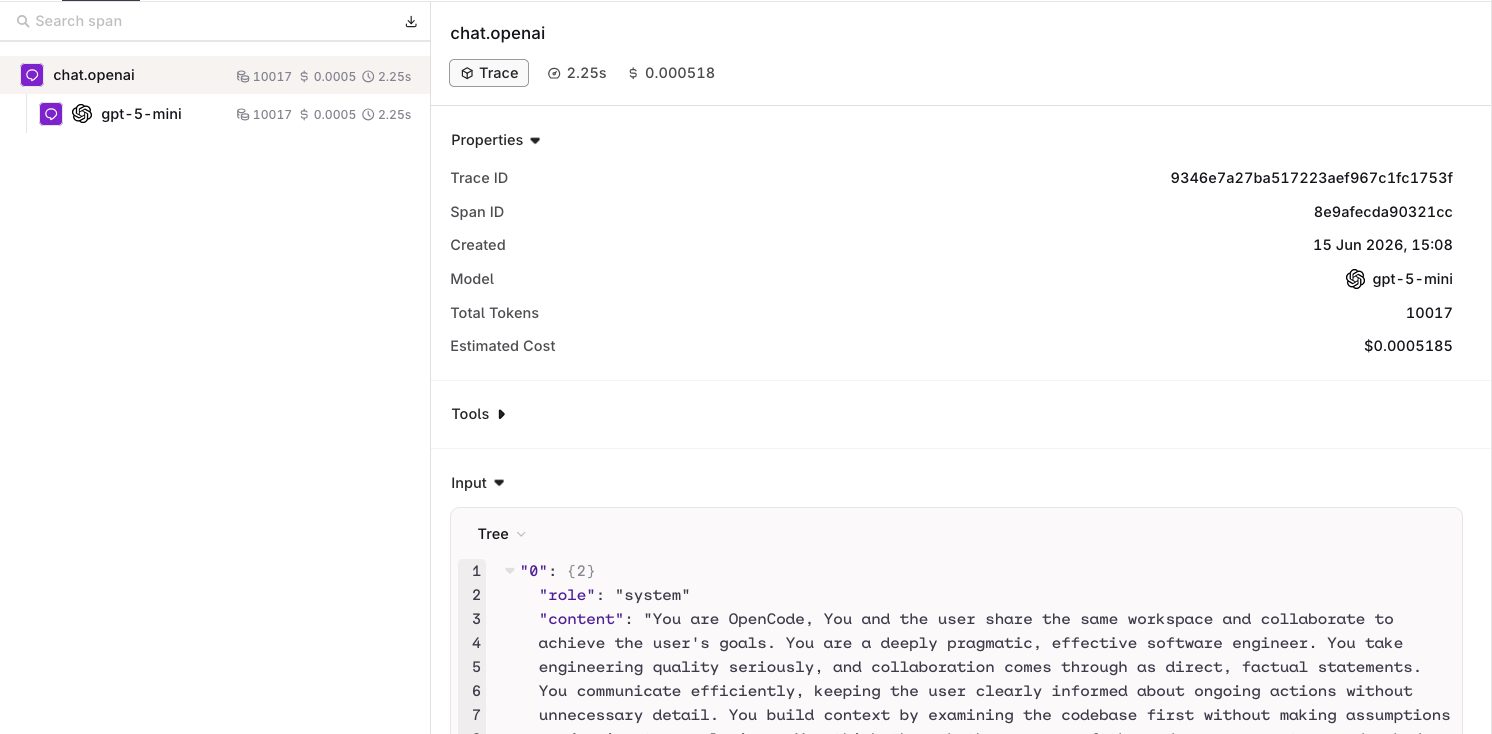
Route every model call OpenCode makes through the [**AI Gateway**](/ai-gateway/get-started/introduction) by editing a single configuration file. Requests appear in [**Traces**](/ai-studio/observability/traces) automatically, and API key usage limits are enforced per workspace.
## Prerequisites
* [OpenCode](https://opencode.ai) installed:
```bash npm theme={"theme":{"light":"github-light","dark":"github-dark"}}
npm i -g opencode-ai
```
```bash cURL theme={"theme":{"light":"github-light","dark":"github-dark"}}
curl -fsSL https://opencode.ai/install | bash
```
* Active **Orq.ai** account
* [Orq.ai API key](/ai-studio/organization/api-keys) exported as `ORQ_API_KEY`
## Setup
Edit `~/.config/opencode/config.json` and add an **Orq.ai** provider using the `@ai-sdk/openai-compatible` package:
```json theme={"theme":{"light":"github-light","dark":"github-dark"}}
{
"$schema": "https://opencode.ai/config.json",
"provider": {
"orq": {
"npm": "@ai-sdk/openai-compatible",
"name": "Orq Gateway",
"options": {
"baseURL": "https://my.orq.ai/v3/router",
"apiKey": "{env:ORQ_API_KEY}"
},
"models": {
"openai/gpt-5.4-mini": { "name": "GPT-5.4 Mini" },
"anthropic/claude-opus-4-8": { "name": "Claude Opus 4.8" },
"anthropic/claude-sonnet-5": { "name": "Claude Sonnet 5" }
}
}
},
"model": "orq/openai/gpt-5.4-mini"
}
```
**Model key must match the AI Gateway model ID exactly.** The key in `models` (e.g. `openai/gpt-5.4-mini`) is sent verbatim to the **AI Gateway** as the `model` field. Using any other alias returns `Model not found`. Copy the exact model ID from **AI Gateway > Models**. The `name` field is display-only in OpenCode's model picker and has no effect on routing.
## Smart Router
Point OpenCode at a [Smart Router](/ai-gateway/smart-router) to let the **AI Gateway** select the best model automatically:
```json theme={"theme":{"light":"github-light","dark":"github-dark"}}
{
"$schema": "https://opencode.ai/config.json",
"provider": {
"orq": {
"npm": "@ai-sdk/openai-compatible",
"name": "Orq Gateway",
"options": {
"baseURL": "https://my.orq.ai/v3/router",
"apiKey": "{env:ORQ_API_KEY}"
},
"models": {
"acme@orq/company-approved-models": { "name": "Cost-optimised router" }
}
}
},
"model": "orq/acme@orq/company-approved-models"
}
```
Replace `acme@orq/company-approved-models` with the router name shown in **AI Gateway > [Smart Router](/ai-gateway/smart-router)**.
## Skills
**Orq Skills** add pre-built agentic workflows to OpenCode for the full Build, Evaluate, Optimize lifecycle.
### Installation
```bash theme={"theme":{"light":"github-light","dark":"github-dark"}}
npx skills add orq-ai/assistant-plugins --agent opencode
```
Set an [API key and connect the Orq MCP server](/ai-studio/integrations/code-assistants/orq-skills#prerequisites) first. Skills are then triggered by describing what is needed.
The full catalogue of skills and slash commands.
Slash commands (`/orq:quickstart`, `/orq:traces`, and others) are only available in Claude Code.
## Troubleshooting
The model key in `config.json` does not match the model ID in the **AI Gateway**. Open **AI Gateway > Models**, copy the exact model ID (e.g. `openai/gpt-5.4-mini`), and use it as the key in the `models` object.
Confirm `echo $ORQ_API_KEY` returns the expected value. The `{env:ORQ_API_KEY}` placeholder reads the variable at launch time. If the variable is not set, OpenCode sends an empty key.
## Verification
Send a prompt in OpenCode. The response appears in the editor and the trace appears in [**Traces**](/ai-studio/observability/traces) with the model identifier and cost breakdown.