> ## Documentation Index
> Fetch the complete documentation index at: https://docs.orq.ai/llms.txt
> Use this file to discover all available pages before exploring further.
# OpenAI Agents SDK integration
> Connect OpenAI Agents SDK to Orq.ai's AI Gateway for complete observability, built-in reliability, and access to 500+ LLMs across 30+ providers.
Route your LLM calls through the AI Gateway with a single base URL change. Zero vendor lock-in: always run on the best model at the lowest cost for your use case.
Instrument your code with OpenTelemetry to capture traces, logs, and metrics for every LLM call, agent step, and tool use.
## AI Gateway
### Overview
OpenAI Agents SDK enables powerful AI-driven automation through structured conversations and tool calling. By connecting the Agents SDK to Orq.ai's AI Gateway, you transform experimental agents into production-ready systems with enterprise-grade capabilities.
### Key Benefits
Orq.ai's AI Gateway enhances your OpenAI Agents with:
Track every agent step, tool use, and interaction with detailed traces and analytics
Automatic fallbacks, retries, and load balancing for production resilience
Real-time cost tracking and spend management across all your AI operations
Access 500+ LLMs and 30+ providers through a single, unified integration
### Prerequisites
Before integrating OpenAI Agents SDK with Orq.ai, ensure you have:
* An Orq.ai account and [API Key](/ai-studio/organization/api-keys)
* Python 3.8 or higher
* OpenAI Agents SDK installed
To setup your API key, see [API keys & Endpoints](/ai-studio/organization/api-keys).
### Installation
Install the OpenAI Agents SDK:
```bash theme={"theme":{"light":"github-light","dark":"github-dark"}}
pip install openai-agents openai
```
### Configuration
Configure OpenAI Agents SDK to use Orq.ai's AI Gateway by setting a custom AsyncOpenAI client:
```python Python theme={"theme":{"light":"github-light","dark":"github-dark"}}
from openai import AsyncOpenAI
from agents import set_default_openai_client, set_tracing_disabled
import os
# Configure OpenAI client with Orq.ai AI Gateway
client = AsyncOpenAI(
api_key=os.getenv("ORQ_API_KEY"),
base_url="https://my.orq.ai/v3/router"
)
# Set as default client for all agents
set_default_openai_client(client)
# Disable the SDK's built-in OpenAI tracing exporter for router-only use
set_tracing_disabled(True)
```
> **base\_url**: `https://my.orq.ai/v3/router`
### Built-in OpenAI Tracing
The OpenAI Agents SDK includes built-in tracing that exports to OpenAI's hosted Traces dashboard by default. When you use Orq.ai's AI Gateway with `ORQ_API_KEY` and do not configure OpenAI tracing credentials, the SDK can print `No API key provided for OpenAI tracing exporter. Exports will be skipped`.
Do not set `OPENAI_API_KEY` only to silence this warning. That sends SDK traces to OpenAI's dashboard instead of Orq.ai. Choose one of these paths:
**Option A: disable the SDK's built-in OpenAI tracing.** Use this for router-only examples when you do not need agent traces in Orq.ai.
```bash theme={"theme":{"light":"github-light","dark":"github-dark"}}
export OPENAI_AGENTS_DISABLE_TRACING=1
```
Or disable it in code:
```typescript TypeScript theme={"theme":{"light":"github-light","dark":"github-dark"}}
import { setTracingDisabled } from "@openai/agents";
setTracingDisabled(true);
```
```python Python theme={"theme":{"light":"github-light","dark":"github-dark"}}
from agents import set_tracing_disabled
set_tracing_disabled(True)
```
**Option B: send agent traces to Orq.ai.** Keep the SDK tracing surface enabled and register an OpenTelemetry exporter to Orq.ai before running agents:
```bash wrap theme={"theme":{"light":"github-light","dark":"github-dark"}}
pip install openinference-instrumentation-openai-agents opentelemetry-sdk opentelemetry-exporter-otlp-proto-http
```
```python Python theme={"theme":{"light":"github-light","dark":"github-dark"}}
import os
from opentelemetry import trace as trace_api
from opentelemetry.exporter.otlp.proto.http.trace_exporter import OTLPSpanExporter
from opentelemetry.sdk.trace import TracerProvider
from opentelemetry.sdk.trace.export import BatchSpanProcessor
from openinference.instrumentation.openai_agents import OpenAIAgentsInstrumentor
exporter = OTLPSpanExporter(
endpoint="https://my.orq.ai/v2/otel/v1/traces",
headers={"Authorization": f"Bearer {os.environ['ORQ_API_KEY']}"},
)
provider = TracerProvider()
provider.add_span_processor(BatchSpanProcessor(exporter))
trace_api.set_tracer_provider(provider)
OpenAIAgentsInstrumentor().instrument(tracer_provider=provider)
```
The Observability section below uses the same Orq.ai OTLP collector and shows complete examples, including flushing buffered spans in short scripts.
### Basic Agent Example
Here's a complete example of creating and running an OpenAI agent through Orq.ai:
```python Python theme={"theme":{"light":"github-light","dark":"github-dark"}}
from openai import AsyncOpenAI
from agents import Agent, Runner, OpenAIResponsesModel, set_default_openai_client, set_tracing_disabled
import os
# Configure client with Orq.ai AI Gateway
client = AsyncOpenAI(
api_key=os.getenv("ORQ_API_KEY"),
base_url="https://my.orq.ai/v3/router"
)
set_default_openai_client(client)
set_tracing_disabled(True)
# Create agent
agent = Agent(
name="Assistant",
instructions="You are a helpful assistant that explains complex concepts simply.",
model=OpenAIResponsesModel(model="openai/gpt-5.6-sol", openai_client=client)
)
# Run the agent
result = Runner.run_sync(agent, "Explain quantum computing in simple terms")
print(result.final_output)
```
### Agent with Tools
OpenAI Agents can use tools while routing through Orq.ai:
```python Python theme={"theme":{"light":"github-light","dark":"github-dark"}}
from openai import AsyncOpenAI
from agents import Agent, Runner, OpenAIResponsesModel, set_default_openai_client, set_tracing_disabled, function_tool
import os
# Configure client
client = AsyncOpenAI(
api_key=os.getenv("ORQ_API_KEY"),
base_url="https://my.orq.ai/v3/router"
)
set_default_openai_client(client)
set_tracing_disabled(True)
# Define a tool using the @function_tool decorator
@function_tool
def get_weather(location: str) -> str:
"""Get the current weather for a location."""
return f"The weather in {location} is sunny and 72°F"
# Create agent with tools
agent = Agent(
name="Weather Assistant",
instructions="You are a weather assistant. Use the get_weather function to provide weather information.",
tools=[get_weather],
model=OpenAIResponsesModel(model="openai/gpt-5.6-sol", openai_client=client)
)
# Run agent with tool access
result = Runner.run_sync(agent, "What's the weather in San Francisco?")
print(result.final_output)
```
### Model Selection
With Orq.ai, you can use any supported model from 30+ providers:
```python Python theme={"theme":{"light":"github-light","dark":"github-dark"}}
from openai import AsyncOpenAI
from agents import Agent, Runner, OpenAIResponsesModel, set_default_openai_client, set_tracing_disabled
import os
# Configure client
client = AsyncOpenAI(
api_key=os.getenv("ORQ_API_KEY"),
base_url="https://my.orq.ai/v3/router"
)
set_tracing_disabled(True)
set_default_openai_client(client)
# Use Claude
claude_agent = Agent(
name="Claude Assistant",
model=OpenAIResponsesModel(model="anthropic/claude-sonnet-5", openai_client=client),
instructions="You are a helpful assistant."
)
# Use Gemini
gemini_agent = Agent(
name="Gemini Assistant",
model=OpenAIResponsesModel(model="google/gemini-2.5-flash", openai_client=client),
instructions="You are a helpful assistant."
)
# Use any other model
groq_agent = Agent(
name="Groq Assistant",
model=OpenAIResponsesModel(model="groq/qwen/qwen3.8-27b", openai_client=client),
instructions="You are a helpful assistant."
)
# Run with different models
result = Runner.run_sync(claude_agent, "Explain machine learning")
print(result.final_output)
```
The same `OpenAIResponsesModel` wrapper works for every provider. Pass the full `provider/model` string and the **AI Gateway** routes the request to the matching provider.
## Observability
### Getting Started
Integrate OpenAI Agents with Orq.ai's observability to gain complete insights into agent performance, token usage, tool utilization, and conversation flows using OpenTelemetry.
### Prerequisites
Before you begin, ensure you have:
* An Orq.ai account and [API Key](/ai-studio/organization/api-keys)
* OpenAI API key
* Python 3.8+
### Install Dependencies
```bash wrap theme={"theme":{"light":"github-light","dark":"github-dark"}}
pip install openai-agents orq-ai-sdk opentelemetry-sdk opentelemetry-instrumentation opentelemetry-exporter-otlp-proto-http
```
### Configure Orq.ai
Set up your environment variables to connect to Orq.ai's OpenTelemetry collector:
**Unix/Linux/macOS:**
```bash theme={"theme":{"light":"github-light","dark":"github-dark"}}
export OTEL_EXPORTER_OTLP_ENDPOINT="https://my.orq.ai/v2/otel"
export OTEL_EXPORTER_OTLP_HEADERS="Authorization=Bearer $ORQ_API_KEY"
export OTEL_RESOURCE_ATTRIBUTES="service.name=openai-agents-app,service.version=1.0.0"
export OPENAI_API_KEY=""
```
**Windows (PowerShell):**
```bash theme={"theme":{"light":"github-light","dark":"github-dark"}}
$env:OTEL_EXPORTER_OTLP_ENDPOINT = "https://my.orq.ai/v2/otel"
$env:OTEL_EXPORTER_OTLP_HEADERS = "Authorization=Bearer "
$env:OTEL_RESOURCE_ATTRIBUTES = "service.name=openai-agents-app,service.version=1.0.0"
$env:OPENAI_API_KEY = ""
```
**Using .env file:**
```bash theme={"theme":{"light":"github-light","dark":"github-dark"}}
OTEL_EXPORTER_OTLP_ENDPOINT=https://my.orq.ai/v2/otel
OTEL_EXPORTER_OTLP_HEADERS=Authorization=Bearer
OTEL_RESOURCE_ATTRIBUTES=service.name=openai-agents-app,service.version=1.0.0
OPENAI_API_KEY=
```
### Common Pitfalls
* **Do not set a custom `base_url` when using OTEL.** Pointing the OpenAI client at the **AI Gateway** while also exporting spans results in duplicate traces: one from the router, one from the OTEL exporter. Use the router when you need multi-provider routing or fallbacks. Use your `OPENAI_API_KEY` directly when you only need observability.
* **Only disable SDK tracing for router-only runs.** `OPENAI_AGENTS_DISABLE_TRACING=1` and `set_tracing_disabled(True)` are correct when you want to silence the OpenAI exporter warning without exporting agent traces. Do not use them with the Observability examples because they prevent agent-level spans from reaching Orq.ai.
* **Wrap runs in `agent_trace(workflow_name=...)`.** Without it the root span is named `"Agent workflow"` for every run, making traces impossible to distinguish.
* **Call `provider.shutdown()` before exit in short scripts.** `BatchSpanProcessor` buffers on a timer and may not flush before the process exits.
### Basic Example
```python Python theme={"theme":{"light":"github-light","dark":"github-dark"}}
import os
from opentelemetry.sdk.trace import TracerProvider
from opentelemetry.sdk.trace.export import BatchSpanProcessor
from opentelemetry.exporter.otlp.proto.http.trace_exporter import OTLPSpanExporter
from orq_ai_sdk.openai_agents_instrumentation import OpenAIAgentsInstrumentor
from agents import Agent, Runner
from agents import trace as agent_trace
os.environ["OTEL_EXPORTER_OTLP_ENDPOINT"] = "https://my.orq.ai/v2/otel"
os.environ["OTEL_EXPORTER_OTLP_HEADERS"] = f"Authorization=Bearer {os.environ['ORQ_API_KEY']}"
provider = TracerProvider()
provider.add_span_processor(BatchSpanProcessor(OTLPSpanExporter()))
OpenAIAgentsInstrumentor().instrument(tracer_provider=provider)
agent = Agent(name="Assistant", instructions="You are a helpful assistant")
with agent_trace(workflow_name="Haiku-Workflow"):
result = Runner.run_sync(agent, "Write a haiku about recursion in programming.")
print(result.final_output)
provider.shutdown() # flush BatchSpanProcessor before exit
```
### Advanced Example with Function Calling
```python Python theme={"theme":{"light":"github-light","dark":"github-dark"}}
import os
from opentelemetry.sdk.trace import TracerProvider
from opentelemetry.sdk.trace.export import BatchSpanProcessor
from opentelemetry.exporter.otlp.proto.http.trace_exporter import OTLPSpanExporter
from orq_ai_sdk.openai_agents_instrumentation import OpenAIAgentsInstrumentor
from agents import Agent, Runner, function_tool
from agents import trace as agent_trace
os.environ["OTEL_EXPORTER_OTLP_ENDPOINT"] = "https://my.orq.ai/v2/otel"
os.environ["OTEL_EXPORTER_OTLP_HEADERS"] = f"Authorization=Bearer {os.environ['ORQ_API_KEY']}"
provider = TracerProvider()
provider.add_span_processor(BatchSpanProcessor(OTLPSpanExporter()))
OpenAIAgentsInstrumentor().instrument(tracer_provider=provider)
@function_tool
def get_weather(location: str) -> str:
"""Mock weather function"""
return f"The weather in {location} is sunny, 72°F"
agent = Agent(
name="Weather Assistant",
instructions="You are a weather assistant. Use the get_weather function to provide weather information.",
tools=[get_weather]
)
with agent_trace(workflow_name="Weather-Workflow"):
result = Runner.run_sync(agent, "What's the weather like in Boston?")
print(result.final_output)
provider.shutdown()
```
### Custom Spans for Agent Operations
```python Python theme={"theme":{"light":"github-light","dark":"github-dark"}}
import os
from opentelemetry.sdk.trace import TracerProvider
from opentelemetry.sdk.trace.export import BatchSpanProcessor
from opentelemetry.exporter.otlp.proto.http.trace_exporter import OTLPSpanExporter
from orq_ai_sdk.openai_agents_instrumentation import OpenAIAgentsInstrumentor
from agents import Agent, Runner
from agents import trace as agent_trace
os.environ["OTEL_EXPORTER_OTLP_ENDPOINT"] = "https://my.orq.ai/v2/otel"
os.environ["OTEL_EXPORTER_OTLP_HEADERS"] = f"Authorization=Bearer {os.environ['ORQ_API_KEY']}"
provider = TracerProvider()
provider.add_span_processor(BatchSpanProcessor(OTLPSpanExporter()))
OpenAIAgentsInstrumentor().instrument(tracer_provider=provider)
tracer = provider.get_tracer(__name__)
agent = Agent(
name="Research Assistant",
instructions="You are a research assistant specialized in data analysis.",
)
with agent_trace(workflow_name="Research-Workflow"):
with tracer.start_as_current_span("agent-execution") as exec_span:
result = Runner.run_sync(agent, "Analyze the trends in the uploaded dataset")
exec_span.set_attribute("execution.status", "completed")
print("Final output:", result.final_output)
provider.shutdown()
```
### View Traces
View your traces in the [AI Studio](/ai-studio/observability/quickstart) in the **Traces** tab.
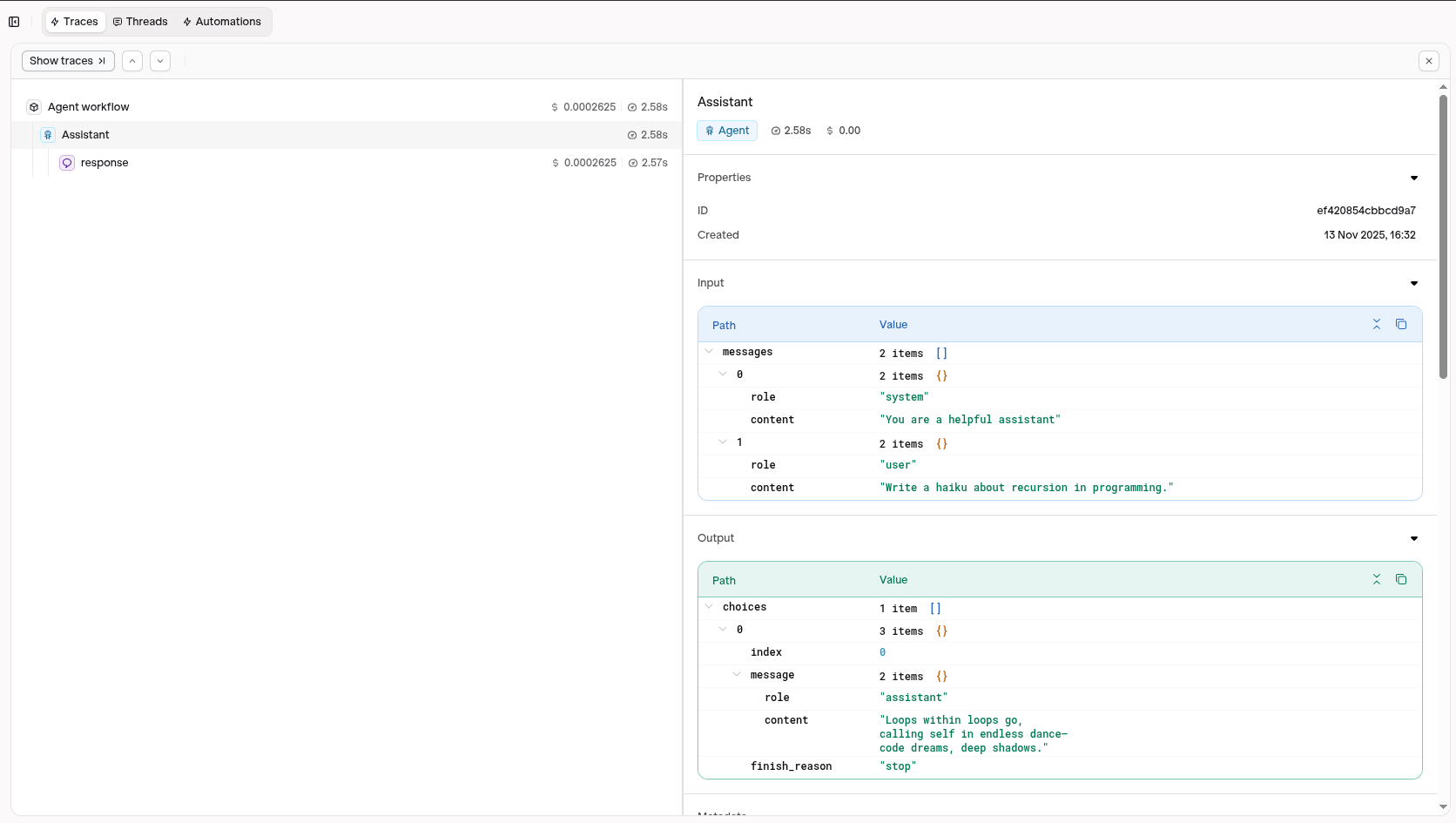 Visit your [AI Studio](https://my.orq.ai) to view real-time analytics and traces.
### Agent and tool capture
Agents, tools, and models are derived from the spans and rendered in [Agent Graphs](/ai-studio/observability/agent-graphs).
#### Installation
```bash wrap theme={"theme":{"light":"github-light","dark":"github-dark"}}
pip install orq-ai-sdk openai-agents opentelemetry-sdk opentelemetry-instrumentation opentelemetry-exporter-otlp-proto-http
```
#### Configuration
Set the OTLP environment variables and initialise the tracer provider with the `OpenAIAgentsInstrumentor` before running any agents:
```python Python theme={"theme":{"light":"github-light","dark":"github-dark"}}
import os
from opentelemetry.sdk.trace import TracerProvider
from opentelemetry.sdk.trace.export import BatchSpanProcessor
from opentelemetry.exporter.otlp.proto.http.trace_exporter import OTLPSpanExporter
from orq_ai_sdk.openai_agents_instrumentation import OpenAIAgentsInstrumentor
os.environ["OTEL_EXPORTER_OTLP_ENDPOINT"] = "https://my.orq.ai/v2/otel"
os.environ["OTEL_EXPORTER_OTLP_HEADERS"] = "Authorization=Bearer "
tracer_provider = TracerProvider()
tracer_provider.add_span_processor(BatchSpanProcessor(OTLPSpanExporter()))
OpenAIAgentsInstrumentor().instrument(tracer_provider=tracer_provider)
```
#### Examples
**Agent with no tools**: captures `agent/Assistant`, `model/gpt-5.6-sol`
```python Python theme={"theme":{"light":"github-light","dark":"github-dark"}}
import os
from openai import AsyncOpenAI
from agents import Agent, Runner, OpenAIResponsesModel, set_default_openai_client
# Configure client with Orq.ai AI Gateway
client = AsyncOpenAI(
api_key=os.getenv("ORQ_API_KEY"),
base_url="https://my.orq.ai/v3/router"
)
set_default_openai_client(client)
agent = Agent(
name="Assistant",
instructions="Be extremely concise.",
model=OpenAIResponsesModel(model="openai/gpt-5.6-sol", openai_client=client),
)
result = Runner.run_sync(agent, "What is the capital of France?")
print(result.final_output)
```
**Agent with a single tool**: captures `agent/Weather Assistant`, `tool/get_weather`, `model/gpt-5.6-sol`
```python Python theme={"theme":{"light":"github-light","dark":"github-dark"}}
import os
from openai import AsyncOpenAI
from agents import Agent, Runner, OpenAIResponsesModel, set_default_openai_client, function_tool
# Configure client with Orq.ai AI Gateway
client = AsyncOpenAI(
api_key=os.getenv("ORQ_API_KEY"),
base_url="https://my.orq.ai/v3/router"
)
set_default_openai_client(client)
@function_tool
def get_weather(location: str) -> str:
"""Get weather for a location."""
data = {"tokyo": "Sunny, 22°C", "paris": "Cloudy, 15°C", "new york": "Rainy, 18°C"}
return data.get(location.lower(), f"No data for {location}")
agent = Agent(
name="Weather Assistant",
instructions="Use get_weather to answer weather questions.",
tools=[get_weather],
model=OpenAIResponsesModel(model="openai/gpt-5.6-sol", openai_client=client),
)
result = Runner.run_sync(agent, "What's the weather in Tokyo?")
print(result.final_output)
```
**Multi-agent workflow with handoff**: captures `agent/Assistant`, `agent/Spanish Assistant`, `tool/random_number_tool`, `model/gpt-5.6-sol`
```python Python theme={"theme":{"light":"github-light","dark":"github-dark"}}
import os
import random
from openai import AsyncOpenAI
from agents import Agent, Runner, OpenAIResponsesModel, set_default_openai_client, function_tool, handoff, trace as agent_trace
from agents.extensions import handoff_filters
from agents import HandoffInputData
# Configure client with Orq.ai AI Gateway
client = AsyncOpenAI(
api_key=os.getenv("ORQ_API_KEY"),
base_url="https://my.orq.ai/v3/router"
)
set_default_openai_client(client)
@function_tool
def random_number_tool(max: int) -> int:
"""Return a random integer between 0 and the given maximum."""
return random.randint(0, max)
def spanish_handoff_message_filter(handoff_message_data: HandoffInputData) -> HandoffInputData:
handoff_message_data = handoff_filters.remove_all_tools(handoff_message_data)
history = (
tuple(handoff_message_data.input_history[2:])
if isinstance(handoff_message_data.input_history, tuple)
else handoff_message_data.input_history
)
return HandoffInputData(
input_history=history,
pre_handoff_items=tuple(handoff_message_data.pre_handoff_items),
new_items=tuple(handoff_message_data.new_items),
)
spanish_agent = Agent(
name="Spanish Assistant",
instructions="You only speak Spanish and are extremely concise.",
handoff_description="A Spanish-speaking assistant.",
model=OpenAIResponsesModel(model="openai/gpt-5.6-sol", openai_client=client),
)
first_agent = Agent(
name="Assistant",
instructions="Be extremely concise.",
tools=[random_number_tool],
model=OpenAIResponsesModel(model="openai/gpt-5.6-sol", openai_client=client),
)
second_agent = Agent(
name="Assistant",
instructions="Be helpful. If the user speaks Spanish, handoff to the Spanish assistant.",
handoffs=[handoff(spanish_agent, input_filter=spanish_handoff_message_filter)],
model=OpenAIResponsesModel(model="openai/gpt-5.6-sol", openai_client=client),
)
async def run_workflow():
with agent_trace(workflow_name="Multi-Agent Workflow"):
result = await Runner.run(first_agent, input="Hi, my name is Sora.")
result = await Runner.run(
first_agent,
input=result.to_input_list() + [
{"content": "Generate a random number between 0 and 100.", "role": "user"}
],
)
result = await Runner.run(
second_agent,
input=result.to_input_list() + [
{"content": "Por favor habla en español. ¿Cuál es mi nombre?", "role": "user"}
],
)
print(result.final_output)
# In Jupyter notebooks (async supported natively)
await run_workflow()
# In regular Python scripts
import asyncio
asyncio.run(run_workflow())
```
## Evaluations & Experiments
Once your agents are running, use **Evaluatorq** to score outputs across a dataset and **Experiments** to compare configurations side-by-side.
Run parallel evaluations across your agents and compare results.
Compare agent configurations and view results in the AI Studio.
Visit your [AI Studio](https://my.orq.ai) to view real-time analytics and traces.
### Agent and tool capture
Agents, tools, and models are derived from the spans and rendered in [Agent Graphs](/ai-studio/observability/agent-graphs).
#### Installation
```bash wrap theme={"theme":{"light":"github-light","dark":"github-dark"}}
pip install orq-ai-sdk openai-agents opentelemetry-sdk opentelemetry-instrumentation opentelemetry-exporter-otlp-proto-http
```
#### Configuration
Set the OTLP environment variables and initialise the tracer provider with the `OpenAIAgentsInstrumentor` before running any agents:
```python Python theme={"theme":{"light":"github-light","dark":"github-dark"}}
import os
from opentelemetry.sdk.trace import TracerProvider
from opentelemetry.sdk.trace.export import BatchSpanProcessor
from opentelemetry.exporter.otlp.proto.http.trace_exporter import OTLPSpanExporter
from orq_ai_sdk.openai_agents_instrumentation import OpenAIAgentsInstrumentor
os.environ["OTEL_EXPORTER_OTLP_ENDPOINT"] = "https://my.orq.ai/v2/otel"
os.environ["OTEL_EXPORTER_OTLP_HEADERS"] = "Authorization=Bearer "
tracer_provider = TracerProvider()
tracer_provider.add_span_processor(BatchSpanProcessor(OTLPSpanExporter()))
OpenAIAgentsInstrumentor().instrument(tracer_provider=tracer_provider)
```
#### Examples
**Agent with no tools**: captures `agent/Assistant`, `model/gpt-5.6-sol`
```python Python theme={"theme":{"light":"github-light","dark":"github-dark"}}
import os
from openai import AsyncOpenAI
from agents import Agent, Runner, OpenAIResponsesModel, set_default_openai_client
# Configure client with Orq.ai AI Gateway
client = AsyncOpenAI(
api_key=os.getenv("ORQ_API_KEY"),
base_url="https://my.orq.ai/v3/router"
)
set_default_openai_client(client)
agent = Agent(
name="Assistant",
instructions="Be extremely concise.",
model=OpenAIResponsesModel(model="openai/gpt-5.6-sol", openai_client=client),
)
result = Runner.run_sync(agent, "What is the capital of France?")
print(result.final_output)
```
**Agent with a single tool**: captures `agent/Weather Assistant`, `tool/get_weather`, `model/gpt-5.6-sol`
```python Python theme={"theme":{"light":"github-light","dark":"github-dark"}}
import os
from openai import AsyncOpenAI
from agents import Agent, Runner, OpenAIResponsesModel, set_default_openai_client, function_tool
# Configure client with Orq.ai AI Gateway
client = AsyncOpenAI(
api_key=os.getenv("ORQ_API_KEY"),
base_url="https://my.orq.ai/v3/router"
)
set_default_openai_client(client)
@function_tool
def get_weather(location: str) -> str:
"""Get weather for a location."""
data = {"tokyo": "Sunny, 22°C", "paris": "Cloudy, 15°C", "new york": "Rainy, 18°C"}
return data.get(location.lower(), f"No data for {location}")
agent = Agent(
name="Weather Assistant",
instructions="Use get_weather to answer weather questions.",
tools=[get_weather],
model=OpenAIResponsesModel(model="openai/gpt-5.6-sol", openai_client=client),
)
result = Runner.run_sync(agent, "What's the weather in Tokyo?")
print(result.final_output)
```
**Multi-agent workflow with handoff**: captures `agent/Assistant`, `agent/Spanish Assistant`, `tool/random_number_tool`, `model/gpt-5.6-sol`
```python Python theme={"theme":{"light":"github-light","dark":"github-dark"}}
import os
import random
from openai import AsyncOpenAI
from agents import Agent, Runner, OpenAIResponsesModel, set_default_openai_client, function_tool, handoff, trace as agent_trace
from agents.extensions import handoff_filters
from agents import HandoffInputData
# Configure client with Orq.ai AI Gateway
client = AsyncOpenAI(
api_key=os.getenv("ORQ_API_KEY"),
base_url="https://my.orq.ai/v3/router"
)
set_default_openai_client(client)
@function_tool
def random_number_tool(max: int) -> int:
"""Return a random integer between 0 and the given maximum."""
return random.randint(0, max)
def spanish_handoff_message_filter(handoff_message_data: HandoffInputData) -> HandoffInputData:
handoff_message_data = handoff_filters.remove_all_tools(handoff_message_data)
history = (
tuple(handoff_message_data.input_history[2:])
if isinstance(handoff_message_data.input_history, tuple)
else handoff_message_data.input_history
)
return HandoffInputData(
input_history=history,
pre_handoff_items=tuple(handoff_message_data.pre_handoff_items),
new_items=tuple(handoff_message_data.new_items),
)
spanish_agent = Agent(
name="Spanish Assistant",
instructions="You only speak Spanish and are extremely concise.",
handoff_description="A Spanish-speaking assistant.",
model=OpenAIResponsesModel(model="openai/gpt-5.6-sol", openai_client=client),
)
first_agent = Agent(
name="Assistant",
instructions="Be extremely concise.",
tools=[random_number_tool],
model=OpenAIResponsesModel(model="openai/gpt-5.6-sol", openai_client=client),
)
second_agent = Agent(
name="Assistant",
instructions="Be helpful. If the user speaks Spanish, handoff to the Spanish assistant.",
handoffs=[handoff(spanish_agent, input_filter=spanish_handoff_message_filter)],
model=OpenAIResponsesModel(model="openai/gpt-5.6-sol", openai_client=client),
)
async def run_workflow():
with agent_trace(workflow_name="Multi-Agent Workflow"):
result = await Runner.run(first_agent, input="Hi, my name is Sora.")
result = await Runner.run(
first_agent,
input=result.to_input_list() + [
{"content": "Generate a random number between 0 and 100.", "role": "user"}
],
)
result = await Runner.run(
second_agent,
input=result.to_input_list() + [
{"content": "Por favor habla en español. ¿Cuál es mi nombre?", "role": "user"}
],
)
print(result.final_output)
# In Jupyter notebooks (async supported natively)
await run_workflow()
# In regular Python scripts
import asyncio
asyncio.run(run_workflow())
```
## Evaluations & Experiments
Once your agents are running, use **Evaluatorq** to score outputs across a dataset and **Experiments** to compare configurations side-by-side.
Run parallel evaluations across your agents and compare results.
Compare agent configurations and view results in the AI Studio.