> ## Documentation Index
> Fetch the complete documentation index at: https://docs.orq.ai/llms.txt
> Use this file to discover all available pages before exploring further.
# Trace Automations
> Automatically act on LLM trace data with rule-based automations. Add traces to datasets, trigger reviews, and scale quality monitoring without manual work.
## **What Are Trace Automations**
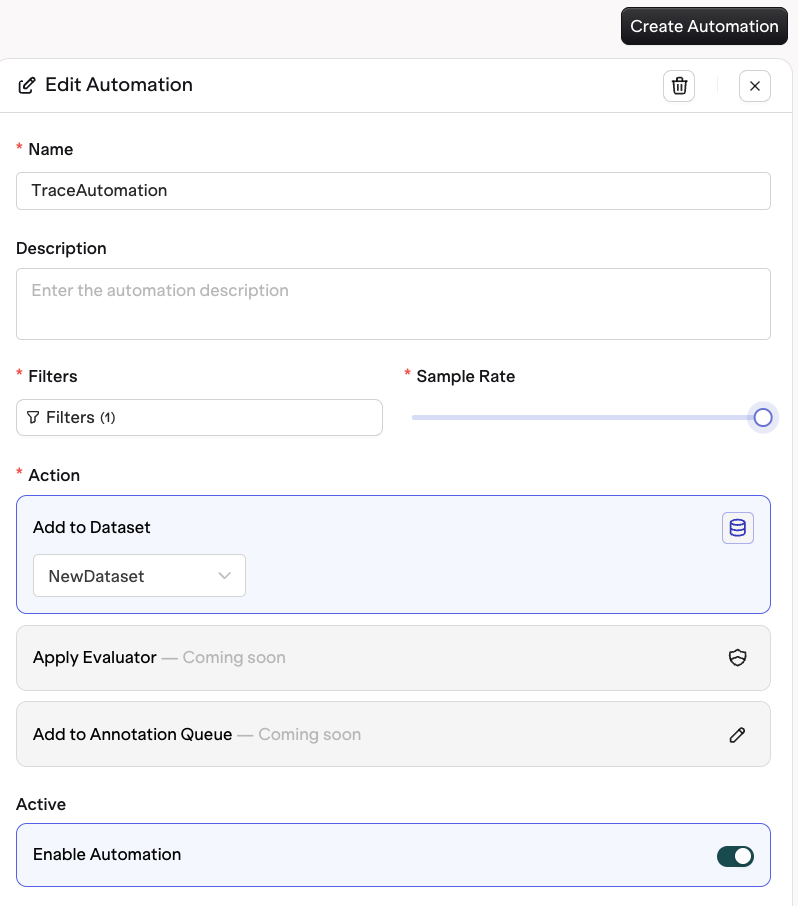
Trace Automations provide a way to build datasets, trigger actions, and streamline monitoring directly from trace activity.\
Each automation consists of:
* **Filters**: define which traces to target (for example, by [span attributes](/ai-studio/observability/span-attributes) such as status, model, or metadata, and by [evaluator output and human feedback](#filtering-on-evaluations-and-human-feedback))
* **Sampling rate**: choose what percentage of matching traces should trigger actions
* **Actions**: define what happens when a trace meets the conditions
This makes it easy to automatically collect, review, and evaluate traces as your application scales.
 ## **Why Use Automations**
As your LLM applications grow, the number of traces generated can quickly become too large to review manually.
Automations ensure that your most important traces are captured and acted on without manual work — whether for quality assurance, retraining, or debugging.
You can use automations to:
* Automatically **add traces to a dataset** for future evaluation or fine-tuning
* Send traces with **low feedback scores** to an **annotation queue** for annotation
* **Trigger webhooks** to launch remote evaluations or downstream processes
* Extend **data retention** for traces with specific outcomes
* Sample a percentage of traces for **random quality checks**
## **Setting Up Trace Automations**
To create a new automation:
Navigate to the **Traces** section in the AI Studio.
Select the **Automations** tab at the top.
Click **Create Automation**.
Define the Filters for the Traces.
Matching Traces will execute the desired Action.
## **Why Use Automations**
As your LLM applications grow, the number of traces generated can quickly become too large to review manually.
Automations ensure that your most important traces are captured and acted on without manual work — whether for quality assurance, retraining, or debugging.
You can use automations to:
* Automatically **add traces to a dataset** for future evaluation or fine-tuning
* Send traces with **low feedback scores** to an **annotation queue** for annotation
* **Trigger webhooks** to launch remote evaluations or downstream processes
* Extend **data retention** for traces with specific outcomes
* Sample a percentage of traces for **random quality checks**
## **Setting Up Trace Automations**
To create a new automation:
Navigate to the **Traces** section in the AI Studio.
Select the **Automations** tab at the top.
Click **Create Automation**.
Define the Filters for the Traces.
Matching Traces will execute the desired Action.
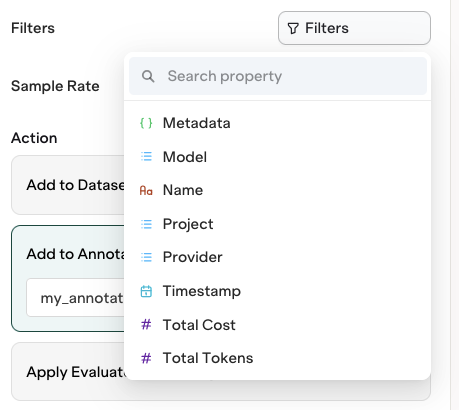 Define the Sampling Rate: choose how many matching Traces will execute the Action.
Choose from the following actions:
* Add to [Dataset](/ai-studio/optimize/datasets).
* Add to [Annotation Queue](/ai-studio/observability/annotation-queues).
Once saved, your automation runs on Traces that arrive from that point on. It is not applied retroactively to Traces already in the Platform.
Once active, every new trace that matches your defined filters will trigger the configured action automatically.
## **Filtering on evaluations and human feedback**
Automations can filter on the results your evaluators produce and on the feedback your team leaves during review. This closes the loop between traces, evaluations, and downstream actions — for example, sending every trace your hallucination evaluator scored highly to an annotation queue, or collecting the traces a reviewer marked as poor into a dataset for retraining.
Evaluators and human reviews appear in the same filter menu as the rest of your trace fields, under **Evals** and **Annotations**. Picking one filters on that evaluator's own result, and the operators and values offered match how it scores — a numeric evaluator offers thresholds, a pass/fail evaluator offers true or false, and a review with fixed options offers exactly those options.
### How these filters are matched
A filter is scoped to the evaluator or review named in it. Filtering on `hallucination > 0.8` matches only when the hallucination evaluator itself scored above 0.8, never when a different evaluator did. Two filters on the same evaluator describe one result, so `> 0.5` and `< 0.9` together mean a single score inside that range.
Free-text reviews — a written note or a correction — are usually filtered on whether one was left at all rather than on its wording. Use **is not empty** for "a reviewer left one" and **is empty** for "nobody did". The same operators work on any evaluator, so you can also ask whether an evaluator ran on a trace at all.
Evaluator and human feedback filters are independent, so a rule can require both — one evaluator result and one piece of human feedback, each satisfying its own filters.
Because evaluations and feedback are recorded after a trace arrives, these filters are evaluated when the evaluation or feedback lands rather than at ingestion. A trace can therefore trigger an automation minutes or days after it was recorded — as soon as the evaluator finishes, or as soon as a reviewer submits their annotation.
A rule filtering only on an evaluation being **empty** is still evaluated when an evaluation lands, so it needs something else to trigger it — pair it with another evaluator or review that does get recorded.
A rule is re-checked every time an evaluation or annotation is recorded on a trace. Repeat runs refresh rather than accumulate: **Add to dataset** keeps one datapoint per rule and span, updating it in place, and **Add to annotation queue** leaves a span that is already in the queue alone. A trace that contains several matching spans produces one datapoint per span, and two different rules writing to the same dataset each keep their own datapoint.
A trace with no evaluations does not match these filters. A rule that filters only on evaluator output or human feedback stays inactive until the first evaluation or annotation arrives for a trace.
Define the Sampling Rate: choose how many matching Traces will execute the Action.
Choose from the following actions:
* Add to [Dataset](/ai-studio/optimize/datasets).
* Add to [Annotation Queue](/ai-studio/observability/annotation-queues).
Once saved, your automation runs on Traces that arrive from that point on. It is not applied retroactively to Traces already in the Platform.
Once active, every new trace that matches your defined filters will trigger the configured action automatically.
## **Filtering on evaluations and human feedback**
Automations can filter on the results your evaluators produce and on the feedback your team leaves during review. This closes the loop between traces, evaluations, and downstream actions — for example, sending every trace your hallucination evaluator scored highly to an annotation queue, or collecting the traces a reviewer marked as poor into a dataset for retraining.
Evaluators and human reviews appear in the same filter menu as the rest of your trace fields, under **Evals** and **Annotations**. Picking one filters on that evaluator's own result, and the operators and values offered match how it scores — a numeric evaluator offers thresholds, a pass/fail evaluator offers true or false, and a review with fixed options offers exactly those options.
### How these filters are matched
A filter is scoped to the evaluator or review named in it. Filtering on `hallucination > 0.8` matches only when the hallucination evaluator itself scored above 0.8, never when a different evaluator did. Two filters on the same evaluator describe one result, so `> 0.5` and `< 0.9` together mean a single score inside that range.
Free-text reviews — a written note or a correction — are usually filtered on whether one was left at all rather than on its wording. Use **is not empty** for "a reviewer left one" and **is empty** for "nobody did". The same operators work on any evaluator, so you can also ask whether an evaluator ran on a trace at all.
Evaluator and human feedback filters are independent, so a rule can require both — one evaluator result and one piece of human feedback, each satisfying its own filters.
Because evaluations and feedback are recorded after a trace arrives, these filters are evaluated when the evaluation or feedback lands rather than at ingestion. A trace can therefore trigger an automation minutes or days after it was recorded — as soon as the evaluator finishes, or as soon as a reviewer submits their annotation.
A rule filtering only on an evaluation being **empty** is still evaluated when an evaluation lands, so it needs something else to trigger it — pair it with another evaluator or review that does get recorded.
A rule is re-checked every time an evaluation or annotation is recorded on a trace. Repeat runs refresh rather than accumulate: **Add to dataset** keeps one datapoint per rule and span, updating it in place, and **Add to annotation queue** leaves a span that is already in the queue alone. A trace that contains several matching spans produces one datapoint per span, and two different rules writing to the same dataset each keep their own datapoint.
A trace with no evaluations does not match these filters. A rule that filters only on evaluator output or human feedback stays inactive until the first evaluation or annotation arrives for a trace.