> ## Documentation Index
> Fetch the complete documentation index at: https://docs.orq.ai/llms.txt
> Use this file to discover all available pages before exploring further.
# Notifiers for alert destinations
> Point Alerts and budget alerts at email, Slack, or a generic webhook by creating one reusable Notifier per destination.
**Use Cases**
* Sending threshold alerts to an on-call address.
* Posting a budget threshold into a Slack channel.
* Forwarding alert payloads into an incident tool through a generic webhook.
***
## Overview
A **Notifier** is a reusable destination that [**Alerts**](/ai-studio/observability/alerts) deliver to. One **Notifier** carries one channel and any number of **Alerts** can select it, so a destination is configured once and shared.
Three channels are available: **Email**, **Slack** through an incoming webhook, and a generic **Webhook**.
## Channels
| Channel | `type` | Destination field | Notes |
| - | - | - | - |
| Email | `NOTIFIER_TYPE_EMAIL` | `emails` | One or more addresses. Duplicates and surrounding whitespace are removed, and each address is validated. |
| Slack | `NOTIFIER_TYPE_SLACK_WEBHOOK` | `incoming_webhook_url` | A Slack incoming webhook URL. |
| Webhook | `NOTIFIER_TYPE_WEBHOOK` | `webhook_url` | Any absolute HTTPS URL, with optional request headers. |
Both webhook URLs must be absolute HTTPS URLs. A plain `http://` URL is rejected with the offending field named, either `webhook_url must be an absolute HTTPS URL` or `incoming_webhook_url must be an absolute HTTPS URL`.
## Create a notifier
Open **Settings** > **Notifiers** and select Notifier to open the sheet. A new one can also be created from the **Alert** form without leaving it.
Enter a **Name** of up to 255 characters.
Select **Send via**, then fill the destination the channel asks for: recipient addresses, a Slack incoming webhook URL, or a webhook URL with optional headers.
Choose **Create**. The button stays disabled until the name and a valid destination are present.
```bash cURL theme={"theme":{"light":"github-light","dark":"github-dark"}}
curl -X POST https://my.orq.ai/v2/notifiers \
-H "Authorization: Bearer $ORQ_API_KEY" \
-H "Content-Type: application/json" \
-d '{
"display_name": "On-call email",
"type": "NOTIFIER_TYPE_EMAIL",
"emails": ["oncall@example.com"]
}'
```
```typescript TypeScript theme={"theme":{"light":"github-light","dark":"github-dark"}}
import { Orq } from "@orq-ai/node";
const orq = new Orq({ apiKey: process.env.ORQ_API_KEY });
const notifier = await orq.notifiers.create({
displayName: "On-call email",
type: "NOTIFIER_TYPE_EMAIL",
emails: ["oncall@example.com"],
});
```
```python Python theme={"theme":{"light":"github-light","dark":"github-dark"}}
import os
from orq_ai_sdk import Orq
orq = Orq(api_key=os.environ["ORQ_API_KEY"])
notifier = orq.notifiers.create(
request={
"display_name": "On-call email",
"type": "NOTIFIER_TYPE_EMAIL",
"emails": ["oncall@example.com"],
}
)
```
```json theme={"theme":{"light":"github-light","dark":"github-dark"}}
{
"notifier": {
"_id": "notifier_01m48465jqdz12asrmg7g7qcw7",
"display_name": "On-call email",
"type": "NOTIFIER_TYPE_EMAIL",
"emails": ["oncall@example.com"],
"project_id": "",
"created_at": "2026-10-06T08:09:54.519Z"
}
}
```
**Parameters**
| Parameter | Type | Required | Description |
| - | - | - | - |
| `display_name` | string | Yes | Name shown wherever the notifier is selected. Up to 255 characters. |
| `type` | enum | Yes | `NOTIFIER_TYPE_EMAIL`, `NOTIFIER_TYPE_SLACK_WEBHOOK`, or `NOTIFIER_TYPE_WEBHOOK`. |
| `emails` | string array | For email | Recipient addresses. Required when the type is email. |
| `incoming_webhook_url` | string | For Slack | Absolute HTTPS URL. Required when the type is Slack. |
| `webhook_url` | string | For webhook | Absolute HTTPS URL. Required when the type is a generic webhook. |
| `headers` | object | No | Request headers for a generic webhook. See [Secret headers](#secret-headers). |
| `project_id` | string | No | Scope the notifier to one **Project**. Omitted means workspace-wide. A project-scoped API key always creates in its own project. |
| `metadata` | object | No | Custom JSON stored with the notifier. |
The wire field is `_id`; the SDKs expose the same value as `id`.
```sh theme={"theme":{"light":"github-light","dark":"github-dark"}}
orq notifiers create \
--display-name "On-call email" \
--type NOTIFIER_TYPE_EMAIL \
--emails oncall@example.com
```
See the [**Orq CLI**](/reference/cli) reference for installation and the flag conventions shared with the generated commands.
## Manage notifiers
The **Notifiers** list shows each one with its **Name**, **Destination**, **Type**, and last update, and supports search by name, a type filter, and page sizes of 25, 50, or 100.
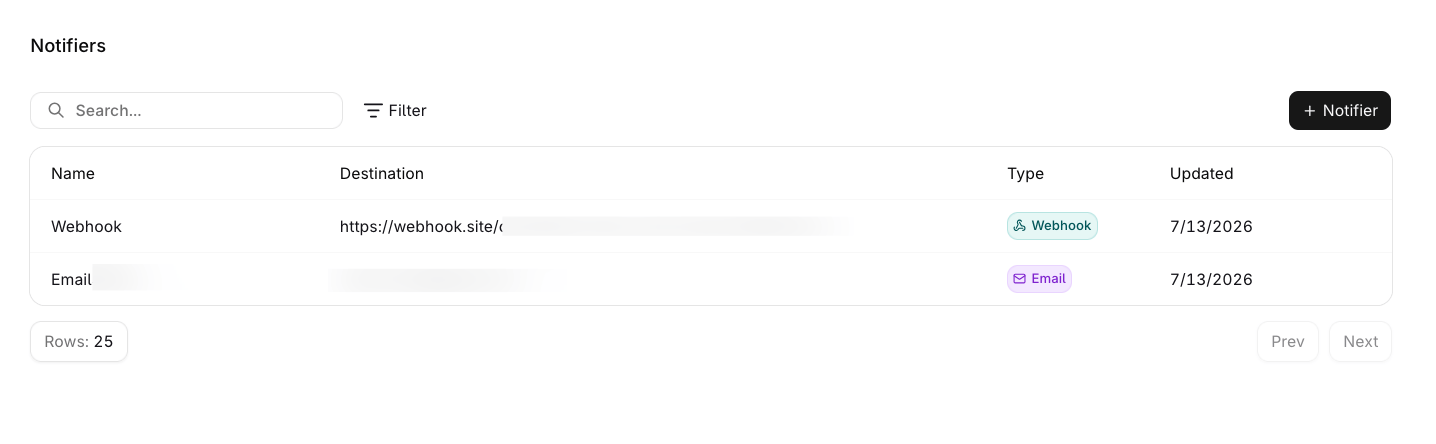 Open the row menu to edit or delete one. A **Notifier** that an **Alert** or a budget alert still selects cannot be deleted: the API refuses with `Notifier is in use and cannot be deleted.` Remove it from those alerts first.
| Operation | Endpoint |
| - | - |
| [Create a notifier](/reference/notifiers/create-a-notifier) | `POST /v2/notifiers` |
| [List notifiers](/reference/notifiers/list-notifiers) | `GET /v2/notifiers` |
| [Retrieve a notifier](/reference/notifiers/retrieve-a-notifier) | `GET /v2/notifiers/{notifier_id}` |
| [Update a notifier](/reference/notifiers/update-a-notifier) | `PATCH /v2/notifiers/{notifier_id}` |
| [Delete a notifier](/reference/notifiers/delete-a-notifier) | `DELETE /v2/notifiers/{notifier_id}` |
`GET /v2/notifiers` accepts `search` for a case-insensitive match on the name, `type` to restrict the result to one or more channels, and `project_id`, and pages with `starting_after` and `ending_before`.
```sh theme={"theme":{"light":"github-light","dark":"github-dark"}}
orq notifiers list
orq notifiers get
orq notifiers update --display-name "On-call"
orq notifiers delete
```
## Where notifiers are used
| Surface | How the notifier is attached |
| - | - |
| [**Alerts**](/ai-studio/observability/alerts) | Selected under **Notify via** in the **Alert** form, which allows several and can create one inline. That page covers the cap and what happens to an **Alert** with none. |
| [**Budget alerts**](/ai-gateway/budgets) | On a budget threshold, where at least one **Notifier** is required. |
| **Monitors** | **Create alert** on a widget opens the [**Alerts**](/ai-studio/observability/alerts) form with the widget's metric, so the same notifier selection applies. |
## Terraform
The provider manages notifiers with the `orq_notifier` resource, and `notifier_ids` attaches them to a budget alert or an alert rule. See [Terraform quickstart](/reference/terraform/quickstart) and [Importing resources](/reference/terraform/importing).
## Secret headers
A generic webhook can carry request headers. A header value is either a plain string or an object that marks it secret:
```json theme={"theme":{"light":"github-light","dark":"github-dark"}}
{
"headers": {
"Authorization": { "secret": true, "value": "Bearer sk-live-..." },
"X-Source": "orq"
}
}
```
A header marked `{"secret": true}` comes back empty on read and stays readable nowhere, unlike a plain header. For the full list of what each storage class protects, see [Secrets](/ai-studio/organization/secrets).
## Send notifications to a Microsoft Teams channel
Route alert notifications to a **Microsoft Teams** channel with a generic webhook **Notifier**. Teams renders messages in its own card format while **Orq.ai** sends a JSON envelope, so the webhook points at a small relay that converts the payload before forwarding it. The [Microsoft Teams example](/ai-gateway/budgets#send-notifications-to-a-microsoft-teams-channel) covers the Teams workflow, the relay, and attaching the notifier to an alert.
## Limitations
| Limitation | Impact | Workaround |
| - | - | - |
| One channel per notifier | A destination that should receive both email and Slack needs two notifiers | Create one per channel and select both on the alert |
| No delivery log | The notifier record does not show what it sent | Check the receiving channel, or use a webhook endpoint that logs requests |
| Deletion is refused while in use | A notifier an **Alert** or budget alert still selects cannot be deleted | Remove it from those alerts, then delete it |
This documentation is built and hosted on [Mintlify](https://mintlify.com), a developer documentation platform.
Open the row menu to edit or delete one. A **Notifier** that an **Alert** or a budget alert still selects cannot be deleted: the API refuses with `Notifier is in use and cannot be deleted.` Remove it from those alerts first.
| Operation | Endpoint |
| - | - |
| [Create a notifier](/reference/notifiers/create-a-notifier) | `POST /v2/notifiers` |
| [List notifiers](/reference/notifiers/list-notifiers) | `GET /v2/notifiers` |
| [Retrieve a notifier](/reference/notifiers/retrieve-a-notifier) | `GET /v2/notifiers/{notifier_id}` |
| [Update a notifier](/reference/notifiers/update-a-notifier) | `PATCH /v2/notifiers/{notifier_id}` |
| [Delete a notifier](/reference/notifiers/delete-a-notifier) | `DELETE /v2/notifiers/{notifier_id}` |
`GET /v2/notifiers` accepts `search` for a case-insensitive match on the name, `type` to restrict the result to one or more channels, and `project_id`, and pages with `starting_after` and `ending_before`.
```sh theme={"theme":{"light":"github-light","dark":"github-dark"}}
orq notifiers list
orq notifiers get
orq notifiers update --display-name "On-call"
orq notifiers delete
```
## Where notifiers are used
| Surface | How the notifier is attached |
| - | - |
| [**Alerts**](/ai-studio/observability/alerts) | Selected under **Notify via** in the **Alert** form, which allows several and can create one inline. That page covers the cap and what happens to an **Alert** with none. |
| [**Budget alerts**](/ai-gateway/budgets) | On a budget threshold, where at least one **Notifier** is required. |
| **Monitors** | **Create alert** on a widget opens the [**Alerts**](/ai-studio/observability/alerts) form with the widget's metric, so the same notifier selection applies. |
## Terraform
The provider manages notifiers with the `orq_notifier` resource, and `notifier_ids` attaches them to a budget alert or an alert rule. See [Terraform quickstart](/reference/terraform/quickstart) and [Importing resources](/reference/terraform/importing).
## Secret headers
A generic webhook can carry request headers. A header value is either a plain string or an object that marks it secret:
```json theme={"theme":{"light":"github-light","dark":"github-dark"}}
{
"headers": {
"Authorization": { "secret": true, "value": "Bearer sk-live-..." },
"X-Source": "orq"
}
}
```
A header marked `{"secret": true}` comes back empty on read and stays readable nowhere, unlike a plain header. For the full list of what each storage class protects, see [Secrets](/ai-studio/organization/secrets).
## Send notifications to a Microsoft Teams channel
Route alert notifications to a **Microsoft Teams** channel with a generic webhook **Notifier**. Teams renders messages in its own card format while **Orq.ai** sends a JSON envelope, so the webhook points at a small relay that converts the payload before forwarding it. The [Microsoft Teams example](/ai-gateway/budgets#send-notifications-to-a-microsoft-teams-channel) covers the Teams workflow, the relay, and attaching the notifier to an alert.
## Limitations
| Limitation | Impact | Workaround |
| - | - | - |
| One channel per notifier | A destination that should receive both email and Slack needs two notifiers | Create one per channel and select both on the alert |
| No delivery log | The notifier record does not show what it sent | Check the receiving channel, or use a webhook endpoint that logs requests |
| Deletion is refused while in use | A notifier an **Alert** or budget alert still selects cannot be deleted | Remove it from those alerts, then delete it |
This documentation is built and hosted on [Mintlify](https://mintlify.com), a developer documentation platform.