> ## Documentation Index
> Fetch the complete documentation index at: https://docs.orq.ai/llms.txt
> Use this file to discover all available pages before exploring further.
# Trace evaluations
> Attach evaluators to Deployments and Agents in Orq.ai to score sampled production traces asynchronously for continuous quality monitoring.
Trace evaluations run [Evaluators](/ai-studio/optimize/evaluators) on production traffic passing through a [Deployment](/ai-studio/ai-engineering/deployments) or [Agent](/ai-studio/ai-engineering/build-agents). Results appear as spans in the [Traces](/ai-studio/observability/traces) hierarchy, providing continuous quality monitoring without manual review.
## How trace evaluations work
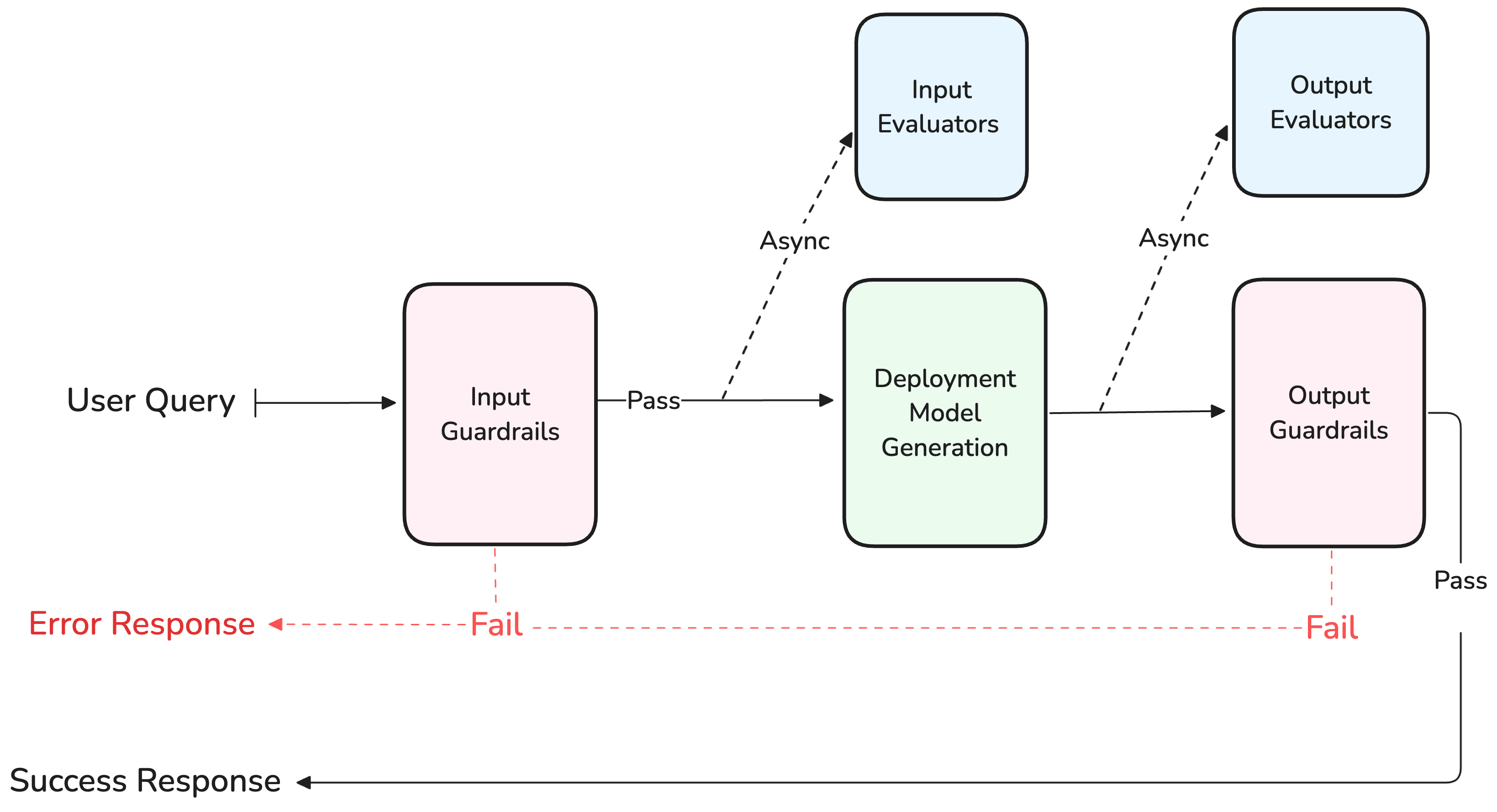
An Evaluator attached to a Deployment or Agent runs on sampled requests. Input Evaluators score the prompt before the model generates; Output Evaluators score the response after generation. Both run **asynchronously** and never block the caller.
This differs from [Guardrails](/ai-studio/ai-engineering/deployments#evaluators-and-guardrails), which run **synchronously** and can deny a generation if the evaluation fails.
 Evaluators do not run when using the Test panel in AI Studio. Invoke the Deployment via the [API or SDK](/ai-studio/ai-engineering/deployments#invoke-a-deployment) to trigger evaluators.
## Trace scrubbing and evaluator data
[Trace Scrubbing](/ai-gateway/configuration/routing-rules#plugins) changes the data stored in traces. It does not change the data processed by an **Evaluator** or **Guardrail**. The check still receives the original runtime input, output, system instructions, and variables before its spans are scrubbed for storage.
When the originating call scrubs any content category (`system`, `input`, `output`, or `variables`), the policy applies to the complete evaluator subtree. All content categories are scrubbed together because an evaluator prompt, explanation, or Python `stdout` can repeat data from any of them. Selecting only `metadata` does not trigger evaluator content scrubbing.
| Trace data | Stored result |
| ---------------------------------------------------------------- | ---------------------------------------------------------------------------------------------------------------------------------------------- |
| Evaluator input snapshot | Stored as an empty object. |
| LLM Evaluator child messages | Preserve message structure, roles, and tool-call names, but store empty text, reasoning, and tool arguments. |
| Explanation, reason, provider response text, and Python `stdout` | Removed or stored as empty values. |
| Evaluator verdict | Preserve `passed`, `value`, and `type`. Preserve available score, label, confidence, categories, outcome, status, and Guardrail action fields. |
For example, a scrubbed boolean Evaluator can still produce this visible result:
```json JSON theme={"theme":{"light":"github-light","dark":"github-dark"}}
{
"passed": true,
"type": "boolean",
"value": true
}
```
Use the preserved verdict to filter traces and monitor quality without storing the source content used to calculate it.
## Attach evaluators
In the Agent configuration, add Evaluators as input or output evaluators.
* **Input evaluator**: evaluates the input before the model generates a response.
* **Output evaluator**: evaluates the output after generation.
Set a **Sample Rate** (0-100%) to control what percentage of matching traces trigger evaluation. A 100% sample rate evaluates every request; a 10% rate evaluates one in ten.
See [Configure Evaluators and Guardrails](/ai-studio/ai-engineering/build-agents#configure-evaluators-and-guardrails) for the full guide.
Evaluators attach to [Deployments](/ai-studio/ai-engineering/deployments#evaluators-and-guardrails) with the same input/output stage and sample rate configuration as Agents.
For conditional evaluation, use [Guardrail Rules](/ai-gateway/configuration/guardrail-rules) to define CEL-based conditions that determine when evaluators run. Evaluation can be triggered based on metadata, identity, model, or other request attributes.
## View evaluator results
Evaluator results attach to individual spans within a trace. Each result includes the Evaluator name, the evaluation score or verdict, and the evaluation stage (`input` or `output`).
In the [Traces](/ai-studio/observability/traces) section, evaluator results appear in the trace hierarchy alongside LLM calls, tool invocations, and other spans. Use the **Evals** filter to narrow traces by evaluator name, score, or pass/fail status.
If an evaluator result needs correction, hover the result on a span and select the edit icon. Set the corrected value and optionally add an explanation. Corrections are written back to the span and are queryable via the [**Orq MCP**](/ai-studio/integrations/code-assistants/orq-mcp).
## Create an Evaluator
Browse the [Marketplace](/ai-studio/marketplace) for pre-built evaluators or create a custom one:
* **LLM Evaluator**: uses a model to judge outputs against criteria defined in a prompt.
* **Python Evaluator**: runs custom Python code for deterministic scoring.
See [Create Evaluators](/ai-studio/optimize/evaluators) for the full guide.
Build LLM-as-a-Judge and Python evaluators for automatic scoring.
Automatically route traces with low evaluator scores to Annotation Queues.
Evaluators do not run when using the Test panel in AI Studio. Invoke the Deployment via the [API or SDK](/ai-studio/ai-engineering/deployments#invoke-a-deployment) to trigger evaluators.
## Trace scrubbing and evaluator data
[Trace Scrubbing](/ai-gateway/configuration/routing-rules#plugins) changes the data stored in traces. It does not change the data processed by an **Evaluator** or **Guardrail**. The check still receives the original runtime input, output, system instructions, and variables before its spans are scrubbed for storage.
When the originating call scrubs any content category (`system`, `input`, `output`, or `variables`), the policy applies to the complete evaluator subtree. All content categories are scrubbed together because an evaluator prompt, explanation, or Python `stdout` can repeat data from any of them. Selecting only `metadata` does not trigger evaluator content scrubbing.
| Trace data | Stored result |
| ---------------------------------------------------------------- | ---------------------------------------------------------------------------------------------------------------------------------------------- |
| Evaluator input snapshot | Stored as an empty object. |
| LLM Evaluator child messages | Preserve message structure, roles, and tool-call names, but store empty text, reasoning, and tool arguments. |
| Explanation, reason, provider response text, and Python `stdout` | Removed or stored as empty values. |
| Evaluator verdict | Preserve `passed`, `value`, and `type`. Preserve available score, label, confidence, categories, outcome, status, and Guardrail action fields. |
For example, a scrubbed boolean Evaluator can still produce this visible result:
```json JSON theme={"theme":{"light":"github-light","dark":"github-dark"}}
{
"passed": true,
"type": "boolean",
"value": true
}
```
Use the preserved verdict to filter traces and monitor quality without storing the source content used to calculate it.
## Attach evaluators
In the Agent configuration, add Evaluators as input or output evaluators.
* **Input evaluator**: evaluates the input before the model generates a response.
* **Output evaluator**: evaluates the output after generation.
Set a **Sample Rate** (0-100%) to control what percentage of matching traces trigger evaluation. A 100% sample rate evaluates every request; a 10% rate evaluates one in ten.
See [Configure Evaluators and Guardrails](/ai-studio/ai-engineering/build-agents#configure-evaluators-and-guardrails) for the full guide.
Evaluators attach to [Deployments](/ai-studio/ai-engineering/deployments#evaluators-and-guardrails) with the same input/output stage and sample rate configuration as Agents.
For conditional evaluation, use [Guardrail Rules](/ai-gateway/configuration/guardrail-rules) to define CEL-based conditions that determine when evaluators run. Evaluation can be triggered based on metadata, identity, model, or other request attributes.
## View evaluator results
Evaluator results attach to individual spans within a trace. Each result includes the Evaluator name, the evaluation score or verdict, and the evaluation stage (`input` or `output`).
In the [Traces](/ai-studio/observability/traces) section, evaluator results appear in the trace hierarchy alongside LLM calls, tool invocations, and other spans. Use the **Evals** filter to narrow traces by evaluator name, score, or pass/fail status.
If an evaluator result needs correction, hover the result on a span and select the edit icon. Set the corrected value and optionally add an explanation. Corrections are written back to the span and are queryable via the [**Orq MCP**](/ai-studio/integrations/code-assistants/orq-mcp).
## Create an Evaluator
Browse the [Marketplace](/ai-studio/marketplace) for pre-built evaluators or create a custom one:
* **LLM Evaluator**: uses a model to judge outputs against criteria defined in a prompt.
* **Python Evaluator**: runs custom Python code for deterministic scoring.
See [Create Evaluators](/ai-studio/optimize/evaluators) for the full guide.
Build LLM-as-a-Judge and Python evaluators for automatic scoring.
Automatically route traces with low evaluator scores to Annotation Queues.