> ## Documentation Index
> Fetch the complete documentation index at: https://docs.orq.ai/llms.txt
> Use this file to discover all available pages before exploring further.
# Create Evaluators
> Build LLM-as-a-Judge and Python evaluators in Orq.ai to automatically score model outputs from AI Studio, the API, or the Orq MCP server.
**Evaluators** are automated tools that assess model outputs within [Experiments](/ai-studio/optimize/experiments), [Deployments](/ai-studio/ai-engineering/deployments), and [Agents](/ai-studio/ai-engineering/build-agents). They verify outputs against reference data, enforce compliance criteria, and power **Guardrails** that block non-compliant generations before they reach users.
Two evaluator types are available:
Use a model to judge outputs against any criteria you define in a prompt.
Write custom Python code for full flexibility. Use for statistical scoring, regex checks, length validation, or any custom evaluation logic.
**HTTP and JSON evaluators are deprecated.** Existing HTTP and JSON evaluators continue to work, but cannot be duplicated. Use Python evaluators instead: the `requests` package is now available for HTTP calls, and `pydantic` is available for JSON schema validation.
Trace Scrubbing does not change the source data processed by an **Evaluator** or **Guardrail**. It scrubs persisted evaluator inputs and free-form output while keeping verdict fields such as `passed`, `value`, and `type` visible. See [Trace scrubbing and evaluator data](/ai-studio/observability/trace-evaluations#trace-scrubbing-and-evaluator-data).
## Use Cases
Score model outputs on dimensions like tone, accuracy, or relevance without manual review. Use LLM-as-a-Judge evaluators with custom rubrics, or import pre-built scoring functions from the [Marketplace](/ai-studio/marketplace).
Verify that outputs meet specific format, content, or structural requirements. Use Python evaluators for custom logic such as regex checks, length validation, or structural assertions.
Attach evaluators as guardrails to block generations that fail a pass condition. Input guardrails run before the model; output guardrails run after. A failed guardrail returns HTTP 422 to the caller.
Run evaluators across a full dataset in an Experiment to track quality over time. Compare evaluator scores across runs and prompt variants to catch regressions before deploying changes.
## Pre-built Evaluators
Before building one from scratch, browse the [Marketplace](/ai-studio/marketplace) for ready-to-use evaluators. Add any of them to a [Project](/ai-studio/get-started/projects) with the **Add to project** button, then use them in [Experiments](/ai-studio/optimize/experiments), [Deployments](/ai-studio/ai-engineering/deployments), and [Agents](/ai-studio/ai-engineering/build-agents).
The Marketplace groups its evaluators into three categories:
* [Function Evaluators](/ai-studio/marketplace#function-evaluators): deterministic checks such as **Contains**, **Valid JSON**, **Length Between**, and **BLEU Score**.
* [LLM Evaluators](/ai-studio/marketplace#llm-evaluators): model-judged checks such as **Tone of Voice**, **Grammar**, **PII**, and **Sentiment Classification**.
* [Ragas Evaluators](/ai-studio/marketplace#ragas-evaluators): retrieval-augmented generation metrics such as **Faithfulness**, **Context Precision**, and **Response Relevancy**.
## LLM Evaluator
LLM Evaluators use a model to judge outputs against any criteria you define in a prompt.
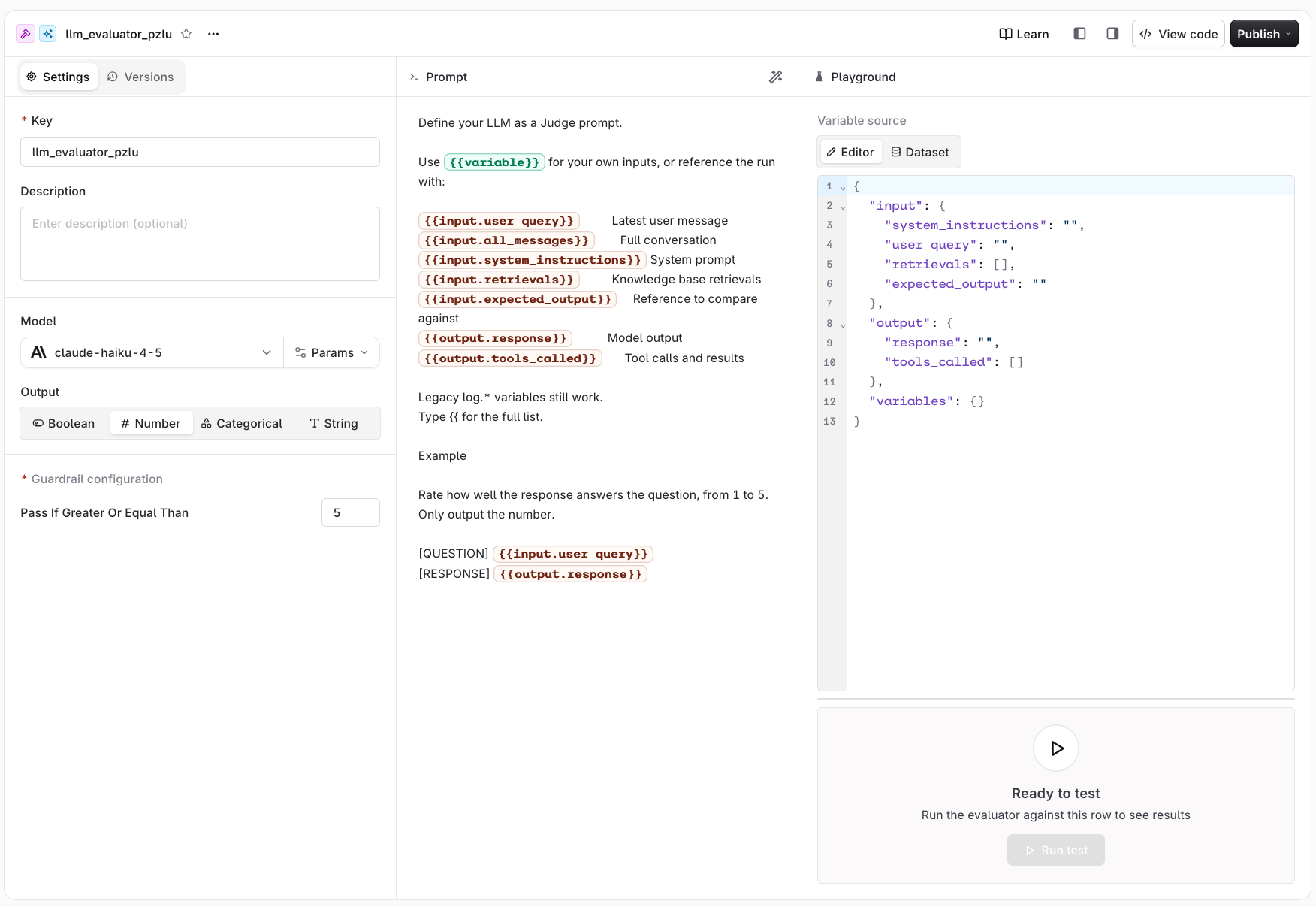
In a [Project](/ai-studio/get-started/projects) or folder, click the button and select **LLM Evaluator**. Select the model to use for evaluation. It must be enabled in the [AI Gateway](/ai-gateway/using-the-router).
 Use the [Create an Evaluator API](/reference/evals/create-an-evaluator).
```bash cURL theme={"theme":{"light":"github-light","dark":"github-dark"}}
curl --request POST \
--url https://my.orq.ai/v2/evaluators \
--header 'accept: application/json' \
--header "authorization: Bearer $ORQ_API_KEY" \
--header 'content-type: application/json' \
--data '{
"type": "llm_eval",
"prompt": "Give a number response from 0 to 1, 0 for inappropriate, 1 for perfectly appropriate {{output.response}}",
"path": "Default/evaluators",
"model": "openai/gpt-5.6-sol",
"key": "myKey",
"guardrail_config": {
"enabled": true,
"type": "number",
"value": 0.7,
"operator": "gte"
}
}'
```
Create an LLM evaluator using [`orq evals create`](/reference/cli):
```bash theme={"theme":{"light":"github-light","dark":"github-dark"}}
orq evals create \
--type llm_eval \
--key myKey \
--path Default/Evaluators \
--model openai/gpt-5.6-sol \
--prompt "Give a number response from 0 to 1, 0 for inappropriate, 1 for perfectly appropriate {{output.response}}" \
--guardrail-config '{"enabled": true, "type": "number", "value": 0.7, "operator": "gte"}'
```
See [install and setup](/reference/cli) to get started with the CLI. Run `orq evals create --help` for the full flag reference.
**Retrieve an evaluator's configuration:**
```prompt wrap theme={"theme":{"light":"github-light","dark":"github-dark"}}
Show me the current configuration for the "tone-scorer" evaluator
```
The assistant uses `search_entities` to resolve the evaluator ID, then `get_llm_eval` to retrieve the full configuration including prompt, model, and output type.
***
**Create an LLM evaluator:**
```prompt wrap theme={"theme":{"light":"github-light","dark":"github-dark"}}
Create an LLM-as-a-Judge evaluator that scores responses on tone: professional, neutral, or aggressive
```
The assistant uses `create_llm_eval` with a categorical scoring rubric and confirms the evaluator ID.
***
**Update an existing LLM evaluator:**
```prompt wrap theme={"theme":{"light":"github-light","dark":"github-dark"}}
Update the "tone-scorer" evaluator to also check for formal language and return a boolean instead of a number
```
The assistant uses `search_entities` to find the evaluator, then `update_llm_eval` with the updated `prompt` and `output_type: "boolean"`.
### Configure Prompt
Reference the evaluated run with the following **string** variables. Type `{{` in the prompt editor to pick one from the full list.
| Variable | Description |
| ------------------------------- | ---------------------------------------------------------------------- |
| `{{input.user_query}}` | The last message sent to the model |
| `{{input.all_messages}}` | The full conversation, including the graded turn |
| `{{input.system_instructions}}` | The system prompt used for the run |
| `{{input.retrievals}}` | [Knowledge Base](/ai-studio/ai-engineering/knowledge-bases) retrievals |
| `{{input.expected_output}}` | The reference used to compare output |
| `{{output.response}}` | The output response generated by the evaluated model |
| `{{output.tools_called}}` | The tool calls made during the run, with their results |
Custom values passed to the evaluator are available under their own name, as `{{variable_name}}`.
Index into a variable to reach a single message or tool call:
```text theme={"theme":{"light":"github-light","dark":"github-dark"}}
{{input.all_messages[0].content}}
{{input.all_messages[-1].role}}
{{output.tools_called[0].name}}
{{output.tools_called[0].arguments}}
```
The `log.*` variables remain supported, so existing Evaluators keep working. Prefer the variables above for new Evaluators.
| Variable | Description |
| -------------------- | -------------------------------------------------------------------------------- |
| `{{log.input}}` | Same as `{{input.user_query}}` |
| `{{log.output}}` | Same as `{{output.response}}` |
| `{{log.retrievals}}` | Same as `{{input.retrievals}}` |
| `{{log.reference}}` | Same as `{{input.expected_output}}` |
| `{{log.tool_calls}}` | Same as `{{output.tools_called}}` |
| `{{log.messages}}` | The conversation **without** the graded turn. `{{input.all_messages}}` keeps it. |
There is no `log.*` equivalent for `{{input.system_instructions}}`.
#### Structured variable shapes
Indexed paths walk the underlying arrays and objects. `output.tools_called` contains:
```typescript theme={"theme":{"light":"github-light","dark":"github-dark"}}
type ToolCalled = {
name: string;
arguments: string;
status: "" | "in_progress" | "completed" | "incomplete" | "failed";
output?: string;
};
```
`input.all_messages` and `log.messages` contain these message variants:
```typescript theme={"theme":{"light":"github-light","dark":"github-dark"}}
type EvaluatorMessage =
| { role: "system" | "developer" | "user"; content: string }
| {
role: "assistant";
content?: string;
tool_calls?: {
id: string;
type: "function";
function: { name: string; arguments: string };
}[];
}
| { role: "tool"; tool_call_id: string; content: string };
```
An empty `status` means the source did not provide one. An assistant message can omit `content` when it only requests tools. Tool arguments are JSON-encoded strings, and `output` is omitted when a tool call has no result. For example:
```text theme={"theme":{"light":"github-light","dark":"github-dark"}}
{{output.tools_called[0].status}}
{{output.tools_called[0].output}}
{{input.all_messages[2].tool_calls[0].function.name}}
{{input.all_messages[3].tool_call_id}}
```
`input.all_messages` includes the graded turn. `log.messages` has the same message shape but excludes that final graded user or assistant turn.
### Model Parameters
The **Model** field selects which model acts as judge. Any model enabled in the [AI Gateway](/ai-gateway/using-the-router) is available. The model choice affects evaluation quality, cost, and latency.
### Output and Guardrail Configuration
Select the output type that matches the evaluation criteria. The **Guardrail configuration** panel is visible directly in the evaluator settings. Set the pass condition for each type:
The model returns a **True** or **False** response. Use for binary pass/fail checks.
**Guardrail**: Select **True** or **False**. The guardrail passes when the model returns the selected value.
The model returns a numeric score. Use any scale that fits the use case (e.g. 1-5, 0-100).
**Guardrail**: Enter a threshold in **Pass if greater or equal than**. The guardrail passes when the score meets or exceeds the threshold.
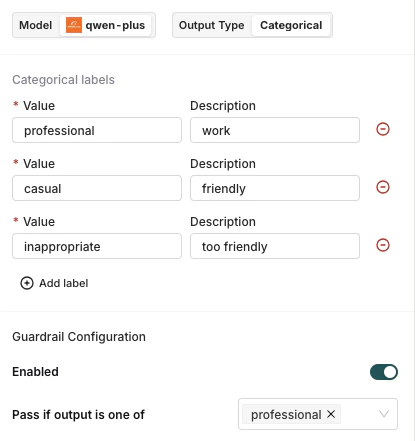
The model classifies the output into one of the predefined labels.
When **Categorical** is selected, a label editor appears below the output type selector. Add one label per row: enter a **Value** (the exact string the model must return) and an optional **Description** to guide the model. At least two labels are required.
**Guardrail**: Select one or more values in **Pass if output is one of**. The guardrail passes when the model's output matches any of the selected labels.
Use the [Create an Evaluator API](/reference/evals/create-an-evaluator).
```bash cURL theme={"theme":{"light":"github-light","dark":"github-dark"}}
curl --request POST \
--url https://my.orq.ai/v2/evaluators \
--header 'accept: application/json' \
--header "authorization: Bearer $ORQ_API_KEY" \
--header 'content-type: application/json' \
--data '{
"type": "llm_eval",
"prompt": "Give a number response from 0 to 1, 0 for inappropriate, 1 for perfectly appropriate {{output.response}}",
"path": "Default/evaluators",
"model": "openai/gpt-5.6-sol",
"key": "myKey",
"guardrail_config": {
"enabled": true,
"type": "number",
"value": 0.7,
"operator": "gte"
}
}'
```
Create an LLM evaluator using [`orq evals create`](/reference/cli):
```bash theme={"theme":{"light":"github-light","dark":"github-dark"}}
orq evals create \
--type llm_eval \
--key myKey \
--path Default/Evaluators \
--model openai/gpt-5.6-sol \
--prompt "Give a number response from 0 to 1, 0 for inappropriate, 1 for perfectly appropriate {{output.response}}" \
--guardrail-config '{"enabled": true, "type": "number", "value": 0.7, "operator": "gte"}'
```
See [install and setup](/reference/cli) to get started with the CLI. Run `orq evals create --help` for the full flag reference.
**Retrieve an evaluator's configuration:**
```prompt wrap theme={"theme":{"light":"github-light","dark":"github-dark"}}
Show me the current configuration for the "tone-scorer" evaluator
```
The assistant uses `search_entities` to resolve the evaluator ID, then `get_llm_eval` to retrieve the full configuration including prompt, model, and output type.
***
**Create an LLM evaluator:**
```prompt wrap theme={"theme":{"light":"github-light","dark":"github-dark"}}
Create an LLM-as-a-Judge evaluator that scores responses on tone: professional, neutral, or aggressive
```
The assistant uses `create_llm_eval` with a categorical scoring rubric and confirms the evaluator ID.
***
**Update an existing LLM evaluator:**
```prompt wrap theme={"theme":{"light":"github-light","dark":"github-dark"}}
Update the "tone-scorer" evaluator to also check for formal language and return a boolean instead of a number
```
The assistant uses `search_entities` to find the evaluator, then `update_llm_eval` with the updated `prompt` and `output_type: "boolean"`.
### Configure Prompt
Reference the evaluated run with the following **string** variables. Type `{{` in the prompt editor to pick one from the full list.
| Variable | Description |
| ------------------------------- | ---------------------------------------------------------------------- |
| `{{input.user_query}}` | The last message sent to the model |
| `{{input.all_messages}}` | The full conversation, including the graded turn |
| `{{input.system_instructions}}` | The system prompt used for the run |
| `{{input.retrievals}}` | [Knowledge Base](/ai-studio/ai-engineering/knowledge-bases) retrievals |
| `{{input.expected_output}}` | The reference used to compare output |
| `{{output.response}}` | The output response generated by the evaluated model |
| `{{output.tools_called}}` | The tool calls made during the run, with their results |
Custom values passed to the evaluator are available under their own name, as `{{variable_name}}`.
Index into a variable to reach a single message or tool call:
```text theme={"theme":{"light":"github-light","dark":"github-dark"}}
{{input.all_messages[0].content}}
{{input.all_messages[-1].role}}
{{output.tools_called[0].name}}
{{output.tools_called[0].arguments}}
```
The `log.*` variables remain supported, so existing Evaluators keep working. Prefer the variables above for new Evaluators.
| Variable | Description |
| -------------------- | -------------------------------------------------------------------------------- |
| `{{log.input}}` | Same as `{{input.user_query}}` |
| `{{log.output}}` | Same as `{{output.response}}` |
| `{{log.retrievals}}` | Same as `{{input.retrievals}}` |
| `{{log.reference}}` | Same as `{{input.expected_output}}` |
| `{{log.tool_calls}}` | Same as `{{output.tools_called}}` |
| `{{log.messages}}` | The conversation **without** the graded turn. `{{input.all_messages}}` keeps it. |
There is no `log.*` equivalent for `{{input.system_instructions}}`.
#### Structured variable shapes
Indexed paths walk the underlying arrays and objects. `output.tools_called` contains:
```typescript theme={"theme":{"light":"github-light","dark":"github-dark"}}
type ToolCalled = {
name: string;
arguments: string;
status: "" | "in_progress" | "completed" | "incomplete" | "failed";
output?: string;
};
```
`input.all_messages` and `log.messages` contain these message variants:
```typescript theme={"theme":{"light":"github-light","dark":"github-dark"}}
type EvaluatorMessage =
| { role: "system" | "developer" | "user"; content: string }
| {
role: "assistant";
content?: string;
tool_calls?: {
id: string;
type: "function";
function: { name: string; arguments: string };
}[];
}
| { role: "tool"; tool_call_id: string; content: string };
```
An empty `status` means the source did not provide one. An assistant message can omit `content` when it only requests tools. Tool arguments are JSON-encoded strings, and `output` is omitted when a tool call has no result. For example:
```text theme={"theme":{"light":"github-light","dark":"github-dark"}}
{{output.tools_called[0].status}}
{{output.tools_called[0].output}}
{{input.all_messages[2].tool_calls[0].function.name}}
{{input.all_messages[3].tool_call_id}}
```
`input.all_messages` includes the graded turn. `log.messages` has the same message shape but excludes that final graded user or assistant turn.
### Model Parameters
The **Model** field selects which model acts as judge. Any model enabled in the [AI Gateway](/ai-gateway/using-the-router) is available. The model choice affects evaluation quality, cost, and latency.
### Output and Guardrail Configuration
Select the output type that matches the evaluation criteria. The **Guardrail configuration** panel is visible directly in the evaluator settings. Set the pass condition for each type:
The model returns a **True** or **False** response. Use for binary pass/fail checks.
**Guardrail**: Select **True** or **False**. The guardrail passes when the model returns the selected value.
The model returns a numeric score. Use any scale that fits the use case (e.g. 1-5, 0-100).
**Guardrail**: Enter a threshold in **Pass if greater or equal than**. The guardrail passes when the score meets or exceeds the threshold.
The model classifies the output into one of the predefined labels.
When **Categorical** is selected, a label editor appears below the output type selector. Add one label per row: enter a **Value** (the exact string the model must return) and an optional **Description** to guide the model. At least two labels are required.
**Guardrail**: Select one or more values in **Pass if output is one of**. The guardrail passes when the model's output matches any of the selected labels.
 The model returns a free-form string response. Not available as a guardrail.
Once configured, the evaluator is available as a guardrail in any [Deployment](/ai-studio/ai-engineering/deployments#evaluators-and-guardrails) or [Agent](/ai-studio/ai-engineering/build-agents#configure-evaluators-and-guardrails) without any additional toggle.
### Examples
```text theme={"theme":{"light":"github-light","dark":"github-dark"}}
Rate the formality of the following output on a scale of 1 to 5:
- 1: Very casual/informal
- 5: Very formal/professional
Only output the number.
[OUTPUT] {{output.response}}
```
```text theme={"theme":{"light":"github-light","dark":"github-dark"}}
Evaluate how accurate the response [OUTPUT] is compared to the query [INPUT].
Score from 0 to 100, where:
- 0: Completely inaccurate or irrelevant
- 50: Partially accurate
- 100: Perfectly accurate and complete
Only output the score as a number.
[INPUT] {{input.user_query}}
[OUTPUT] {{output.response}}
```
```text theme={"theme":{"light":"github-light","dark":"github-dark"}}
Evaluate if the response adequately answers the user's question.
Return 1 if the response is satisfactory, 0 if it is not.
[QUESTION] {{input.user_query}}
[RESPONSE] {{output.response}}
```
```text theme={"theme":{"light":"github-light","dark":"github-dark"}}
Review the full prior conversation and the latest response.
Return 1 if the response stays consistent with what was already discussed, 0 if it contradicts earlier messages.
[CONVERSATION] {{log.messages}}
[RESPONSE] {{output.response}}
```
This example keeps `{{log.messages}}` on purpose: it is the only variable that excludes the graded turn, so the response is not shown twice. `{{input.all_messages}}` includes it.
```text theme={"theme":{"light":"github-light","dark":"github-dark"}}
Compare the response [OUTPUT] against the reference answer [REFERENCE].
Return 1 if the response conveys the same meaning as the reference, 0 if it does not.
[OUTPUT] {{output.response}}
[REFERENCE] {{input.expected_output}}
```
```text theme={"theme":{"light":"github-light","dark":"github-dark"}}
Review the tool calls made during the run.
Return 1 if the correct tool was called with valid arguments for the user's request, 0 otherwise.
[REQUEST] {{input.user_query}}
[TOOL CALLS] {{output.tools_called}}
```
### Testing
Fill the payload manually. The panel opens with every field present and empty. **Run** stays disabled until at least one field has a value.
Each field is named after the variable it fills, so the payload reads like the prompt above it:
```json JSON theme={"theme":{"light":"github-light","dark":"github-dark"}}
{
"input": {
"system_instructions": "",
"user_query": "",
"retrievals": [],
"expected_output": ""
},
"output": {
"response": "",
"tools_called": []
},
"variables": {}
}
```
| Payload field | Prompt variable |
| --------------------------- | ------------------------------------------------ |
| `input.system_instructions` | `{{input.system_instructions}}` |
| `input.user_query` | `{{input.user_query}}`, `{{log.input}}` |
| `input.retrievals` | `{{input.retrievals}}`, `{{log.retrievals}}` |
| `input.expected_output` | `{{input.expected_output}}`, `{{log.reference}}` |
| `output.response` | `{{output.response}}`, `{{log.output}}` |
| `output.tools_called` | `{{output.tools_called}}`, `{{log.tool_calls}}` |
| `variables` | Custom variables, as `{{variable_name}}` |
Each entry in `output.tools_called` takes the tool `name`, the `arguments` it was called with, and the `output` it returned.
`{{input.all_messages}}` and `{{log.messages}}` resolve against the conversation assembled from these fields.
To grade a multi-turn conversation, add a `messages` array alongside `input` and `output` instead of filling `input.user_query` and `output.response`. A conversation takes precedence: when `messages` is present, `input.user_query` is ignored, and `output.response` is appended only when the conversation carries no assistant answer.
`input`, `output` and `log` are reserved names. A custom variable that uses one of them is dropped before the evaluator runs, because it would shadow the namespace the prompt already resolves against.
The model returns a free-form string response. Not available as a guardrail.
Once configured, the evaluator is available as a guardrail in any [Deployment](/ai-studio/ai-engineering/deployments#evaluators-and-guardrails) or [Agent](/ai-studio/ai-engineering/build-agents#configure-evaluators-and-guardrails) without any additional toggle.
### Examples
```text theme={"theme":{"light":"github-light","dark":"github-dark"}}
Rate the formality of the following output on a scale of 1 to 5:
- 1: Very casual/informal
- 5: Very formal/professional
Only output the number.
[OUTPUT] {{output.response}}
```
```text theme={"theme":{"light":"github-light","dark":"github-dark"}}
Evaluate how accurate the response [OUTPUT] is compared to the query [INPUT].
Score from 0 to 100, where:
- 0: Completely inaccurate or irrelevant
- 50: Partially accurate
- 100: Perfectly accurate and complete
Only output the score as a number.
[INPUT] {{input.user_query}}
[OUTPUT] {{output.response}}
```
```text theme={"theme":{"light":"github-light","dark":"github-dark"}}
Evaluate if the response adequately answers the user's question.
Return 1 if the response is satisfactory, 0 if it is not.
[QUESTION] {{input.user_query}}
[RESPONSE] {{output.response}}
```
```text theme={"theme":{"light":"github-light","dark":"github-dark"}}
Review the full prior conversation and the latest response.
Return 1 if the response stays consistent with what was already discussed, 0 if it contradicts earlier messages.
[CONVERSATION] {{log.messages}}
[RESPONSE] {{output.response}}
```
This example keeps `{{log.messages}}` on purpose: it is the only variable that excludes the graded turn, so the response is not shown twice. `{{input.all_messages}}` includes it.
```text theme={"theme":{"light":"github-light","dark":"github-dark"}}
Compare the response [OUTPUT] against the reference answer [REFERENCE].
Return 1 if the response conveys the same meaning as the reference, 0 if it does not.
[OUTPUT] {{output.response}}
[REFERENCE] {{input.expected_output}}
```
```text theme={"theme":{"light":"github-light","dark":"github-dark"}}
Review the tool calls made during the run.
Return 1 if the correct tool was called with valid arguments for the user's request, 0 otherwise.
[REQUEST] {{input.user_query}}
[TOOL CALLS] {{output.tools_called}}
```
### Testing
Fill the payload manually. The panel opens with every field present and empty. **Run** stays disabled until at least one field has a value.
Each field is named after the variable it fills, so the payload reads like the prompt above it:
```json JSON theme={"theme":{"light":"github-light","dark":"github-dark"}}
{
"input": {
"system_instructions": "",
"user_query": "",
"retrievals": [],
"expected_output": ""
},
"output": {
"response": "",
"tools_called": []
},
"variables": {}
}
```
| Payload field | Prompt variable |
| --------------------------- | ------------------------------------------------ |
| `input.system_instructions` | `{{input.system_instructions}}` |
| `input.user_query` | `{{input.user_query}}`, `{{log.input}}` |
| `input.retrievals` | `{{input.retrievals}}`, `{{log.retrievals}}` |
| `input.expected_output` | `{{input.expected_output}}`, `{{log.reference}}` |
| `output.response` | `{{output.response}}`, `{{log.output}}` |
| `output.tools_called` | `{{output.tools_called}}`, `{{log.tool_calls}}` |
| `variables` | Custom variables, as `{{variable_name}}` |
Each entry in `output.tools_called` takes the tool `name`, the `arguments` it was called with, and the `output` it returned.
`{{input.all_messages}}` and `{{log.messages}}` resolve against the conversation assembled from these fields.
To grade a multi-turn conversation, add a `messages` array alongside `input` and `output` instead of filling `input.user_query` and `output.response`. A conversation takes precedence: when `messages` is present, `input.user_query` is ignored, and `output.response` is appended only when the conversation carries no assistant answer.
`input`, `output` and `log` are reserved names. A custom variable that uses one of them is dropped before the evaluator runs, because it would shadow the namespace the prompt already resolves against.
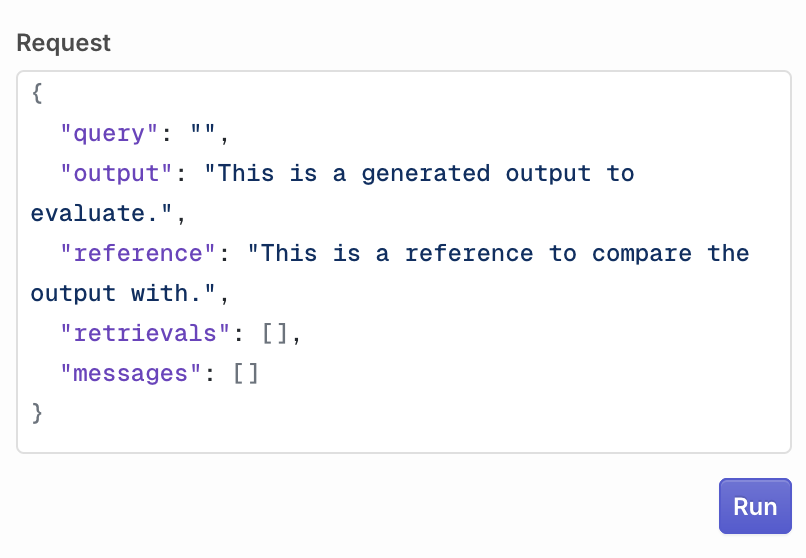 Click **Run** to execute the evaluator. The result appears in the **Response** field.
 Select a dataset from the dropdown. Use the row pagination controls to navigate between rows. The selected row's data is shown in the tree view.
The following variables are available in the evaluator prompt when testing with a Dataset:
| Source | Prompt variable | Description |
| ------------------- | --------------------------- | ------------------------------------------------------------------------------------------------------ |
| `inputs.field_name` | `{{field_name}}` | Custom input fields from the dataset row, referenced directly by field name (e.g. `{{product_input}}`) |
| `messages` | `{{input.all_messages}}` | The full conversation stored on the row |
| `messages` | `{{log.messages}}` | The same conversation, without the graded turn |
| `reference` | `{{input.expected_output}}` | The reference used to compare the output |
The graded turn comes from the row's `messages`: the last user entry fills `{{input.user_query}}` and `{{log.input}}`, and the last assistant entry fills `{{output.response}}` and `{{log.output}}`. A row with no `messages` falls back to columns named `input` and `output`, and leaves both pairs empty when it has neither.
Click **Run test** to execute the evaluator against the selected row. The result appears in the **Response** field.
Once created, this evaluator is available as a guardrail in **Deployments** and **Agents**. See [Evaluators and Guardrails in Deployments](/ai-studio/ai-engineering/deployments#evaluators-and-guardrails) and [Evaluators and Guardrails in Agents](/ai-studio/ai-engineering/build-agents#configure-evaluators-and-guardrails) to learn more.
## Python Evaluator
Python Evaluators let you write custom **Python code** for maximum flexibility: from simple validations (regex, length checks) to complex analyses (statistical scoring, custom algorithms).
Python code is limited to 1 MB (1,048,576 bytes) per evaluator: roughly 1 million characters, or about 20,000 lines of typical Python. Larger code returns a `Code exceeds maximum size` error and does not run.
In a [Project](/ai-studio/get-started/projects) or folder, click the button, select **Evaluator**, then **Python**. This opens the code editor. The evaluation function has access to the following fields from the evaluated model's log:
* `log["input"]` ``: the last message sent to generate the output
* `log["output"]` ``: the generated response from the model
* `log["reference"]` ``: the reference used to compare the output
* `log["expected_output"]` ``: the same value as `log["reference"]`
* `log["retrievals"]` `list[str]`: all [Knowledge Base](/ai-studio/ai-engineering/knowledge-bases) retrievals
* `log["messages"]` `list[dict]`: the conversation before the graded turn, each entry with `role` and `content`
* `log["tool_calls"]` `list[dict]`: each entry with `tool_name`, `tool_arguments`, `tool_id`, `tool_run_id`, `tool_type`, and `response["raw_response"]`
Every key is always present, so index directly. Lists are empty when the run carried no value, and the two reference fields can be `None`. See [Evaluator variables](#evaluator-variables) for how these map onto the LLM Evaluator prompt variables.
The evaluator can return two response types:
* **Number**: return a numeric score
* **Boolean**: return a true/false value
Example: compare output size with the reference:
```python Python theme={"theme":{"light":"github-light","dark":"github-dark"}}
def evaluate(log):
output_size = len(log["output"])
reference_size = len(log["reference"])
return abs(output_size - reference_size)
```
You can define multiple methods within the code editor. The last method is the entry-point for the Evaluator when run.
Use the [Create an Evaluator API](/reference/evals/create-an-evaluator). Use `\n` to indicate newlines in code.
```bash cURL theme={"theme":{"light":"github-light","dark":"github-dark"}}
curl --request POST \
--url https://my.orq.ai/v2/evaluators \
--header 'accept: application/json' \
--header "authorization: Bearer $ORQ_API_KEY" \
--header 'content-type: application/json' \
--data '{
"type": "python_eval",
"path": "Default/Evaluators",
"key": "MyEvaluator",
"code": "def evaluate(log):\n output_size = len(log[\"output\"])\n reference_size = len(log[\"reference\"])\n return abs(output_size - reference_size)\n",
"guardrail_config": {
"enabled": true,
"type": "number",
"value": 10,
"operator": "lte"
}
}'
```
Create a Python evaluator using [`orq evals create`](/reference/cli):
```bash theme={"theme":{"light":"github-light","dark":"github-dark"}}
orq evals create \
--type python_eval \
--key MyEvaluator \
--path Default/Evaluators \
--code $'def evaluate(log):\n output_size = len(log["output"])\n reference_size = len(log["reference"])\n return abs(output_size - reference_size)\n' \
--guardrail-config '{"enabled": true, "type": "number", "value": 10, "operator": "lte"}'
```
See [install and setup](/reference/cli) to get started with the CLI. Run `orq evals create --help` for the full flag reference.
**Retrieve a Python evaluator's configuration:**
```prompt wrap theme={"theme":{"light":"github-light","dark":"github-dark"}}
Show me the current configuration for the "json-validator" evaluator
```
The assistant uses `search_entities` to resolve the evaluator ID, then `get_python_eval` to retrieve the full configuration including code and output type.
***
**Create a Python evaluator:**
```prompt wrap theme={"theme":{"light":"github-light","dark":"github-dark"}}
Create a Python evaluator that checks whether the response contains a valid JSON object
```
The assistant writes a Python snippet that parses the response and validates JSON structure, then uses `create_python_eval` to register it in your workspace.
***
**Update a Python evaluator:**
```prompt wrap theme={"theme":{"light":"github-light","dark":"github-dark"}}
Update the "json-validator" evaluator to also check that the JSON contains a "status" field
```
The assistant uses `search_entities` to find the evaluator, then `update_python_eval` with the updated `code`.
### Environment and Libraries
The Python Evaluator runs in **Python 3.12** with the following preloaded libraries:
```text theme={"theme":{"light":"github-light","dark":"github-dark"}}
numpy==2.4.4
nltk==3.9.4
requests
pydantic
json
re
```
### Guardrail Configuration
Within a [Deployment](/ai-studio/ai-engineering/deployments) or [Agent](/ai-studio/ai-engineering/build-agents), use the Python Evaluator as a Guardrail to block generations that don't meet the custom evaluation logic.
Use the **Pass condition** to define when the guardrail passes:
* **Boolean evaluators**: select **True** or **False**. The guardrail passes when your function returns the selected value.
* **Number evaluators**: enter a score threshold. The guardrail passes when your function's return value is greater than or equal to the threshold.
Any evaluator created in **Orq.ai**, whether LLM or Python, can be attached as a guardrail in a [Deployment](/ai-studio/ai-engineering/deployments#evaluators-and-guardrails) or [Agent](/ai-studio/ai-engineering/build-agents#configure-evaluators-and-guardrails). Only the **Pass condition** needs to be set.
To call an external policy engine or a third-party guardrail provider from the Python Evaluator, see [External Guardrails](/ai-gateway/configuration/external-guardrails).
### Examples
Use the `requests` package to send the output to an external endpoint and confirm it comes back unchanged. Return `True` only when the call succeeds and the echoed text matches the output.
```python Python theme={"theme":{"light":"github-light","dark":"github-dark"}}
def evaluate(log):
import requests
try:
r = requests.post(
"https://httpbin.org/post",
json={"text": log["output"]},
timeout=10,
)
echoed = r.json()["json"]["text"]
return echoed == log["output"] # round-trip succeeded
except (requests.RequestException, KeyError, ValueError):
return False
```
Use `pydantic` to validate that the output is JSON matching the expected damage report schema, including a confidence score between 0 and 1. Return `True` when it parses and validates, `False` otherwise.
```python Python theme={"theme":{"light":"github-light","dark":"github-dark"}}
def evaluate(log):
import json
from typing import List
from pydantic import BaseModel, field_validator, ValidationError
class Damage(BaseModel):
type: str
location: str
severity: str
confidence: float
description: str
@field_validator("confidence")
@classmethod
def confidence_in_range(cls, v):
if not 0.0 <= v <= 1.0:
raise ValueError("confidence must be between 0 and 1")
return v
class Assessment(BaseModel):
damages: List[Damage]
assetType: str
observations: List[str]
overallAssessment: str
try:
Assessment(**json.loads(log["output"]))
return True
except (ValidationError, json.JSONDecodeError, KeyError):
return False
```
### Testing
Fill the payload manually in the **Editor**. Enter values for `input`, `output`, `reference`, `messages`, and `retrievals`. All `log` fields resolve against what you enter.
Select a dataset from the dropdown. Use the row pagination controls to navigate between rows. The selected row's data is shown in the tree view.
The following variables are available in the evaluator prompt when testing with a Dataset:
| Source | Prompt variable | Description |
| ------------------- | --------------------------- | ------------------------------------------------------------------------------------------------------ |
| `inputs.field_name` | `{{field_name}}` | Custom input fields from the dataset row, referenced directly by field name (e.g. `{{product_input}}`) |
| `messages` | `{{input.all_messages}}` | The full conversation stored on the row |
| `messages` | `{{log.messages}}` | The same conversation, without the graded turn |
| `reference` | `{{input.expected_output}}` | The reference used to compare the output |
The graded turn comes from the row's `messages`: the last user entry fills `{{input.user_query}}` and `{{log.input}}`, and the last assistant entry fills `{{output.response}}` and `{{log.output}}`. A row with no `messages` falls back to columns named `input` and `output`, and leaves both pairs empty when it has neither.
Click **Run test** to execute the evaluator against the selected row. The result appears in the **Response** field.
Once created, this evaluator is available as a guardrail in **Deployments** and **Agents**. See [Evaluators and Guardrails in Deployments](/ai-studio/ai-engineering/deployments#evaluators-and-guardrails) and [Evaluators and Guardrails in Agents](/ai-studio/ai-engineering/build-agents#configure-evaluators-and-guardrails) to learn more.
## Python Evaluator
Python Evaluators let you write custom **Python code** for maximum flexibility: from simple validations (regex, length checks) to complex analyses (statistical scoring, custom algorithms).
Python code is limited to 1 MB (1,048,576 bytes) per evaluator: roughly 1 million characters, or about 20,000 lines of typical Python. Larger code returns a `Code exceeds maximum size` error and does not run.
In a [Project](/ai-studio/get-started/projects) or folder, click the button, select **Evaluator**, then **Python**. This opens the code editor. The evaluation function has access to the following fields from the evaluated model's log:
* `log["input"]` ``: the last message sent to generate the output
* `log["output"]` ``: the generated response from the model
* `log["reference"]` ``: the reference used to compare the output
* `log["expected_output"]` ``: the same value as `log["reference"]`
* `log["retrievals"]` `list[str]`: all [Knowledge Base](/ai-studio/ai-engineering/knowledge-bases) retrievals
* `log["messages"]` `list[dict]`: the conversation before the graded turn, each entry with `role` and `content`
* `log["tool_calls"]` `list[dict]`: each entry with `tool_name`, `tool_arguments`, `tool_id`, `tool_run_id`, `tool_type`, and `response["raw_response"]`
Every key is always present, so index directly. Lists are empty when the run carried no value, and the two reference fields can be `None`. See [Evaluator variables](#evaluator-variables) for how these map onto the LLM Evaluator prompt variables.
The evaluator can return two response types:
* **Number**: return a numeric score
* **Boolean**: return a true/false value
Example: compare output size with the reference:
```python Python theme={"theme":{"light":"github-light","dark":"github-dark"}}
def evaluate(log):
output_size = len(log["output"])
reference_size = len(log["reference"])
return abs(output_size - reference_size)
```
You can define multiple methods within the code editor. The last method is the entry-point for the Evaluator when run.
Use the [Create an Evaluator API](/reference/evals/create-an-evaluator). Use `\n` to indicate newlines in code.
```bash cURL theme={"theme":{"light":"github-light","dark":"github-dark"}}
curl --request POST \
--url https://my.orq.ai/v2/evaluators \
--header 'accept: application/json' \
--header "authorization: Bearer $ORQ_API_KEY" \
--header 'content-type: application/json' \
--data '{
"type": "python_eval",
"path": "Default/Evaluators",
"key": "MyEvaluator",
"code": "def evaluate(log):\n output_size = len(log[\"output\"])\n reference_size = len(log[\"reference\"])\n return abs(output_size - reference_size)\n",
"guardrail_config": {
"enabled": true,
"type": "number",
"value": 10,
"operator": "lte"
}
}'
```
Create a Python evaluator using [`orq evals create`](/reference/cli):
```bash theme={"theme":{"light":"github-light","dark":"github-dark"}}
orq evals create \
--type python_eval \
--key MyEvaluator \
--path Default/Evaluators \
--code $'def evaluate(log):\n output_size = len(log["output"])\n reference_size = len(log["reference"])\n return abs(output_size - reference_size)\n' \
--guardrail-config '{"enabled": true, "type": "number", "value": 10, "operator": "lte"}'
```
See [install and setup](/reference/cli) to get started with the CLI. Run `orq evals create --help` for the full flag reference.
**Retrieve a Python evaluator's configuration:**
```prompt wrap theme={"theme":{"light":"github-light","dark":"github-dark"}}
Show me the current configuration for the "json-validator" evaluator
```
The assistant uses `search_entities` to resolve the evaluator ID, then `get_python_eval` to retrieve the full configuration including code and output type.
***
**Create a Python evaluator:**
```prompt wrap theme={"theme":{"light":"github-light","dark":"github-dark"}}
Create a Python evaluator that checks whether the response contains a valid JSON object
```
The assistant writes a Python snippet that parses the response and validates JSON structure, then uses `create_python_eval` to register it in your workspace.
***
**Update a Python evaluator:**
```prompt wrap theme={"theme":{"light":"github-light","dark":"github-dark"}}
Update the "json-validator" evaluator to also check that the JSON contains a "status" field
```
The assistant uses `search_entities` to find the evaluator, then `update_python_eval` with the updated `code`.
### Environment and Libraries
The Python Evaluator runs in **Python 3.12** with the following preloaded libraries:
```text theme={"theme":{"light":"github-light","dark":"github-dark"}}
numpy==2.4.4
nltk==3.9.4
requests
pydantic
json
re
```
### Guardrail Configuration
Within a [Deployment](/ai-studio/ai-engineering/deployments) or [Agent](/ai-studio/ai-engineering/build-agents), use the Python Evaluator as a Guardrail to block generations that don't meet the custom evaluation logic.
Use the **Pass condition** to define when the guardrail passes:
* **Boolean evaluators**: select **True** or **False**. The guardrail passes when your function returns the selected value.
* **Number evaluators**: enter a score threshold. The guardrail passes when your function's return value is greater than or equal to the threshold.
Any evaluator created in **Orq.ai**, whether LLM or Python, can be attached as a guardrail in a [Deployment](/ai-studio/ai-engineering/deployments#evaluators-and-guardrails) or [Agent](/ai-studio/ai-engineering/build-agents#configure-evaluators-and-guardrails). Only the **Pass condition** needs to be set.
To call an external policy engine or a third-party guardrail provider from the Python Evaluator, see [External Guardrails](/ai-gateway/configuration/external-guardrails).
### Examples
Use the `requests` package to send the output to an external endpoint and confirm it comes back unchanged. Return `True` only when the call succeeds and the echoed text matches the output.
```python Python theme={"theme":{"light":"github-light","dark":"github-dark"}}
def evaluate(log):
import requests
try:
r = requests.post(
"https://httpbin.org/post",
json={"text": log["output"]},
timeout=10,
)
echoed = r.json()["json"]["text"]
return echoed == log["output"] # round-trip succeeded
except (requests.RequestException, KeyError, ValueError):
return False
```
Use `pydantic` to validate that the output is JSON matching the expected damage report schema, including a confidence score between 0 and 1. Return `True` when it parses and validates, `False` otherwise.
```python Python theme={"theme":{"light":"github-light","dark":"github-dark"}}
def evaluate(log):
import json
from typing import List
from pydantic import BaseModel, field_validator, ValidationError
class Damage(BaseModel):
type: str
location: str
severity: str
confidence: float
description: str
@field_validator("confidence")
@classmethod
def confidence_in_range(cls, v):
if not 0.0 <= v <= 1.0:
raise ValueError("confidence must be between 0 and 1")
return v
class Assessment(BaseModel):
damages: List[Damage]
assetType: str
observations: List[str]
overallAssessment: str
try:
Assessment(**json.loads(log["output"]))
return True
except (ValidationError, json.JSONDecodeError, KeyError):
return False
```
### Testing
Fill the payload manually in the **Editor**. Enter values for `input`, `output`, `reference`, `messages`, and `retrievals`. All `log` fields resolve against what you enter.
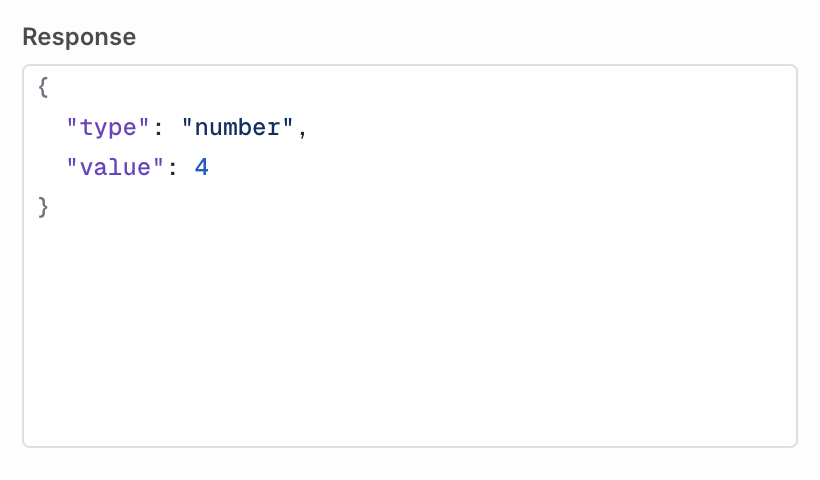
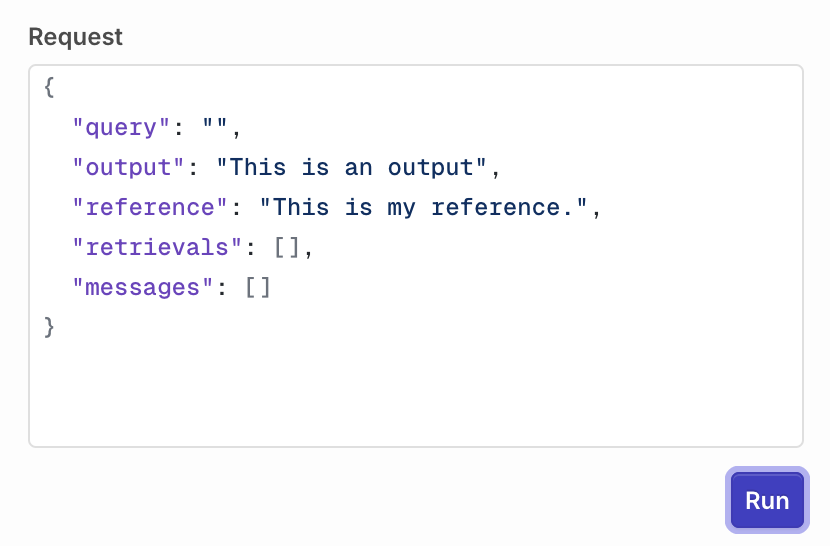 Click **Run** to execute the evaluator. The result appears in the **Response** field.
 ## Evaluator variables
**LLM Evaluators** and **Python Evaluators** read the same run through different mechanisms. An **LLM Evaluator** renders template variables into the judge prompt. A **Python Evaluator** receives one `log` dictionary as the argument to `evaluate()`. Nothing substitutes `{{...}}` inside Python code.
### Equivalent values
| Run data | LLM Evaluator prompt | Python Evaluator |
| ------------------------------------ | --------------------------- | -------------------------------------------- |
| Latest user message | `{{input.user_query}}` | `log["input"]` |
| Model output | `{{output.response}}` | `log["output"]` |
| Reference | `{{input.expected_output}}` | `log["expected_output"]`, `log["reference"]` |
| Knowledge Base retrievals | `{{input.retrievals}}` | `log["retrievals"]` |
| Conversation without the graded turn | `{{log.messages}}` | `log["messages"]` |
| Tool calls and results | `{{output.tools_called}}` | `log["tool_calls"]` |
### Distinctions
**Tool call entries use different field names.** A prompt reads `{{output.tools_called[0].name}}`, `.arguments`, `.status`, and `.output`. Python reads `log["tool_calls"][0]["tool_name"]`, `["tool_arguments"]`, and `["response"]["raw_response"]`.
**Three variables have no Python equivalent:**
* `{{input.all_messages}}` includes the graded turn. `log["messages"]` always excludes it, so it matches `{{log.messages}}` instead.
* `{{input.system_instructions}}` is a prompt variable only. Python code reads the system prompt as the `system` entry inside `log["messages"]`.
* Custom variables, written `{{variable}}` in a prompt, are not passed to Python code.
**Lists reach a prompt as formatted text.** `{{input.retrievals}}` and `{{output.tools_called}}` render as a readable block, while indexed forms such as `{{input.retrievals[0]}}` walk the underlying structure. Python always receives the raw list.
**Legacy `log.*` prompt variables still work.** `{{log.input}}`, `{{log.output}}`, `{{log.reference}}`, `{{log.retrievals}}`, `{{log.messages}}`, and `{{log.tool_calls}}` remain supported in **LLM Evaluator** prompts. Prefer the `input.*` and `output.*` names in new evaluators.
`input`, `output`, and `log` are reserved names. A custom variable that uses one of them is dropped before the evaluator runs, because it would shadow the namespace the prompt already resolves against.
## Versions
When you are done editing, click Publish to save your changes. You will be prompted to write a commit message and choose a version bump:
## Evaluator variables
**LLM Evaluators** and **Python Evaluators** read the same run through different mechanisms. An **LLM Evaluator** renders template variables into the judge prompt. A **Python Evaluator** receives one `log` dictionary as the argument to `evaluate()`. Nothing substitutes `{{...}}` inside Python code.
### Equivalent values
| Run data | LLM Evaluator prompt | Python Evaluator |
| ------------------------------------ | --------------------------- | -------------------------------------------- |
| Latest user message | `{{input.user_query}}` | `log["input"]` |
| Model output | `{{output.response}}` | `log["output"]` |
| Reference | `{{input.expected_output}}` | `log["expected_output"]`, `log["reference"]` |
| Knowledge Base retrievals | `{{input.retrievals}}` | `log["retrievals"]` |
| Conversation without the graded turn | `{{log.messages}}` | `log["messages"]` |
| Tool calls and results | `{{output.tools_called}}` | `log["tool_calls"]` |
### Distinctions
**Tool call entries use different field names.** A prompt reads `{{output.tools_called[0].name}}`, `.arguments`, `.status`, and `.output`. Python reads `log["tool_calls"][0]["tool_name"]`, `["tool_arguments"]`, and `["response"]["raw_response"]`.
**Three variables have no Python equivalent:**
* `{{input.all_messages}}` includes the graded turn. `log["messages"]` always excludes it, so it matches `{{log.messages}}` instead.
* `{{input.system_instructions}}` is a prompt variable only. Python code reads the system prompt as the `system` entry inside `log["messages"]`.
* Custom variables, written `{{variable}}` in a prompt, are not passed to Python code.
**Lists reach a prompt as formatted text.** `{{input.retrievals}}` and `{{output.tools_called}}` render as a readable block, while indexed forms such as `{{input.retrievals[0]}}` walk the underlying structure. Python always receives the raw list.
**Legacy `log.*` prompt variables still work.** `{{log.input}}`, `{{log.output}}`, `{{log.reference}}`, `{{log.retrievals}}`, `{{log.messages}}`, and `{{log.tool_calls}}` remain supported in **LLM Evaluator** prompts. Prefer the `input.*` and `output.*` names in new evaluators.
`input`, `output`, and `log` are reserved names. A custom variable that uses one of them is dropped before the evaluator runs, because it would shadow the namespace the prompt already resolves against.
## Versions
When you are done editing, click Publish to save your changes. You will be prompted to write a commit message and choose a version bump:
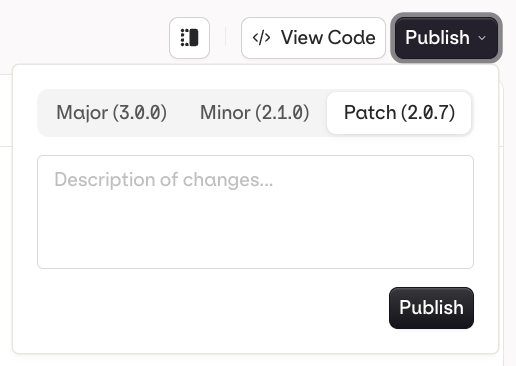 * **Patch** (e.g. `v1.0.0` to `v1.0.1`): small fixes, no behaviour change
* **Minor** (e.g. `v1.0.0` to `v1.1.0`): new functionality, backwards compatible
* **Major** (e.g. `v1.0.0` to `v2.0.0`): breaking change or significant rework
The **Versions** tab shows the full history with author and publish timestamp for each version.
* **Patch** (e.g. `v1.0.0` to `v1.0.1`): small fixes, no behaviour change
* **Minor** (e.g. `v1.0.0` to `v1.1.0`): new functionality, backwards compatible
* **Major** (e.g. `v1.0.0` to `v2.0.0`): breaking change or significant rework
The **Versions** tab shows the full history with author and publish timestamp for each version.
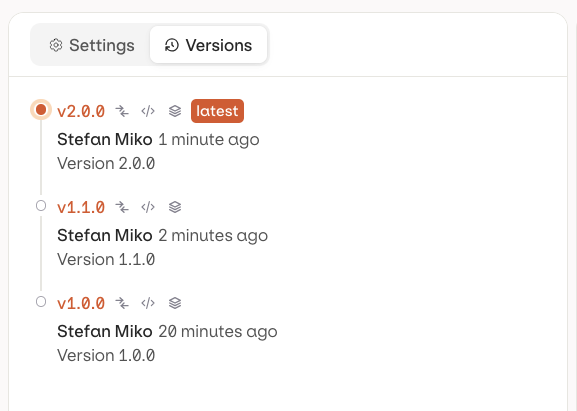 Each published version has three action buttons:
| Action | Icon | Description |
| ----------- | --------------------------- | ------------------------------------------------------------------------------------------------------ |
| Compare | | Open a diff view to see what changed between versions, and restore an older one |
| Code | | Load a code snippet to invoke the evaluator at this exact version |
| Environment | | Tag the version with an [Environment](/ai-studio/organization/environments) (e.g. production, staging) |
Reference a specific version by appending `@` and the version number: `my-evaluator@1.0.1`. Reference an environment tag directly: `my-evaluator@production`. Without a suffix, the latest published version is used.
### Restoring a Version
In **Compare** (see above), click Restore next to an older version to load it into the current working draft.
Restore does not publish automatically: the evaluator is loaded into the draft as unpublished changes on the **Settings** tab, and Publish still needs to be clicked for it to become a real version. Earlier versions are never deleted, so restoring is always reversible.
If there are unpublished changes already, a confirmation dialog asks for confirmation before overwriting them.
## List Evaluators
Install the SDK before using the Node.js or Python examples below:
```bash Node.js theme={"theme":{"light":"github-light","dark":"github-dark"}}
npm install @orq-ai/node
```
```bash Python theme={"theme":{"light":"github-light","dark":"github-dark"}}
pip install orq-ai-sdk
```
Use the [List Evaluators API](/reference/evals/get-all-evaluators):
```bash cURL theme={"theme":{"light":"github-light","dark":"github-dark"}}
curl --request GET \
--url https://my.orq.ai/v2/evaluators \
--header 'accept: application/json' \
--header "authorization: Bearer $ORQ_API_KEY"
```
```typescript TypeScript theme={"theme":{"light":"github-light","dark":"github-dark"}}
import { Orq } from "@orq-ai/node";
const orq = new Orq({ apiKey: process.env["ORQ_API_KEY"] ?? "" });
const result = await orq.evals.all({});
console.log(result);
```
```python Python theme={"theme":{"light":"github-light","dark":"github-dark"}}
from orq_ai_sdk import Orq
import os
with Orq(api_key=os.getenv("ORQ_API_KEY", "")) as orq:
res = orq.evals.all(limit=10)
print(res)
```
## Invoke an Evaluator
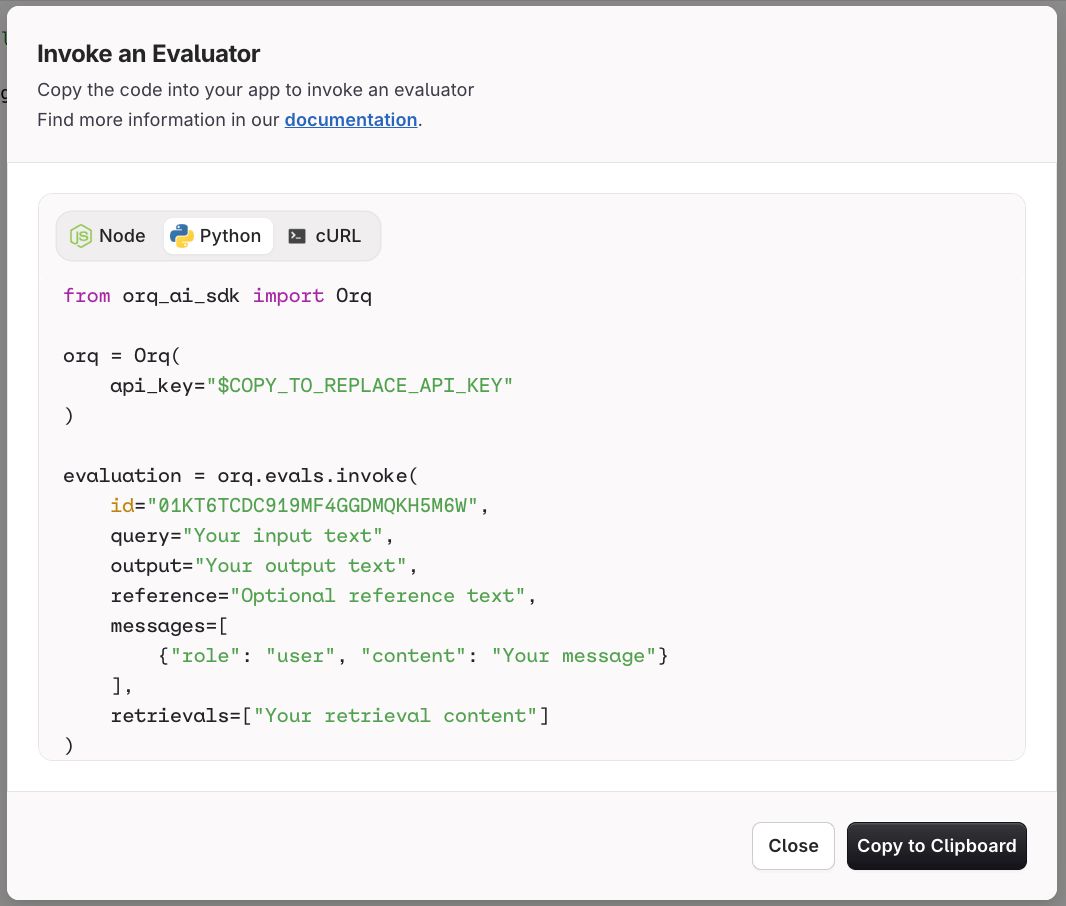
Fetch the evaluator ID from the [List Evaluators API](/reference/evals/get-all-evaluators), then invoke it. Use the **View Code** button on your evaluator page in the AI Studio to get a pre-filled snippet.
Each published version has three action buttons:
| Action | Icon | Description |
| ----------- | --------------------------- | ------------------------------------------------------------------------------------------------------ |
| Compare | | Open a diff view to see what changed between versions, and restore an older one |
| Code | | Load a code snippet to invoke the evaluator at this exact version |
| Environment | | Tag the version with an [Environment](/ai-studio/organization/environments) (e.g. production, staging) |
Reference a specific version by appending `@` and the version number: `my-evaluator@1.0.1`. Reference an environment tag directly: `my-evaluator@production`. Without a suffix, the latest published version is used.
### Restoring a Version
In **Compare** (see above), click Restore next to an older version to load it into the current working draft.
Restore does not publish automatically: the evaluator is loaded into the draft as unpublished changes on the **Settings** tab, and Publish still needs to be clicked for it to become a real version. Earlier versions are never deleted, so restoring is always reversible.
If there are unpublished changes already, a confirmation dialog asks for confirmation before overwriting them.
## List Evaluators
Install the SDK before using the Node.js or Python examples below:
```bash Node.js theme={"theme":{"light":"github-light","dark":"github-dark"}}
npm install @orq-ai/node
```
```bash Python theme={"theme":{"light":"github-light","dark":"github-dark"}}
pip install orq-ai-sdk
```
Use the [List Evaluators API](/reference/evals/get-all-evaluators):
```bash cURL theme={"theme":{"light":"github-light","dark":"github-dark"}}
curl --request GET \
--url https://my.orq.ai/v2/evaluators \
--header 'accept: application/json' \
--header "authorization: Bearer $ORQ_API_KEY"
```
```typescript TypeScript theme={"theme":{"light":"github-light","dark":"github-dark"}}
import { Orq } from "@orq-ai/node";
const orq = new Orq({ apiKey: process.env["ORQ_API_KEY"] ?? "" });
const result = await orq.evals.all({});
console.log(result);
```
```python Python theme={"theme":{"light":"github-light","dark":"github-dark"}}
from orq_ai_sdk import Orq
import os
with Orq(api_key=os.getenv("ORQ_API_KEY", "")) as orq:
res = orq.evals.all(limit=10)
print(res)
```
## Invoke an Evaluator
Fetch the evaluator ID from the [List Evaluators API](/reference/evals/get-all-evaluators), then invoke it. Use the **View Code** button on your evaluator page in the AI Studio to get a pre-filled snippet.
 Send the evaluated run under `context`. The field names match the prompt variables they fill, so `input.user_query` in the body is `{{input.user_query}}` in the prompt.
```bash cURL theme={"theme":{"light":"github-light","dark":"github-dark"}}
curl --request POST \
--url 'https://my.orq.ai/v3/evaluators//invoke' \
--header "Authorization: Bearer $ORQ_API_KEY" \
--header 'Content-Type: application/json' \
--data '{
"context": {
"input": {
"user_query": "What is the capital of France?",
"expected_output": "Paris"
},
"output": {
"response": "The capital of France is Paris."
}
}
}'
```
```typescript TypeScript theme={"theme":{"light":"github-light","dark":"github-dark"}}
import { Orq } from "@orq-ai/node";
const orq = new Orq({ apiKey: process.env["ORQ_API_KEY"] ?? "" });
const evaluation = await orq.evals.invoke({
id: "01JN5J8W4J5JP8ZSD0TADK11GJ",
invokeEvaluatorRequest: {
context: {
input: {
user_query: "What is the capital of France?",
expected_output: "Paris"
},
output: {
response: "The capital of France is Paris."
}
}
}
});
console.log(evaluation);
```
```python Python theme={"theme":{"light":"github-light","dark":"github-dark"}}
from orq_ai_sdk import Orq
import os
orq = Orq(api_key=os.getenv("ORQ_API_KEY", ""))
evaluation = orq.evals.invoke(
id="01JN5J8W4J5JP8ZSD0TADK11GJ",
context={
"input": {
"user_query": "What is the capital of France?",
"expected_output": "Paris",
},
"output": {"response": "The capital of France is Paris."},
},
)
print(evaluation)
```
The evaluator ID also accepts `@` or `@` to grade against a published version instead of the current one. A version is a semantic version string, such as `01JN5J8W4J5JP8ZSD0TADK11GJ@1.0.0`. An environment is the name a version is published to, such as `01JN5J8W4J5JP8ZSD0TADK11GJ@production`.
The flat fields `query`, `output`, `reference`, `messages` and `retrievals` are still accepted at the top level and map onto `context`: `query` fills `context.input.user_query`, `output` fills `context.output.response`, and `reference` fills `context.input.expected_output`. `messages` and `retrievals` keep their names. New integrations use `context`.
### Pass custom variables
Add a `variables` object to an evaluator invocation to provide template values. Variable names must be non-empty. Values can be any JSON value, including nested arrays and objects. Request values override evaluator defaults for matching keys.
```bash cURL theme={"theme":{"light":"github-light","dark":"github-dark"}}
curl 'https://my.orq.ai/v3/evaluators//invoke' \
-H "Authorization: Bearer $ORQ_API_KEY" \
-H 'Content-Type: application/json' \
-d '{
"query": "The customer received the wrong item.",
"output": "The order can be refunded.",
"variables": {
"locale": "en-US",
"tags": ["refund", "priority"],
"customer": {"tier": "gold", "verified": true}
}
}'
```
```typescript TypeScript theme={"theme":{"light":"github-light","dark":"github-dark"}}
import { Orq } from '@orq-ai/node';
const client = new Orq({ apiKey: process.env['ORQ_API_KEY'] ?? '' });
const evaluation = await client.evals.invoke({
id: '',
invokeEvaluatorRequest: {
query: 'The customer received the wrong item.',
output: 'The order can be refunded.',
variables: {
locale: 'en-US',
tags: ['refund', 'priority'],
customer: { tier: 'gold', verified: true },
},
},
});
console.log(evaluation);
```
```python Python theme={"theme":{"light":"github-light","dark":"github-dark"}}
from orq_ai_sdk import Orq
import os
client = Orq(api_key=os.getenv('ORQ_API_KEY', ''))
evaluation = client.evals.invoke(
id='',
query='The customer received the wrong item.',
output='The order can be refunded.',
variables={
'locale': 'en-US',
'tags': ['refund', 'priority'],
'customer': {'tier': 'gold', 'verified': True},
},
)
print(evaluation)
```
## Guardrail Error Response
When a guardrail evaluation fails, the status depends on the surface: `400` on the Responses endpoint and on the OpenAI-compatible chat completions endpoint, and `422` on the Anthropic- and Google-compatible endpoints and on the Agents and Deployments surfaces. The response body lists every guardrail that did not pass.
On the Responses endpoint, the OpenAI-compatible chat completions endpoint, and Deployments, a guardrail that exceeds its per-guardrail `timeout` returns HTTP `408` with `error.code` `guardrail_timeout`. See [Guardrail timeout](/ai-gateway/configuration/guardrails#timeout).
```json theme={"theme":{"light":"github-light","dark":"github-dark"}}
{
"code": 422,
"error": "Validation failed: Not all guardrails were met while validating the response.",
"message": "Validation failed: Not all guardrails were met while validating the response.",
"source": "system",
"guardrails": [
{
"id": "01KMR75R90XDA80020YT8MHP2W",
"status": "completed",
"started_at": "2026-03-27T17:58:55.330Z",
"finished_at": "2026-03-27T17:58:55.364Z",
"related_entities": [
{
"type": "evaluator",
"evaluator_id": "01KK9D8Z0JCEC1ASQJH8R28B57",
"evaluator_metric_name": "python_evaluator"
}
],
"passed": false,
"reason": null,
"evaluator_type": "output_guardrail",
"type": "boolean",
"value": false
}
]
}
```
| Field | Type | Description |
| ------------------ | -------------------------- | ---------------------------------------------------------------------------------------------------------------------- |
| `id` | string | Internal ID of the guardrail result. |
| `status` | string | Execution status: `"completed"` or `"failed"`. |
| `started_at` | string | ISO 8601 timestamp when the guardrail evaluation started. |
| `finished_at` | string | ISO 8601 timestamp when the guardrail evaluation finished. |
| `related_entities` | array | References to the evaluator that ran. Each entry contains `type`, `evaluator_id`, and `evaluator_metric_name`. |
| `passed` | boolean | `false` for every entry in this error response. |
| `reason` | string or null | Explanation of the failure, when provided by the evaluator. |
| `evaluator_type` | string | `"input_guardrail"` if the guardrail ran before the model. `"output_guardrail"` if the guardrail ran after generation. |
| `type` | string | The value type returned by the evaluator: `"boolean"`, `"number"`, or `"categorical"`. |
| `value` | boolean, number, or string | The raw value returned by the evaluator. |
```json theme={"theme":{"light":"github-light","dark":"github-dark"}}
{
"code": 422,
"error": "Validation failed: Not all guardrails were met while validating the messages.",
"message": "Validation failed: Not all guardrails were met while validating the messages.",
"source": "system"
}
```
The `guardrails` array is not included in Agent responses. Use [Traces](/ai-studio/observability/traces) in the **Orq.ai** Studio to identify which guardrail failed.
**When the evaluator fails to execute:** If a monitoring Evaluator fails to run, or exceeds its `timeout`, the generation proceeds without it. A Guardrail that cannot run, or that exceeds its `timeout`, blocks the request instead. Monitor skipped and failed executions through [Traces](/ai-studio/observability/traces).
**When an LLM guardrail's underlying model fails:** If the model powering an LLM guardrail is unavailable, **Orq.ai** fails the entire request for safety. Since the guardrail could not run, there is no way to know whether it would have blocked the generation.
## Evaluatorq
**Evaluatorq** is a dedicated SDK for running evaluations programmatically. It supports parallel job execution, flexible data sources (inline, CSV, Orq datasets), and syncs results to the **Orq.ai** AI Studio.
**Install:**
```bash Node.js theme={"theme":{"light":"github-light","dark":"github-dark"}}
npm install @orq-ai/evaluatorq
```
```bash Python theme={"theme":{"light":"github-light","dark":"github-dark"}}
pip install evaluatorq
```
**Usage example:**
```typescript TypeScript theme={"theme":{"light":"github-light","dark":"github-dark"}}
import { evaluatorq, job } from "@orq-ai/evaluatorq";
const textAnalyzer = job("text-analyzer", async (data) => {
const text = data.inputs.text;
return {
length: text.length,
wordCount: text.split(" ").length,
uppercase: text.toUpperCase(),
};
});
await evaluatorq("text-analysis", {
data: [
{ inputs: { text: "Hello world" } },
{ inputs: { text: "Testing evaluation" } },
],
jobs: [textAnalyzer],
evaluators: [
{
name: "length-check",
scorer: async ({ output }) => {
const passesCheck = output.length > 10;
return {
value: passesCheck ? 1 : 0,
explanation: passesCheck
? "Output length is sufficient"
: `Output too short (${output.length} chars, need >10)`,
};
},
},
],
});
```
```python Python theme={"theme":{"light":"github-light","dark":"github-dark"}}
import asyncio
from evaluatorq import evaluatorq, job, DataPoint, EvaluationResult
@job("text-analyzer")
async def text_analyzer(data: DataPoint, row: int):
text = data.inputs["text"]
return {
"length": len(text),
"word_count": len(text.split()),
"uppercase": text.upper(),
}
async def length_check_scorer(params):
output = params["output"]
passes_check = output["length"] > 10
return EvaluationResult(
value=1 if passes_check else 0,
explanation=(
"Output length is sufficient"
if passes_check
else f"Output too short ({output['length']} chars, need >10)"
)
)
async def main():
await evaluatorq(
"text-analysis",
data=[
DataPoint(inputs={"text": "Hello world"}),
DataPoint(inputs={"text": "Testing evaluation"}),
],
jobs=[text_analyzer],
evaluators=[{"name": "length-check", "scorer": length_check_scorer}],
)
if __name__ == "__main__":
asyncio.run(main())
```
See the [Python Evaluatorq](https://github.com/orq-ai/evaluatorq) and [TypeScript Evaluatorq](https://github.com/orq-ai/orqkit/tree/main/packages/evaluatorq) repositories for more.
Step-by-step walkthrough comparing agent variants with parallel evaluators, including DeepEval and Ragas integration.
Test agents through realistic multi-turn conversations using AI-generated personas, scenarios, and a judge.
Send the evaluated run under `context`. The field names match the prompt variables they fill, so `input.user_query` in the body is `{{input.user_query}}` in the prompt.
```bash cURL theme={"theme":{"light":"github-light","dark":"github-dark"}}
curl --request POST \
--url 'https://my.orq.ai/v3/evaluators//invoke' \
--header "Authorization: Bearer $ORQ_API_KEY" \
--header 'Content-Type: application/json' \
--data '{
"context": {
"input": {
"user_query": "What is the capital of France?",
"expected_output": "Paris"
},
"output": {
"response": "The capital of France is Paris."
}
}
}'
```
```typescript TypeScript theme={"theme":{"light":"github-light","dark":"github-dark"}}
import { Orq } from "@orq-ai/node";
const orq = new Orq({ apiKey: process.env["ORQ_API_KEY"] ?? "" });
const evaluation = await orq.evals.invoke({
id: "01JN5J8W4J5JP8ZSD0TADK11GJ",
invokeEvaluatorRequest: {
context: {
input: {
user_query: "What is the capital of France?",
expected_output: "Paris"
},
output: {
response: "The capital of France is Paris."
}
}
}
});
console.log(evaluation);
```
```python Python theme={"theme":{"light":"github-light","dark":"github-dark"}}
from orq_ai_sdk import Orq
import os
orq = Orq(api_key=os.getenv("ORQ_API_KEY", ""))
evaluation = orq.evals.invoke(
id="01JN5J8W4J5JP8ZSD0TADK11GJ",
context={
"input": {
"user_query": "What is the capital of France?",
"expected_output": "Paris",
},
"output": {"response": "The capital of France is Paris."},
},
)
print(evaluation)
```
The evaluator ID also accepts `@` or `@` to grade against a published version instead of the current one. A version is a semantic version string, such as `01JN5J8W4J5JP8ZSD0TADK11GJ@1.0.0`. An environment is the name a version is published to, such as `01JN5J8W4J5JP8ZSD0TADK11GJ@production`.
The flat fields `query`, `output`, `reference`, `messages` and `retrievals` are still accepted at the top level and map onto `context`: `query` fills `context.input.user_query`, `output` fills `context.output.response`, and `reference` fills `context.input.expected_output`. `messages` and `retrievals` keep their names. New integrations use `context`.
### Pass custom variables
Add a `variables` object to an evaluator invocation to provide template values. Variable names must be non-empty. Values can be any JSON value, including nested arrays and objects. Request values override evaluator defaults for matching keys.
```bash cURL theme={"theme":{"light":"github-light","dark":"github-dark"}}
curl 'https://my.orq.ai/v3/evaluators//invoke' \
-H "Authorization: Bearer $ORQ_API_KEY" \
-H 'Content-Type: application/json' \
-d '{
"query": "The customer received the wrong item.",
"output": "The order can be refunded.",
"variables": {
"locale": "en-US",
"tags": ["refund", "priority"],
"customer": {"tier": "gold", "verified": true}
}
}'
```
```typescript TypeScript theme={"theme":{"light":"github-light","dark":"github-dark"}}
import { Orq } from '@orq-ai/node';
const client = new Orq({ apiKey: process.env['ORQ_API_KEY'] ?? '' });
const evaluation = await client.evals.invoke({
id: '',
invokeEvaluatorRequest: {
query: 'The customer received the wrong item.',
output: 'The order can be refunded.',
variables: {
locale: 'en-US',
tags: ['refund', 'priority'],
customer: { tier: 'gold', verified: true },
},
},
});
console.log(evaluation);
```
```python Python theme={"theme":{"light":"github-light","dark":"github-dark"}}
from orq_ai_sdk import Orq
import os
client = Orq(api_key=os.getenv('ORQ_API_KEY', ''))
evaluation = client.evals.invoke(
id='',
query='The customer received the wrong item.',
output='The order can be refunded.',
variables={
'locale': 'en-US',
'tags': ['refund', 'priority'],
'customer': {'tier': 'gold', 'verified': True},
},
)
print(evaluation)
```
## Guardrail Error Response
When a guardrail evaluation fails, the status depends on the surface: `400` on the Responses endpoint and on the OpenAI-compatible chat completions endpoint, and `422` on the Anthropic- and Google-compatible endpoints and on the Agents and Deployments surfaces. The response body lists every guardrail that did not pass.
On the Responses endpoint, the OpenAI-compatible chat completions endpoint, and Deployments, a guardrail that exceeds its per-guardrail `timeout` returns HTTP `408` with `error.code` `guardrail_timeout`. See [Guardrail timeout](/ai-gateway/configuration/guardrails#timeout).
```json theme={"theme":{"light":"github-light","dark":"github-dark"}}
{
"code": 422,
"error": "Validation failed: Not all guardrails were met while validating the response.",
"message": "Validation failed: Not all guardrails were met while validating the response.",
"source": "system",
"guardrails": [
{
"id": "01KMR75R90XDA80020YT8MHP2W",
"status": "completed",
"started_at": "2026-03-27T17:58:55.330Z",
"finished_at": "2026-03-27T17:58:55.364Z",
"related_entities": [
{
"type": "evaluator",
"evaluator_id": "01KK9D8Z0JCEC1ASQJH8R28B57",
"evaluator_metric_name": "python_evaluator"
}
],
"passed": false,
"reason": null,
"evaluator_type": "output_guardrail",
"type": "boolean",
"value": false
}
]
}
```
| Field | Type | Description |
| ------------------ | -------------------------- | ---------------------------------------------------------------------------------------------------------------------- |
| `id` | string | Internal ID of the guardrail result. |
| `status` | string | Execution status: `"completed"` or `"failed"`. |
| `started_at` | string | ISO 8601 timestamp when the guardrail evaluation started. |
| `finished_at` | string | ISO 8601 timestamp when the guardrail evaluation finished. |
| `related_entities` | array | References to the evaluator that ran. Each entry contains `type`, `evaluator_id`, and `evaluator_metric_name`. |
| `passed` | boolean | `false` for every entry in this error response. |
| `reason` | string or null | Explanation of the failure, when provided by the evaluator. |
| `evaluator_type` | string | `"input_guardrail"` if the guardrail ran before the model. `"output_guardrail"` if the guardrail ran after generation. |
| `type` | string | The value type returned by the evaluator: `"boolean"`, `"number"`, or `"categorical"`. |
| `value` | boolean, number, or string | The raw value returned by the evaluator. |
```json theme={"theme":{"light":"github-light","dark":"github-dark"}}
{
"code": 422,
"error": "Validation failed: Not all guardrails were met while validating the messages.",
"message": "Validation failed: Not all guardrails were met while validating the messages.",
"source": "system"
}
```
The `guardrails` array is not included in Agent responses. Use [Traces](/ai-studio/observability/traces) in the **Orq.ai** Studio to identify which guardrail failed.
**When the evaluator fails to execute:** If a monitoring Evaluator fails to run, or exceeds its `timeout`, the generation proceeds without it. A Guardrail that cannot run, or that exceeds its `timeout`, blocks the request instead. Monitor skipped and failed executions through [Traces](/ai-studio/observability/traces).
**When an LLM guardrail's underlying model fails:** If the model powering an LLM guardrail is unavailable, **Orq.ai** fails the entire request for safety. Since the guardrail could not run, there is no way to know whether it would have blocked the generation.
## Evaluatorq
**Evaluatorq** is a dedicated SDK for running evaluations programmatically. It supports parallel job execution, flexible data sources (inline, CSV, Orq datasets), and syncs results to the **Orq.ai** AI Studio.
**Install:**
```bash Node.js theme={"theme":{"light":"github-light","dark":"github-dark"}}
npm install @orq-ai/evaluatorq
```
```bash Python theme={"theme":{"light":"github-light","dark":"github-dark"}}
pip install evaluatorq
```
**Usage example:**
```typescript TypeScript theme={"theme":{"light":"github-light","dark":"github-dark"}}
import { evaluatorq, job } from "@orq-ai/evaluatorq";
const textAnalyzer = job("text-analyzer", async (data) => {
const text = data.inputs.text;
return {
length: text.length,
wordCount: text.split(" ").length,
uppercase: text.toUpperCase(),
};
});
await evaluatorq("text-analysis", {
data: [
{ inputs: { text: "Hello world" } },
{ inputs: { text: "Testing evaluation" } },
],
jobs: [textAnalyzer],
evaluators: [
{
name: "length-check",
scorer: async ({ output }) => {
const passesCheck = output.length > 10;
return {
value: passesCheck ? 1 : 0,
explanation: passesCheck
? "Output length is sufficient"
: `Output too short (${output.length} chars, need >10)`,
};
},
},
],
});
```
```python Python theme={"theme":{"light":"github-light","dark":"github-dark"}}
import asyncio
from evaluatorq import evaluatorq, job, DataPoint, EvaluationResult
@job("text-analyzer")
async def text_analyzer(data: DataPoint, row: int):
text = data.inputs["text"]
return {
"length": len(text),
"word_count": len(text.split()),
"uppercase": text.upper(),
}
async def length_check_scorer(params):
output = params["output"]
passes_check = output["length"] > 10
return EvaluationResult(
value=1 if passes_check else 0,
explanation=(
"Output length is sufficient"
if passes_check
else f"Output too short ({output['length']} chars, need >10)"
)
)
async def main():
await evaluatorq(
"text-analysis",
data=[
DataPoint(inputs={"text": "Hello world"}),
DataPoint(inputs={"text": "Testing evaluation"}),
],
jobs=[text_analyzer],
evaluators=[{"name": "length-check", "scorer": length_check_scorer}],
)
if __name__ == "__main__":
asyncio.run(main())
```
See the [Python Evaluatorq](https://github.com/orq-ai/evaluatorq) and [TypeScript Evaluatorq](https://github.com/orq-ai/orqkit/tree/main/packages/evaluatorq) repositories for more.
Step-by-step walkthrough comparing agent variants with parallel evaluators, including DeepEval and Ragas integration.
Test agents through realistic multi-turn conversations using AI-generated personas, scenarios, and a judge.