> ## Documentation Index
> Fetch the complete documentation index at: https://docs.orq.ai/llms.txt
> Use this file to discover all available pages before exploring further.
# Management Keys
> Create workspace-scoped management keys in Orq.ai to authenticate admin operations on API keys, budgets, projects, and workspace settings.
## Overview
Management Keys are only available to workspace admins. The **Management Keys** page is not visible to non-admin members.
**Management Keys** are workspace-scoped tokens for authenticating workspace administration operations. They can manage **API keys**, **Budgets**, **Projects**, **Smart Routers**, **Evaluators**, **Workspace models**, and **Workspace Settings**.
Management Keys cannot be used to query models or agents. Use a standard [API Key](/ai-studio/organization/api-keys) for inference and product endpoints.
### Use cases
* Automating workspace provisioning via the API.
* Delegating API key rotation to a deployment pipeline without granting full admin access.
* Letting a billing automation script read and update Budgets without exposing API key management.
### Workspace administration endpoints
Standard API keys are project-scoped. Use a Management Key for these workspace administration endpoints:
| Endpoint family | Management Key access |
| ------------------------ | -------------------------------------------------------------------------------------------------------------- |
| `/v2/api-keys*` | List, retrieve, create, update, and delete API keys. `/v2/api-keys/capabilities` is public. |
| `/v2/budgets*` | List, retrieve, create, update, reset, and delete Budgets. |
| `/v2/projects*` | Manage Projects across the workspace. A project-scoped API key can only list or retrieve its selected Project. |
| `/v2/smart-routers*` | List, retrieve, create, update, enable, disable, and delete Smart Routers. |
| `/v2/evaluators*` | List, retrieve, create, update, and delete Evaluators. |
| `/v2/workspace-settings` | Retrieve or update Workspace Settings according to the key capability. |
Notifiers are intentionally not listed here: their routes are project-scoped and do not require a Management Key. Project-scoped API keys can access the Notifiers API for their selected project.
## View Management Keys
Navigate to **Settings** → **Organization** → **Management Keys** to view all keys in the workspace.
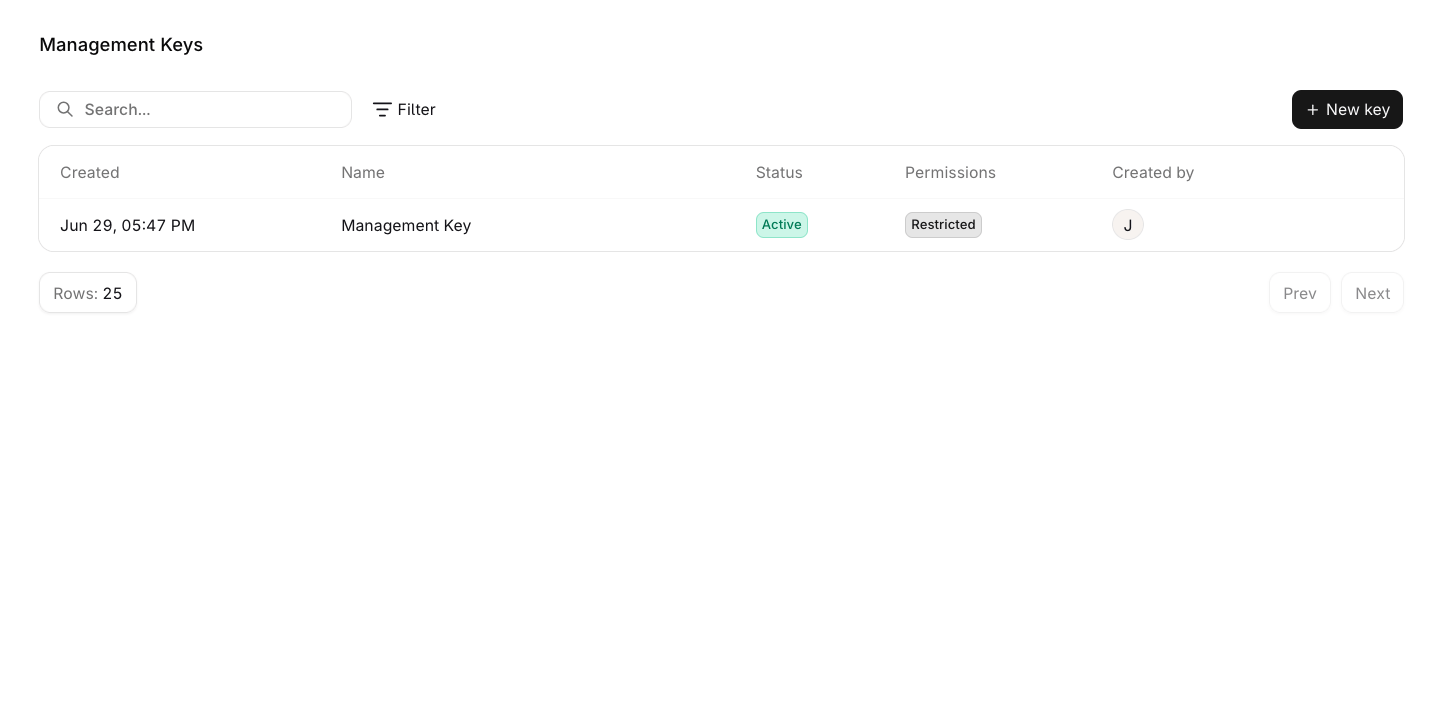 Click any row to open the edit panel and update the key's name, permissions, or expiration date. Hover a row and click for additional options:
* Edit: open the edit panel to update the key's name, permissions, or expiration date.
* Duplicate: create a new key with the same permissions.
* Delete: permanently remove the key from the workspace.
## Create a Management Key
Navigate to **Settings** → **Organization** → **Management Keys** and click New key.
Click any row to open the edit panel and update the key's name, permissions, or expiration date. Hover a row and click for additional options:
* Edit: open the edit panel to update the key's name, permissions, or expiration date.
* Duplicate: create a new key with the same permissions.
* Delete: permanently remove the key from the workspace.
## Create a Management Key
Navigate to **Settings** → **Organization** → **Management Keys** and click New key.
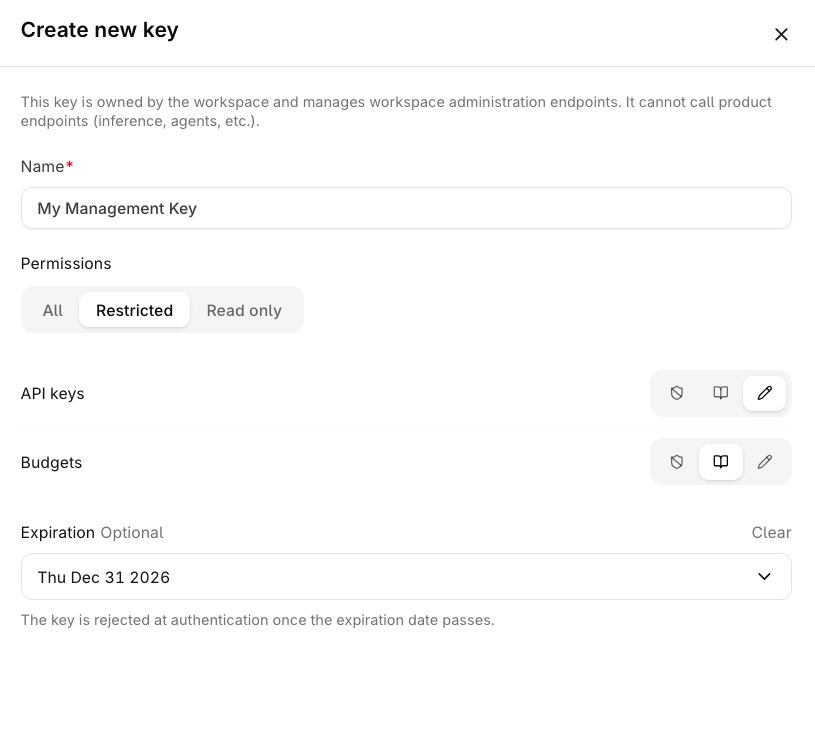 Enter a **Name** for the key (required, max 128 characters).
Select a **Permissions** mode, default is All. See [Permission modes](#permission-modes) below.
Set an **Expiration** date if the key should stop authenticating after a certain date.
Click Create key. A **Save your key** panel appears showing the token.
The token is only shown once. Store it securely before closing this panel. It cannot be retrieved afterwards.
### Permission modes
| Mode | Description |
| -------------- | -------------------------------------------------------------------------------------------------- |
| **All** | Full read and write access to all capabilities. |
| **Restricted** | Configure access per capability. Each capability can be set to None, Read, or Write independently. |
| **Read only** | Read access to all capabilities. |
### Capabilities
| Capability | None | Read | Write |
| ---------------------- | --------------------------------- | ------------------------------------------------------------------------------------------------------- | ------------------------------------------------------------------------------------ |
| **API keys** | No access. | List and view workspace **API keys**. | List, view, create, update, revoke, and delete workspace **API keys**. |
| **Budgets** | No access. | List and view workspace **Budgets**. | List, view, create, update, reset, and delete workspace **Budgets**. |
| **Projects** | No access. | List and view workspace **Projects**. | List, view, create, update, and delete workspace **Projects**. |
| **Smart Routers** | No access. | List and view workspace **Smart Routers**. | List, view, create, update, enable, disable, and delete workspace **Smart Routers**. |
| **Evaluators** | No access. | List and view workspace **Evaluators**. | List, view, create, update, and delete workspace **Evaluators**. |
| **Workspace models** | No access. | No list or view endpoints exist for workspace **models**; read access alone performs no API operations. | Enable and disable workspace **models** and manage their sharing. |
| **Workspace Settings** | No access. | View workspace settings. | View and update workspace settings. |
Management Keys are not available through MCP. Use the REST API to manage keys programmatically. See [Manage keys programmatically](/ai-gateway/configuration/api-keys#manage-keys-programmatically) for the key lifecycle, permission model, and SDK examples.
Enter a **Name** for the key (required, max 128 characters).
Select a **Permissions** mode, default is All. See [Permission modes](#permission-modes) below.
Set an **Expiration** date if the key should stop authenticating after a certain date.
Click Create key. A **Save your key** panel appears showing the token.
The token is only shown once. Store it securely before closing this panel. It cannot be retrieved afterwards.
### Permission modes
| Mode | Description |
| -------------- | -------------------------------------------------------------------------------------------------- |
| **All** | Full read and write access to all capabilities. |
| **Restricted** | Configure access per capability. Each capability can be set to None, Read, or Write independently. |
| **Read only** | Read access to all capabilities. |
### Capabilities
| Capability | None | Read | Write |
| ---------------------- | --------------------------------- | ------------------------------------------------------------------------------------------------------- | ------------------------------------------------------------------------------------ |
| **API keys** | No access. | List and view workspace **API keys**. | List, view, create, update, revoke, and delete workspace **API keys**. |
| **Budgets** | No access. | List and view workspace **Budgets**. | List, view, create, update, reset, and delete workspace **Budgets**. |
| **Projects** | No access. | List and view workspace **Projects**. | List, view, create, update, and delete workspace **Projects**. |
| **Smart Routers** | No access. | List and view workspace **Smart Routers**. | List, view, create, update, enable, disable, and delete workspace **Smart Routers**. |
| **Evaluators** | No access. | List and view workspace **Evaluators**. | List, view, create, update, and delete workspace **Evaluators**. |
| **Workspace models** | No access. | No list or view endpoints exist for workspace **models**; read access alone performs no API operations. | Enable and disable workspace **models** and manage their sharing. |
| **Workspace Settings** | No access. | View workspace settings. | View and update workspace settings. |
Management Keys are not available through MCP. Use the REST API to manage keys programmatically. See [Manage keys programmatically](/ai-gateway/configuration/api-keys#manage-keys-programmatically) for the key lifecycle, permission model, and SDK examples.