> ## Documentation Index
> Fetch the complete documentation index at: https://docs.orq.ai/llms.txt
> Use this file to discover all available pages before exploring further.
# Release 3.13
> Release 3.13 adds Claude Haiku 4.5 to the AI Router and introduces a verified n8n integration for workflow automation with 1,000+ apps.
Claude Haiku 4.5, Anthropic's latest AI Model is now available in the [AI Router](/docs/model-garden/overview).
Orq.ai is now available as a verified integration on [n8n](https://n8n.io), the workflow automation platform trusted by technical teams worldwide. Connect your **Orq.ai** [Deployments](/docs/deployments/overview) with over 1,000 apps, services, and data sources to build AI-powered automations.
## What's New
**Verified n8n Node**
Build sophisticated workflow automations by connecting Orq.ai directly into your n8n workflows. The integration is built and maintained by Orq.ai and verified by n8n, ensuring reliability and security.
**Key Capabilities:**
* **Seamless Deployment Integration**: Invoke any Orq [Deployment](/docs/deployments/overview) directly from your n8n workflows
* **Knowledge Base Search**: Search through [Knowledge Bases](/docs/knowledge/overview) and retrieve relevant content.
* **1,000+ App Connections**: Connect your LLM applications with popular tools including databases, APIs, CRMs, messaging platforms, and more.
## Use Cases
* Automate content generation workflows across multiple platforms.
* Build intelligent data processing pipelines with RAG-enabled Deployments.
* Orchestrate complex multi-step AI workflows with conditional logic.
* Integrate LLM outputs with CRMs, databases, and notification systems.
## Getting Started
1. Install the Orq Deployment node in your n8n instance (requires owner permissions).
2. Configure authentication with your Orq.ai [API Key](/docs/ai-studio/organization/api-keys).
3. Add a Orq Deployment node or Knowledge Base node to your n8n workflow.
4. Connect with other n8n nodes to build complete automations
Learn more about the integration on [the n8n Integration Page](https://n8n.io/integrations/orq-deployment/)
Read the [Github Repository for the n8n node](https://github.com/orq-ai/orqkit/tree/main/packages/n8n-nodes-orq).
We've introduced a new [**Tools API**](/docs/tools/overview), making it easier to integrate and manage custom tools programmatically.
#### What’s new
* **HTTP Tools** – External API integrations with templating & authentication.
* URL templates with `{{parameter}}` substitution
* Support for HTTP methods (GET, POST, PUT, DELETE, etc.)
* Custom headers (including authentication)
* Parameter definitions with types, descriptions, default values
* Control over which parameters are visible to the LLM (`send_to_model`)
* **Function Tools** – Define tool schemas via API (same as in the UI).
* OpenAPI-style schemas for custom business logic
* Function name, description, parameters
* Strict parameter validation
* Optional manual approval before execution
* **Code Tools (Python)** – Run custom Python code in a secure sandbox.
* Define parameters in JSON Schema
* Access `params` variable for LLM-provided inputs
* Supports return value processing & error handling
* Fully isolated execution environment
We've just introduced our new [**Memory Stores API**](/reference/memory-stores/list-memory-stores), enabling persistent, entity-based memory across conversations so your agents can recall context and build more intelligent interactions.
## Key Features
### Persistent & Isolated Memory
* **Entity-based Isolation**: Use `entity_id` to scope memory per user, session, or organization.
* **Multi-Tenant Support**: Secure separation of data across entities.
### Structured Memory Storage
* [**Memory Stores**](/docs/agents/agent-api#memory-management): Named containers for storing different types of contextual data.
* **Built-in Tools**: Automatic read, write, and query operations for seamless integration.
### Agent Memory Workflow
* **Discover First**: Agents must use `retrieve_memory_stores` to discover available memory before interacting with them.
* **Query Smartly**: Once discovered, use `query_memory_store` to fetch relevant information before responding.
* **System Prompt Guidance**: Example:
> "Use retrieve\_memory\_stores to see what memory stores are available, then use query\_memory\_store to search for relevant information before responding."
### Streaming & Entity Tracking
* **Streaming Support**: Use `entity_id` for real-time memory tracking during ongoing conversations.
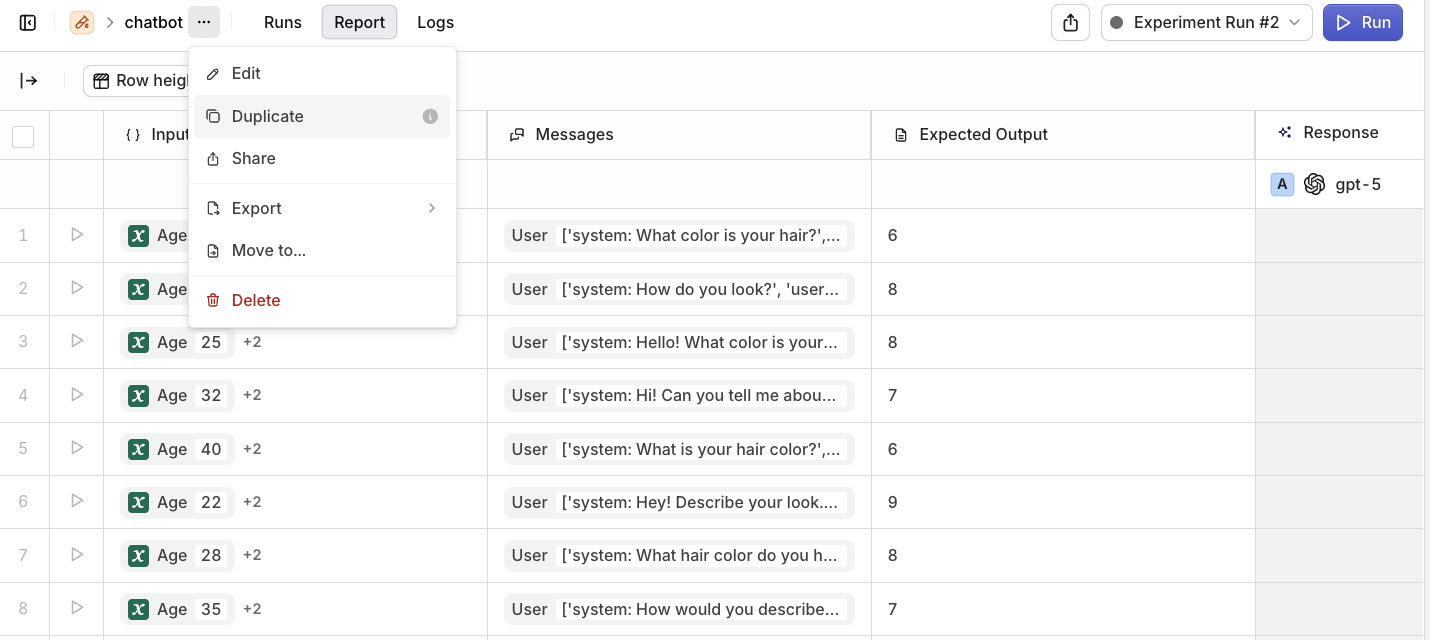 You can now **duplicate an existing experiment** and run it on a new dataset with the same configuration. This makes it easy to reuse setups and compare results across datasets without manually recreating settings.
To learn more about setting up and running experiments, see [Experiments](/docs/experiments/overview)
Claude Sonnet 4.5, Anthropic's latest AI Model is now available in the [AI Router](/docs/model-garden/overview).
You can now **duplicate an existing experiment** and run it on a new dataset with the same configuration. This makes it easy to reuse setups and compare results across datasets without manually recreating settings.
To learn more about setting up and running experiments, see [Experiments](/docs/experiments/overview)
Claude Sonnet 4.5, Anthropic's latest AI Model is now available in the [AI Router](/docs/model-garden/overview).
 We've just delivered our new **Agents Beta API** to build single and multi-agent systems, making it easier than ever to build and run powerful agents.
## Key Features
### Built on Modern Standards
[**Using A2A Protocol**](https://a2a-protocol.org/latest/) for reliable multi-agent coordination
### Intelligent Memory & Context
* [**Memory Stores**](/docs/agents/agent-api#memory-management): Persistent context across conversations with entity-based isolation.
* [**Knowledge Base**](/docs/knowledge/overview): Ground responses in your data with dynamic discovery and querying
### Multi-Modal Processing
* **File Processing** - Handle images and PDFs with support varying per given model
* **Search & Web Scraping** - Bring in real-time insights with built-in search and scraping tools
### Flexible Tool Ecosystem
* **HTTP Tools** - Seamless external API integrations with parameter templating and authentication
* **Function Tools** - Custom business logic and access to internal systems with OpenAI function calling schema validation
* **Code Tools** - Custom Python logic and transformations in secure sandbox environments
### Architecture
* **Multi-Agent Systems** - Build sophisticated hierarchies with specialized sub-agents and intelligent delegation.
* **Synchronous and streaming endpoints** for different use cases.
Orq handles memory, orchestration, and execution so you can focus on your agent’s role and behavior.
## Example
Initiate an Agent call with a single call to the `/v2/agents/run` API as follow:
```bash cURL theme={"theme":{"light":"github-light","dark":"github-dark"}}
curl --location 'https://api.orq.ai/v2/agents/stream-run' \
--header 'Content-Type: application/json' \
--header 'Authorization: $ORQ_API_KEY' \
--data '{
"key": "simple-agent-1",
"role": "Assistant",
"description": "A helpful assistant for general tasks",
"instructions": "Be helpful and concise",
"settings": {
"max_iterations": 3,
"max_execution_time": 300,
"tools": [
{
"type": "current_date"
}
]
},
"message": {
"role": "user",
"parts": [
{
"kind": "text",
"text": "What'\''s today'\''s date and day of the week?"
}
]
},
"model": "openai/gpt-4o",
"path": "Default/agents",
"memory_stores": [],
"team_of_agents": []
}'
```
To learn more about agents, see [Agents](/docs/agents/overview) and browse through the advanced usages of our new API.
We've just delivered our new **Agents Beta API** to build single and multi-agent systems, making it easier than ever to build and run powerful agents.
## Key Features
### Built on Modern Standards
[**Using A2A Protocol**](https://a2a-protocol.org/latest/) for reliable multi-agent coordination
### Intelligent Memory & Context
* [**Memory Stores**](/docs/agents/agent-api#memory-management): Persistent context across conversations with entity-based isolation.
* [**Knowledge Base**](/docs/knowledge/overview): Ground responses in your data with dynamic discovery and querying
### Multi-Modal Processing
* **File Processing** - Handle images and PDFs with support varying per given model
* **Search & Web Scraping** - Bring in real-time insights with built-in search and scraping tools
### Flexible Tool Ecosystem
* **HTTP Tools** - Seamless external API integrations with parameter templating and authentication
* **Function Tools** - Custom business logic and access to internal systems with OpenAI function calling schema validation
* **Code Tools** - Custom Python logic and transformations in secure sandbox environments
### Architecture
* **Multi-Agent Systems** - Build sophisticated hierarchies with specialized sub-agents and intelligent delegation.
* **Synchronous and streaming endpoints** for different use cases.
Orq handles memory, orchestration, and execution so you can focus on your agent’s role and behavior.
## Example
Initiate an Agent call with a single call to the `/v2/agents/run` API as follow:
```bash cURL theme={"theme":{"light":"github-light","dark":"github-dark"}}
curl --location 'https://api.orq.ai/v2/agents/stream-run' \
--header 'Content-Type: application/json' \
--header 'Authorization: $ORQ_API_KEY' \
--data '{
"key": "simple-agent-1",
"role": "Assistant",
"description": "A helpful assistant for general tasks",
"instructions": "Be helpful and concise",
"settings": {
"max_iterations": 3,
"max_execution_time": 300,
"tools": [
{
"type": "current_date"
}
]
},
"message": {
"role": "user",
"parts": [
{
"kind": "text",
"text": "What'\''s today'\''s date and day of the week?"
}
]
},
"model": "openai/gpt-4o",
"path": "Default/agents",
"memory_stores": [],
"team_of_agents": []
}'
```
To learn more about agents, see [Agents](/docs/agents/overview) and browse through the advanced usages of our new API.