> ## Documentation Index
> Fetch the complete documentation index at: https://docs.orq.ai/llms.txt
> Use this file to discover all available pages before exploring further.
# Release 4.2
> Release 4.2 launches the sovereign AI Router with EU data residency, single-key access to 300+ models, VPC deployment, and enterprise audit logs.
Running AI workloads means navigating a patchwork of provider endpoints, data residency requirements, and GDPR considerations. The AI Router gives you a single, EU-hosted gateway to route traffic across models and providers while keeping data where it needs to stay.
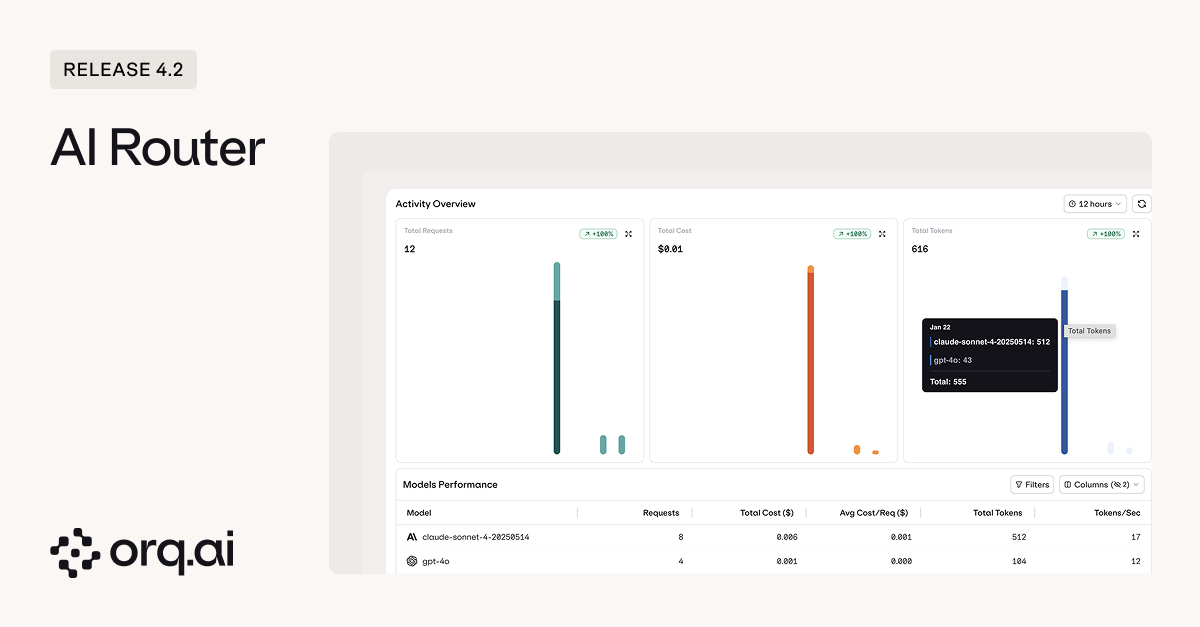 **Key Features:**
* **EU data residency** — route AI traffic through European infrastructure, simplifying GDPR compliance without sacrificing model choice.
* [**One key, 300+ models**](https://docs.orq.ai/docs/proxy/supported-models) — a single Router API key gives developers access to 20+ model providers without managing separate credentials for each.
* [**Centralized key management**](https://docs.orq.ai/docs/ai-gateway/api-keys) — create Router API keys scoped by project, environment, or use case.
* [**Credit limits**](https://docs.orq.ai/docs/ai-gateway/api-keys) — set spend caps per key to prevent runaway costs before they happen.
* **Key expiration** — issue time-limited keys to external clients or contractors that automatically expire, so you never have to remember to revoke them.
* **Air-gapped VPC deployment** — deploy the AI Router within your own virtual private cloud for complete network isolation and control.
* [**Dedicated Traces view**](https://docs.orq.ai/docs/router/traces) — see every request routed through the AI Router in one place, no manual filtering across projects required.
* **Usage and spend dashboard** — track tokens, latency, and costs across teams and applications from a single view.
Learn how to configure the AI Router and manage API keys in the [AI Router Documentation.](https://docs.orq.ai/docs/router/using-the-router)
When something changes in production, you need to know who did it and when. Audit Logs give you a complete record of every action across your organization: API key creation, deployment changes, team member modifications, dataset updates, all in one place.
**Key Features:**
* **EU data residency** — route AI traffic through European infrastructure, simplifying GDPR compliance without sacrificing model choice.
* [**One key, 300+ models**](https://docs.orq.ai/docs/proxy/supported-models) — a single Router API key gives developers access to 20+ model providers without managing separate credentials for each.
* [**Centralized key management**](https://docs.orq.ai/docs/ai-gateway/api-keys) — create Router API keys scoped by project, environment, or use case.
* [**Credit limits**](https://docs.orq.ai/docs/ai-gateway/api-keys) — set spend caps per key to prevent runaway costs before they happen.
* **Key expiration** — issue time-limited keys to external clients or contractors that automatically expire, so you never have to remember to revoke them.
* **Air-gapped VPC deployment** — deploy the AI Router within your own virtual private cloud for complete network isolation and control.
* [**Dedicated Traces view**](https://docs.orq.ai/docs/router/traces) — see every request routed through the AI Router in one place, no manual filtering across projects required.
* **Usage and spend dashboard** — track tokens, latency, and costs across teams and applications from a single view.
Learn how to configure the AI Router and manage API keys in the [AI Router Documentation.](https://docs.orq.ai/docs/router/using-the-router)
When something changes in production, you need to know who did it and when. Audit Logs give you a complete record of every action across your organization: API key creation, deployment changes, team member modifications, dataset updates, all in one place.
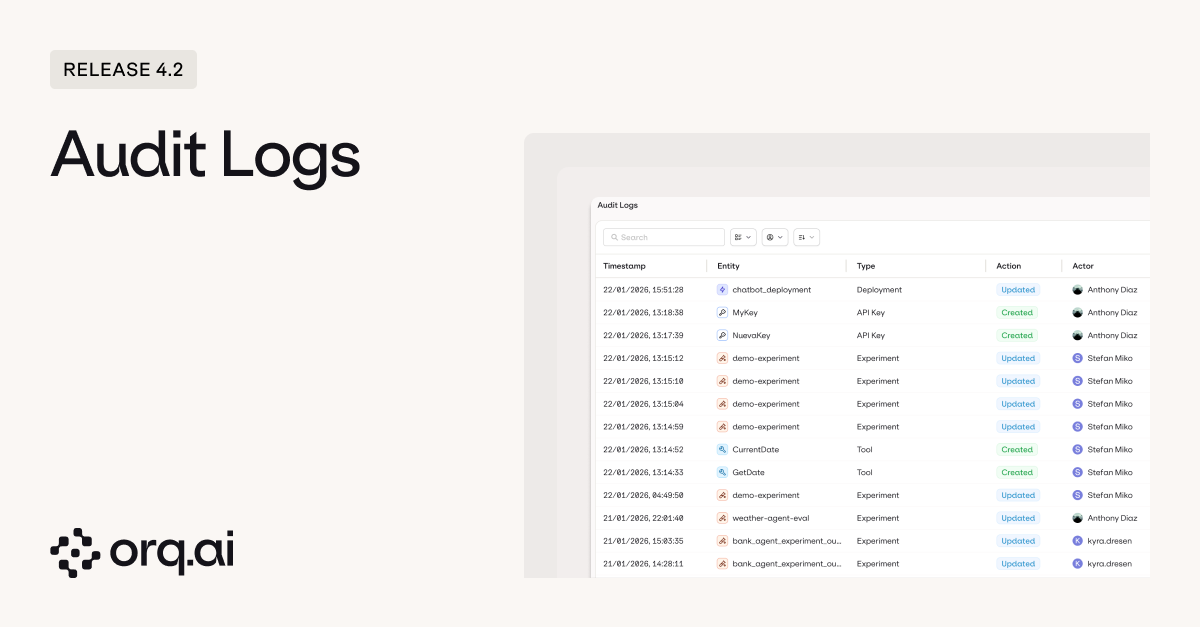 **What's Tracked:**
* [**Every action, timestamped**](https://docs.orq.ai/docs/ai-studio/organization/audit-logs) including Created, Updated, Deleted, and Revoked events across all entity types such as API Keys, Agents, Experiments, and Team Members.
* **Full actor attribution** so you always know who made the change, not just what changed.
* [**Filterable by entity type and actor**](https://docs.orq.ai/docs/ai-studio/organization/audit-logs#filter-options) to quickly narrow down exactly what you're looking for.
* **Configurable retention** with custom TTL settings based on your compliance requirements.
Whether it's security reviews, compliance audits, or just figuring out why something broke on Friday afternoon, the audit trail is there when you need it.
Access Audit Logs from Organization > Audit Logs. Learn more in the [Audit Logs Documentation](https://docs.orq.ai/docs/ai-studio/organization/audit-logs).
Debugging agents used to mean diving into the global Traces view and manually filtering down to the agent you care about. Now every agent has its own dedicated trace view, showing all executions for that agent with the full breakdown of what happened and why.
**What's Tracked:**
* [**Every action, timestamped**](https://docs.orq.ai/docs/ai-studio/organization/audit-logs) including Created, Updated, Deleted, and Revoked events across all entity types such as API Keys, Agents, Experiments, and Team Members.
* **Full actor attribution** so you always know who made the change, not just what changed.
* [**Filterable by entity type and actor**](https://docs.orq.ai/docs/ai-studio/organization/audit-logs#filter-options) to quickly narrow down exactly what you're looking for.
* **Configurable retention** with custom TTL settings based on your compliance requirements.
Whether it's security reviews, compliance audits, or just figuring out why something broke on Friday afternoon, the audit trail is there when you need it.
Access Audit Logs from Organization > Audit Logs. Learn more in the [Audit Logs Documentation](https://docs.orq.ai/docs/ai-studio/organization/audit-logs).
Debugging agents used to mean diving into the global Traces view and manually filtering down to the agent you care about. Now every agent has its own dedicated trace view, showing all executions for that agent with the full breakdown of what happened and why.
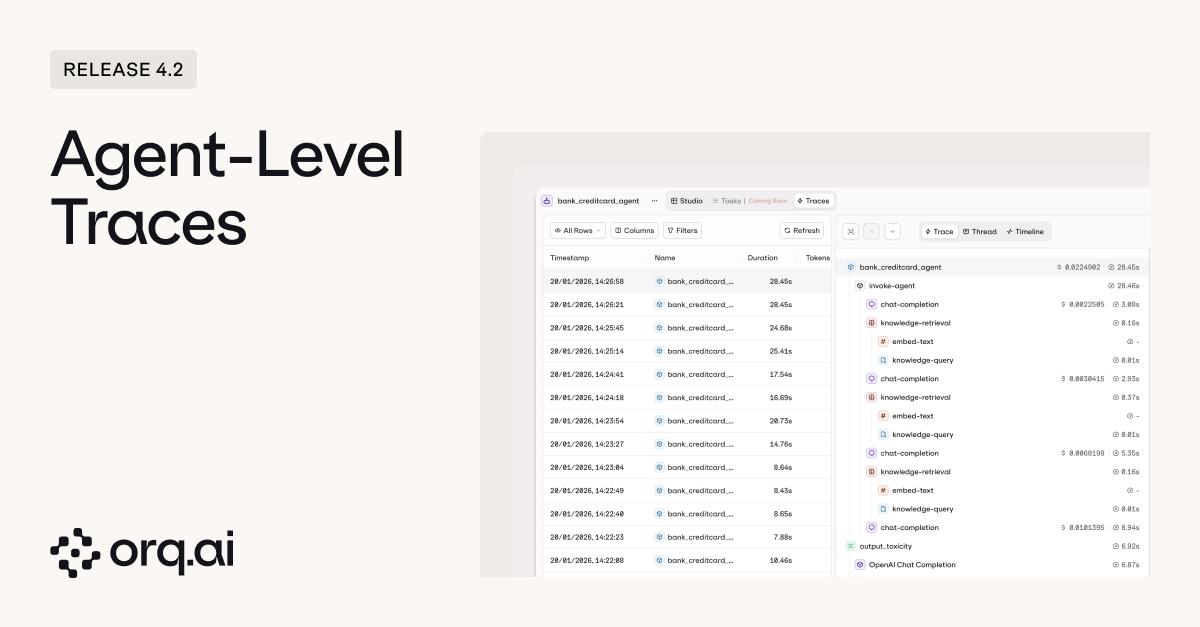 **What's New:**
* [**Traces scoped to the agent**](https://docs.orq.ai/docs/agents/agent-studio#agent-traces) so you see every execution for that specific agent without manual filtering. Apply additional filters from there to narrow down further.
* **Full execution visibility** showing each step in the agent's reasoning, every tool call with its parameters, and the results of each tool execution.
* [**Saved views**](https://docs.orq.ai/docs/agents/agent-studio#creating-custom-views) to create reusable filter presets for yourself (private) or share them across the project for consistent team-wide debugging workflows.
When an agent misbehaves in production, you can trace exactly where it went wrong: which tool it called, what parameters it passed, and what came back.
Learn more about agent debugging in the [Agents Documentation](/docs/agents/overview).
Until now, experiments were designed around prompts and model variants. But if you're building agents, you need the same rigor: controlled comparisons, consistent datasets, and structured evaluation. Now you can run agents directly in experiments alongside prompt variants.
**What's New:**
* [**Traces scoped to the agent**](https://docs.orq.ai/docs/agents/agent-studio#agent-traces) so you see every execution for that specific agent without manual filtering. Apply additional filters from there to narrow down further.
* **Full execution visibility** showing each step in the agent's reasoning, every tool call with its parameters, and the results of each tool execution.
* [**Saved views**](https://docs.orq.ai/docs/agents/agent-studio#creating-custom-views) to create reusable filter presets for yourself (private) or share them across the project for consistent team-wide debugging workflows.
When an agent misbehaves in production, you can trace exactly where it went wrong: which tool it called, what parameters it passed, and what came back.
Learn more about agent debugging in the [Agents Documentation](/docs/agents/overview).
Until now, experiments were designed around prompts and model variants. But if you're building agents, you need the same rigor: controlled comparisons, consistent datasets, and structured evaluation. Now you can run agents directly in experiments alongside prompt variants.
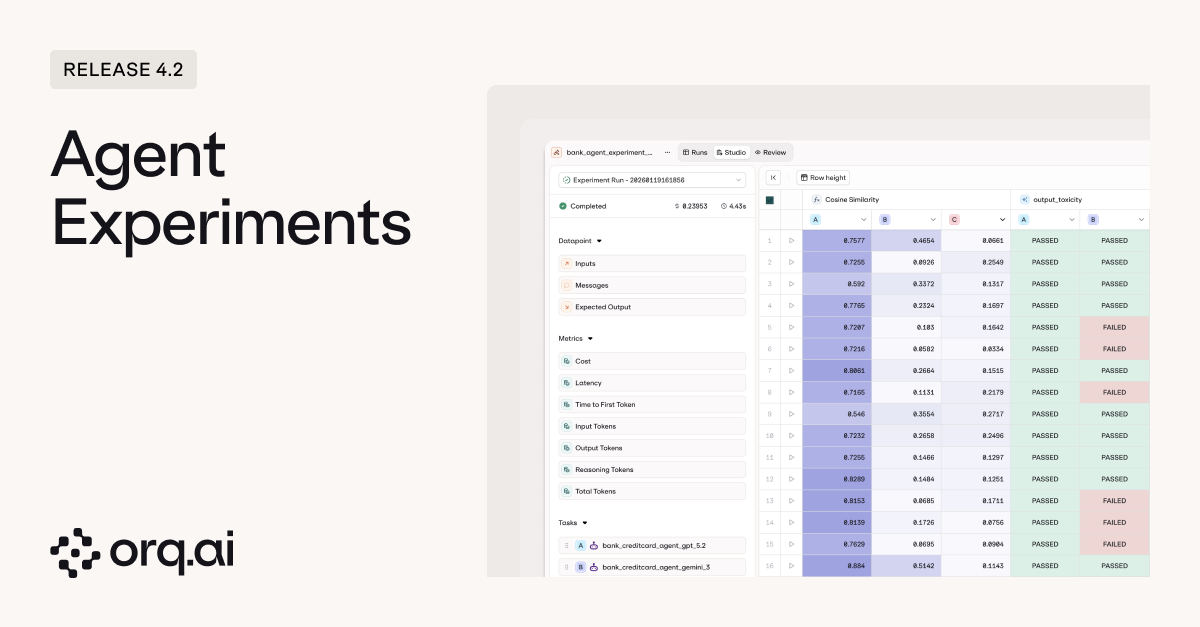 **What's New:**
* [**Run agents in experiments**](https://docs.orq.ai/docs/experiments/creating#task,-prompt-and-agent-configuration) to test agent performance against the same datasets and evaluators you use for prompts.
* **Swap agents during setup** to quickly benchmark different agent architectures or configurations against each other.
* **Test agents with different tool sets** to see how tool availability affects agent behavior and outcomes.
* **Compare multi-agent setups** to evaluate different orchestration patterns and agent combinations.
* **Run the same agent on different models** to find the right cost/performance tradeoff without changing anything else.
* [**Full execution visibility in review mode**](https://docs.orq.ai/docs/experiments/creating#review-a-model-execution) showing the complete agent run including every step, tool call, and tool response.
Same experiment workflow, same evaluators, but now with full support for agent-based systems.
Learn how to run agent experiments in the [Experiments Documentation](https://docs.orq.ai/docs/experiments/creating#creating-an-experiment).
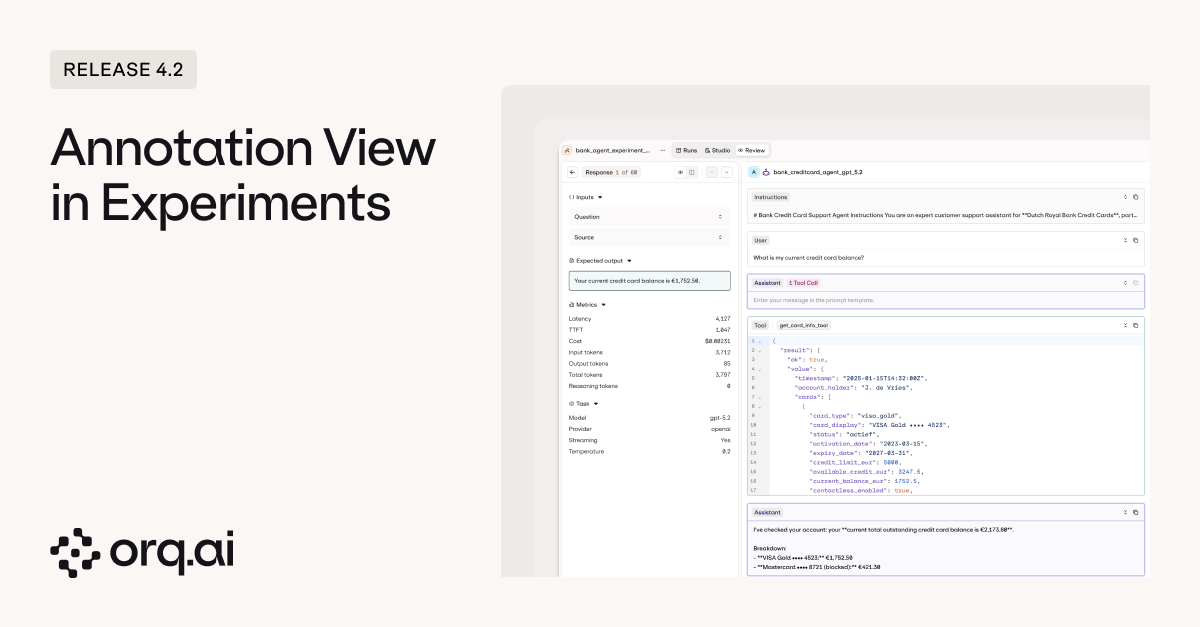
Automated evaluators catch a lot, but sometimes you need a human to look at the output and say "this isn't right." Experiments now have a dedicated review screen where you can leave structured human feedback on individual results, with full visibility into what happened during execution.
**What's New:**
* [**Run agents in experiments**](https://docs.orq.ai/docs/experiments/creating#task,-prompt-and-agent-configuration) to test agent performance against the same datasets and evaluators you use for prompts.
* **Swap agents during setup** to quickly benchmark different agent architectures or configurations against each other.
* **Test agents with different tool sets** to see how tool availability affects agent behavior and outcomes.
* **Compare multi-agent setups** to evaluate different orchestration patterns and agent combinations.
* **Run the same agent on different models** to find the right cost/performance tradeoff without changing anything else.
* [**Full execution visibility in review mode**](https://docs.orq.ai/docs/experiments/creating#review-a-model-execution) showing the complete agent run including every step, tool call, and tool response.
Same experiment workflow, same evaluators, but now with full support for agent-based systems.
Learn how to run agent experiments in the [Experiments Documentation](https://docs.orq.ai/docs/experiments/creating#creating-an-experiment).
Automated evaluators catch a lot, but sometimes you need a human to look at the output and say "this isn't right." Experiments now have a dedicated review screen where you can leave structured human feedback on individual results, with full visibility into what happened during execution.
 **What's New:**
* [**Human review on experiment results**](https://docs.orq.ai/docs/experiments/creating#review-a-model-execution) to annotate individual transactions directly from the review screen, whether you're evaluating prompt outputs or full agent executions.
* **Full execution context while reviewing** so annotators see everything: the input, the output, and for agents, every step and tool call that led to the result.
* **All metrics at a glance** including latency, time to first token, token consumption, temperature settings, and other configuration details.
* [**Read-only visibility in the overview**](https://docs.orq.ai/docs/experiments/creating#comparing-model-performance) so human feedback is preserved and visible to the full team without risk of accidental edits.
Whether it's PMs doing spot-checks, AI engineers debugging edge cases, or dedicated annotators working through a review queue, the feedback lives right where the experiment results do.
Learn more about human review workflows in the [Experiments Documentation](https://docs.orq.ai/docs/experiments/creating#review-a-model-execution).
A round of quality-of-life updates to make experiments faster to navigate and easier to iterate on.
**What's New:**
* **Redesigned experiment UI** for clearer navigation and results at a glance.
* **Granular token tracking** showing input, output, reasoning, and total tokens per run.
* **Dataset search** to find the right dataset faster when setting up experiments.
* **Custom names when duplicating** so cloned experiments are easier to identify.
* **Logs moved to Review mode** for a simplified experiment view.
Learn more in the [Experiments Documentation](/docs/experiments/creating).
We've updated the Deployment UI to align with the Agents experience, bringing a consistent layout and navigation patterns across both.
Learn more in the [Deployments Documentation](/docs/deployments/overview).
The Chunking API now delivers up to 8x faster document processing. Optimized for typical document sizes like 20-page PDFs, so knowledge base ingestion and RAG pipelines spend less time waiting.
Learn more in the [Chunking API Documentation](https://docs.orq.ai/docs/knowledge/api#chunking-data).
We've updated naming across the platform for clarity:
* **Admin** → [**Organization**](https://docs.orq.ai/docs/ai-studio/organization/overview) — same capabilities, new name. Your central hub for workspace configuration, team management, API keys, billing, environments, webhooks, and human review workflows.
* **Contacts** → [**Identities**](https://docs.orq.ai/docs/analytics/identity) — tie AI metrics to specific users, teams, projects, or clients across your organization. Create an Identity via the API or Studio, attach it to API calls, and get usage analytics grouped by that entity. You can also set budget limits per Identity to control spending at the user or department level. New in this release: pass an Identity directly on the deployment invoke request instead of setting it on the client.
The Identity rename is backward compatible — if you don't update the SDK, your existing code will continue to work. If you update to the latest SDK version, you'll need to rename `contact` to `identity` in your code.
```bash theme={"theme":{"light":"github-light","dark":"github-dark"}}
curl 'https://my.orq.ai/v2/deployments/invoke' \
-H 'Authorization: Bearer ' \
-H 'Content-Type: application/json' \
--data-raw '{
"key": "my_deployment",
"identity": {
"id": "identity_01ARZ3NDEKTSV4RRFFQ69G5FAV",
"display_name": "Jane Doe",
"email": "jane.doe@example.com",
"tags": ["hr", "engineering"]
}
}'
```
```python theme={"theme":{"light":"github-light","dark":"github-dark"}}
from orq_ai_sdk import Orq
client = Orq(api_key="")
completion = client.deployments.invoke(
key="my_deployment",
identity={
"id": "identity_01ARZ3NDEKTSV4RRFFQ69G5FAV",
"display_name": "Jane Doe",
"email": "jane.doe@example.com",
"tags": ["hr", "engineering"]
}
)
```
```typescript theme={"theme":{"light":"github-light","dark":"github-dark"}}
import { Orq } from "@orq-ai/node";
const client = new Orq({ apiKey: "" });
const completion = await client.deployments.invoke({
key: "my_deployment",
identity: {
id: "identity_01ARZ3NDEKTSV4RRFFQ69G5FAV",
displayName: "Jane Doe",
email: "jane.doe@example.com",
tags: ["hr", "engineering"],
},
});
```
See the updated [Organization Documentation](https://docs.orq.ai/docs/ai-studio/organization/overview) and [Identities Documentation](https://docs.orq.ai/docs/analytics/identity).
We've added GLM 4.7 from Z.ai to the **AI Router**. This 355B parameter Mixture-of-Experts model (32B active parameters) brings a 38% improvement over GLM 4.6 on HLE benchmarks, with comprehensive upgrades to general conversation, reasoning, and agent capabilities.
**Model Specs:**
* **200K context window** with 128K maximum output tokens
* **Enhanced agentic coding capabilities** for complex multi-step development tasks
* **Tool calling, JSON mode, and streaming** supported
**Pricing:**
* \$0.60 per 1M input tokens
* \$2.20 per 1M output tokens
Explore GLM 4.7 in the [AI Router](/docs/model-garden/overview) or via [Supported Models](https://docs.orq.ai/docs/proxy/supported-models#chat-models).
**What's New:**
* [**Human review on experiment results**](https://docs.orq.ai/docs/experiments/creating#review-a-model-execution) to annotate individual transactions directly from the review screen, whether you're evaluating prompt outputs or full agent executions.
* **Full execution context while reviewing** so annotators see everything: the input, the output, and for agents, every step and tool call that led to the result.
* **All metrics at a glance** including latency, time to first token, token consumption, temperature settings, and other configuration details.
* [**Read-only visibility in the overview**](https://docs.orq.ai/docs/experiments/creating#comparing-model-performance) so human feedback is preserved and visible to the full team without risk of accidental edits.
Whether it's PMs doing spot-checks, AI engineers debugging edge cases, or dedicated annotators working through a review queue, the feedback lives right where the experiment results do.
Learn more about human review workflows in the [Experiments Documentation](https://docs.orq.ai/docs/experiments/creating#review-a-model-execution).
A round of quality-of-life updates to make experiments faster to navigate and easier to iterate on.
**What's New:**
* **Redesigned experiment UI** for clearer navigation and results at a glance.
* **Granular token tracking** showing input, output, reasoning, and total tokens per run.
* **Dataset search** to find the right dataset faster when setting up experiments.
* **Custom names when duplicating** so cloned experiments are easier to identify.
* **Logs moved to Review mode** for a simplified experiment view.
Learn more in the [Experiments Documentation](/docs/experiments/creating).
We've updated the Deployment UI to align with the Agents experience, bringing a consistent layout and navigation patterns across both.
Learn more in the [Deployments Documentation](/docs/deployments/overview).
The Chunking API now delivers up to 8x faster document processing. Optimized for typical document sizes like 20-page PDFs, so knowledge base ingestion and RAG pipelines spend less time waiting.
Learn more in the [Chunking API Documentation](https://docs.orq.ai/docs/knowledge/api#chunking-data).
We've updated naming across the platform for clarity:
* **Admin** → [**Organization**](https://docs.orq.ai/docs/ai-studio/organization/overview) — same capabilities, new name. Your central hub for workspace configuration, team management, API keys, billing, environments, webhooks, and human review workflows.
* **Contacts** → [**Identities**](https://docs.orq.ai/docs/analytics/identity) — tie AI metrics to specific users, teams, projects, or clients across your organization. Create an Identity via the API or Studio, attach it to API calls, and get usage analytics grouped by that entity. You can also set budget limits per Identity to control spending at the user or department level. New in this release: pass an Identity directly on the deployment invoke request instead of setting it on the client.
The Identity rename is backward compatible — if you don't update the SDK, your existing code will continue to work. If you update to the latest SDK version, you'll need to rename `contact` to `identity` in your code.
```bash theme={"theme":{"light":"github-light","dark":"github-dark"}}
curl 'https://my.orq.ai/v2/deployments/invoke' \
-H 'Authorization: Bearer ' \
-H 'Content-Type: application/json' \
--data-raw '{
"key": "my_deployment",
"identity": {
"id": "identity_01ARZ3NDEKTSV4RRFFQ69G5FAV",
"display_name": "Jane Doe",
"email": "jane.doe@example.com",
"tags": ["hr", "engineering"]
}
}'
```
```python theme={"theme":{"light":"github-light","dark":"github-dark"}}
from orq_ai_sdk import Orq
client = Orq(api_key="")
completion = client.deployments.invoke(
key="my_deployment",
identity={
"id": "identity_01ARZ3NDEKTSV4RRFFQ69G5FAV",
"display_name": "Jane Doe",
"email": "jane.doe@example.com",
"tags": ["hr", "engineering"]
}
)
```
```typescript theme={"theme":{"light":"github-light","dark":"github-dark"}}
import { Orq } from "@orq-ai/node";
const client = new Orq({ apiKey: "" });
const completion = await client.deployments.invoke({
key: "my_deployment",
identity: {
id: "identity_01ARZ3NDEKTSV4RRFFQ69G5FAV",
displayName: "Jane Doe",
email: "jane.doe@example.com",
tags: ["hr", "engineering"],
},
});
```
See the updated [Organization Documentation](https://docs.orq.ai/docs/ai-studio/organization/overview) and [Identities Documentation](https://docs.orq.ai/docs/analytics/identity).
We've added GLM 4.7 from Z.ai to the **AI Router**. This 355B parameter Mixture-of-Experts model (32B active parameters) brings a 38% improvement over GLM 4.6 on HLE benchmarks, with comprehensive upgrades to general conversation, reasoning, and agent capabilities.
**Model Specs:**
* **200K context window** with 128K maximum output tokens
* **Enhanced agentic coding capabilities** for complex multi-step development tasks
* **Tool calling, JSON mode, and streaming** supported
**Pricing:**
* \$0.60 per 1M input tokens
* \$2.20 per 1M output tokens
Explore GLM 4.7 in the [AI Router](/docs/model-garden/overview) or via [Supported Models](https://docs.orq.ai/docs/proxy/supported-models#chat-models).