> ## Documentation Index
> Fetch the complete documentation index at: https://docs.orq.ai/llms.txt
> Use this file to discover all available pages before exploring further.
# Release 4.3
> Release 4.3 adds AI Router credits with auto top-up and unified billing across 300+ models, plus agent version control and environment support.
Managing model usage across providers used to mean juggling separate billing accounts and API keys. Now you can purchase credits directly in Orq and access 300+ models across 20+ providers with a single API key.
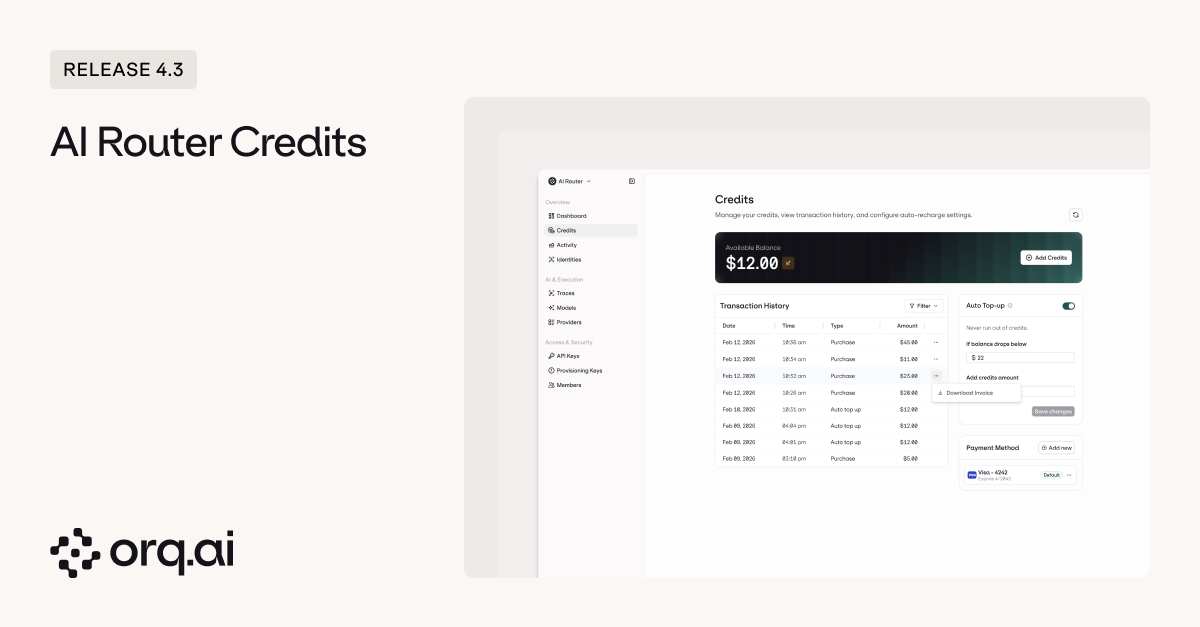 **What's Available:**
* [**Purchase credits starting at \$5**](https://docs.orq.ai/docs/router/credits#purchasing-credits) — buy credits directly in the platform and immediately unlock access to OpenAI, Anthropic, Google, Mistral, Meta, and 15+ other providers without configuring individual API keys.
* [**Unified usage tracking**](https://docs.orq.ai/docs/router/credits#usage-tracking) — monitor credit consumption in real-time with detailed transaction history across all API keys, so you know exactly where spend is going.
* [**Automatic top-up**](https://docs.orq.ai/docs/router/credits#auto-top-up) — configure balance thresholds and credits replenish automatically when you hit them, preventing service interruption mid-request.
* **VAT-compliant invoicing** — get proper invoices with VAT included for international purchases, not just payment receipts.
Learn how to purchase and manage credits in the [AI Router Credits Documentation](https://docs.orq.ai/docs/router/credits).
When agent behavior changes in production, you need to know what happened, when, and which version was running. Activity tracking gives you a complete audit trail, version control lets you invoke specific versions programmatically, and environments let you manage agent lifecycle from development to production.
**What's Available:**
* [**Purchase credits starting at \$5**](https://docs.orq.ai/docs/router/credits#purchasing-credits) — buy credits directly in the platform and immediately unlock access to OpenAI, Anthropic, Google, Mistral, Meta, and 15+ other providers without configuring individual API keys.
* [**Unified usage tracking**](https://docs.orq.ai/docs/router/credits#usage-tracking) — monitor credit consumption in real-time with detailed transaction history across all API keys, so you know exactly where spend is going.
* [**Automatic top-up**](https://docs.orq.ai/docs/router/credits#auto-top-up) — configure balance thresholds and credits replenish automatically when you hit them, preventing service interruption mid-request.
* **VAT-compliant invoicing** — get proper invoices with VAT included for international purchases, not just payment receipts.
Learn how to purchase and manage credits in the [AI Router Credits Documentation](https://docs.orq.ai/docs/router/credits).
When agent behavior changes in production, you need to know what happened, when, and which version was running. Activity tracking gives you a complete audit trail, version control lets you invoke specific versions programmatically, and environments let you manage agent lifecycle from development to production.
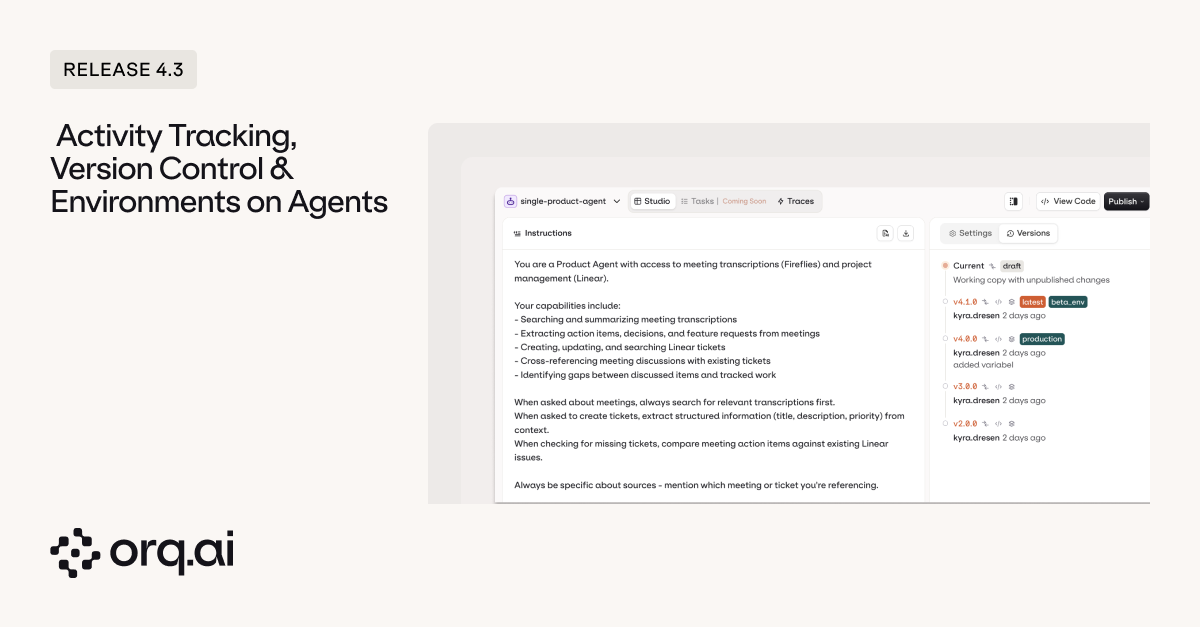 **What's Tracked:**
* [**Track all activities**](https://docs.orq.ai/docs/agents/agent-studio#versions) across agents and related entities with full audit trail support showing what changed, when, and by whom.
* [**Version-level invocation tracking**](https://docs.orq.ai/docs/agents/agent-studio#calling-a-specific-version) — invoke and compare specific agent versions to measure performance across iterations and roll back when needed.
* [**Custom environments**](https://docs.orq.ai/docs/agents/agent-studio#assigning-environments) — create and tag environments like staging, production, or testing to manage and promote agents across your development lifecycle.
Learn more in the [Agent Studio Documentation](https://docs.orq.ai/docs/agents/agent-studio#versions).
Enterprise teams shouldn't have to manage separate credentials for every tool. Single sign-on lets your team authenticate with the accounts they already use.
**What's Tracked:**
* [**Track all activities**](https://docs.orq.ai/docs/agents/agent-studio#versions) across agents and related entities with full audit trail support showing what changed, when, and by whom.
* [**Version-level invocation tracking**](https://docs.orq.ai/docs/agents/agent-studio#calling-a-specific-version) — invoke and compare specific agent versions to measure performance across iterations and roll back when needed.
* [**Custom environments**](https://docs.orq.ai/docs/agents/agent-studio#assigning-environments) — create and tag environments like staging, production, or testing to manage and promote agents across your development lifecycle.
Learn more in the [Agent Studio Documentation](https://docs.orq.ai/docs/agents/agent-studio#versions).
Enterprise teams shouldn't have to manage separate credentials for every tool. Single sign-on lets your team authenticate with the accounts they already use.
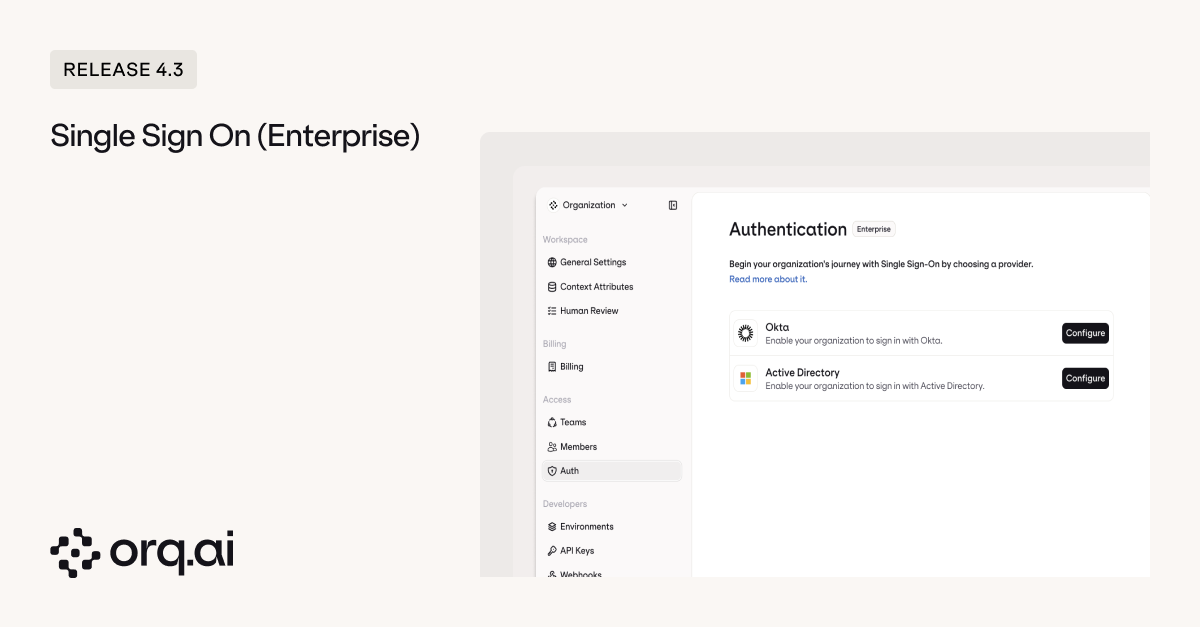 **What's New:**
* [**Sign in with Microsoft**](https://docs.orq.ai/docs/enterprise/sso#microsoft-sso) — authenticate using Azure AD or Entra ID.
* [**Sign in with Okta**](https://docs.orq.ai/docs/enterprise/sso#okta-sso) — authenticate with Okta as your identity provider.
* **Centralized access management** — grant and revoke workspace access directly through your identity provider instead of managing users manually in Orq.ai.
Learn how to configure SSO in the [Enterprise SSO Documentation](https://docs.orq.ai/docs/enterprise/sso).
Running multiple deployment variants used to mean choosing between shared configuration (risky for testing) or duplicating entire deployments (messy to manage). Now you can configure behavior independently for each variant.
**What's New:**
* [**Variant-level configuration**](https://docs.orq.ai/docs/deployments/creating) — set evaluators, guardrails, caching, TTL settings, and security masking controls independently per variant for safe A/B testing and progressive rollouts without affecting other versions.
Learn more in the [Deployment Variants Documentation](https://docs.orq.ai/docs/deployments/creating).
Connecting to authenticated MCP servers used to require workarounds. Now you can configure custom headers directly on MCP tools.
**What's New:**
* [**Custom header configuration per tool**](https://docs.orq.ai/docs/tools/creating#creating-an-mcp-tool) — add authentication tokens or API keys as custom headers when configuring MCP tools to connect securely to private or enterprise MCP servers.
Learn more in the [MCP Tools Documentation](https://docs.orq.ai/docs/tools/creating#creating-an-mcp-tool).
Large knowledge bases return too much irrelevant context. Metadata filtering lets you narrow results before semantic search runs.
**What's New:**
* [**Sign in with Microsoft**](https://docs.orq.ai/docs/enterprise/sso#microsoft-sso) — authenticate using Azure AD or Entra ID.
* [**Sign in with Okta**](https://docs.orq.ai/docs/enterprise/sso#okta-sso) — authenticate with Okta as your identity provider.
* **Centralized access management** — grant and revoke workspace access directly through your identity provider instead of managing users manually in Orq.ai.
Learn how to configure SSO in the [Enterprise SSO Documentation](https://docs.orq.ai/docs/enterprise/sso).
Running multiple deployment variants used to mean choosing between shared configuration (risky for testing) or duplicating entire deployments (messy to manage). Now you can configure behavior independently for each variant.
**What's New:**
* [**Variant-level configuration**](https://docs.orq.ai/docs/deployments/creating) — set evaluators, guardrails, caching, TTL settings, and security masking controls independently per variant for safe A/B testing and progressive rollouts without affecting other versions.
Learn more in the [Deployment Variants Documentation](https://docs.orq.ai/docs/deployments/creating).
Connecting to authenticated MCP servers used to require workarounds. Now you can configure custom headers directly on MCP tools.
**What's New:**
* [**Custom header configuration per tool**](https://docs.orq.ai/docs/tools/creating#creating-an-mcp-tool) — add authentication tokens or API keys as custom headers when configuring MCP tools to connect securely to private or enterprise MCP servers.
Learn more in the [MCP Tools Documentation](https://docs.orq.ai/docs/tools/creating#creating-an-mcp-tool).
Large knowledge bases return too much irrelevant context. Metadata filtering lets you narrow results before semantic search runs.
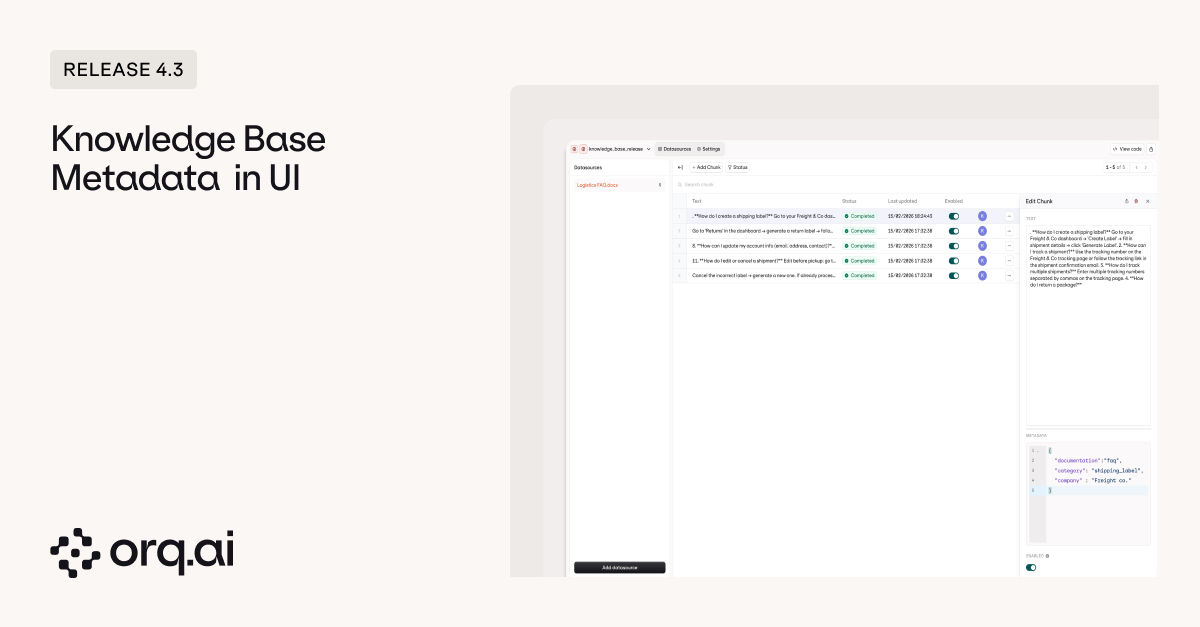 **What's New:**
* [**Add, edit, and view metadata in UI**](https://docs.orq.ai/docs/knowledge/api#chunk-metadata) — manage key-value metadata on knowledge base chunks via API or UI (previously API-only) for better organization by topic, source, client, or any custom attribute.
* [**Filter by metadata before query execution**](https://docs.orq.ai/docs/knowledge/api#chunk-metadata) — narrow results by, for example, department, project, version, or customer segment before semantic search runs to retrieve only relevant context.
```bash cURL theme={"theme":{"light":"github-light","dark":"github-dark"}}
curl -X POST https://api.orq.ai/v2/knowledge/{knowledge_id}/chunks \
-H "Authorization: Bearer YOUR_API_KEY" \
-H "Content-Type: application/json" \
-d '{
"text": "Customer onboarding guide for enterprise clients",
"metadata": {
"department": "sales",
"client_tier": "enterprise",
"version": "2.0"
}
}'
```
```python Python theme={"theme":{"light":"github-light","dark":"github-dark"}}
from orq_ai_sdk import Orq
client = Orq(api_key="YOUR_API_KEY")
client.knowledge.add_chunk(
knowledge_id="kb_123",
text="Customer onboarding guide for enterprise clients",
metadata={
"department": "sales",
"client_tier": "enterprise",
"version": "2.0"
}
)
```
```typescript TypeScript theme={"theme":{"light":"github-light","dark":"github-dark"}}
import { Orq } from "@orq-ai/node";
const orq = new Orq({ apiKey: "YOUR_API_KEY" });
await orq.knowledge.addChunk({
knowledgeId: "kb_123",
text: "Customer onboarding guide for enterprise clients",
metadata: {
department: "sales",
clientTier: "enterprise",
version: "2.0"
}
});
```
Learn more in the [Knowledge Base Documentation](https://docs.orq.ai/docs/knowledge/overview).
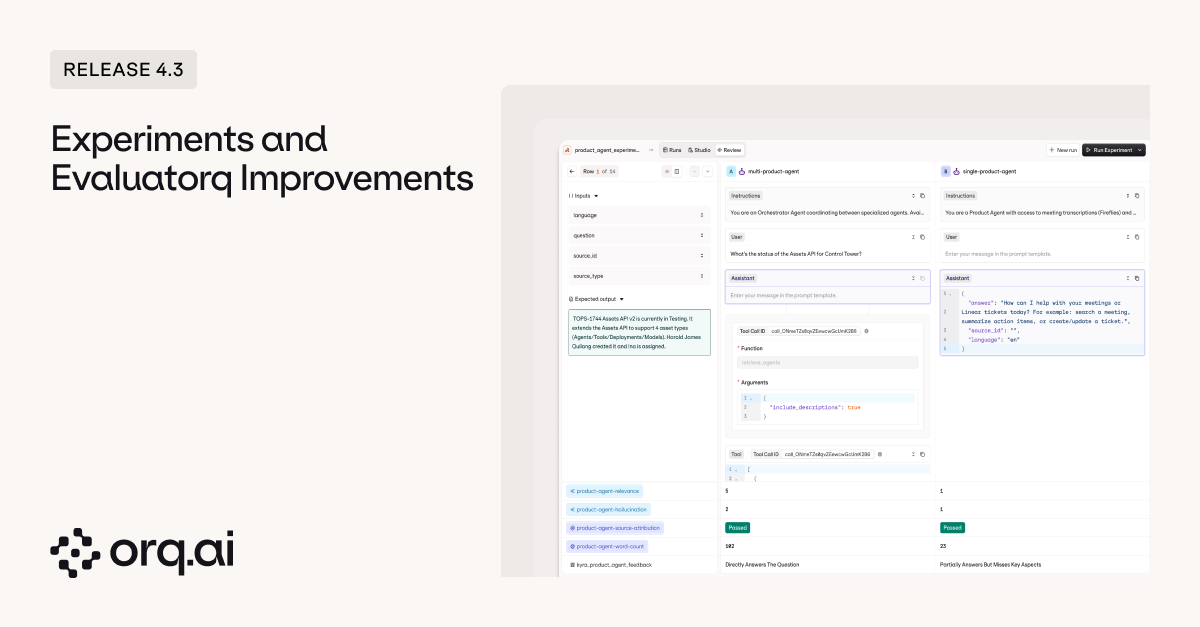
Running better experiments requires both structured review workflows and execution transparency. Evaluatorq-sourced experiments now include a dedicated UI with side-by-side comparison, while agent experiments expose complete behavior details showing every tool call, parameter, and outcome.
**What's New:**
* [**Add, edit, and view metadata in UI**](https://docs.orq.ai/docs/knowledge/api#chunk-metadata) — manage key-value metadata on knowledge base chunks via API or UI (previously API-only) for better organization by topic, source, client, or any custom attribute.
* [**Filter by metadata before query execution**](https://docs.orq.ai/docs/knowledge/api#chunk-metadata) — narrow results by, for example, department, project, version, or customer segment before semantic search runs to retrieve only relevant context.
```bash cURL theme={"theme":{"light":"github-light","dark":"github-dark"}}
curl -X POST https://api.orq.ai/v2/knowledge/{knowledge_id}/chunks \
-H "Authorization: Bearer YOUR_API_KEY" \
-H "Content-Type: application/json" \
-d '{
"text": "Customer onboarding guide for enterprise clients",
"metadata": {
"department": "sales",
"client_tier": "enterprise",
"version": "2.0"
}
}'
```
```python Python theme={"theme":{"light":"github-light","dark":"github-dark"}}
from orq_ai_sdk import Orq
client = Orq(api_key="YOUR_API_KEY")
client.knowledge.add_chunk(
knowledge_id="kb_123",
text="Customer onboarding guide for enterprise clients",
metadata={
"department": "sales",
"client_tier": "enterprise",
"version": "2.0"
}
)
```
```typescript TypeScript theme={"theme":{"light":"github-light","dark":"github-dark"}}
import { Orq } from "@orq-ai/node";
const orq = new Orq({ apiKey: "YOUR_API_KEY" });
await orq.knowledge.addChunk({
knowledgeId: "kb_123",
text: "Customer onboarding guide for enterprise clients",
metadata: {
department: "sales",
clientTier: "enterprise",
version: "2.0"
}
});
```
Learn more in the [Knowledge Base Documentation](https://docs.orq.ai/docs/knowledge/overview).
Running better experiments requires both structured review workflows and execution transparency. Evaluatorq-sourced experiments now include a dedicated UI with side-by-side comparison, while agent experiments expose complete behavior details showing every tool call, parameter, and outcome.
 **What's New:**
* [**Full Evaluatorq support**](https://docs.orq.ai/docs/experiments/api) — run Evaluatorq-sourced experiments from code and get dedicated review tabs and export functionality in the UI for structured human feedback workflows.
* [**Complete agent messages**](https://docs.orq.ai/docs/experiments/creating#agent-experiments) — view every message and tool call from agents run via the Orq.ai experiments UI, including parameter configuration, tool responses, and the complete conversation flow.
Learn more in the [Experiments Documentation](https://docs.orq.ai/docs/experiments/creating).
Workspace management and navigation improvements.
**What's New:**
* [**Updated members page**](https://docs.orq.ai/docs/ai-studio/organization/members-teams) — redesigned layout aligned with the modern design system.
* [**Improved environment configuration**](https://docs.orq.ai/docs/ai-studio/organization/environments) — better interface for setting up and managing environments.
* [**Keyboard shortcuts**](https://docs.orq.ai/docs/ai-studio/organization/overview) — navigate between applications using keyboard shortcuts in the top-left app switcher.
* [**AI Router filtering**](https://docs.orq.ai/docs/model-garden/using-ui): filter models by enabled API keys to see only what you can actually use.
Learn more in the [Workspace Settings Documentation](https://docs.orq.ai/docs/ai-studio/organization/workspace-settings).
Platform-level upgrades for reliability and structured outputs.
**What's New:**
* **Improved load balancing** — better request distribution for higher reliability under traffic spikes.
* **Sonar structured outputs** — Perplexity's Sonar models now support structured output mode for reliable JSON generation.
Explore models in the [AI Router](https://docs.orq.ai/docs/model-garden/overview) or via [Supported Models](https://docs.orq.ai/docs/proxy/supported-models).
Anthropic's high-intelligence model with advanced reasoning, vision, and PDF processing capabilities.
**Model Specs:**
* **200K context window** with 128K maximum output tokens
* **Tool calling, vision, PDF processing** — full multimodal support with function calling and streaming
* **Advanced reasoning** — designed for complex, multi-step tasks requiring deep analysis
**Pricing:**
* \$5.00 per 1M input tokens
* \$25.00 per 1M output tokens
Explore Claude Opus 4.6 in the [AI Router](https://docs.orq.ai/docs/model-garden/overview) or via [Supported Models](https://docs.orq.ai/docs/proxy/supported-models).
MiniMax expands with new M2.5 variants hosted in Singapore, offering strong reasoning, coding, and tool-calling capabilities.
**New Models:**
* **MiniMax-M2.5** — advanced foundation model with 204,800 context window and 204,800 max output tokens for reasoning and agent workflows. \$0.15/\$1.20 per 1M tokens.
* **MiniMax-M2.5-lightning** — speed-optimized version of M2.5 with the same 204,800 context window and output limits. \$0.30/\$2.40 per 1M tokens.
**Also Available:**
* minimax-m2, minimax-m2-1, minimax-m2-1-lightning, minimax-m2-5, minimax-m2-5-lightning, minimax-m2-her
Explore MiniMax models in the [AI Router](https://docs.orq.ai/docs/model-garden/overview) or via [Supported Models](https://docs.orq.ai/docs/proxy/supported-models).
OpenAI's next-generation coding and multimodal models with extended context and reasoning support.
**New Models:**
* **GPT-5.3 Codex** — coding-optimized model with 400K context window and 128K max output tokens. Supports tool calling, JSON mode, vision, and streaming. \$1.75/\$14.00 per 1M tokens.
* **GPT-5.3 Codex Spark** — faster variant with same pricing, 128K context window and 32K max output tokens, optimized for lightweight coding workflows.
Explore GPT-5.3 models in the [AI Router](https://docs.orq.ai/docs/model-garden/overview) or via [Supported Models](https://docs.orq.ai/docs/proxy/supported-models).
Z.ai's 744B parameter Mixture-of-Experts model (40B active parameters) designed for agentic engineering.
**Model Specs:**
* **200K context window** with 128K maximum output tokens
* **Enhanced coding and reasoning** — optimized for agentic workflows with improved tool capabilities
* **Tool calling support** — full function calling and streaming support
**Pricing:**
* \$1.00 per 1M input tokens
* \$3.20 per 1M output tokens
Explore GLM-5 in the [AI Router](https://docs.orq.ai/docs/model-garden/overview) or via [Supported Models](https://docs.orq.ai/docs/proxy/supported-models).
As we announced earlier, all workspace entities (including prompts, agents, deployments, knowledge bases, memory stores, evaluators, and tools) are moving to the project level. The global shared project will be the default way to share resources across your organization, available in every workspace and visible to all members for organization-wide access. No action needed now: we'll release a new folder type soon to help you organize and migrate your entities.
**What's Coming:**
* **Organization-wide visibility** — entities in the global shared project are accessible to all workspace members.
* **Centralized resources** — share prompts, tools, evaluators, and other entities across your entire organization without manual distribution.
* **Automatic availability** — no setup required, the global shared project appears in every workspace by default.
More details coming soon in the [Projects Documentation](https://docs.orq.ai/docs/ai-studio/get-started/projects).
**What's New:**
* [**Full Evaluatorq support**](https://docs.orq.ai/docs/experiments/api) — run Evaluatorq-sourced experiments from code and get dedicated review tabs and export functionality in the UI for structured human feedback workflows.
* [**Complete agent messages**](https://docs.orq.ai/docs/experiments/creating#agent-experiments) — view every message and tool call from agents run via the Orq.ai experiments UI, including parameter configuration, tool responses, and the complete conversation flow.
Learn more in the [Experiments Documentation](https://docs.orq.ai/docs/experiments/creating).
Workspace management and navigation improvements.
**What's New:**
* [**Updated members page**](https://docs.orq.ai/docs/ai-studio/organization/members-teams) — redesigned layout aligned with the modern design system.
* [**Improved environment configuration**](https://docs.orq.ai/docs/ai-studio/organization/environments) — better interface for setting up and managing environments.
* [**Keyboard shortcuts**](https://docs.orq.ai/docs/ai-studio/organization/overview) — navigate between applications using keyboard shortcuts in the top-left app switcher.
* [**AI Router filtering**](https://docs.orq.ai/docs/model-garden/using-ui): filter models by enabled API keys to see only what you can actually use.
Learn more in the [Workspace Settings Documentation](https://docs.orq.ai/docs/ai-studio/organization/workspace-settings).
Platform-level upgrades for reliability and structured outputs.
**What's New:**
* **Improved load balancing** — better request distribution for higher reliability under traffic spikes.
* **Sonar structured outputs** — Perplexity's Sonar models now support structured output mode for reliable JSON generation.
Explore models in the [AI Router](https://docs.orq.ai/docs/model-garden/overview) or via [Supported Models](https://docs.orq.ai/docs/proxy/supported-models).
Anthropic's high-intelligence model with advanced reasoning, vision, and PDF processing capabilities.
**Model Specs:**
* **200K context window** with 128K maximum output tokens
* **Tool calling, vision, PDF processing** — full multimodal support with function calling and streaming
* **Advanced reasoning** — designed for complex, multi-step tasks requiring deep analysis
**Pricing:**
* \$5.00 per 1M input tokens
* \$25.00 per 1M output tokens
Explore Claude Opus 4.6 in the [AI Router](https://docs.orq.ai/docs/model-garden/overview) or via [Supported Models](https://docs.orq.ai/docs/proxy/supported-models).
MiniMax expands with new M2.5 variants hosted in Singapore, offering strong reasoning, coding, and tool-calling capabilities.
**New Models:**
* **MiniMax-M2.5** — advanced foundation model with 204,800 context window and 204,800 max output tokens for reasoning and agent workflows. \$0.15/\$1.20 per 1M tokens.
* **MiniMax-M2.5-lightning** — speed-optimized version of M2.5 with the same 204,800 context window and output limits. \$0.30/\$2.40 per 1M tokens.
**Also Available:**
* minimax-m2, minimax-m2-1, minimax-m2-1-lightning, minimax-m2-5, minimax-m2-5-lightning, minimax-m2-her
Explore MiniMax models in the [AI Router](https://docs.orq.ai/docs/model-garden/overview) or via [Supported Models](https://docs.orq.ai/docs/proxy/supported-models).
OpenAI's next-generation coding and multimodal models with extended context and reasoning support.
**New Models:**
* **GPT-5.3 Codex** — coding-optimized model with 400K context window and 128K max output tokens. Supports tool calling, JSON mode, vision, and streaming. \$1.75/\$14.00 per 1M tokens.
* **GPT-5.3 Codex Spark** — faster variant with same pricing, 128K context window and 32K max output tokens, optimized for lightweight coding workflows.
Explore GPT-5.3 models in the [AI Router](https://docs.orq.ai/docs/model-garden/overview) or via [Supported Models](https://docs.orq.ai/docs/proxy/supported-models).
Z.ai's 744B parameter Mixture-of-Experts model (40B active parameters) designed for agentic engineering.
**Model Specs:**
* **200K context window** with 128K maximum output tokens
* **Enhanced coding and reasoning** — optimized for agentic workflows with improved tool capabilities
* **Tool calling support** — full function calling and streaming support
**Pricing:**
* \$1.00 per 1M input tokens
* \$3.20 per 1M output tokens
Explore GLM-5 in the [AI Router](https://docs.orq.ai/docs/model-garden/overview) or via [Supported Models](https://docs.orq.ai/docs/proxy/supported-models).
As we announced earlier, all workspace entities (including prompts, agents, deployments, knowledge bases, memory stores, evaluators, and tools) are moving to the project level. The global shared project will be the default way to share resources across your organization, available in every workspace and visible to all members for organization-wide access. No action needed now: we'll release a new folder type soon to help you organize and migrate your entities.
**What's Coming:**
* **Organization-wide visibility** — entities in the global shared project are accessible to all workspace members.
* **Centralized resources** — share prompts, tools, evaluators, and other entities across your entire organization without manual distribution.
* **Automatic availability** — no setup required, the global shared project appears in every workspace by default.
More details coming soon in the [Projects Documentation](https://docs.orq.ai/docs/ai-studio/get-started/projects).