> ## Documentation Index
> Fetch the complete documentation index at: https://docs.orq.ai/llms.txt
> Use this file to discover all available pages before exploring further.
# Release 4.5
> Release 4.5 adds Jinja2 and Mustache template engines for advanced prompt templating, plus version control for evaluators and tools.
Building complex prompts with variable injection and conditional logic used to require string concatenation or external templating. Now you can use full-featured Jinja2 or Mustache templating directly in [Deployments](/ai-studio/ai-engineering/deployments#variables-and-prompt-templating) and [Experiments](/ai-studio/optimize/experiments#variables-and-prompt-templating).
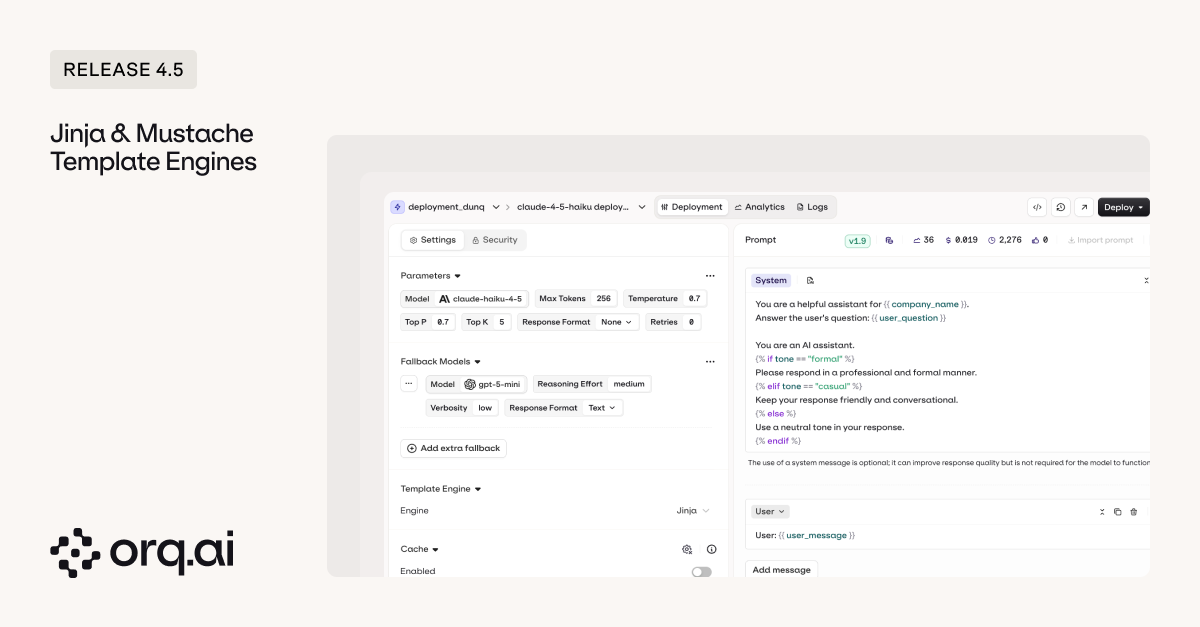 **What's Available:**
* **[Jinja2 templating](/ai-studio/prompts/prompt-templating)** — use Python-style loops, conditionals, filters, and template inheritance for complex prompt logic without leaving the Orq UI, replacing if-else statements in code with declarative templates.
* **[Mustache templating](/ai-studio/prompts/prompt-templating)** — language-agnostic alternative for basic variable injection and simple conditionals, ideal for cross-platform consistency.
Learn more in the [Deployments Documentation](/ai-studio/ai-engineering/deployments#variables-and-prompt-templating) and [Experiments Documentation](/ai-studio/optimize/experiments#variables-and-prompt-templating).
When evaluator logic or tool configurations change, you need to know what changed, when, and be able to roll back if needed. Version control now tracks every change to your evaluators and tools with full audit history.
**What's Available:**
* **[Jinja2 templating](/ai-studio/prompts/prompt-templating)** — use Python-style loops, conditionals, filters, and template inheritance for complex prompt logic without leaving the Orq UI, replacing if-else statements in code with declarative templates.
* **[Mustache templating](/ai-studio/prompts/prompt-templating)** — language-agnostic alternative for basic variable injection and simple conditionals, ideal for cross-platform consistency.
Learn more in the [Deployments Documentation](/ai-studio/ai-engineering/deployments#variables-and-prompt-templating) and [Experiments Documentation](/ai-studio/optimize/experiments#variables-and-prompt-templating).
When evaluator logic or tool configurations change, you need to know what changed, when, and be able to roll back if needed. Version control now tracks every change to your evaluators and tools with full audit history.
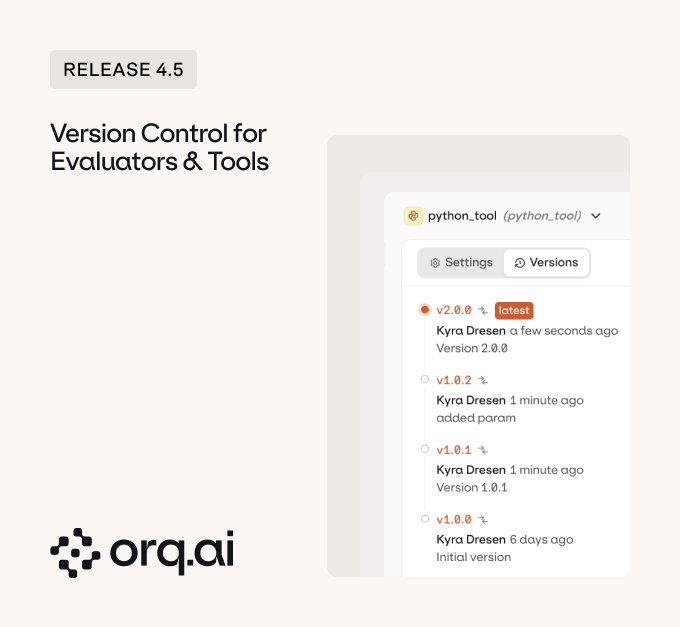 **What's Available:**
* **[Version history for evaluators](/ai-studio/optimize/evaluators#versions)** — view diffs between versions, restore previous configurations, and audit who changed what and when across LLM-based evaluators and Python evaluators.
* **[Invoke specific evaluator versions](/ai-studio/optimize/evaluators#versions)** — call specific evaluator versions programmatically or mature them across environments for controlled testing and gradual rollouts.
* **[Version history for tools](/ai-studio/ai-engineering/create-tools#versions)** — track all changes to custom tools with full version history, so you can see how tool behavior evolved and roll back when updates cause issues.
Learn more in the [Evaluators Documentation](/ai-studio/optimize/evaluators#versions) and [Tools Documentation](/ai-studio/ai-engineering/create-tools#versions).
Evaluations used to create handoff delays between engineers and PMs. Now engineers can kick off experiments via code while PMs run evaluations in the UI, with detailed execution traces showing what your LangGraph or Vercel AI SDK agent did at each step.
**What's New:**
* **[Run evals after kicking off Experiments from code using Evaluatorq](/ai-studio/optimize/experiments#add-evaluators-after-running)** — run evaluations from the UI after engineers kick off experiments via code, enabling PMs to review results and iterate on evaluations without engineering dependencies.
* **[Detailed agent execution in review screen](/ai-studio/optimize/experiments)** — view complete execution flow in the experiments UI review screen showing exactly what your LangGraph or Vercel AI SDK agent did at each step to reach the output, including tool calls, parameters, and responses.
Learn more in the [Experiments & Evaluations Documentation](/ai-studio/optimize/experiments#view-results).
Tracing async function calls required manual instrumentation. Now you can use the [@traced decorator](/ai-studio/observability/traces#custom-tracing-using-the-@traced-decorator) with async Python functions for automatic trace capture.
**What's New:**
* **[@traced decorator for async functions](/ai-studio/observability/traces#custom-tracing-using-the-@traced-decorator)** — use the @traced decorator with async Python functions for automatic performance tracking without blocking execution or manual span creation, supporting span types including `agent`, `llm`, `retrieval`, `tool`, `function`, and `embedding`.
```python Python (Sync) theme={"theme":{"light":"github-light","dark":"github-dark"}}
import os
from orq_ai_sdk import Orq
from orq_ai_sdk.traced import traced
@traced(name="process_document", type="agent")
def process_document(doc_id: str):
result = {"status": "processed", "doc_id": doc_id}
return result
@traced(name="fetch_context", type="retrieval")
def fetch_relevant_context(query: str):
return {"context": "relevant information", "sources": ["doc1", "doc2"]}
@traced(name="format_response", type="function")
def format_response(raw_output: str, metadata: dict):
return {"formatted": raw_output.strip(), "metadata": metadata}
with Orq(api_key=os.getenv("ORQ_API_KEY")) as orq:
doc = process_document("doc-123")
context = fetch_relevant_context("user query")
response = orq.deployments.invoke(
key="summarizer",
context={"environments": ["production"]},
inputs={"text": doc["status"], "context": context}
)
formatted = format_response(response.choices[0].message.content, {"doc_id": "doc-123"})
```
```python Python (Async) theme={"theme":{"light":"github-light","dark":"github-dark"}}
import os
import asyncio
from orq_ai_sdk import Orq
from orq_ai_sdk.traced import traced
@traced(name="process_document", type="agent")
async def process_document(doc_id: str):
result = {"status": "processed", "doc_id": doc_id}
return result
@traced(name="fetch_context", type="retrieval")
async def fetch_relevant_context(query: str):
return {"context": "relevant information", "sources": ["doc1", "doc2"]}
@traced(name="format_response", type="function")
async def format_response(raw_output: str, metadata: dict):
return {"formatted": raw_output.strip(), "metadata": metadata}
async def main():
async with Orq(api_key=os.getenv("ORQ_API_KEY")) as orq:
doc = await process_document("doc-123")
context = await fetch_relevant_context("user query")
response = await orq.deployments.invoke_async(
key="summarizer",
context={"environments": ["production"]},
inputs={"text": doc["status"], "context": context}
)
formatted = await format_response(response.choices[0].message.content, {"doc_id": "doc-123"})
asyncio.run(main())
```
Learn more in the [Traces Documentation](/ai-studio/observability/traces#custom-tracing-using-the-@traced-decorator).
Now you can update existing agent configurations directly from your favorite Coding Assistant like [Claude Desktop](/ai-studio/integrations/chat-interfaces/claude-desktop), [Claude Code](/ai-studio/integrations/code-assistants/claude-code), [Cursor](/ai-studio/integrations/code-assistants/cursor), or [Codex](/ai-studio/integrations/code-assistants/codex).
**What's New:**
* **[Update agents from conversation](/ai-studio/integrations/code-assistants/orq-mcp)** — modify agent configurations, tools, evaluators, and guardrails without switching to the Orq UI, keeping your development flow uninterrupted.
Learn how to use Orq MCP in [Claude Code](/ai-studio/integrations/code-assistants/claude-code), [Claude Desktop](/ai-studio/integrations/chat-interfaces/claude-desktop), [Cursor](/ai-studio/integrations/code-assistants/cursor), and [Codex](/ai-studio/integrations/code-assistants/codex).
The redesigned teams page syncs the design with the rest of the platform and brings all team management into a single, sortable interface.
**What's New:**
* **[Redesigned team management](/ai-studio/organization/members-teams)** — sortable columns, bulk actions, and role editing let you manage permissions at a glance without navigating between pages.
Learn more in the [Permissions Documentation](/ai-studio/organization/members-teams).
The Growth Plan gives small teams launching or scaling AI features in production complete end-to-end platform capabilities.
**What's New:**
* **[Growth Plan launched](https://orq.ai/pricing)** — new span-based and seat-based tier with 100K spans/month, 500 agent runs/month, and 30-day retention for production observability.
* **Legacy plan protection** — existing clients on legacy plans are not affected and can continue with current pricing, with optional migration to Growth Plan available.
View pricing details at [Orq.ai/pricing](https://orq.ai/pricing).
Alibaba's Qwen model family brings advanced reasoning, vision, and specialized capabilities optimized for multilingual and long-context tasks.
**Model Specs:**
* **Qwen3.5 series** — latest flagship models including Qwen3.5 Plus with 1M context window and Qwen3.5 397B-A17B, both with 65K max output tokens, vision support, tool calling, and advanced reasoning capabilities.
* **Qwen2.5 series (0.5B to 72B parameters)** — foundation models with function calling and streaming, optimized for Chinese and English language tasks.
* **Specialized variants** — dedicated models for reasoning (QwQ), vision (Qwen-VL), coding (Qwen-Coder), and mathematics (Qwen-Math).
Explore Alibaba models in the [AI Router](/ai-gateway/using-the-router) or via [Supported Models](/ai-gateway/supported-models).
xAI's Grok model lineup combines real-time data access with strong reasoning capabilities and vision support.
**Model Specs:**
* **Grok 4** — flagship model with enhanced reasoning, vision capabilities, function calling, and access to real-time X (Twitter) data for current events.
* **Grok 4.1** — advanced variant with improved multimodal understanding and extended capabilities.
* **Grok 3** — production-ready model with strong reasoning and multimodal support.
* **Reasoning and creative modes** — switch between analytical reasoning mode for problem-solving or creative mode for content generation and ideation.
Explore Grok models in the [AI Router](/ai-gateway/using-the-router) or via [Supported Models](/ai-gateway/supported-models).
Google's latest Gemini models bring improved multimodal understanding and new cost-efficient variants.
**What's New:**
* **Gemini 3.1 Pro Preview** — enhanced multimodal capabilities with improved vision understanding and longer context windows for complex tasks.
* **Gemini 3.1 Flash Lite Preview** — cost-efficient variant optimized for high-throughput applications with reduced latency and competitive pricing for production workloads.
Explore Gemini models in the [AI Router](/ai-gateway/using-the-router) or via [Supported Models](/ai-gateway/supported-models).
Latest models from OpenAI and Meta with expanded capabilities and specialized fine-tunes.
**What's New:**
* **GPT-5.4** — OpenAI's latest model with enhanced reasoning, multimodal capabilities, 1M context window, 128K max output tokens, and improved instruction following.
* **Meta Llama 4** — open-source model family available in multiple parameter sizes with expanded regional variants and specialized fine-tunes for coding, reasoning, and multilingual tasks.
Explore these models in the [AI Router](/ai-gateway/using-the-router) or via [Supported Models](/ai-gateway/supported-models).
**Human Review Sets Removal**
Human Review Sets have been removed. Human reviews are now managed at the project level. If you were using this feature, check your annotation queues for existing work—all previous reviews are preserved and the rest of your workspace remains unaffected.
**Legacy Plan Update**
Existing clients on legacy plans are not affected by the new Growth Plan pricing and can continue with their current pricing. If you're interested in exploring Growth Plan features or discussing your plan options, contact us at [support@orq.ai](mailto:support@orq.ai).
Questions? Reach out to [support@orq.ai](mailto:support@orq.ai).
**What's Available:**
* **[Version history for evaluators](/ai-studio/optimize/evaluators#versions)** — view diffs between versions, restore previous configurations, and audit who changed what and when across LLM-based evaluators and Python evaluators.
* **[Invoke specific evaluator versions](/ai-studio/optimize/evaluators#versions)** — call specific evaluator versions programmatically or mature them across environments for controlled testing and gradual rollouts.
* **[Version history for tools](/ai-studio/ai-engineering/create-tools#versions)** — track all changes to custom tools with full version history, so you can see how tool behavior evolved and roll back when updates cause issues.
Learn more in the [Evaluators Documentation](/ai-studio/optimize/evaluators#versions) and [Tools Documentation](/ai-studio/ai-engineering/create-tools#versions).
Evaluations used to create handoff delays between engineers and PMs. Now engineers can kick off experiments via code while PMs run evaluations in the UI, with detailed execution traces showing what your LangGraph or Vercel AI SDK agent did at each step.
**What's New:**
* **[Run evals after kicking off Experiments from code using Evaluatorq](/ai-studio/optimize/experiments#add-evaluators-after-running)** — run evaluations from the UI after engineers kick off experiments via code, enabling PMs to review results and iterate on evaluations without engineering dependencies.
* **[Detailed agent execution in review screen](/ai-studio/optimize/experiments)** — view complete execution flow in the experiments UI review screen showing exactly what your LangGraph or Vercel AI SDK agent did at each step to reach the output, including tool calls, parameters, and responses.
Learn more in the [Experiments & Evaluations Documentation](/ai-studio/optimize/experiments#view-results).
Tracing async function calls required manual instrumentation. Now you can use the [@traced decorator](/ai-studio/observability/traces#custom-tracing-using-the-@traced-decorator) with async Python functions for automatic trace capture.
**What's New:**
* **[@traced decorator for async functions](/ai-studio/observability/traces#custom-tracing-using-the-@traced-decorator)** — use the @traced decorator with async Python functions for automatic performance tracking without blocking execution or manual span creation, supporting span types including `agent`, `llm`, `retrieval`, `tool`, `function`, and `embedding`.
```python Python (Sync) theme={"theme":{"light":"github-light","dark":"github-dark"}}
import os
from orq_ai_sdk import Orq
from orq_ai_sdk.traced import traced
@traced(name="process_document", type="agent")
def process_document(doc_id: str):
result = {"status": "processed", "doc_id": doc_id}
return result
@traced(name="fetch_context", type="retrieval")
def fetch_relevant_context(query: str):
return {"context": "relevant information", "sources": ["doc1", "doc2"]}
@traced(name="format_response", type="function")
def format_response(raw_output: str, metadata: dict):
return {"formatted": raw_output.strip(), "metadata": metadata}
with Orq(api_key=os.getenv("ORQ_API_KEY")) as orq:
doc = process_document("doc-123")
context = fetch_relevant_context("user query")
response = orq.deployments.invoke(
key="summarizer",
context={"environments": ["production"]},
inputs={"text": doc["status"], "context": context}
)
formatted = format_response(response.choices[0].message.content, {"doc_id": "doc-123"})
```
```python Python (Async) theme={"theme":{"light":"github-light","dark":"github-dark"}}
import os
import asyncio
from orq_ai_sdk import Orq
from orq_ai_sdk.traced import traced
@traced(name="process_document", type="agent")
async def process_document(doc_id: str):
result = {"status": "processed", "doc_id": doc_id}
return result
@traced(name="fetch_context", type="retrieval")
async def fetch_relevant_context(query: str):
return {"context": "relevant information", "sources": ["doc1", "doc2"]}
@traced(name="format_response", type="function")
async def format_response(raw_output: str, metadata: dict):
return {"formatted": raw_output.strip(), "metadata": metadata}
async def main():
async with Orq(api_key=os.getenv("ORQ_API_KEY")) as orq:
doc = await process_document("doc-123")
context = await fetch_relevant_context("user query")
response = await orq.deployments.invoke_async(
key="summarizer",
context={"environments": ["production"]},
inputs={"text": doc["status"], "context": context}
)
formatted = await format_response(response.choices[0].message.content, {"doc_id": "doc-123"})
asyncio.run(main())
```
Learn more in the [Traces Documentation](/ai-studio/observability/traces#custom-tracing-using-the-@traced-decorator).
Now you can update existing agent configurations directly from your favorite Coding Assistant like [Claude Desktop](/ai-studio/integrations/chat-interfaces/claude-desktop), [Claude Code](/ai-studio/integrations/code-assistants/claude-code), [Cursor](/ai-studio/integrations/code-assistants/cursor), or [Codex](/ai-studio/integrations/code-assistants/codex).
**What's New:**
* **[Update agents from conversation](/ai-studio/integrations/code-assistants/orq-mcp)** — modify agent configurations, tools, evaluators, and guardrails without switching to the Orq UI, keeping your development flow uninterrupted.
Learn how to use Orq MCP in [Claude Code](/ai-studio/integrations/code-assistants/claude-code), [Claude Desktop](/ai-studio/integrations/chat-interfaces/claude-desktop), [Cursor](/ai-studio/integrations/code-assistants/cursor), and [Codex](/ai-studio/integrations/code-assistants/codex).
The redesigned teams page syncs the design with the rest of the platform and brings all team management into a single, sortable interface.
**What's New:**
* **[Redesigned team management](/ai-studio/organization/members-teams)** — sortable columns, bulk actions, and role editing let you manage permissions at a glance without navigating between pages.
Learn more in the [Permissions Documentation](/ai-studio/organization/members-teams).
The Growth Plan gives small teams launching or scaling AI features in production complete end-to-end platform capabilities.
**What's New:**
* **[Growth Plan launched](https://orq.ai/pricing)** — new span-based and seat-based tier with 100K spans/month, 500 agent runs/month, and 30-day retention for production observability.
* **Legacy plan protection** — existing clients on legacy plans are not affected and can continue with current pricing, with optional migration to Growth Plan available.
View pricing details at [Orq.ai/pricing](https://orq.ai/pricing).
Alibaba's Qwen model family brings advanced reasoning, vision, and specialized capabilities optimized for multilingual and long-context tasks.
**Model Specs:**
* **Qwen3.5 series** — latest flagship models including Qwen3.5 Plus with 1M context window and Qwen3.5 397B-A17B, both with 65K max output tokens, vision support, tool calling, and advanced reasoning capabilities.
* **Qwen2.5 series (0.5B to 72B parameters)** — foundation models with function calling and streaming, optimized for Chinese and English language tasks.
* **Specialized variants** — dedicated models for reasoning (QwQ), vision (Qwen-VL), coding (Qwen-Coder), and mathematics (Qwen-Math).
Explore Alibaba models in the [AI Router](/ai-gateway/using-the-router) or via [Supported Models](/ai-gateway/supported-models).
xAI's Grok model lineup combines real-time data access with strong reasoning capabilities and vision support.
**Model Specs:**
* **Grok 4** — flagship model with enhanced reasoning, vision capabilities, function calling, and access to real-time X (Twitter) data for current events.
* **Grok 4.1** — advanced variant with improved multimodal understanding and extended capabilities.
* **Grok 3** — production-ready model with strong reasoning and multimodal support.
* **Reasoning and creative modes** — switch between analytical reasoning mode for problem-solving or creative mode for content generation and ideation.
Explore Grok models in the [AI Router](/ai-gateway/using-the-router) or via [Supported Models](/ai-gateway/supported-models).
Google's latest Gemini models bring improved multimodal understanding and new cost-efficient variants.
**What's New:**
* **Gemini 3.1 Pro Preview** — enhanced multimodal capabilities with improved vision understanding and longer context windows for complex tasks.
* **Gemini 3.1 Flash Lite Preview** — cost-efficient variant optimized for high-throughput applications with reduced latency and competitive pricing for production workloads.
Explore Gemini models in the [AI Router](/ai-gateway/using-the-router) or via [Supported Models](/ai-gateway/supported-models).
Latest models from OpenAI and Meta with expanded capabilities and specialized fine-tunes.
**What's New:**
* **GPT-5.4** — OpenAI's latest model with enhanced reasoning, multimodal capabilities, 1M context window, 128K max output tokens, and improved instruction following.
* **Meta Llama 4** — open-source model family available in multiple parameter sizes with expanded regional variants and specialized fine-tunes for coding, reasoning, and multilingual tasks.
Explore these models in the [AI Router](/ai-gateway/using-the-router) or via [Supported Models](/ai-gateway/supported-models).
**Human Review Sets Removal**
Human Review Sets have been removed. Human reviews are now managed at the project level. If you were using this feature, check your annotation queues for existing work—all previous reviews are preserved and the rest of your workspace remains unaffected.
**Legacy Plan Update**
Existing clients on legacy plans are not affected by the new Growth Plan pricing and can continue with their current pricing. If you're interested in exploring Growth Plan features or discussing your plan options, contact us at [support@orq.ai](mailto:support@orq.ai).
Questions? Reach out to [support@orq.ai](mailto:support@orq.ai).