> ## Documentation Index
> Fetch the complete documentation index at: https://docs.orq.ai/llms.txt
> Use this file to discover all available pages before exploring further.
# Release 4.9
> Release 4.9 introduces native Skills, an Errors view in Traces, LangGraph trace visualization, and improved Azure Foundry model onboarding.
Agents are increasingly capable, but often lack the context they need to do real work reliably. Skills solve this by packaging context, tools, steps, and output format into one definition. Define a Skill once and reuse it across any Agent that needs it.
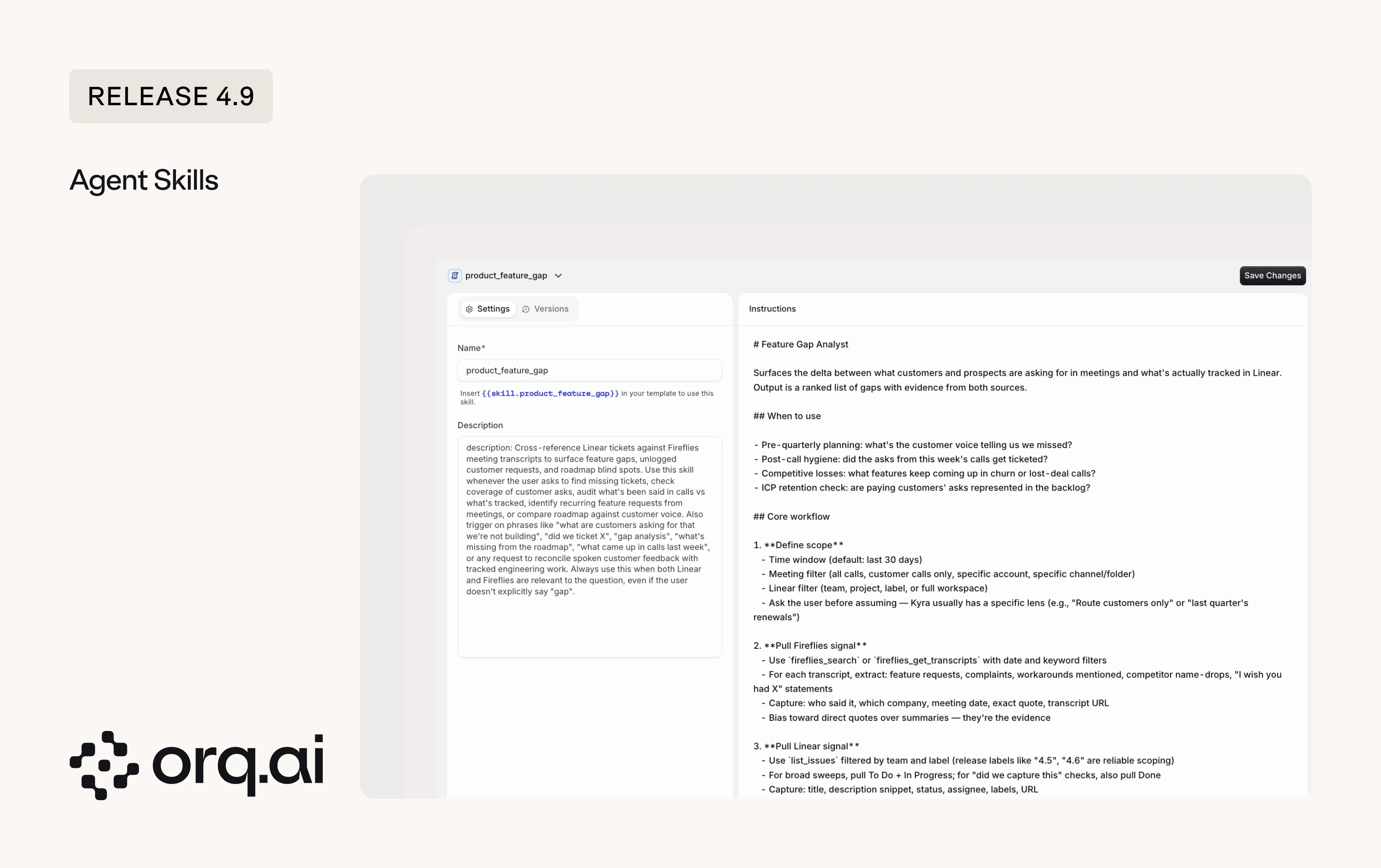 * **On-demand invocation**: Agents invoke attached [Skills](/ai-studio/ai-engineering/skills) only when the conversation needs them, so the base Agent instructions stay small and you don't pay tokens for capabilities the conversation never touches. Two examples:
* A `write-changelog` Skill your docs-agent calls when a release ships, encoding section order, bullet format, and tone rules.
* A `linear-feature-gap` Skill that walks your product agent through `list_initiatives`, then `list_issues` filtered by a `feature-request` label, and surfaces requests not tied to any initiative as gaps.
* **How the Agent picks a Skill**: The Agent decides which Skill to invoke based on the Skill's description and the Agent's instructions, so both need to be clear and specific. You can also explicitly ask the Agent to use a Skill from the user input message.
Prompt Snippets are now Skills, and the change is backward compatible. Existing
* **On-demand invocation**: Agents invoke attached [Skills](/ai-studio/ai-engineering/skills) only when the conversation needs them, so the base Agent instructions stay small and you don't pay tokens for capabilities the conversation never touches. Two examples:
* A `write-changelog` Skill your docs-agent calls when a release ships, encoding section order, bullet format, and tone rules.
* A `linear-feature-gap` Skill that walks your product agent through `list_initiatives`, then `list_issues` filtered by a `feature-request` label, and surfaces requests not tied to any initiative as gaps.
* **How the Agent picks a Skill**: The Agent decides which Skill to invoke based on the Skill's description and the Agent's instructions, so both need to be clear and specific. You can also explicitly ask the Agent to use a Skill from the user input message.
Prompt Snippets are now Skills, and the change is backward compatible. Existing {'{{snippet.key}}'} references keep working, so you don't need to update existing Prompts, and you can reference Skills going forward the same way you referenced Prompt Snippets. Start with the [Skills overview](/ai-studio/ai-engineering/skills).
A new Errors view in Traces surfaces every failing request across systems in one place. Filter by Agent to triage a single Agent's errors, combine the error filter with an Identity to see issues a specific client is hitting, and save the result as a custom view.
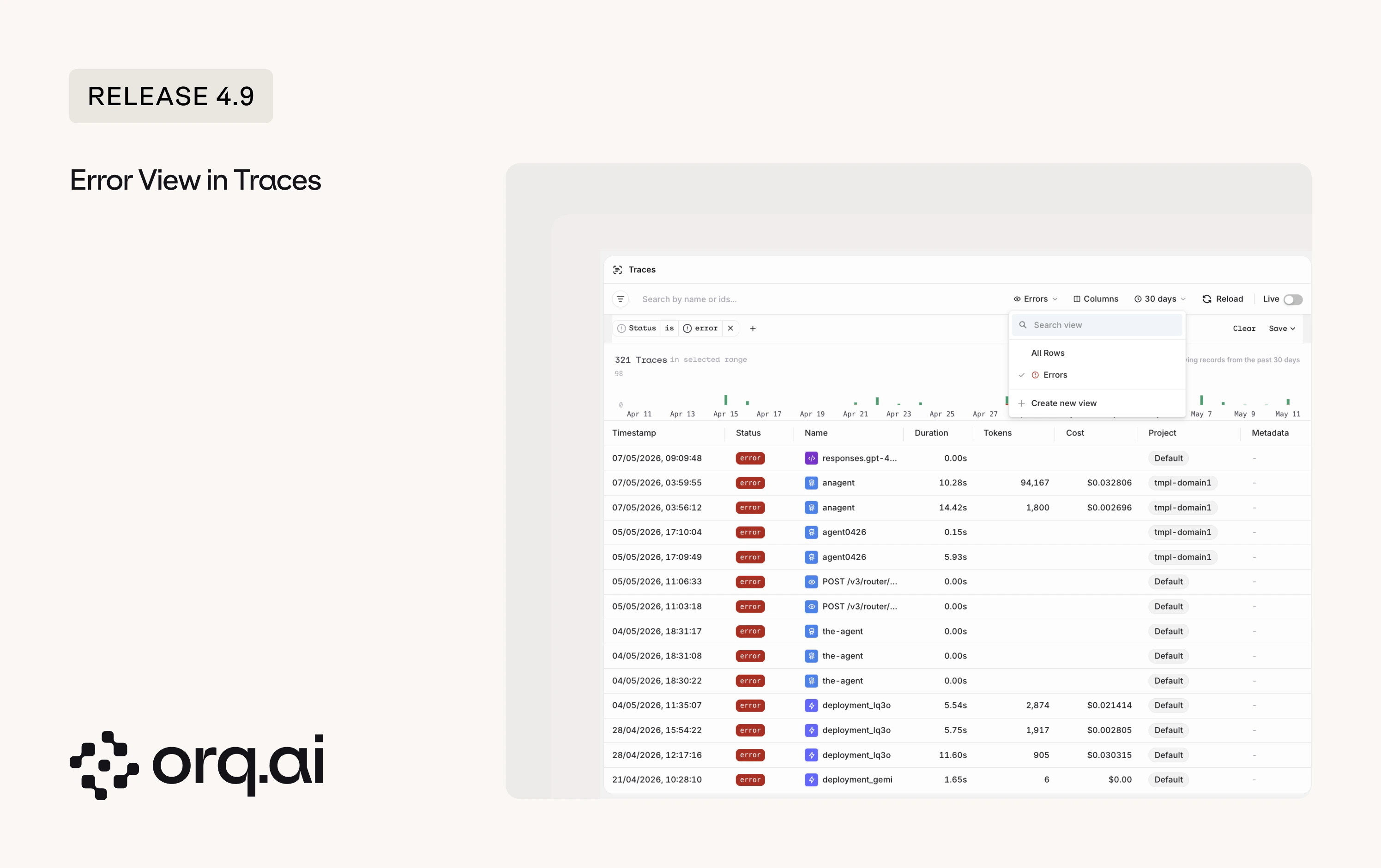 * **[Errors](/ai-studio/observability/traces#viewing-errors) across systems**: Every failing request surfaced in one view, across providers and Agents.
* **Scope to an Agent or Identity**: Combine the error filter with an Agent or Identity to debug a specific Agent or client.
* **Custom views with quick filter**: Save filtered setups as custom views, and jump to errors from any view with the quick error filter.
* **Open the Errors view**: Click the **All Rows** view button in the top right of Traces and select **Errors**.
See [Viewing errors in Traces](/ai-studio/observability/traces#viewing-errors) for details.
* **[LangGraph graph view](/ai-studio/integrations/frameworks/langgraph#viewing-traces)**: See the LangGraph agent graph alongside its trace.
* **[LangChain and LangGraph callbacks](/ai-studio/integrations/frameworks/langgraph#examples)**: A new `@orq-ai/langchain-js` callback adds tracing for Node and TypeScript apps. The Python callback now supports global registration and async, so you wire it up once instead of per invocation.
* **[Azure Foundry Model Onboarding Improved](/ai-studio/integrations/providers/azure#onboarding-models-to-orq-ai)**: Connect every model in an Azure Foundry deployment in one step.
* **OpenAI data residency**: Pin OpenAI traffic to a specific geography for compliance.
* **DeepSeek V4 thinking and caching**: Use **DeepSeek V4** with reasoning and prompt caching.
* **Faster image generation**: The **AI Router** no longer waits for the generated image to finish uploading to storage before returning the response.
* **Observe onboarding snippets**: Copy-paste tracing snippets in the Observe onboarding flow, matching the Router experience.
* **[Team of Agents section](/ai-studio/ai-engineering/build-agents#add-tools)**: Multi-agent orchestration moves out of the tool picker into its own section in **Agent Studio**.
* **[Filter traces by identity](/ai-studio/observability/traces#filtering-traces)**: `list_traces` accepts an `identity_id` filter.
New additions to the **Model Garden** across **Alibaba**, **AWS Bedrock**, **Google Vertex**, **Google AI**, **Mistral**, and **TensorX**. Browse details on the [Supported Models](/ai-gateway/supported-models) page.
| Provider | Models |
| ----------------- | ------------------------------------------------------------------------------------------------------------------------------------------------------------------------------------------------------------------------------------------------------------------------------------------------------------------------------------------------------ |
| **Alibaba** | `deepseek_v4_flash`, `deepseek_v4_pro`, `kimi_k2_5`, `qwen_mt_flash`, `qwen_mt_lite`, `qwen_plus_2025_12_01`, `qwen3_5_27b`, `qwen3_5_35b_a3b`, `qwen3_5_122b_a10b`, `qwen3_5_flash_2026_02_23`, `qwen3_6_27b`, `qwen3_6_35b_a3b`, `qwen3_6_flash`, `qwen3_6_plus`, `qwen3_6_plus_2026_04_02`, `qwen3_vl_flash_2025_10_15`, `qwen3_vl_plus_2025_12_19` |
| **AWS Bedrock** | `amazon_nova_premier_v10`, `qwen_qwen3_coder_next` |
| **Google Vertex** | `deepseek_ai_deepseek_v3_2_maas`, `gemini-3.1-flash-lite`, `moonshotai_kimi_k2_thinking_maas` |
| **Google AI** | `gemini-3.1-flash-lite`, `gemma_4_26b_a4b_it`, `gemma_4_31b_it` |
| **Mistral** | `mistral_medium_2604` |
| **TensorX** | `nemotron_3_super_120b`, `qwen3_5_9b`, `qwen3_5_122b_a10b` |
* **Anthropic /v1/messages bridge**: Anthropic-format `/v1/messages` requests now route accurately to more providers through the **AI Router**.
* **[Moderations endpoint](/reference/moderations/create-moderation)**: Run content moderation on text through the **AI Router** to classify against safety categories and get scores for harmful content detection.
* **Trace filter by Evaluator**: Filtering Traces by Evaluator returns matches.
* **Duplicate traces**: When a request was instrumented both through a client framework (such as an OpenTelemetry SDK or a LangChain callback) and the **AI Router**, it produced two trace rows. Requests now resolve to a single trace with parent-span relationships intact.
* **Annotations on traces**: Annotations render correctly on traces from the new pipeline and propagate to datasets and review queues.
* **Gemini streaming with function tools**: Token-by-token streaming works on Gemini tool calls.
* **Gemini multimodal inputs**: Audio and HTTPS image URLs sent to Gemini reach the model instead of being dropped.
* **OpenAI file uploads**: Filenames preserved through chat completions.
* **Router [policies](/ai-gateway/configuration/guardrail-rules) and [guardrails](/ai-gateway/configuration/guardrail-rules)**: Enable toggles stay in sync across tables, expressions clear cleanly, duplicate names are caught at entry, and policy limits update without errors.
* **[Pydantic AI onboarding snippet](/ai-studio/integrations/frameworks/pydantic-ai#observability)**: Snippet runs out of the box.
* **Agent secret redaction**: Secrets used in Agent instructions and stored values are redacted before being saved.
* **[Errors](/ai-studio/observability/traces#viewing-errors) across systems**: Every failing request surfaced in one view, across providers and Agents.
* **Scope to an Agent or Identity**: Combine the error filter with an Agent or Identity to debug a specific Agent or client.
* **Custom views with quick filter**: Save filtered setups as custom views, and jump to errors from any view with the quick error filter.
* **Open the Errors view**: Click the **All Rows** view button in the top right of Traces and select **Errors**.
See [Viewing errors in Traces](/ai-studio/observability/traces#viewing-errors) for details.
* **[LangGraph graph view](/ai-studio/integrations/frameworks/langgraph#viewing-traces)**: See the LangGraph agent graph alongside its trace.
* **[LangChain and LangGraph callbacks](/ai-studio/integrations/frameworks/langgraph#examples)**: A new `@orq-ai/langchain-js` callback adds tracing for Node and TypeScript apps. The Python callback now supports global registration and async, so you wire it up once instead of per invocation.
* **[Azure Foundry Model Onboarding Improved](/ai-studio/integrations/providers/azure#onboarding-models-to-orq-ai)**: Connect every model in an Azure Foundry deployment in one step.
* **OpenAI data residency**: Pin OpenAI traffic to a specific geography for compliance.
* **DeepSeek V4 thinking and caching**: Use **DeepSeek V4** with reasoning and prompt caching.
* **Faster image generation**: The **AI Router** no longer waits for the generated image to finish uploading to storage before returning the response.
* **Observe onboarding snippets**: Copy-paste tracing snippets in the Observe onboarding flow, matching the Router experience.
* **[Team of Agents section](/ai-studio/ai-engineering/build-agents#add-tools)**: Multi-agent orchestration moves out of the tool picker into its own section in **Agent Studio**.
* **[Filter traces by identity](/ai-studio/observability/traces#filtering-traces)**: `list_traces` accepts an `identity_id` filter.
New additions to the **Model Garden** across **Alibaba**, **AWS Bedrock**, **Google Vertex**, **Google AI**, **Mistral**, and **TensorX**. Browse details on the [Supported Models](/ai-gateway/supported-models) page.
| Provider | Models |
| ----------------- | ------------------------------------------------------------------------------------------------------------------------------------------------------------------------------------------------------------------------------------------------------------------------------------------------------------------------------------------------------ |
| **Alibaba** | `deepseek_v4_flash`, `deepseek_v4_pro`, `kimi_k2_5`, `qwen_mt_flash`, `qwen_mt_lite`, `qwen_plus_2025_12_01`, `qwen3_5_27b`, `qwen3_5_35b_a3b`, `qwen3_5_122b_a10b`, `qwen3_5_flash_2026_02_23`, `qwen3_6_27b`, `qwen3_6_35b_a3b`, `qwen3_6_flash`, `qwen3_6_plus`, `qwen3_6_plus_2026_04_02`, `qwen3_vl_flash_2025_10_15`, `qwen3_vl_plus_2025_12_19` |
| **AWS Bedrock** | `amazon_nova_premier_v10`, `qwen_qwen3_coder_next` |
| **Google Vertex** | `deepseek_ai_deepseek_v3_2_maas`, `gemini-3.1-flash-lite`, `moonshotai_kimi_k2_thinking_maas` |
| **Google AI** | `gemini-3.1-flash-lite`, `gemma_4_26b_a4b_it`, `gemma_4_31b_it` |
| **Mistral** | `mistral_medium_2604` |
| **TensorX** | `nemotron_3_super_120b`, `qwen3_5_9b`, `qwen3_5_122b_a10b` |
* **Anthropic /v1/messages bridge**: Anthropic-format `/v1/messages` requests now route accurately to more providers through the **AI Router**.
* **[Moderations endpoint](/reference/moderations/create-moderation)**: Run content moderation on text through the **AI Router** to classify against safety categories and get scores for harmful content detection.
* **Trace filter by Evaluator**: Filtering Traces by Evaluator returns matches.
* **Duplicate traces**: When a request was instrumented both through a client framework (such as an OpenTelemetry SDK or a LangChain callback) and the **AI Router**, it produced two trace rows. Requests now resolve to a single trace with parent-span relationships intact.
* **Annotations on traces**: Annotations render correctly on traces from the new pipeline and propagate to datasets and review queues.
* **Gemini streaming with function tools**: Token-by-token streaming works on Gemini tool calls.
* **Gemini multimodal inputs**: Audio and HTTPS image URLs sent to Gemini reach the model instead of being dropped.
* **OpenAI file uploads**: Filenames preserved through chat completions.
* **Router [policies](/ai-gateway/configuration/guardrail-rules) and [guardrails](/ai-gateway/configuration/guardrail-rules)**: Enable toggles stay in sync across tables, expressions clear cleanly, duplicate names are caught at entry, and policy limits update without errors.
* **[Pydantic AI onboarding snippet](/ai-studio/integrations/frameworks/pydantic-ai#observability)**: Snippet runs out of the box.
* **Agent secret redaction**: Secrets used in Agent instructions and stored values are redacted before being saved.