> ## Documentation Index
> Fetch the complete documentation index at: https://docs.orq.ai/llms.txt
> Use this file to discover all available pages before exploring further.
# Budgets | AI Gateway
> Set spending limits on any scope (workspace, project, identity, API key, provider, or model) to control AI costs across the organization.
**Budgets** apply spending controls to a named target. Each budget defines a scope (what it applies to), period limits (how much can be spent or consumed per reset period), and an optional expiration date after which the budget stops enforcing. When a cost or token limit is reached, requests matching the budget's scope are blocked until the period resets. Requests per minute limits block for one minute only, independent of the reset period.
Common use cases:
* Cap monthly spend per customer or tenant by scoping a budget to an **Identity**.
* Prevent a staging or CI environment from consuming production credits by scoping a budget to its **API Key**.
* Limit exposure to an expensive provider or model during evaluation by scoping a budget to a **Provider** or **Model**.
* Enforce a hard workspace-wide cost ceiling as a safety net by scoping a budget to the **Workspace**.
* Control spend for a time-boxed experiment using a **One-time** reset period with an expiration date.
Navigate to **Settings > Organization > Budgets** to manage budgets.
Only workspace admins can create, edit, or delete budgets.
## Overview
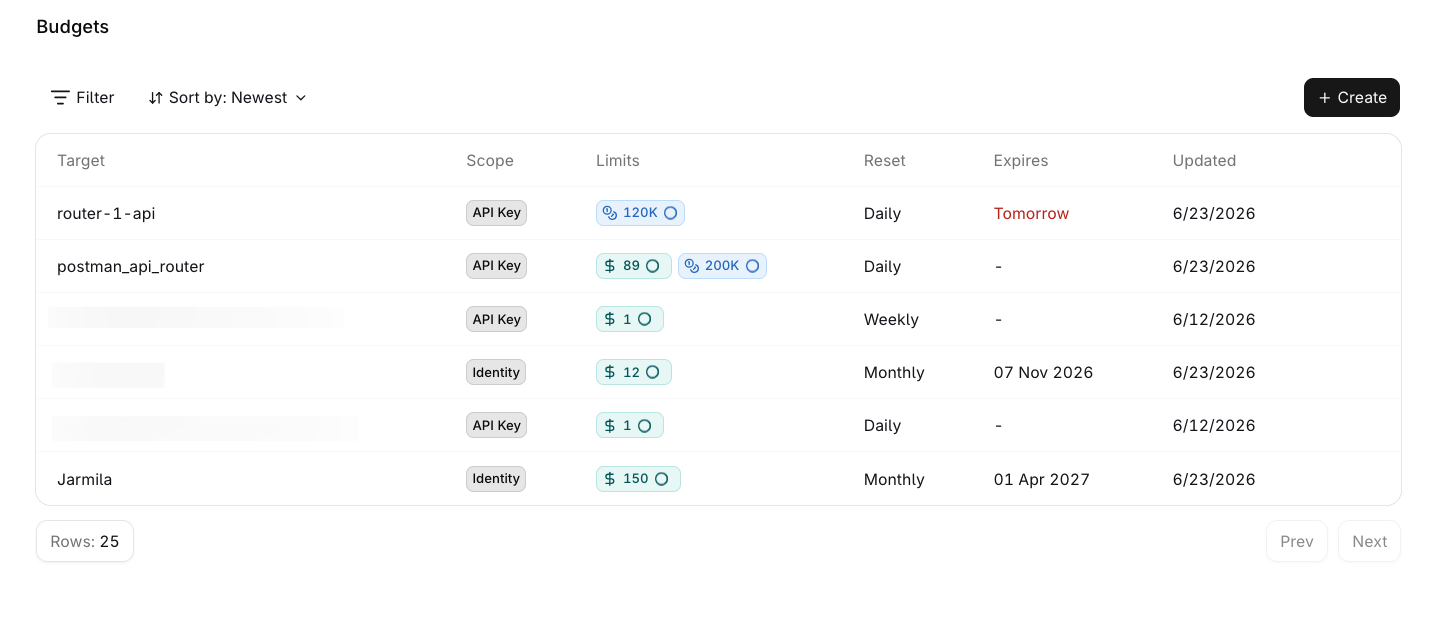
The Budgets table lists all budgets in the organization.
 | Column | Description |
| ----------- | -------------------------------------------------------------------------------------------------------------------------------------------------------------------------------------------------------- |
| **Target** | The entity the budget applies to (e.g. the workspace, a project name, an API key name, an identity name, a provider, or a model name). |
| **Scope** | The type of entity: Workspace, Project, Identity, API Key, Provider, or Model. |
| **Limits** | The configured cost and token limits for the reset period. Hover a limit pill to [see current usage](#monitor-usage). |
| **Reset** | The configured reset period: Daily, Weekly, Monthly, Yearly, or One-time (no automatic reset). |
| **Expires** | Time remaining until the budget stops enforcing. Shown in red when expiration is approaching. After expiration the budget remains in the list but no longer enforces. Blank if the budget never expires. |
| **Updated** | The date the budget was last modified. |
Use Filter to narrow the list by **Period** (Daily, Monthly, One-time, Weekly, Yearly), **Scope**, or **Status** (Active, Expired).
Use Sort by to reorder by **Expiry soon**, **Newest**, or **Recently updated**.
### Monitor usage
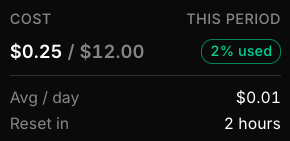
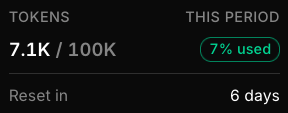
Hover any limit pill in the **Limits** column to see a breakdown of current consumption for that budget. The tooltip shows current usage, the percentage of the limit consumed, and (for period-based budgets) the average daily spend and time remaining until the next reset.
| Column | Description |
| ----------- | -------------------------------------------------------------------------------------------------------------------------------------------------------------------------------------------------------- |
| **Target** | The entity the budget applies to (e.g. the workspace, a project name, an API key name, an identity name, a provider, or a model name). |
| **Scope** | The type of entity: Workspace, Project, Identity, API Key, Provider, or Model. |
| **Limits** | The configured cost and token limits for the reset period. Hover a limit pill to [see current usage](#monitor-usage). |
| **Reset** | The configured reset period: Daily, Weekly, Monthly, Yearly, or One-time (no automatic reset). |
| **Expires** | Time remaining until the budget stops enforcing. Shown in red when expiration is approaching. After expiration the budget remains in the list but no longer enforces. Blank if the budget never expires. |
| **Updated** | The date the budget was last modified. |
Use Filter to narrow the list by **Period** (Daily, Monthly, One-time, Weekly, Yearly), **Scope**, or **Status** (Active, Expired).
Use Sort by to reorder by **Expiry soon**, **Newest**, or **Recently updated**.
### Monitor usage
Hover any limit pill in the **Limits** column to see a breakdown of current consumption for that budget. The tooltip shows current usage, the percentage of the limit consumed, and (for period-based budgets) the average daily spend and time remaining until the next reset.
 ## Create a budget
Click Create in the top-right corner of the Budgets page.
## Create a budget
Click Create in the top-right corner of the Budgets page.
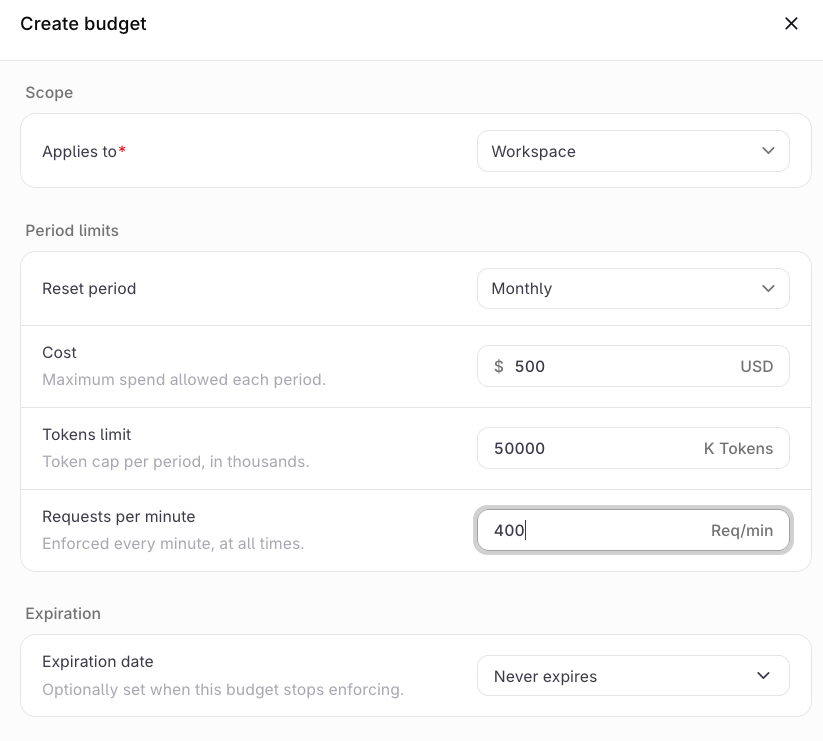 Under **Scope**, select what the budget **Applies to**:
| Option | Description |
| ------------- | -------------------------------------- |
| **Workspace** | Applies to the entire workspace. |
| **Project** | Applies to a specific project. |
| **Identity** | Applies to a contact by external ID. |
| **API Key** | Applies to a specific API key. |
| **Provider** | Applies to all requests to a provider. |
| **Model** | Applies to a specific model. |
For all scope types except **Workspace**, a second field appears to select the specific target (for example, which API key or which identity).
Only one budget is allowed per target. If a budget already exists for the selected target, an inline error is shown and the budget cannot be created until a different target is selected.
Under **Period limits**, set the **Reset period** (required) and one or more of the following limits:
| Limit | Unit | Description |
| ----------------------- | -------- | --------------------------------------------- |
| **Cost** | USD | Maximum spend allowed per reset period. |
| **Tokens limit** | K Tokens | Token cap per reset period, in thousands. |
| **Requests per minute** | Req/min | Rate cap enforced every minute, at all times. |
Leave a limit at `0` to leave it unconfigured. At least one limit must be set to a non-zero value to create the budget.
Reset periods follow a fixed schedule:
| Period | Resets at |
| -------- | ------------------------------------------------------------- |
| Daily | Midnight UTC |
| Weekly | Monday midnight UTC |
| Monthly | 1st of the month, midnight UTC |
| Yearly | January 1st, midnight UTC |
| One-time | Does not reset. Limit applies for the lifetime of the budget. |
**Requests per minute** is a rolling rate cap enforced continuously, independent of the reset period.
If a budget is exhausted before the period resets, an admin can increase its limit to unblock further usage immediately. Existing usage is not removed; the higher limit simply allows the entity to consume more within the current period.
Under **Expiration**, set an **Expiration date** if the budget should stop enforcing after a specific date. Leave it as **Never expires** for an indefinite budget.
Click Create budget. The budget appears in the list immediately and begins enforcing on the next request.
## Edit or delete a budget
Select the menu on any budget row to:
* **Edit**: update the period limits or expiration date. The scope and target cannot be changed after creation.
* **Delete**: permanently removes the budget. Enforcement stops immediately.
Budgets can also be created and updated programmatically through the API using a **Management Key**. Regular API keys cannot manage Budgets.
## See also
Create and manage AI Gateway API keys with optional spending limits.
Manage the workspace credit balance, payment methods, and auto top-up.
Under **Scope**, select what the budget **Applies to**:
| Option | Description |
| ------------- | -------------------------------------- |
| **Workspace** | Applies to the entire workspace. |
| **Project** | Applies to a specific project. |
| **Identity** | Applies to a contact by external ID. |
| **API Key** | Applies to a specific API key. |
| **Provider** | Applies to all requests to a provider. |
| **Model** | Applies to a specific model. |
For all scope types except **Workspace**, a second field appears to select the specific target (for example, which API key or which identity).
Only one budget is allowed per target. If a budget already exists for the selected target, an inline error is shown and the budget cannot be created until a different target is selected.
Under **Period limits**, set the **Reset period** (required) and one or more of the following limits:
| Limit | Unit | Description |
| ----------------------- | -------- | --------------------------------------------- |
| **Cost** | USD | Maximum spend allowed per reset period. |
| **Tokens limit** | K Tokens | Token cap per reset period, in thousands. |
| **Requests per minute** | Req/min | Rate cap enforced every minute, at all times. |
Leave a limit at `0` to leave it unconfigured. At least one limit must be set to a non-zero value to create the budget.
Reset periods follow a fixed schedule:
| Period | Resets at |
| -------- | ------------------------------------------------------------- |
| Daily | Midnight UTC |
| Weekly | Monday midnight UTC |
| Monthly | 1st of the month, midnight UTC |
| Yearly | January 1st, midnight UTC |
| One-time | Does not reset. Limit applies for the lifetime of the budget. |
**Requests per minute** is a rolling rate cap enforced continuously, independent of the reset period.
If a budget is exhausted before the period resets, an admin can increase its limit to unblock further usage immediately. Existing usage is not removed; the higher limit simply allows the entity to consume more within the current period.
Under **Expiration**, set an **Expiration date** if the budget should stop enforcing after a specific date. Leave it as **Never expires** for an indefinite budget.
Click Create budget. The budget appears in the list immediately and begins enforcing on the next request.
## Edit or delete a budget
Select the menu on any budget row to:
* **Edit**: update the period limits or expiration date. The scope and target cannot be changed after creation.
* **Delete**: permanently removes the budget. Enforcement stops immediately.
Budgets can also be created and updated programmatically through the API using a **Management Key**. Regular API keys cannot manage Budgets.
## See also
Create and manage AI Gateway API keys with optional spending limits.
Manage the workspace credit balance, payment methods, and auto top-up.