> ## Documentation Index
> Fetch the complete documentation index at: https://docs.orq.ai/llms.txt
> Use this file to discover all available pages before exploring further.
# Identities | AI Gateway
> Attribute AI Gateway requests to users, teams, or clients. Create identities via API to track per-identity cost, token usage, and error rate across the gateway.
**Identities** group **AI Gateway** requests by user, team, project, or client, giving per-identity visibility into cost, token usage, and error rates.
They can represent:
* a **User**
* a **Team**
* a **Project**
* a **Client**
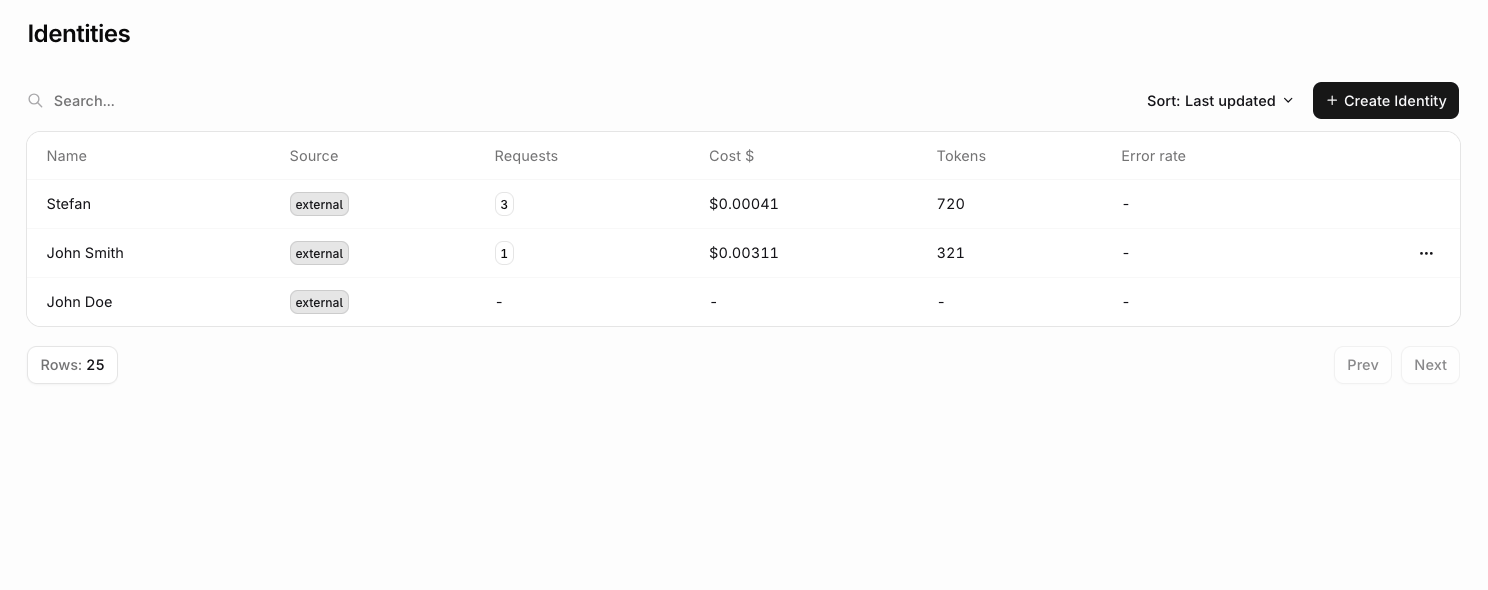 Common use cases:
* Per-user cost attribution and cross-charging to tenants or customers.
* Enforcing per-user rate limits to prevent abuse.
* Identifying which users generate the most load or cost.
* Linking LLM usage to existing user analytics for cohort analysis.
## Creating an identity
In the **AI Gateway** sidebar, go to **Identities** and click **New Identity**. Fill in the external ID and any optional fields (display name, email, metadata), then click **Create**.
The identity is available immediately and can be attached to requests using its external ID.
Create identities via the API or SDK before attaching them to requests.
```bash cURL theme={"theme":{"light":"github-light","dark":"github-dark"}}
curl --location 'https://api.orq.ai/v2/identities' \
--header "Authorization: Bearer $ORQ_API_KEY" \
--header 'Content-Type: application/json' \
--data-raw '{
"external_id": "user_123",
"display_name": "Client A",
"email": "john@example.com",
"metadata": {
"role": "admin"
}
}'
```
```typescript TypeScript theme={"theme":{"light":"github-light","dark":"github-dark"}}
import { Orq } from "@orq-ai/node";
const orq = new Orq({ apiKey: process.env.ORQ_API_KEY ?? "" });
const identity = await orq.identities.create({
externalId: "user_123",
displayName: "Client A",
email: "john@example.com",
metadata: { role: "admin" },
});
```
```python Python theme={"theme":{"light":"github-light","dark":"github-dark"}}
from orq_ai_sdk import Orq
import os
orq = Orq(api_key=os.getenv("ORQ_API_KEY"))
identity = orq.identities.create(
external_id="user_123",
display_name="Client A",
email="john@example.com",
metadata={"role": "admin"},
)
```
See the [API Reference](/reference/identities/create-an-identity) for the full parameter specification.
## Attaching an identity to a request
Every **AI Gateway** request can be attributed to a specific user, team, or client. The gateway checks each of the following sources in order and uses the first match found:
| Order | Source | Effect |
| ----- | ------------------------------------- | ------------------------------------------------------------------------ |
| 1 | `identity` object in the request body | Tags the request and upserts the identity record (name, email, metadata) |
| 2 | `X-ORQ-IDENTITY-ID` request header | Tags the request only; does not update the identity record |
| 3 | API key owner | Tags the request only; applies automatically when the key is user-owned |
Pass the identity's `external_id` in the `identity.id` field on any **AI Gateway** request. If no identity with that `external_id` exists, one is created automatically; if it does exist, its record is updated with any `display_name`, `email`, or `metadata` provided.
The `identityId` / `identity_id` constructor option was removed in SDK v4.10.0. Pass `identity` on each request instead.
**Orq SDK**
```bash Chat Completions theme={"theme":{"light":"github-light","dark":"github-dark"}}
curl 'https://api.orq.ai/v3/router/chat/completions' \
-H "Authorization: Bearer $ORQ_API_KEY" \
-H 'Content-Type: application/json' \
-d '{
"model": "anthropic/claude-sonnet-4-6",
"messages": [{"role": "user", "content": "Hello"}],
"identity": {"id": "user_123"}
}'
```
```bash Responses theme={"theme":{"light":"github-light","dark":"github-dark"}}
curl 'https://api.orq.ai/v3/router/responses' \
-H "Authorization: Bearer $ORQ_API_KEY" \
-H 'Content-Type: application/json' \
-d '{
"model": "anthropic/claude-sonnet-4-6",
"input": "Hello",
"identity": {"id": "user_123"}
}'
```
```typescript TypeScript theme={"theme":{"light":"github-light","dark":"github-dark"}}
import { Orq } from "@orq-ai/node";
const orq = new Orq({ apiKey: process.env.ORQ_API_KEY ?? "" });
const response = await orq.responses.create({
model: "anthropic/claude-sonnet-4-6",
input: "Hello",
identity: { id: "user_123" },
});
```
```python Python theme={"theme":{"light":"github-light","dark":"github-dark"}}
from orq_ai_sdk import Orq
import os
orq = Orq(api_key=os.getenv("ORQ_API_KEY"))
response = orq.responses.create(
model="anthropic/claude-sonnet-4-6",
input="Hello",
identity={"id": "user_123"},
)
```
**OpenAI SDK**
```typescript TypeScript (Responses) theme={"theme":{"light":"github-light","dark":"github-dark"}}
import OpenAI from "openai";
const client = new OpenAI({
apiKey: process.env.ORQ_API_KEY,
baseURL: "https://api.orq.ai/v3/router",
});
const response = await client.responses.create({
model: "openai/gpt-4o",
input: "Hello",
extra_body: {
identity: {
id: "user_123",
display_name: "John Smith",
email: "john@example.com",
metadata: [{ plan: "pro" }],
},
},
});
```
```python Python (Responses) theme={"theme":{"light":"github-light","dark":"github-dark"}}
from openai import OpenAI
import os
client = OpenAI(
api_key=os.environ.get("ORQ_API_KEY"),
base_url="https://api.orq.ai/v3/router",
)
response = client.responses.create(
model="openai/gpt-4o",
input="Hello",
extra_body={
"identity": {
"id": "user_123",
"display_name": "John Smith",
"email": "john@example.com",
"metadata": [{"plan": "pro"}],
}
},
)
```
```typescript TypeScript (Chat Completions) theme={"theme":{"light":"github-light","dark":"github-dark"}}
import OpenAI from "openai";
const client = new OpenAI({
apiKey: process.env.ORQ_API_KEY,
baseURL: "https://api.orq.ai/v3/router",
});
const response = await client.chat.completions.create({
model: "openai/gpt-4o",
messages: [{ role: "user", content: "Hello" }],
extra_body: {
identity: {
id: "user_123",
display_name: "John Smith",
email: "john@example.com",
metadata: [{ plan: "pro" }],
},
},
});
```
```python Python (Chat Completions) theme={"theme":{"light":"github-light","dark":"github-dark"}}
from openai import OpenAI
import os
client = OpenAI(
api_key=os.environ.get("ORQ_API_KEY"),
base_url="https://api.orq.ai/v3/router",
)
response = client.chat.completions.create(
model="openai/gpt-4o",
messages=[{"role": "user", "content": "Hello"}],
extra_body={
"identity": {"id": "user_123", "display_name": "John Smith", "email": "john@example.com", "metadata": [{"plan": "pro"}]},
},
)
```
Use the `X-ORQ-IDENTITY-ID` header to tag a request with an existing identity without modifying the request body. Useful in proxy or middleware layers where the payload is opaque.
The `X-ORQ-IDENTITY-ID` header does not upsert the identity record. Use the body `identity` object to keep the identity's display name, email, and metadata up to date.
The identity must already exist before using this header. If no identity with the given ID has been created via the body method or the [Create identity](/reference/identities/create-an-identity) endpoint, the request is processed but the tag is not attributed to any identity record.
**Orq SDK**
```bash cURL theme={"theme":{"light":"github-light","dark":"github-dark"}}
curl 'https://api.orq.ai/v3/router/responses' \
-H "Authorization: Bearer $ORQ_API_KEY" \
-H "X-ORQ-IDENTITY-ID: user_123" \
-H 'Content-Type: application/json' \
-d '{
"model": "anthropic/claude-sonnet-4-6",
"input": "Hello"
}'
```
```typescript TypeScript theme={"theme":{"light":"github-light","dark":"github-dark"}}
import { Orq } from "@orq-ai/node";
const orq = new Orq({ apiKey: process.env.ORQ_API_KEY ?? "" });
const response = await orq.responses.create(
{ model: "anthropic/claude-sonnet-4-6", input: "Hello" },
{ headers: { "X-ORQ-IDENTITY-ID": "user_123" } },
);
```
```python Python theme={"theme":{"light":"github-light","dark":"github-dark"}}
from orq_ai_sdk import Orq
import os
orq = Orq(api_key=os.getenv("ORQ_API_KEY"))
response = orq.responses.create(
model="anthropic/claude-sonnet-4-6",
input="Hello",
http_headers={"X-ORQ-IDENTITY-ID": "user_123"},
)
```
**OpenAI SDK**
```typescript TypeScript theme={"theme":{"light":"github-light","dark":"github-dark"}}
import OpenAI from "openai";
const client = new OpenAI({
apiKey: process.env.ORQ_API_KEY,
baseURL: "https://api.orq.ai/v3/router",
});
const response = await client.chat.completions.create(
{ model: "openai/gpt-4o", messages: [{ role: "user", content: "Hello" }] },
{ headers: { "X-ORQ-IDENTITY-ID": "user_123" } },
);
```
```python Python theme={"theme":{"light":"github-light","dark":"github-dark"}}
from openai import OpenAI
import os
client = OpenAI(
api_key=os.environ.get("ORQ_API_KEY"),
base_url="https://api.orq.ai/v3/router",
)
response = client.chat.completions.create(
model="openai/gpt-4o",
messages=[{"role": "user", "content": "Hello"}],
extra_headers={"X-ORQ-IDENTITY-ID": "user_123"},
)
```
When a request includes no `identity` body field and no `X-ORQ-IDENTITY-ID` header, **AI Gateway** automatically attributes the request to the API key's owner, provided the key is user-owned. No additional configuration is required.
## Retrieving an identity via the API
Once an identity is in use, fetch its full record at any time using its `_id` (ULID) or `external_id`.
```bash cURL theme={"theme":{"light":"github-light","dark":"github-dark"}}
curl 'https://api.orq.ai/v2/identities/' \
-H "Authorization: Bearer $ORQ_API_KEY" \
-H 'Accept: application/json'
```
```typescript TypeScript theme={"theme":{"light":"github-light","dark":"github-dark"}}
const identity = await orq.identities.retrieve({ id: "01ARZ3NDEKTSV4RRFFQ69G5FAV" });
console.log(identity);
```
```python Python theme={"theme":{"light":"github-light","dark":"github-dark"}}
identity = orq.identities.retrieve(id="01ARZ3NDEKTSV4RRFFQ69G5FAV")
print(identity)
```
The response returns the full identity record:
```json theme={"theme":{"light":"github-light","dark":"github-dark"}}
{
"_id": "01ARZ3NDEKTSV4RRFFQ69G5FAV",
"external_id": "user_12345",
"display_name": "John Smith",
"email": "john@example.com",
"avatar_url": "https://example.com/avatars/john-smith.jpg",
"tags": ["premium", "beta-user"],
"metadata": {
"department": "Engineering",
"role": "Senior Developer",
"subscription_tier": "premium"
},
"created": "2024-01-15T10:30:00Z",
"updated": "2024-01-15T10:30:00Z"
}
```
See the [API Reference](/reference/identities/retrieve-an-identity) for the full parameter and response specification.
## Listing identities with metrics
Pass `include_metrics=true` to retrieve 30-day usage metrics for each identity.
```bash cURL theme={"theme":{"light":"github-light","dark":"github-dark"}}
curl 'https://api.orq.ai/v2/identities?include_metrics=true' \
-H "Authorization: Bearer $ORQ_API_KEY" \
-H 'Accept: application/json'
```
```typescript TypeScript theme={"theme":{"light":"github-light","dark":"github-dark"}}
const identities = await orq.identities.list({ includeMetrics: true });
console.log(identities.data);
```
```python Python theme={"theme":{"light":"github-light","dark":"github-dark"}}
result = orq.identities.list(include_metrics=True)
print(result.data)
```
Each identity includes a `metrics` object covering the last 30 days:
| Field | Description |
| ---------------- | --------------------------------------------------- |
| `total_cost` | Total spend in USD |
| `total_tokens` | Total tokens consumed |
| `total_requests` | Total number of requests |
| `error_rate` | Ratio of failed requests (e.g. `0.33` = 33% errors) |
See the [API Reference](/reference/identities/list-identities) for pagination, search, and tag filtering parameters.
## Identity field reference
Fields accepted on the `identity` object for any AI Gateway request:
| Field | Type | Required | Description |
| -------------- | --------- | -------- | ------------------------------------------------------------ |
| `id` | string | Yes | Unique identity identifier (max 255 characters) |
| `display_name` | string | No | Human-readable name |
| `email` | string | No | Email address |
| `metadata` | object\[] | No | Array of objects with custom key-value pairs (max 20 fields) |
| `logo_url` | string | No | URL to a profile image |
| `tags` | string\[] | No | Classification tags for segmentation (max 10) |
## Best practices
* **Consistent IDs**: Use predictable identity ID patterns (e.g. `user-{userId}`, `tenant-{orgId}-{userId}`) across the application.
* **Essential metadata only**: Include only relevant metadata fields to minimize payload size.
* **Tag strategy**: Use tags for filtering and segmentation rather than storing detailed data.
* **Privacy compliance**: Ensure identity data handling meets applicable privacy requirements.
* **Validation**: Validate `id` format and length before sending requests.
## Troubleshooting
| Issue | Cause | Solution |
| ------------------------------------- | -------------------------------------- | ----------------------------------------------- |
| Identity not appearing in analytics | Missing or invalid `identity.id` | Ensure `identity.id` is provided and non-empty |
| Duplicate identities in the dashboard | Inconsistent ID format across requests | Standardize identity ID generation in one place |
Common use cases:
* Per-user cost attribution and cross-charging to tenants or customers.
* Enforcing per-user rate limits to prevent abuse.
* Identifying which users generate the most load or cost.
* Linking LLM usage to existing user analytics for cohort analysis.
## Creating an identity
In the **AI Gateway** sidebar, go to **Identities** and click **New Identity**. Fill in the external ID and any optional fields (display name, email, metadata), then click **Create**.
The identity is available immediately and can be attached to requests using its external ID.
Create identities via the API or SDK before attaching them to requests.
```bash cURL theme={"theme":{"light":"github-light","dark":"github-dark"}}
curl --location 'https://api.orq.ai/v2/identities' \
--header "Authorization: Bearer $ORQ_API_KEY" \
--header 'Content-Type: application/json' \
--data-raw '{
"external_id": "user_123",
"display_name": "Client A",
"email": "john@example.com",
"metadata": {
"role": "admin"
}
}'
```
```typescript TypeScript theme={"theme":{"light":"github-light","dark":"github-dark"}}
import { Orq } from "@orq-ai/node";
const orq = new Orq({ apiKey: process.env.ORQ_API_KEY ?? "" });
const identity = await orq.identities.create({
externalId: "user_123",
displayName: "Client A",
email: "john@example.com",
metadata: { role: "admin" },
});
```
```python Python theme={"theme":{"light":"github-light","dark":"github-dark"}}
from orq_ai_sdk import Orq
import os
orq = Orq(api_key=os.getenv("ORQ_API_KEY"))
identity = orq.identities.create(
external_id="user_123",
display_name="Client A",
email="john@example.com",
metadata={"role": "admin"},
)
```
See the [API Reference](/reference/identities/create-an-identity) for the full parameter specification.
## Attaching an identity to a request
Every **AI Gateway** request can be attributed to a specific user, team, or client. The gateway checks each of the following sources in order and uses the first match found:
| Order | Source | Effect |
| ----- | ------------------------------------- | ------------------------------------------------------------------------ |
| 1 | `identity` object in the request body | Tags the request and upserts the identity record (name, email, metadata) |
| 2 | `X-ORQ-IDENTITY-ID` request header | Tags the request only; does not update the identity record |
| 3 | API key owner | Tags the request only; applies automatically when the key is user-owned |
Pass the identity's `external_id` in the `identity.id` field on any **AI Gateway** request. If no identity with that `external_id` exists, one is created automatically; if it does exist, its record is updated with any `display_name`, `email`, or `metadata` provided.
The `identityId` / `identity_id` constructor option was removed in SDK v4.10.0. Pass `identity` on each request instead.
**Orq SDK**
```bash Chat Completions theme={"theme":{"light":"github-light","dark":"github-dark"}}
curl 'https://api.orq.ai/v3/router/chat/completions' \
-H "Authorization: Bearer $ORQ_API_KEY" \
-H 'Content-Type: application/json' \
-d '{
"model": "anthropic/claude-sonnet-4-6",
"messages": [{"role": "user", "content": "Hello"}],
"identity": {"id": "user_123"}
}'
```
```bash Responses theme={"theme":{"light":"github-light","dark":"github-dark"}}
curl 'https://api.orq.ai/v3/router/responses' \
-H "Authorization: Bearer $ORQ_API_KEY" \
-H 'Content-Type: application/json' \
-d '{
"model": "anthropic/claude-sonnet-4-6",
"input": "Hello",
"identity": {"id": "user_123"}
}'
```
```typescript TypeScript theme={"theme":{"light":"github-light","dark":"github-dark"}}
import { Orq } from "@orq-ai/node";
const orq = new Orq({ apiKey: process.env.ORQ_API_KEY ?? "" });
const response = await orq.responses.create({
model: "anthropic/claude-sonnet-4-6",
input: "Hello",
identity: { id: "user_123" },
});
```
```python Python theme={"theme":{"light":"github-light","dark":"github-dark"}}
from orq_ai_sdk import Orq
import os
orq = Orq(api_key=os.getenv("ORQ_API_KEY"))
response = orq.responses.create(
model="anthropic/claude-sonnet-4-6",
input="Hello",
identity={"id": "user_123"},
)
```
**OpenAI SDK**
```typescript TypeScript (Responses) theme={"theme":{"light":"github-light","dark":"github-dark"}}
import OpenAI from "openai";
const client = new OpenAI({
apiKey: process.env.ORQ_API_KEY,
baseURL: "https://api.orq.ai/v3/router",
});
const response = await client.responses.create({
model: "openai/gpt-4o",
input: "Hello",
extra_body: {
identity: {
id: "user_123",
display_name: "John Smith",
email: "john@example.com",
metadata: [{ plan: "pro" }],
},
},
});
```
```python Python (Responses) theme={"theme":{"light":"github-light","dark":"github-dark"}}
from openai import OpenAI
import os
client = OpenAI(
api_key=os.environ.get("ORQ_API_KEY"),
base_url="https://api.orq.ai/v3/router",
)
response = client.responses.create(
model="openai/gpt-4o",
input="Hello",
extra_body={
"identity": {
"id": "user_123",
"display_name": "John Smith",
"email": "john@example.com",
"metadata": [{"plan": "pro"}],
}
},
)
```
```typescript TypeScript (Chat Completions) theme={"theme":{"light":"github-light","dark":"github-dark"}}
import OpenAI from "openai";
const client = new OpenAI({
apiKey: process.env.ORQ_API_KEY,
baseURL: "https://api.orq.ai/v3/router",
});
const response = await client.chat.completions.create({
model: "openai/gpt-4o",
messages: [{ role: "user", content: "Hello" }],
extra_body: {
identity: {
id: "user_123",
display_name: "John Smith",
email: "john@example.com",
metadata: [{ plan: "pro" }],
},
},
});
```
```python Python (Chat Completions) theme={"theme":{"light":"github-light","dark":"github-dark"}}
from openai import OpenAI
import os
client = OpenAI(
api_key=os.environ.get("ORQ_API_KEY"),
base_url="https://api.orq.ai/v3/router",
)
response = client.chat.completions.create(
model="openai/gpt-4o",
messages=[{"role": "user", "content": "Hello"}],
extra_body={
"identity": {"id": "user_123", "display_name": "John Smith", "email": "john@example.com", "metadata": [{"plan": "pro"}]},
},
)
```
Use the `X-ORQ-IDENTITY-ID` header to tag a request with an existing identity without modifying the request body. Useful in proxy or middleware layers where the payload is opaque.
The `X-ORQ-IDENTITY-ID` header does not upsert the identity record. Use the body `identity` object to keep the identity's display name, email, and metadata up to date.
The identity must already exist before using this header. If no identity with the given ID has been created via the body method or the [Create identity](/reference/identities/create-an-identity) endpoint, the request is processed but the tag is not attributed to any identity record.
**Orq SDK**
```bash cURL theme={"theme":{"light":"github-light","dark":"github-dark"}}
curl 'https://api.orq.ai/v3/router/responses' \
-H "Authorization: Bearer $ORQ_API_KEY" \
-H "X-ORQ-IDENTITY-ID: user_123" \
-H 'Content-Type: application/json' \
-d '{
"model": "anthropic/claude-sonnet-4-6",
"input": "Hello"
}'
```
```typescript TypeScript theme={"theme":{"light":"github-light","dark":"github-dark"}}
import { Orq } from "@orq-ai/node";
const orq = new Orq({ apiKey: process.env.ORQ_API_KEY ?? "" });
const response = await orq.responses.create(
{ model: "anthropic/claude-sonnet-4-6", input: "Hello" },
{ headers: { "X-ORQ-IDENTITY-ID": "user_123" } },
);
```
```python Python theme={"theme":{"light":"github-light","dark":"github-dark"}}
from orq_ai_sdk import Orq
import os
orq = Orq(api_key=os.getenv("ORQ_API_KEY"))
response = orq.responses.create(
model="anthropic/claude-sonnet-4-6",
input="Hello",
http_headers={"X-ORQ-IDENTITY-ID": "user_123"},
)
```
**OpenAI SDK**
```typescript TypeScript theme={"theme":{"light":"github-light","dark":"github-dark"}}
import OpenAI from "openai";
const client = new OpenAI({
apiKey: process.env.ORQ_API_KEY,
baseURL: "https://api.orq.ai/v3/router",
});
const response = await client.chat.completions.create(
{ model: "openai/gpt-4o", messages: [{ role: "user", content: "Hello" }] },
{ headers: { "X-ORQ-IDENTITY-ID": "user_123" } },
);
```
```python Python theme={"theme":{"light":"github-light","dark":"github-dark"}}
from openai import OpenAI
import os
client = OpenAI(
api_key=os.environ.get("ORQ_API_KEY"),
base_url="https://api.orq.ai/v3/router",
)
response = client.chat.completions.create(
model="openai/gpt-4o",
messages=[{"role": "user", "content": "Hello"}],
extra_headers={"X-ORQ-IDENTITY-ID": "user_123"},
)
```
When a request includes no `identity` body field and no `X-ORQ-IDENTITY-ID` header, **AI Gateway** automatically attributes the request to the API key's owner, provided the key is user-owned. No additional configuration is required.
## Retrieving an identity via the API
Once an identity is in use, fetch its full record at any time using its `_id` (ULID) or `external_id`.
```bash cURL theme={"theme":{"light":"github-light","dark":"github-dark"}}
curl 'https://api.orq.ai/v2/identities/' \
-H "Authorization: Bearer $ORQ_API_KEY" \
-H 'Accept: application/json'
```
```typescript TypeScript theme={"theme":{"light":"github-light","dark":"github-dark"}}
const identity = await orq.identities.retrieve({ id: "01ARZ3NDEKTSV4RRFFQ69G5FAV" });
console.log(identity);
```
```python Python theme={"theme":{"light":"github-light","dark":"github-dark"}}
identity = orq.identities.retrieve(id="01ARZ3NDEKTSV4RRFFQ69G5FAV")
print(identity)
```
The response returns the full identity record:
```json theme={"theme":{"light":"github-light","dark":"github-dark"}}
{
"_id": "01ARZ3NDEKTSV4RRFFQ69G5FAV",
"external_id": "user_12345",
"display_name": "John Smith",
"email": "john@example.com",
"avatar_url": "https://example.com/avatars/john-smith.jpg",
"tags": ["premium", "beta-user"],
"metadata": {
"department": "Engineering",
"role": "Senior Developer",
"subscription_tier": "premium"
},
"created": "2024-01-15T10:30:00Z",
"updated": "2024-01-15T10:30:00Z"
}
```
See the [API Reference](/reference/identities/retrieve-an-identity) for the full parameter and response specification.
## Listing identities with metrics
Pass `include_metrics=true` to retrieve 30-day usage metrics for each identity.
```bash cURL theme={"theme":{"light":"github-light","dark":"github-dark"}}
curl 'https://api.orq.ai/v2/identities?include_metrics=true' \
-H "Authorization: Bearer $ORQ_API_KEY" \
-H 'Accept: application/json'
```
```typescript TypeScript theme={"theme":{"light":"github-light","dark":"github-dark"}}
const identities = await orq.identities.list({ includeMetrics: true });
console.log(identities.data);
```
```python Python theme={"theme":{"light":"github-light","dark":"github-dark"}}
result = orq.identities.list(include_metrics=True)
print(result.data)
```
Each identity includes a `metrics` object covering the last 30 days:
| Field | Description |
| ---------------- | --------------------------------------------------- |
| `total_cost` | Total spend in USD |
| `total_tokens` | Total tokens consumed |
| `total_requests` | Total number of requests |
| `error_rate` | Ratio of failed requests (e.g. `0.33` = 33% errors) |
See the [API Reference](/reference/identities/list-identities) for pagination, search, and tag filtering parameters.
## Identity field reference
Fields accepted on the `identity` object for any AI Gateway request:
| Field | Type | Required | Description |
| -------------- | --------- | -------- | ------------------------------------------------------------ |
| `id` | string | Yes | Unique identity identifier (max 255 characters) |
| `display_name` | string | No | Human-readable name |
| `email` | string | No | Email address |
| `metadata` | object\[] | No | Array of objects with custom key-value pairs (max 20 fields) |
| `logo_url` | string | No | URL to a profile image |
| `tags` | string\[] | No | Classification tags for segmentation (max 10) |
## Best practices
* **Consistent IDs**: Use predictable identity ID patterns (e.g. `user-{userId}`, `tenant-{orgId}-{userId}`) across the application.
* **Essential metadata only**: Include only relevant metadata fields to minimize payload size.
* **Tag strategy**: Use tags for filtering and segmentation rather than storing detailed data.
* **Privacy compliance**: Ensure identity data handling meets applicable privacy requirements.
* **Validation**: Validate `id` format and length before sending requests.
## Troubleshooting
| Issue | Cause | Solution |
| ------------------------------------- | -------------------------------------- | ----------------------------------------------- |
| Identity not appearing in analytics | Missing or invalid `identity.id` | Ensure `identity.id` is provided and non-empty |
| Duplicate identities in the dashboard | Inconsistent ID format across requests | Standardize identity ID generation in one place |