> ## Documentation Index
> Fetch the complete documentation index at: https://docs.orq.ai/llms.txt
> Use this file to discover all available pages before exploring further.
# External Knowledge Bases
> Connect an existing vector database via a standard API. Keep data management on the existing infrastructure.
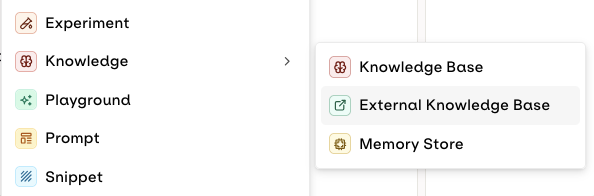
To connect to an external Knowledge Base, click the button on the desired [Project](/docs/ai-studio/get-started/projects) and select **Knowledge Base > External**.
 The following modal opens to configure the external knowledge base.
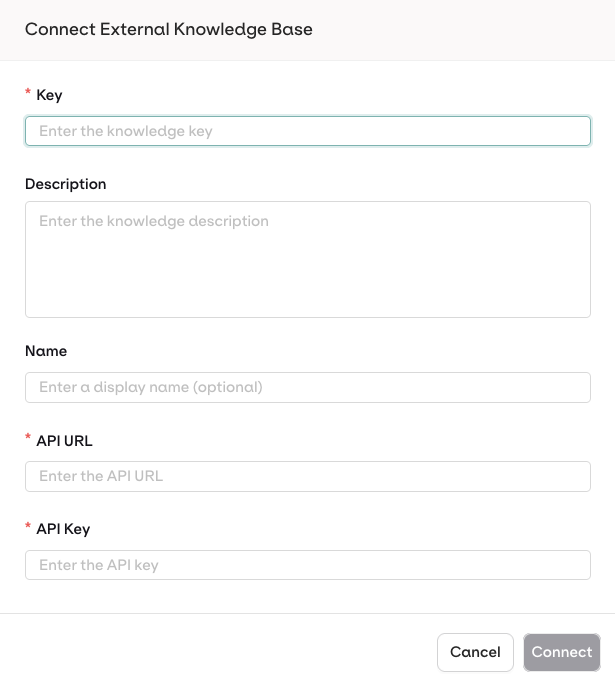 | Field | Description | Example |
| --------------- | ----------------------------------------------------------------------------------- | -------------------------------- |
| **Key** | Unique identifier, alphanumeric with hyphens/underscores | `external_kb` |
| **Description** | Description of the knowledge base | `External Knowledge Base` |
| **Name** | Display name | `External Knowledge Base Name` |
| **API URL** | URL to search the knowledge base, must be HTTPS | `https://api.example.org/search` |
| **API Key** | Authentication API key. **Orq.ai** will use Bearer Authentication to call your API. | `` |
Orq.ai includes the API Key in the `Authorization: Bearer ` header when calling your endpoint.
API keys are encrypted using workspace-specific keys (AES-256-GCM).
Select Connect to finalize.
## API Payloads
Example payloads for the request and response expected from your external API:
```json theme={"theme":{"light":"github-light","dark":"github-dark"}}
{
"query": "",
"top_k": 50,
"threshold": 0.5,
"filter_by": {},
"search_options": {
"include_vectors": true,
"include_metadata": true,
"include_scores": true
},
"rerank_config": {
"model": "cohere/rerank-multilingual-v3.0",
"threshold": 0,
"top_k": 10
}
}
```
```json theme={"theme":{"light":"github-light","dark":"github-dark"}}
{
"matches": [
{
"id": "",
"text": "",
"vector": [123],
"metadata": {},
"scores": {
"rerank_score": 123,
"search_score": 123
}
}
]
}
```
The API must respond like a standard Knowledge Base search. See our [Search API](/reference/knowledge-bases/search-knowledge-base) for the expected payload format.
## Example Implementations
Clone the [Python example Server](https://github.com/orq-ai/orq-cookbooks/tree/main/knowledge-bases/external-knowledge-bases/external-knowledge-bases-python)
```
pip install -r requirements.txt
```
```
uvicorn main:app --reload
```
The API is running at `http://localhost:8000`
Dynamic Documentation is available at `http://localhost:8000/docs`
Clone the [Node example Server](https://github.com/orq-ai/orq-cookbooks/tree/main/knowledge-bases/external-knowledge-bases/external-knowledge-bases-node)
```
npm install
```
```
npm run dev
```
The API is running at `http://localhost:8000`
Dynamic Documentation is available at `http://localhost:8000/doc`
## Integrate Vector Database Providers
**Orq.ai** supports providers like **Weaviate** and **Pinecone**, as both platforms expose REST APIs that conform to the expected payload format.
**Configuration in Orq.ai:**
* **API URL**: `https://your-cluster.weaviate.cloud/v1/graphql`
* **API Key**: Your Weaviate API key
**Configuration in Orq.ai:**
* **API URL**: `https://$INDEX_HOST/records/namespaces/$NAMESPACE/search`
* **API Key**: Your Pinecone API key
## Troubleshoot Common Errors
| Scenario | Error Message |
| --------------------- | ----------------------------------------------------------- |
| HTTP instead of HTTPS | "External knowledge base URL must use HTTPS protocol" |
| Local/private IP | "External knowledge base URL cannot point to local network" |
| API unreachable | "Failed to verify external knowledge base connectivity" |
| API timeout (>50s) | "External API request timed out" |
**Cannot connect to external API**
1. Verify your API endpoint is publicly accessible via HTTPS.
2. Check your API logs for incoming requests from Orq.ai IP addresses.
3. Verify your firewall/security groups allow inbound HTTPS traffic.
**API key authentication failing**
1. Verify the API key is correct and has not expired.
2. Check that your API expects Bearer authentication in the `Authorization` header.
3. Confirm your API key has the necessary permissions to perform searches.
**No results returned or poor quality results**
1. Verify your API returns the expected response format (see Response Payload above).
2. Check that `scores.search_score` values are between 0 and 1.
3. Test with different `threshold` values (lower threshold = more results).
4. If using reranking, ensure both `search_score` and `rerank_score` are provided.
5. Verify your external vector database has sufficient indexed documents.
**Slow response times**
1. Monitor your external API response times.
2. Consider implementing caching for frequently searched queries.
3. Optimize your vector database indexes.
4. Check if your external API is rate limiting requests.
## Configure your External Knowledge Base
Datasource configuration is not accessible within External Knowledge Bases, as data is hosted outside of Orq.ai.
The available configurations are:
* [Agentic RAG](/docs/ai-studio/ai-engineering/knowledge-bases#agentic-rag)
* Search retrieval parameters: [Chunk Limit, Search Threshold](/docs/ai-studio/ai-engineering/knowledge-bases#search-modes)
* [Rerank Model](/docs/ai-studio/ai-engineering/knowledge-bases#rerank-model)
For detailed configuration options, see [Embedding Models](/docs/ai-studio/ai-engineering/knowledge-bases#embedding-models), [Agentic RAG](/docs/ai-studio/ai-engineering/knowledge-bases#agentic-rag), [Search Modes](/docs/ai-studio/ai-engineering/knowledge-bases#search-modes), and [Rerank Model](/docs/ai-studio/ai-engineering/knowledge-bases#rerank-model) on the Knowledge Bases page. All settings apply to both internal and external Knowledge Bases.
**Your External Knowledge Base is connected:**
* Use it just like any other Knowledge Base. See [Search a Knowledge Base](/docs/ai-studio/ai-engineering/knowledge-bases#search-a-knowledge-base).
* Your knowledge base can also be used with [Agents](/docs/ai-studio/ai-engineering/build-agents). See [Connect Knowledge Bases](/docs/ai-studio/ai-engineering/build-agents#connect-knowledge-bases).
* Your API is called at runtime when the model needs to perform a search.
| Field | Description | Example |
| --------------- | ----------------------------------------------------------------------------------- | -------------------------------- |
| **Key** | Unique identifier, alphanumeric with hyphens/underscores | `external_kb` |
| **Description** | Description of the knowledge base | `External Knowledge Base` |
| **Name** | Display name | `External Knowledge Base Name` |
| **API URL** | URL to search the knowledge base, must be HTTPS | `https://api.example.org/search` |
| **API Key** | Authentication API key. **Orq.ai** will use Bearer Authentication to call your API. | `` |
Orq.ai includes the API Key in the `Authorization: Bearer ` header when calling your endpoint.
API keys are encrypted using workspace-specific keys (AES-256-GCM).
Select Connect to finalize.
## API Payloads
Example payloads for the request and response expected from your external API:
```json theme={"theme":{"light":"github-light","dark":"github-dark"}}
{
"query": "",
"top_k": 50,
"threshold": 0.5,
"filter_by": {},
"search_options": {
"include_vectors": true,
"include_metadata": true,
"include_scores": true
},
"rerank_config": {
"model": "cohere/rerank-multilingual-v3.0",
"threshold": 0,
"top_k": 10
}
}
```
```json theme={"theme":{"light":"github-light","dark":"github-dark"}}
{
"matches": [
{
"id": "",
"text": "",
"vector": [123],
"metadata": {},
"scores": {
"rerank_score": 123,
"search_score": 123
}
}
]
}
```
The API must respond like a standard Knowledge Base search. See our [Search API](/reference/knowledge-bases/search-knowledge-base) for the expected payload format.
## Example Implementations
Clone the [Python example Server](https://github.com/orq-ai/orq-cookbooks/tree/main/knowledge-bases/external-knowledge-bases/external-knowledge-bases-python)
```
pip install -r requirements.txt
```
```
uvicorn main:app --reload
```
The API is running at `http://localhost:8000`
Dynamic Documentation is available at `http://localhost:8000/docs`
Clone the [Node example Server](https://github.com/orq-ai/orq-cookbooks/tree/main/knowledge-bases/external-knowledge-bases/external-knowledge-bases-node)
```
npm install
```
```
npm run dev
```
The API is running at `http://localhost:8000`
Dynamic Documentation is available at `http://localhost:8000/doc`
## Integrate Vector Database Providers
**Orq.ai** supports providers like **Weaviate** and **Pinecone**, as both platforms expose REST APIs that conform to the expected payload format.
**Configuration in Orq.ai:**
* **API URL**: `https://your-cluster.weaviate.cloud/v1/graphql`
* **API Key**: Your Weaviate API key
**Configuration in Orq.ai:**
* **API URL**: `https://$INDEX_HOST/records/namespaces/$NAMESPACE/search`
* **API Key**: Your Pinecone API key
## Troubleshoot Common Errors
| Scenario | Error Message |
| --------------------- | ----------------------------------------------------------- |
| HTTP instead of HTTPS | "External knowledge base URL must use HTTPS protocol" |
| Local/private IP | "External knowledge base URL cannot point to local network" |
| API unreachable | "Failed to verify external knowledge base connectivity" |
| API timeout (>50s) | "External API request timed out" |
**Cannot connect to external API**
1. Verify your API endpoint is publicly accessible via HTTPS.
2. Check your API logs for incoming requests from Orq.ai IP addresses.
3. Verify your firewall/security groups allow inbound HTTPS traffic.
**API key authentication failing**
1. Verify the API key is correct and has not expired.
2. Check that your API expects Bearer authentication in the `Authorization` header.
3. Confirm your API key has the necessary permissions to perform searches.
**No results returned or poor quality results**
1. Verify your API returns the expected response format (see Response Payload above).
2. Check that `scores.search_score` values are between 0 and 1.
3. Test with different `threshold` values (lower threshold = more results).
4. If using reranking, ensure both `search_score` and `rerank_score` are provided.
5. Verify your external vector database has sufficient indexed documents.
**Slow response times**
1. Monitor your external API response times.
2. Consider implementing caching for frequently searched queries.
3. Optimize your vector database indexes.
4. Check if your external API is rate limiting requests.
## Configure your External Knowledge Base
Datasource configuration is not accessible within External Knowledge Bases, as data is hosted outside of Orq.ai.
The available configurations are:
* [Agentic RAG](/docs/ai-studio/ai-engineering/knowledge-bases#agentic-rag)
* Search retrieval parameters: [Chunk Limit, Search Threshold](/docs/ai-studio/ai-engineering/knowledge-bases#search-modes)
* [Rerank Model](/docs/ai-studio/ai-engineering/knowledge-bases#rerank-model)
For detailed configuration options, see [Embedding Models](/docs/ai-studio/ai-engineering/knowledge-bases#embedding-models), [Agentic RAG](/docs/ai-studio/ai-engineering/knowledge-bases#agentic-rag), [Search Modes](/docs/ai-studio/ai-engineering/knowledge-bases#search-modes), and [Rerank Model](/docs/ai-studio/ai-engineering/knowledge-bases#rerank-model) on the Knowledge Bases page. All settings apply to both internal and external Knowledge Bases.
**Your External Knowledge Base is connected:**
* Use it just like any other Knowledge Base. See [Search a Knowledge Base](/docs/ai-studio/ai-engineering/knowledge-bases#search-a-knowledge-base).
* Your knowledge base can also be used with [Agents](/docs/ai-studio/ai-engineering/build-agents). See [Connect Knowledge Bases](/docs/ai-studio/ai-engineering/build-agents#connect-knowledge-bases).
* Your API is called at runtime when the model needs to perform a search.