> ## Documentation Index
> Fetch the complete documentation index at: https://docs.orq.ai/llms.txt
> Use this file to discover all available pages before exploring further.
# Memory Stores
> Entity-scoped long-term memory that persists across sessions, enabling personalization and context continuity for AI agents.
**Memory Stores** provide persistent storage for agent memories, allowing agents to retain and retrieve information across conversations and sessions. Unlike [Knowledge Bases](/docs/ai-studio/ai-engineering/knowledge-bases), Memory Stores are entity-scoped: each Memory within a store is tied to a specific entity (a user, session, or any object the application defines), enabling personalized, per-entity recall.
Only **long-term memory** is currently supported: stored information persists indefinitely with no automatic expiration.
To use a Memory Store with an Agent, see [Connect Memory Stores](/docs/ai-studio/ai-engineering/build-agents#connect-memory-stores).
Give the agent persistent per-entity memory across conversations.
## Use Cases
**Memory Stores** store arbitrary text per entity, such as a user or session. Documents accumulate over time and are retrieved semantically on each interaction. Use when an agent needs to remember what a specific person said or did in a previous conversation.
## Architecture
```mermaid theme={"theme":{"light":"github-light","dark":"github-dark"}}
graph TD
A[Memory Stores] --> B[Memory\nuser_123]
A --> C[Memory\nuser_456]
B --> E[Memory Document]
B --> F[Memory Document]
B --> G[Memory Document]
C --> H[Memory Document]
C --> I[Memory Document]
C --> J[Memory Document]
classDef storeClass fill:#0F172A,stroke:#3B82F6,stroke-width:3px,color:#FFFFFF
classDef memoryClass fill:#1E293B,stroke:#8B5CF6,stroke-width:2px,color:#FFFFFF
classDef documentClass fill:#334155,stroke:#10B981,stroke-width:2px,color:#FFFFFF
class A storeClass
class B,C memoryClass
class E,F,G,H,I,J documentClass
```
| Concept | Description |
| ------------------- | ---------------------------------------------------------------------------- |
| **Memory Store** | Top-level container organizing all memories for a use case |
| **Memory** | An entity within the store (e.g., a specific user, customer, or session) |
| **Memory Document** | The actual content item stored within a Memory, embedded for semantic search |
## Create a Memory Store
Head to a Project, use the button, and select **Knowledge > Memory Store**.
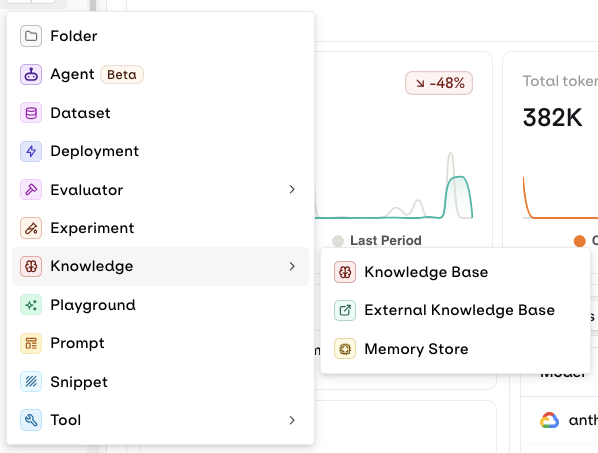 The following modal opens:
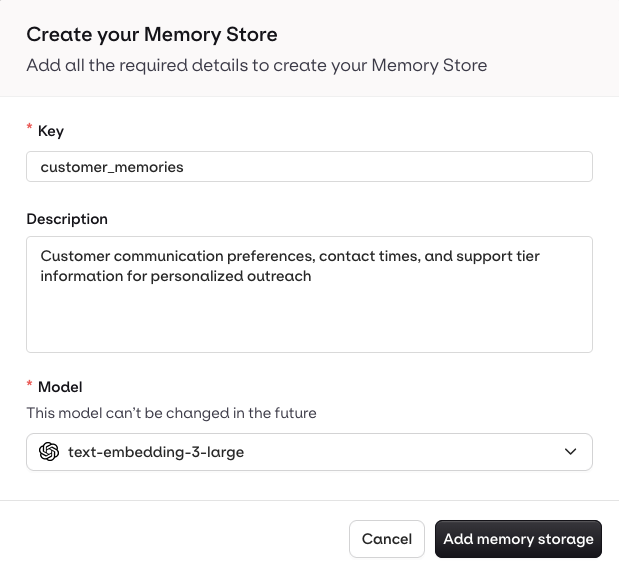 Ensure the description is thorough, as Agents use it to identify the correct Memory Store:
* **Good example**: "Customer communication preferences, contact times, and support tier information for personalized outreach"
* **Bad example**: "Customer data"
When a customer shares their communication preferences or contact information:
1. Extract key details (preferred contact method, time windows, support tier)
2. Store in the "customer\_preferences" Memory Store
3. Use clear, descriptive language
Use the [Create Memory Store API](/reference/memory-stores/create-memory-store).
Required inputs:
* `key`: unique identifier for the store (immutable after creation)
* `path`: the Project and folder (e.g., `default`)
* `embedding_config.model`: embedding model for semantic search (e.g., `cohere/embed-v4.0`)
```bash cURL theme={"theme":{"light":"github-light","dark":"github-dark"}}
curl --request POST \
--url https://api.orq.ai/v2/memory-stores \
--header 'accept: application/json' \
--header 'authorization: Bearer ' \
--header 'content-type: application/json' \
--data '
{
"key": "customer_information",
"description": "Store for customer interaction history and preferences",
"path": "default",
"embedding_config": {
"model": "cohere/embed-v4.0"
}
}'
```
```python Python theme={"theme":{"light":"github-light","dark":"github-dark"}}
from orq_ai_sdk import Orq
import os
client = Orq(api_key=os.environ["ORQ_API_KEY"])
store = client.memory_stores.create(request={
"key": "customer_information",
"description": "Store for customer interaction history and preferences",
"path": "default",
"embedding_config": {
"model": "cohere/embed-v4.0"
}
})
```
```typescript TypeScript theme={"theme":{"light":"github-light","dark":"github-dark"}}
import { Orq } from '@orq-ai/node';
const client = new Orq({
apiKey: process.env.ORQ_API_KEY,
});
await client.memoryStores.create({
key: 'customer_information',
description: 'Store for customer interaction history and preferences',
path: 'default',
embeddingConfig: {
model: 'cohere/embed-v4.0',
},
});
```
The `key` is immutable and must be unique within the workspace. It cannot be changed after creation.
```bash theme={"theme":{"light":"github-light","dark":"github-dark"}}
orq memory-stores create \
--key customer_information \
--description "Store for customer interaction history and preferences" \
--path default \
--embedding-config '{"model": "cohere/embed-v4.0"}'
```
See [install and setup](/reference/cli) to get started with the CLI. Run `orq memory-stores create --help` for the full flag reference.
## Manage Memories and Documents
A **Memory** represents a specific entity within a Memory Store, identified by an `entity_id`. Each Memory holds **Documents**: the actual text content embedded for semantic search.
**Create an Entity**
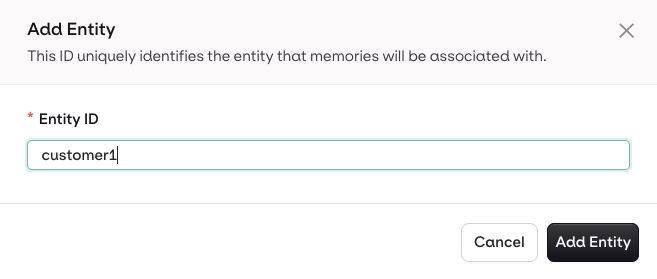
Once a Memory Store is created, select **Add Entity**, enter an ID for the entity, and press **Save**.
Ensure the description is thorough, as Agents use it to identify the correct Memory Store:
* **Good example**: "Customer communication preferences, contact times, and support tier information for personalized outreach"
* **Bad example**: "Customer data"
When a customer shares their communication preferences or contact information:
1. Extract key details (preferred contact method, time windows, support tier)
2. Store in the "customer\_preferences" Memory Store
3. Use clear, descriptive language
Use the [Create Memory Store API](/reference/memory-stores/create-memory-store).
Required inputs:
* `key`: unique identifier for the store (immutable after creation)
* `path`: the Project and folder (e.g., `default`)
* `embedding_config.model`: embedding model for semantic search (e.g., `cohere/embed-v4.0`)
```bash cURL theme={"theme":{"light":"github-light","dark":"github-dark"}}
curl --request POST \
--url https://api.orq.ai/v2/memory-stores \
--header 'accept: application/json' \
--header 'authorization: Bearer ' \
--header 'content-type: application/json' \
--data '
{
"key": "customer_information",
"description": "Store for customer interaction history and preferences",
"path": "default",
"embedding_config": {
"model": "cohere/embed-v4.0"
}
}'
```
```python Python theme={"theme":{"light":"github-light","dark":"github-dark"}}
from orq_ai_sdk import Orq
import os
client = Orq(api_key=os.environ["ORQ_API_KEY"])
store = client.memory_stores.create(request={
"key": "customer_information",
"description": "Store for customer interaction history and preferences",
"path": "default",
"embedding_config": {
"model": "cohere/embed-v4.0"
}
})
```
```typescript TypeScript theme={"theme":{"light":"github-light","dark":"github-dark"}}
import { Orq } from '@orq-ai/node';
const client = new Orq({
apiKey: process.env.ORQ_API_KEY,
});
await client.memoryStores.create({
key: 'customer_information',
description: 'Store for customer interaction history and preferences',
path: 'default',
embeddingConfig: {
model: 'cohere/embed-v4.0',
},
});
```
The `key` is immutable and must be unique within the workspace. It cannot be changed after creation.
```bash theme={"theme":{"light":"github-light","dark":"github-dark"}}
orq memory-stores create \
--key customer_information \
--description "Store for customer interaction history and preferences" \
--path default \
--embedding-config '{"model": "cohere/embed-v4.0"}'
```
See [install and setup](/reference/cli) to get started with the CLI. Run `orq memory-stores create --help` for the full flag reference.
## Manage Memories and Documents
A **Memory** represents a specific entity within a Memory Store, identified by an `entity_id`. Each Memory holds **Documents**: the actual text content embedded for semantic search.
**Create an Entity**
Once a Memory Store is created, select **Add Entity**, enter an ID for the entity, and press **Save**.
 **View Memories**
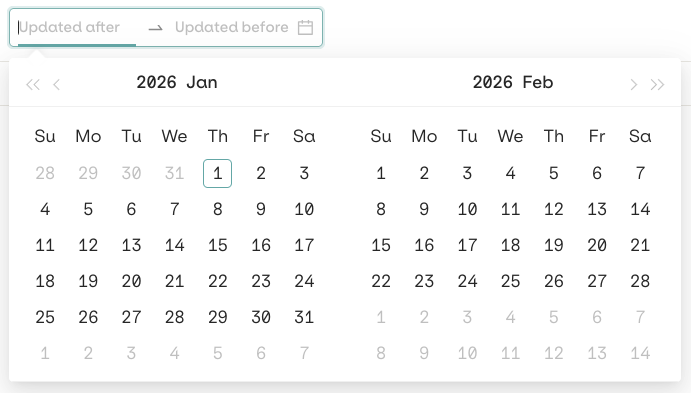
Select an entity to see all Memory Documents stored for it. Each document shows the date it was recorded. Use date filters to narrow results.
**View Memories**
Select an entity to see all Memory Documents stored for it. Each document shows the date it was recorded. Use date filters to narrow results.
 **Add a Memory Document**
Use **Add Memory** to manually add a Memory Document to an entity. Fill in the content and press **Add Memory**.
Memories are best managed dynamically through the API. See the API & SDK tab for programmatic access.
**Create a Memory (entity)**
```bash cURL theme={"theme":{"light":"github-light","dark":"github-dark"}}
curl --request POST \
--url https://api.orq.ai/v2/memory-stores/customer_information/memories \
--header 'accept: application/json' \
--header 'authorization: Bearer ' \
--header 'content-type: application/json' \
--data '
{
"entity_id": "customer_456",
"metadata": {
"type": "customer",
"segment": "premium",
"region": "north_america",
"status": "active"
}
}'
```
```python Python theme={"theme":{"light":"github-light","dark":"github-dark"}}
memory = client.memory_stores.create_memory(
memory_store_key="customer_information",
entity_id="customer_456",
metadata={
"type": "customer",
"segment": "premium",
"region": "north_america",
"status": "active"
}
)
print(f"Created memory with ID: {memory._id}")
```
```typescript TypeScript theme={"theme":{"light":"github-light","dark":"github-dark"}}
const memory = await client.memoryStores.createMemory({
memoryStoreKey: 'customer_information',
requestBody: {
entityId: 'customer_456',
metadata: {
type: 'customer',
segment: 'premium',
region: 'north_america',
status: 'active',
},
},
});
console.log(`Created memory with ID: ${memory._id}`);
```
**Add a Memory Document**
Documents hold the text content that agents can retrieve. Each document is embedded automatically when created.
```bash cURL theme={"theme":{"light":"github-light","dark":"github-dark"}}
curl --request POST \
--url https://api.orq.ai/v2/memory-stores/customer_information/memories//documents \
--header 'accept: application/json' \
--header 'authorization: Bearer ' \
--header 'content-type: application/json' \
--data '
{
"text": "Customer prefers email communication. Best contact window: 2-4 PM EST. Premium support subscriber."
}'
```
```python Python theme={"theme":{"light":"github-light","dark":"github-dark"}}
document = client.memory_stores.create_document(
memory_store_key="customer_information",
memory_entity_id=memory._id,
text="Customer prefers email communication. Best contact window: 2-4 PM EST. Premium support subscriber."
)
print(f"Created document with ID: {document._id}")
```
```typescript TypeScript theme={"theme":{"light":"github-light","dark":"github-dark"}}
const document = await client.memoryStores.createDocument({
memoryStoreKey: 'customer_information',
memoryEntityId: memory._id,
requestBody: {
text: 'Customer prefers email communication. Best contact window: 2-4 PM EST. Premium support subscriber.',
},
});
console.log(`Created document with ID: ${document._id}`);
```
**Update a Memory Document**
```bash cURL theme={"theme":{"light":"github-light","dark":"github-dark"}}
curl --request PATCH \
--url https://api.orq.ai/v2/memory-stores/customer_information/memories//documents/ \
--header 'accept: application/json' \
--header 'authorization: Bearer ' \
--header 'content-type: application/json' \
--data '
{
"text": "Customer strongly prefers email. Contact window: 2-4 PM EST weekdays. Premium support subscriber since Jan 2024."
}'
```
```python Python theme={"theme":{"light":"github-light","dark":"github-dark"}}
client.memory_stores.update_document(
memory_store_key="customer_information",
memory_entity_id="",
document_id="",
text="Customer strongly prefers email. Contact window: 2-4 PM EST weekdays. Premium support subscriber since Jan 2024."
)
```
```typescript TypeScript theme={"theme":{"light":"github-light","dark":"github-dark"}}
await client.memoryStores.updateDocument({
memoryStoreKey: 'customer_information',
memoryEntityId: '',
documentId: '',
requestBody: {
text: 'Customer strongly prefers email. Contact window: 2-4 PM EST weekdays. Premium support subscriber since Jan 2024.',
},
});
```
**Delete a Memory Document**
```bash cURL theme={"theme":{"light":"github-light","dark":"github-dark"}}
curl --request DELETE \
--url https://api.orq.ai/v2/memory-stores/customer_information/memories//documents/ \
--header 'accept: application/json' \
--header 'authorization: Bearer '
```
```python Python theme={"theme":{"light":"github-light","dark":"github-dark"}}
client.memory_stores.delete_document(
memory_store_key="customer_information",
memory_entity_id="",
document_id=""
)
```
```typescript TypeScript theme={"theme":{"light":"github-light","dark":"github-dark"}}
await client.memoryStores.deleteDocument({
memoryStoreKey: 'customer_information',
memoryEntityId: '',
documentId: '',
});
```
For the full CRUD reference (list, retrieve, update memory stores and memories), see the [Memory Stores API Reference](/reference/memory-stores/list-memory-stores).
**Create a Memory (entity):**
```bash theme={"theme":{"light":"github-light","dark":"github-dark"}}
orq memory-stores create-memory customer_information \
--entity-id customer_456
```
**Add a Memory Document:**
```bash theme={"theme":{"light":"github-light","dark":"github-dark"}}
orq memory-stores create-document customer_information \
--text "Customer prefers email communication. Best contact window: 2-4 PM EST. Premium support subscriber."
```
**Update a Memory Document:**
```bash theme={"theme":{"light":"github-light","dark":"github-dark"}}
orq memory-stores update-document customer_information \
--text "Customer strongly prefers email. Contact window: 2-4 PM EST weekdays. Premium support subscriber since Jan 2024."
```
**Delete a Memory Document:**
```bash theme={"theme":{"light":"github-light","dark":"github-dark"}}
orq memory-stores delete-document customer_information
```
See [install and setup](/reference/cli) to get started with the CLI. Run `orq memory-stores --help` for the full command reference.
## Best Practices
**Entity ID strategy**: Use consistent, unique identifiers. Prefix by type (e.g., `user_123`, `session_456`) and keep IDs stable across all services.
**Descriptions**: Write exhaustive Memory Store descriptions. Agents use them to identify the correct store to query.
**Organization**: Create separate stores for different contexts (customers, products, sessions). Use descriptive keys.
**Metadata**: Use tags for filtering and categorization, not for storing large text content. Keep data types consistent per field.
See Memory Stores powering real agent applications. Read our cookbooks [Multi-Agent HR System](/docs/ai-studio/cookbooks/chatbots/agents-API) and [Chat History](/docs/ai-studio/cookbooks/chatbots/maintaining-history-with-a-model).
**Add a Memory Document**
Use **Add Memory** to manually add a Memory Document to an entity. Fill in the content and press **Add Memory**.
Memories are best managed dynamically through the API. See the API & SDK tab for programmatic access.
**Create a Memory (entity)**
```bash cURL theme={"theme":{"light":"github-light","dark":"github-dark"}}
curl --request POST \
--url https://api.orq.ai/v2/memory-stores/customer_information/memories \
--header 'accept: application/json' \
--header 'authorization: Bearer ' \
--header 'content-type: application/json' \
--data '
{
"entity_id": "customer_456",
"metadata": {
"type": "customer",
"segment": "premium",
"region": "north_america",
"status": "active"
}
}'
```
```python Python theme={"theme":{"light":"github-light","dark":"github-dark"}}
memory = client.memory_stores.create_memory(
memory_store_key="customer_information",
entity_id="customer_456",
metadata={
"type": "customer",
"segment": "premium",
"region": "north_america",
"status": "active"
}
)
print(f"Created memory with ID: {memory._id}")
```
```typescript TypeScript theme={"theme":{"light":"github-light","dark":"github-dark"}}
const memory = await client.memoryStores.createMemory({
memoryStoreKey: 'customer_information',
requestBody: {
entityId: 'customer_456',
metadata: {
type: 'customer',
segment: 'premium',
region: 'north_america',
status: 'active',
},
},
});
console.log(`Created memory with ID: ${memory._id}`);
```
**Add a Memory Document**
Documents hold the text content that agents can retrieve. Each document is embedded automatically when created.
```bash cURL theme={"theme":{"light":"github-light","dark":"github-dark"}}
curl --request POST \
--url https://api.orq.ai/v2/memory-stores/customer_information/memories//documents \
--header 'accept: application/json' \
--header 'authorization: Bearer ' \
--header 'content-type: application/json' \
--data '
{
"text": "Customer prefers email communication. Best contact window: 2-4 PM EST. Premium support subscriber."
}'
```
```python Python theme={"theme":{"light":"github-light","dark":"github-dark"}}
document = client.memory_stores.create_document(
memory_store_key="customer_information",
memory_entity_id=memory._id,
text="Customer prefers email communication. Best contact window: 2-4 PM EST. Premium support subscriber."
)
print(f"Created document with ID: {document._id}")
```
```typescript TypeScript theme={"theme":{"light":"github-light","dark":"github-dark"}}
const document = await client.memoryStores.createDocument({
memoryStoreKey: 'customer_information',
memoryEntityId: memory._id,
requestBody: {
text: 'Customer prefers email communication. Best contact window: 2-4 PM EST. Premium support subscriber.',
},
});
console.log(`Created document with ID: ${document._id}`);
```
**Update a Memory Document**
```bash cURL theme={"theme":{"light":"github-light","dark":"github-dark"}}
curl --request PATCH \
--url https://api.orq.ai/v2/memory-stores/customer_information/memories//documents/ \
--header 'accept: application/json' \
--header 'authorization: Bearer ' \
--header 'content-type: application/json' \
--data '
{
"text": "Customer strongly prefers email. Contact window: 2-4 PM EST weekdays. Premium support subscriber since Jan 2024."
}'
```
```python Python theme={"theme":{"light":"github-light","dark":"github-dark"}}
client.memory_stores.update_document(
memory_store_key="customer_information",
memory_entity_id="",
document_id="",
text="Customer strongly prefers email. Contact window: 2-4 PM EST weekdays. Premium support subscriber since Jan 2024."
)
```
```typescript TypeScript theme={"theme":{"light":"github-light","dark":"github-dark"}}
await client.memoryStores.updateDocument({
memoryStoreKey: 'customer_information',
memoryEntityId: '',
documentId: '',
requestBody: {
text: 'Customer strongly prefers email. Contact window: 2-4 PM EST weekdays. Premium support subscriber since Jan 2024.',
},
});
```
**Delete a Memory Document**
```bash cURL theme={"theme":{"light":"github-light","dark":"github-dark"}}
curl --request DELETE \
--url https://api.orq.ai/v2/memory-stores/customer_information/memories//documents/ \
--header 'accept: application/json' \
--header 'authorization: Bearer '
```
```python Python theme={"theme":{"light":"github-light","dark":"github-dark"}}
client.memory_stores.delete_document(
memory_store_key="customer_information",
memory_entity_id="",
document_id=""
)
```
```typescript TypeScript theme={"theme":{"light":"github-light","dark":"github-dark"}}
await client.memoryStores.deleteDocument({
memoryStoreKey: 'customer_information',
memoryEntityId: '',
documentId: '',
});
```
For the full CRUD reference (list, retrieve, update memory stores and memories), see the [Memory Stores API Reference](/reference/memory-stores/list-memory-stores).
**Create a Memory (entity):**
```bash theme={"theme":{"light":"github-light","dark":"github-dark"}}
orq memory-stores create-memory customer_information \
--entity-id customer_456
```
**Add a Memory Document:**
```bash theme={"theme":{"light":"github-light","dark":"github-dark"}}
orq memory-stores create-document customer_information \
--text "Customer prefers email communication. Best contact window: 2-4 PM EST. Premium support subscriber."
```
**Update a Memory Document:**
```bash theme={"theme":{"light":"github-light","dark":"github-dark"}}
orq memory-stores update-document customer_information \
--text "Customer strongly prefers email. Contact window: 2-4 PM EST weekdays. Premium support subscriber since Jan 2024."
```
**Delete a Memory Document:**
```bash theme={"theme":{"light":"github-light","dark":"github-dark"}}
orq memory-stores delete-document customer_information
```
See [install and setup](/reference/cli) to get started with the CLI. Run `orq memory-stores --help` for the full command reference.
## Best Practices
**Entity ID strategy**: Use consistent, unique identifiers. Prefix by type (e.g., `user_123`, `session_456`) and keep IDs stable across all services.
**Descriptions**: Write exhaustive Memory Store descriptions. Agents use them to identify the correct store to query.
**Organization**: Create separate stores for different contexts (customers, products, sessions). Use descriptive keys.
**Metadata**: Use tags for filtering and categorization, not for storing large text content. Keep data types consistent per field.
See Memory Stores powering real agent applications. Read our cookbooks [Multi-Agent HR System](/docs/ai-studio/cookbooks/chatbots/agents-API) and [Chat History](/docs/ai-studio/cookbooks/chatbots/maintaining-history-with-a-model).