> ## Documentation Index
> Fetch the complete documentation index at: https://docs.orq.ai/llms.txt
> Use this file to discover all available pages before exploring further.
# Schedule Agents
> Run an agent on a recurring cadence without holding open an HTTP connection. Create, list, pause, resume, trigger, and delete agent schedules.
Run an agent on a recurring cadence without holding open an HTTP connection. Each scheduled run follows the same execution path, tracing, and billing as a direct API call.
## Create a Schedule
Open the agent and go to the **Schedules** tab. Click New schedule to open the form.
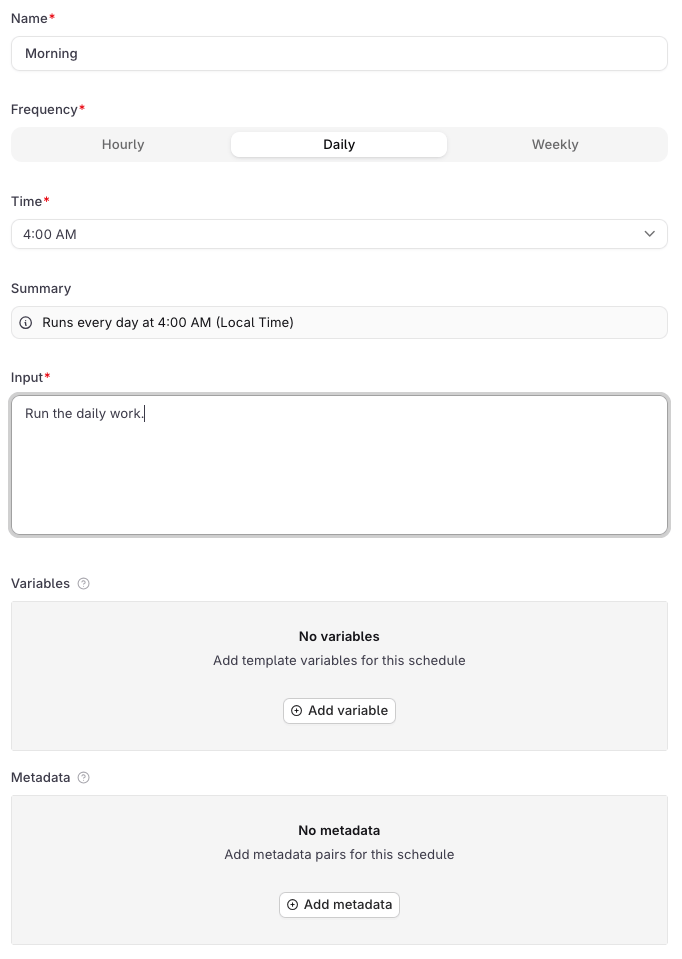 | Field | Description |
| ---------------- | --------------------------------------------------------------------------------------------------------------- |
| **Name** | A display label for the schedule in the UI. Required. Not sent to the agent. |
| **Frequency** | **Hourly**, **Daily**, or **Weekly**. |
| **Time** | The hour the schedule fires, in local time. Shown for Daily and Weekly. |
| **Pick the day** | Day of the week to fire. Shown for Weekly only. |
| **Summary** | Auto-generated human-readable description of the schedule. |
| **Input** | The user message sent to the agent on each firing. Required, since every agent invocation needs a user message. |
| **Variables** | Key-value pairs passed to the agent on each run. See below. |
| **Metadata** | Key-value pairs attached to every response this schedule generates. See below. |
**Variables**
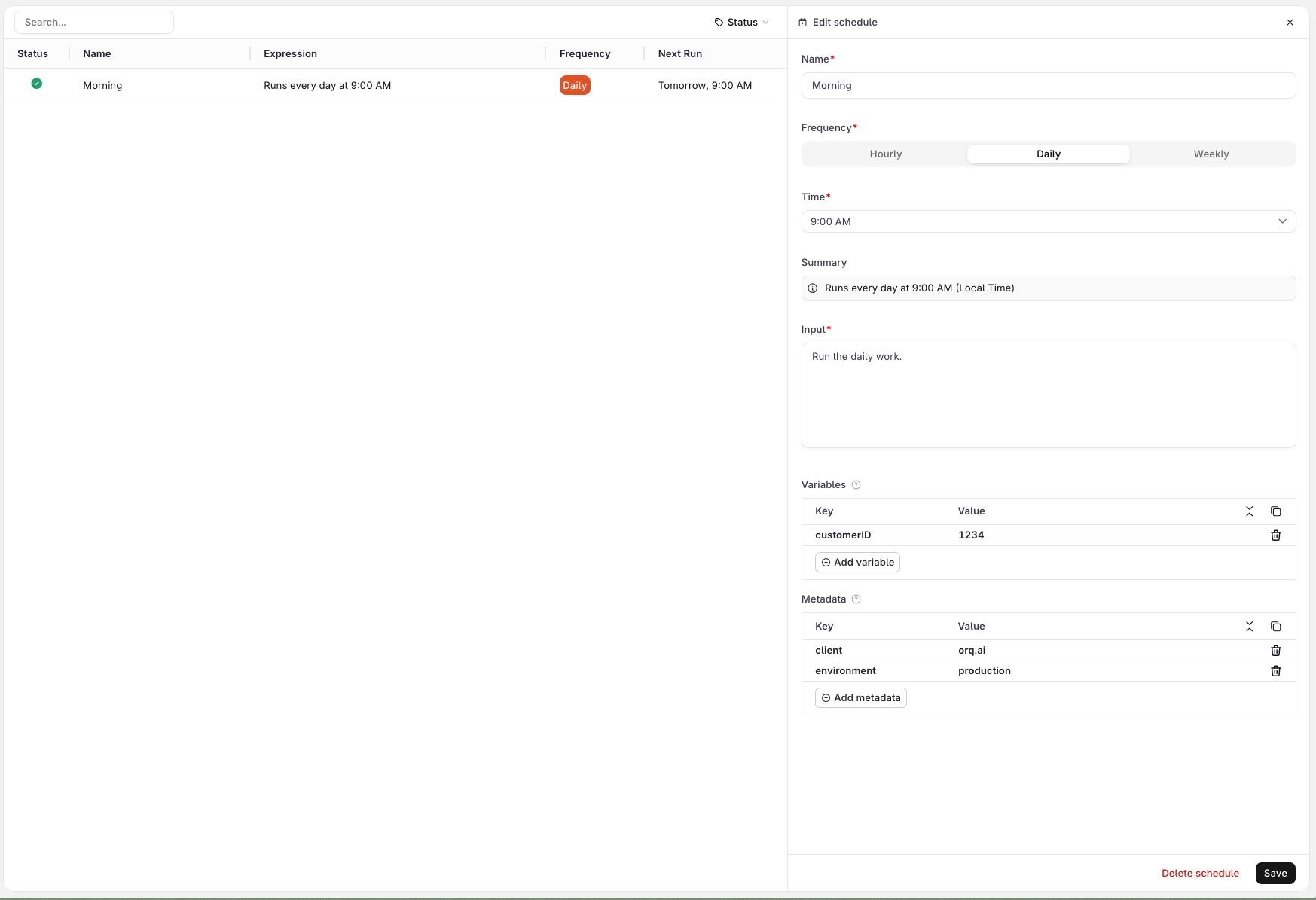
Use the **Variables** section to define values that the agent needs on each run. Variables are sent alongside the input as a distinct payload field, and can be consumed by the agent's instructions, any configured tool, or a subagent wherever the variable is wired up.
For example, a support agent with an HTTP tool that looks up a customer in an external system can receive `customer_id=1234` from the schedule and use it to query the right record on every run. See the screenshot below.
Variables cannot be referenced inside the **Input** field itself. Wire them into the agent's instructions, a tool, or a subagent instead.
**Metadata**
Use the **Metadata** section to attach arbitrary key-value pairs to every response generated by this schedule. Metadata is not passed to the agent: it is stored on the trace and can be used to filter traces in **Observability**, identify which schedule triggered a run, or tag responses for downstream processing.
Click **Create** to activate the schedule. It starts firing at the next matching time.
| Field | Description |
| ---------------- | --------------------------------------------------------------------------------------------------------------- |
| **Name** | A display label for the schedule in the UI. Required. Not sent to the agent. |
| **Frequency** | **Hourly**, **Daily**, or **Weekly**. |
| **Time** | The hour the schedule fires, in local time. Shown for Daily and Weekly. |
| **Pick the day** | Day of the week to fire. Shown for Weekly only. |
| **Summary** | Auto-generated human-readable description of the schedule. |
| **Input** | The user message sent to the agent on each firing. Required, since every agent invocation needs a user message. |
| **Variables** | Key-value pairs passed to the agent on each run. See below. |
| **Metadata** | Key-value pairs attached to every response this schedule generates. See below. |
**Variables**
Use the **Variables** section to define values that the agent needs on each run. Variables are sent alongside the input as a distinct payload field, and can be consumed by the agent's instructions, any configured tool, or a subagent wherever the variable is wired up.
For example, a support agent with an HTTP tool that looks up a customer in an external system can receive `customer_id=1234` from the schedule and use it to query the right record on every run. See the screenshot below.
Variables cannot be referenced inside the **Input** field itself. Wire them into the agent's instructions, a tool, or a subagent instead.
**Metadata**
Use the **Metadata** section to attach arbitrary key-value pairs to every response generated by this schedule. Metadata is not passed to the agent: it is stored on the trace and can be used to filter traces in **Observability**, identify which schedule triggered a run, or tag responses for downstream processing.
Click **Create** to activate the schedule. It starts firing at the next matching time.
 Only `cron` schedules are supported. Expressions use the 6-field format: `sec min hour dom month dow`. Three patterns are accepted:
| Pattern | Expression | Example |
| ------- | ---------------------- | ---------------------------------------- |
| Hourly | `0 0 * * * *` | Fires every hour |
| Daily | `0 0 * * *` | `0 0 9 * * *` (9:00 AM UTC daily) |
| Weekly | `0 0 * * ` | `0 0 9 * * 1` (9:00 AM UTC every Monday) |
`` is `0` (Sunday) through `6` (Saturday). All times are stored in UTC; the UI displays them in user's local timezone.
Only `cron` is accepted. Seconds and minutes must be `0`, dom and month must be `*`, and the weekday field must be a single integer `0`-`6` or `*` (names like `mon` and ranges like `1-5` are rejected). To run an agent in response to an event rather than a clock, invoke it directly via the [Run API](/docs/ai-studio/ai-engineering/run-agents).
Expressions that do not match a supported pattern return `400` with `"code": "invalid_expression"`. The `message` field describes the specific violation, for example `invalid schedule expression: day-of-month and month fields must be '*'`
```bash cURL theme={"theme":{"light":"github-light","dark":"github-dark"}}
curl -X POST https://my.orq.ai/v3/agents/ops_digest/schedules \
-H "Authorization: Bearer $ORQ_API_KEY" \
-H "Content-Type: application/json" \
-d '{
"type": "cron",
"expression": "0 0 9 * * *",
"display_name": "Morning briefing",
"payload": {
"input": "Generate the morning briefing for {{region}}",
"variables": { "region": "EMEA" }
}
}'
```
```python Python theme={"theme":{"light":"github-light","dark":"github-dark"}}
from orq_ai_sdk import Orq
import os
with Orq(api_key=os.getenv("ORQ_API_KEY", "")) as orq:
schedule = orq.schedules.create(
agent_key="ops_digest",
type_="cron",
expression="0 0 9 * * *",
display_name="Morning briefing",
payload={
"input": "Generate the morning briefing for {{region}}",
"variables": {"region": "EMEA"},
},
)
print(schedule)
```
```typescript TypeScript theme={"theme":{"light":"github-light","dark":"github-dark"}}
import { Orq } from '@orq-ai/node';
const orq = new Orq({ apiKey: process.env['ORQ_API_KEY'] ?? '' });
const schedule = await orq.schedules.create({
agentKey: 'ops_digest',
requestBody: {
type: 'cron',
expression: '0 0 9 * * *',
displayName: 'Morning briefing',
payload: {
input: 'Generate the morning briefing for {{region}}',
variables: { region: 'EMEA' },
},
},
});
console.log(schedule);
```
The TypeScript SDK uses camelCase keys (`agentKey`, `requestBody`) and nests the request body under `requestBody`, while the Python SDK uses flat keyword arguments. Both map to the same wire format.
`payload` is required. Response (schedule records use `_id` rather than `id`):
```json theme={"theme":{"light":"github-light","dark":"github-dark"}}
{
"_id": "01KPN29WWKSK0VDPJNTKZPVNRB",
"agent_key": "ops_digest",
"type": "cron",
"expression": "0 0 9 * * *",
"display_name": "Morning briefing",
"is_active": true,
"generation": 1,
"payload": {
"input": "Generate the morning briefing for {{region}}",
"variables": { "region": "EMEA" }
},
"trigger_count": 0,
"created": "2026-04-20T10:00:00Z",
"updated": "2026-04-20T10:00:00Z"
}
```
**Schedule fields:**
| Field | Type | Description |
| -------------- | ------ | ------------------------------------------------------------------------------------ |
| `display_name` | string | Required. Label shown in the UI Schedules tab. Max 200 characters, cannot be blank. |
| `type` | string | Must be `cron`. |
| `expression` | string | 6-field cron expression matching one of the three supported patterns. |
| `agent_tag` | string | Pin the schedule to a specific agent version. Omit to always run the active version. |
**Payload fields:**
| Field | Type | Description |
| ------------------ | --------------- | ------------------------------------------------------------------------------------------------------------------------------------------------------------------------------------------- |
| `input` | string or array | The instruction the agent runs on each firing. Same shape as the `input` field in the [Run API](/docs/ai-studio/ai-engineering/run-agents). Supports template variables via `{{variable}}`. |
| `variables` | object | Template variable substitution. Use `{"secret": true, "value": "..."}` for secret values. |
| `memory_entity_id` | string | Memory store entity to attach on each run. |
| `metadata` | object | Opaque key/value pairs attached to every response this schedule generates. Values must be strings. |
`generation` increments each time `type` or `expression` changes and resets `trigger_count` to 0. Use it to distinguish firings before and after a cadence change.
Use `agent_tag` (string) to pin the schedule to a specific agent version. Omit it to always use the active version:
```json theme={"theme":{"light":"github-light","dark":"github-dark"}}
{
"type": "cron",
"expression": "0 0 9 * * *",
"display_name": "Morning briefing",
"agent_tag": "v2",
"payload": { "input": "Generate the morning briefing for {{region}}" }
}
```
`display_name` is required and is not exposed as a flag on `schedules create`, so pipe the full body via `--stdin`:
```bash theme={"theme":{"light":"github-light","dark":"github-dark"}}
echo '{
"type": "cron",
"expression": "0 0 9 * * *",
"display_name": "Morning briefing",
"payload": {
"input": "Generate the morning briefing for {{region}}",
"variables": { "region": "EMEA" }
}
}' | orq schedules create ops_digest --stdin
```
See [install and setup](/reference/cli) to get started with the CLI. Run `orq schedules create --help` for the full flag reference.
## List & Retrieve
All schedules for the agent are listed in the **Schedules** tab. Click a schedule row to open its details, including trigger count and last fired time.
```bash cURL theme={"theme":{"light":"github-light","dark":"github-dark"}}
# List all schedules
curl https://my.orq.ai/v3/agents/ops_digest/schedules \
-H "Authorization: Bearer $ORQ_API_KEY"
# Get a single schedule
curl https://my.orq.ai/v3/agents/ops_digest/schedules/{schedule_id} \
-H "Authorization: Bearer $ORQ_API_KEY"
```
```python Python theme={"theme":{"light":"github-light","dark":"github-dark"}}
from orq_ai_sdk import Orq
import os
with Orq(api_key=os.getenv("ORQ_API_KEY", "")) as orq:
# List all schedules
result = orq.schedules.list(agent_key="ops_digest")
print(result.schedules)
# Get a single schedule
schedule = orq.schedules.retrieve(
agent_key="ops_digest",
schedule_id="{schedule_id}",
)
print(schedule)
```
```typescript TypeScript theme={"theme":{"light":"github-light","dark":"github-dark"}}
import { Orq } from '@orq-ai/node';
const orq = new Orq({ apiKey: process.env['ORQ_API_KEY'] ?? '' });
// List all schedules
const result = await orq.schedules.list({ agentKey: 'ops_digest' });
console.log(result.schedules);
// Get a single schedule
const schedule = await orq.schedules.retrieve({
agentKey: 'ops_digest',
scheduleId: '{schedule_id}',
});
console.log(schedule);
```
List returns `{ "schedules": [...] }`, most recent first. The single-schedule response includes `trigger_count`, `last_triggered_at` (UTC timestamp string; `null` before the first firing), and `generation`.
```bash theme={"theme":{"light":"github-light","dark":"github-dark"}}
# List schedules for this agent
orq schedules list ops_digest
# Get a single schedule
orq schedules retrieve ops_digest
```
See [install and setup](/reference/cli) to get started with the CLI. Run `orq schedules list --help` for the full flag reference.
## Pause and Resume
Click on the schedule row, then click Enable to toggle the schedule on or off. Field edits saved while paused take effect on the next active run.
```bash cURL theme={"theme":{"light":"github-light","dark":"github-dark"}}
# Pause
curl -X PATCH https://my.orq.ai/v3/agents/ops_digest/schedules/{schedule_id} \
-H "Authorization: Bearer $ORQ_API_KEY" \
-H "Content-Type: application/json" \
-d '{ "is_active": false }'
# Resume
curl -X PATCH https://my.orq.ai/v3/agents/ops_digest/schedules/{schedule_id} \
-H "Authorization: Bearer $ORQ_API_KEY" \
-H "Content-Type: application/json" \
-d '{ "is_active": true }'
```
```python Python theme={"theme":{"light":"github-light","dark":"github-dark"}}
from orq_ai_sdk import Orq
import os
with Orq(api_key=os.getenv("ORQ_API_KEY", "")) as orq:
# Pause
orq.schedules.update(
agent_key="ops_digest",
schedule_id="{schedule_id}",
is_active=False,
)
# Resume
orq.schedules.update(
agent_key="ops_digest",
schedule_id="{schedule_id}",
is_active=True,
)
```
```typescript TypeScript theme={"theme":{"light":"github-light","dark":"github-dark"}}
import { Orq } from '@orq-ai/node';
const orq = new Orq({ apiKey: process.env['ORQ_API_KEY'] ?? '' });
// Pause
await orq.schedules.update({
agentKey: 'ops_digest',
scheduleId: '{schedule_id}',
requestBody: { isActive: false },
});
// Resume
await orq.schedules.update({
agentKey: 'ops_digest',
scheduleId: '{schedule_id}',
requestBody: { isActive: true },
});
```
Payload-only and `agent_tag`-only changes do not reset the firing cadence and apply to the next regular run. Changing `type` or `expression` shifts the cadence from the PATCH time and resets `trigger_count` to 0.
**Lifecycle notes:**
* **Missed firings**: Not replayed. If the service is unavailable when a schedule fires, that firing is lost. The schedule resumes on its next scheduled time once service is restored.
```bash theme={"theme":{"light":"github-light","dark":"github-dark"}}
# Pause
orq schedules update ops_digest --is-active=false
# Resume
orq schedules update ops_digest --is-active=true
```
See [install and setup](/reference/cli) to get started with the CLI. Run `orq schedules update --help` for the full flag reference.
## Trigger On Demand
Runs the schedule's payload immediately without affecting its regular cadence. Useful for smoke-testing a new schedule or manually re-running a missed execution.
```bash cURL theme={"theme":{"light":"github-light","dark":"github-dark"}}
curl -X POST https://my.orq.ai/v3/agents/ops_digest/schedules/{schedule_id}/execution \
-H "Authorization: Bearer $ORQ_API_KEY"
```
```python Python theme={"theme":{"light":"github-light","dark":"github-dark"}}
from orq_ai_sdk import Orq
import os
with Orq(api_key=os.getenv("ORQ_API_KEY", "")) as orq:
orq.schedules.trigger(
agent_key="ops_digest",
schedule_id="{schedule_id}",
)
```
```typescript TypeScript theme={"theme":{"light":"github-light","dark":"github-dark"}}
import { Orq } from '@orq-ai/node';
const orq = new Orq({ apiKey: process.env['ORQ_API_KEY'] ?? '' });
await orq.schedules.trigger({
agentKey: 'ops_digest',
scheduleId: '{schedule_id}',
});
```
Returns `202 Accepted` with:
```json theme={"theme":{"light":"github-light","dark":"github-dark"}}
{
"status": "triggered",
"schedule_id": "01KPN29WWKSK0VDPJNTKZPVNRB"
}
```
The run appears in traces as a `schedule.` leading span roughly 10 seconds later, carrying `orq.schedule_id` and the full agent execution chain. Schedule-driven cost and token usage appear in usage reports alongside HTTP-invoked runs. Inactive schedules return `400 schedule_inactive`.
```bash theme={"theme":{"light":"github-light","dark":"github-dark"}}
orq schedules trigger ops_digest
```
See [install and setup](/reference/cli) to get started with the CLI. Run `orq schedules trigger --help` for the full flag reference.
## Delete
Click on the schedule row, then click **Delete**. The action is immediate and permanent.
```bash cURL theme={"theme":{"light":"github-light","dark":"github-dark"}}
curl -X DELETE https://my.orq.ai/v3/agents/ops_digest/schedules/{schedule_id} \
-H "Authorization: Bearer $ORQ_API_KEY"
```
```python Python theme={"theme":{"light":"github-light","dark":"github-dark"}}
from orq_ai_sdk import Orq
import os
with Orq(api_key=os.getenv("ORQ_API_KEY", "")) as orq:
orq.schedules.delete(
agent_key="ops_digest",
schedule_id="{schedule_id}",
)
```
```typescript TypeScript theme={"theme":{"light":"github-light","dark":"github-dark"}}
import { Orq } from '@orq-ai/node';
const orq = new Orq({ apiKey: process.env['ORQ_API_KEY'] ?? '' });
await orq.schedules.delete({
agentKey: 'ops_digest',
scheduleId: '{schedule_id}',
});
```
Returns `204 No Content`. Deleting the agent itself removes all its schedules automatically.
```bash theme={"theme":{"light":"github-light","dark":"github-dark"}}
orq schedules delete ops_digest
```
See [install and setup](/reference/cli) to get started with the CLI. Run `orq schedules delete --help` for the full flag reference.
## Examples
```bash cURL theme={"theme":{"light":"github-light","dark":"github-dark"}}
curl -X POST https://my.orq.ai/v3/agents/ops_digest/schedules \
-H "Authorization: Bearer $ORQ_API_KEY" \
-H "Content-Type: application/json" \
-d '{
"type": "cron",
"expression": "0 0 9 * * *",
"display_name": "Daily morning briefing",
"agent_tag": "v2",
"payload": {
"input": "Generate the morning briefing for {{region}}",
"variables": { "region": "EMEA" },
"metadata": { "run_source": "daily-briefing" }
}
}'
```
```python Python theme={"theme":{"light":"github-light","dark":"github-dark"}}
from orq_ai_sdk import Orq
import os
with Orq(api_key=os.getenv("ORQ_API_KEY", "")) as orq:
schedule = orq.schedules.create(
agent_key="ops_digest",
type_="cron",
expression="0 0 9 * * *",
display_name="Daily morning briefing",
agent_tag="v2",
payload={
"input": "Generate the morning briefing for {{region}}",
"variables": {"region": "EMEA"},
"metadata": {"run_source": "daily-briefing"},
},
)
print(schedule)
```
```typescript TypeScript theme={"theme":{"light":"github-light","dark":"github-dark"}}
import { Orq } from '@orq-ai/node';
const orq = new Orq({ apiKey: process.env['ORQ_API_KEY'] ?? '' });
const schedule = await orq.schedules.create({
agentKey: 'ops_digest',
requestBody: {
type: 'cron',
expression: '0 0 9 * * *',
displayName: 'Daily morning briefing',
agentTag: 'v2',
payload: {
input: 'Generate the morning briefing for {{region}}',
variables: { region: 'EMEA' },
metadata: { run_source: 'daily-briefing' },
},
},
});
console.log(schedule);
```
```bash cURL theme={"theme":{"light":"github-light","dark":"github-dark"}}
curl -X POST https://my.orq.ai/v3/agents/knowledge_indexer/schedules \
-H "Authorization: Bearer $ORQ_API_KEY" \
-H "Content-Type: application/json" \
-d '{
"type": "cron",
"expression": "0 0 * * * *",
"display_name": "Hourly knowledge indexer",
"payload": {
"input": "Fetch new entries and update the knowledge base",
"memory_entity_id": "mem_entity_123"
}
}'
```
```python Python theme={"theme":{"light":"github-light","dark":"github-dark"}}
from orq_ai_sdk import Orq
import os
with Orq(api_key=os.getenv("ORQ_API_KEY", "")) as orq:
schedule = orq.schedules.create(
agent_key="knowledge_indexer",
type_="cron",
expression="0 0 * * * *",
display_name="Hourly knowledge indexer",
payload={
"input": "Fetch new entries and update the knowledge base",
"memory_entity_id": "mem_entity_123",
},
)
print(schedule)
```
```typescript TypeScript theme={"theme":{"light":"github-light","dark":"github-dark"}}
import { Orq } from '@orq-ai/node';
const orq = new Orq({ apiKey: process.env['ORQ_API_KEY'] ?? '' });
const schedule = await orq.schedules.create({
agentKey: 'knowledge_indexer',
requestBody: {
type: 'cron',
expression: '0 0 * * * *',
displayName: 'Hourly knowledge indexer',
payload: {
input: 'Fetch new entries and update the knowledge base',
memoryEntityId: 'mem_entity_123',
},
},
});
console.log(schedule);
```
`memory_entity_id` attaches a [Memory Store](/docs/ai-studio/ai-engineering/memory-stores) entity to every run. The agent can read from and write to the store on each firing, accumulating context across executions.
```bash cURL theme={"theme":{"light":"github-light","dark":"github-dark"}}
curl -X POST https://my.orq.ai/v3/agents/daily_sync/schedules \
-H "Authorization: Bearer $ORQ_API_KEY" \
-H "Content-Type: application/json" \
-d '{
"type": "cron",
"expression": "0 0 3 * * *",
"display_name": "Nightly warehouse sync",
"payload": {
"input": "Sync new rows from {{table}} to the analytics warehouse",
"variables": {
"table": "orders",
"warehouse_token": { "secret": true, "value": "sk-secret-123" }
}
}
}'
```
```python Python theme={"theme":{"light":"github-light","dark":"github-dark"}}
from orq_ai_sdk import Orq
import os
with Orq(api_key=os.getenv("ORQ_API_KEY", "")) as orq:
schedule = orq.schedules.create(
agent_key="daily_sync",
type_="cron",
expression="0 0 3 * * *",
display_name="Nightly warehouse sync",
payload={
"input": "Sync new rows from {{table}} to the analytics warehouse",
"variables": {
"table": "orders",
"warehouse_token": {"secret": True, "value": "sk-secret-123"},
},
},
)
print(schedule)
```
```typescript TypeScript theme={"theme":{"light":"github-light","dark":"github-dark"}}
import { Orq } from '@orq-ai/node';
const orq = new Orq({ apiKey: process.env['ORQ_API_KEY'] ?? '' });
const schedule = await orq.schedules.create({
agentKey: 'daily_sync',
requestBody: {
type: 'cron',
expression: '0 0 3 * * *',
displayName: 'Nightly warehouse sync',
payload: {
input: 'Sync new rows from {{table}} to the analytics warehouse',
variables: {
table: 'orders',
warehouse_token: { secret: true, value: 'sk-secret-123' },
},
},
},
});
console.log(schedule);
```
Secret values are redacted from traces and stripped from the stored payload's observable form.
`display_name` is not yet exposed as a flag on `schedules create`, so these examples pipe the full body via `--stdin`:
```bash theme={"theme":{"light":"github-light","dark":"github-dark"}}
echo '{
"type": "cron",
"expression": "0 0 9 * * *",
"display_name": "Daily morning briefing",
"agent_tag": "v2",
"payload": {
"input": "Generate the morning briefing for {{region}}",
"variables": { "region": "EMEA" },
"metadata": { "run_source": "daily-briefing" }
}
}' | orq schedules create ops_digest --stdin
```
```bash theme={"theme":{"light":"github-light","dark":"github-dark"}}
echo '{
"type": "cron",
"expression": "0 0 * * * *",
"display_name": "Hourly knowledge indexer",
"payload": {
"input": "Fetch new entries and update the knowledge base",
"memory_entity_id": "mem_entity_123"
}
}' | orq schedules create knowledge_indexer --stdin
```
```bash theme={"theme":{"light":"github-light","dark":"github-dark"}}
echo '{
"type": "cron",
"expression": "0 0 3 * * *",
"display_name": "Nightly warehouse sync",
"payload": {
"input": "Sync new rows from {{table}} to the analytics warehouse",
"variables": {
"table": "orders",
"warehouse_token": { "secret": true, "value": "sk-secret-123" }
}
}
}' | orq schedules create daily_sync --stdin
```
See [install and setup](/reference/cli) to get started with the CLI. Run `orq schedules create --help` for the full flag reference.
Only `cron` schedules are supported. Expressions use the 6-field format: `sec min hour dom month dow`. Three patterns are accepted:
| Pattern | Expression | Example |
| ------- | ---------------------- | ---------------------------------------- |
| Hourly | `0 0 * * * *` | Fires every hour |
| Daily | `0 0 * * *` | `0 0 9 * * *` (9:00 AM UTC daily) |
| Weekly | `0 0 * * ` | `0 0 9 * * 1` (9:00 AM UTC every Monday) |
`` is `0` (Sunday) through `6` (Saturday). All times are stored in UTC; the UI displays them in user's local timezone.
Only `cron` is accepted. Seconds and minutes must be `0`, dom and month must be `*`, and the weekday field must be a single integer `0`-`6` or `*` (names like `mon` and ranges like `1-5` are rejected). To run an agent in response to an event rather than a clock, invoke it directly via the [Run API](/docs/ai-studio/ai-engineering/run-agents).
Expressions that do not match a supported pattern return `400` with `"code": "invalid_expression"`. The `message` field describes the specific violation, for example `invalid schedule expression: day-of-month and month fields must be '*'`
```bash cURL theme={"theme":{"light":"github-light","dark":"github-dark"}}
curl -X POST https://my.orq.ai/v3/agents/ops_digest/schedules \
-H "Authorization: Bearer $ORQ_API_KEY" \
-H "Content-Type: application/json" \
-d '{
"type": "cron",
"expression": "0 0 9 * * *",
"display_name": "Morning briefing",
"payload": {
"input": "Generate the morning briefing for {{region}}",
"variables": { "region": "EMEA" }
}
}'
```
```python Python theme={"theme":{"light":"github-light","dark":"github-dark"}}
from orq_ai_sdk import Orq
import os
with Orq(api_key=os.getenv("ORQ_API_KEY", "")) as orq:
schedule = orq.schedules.create(
agent_key="ops_digest",
type_="cron",
expression="0 0 9 * * *",
display_name="Morning briefing",
payload={
"input": "Generate the morning briefing for {{region}}",
"variables": {"region": "EMEA"},
},
)
print(schedule)
```
```typescript TypeScript theme={"theme":{"light":"github-light","dark":"github-dark"}}
import { Orq } from '@orq-ai/node';
const orq = new Orq({ apiKey: process.env['ORQ_API_KEY'] ?? '' });
const schedule = await orq.schedules.create({
agentKey: 'ops_digest',
requestBody: {
type: 'cron',
expression: '0 0 9 * * *',
displayName: 'Morning briefing',
payload: {
input: 'Generate the morning briefing for {{region}}',
variables: { region: 'EMEA' },
},
},
});
console.log(schedule);
```
The TypeScript SDK uses camelCase keys (`agentKey`, `requestBody`) and nests the request body under `requestBody`, while the Python SDK uses flat keyword arguments. Both map to the same wire format.
`payload` is required. Response (schedule records use `_id` rather than `id`):
```json theme={"theme":{"light":"github-light","dark":"github-dark"}}
{
"_id": "01KPN29WWKSK0VDPJNTKZPVNRB",
"agent_key": "ops_digest",
"type": "cron",
"expression": "0 0 9 * * *",
"display_name": "Morning briefing",
"is_active": true,
"generation": 1,
"payload": {
"input": "Generate the morning briefing for {{region}}",
"variables": { "region": "EMEA" }
},
"trigger_count": 0,
"created": "2026-04-20T10:00:00Z",
"updated": "2026-04-20T10:00:00Z"
}
```
**Schedule fields:**
| Field | Type | Description |
| -------------- | ------ | ------------------------------------------------------------------------------------ |
| `display_name` | string | Required. Label shown in the UI Schedules tab. Max 200 characters, cannot be blank. |
| `type` | string | Must be `cron`. |
| `expression` | string | 6-field cron expression matching one of the three supported patterns. |
| `agent_tag` | string | Pin the schedule to a specific agent version. Omit to always run the active version. |
**Payload fields:**
| Field | Type | Description |
| ------------------ | --------------- | ------------------------------------------------------------------------------------------------------------------------------------------------------------------------------------------- |
| `input` | string or array | The instruction the agent runs on each firing. Same shape as the `input` field in the [Run API](/docs/ai-studio/ai-engineering/run-agents). Supports template variables via `{{variable}}`. |
| `variables` | object | Template variable substitution. Use `{"secret": true, "value": "..."}` for secret values. |
| `memory_entity_id` | string | Memory store entity to attach on each run. |
| `metadata` | object | Opaque key/value pairs attached to every response this schedule generates. Values must be strings. |
`generation` increments each time `type` or `expression` changes and resets `trigger_count` to 0. Use it to distinguish firings before and after a cadence change.
Use `agent_tag` (string) to pin the schedule to a specific agent version. Omit it to always use the active version:
```json theme={"theme":{"light":"github-light","dark":"github-dark"}}
{
"type": "cron",
"expression": "0 0 9 * * *",
"display_name": "Morning briefing",
"agent_tag": "v2",
"payload": { "input": "Generate the morning briefing for {{region}}" }
}
```
`display_name` is required and is not exposed as a flag on `schedules create`, so pipe the full body via `--stdin`:
```bash theme={"theme":{"light":"github-light","dark":"github-dark"}}
echo '{
"type": "cron",
"expression": "0 0 9 * * *",
"display_name": "Morning briefing",
"payload": {
"input": "Generate the morning briefing for {{region}}",
"variables": { "region": "EMEA" }
}
}' | orq schedules create ops_digest --stdin
```
See [install and setup](/reference/cli) to get started with the CLI. Run `orq schedules create --help` for the full flag reference.
## List & Retrieve
All schedules for the agent are listed in the **Schedules** tab. Click a schedule row to open its details, including trigger count and last fired time.
```bash cURL theme={"theme":{"light":"github-light","dark":"github-dark"}}
# List all schedules
curl https://my.orq.ai/v3/agents/ops_digest/schedules \
-H "Authorization: Bearer $ORQ_API_KEY"
# Get a single schedule
curl https://my.orq.ai/v3/agents/ops_digest/schedules/{schedule_id} \
-H "Authorization: Bearer $ORQ_API_KEY"
```
```python Python theme={"theme":{"light":"github-light","dark":"github-dark"}}
from orq_ai_sdk import Orq
import os
with Orq(api_key=os.getenv("ORQ_API_KEY", "")) as orq:
# List all schedules
result = orq.schedules.list(agent_key="ops_digest")
print(result.schedules)
# Get a single schedule
schedule = orq.schedules.retrieve(
agent_key="ops_digest",
schedule_id="{schedule_id}",
)
print(schedule)
```
```typescript TypeScript theme={"theme":{"light":"github-light","dark":"github-dark"}}
import { Orq } from '@orq-ai/node';
const orq = new Orq({ apiKey: process.env['ORQ_API_KEY'] ?? '' });
// List all schedules
const result = await orq.schedules.list({ agentKey: 'ops_digest' });
console.log(result.schedules);
// Get a single schedule
const schedule = await orq.schedules.retrieve({
agentKey: 'ops_digest',
scheduleId: '{schedule_id}',
});
console.log(schedule);
```
List returns `{ "schedules": [...] }`, most recent first. The single-schedule response includes `trigger_count`, `last_triggered_at` (UTC timestamp string; `null` before the first firing), and `generation`.
```bash theme={"theme":{"light":"github-light","dark":"github-dark"}}
# List schedules for this agent
orq schedules list ops_digest
# Get a single schedule
orq schedules retrieve ops_digest
```
See [install and setup](/reference/cli) to get started with the CLI. Run `orq schedules list --help` for the full flag reference.
## Pause and Resume
Click on the schedule row, then click Enable to toggle the schedule on or off. Field edits saved while paused take effect on the next active run.
```bash cURL theme={"theme":{"light":"github-light","dark":"github-dark"}}
# Pause
curl -X PATCH https://my.orq.ai/v3/agents/ops_digest/schedules/{schedule_id} \
-H "Authorization: Bearer $ORQ_API_KEY" \
-H "Content-Type: application/json" \
-d '{ "is_active": false }'
# Resume
curl -X PATCH https://my.orq.ai/v3/agents/ops_digest/schedules/{schedule_id} \
-H "Authorization: Bearer $ORQ_API_KEY" \
-H "Content-Type: application/json" \
-d '{ "is_active": true }'
```
```python Python theme={"theme":{"light":"github-light","dark":"github-dark"}}
from orq_ai_sdk import Orq
import os
with Orq(api_key=os.getenv("ORQ_API_KEY", "")) as orq:
# Pause
orq.schedules.update(
agent_key="ops_digest",
schedule_id="{schedule_id}",
is_active=False,
)
# Resume
orq.schedules.update(
agent_key="ops_digest",
schedule_id="{schedule_id}",
is_active=True,
)
```
```typescript TypeScript theme={"theme":{"light":"github-light","dark":"github-dark"}}
import { Orq } from '@orq-ai/node';
const orq = new Orq({ apiKey: process.env['ORQ_API_KEY'] ?? '' });
// Pause
await orq.schedules.update({
agentKey: 'ops_digest',
scheduleId: '{schedule_id}',
requestBody: { isActive: false },
});
// Resume
await orq.schedules.update({
agentKey: 'ops_digest',
scheduleId: '{schedule_id}',
requestBody: { isActive: true },
});
```
Payload-only and `agent_tag`-only changes do not reset the firing cadence and apply to the next regular run. Changing `type` or `expression` shifts the cadence from the PATCH time and resets `trigger_count` to 0.
**Lifecycle notes:**
* **Missed firings**: Not replayed. If the service is unavailable when a schedule fires, that firing is lost. The schedule resumes on its next scheduled time once service is restored.
```bash theme={"theme":{"light":"github-light","dark":"github-dark"}}
# Pause
orq schedules update ops_digest --is-active=false
# Resume
orq schedules update ops_digest --is-active=true
```
See [install and setup](/reference/cli) to get started with the CLI. Run `orq schedules update --help` for the full flag reference.
## Trigger On Demand
Runs the schedule's payload immediately without affecting its regular cadence. Useful for smoke-testing a new schedule or manually re-running a missed execution.
```bash cURL theme={"theme":{"light":"github-light","dark":"github-dark"}}
curl -X POST https://my.orq.ai/v3/agents/ops_digest/schedules/{schedule_id}/execution \
-H "Authorization: Bearer $ORQ_API_KEY"
```
```python Python theme={"theme":{"light":"github-light","dark":"github-dark"}}
from orq_ai_sdk import Orq
import os
with Orq(api_key=os.getenv("ORQ_API_KEY", "")) as orq:
orq.schedules.trigger(
agent_key="ops_digest",
schedule_id="{schedule_id}",
)
```
```typescript TypeScript theme={"theme":{"light":"github-light","dark":"github-dark"}}
import { Orq } from '@orq-ai/node';
const orq = new Orq({ apiKey: process.env['ORQ_API_KEY'] ?? '' });
await orq.schedules.trigger({
agentKey: 'ops_digest',
scheduleId: '{schedule_id}',
});
```
Returns `202 Accepted` with:
```json theme={"theme":{"light":"github-light","dark":"github-dark"}}
{
"status": "triggered",
"schedule_id": "01KPN29WWKSK0VDPJNTKZPVNRB"
}
```
The run appears in traces as a `schedule.` leading span roughly 10 seconds later, carrying `orq.schedule_id` and the full agent execution chain. Schedule-driven cost and token usage appear in usage reports alongside HTTP-invoked runs. Inactive schedules return `400 schedule_inactive`.
```bash theme={"theme":{"light":"github-light","dark":"github-dark"}}
orq schedules trigger ops_digest
```
See [install and setup](/reference/cli) to get started with the CLI. Run `orq schedules trigger --help` for the full flag reference.
## Delete
Click on the schedule row, then click **Delete**. The action is immediate and permanent.
```bash cURL theme={"theme":{"light":"github-light","dark":"github-dark"}}
curl -X DELETE https://my.orq.ai/v3/agents/ops_digest/schedules/{schedule_id} \
-H "Authorization: Bearer $ORQ_API_KEY"
```
```python Python theme={"theme":{"light":"github-light","dark":"github-dark"}}
from orq_ai_sdk import Orq
import os
with Orq(api_key=os.getenv("ORQ_API_KEY", "")) as orq:
orq.schedules.delete(
agent_key="ops_digest",
schedule_id="{schedule_id}",
)
```
```typescript TypeScript theme={"theme":{"light":"github-light","dark":"github-dark"}}
import { Orq } from '@orq-ai/node';
const orq = new Orq({ apiKey: process.env['ORQ_API_KEY'] ?? '' });
await orq.schedules.delete({
agentKey: 'ops_digest',
scheduleId: '{schedule_id}',
});
```
Returns `204 No Content`. Deleting the agent itself removes all its schedules automatically.
```bash theme={"theme":{"light":"github-light","dark":"github-dark"}}
orq schedules delete ops_digest
```
See [install and setup](/reference/cli) to get started with the CLI. Run `orq schedules delete --help` for the full flag reference.
## Examples
```bash cURL theme={"theme":{"light":"github-light","dark":"github-dark"}}
curl -X POST https://my.orq.ai/v3/agents/ops_digest/schedules \
-H "Authorization: Bearer $ORQ_API_KEY" \
-H "Content-Type: application/json" \
-d '{
"type": "cron",
"expression": "0 0 9 * * *",
"display_name": "Daily morning briefing",
"agent_tag": "v2",
"payload": {
"input": "Generate the morning briefing for {{region}}",
"variables": { "region": "EMEA" },
"metadata": { "run_source": "daily-briefing" }
}
}'
```
```python Python theme={"theme":{"light":"github-light","dark":"github-dark"}}
from orq_ai_sdk import Orq
import os
with Orq(api_key=os.getenv("ORQ_API_KEY", "")) as orq:
schedule = orq.schedules.create(
agent_key="ops_digest",
type_="cron",
expression="0 0 9 * * *",
display_name="Daily morning briefing",
agent_tag="v2",
payload={
"input": "Generate the morning briefing for {{region}}",
"variables": {"region": "EMEA"},
"metadata": {"run_source": "daily-briefing"},
},
)
print(schedule)
```
```typescript TypeScript theme={"theme":{"light":"github-light","dark":"github-dark"}}
import { Orq } from '@orq-ai/node';
const orq = new Orq({ apiKey: process.env['ORQ_API_KEY'] ?? '' });
const schedule = await orq.schedules.create({
agentKey: 'ops_digest',
requestBody: {
type: 'cron',
expression: '0 0 9 * * *',
displayName: 'Daily morning briefing',
agentTag: 'v2',
payload: {
input: 'Generate the morning briefing for {{region}}',
variables: { region: 'EMEA' },
metadata: { run_source: 'daily-briefing' },
},
},
});
console.log(schedule);
```
```bash cURL theme={"theme":{"light":"github-light","dark":"github-dark"}}
curl -X POST https://my.orq.ai/v3/agents/knowledge_indexer/schedules \
-H "Authorization: Bearer $ORQ_API_KEY" \
-H "Content-Type: application/json" \
-d '{
"type": "cron",
"expression": "0 0 * * * *",
"display_name": "Hourly knowledge indexer",
"payload": {
"input": "Fetch new entries and update the knowledge base",
"memory_entity_id": "mem_entity_123"
}
}'
```
```python Python theme={"theme":{"light":"github-light","dark":"github-dark"}}
from orq_ai_sdk import Orq
import os
with Orq(api_key=os.getenv("ORQ_API_KEY", "")) as orq:
schedule = orq.schedules.create(
agent_key="knowledge_indexer",
type_="cron",
expression="0 0 * * * *",
display_name="Hourly knowledge indexer",
payload={
"input": "Fetch new entries and update the knowledge base",
"memory_entity_id": "mem_entity_123",
},
)
print(schedule)
```
```typescript TypeScript theme={"theme":{"light":"github-light","dark":"github-dark"}}
import { Orq } from '@orq-ai/node';
const orq = new Orq({ apiKey: process.env['ORQ_API_KEY'] ?? '' });
const schedule = await orq.schedules.create({
agentKey: 'knowledge_indexer',
requestBody: {
type: 'cron',
expression: '0 0 * * * *',
displayName: 'Hourly knowledge indexer',
payload: {
input: 'Fetch new entries and update the knowledge base',
memoryEntityId: 'mem_entity_123',
},
},
});
console.log(schedule);
```
`memory_entity_id` attaches a [Memory Store](/docs/ai-studio/ai-engineering/memory-stores) entity to every run. The agent can read from and write to the store on each firing, accumulating context across executions.
```bash cURL theme={"theme":{"light":"github-light","dark":"github-dark"}}
curl -X POST https://my.orq.ai/v3/agents/daily_sync/schedules \
-H "Authorization: Bearer $ORQ_API_KEY" \
-H "Content-Type: application/json" \
-d '{
"type": "cron",
"expression": "0 0 3 * * *",
"display_name": "Nightly warehouse sync",
"payload": {
"input": "Sync new rows from {{table}} to the analytics warehouse",
"variables": {
"table": "orders",
"warehouse_token": { "secret": true, "value": "sk-secret-123" }
}
}
}'
```
```python Python theme={"theme":{"light":"github-light","dark":"github-dark"}}
from orq_ai_sdk import Orq
import os
with Orq(api_key=os.getenv("ORQ_API_KEY", "")) as orq:
schedule = orq.schedules.create(
agent_key="daily_sync",
type_="cron",
expression="0 0 3 * * *",
display_name="Nightly warehouse sync",
payload={
"input": "Sync new rows from {{table}} to the analytics warehouse",
"variables": {
"table": "orders",
"warehouse_token": {"secret": True, "value": "sk-secret-123"},
},
},
)
print(schedule)
```
```typescript TypeScript theme={"theme":{"light":"github-light","dark":"github-dark"}}
import { Orq } from '@orq-ai/node';
const orq = new Orq({ apiKey: process.env['ORQ_API_KEY'] ?? '' });
const schedule = await orq.schedules.create({
agentKey: 'daily_sync',
requestBody: {
type: 'cron',
expression: '0 0 3 * * *',
displayName: 'Nightly warehouse sync',
payload: {
input: 'Sync new rows from {{table}} to the analytics warehouse',
variables: {
table: 'orders',
warehouse_token: { secret: true, value: 'sk-secret-123' },
},
},
},
});
console.log(schedule);
```
Secret values are redacted from traces and stripped from the stored payload's observable form.
`display_name` is not yet exposed as a flag on `schedules create`, so these examples pipe the full body via `--stdin`:
```bash theme={"theme":{"light":"github-light","dark":"github-dark"}}
echo '{
"type": "cron",
"expression": "0 0 9 * * *",
"display_name": "Daily morning briefing",
"agent_tag": "v2",
"payload": {
"input": "Generate the morning briefing for {{region}}",
"variables": { "region": "EMEA" },
"metadata": { "run_source": "daily-briefing" }
}
}' | orq schedules create ops_digest --stdin
```
```bash theme={"theme":{"light":"github-light","dark":"github-dark"}}
echo '{
"type": "cron",
"expression": "0 0 * * * *",
"display_name": "Hourly knowledge indexer",
"payload": {
"input": "Fetch new entries and update the knowledge base",
"memory_entity_id": "mem_entity_123"
}
}' | orq schedules create knowledge_indexer --stdin
```
```bash theme={"theme":{"light":"github-light","dark":"github-dark"}}
echo '{
"type": "cron",
"expression": "0 0 3 * * *",
"display_name": "Nightly warehouse sync",
"payload": {
"input": "Sync new rows from {{table}} to the analytics warehouse",
"variables": {
"table": "orders",
"warehouse_token": { "secret": true, "value": "sk-secret-123" }
}
}
}' | orq schedules create daily_sync --stdin
```
See [install and setup](/reference/cli) to get started with the CLI. Run `orq schedules create --help` for the full flag reference.