> ## Documentation Index
> Fetch the complete documentation index at: https://docs.orq.ai/llms.txt
> Use this file to discover all available pages before exploring further.
# Skills
> Skills are reusable, instruction-driven capabilities in Orq.ai. Define a task once and plug it into any agent, prompt, or Jinja template that needs it.
Skills are reusable, instruction-driven capabilities that tell an **Agent** how to perform a specific task reliably, using the right context, tools, steps, and output format. Attach a Skill to an Agent so it can invoke it on demand when relevant, or reference it statically inside agent instructions, [**Prompts**](/docs/ai-studio/prompts/prompts), and Jinja templates using `{{skill.key}}`. Any update to a Skill propagates automatically to every reference.
## Use Cases
Build agents that invoke specialized Skills on demand: a support agent that draws on a "summarize thread" Skill only when the conversation warrants it, or a research agent that invokes a "extract key claims" Skill selectively.
Package your brand guidelines, writing style, or response format rules into a Skill and embed it across every agent and prompt that needs it. Update once and the change propagates everywhere.
Encode compliance rules, classification criteria, or structured output schemas as Skills. Any team building on top of the same agents or prompts shares the same versioned definition without duplication.
## Using Skills with Agents
Open the **Skills** section in the agent configuration, click Skills, and search for the Skill to attach it. Once attached, the agent can invoke it when relevant, without the Skill being present in the instructions at all times. Use this for capabilities the agent should draw on selectively depending on the conversation, for example a "summarize thread" Skill invoked only when the user asks for a summary.
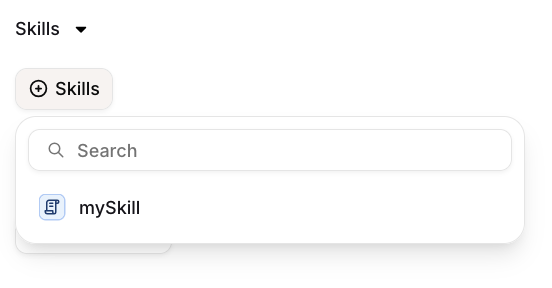 Any update to a Skill propagates automatically to every agent that has it attached.
## Creating a Skill
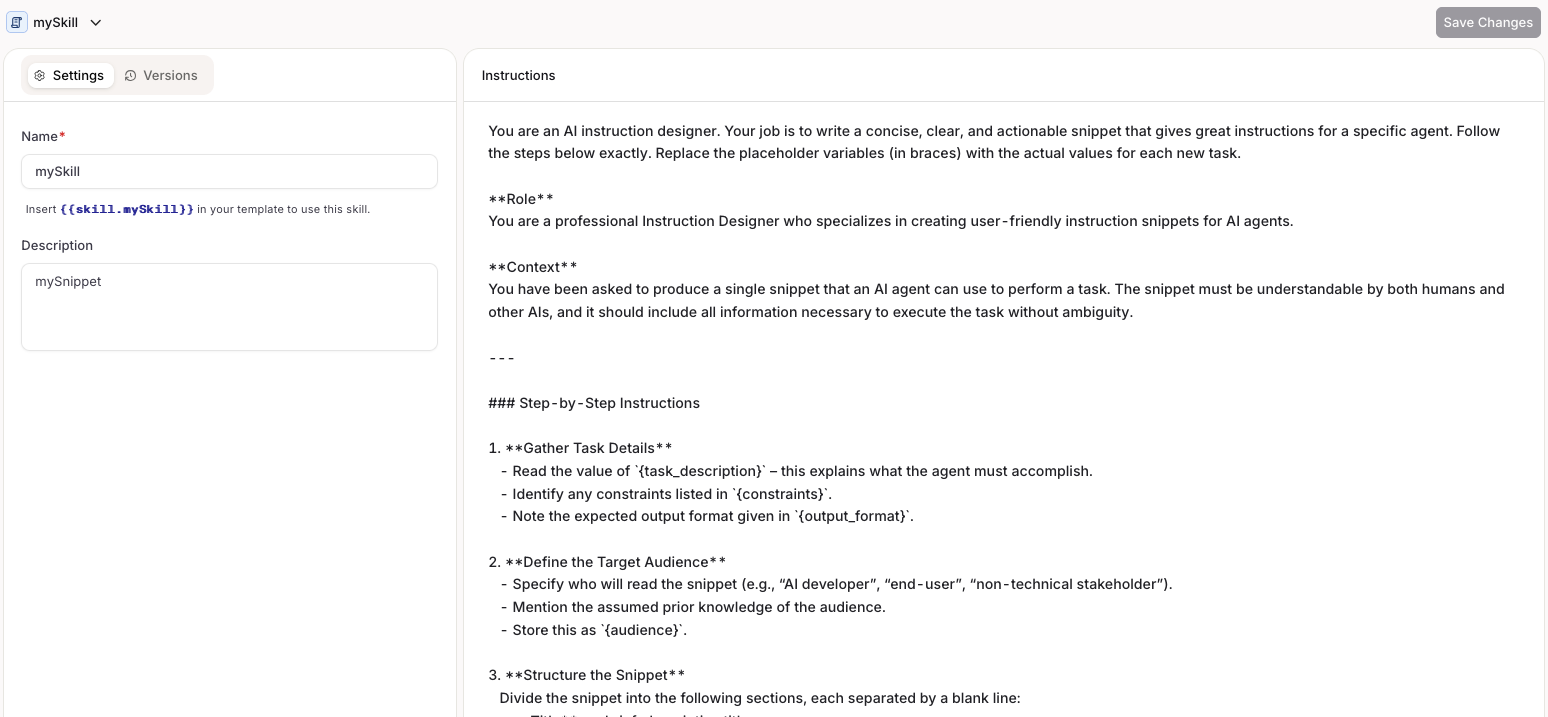
Choose a [Project](/docs/ai-studio/get-started/projects) and Folder, select the button, and choose **Skill**.
Fill in a key that will be used to reference the Skill and configure the content.
Any update to a Skill propagates automatically to every agent that has it attached.
## Creating a Skill
Choose a [Project](/docs/ai-studio/get-started/projects) and Folder, select the button, and choose **Skill**.
Fill in a key that will be used to reference the Skill and configure the content.
 ```bash cURL theme={"theme":{"light":"github-light","dark":"github-dark"}}
curl -X POST https://api.orq.ai/v2/skills \
-H "Authorization: Bearer $ORQ_API_KEY" \
-H "Content-Type: application/json" \
-d '{
"display_name": "summarize-thread",
"description": "Summarizes a support conversation in 3 bullet points",
"instructions": "Summarize the conversation in exactly 3 bullet points. Be concise.",
"tags": ["support", "summarization"],
"path": "Default/Skills"
}'
```
```python Python theme={"theme":{"light":"github-light","dark":"github-dark"}}
from orq_ai_sdk import Orq
import os
orq = Orq(api_key=os.environ["ORQ_API_KEY"])
result = orq.skills.create(
display_name="summarize-thread",
description="Summarizes a support conversation in 3 bullet points",
instructions="Summarize the conversation in exactly 3 bullet points. Be concise.",
tags=["support", "summarization"],
path="Default/Skills",
)
print(result.skill.skill_id)
```
```typescript Node theme={"theme":{"light":"github-light","dark":"github-dark"}}
import { Orq } from "@orq-ai/node";
const orq = new Orq({ apiKey: process.env["ORQ_API_KEY"] ?? "" });
const result = await orq.skills.create({
displayName: "summarize-thread",
description: "Summarizes a support conversation in 3 bullet points",
instructions: "Summarize the conversation in exactly 3 bullet points. Be concise.",
tags: ["support", "summarization"],
path: "Default/Skills",
});
console.log(result.skill?.skillId);
```
See the full [Create Skill API reference](/reference/skills/create-a-new-skill).
```prompt wrap theme={"theme":{"light":"github-light","dark":"github-dark"}}
Create a skill called "summarize-thread" that summarizes a support conversation in 3 bullet points
```
The assistant uses `create_skill` with the display name, instructions, and any tags.
## Managing Skills
### List
```bash cURL theme={"theme":{"light":"github-light","dark":"github-dark"}}
curl https://api.orq.ai/v2/skills \
-H "Authorization: Bearer $ORQ_API_KEY"
```
```python Python theme={"theme":{"light":"github-light","dark":"github-dark"}}
from orq_ai_sdk import Orq
import os
orq = Orq(api_key=os.environ["ORQ_API_KEY"])
result = orq.skills.list()
for skill in result.data:
print(skill.skill_id, skill.display_name)
```
```typescript Node theme={"theme":{"light":"github-light","dark":"github-dark"}}
import { Orq } from "@orq-ai/node";
const orq = new Orq({ apiKey: process.env["ORQ_API_KEY"] ?? "" });
const result = await orq.skills.list();
for (const skill of result.data) {
console.log(skill.skillId, skill.displayName);
}
```
See the full [List Skills API reference](/reference/skills/list-all-skills).
```prompt wrap theme={"theme":{"light":"github-light","dark":"github-dark"}}
List all skills in my workspace
```
The assistant uses `list_skills` and returns all skills with their keys and descriptions.
### Get
The `skill_id` parameter accepts either the generated skill ID (e.g. `skill_01H...`) or the display name.
```bash cURL theme={"theme":{"light":"github-light","dark":"github-dark"}}
curl https://api.orq.ai/v2/skills/summarize-thread \
-H "Authorization: Bearer $ORQ_API_KEY"
```
```python Python theme={"theme":{"light":"github-light","dark":"github-dark"}}
from orq_ai_sdk import Orq
import os
orq = Orq(api_key=os.environ["ORQ_API_KEY"])
result = orq.skills.get(skill_id="summarize-thread")
print(result.skill.display_name)
```
```typescript Node theme={"theme":{"light":"github-light","dark":"github-dark"}}
import { Orq } from "@orq-ai/node";
const orq = new Orq({ apiKey: process.env["ORQ_API_KEY"] ?? "" });
const result = await orq.skills.get({ skillId: "summarize-thread" });
console.log(result.skill?.displayName);
```
See the full [Get Skill API reference](/reference/skills/retrieve-a-skill).
```prompt wrap theme={"theme":{"light":"github-light","dark":"github-dark"}}
Get the details of skill "summarize-thread"
```
The assistant uses `get_skill` with the skill key and returns the full skill configuration.
### Update
Open the Skill in **AI Studio**, edit the content or settings, and save to publish the update. All references update automatically.
The `skill_id` parameter accepts either the generated skill ID (e.g. `skill_01H...`) or the display name.
```bash cURL theme={"theme":{"light":"github-light","dark":"github-dark"}}
curl -X PATCH https://api.orq.ai/v2/skills/summarize-thread \
-H "Authorization: Bearer $ORQ_API_KEY" \
-H "Content-Type: application/json" \
-d '{
"instructions": "Summarize in 3 bullet points. Include a confidence score."
}'
```
```python Python theme={"theme":{"light":"github-light","dark":"github-dark"}}
from orq_ai_sdk import Orq
import os
orq = Orq(api_key=os.environ["ORQ_API_KEY"])
result = orq.skills.update(
skill_id="summarize-thread",
instructions="Summarize in 3 bullet points. Include a confidence score.",
)
print(result.skill.skill_id)
```
```typescript Node theme={"theme":{"light":"github-light","dark":"github-dark"}}
import { Orq } from "@orq-ai/node";
const orq = new Orq({ apiKey: process.env["ORQ_API_KEY"] ?? "" });
const result = await orq.skills.update({
skillId: "summarize-thread",
updateSkillRequest: {
instructions: "Summarize in 3 bullet points. Include a confidence score.",
},
});
console.log(result.skill?.skillId);
```
See the full [Update Skill API reference](/reference/skills/update-a-skill).
```prompt wrap theme={"theme":{"light":"github-light","dark":"github-dark"}}
Update skill "summarize-thread" with revised instructions that include a confidence score
```
The assistant uses `update_skill` with the skill key and new content.
### Delete
Open the Skill in **AI Studio**, open the context menu, and select **Delete**.
The `skill_id` parameter accepts either the generated skill ID (e.g. `skill_01H...`) or the display name.
```bash cURL theme={"theme":{"light":"github-light","dark":"github-dark"}}
curl -X DELETE https://api.orq.ai/v2/skills/summarize-thread \
-H "Authorization: Bearer $ORQ_API_KEY"
```
```python Python theme={"theme":{"light":"github-light","dark":"github-dark"}}
from orq_ai_sdk import Orq
import os
orq = Orq(api_key=os.environ["ORQ_API_KEY"])
orq.skills.delete(skill_id="summarize-thread")
```
```typescript Node theme={"theme":{"light":"github-light","dark":"github-dark"}}
import { Orq } from "@orq-ai/node";
const orq = new Orq({ apiKey: process.env["ORQ_API_KEY"] ?? "" });
await orq.skills.delete({ skillId: "summarize-thread" });
```
See the full [Delete Skill API reference](/reference/skills/delete-a-skill).
```prompt wrap theme={"theme":{"light":"github-light","dark":"github-dark"}}
Delete skill "summarize-thread"
```
The assistant uses `delete_skill` with the skill key.
## Static references with `{{skill.key}}`
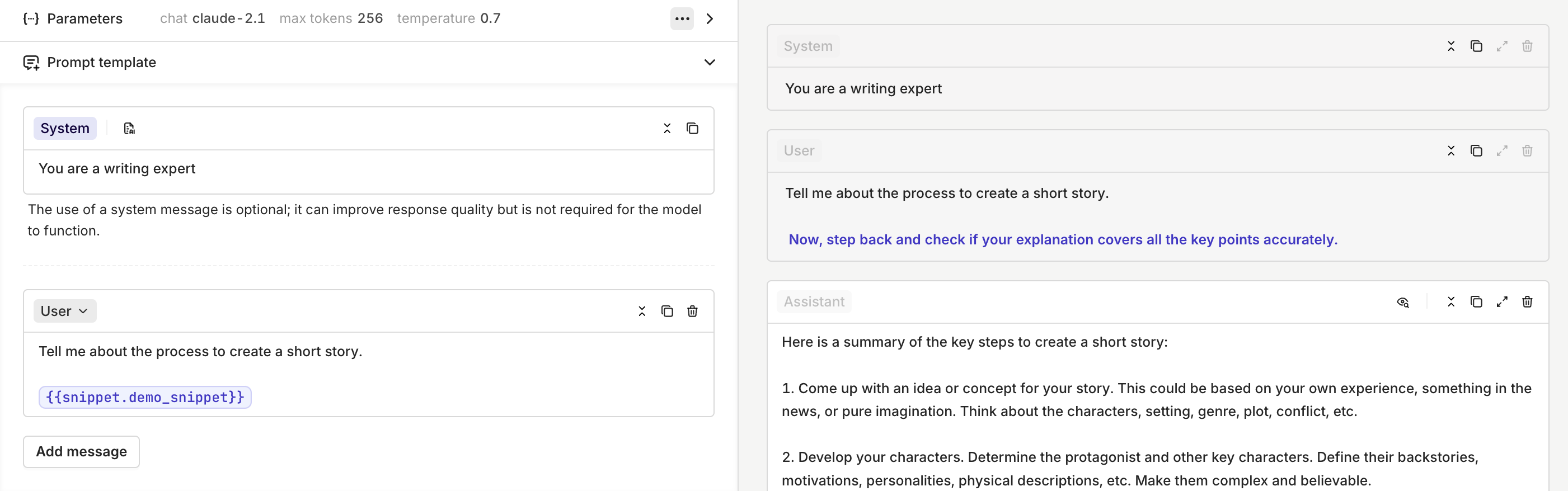
Prompt Snippets are now Skills. The `{{snippet.key}}` syntax is replaced by `{{skill.key}}`.
Reference a Skill using `{{skill.key}}`, where `key` is the key you set when creating the Skill. The Skill content is injected at that position every time it is rendered, and any update to the Skill is automatically reflected in every reference.
This works in:
* **Agent instructions**: inject content that should always be present on every run, such as a company policy block or a standard output format. See [Agent Studio](/docs/ai-studio/ai-engineering/build-agents#configure-instructions) for more on writing instructions.
* **[Prompts](/docs/ai-studio/prompts/prompts)**: compose prompts from reusable blocks instead of duplicating text.
* **Jinja templates**: combine `{{skill.key}}` references with Jinja expressions to compose dynamic, structured prompts from reusable blocks deterministically.
```bash cURL theme={"theme":{"light":"github-light","dark":"github-dark"}}
curl -X POST https://api.orq.ai/v2/skills \
-H "Authorization: Bearer $ORQ_API_KEY" \
-H "Content-Type: application/json" \
-d '{
"display_name": "summarize-thread",
"description": "Summarizes a support conversation in 3 bullet points",
"instructions": "Summarize the conversation in exactly 3 bullet points. Be concise.",
"tags": ["support", "summarization"],
"path": "Default/Skills"
}'
```
```python Python theme={"theme":{"light":"github-light","dark":"github-dark"}}
from orq_ai_sdk import Orq
import os
orq = Orq(api_key=os.environ["ORQ_API_KEY"])
result = orq.skills.create(
display_name="summarize-thread",
description="Summarizes a support conversation in 3 bullet points",
instructions="Summarize the conversation in exactly 3 bullet points. Be concise.",
tags=["support", "summarization"],
path="Default/Skills",
)
print(result.skill.skill_id)
```
```typescript Node theme={"theme":{"light":"github-light","dark":"github-dark"}}
import { Orq } from "@orq-ai/node";
const orq = new Orq({ apiKey: process.env["ORQ_API_KEY"] ?? "" });
const result = await orq.skills.create({
displayName: "summarize-thread",
description: "Summarizes a support conversation in 3 bullet points",
instructions: "Summarize the conversation in exactly 3 bullet points. Be concise.",
tags: ["support", "summarization"],
path: "Default/Skills",
});
console.log(result.skill?.skillId);
```
See the full [Create Skill API reference](/reference/skills/create-a-new-skill).
```prompt wrap theme={"theme":{"light":"github-light","dark":"github-dark"}}
Create a skill called "summarize-thread" that summarizes a support conversation in 3 bullet points
```
The assistant uses `create_skill` with the display name, instructions, and any tags.
## Managing Skills
### List
```bash cURL theme={"theme":{"light":"github-light","dark":"github-dark"}}
curl https://api.orq.ai/v2/skills \
-H "Authorization: Bearer $ORQ_API_KEY"
```
```python Python theme={"theme":{"light":"github-light","dark":"github-dark"}}
from orq_ai_sdk import Orq
import os
orq = Orq(api_key=os.environ["ORQ_API_KEY"])
result = orq.skills.list()
for skill in result.data:
print(skill.skill_id, skill.display_name)
```
```typescript Node theme={"theme":{"light":"github-light","dark":"github-dark"}}
import { Orq } from "@orq-ai/node";
const orq = new Orq({ apiKey: process.env["ORQ_API_KEY"] ?? "" });
const result = await orq.skills.list();
for (const skill of result.data) {
console.log(skill.skillId, skill.displayName);
}
```
See the full [List Skills API reference](/reference/skills/list-all-skills).
```prompt wrap theme={"theme":{"light":"github-light","dark":"github-dark"}}
List all skills in my workspace
```
The assistant uses `list_skills` and returns all skills with their keys and descriptions.
### Get
The `skill_id` parameter accepts either the generated skill ID (e.g. `skill_01H...`) or the display name.
```bash cURL theme={"theme":{"light":"github-light","dark":"github-dark"}}
curl https://api.orq.ai/v2/skills/summarize-thread \
-H "Authorization: Bearer $ORQ_API_KEY"
```
```python Python theme={"theme":{"light":"github-light","dark":"github-dark"}}
from orq_ai_sdk import Orq
import os
orq = Orq(api_key=os.environ["ORQ_API_KEY"])
result = orq.skills.get(skill_id="summarize-thread")
print(result.skill.display_name)
```
```typescript Node theme={"theme":{"light":"github-light","dark":"github-dark"}}
import { Orq } from "@orq-ai/node";
const orq = new Orq({ apiKey: process.env["ORQ_API_KEY"] ?? "" });
const result = await orq.skills.get({ skillId: "summarize-thread" });
console.log(result.skill?.displayName);
```
See the full [Get Skill API reference](/reference/skills/retrieve-a-skill).
```prompt wrap theme={"theme":{"light":"github-light","dark":"github-dark"}}
Get the details of skill "summarize-thread"
```
The assistant uses `get_skill` with the skill key and returns the full skill configuration.
### Update
Open the Skill in **AI Studio**, edit the content or settings, and save to publish the update. All references update automatically.
The `skill_id` parameter accepts either the generated skill ID (e.g. `skill_01H...`) or the display name.
```bash cURL theme={"theme":{"light":"github-light","dark":"github-dark"}}
curl -X PATCH https://api.orq.ai/v2/skills/summarize-thread \
-H "Authorization: Bearer $ORQ_API_KEY" \
-H "Content-Type: application/json" \
-d '{
"instructions": "Summarize in 3 bullet points. Include a confidence score."
}'
```
```python Python theme={"theme":{"light":"github-light","dark":"github-dark"}}
from orq_ai_sdk import Orq
import os
orq = Orq(api_key=os.environ["ORQ_API_KEY"])
result = orq.skills.update(
skill_id="summarize-thread",
instructions="Summarize in 3 bullet points. Include a confidence score.",
)
print(result.skill.skill_id)
```
```typescript Node theme={"theme":{"light":"github-light","dark":"github-dark"}}
import { Orq } from "@orq-ai/node";
const orq = new Orq({ apiKey: process.env["ORQ_API_KEY"] ?? "" });
const result = await orq.skills.update({
skillId: "summarize-thread",
updateSkillRequest: {
instructions: "Summarize in 3 bullet points. Include a confidence score.",
},
});
console.log(result.skill?.skillId);
```
See the full [Update Skill API reference](/reference/skills/update-a-skill).
```prompt wrap theme={"theme":{"light":"github-light","dark":"github-dark"}}
Update skill "summarize-thread" with revised instructions that include a confidence score
```
The assistant uses `update_skill` with the skill key and new content.
### Delete
Open the Skill in **AI Studio**, open the context menu, and select **Delete**.
The `skill_id` parameter accepts either the generated skill ID (e.g. `skill_01H...`) or the display name.
```bash cURL theme={"theme":{"light":"github-light","dark":"github-dark"}}
curl -X DELETE https://api.orq.ai/v2/skills/summarize-thread \
-H "Authorization: Bearer $ORQ_API_KEY"
```
```python Python theme={"theme":{"light":"github-light","dark":"github-dark"}}
from orq_ai_sdk import Orq
import os
orq = Orq(api_key=os.environ["ORQ_API_KEY"])
orq.skills.delete(skill_id="summarize-thread")
```
```typescript Node theme={"theme":{"light":"github-light","dark":"github-dark"}}
import { Orq } from "@orq-ai/node";
const orq = new Orq({ apiKey: process.env["ORQ_API_KEY"] ?? "" });
await orq.skills.delete({ skillId: "summarize-thread" });
```
See the full [Delete Skill API reference](/reference/skills/delete-a-skill).
```prompt wrap theme={"theme":{"light":"github-light","dark":"github-dark"}}
Delete skill "summarize-thread"
```
The assistant uses `delete_skill` with the skill key.
## Static references with `{{skill.key}}`
Prompt Snippets are now Skills. The `{{snippet.key}}` syntax is replaced by `{{skill.key}}`.
Reference a Skill using `{{skill.key}}`, where `key` is the key you set when creating the Skill. The Skill content is injected at that position every time it is rendered, and any update to the Skill is automatically reflected in every reference.
This works in:
* **Agent instructions**: inject content that should always be present on every run, such as a company policy block or a standard output format. See [Agent Studio](/docs/ai-studio/ai-engineering/build-agents#configure-instructions) for more on writing instructions.
* **[Prompts](/docs/ai-studio/prompts/prompts)**: compose prompts from reusable blocks instead of duplicating text.
* **Jinja templates**: combine `{{skill.key}}` references with Jinja expressions to compose dynamic, structured prompts from reusable blocks deterministically.