> ## Documentation Index
> Fetch the complete documentation index at: https://docs.orq.ai/llms.txt
> Use this file to discover all available pages before exploring further.
# Build a customer support chatbot in Node.js
> Build a production-ready Node.js customer support chatbot via AI Gateway with streaming, fallbacks, caching, and RAG knowledge base integration.
* Learn how to use Orq AI Gateway
* Connect primary and fallback AI providers to avoid vendor lock-in
* Enable streaming for real-time responses and better UX
* Add a knowledge base with custom docs for contextual answers
* Set up caching for recurring requests
* Build a production-ready customer support agent in minutes
## Overview
This tutorial builds a customer support application in Node.js using **AI Gateway**, where support queries have access to relevant business context from a Knowledge Base. The system includes a primary model (GPT-4o) and a fallback model (Claude Sonnet) that automatically activates during rate limits or outages.
The tutorial also covers caching for user queries, identity tracing to monitor per-user LLM request volumes, and Thread tracking to visualize complete conversation flows between users and the assistant.
```mermaid theme={"theme":{"light":"github-light","dark":"github-dark"}}
graph LR
A[User Query] --> B[Orq AI Gateway]
B --> C{Cache Enabled?}
C -->|Yes - Cache Hit| D[Return Cached Response]
C -->|Yes - Cache Miss| E[Search Knowledge Base]
C -->|No| E
E --> F[Enrich Query with Context]
F --> G{Select Model}
G -->|Primary Available| H[OpenAI GPT-4o]
G -->|Rate Limit/Outage| I[Claude Sonnet Fallback]
H -->|Error/Unavailable| I
H -->|Success| J[Generate Response]
I --> J
J --> A
D --> A
B -.->|Track| K[Identity Tracing]
B -.->|Track| L[Thread Tracking]
style B fill:#e1f5ff
style E fill:#f0e1ff
style J fill:#e1ffe1
style C fill:#fff4e1
```
## What is AI gateway?
**AI Gateway** is a **single unified API endpoint** that lets you seamlessly route and manage requests across multiple AI model providers (e.g., OpenAI, Anthropic, Google, AWS). This functionality comes in handy, when you want to:
* Avoid dependency on a single provider (vendor lock-in)
* Automatically switch between providers in case of an outage
* Scale reliably when the usage surges
## Build the customer support chat
Inside the IDE of choice, set up the Node.js project. This tutorial uses npm; alternatives such as pnpm are also supported.
```bash theme={"theme":{"light":"github-light","dark":"github-dark"}}
npm init -y && npm add @orq-ai/node openai dotenv && npm install -D typescript @types/node tsx
```
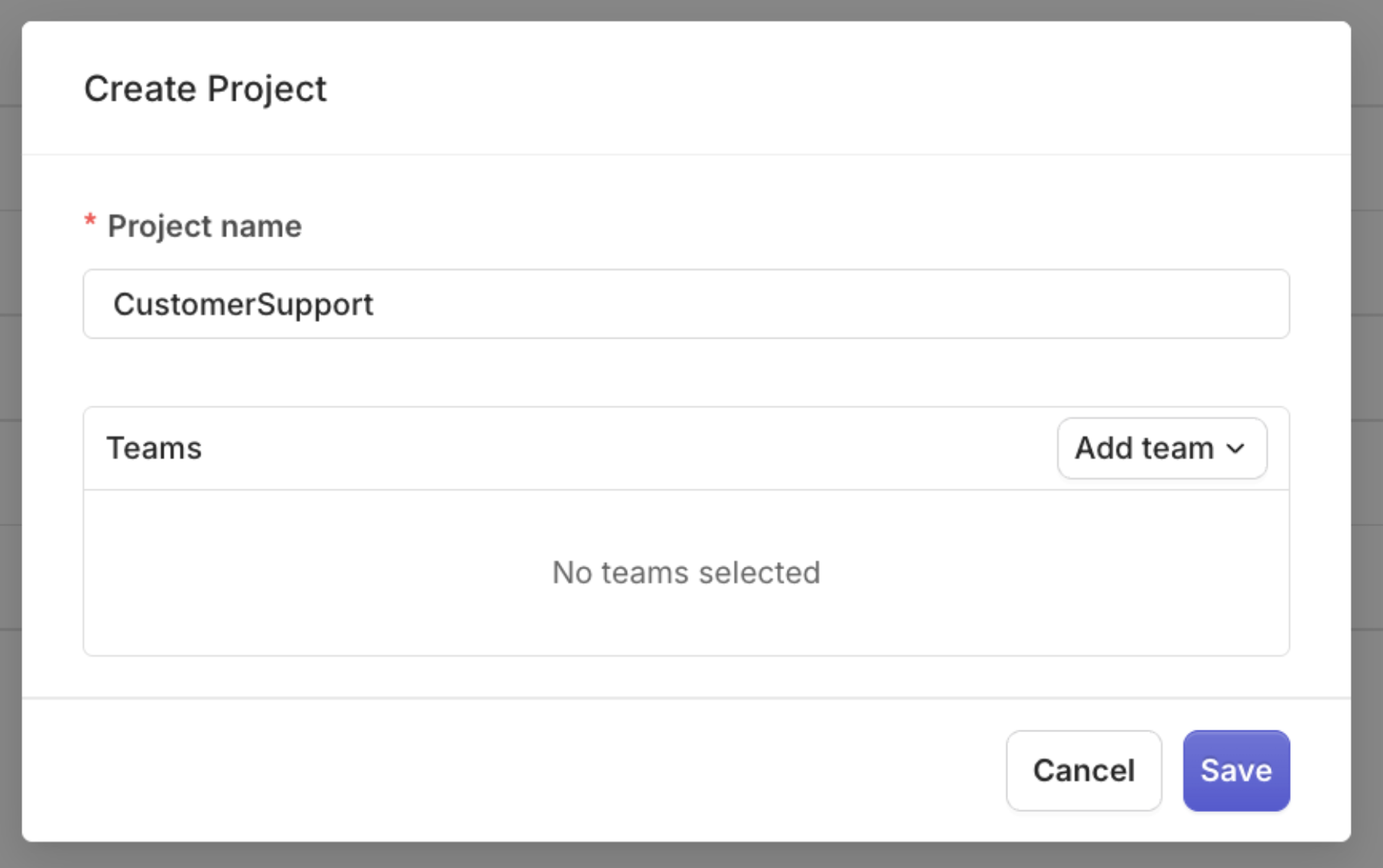
First, inside Orq dashboard create a project that we can assign API keys to by clicking the + button next to Project menu:
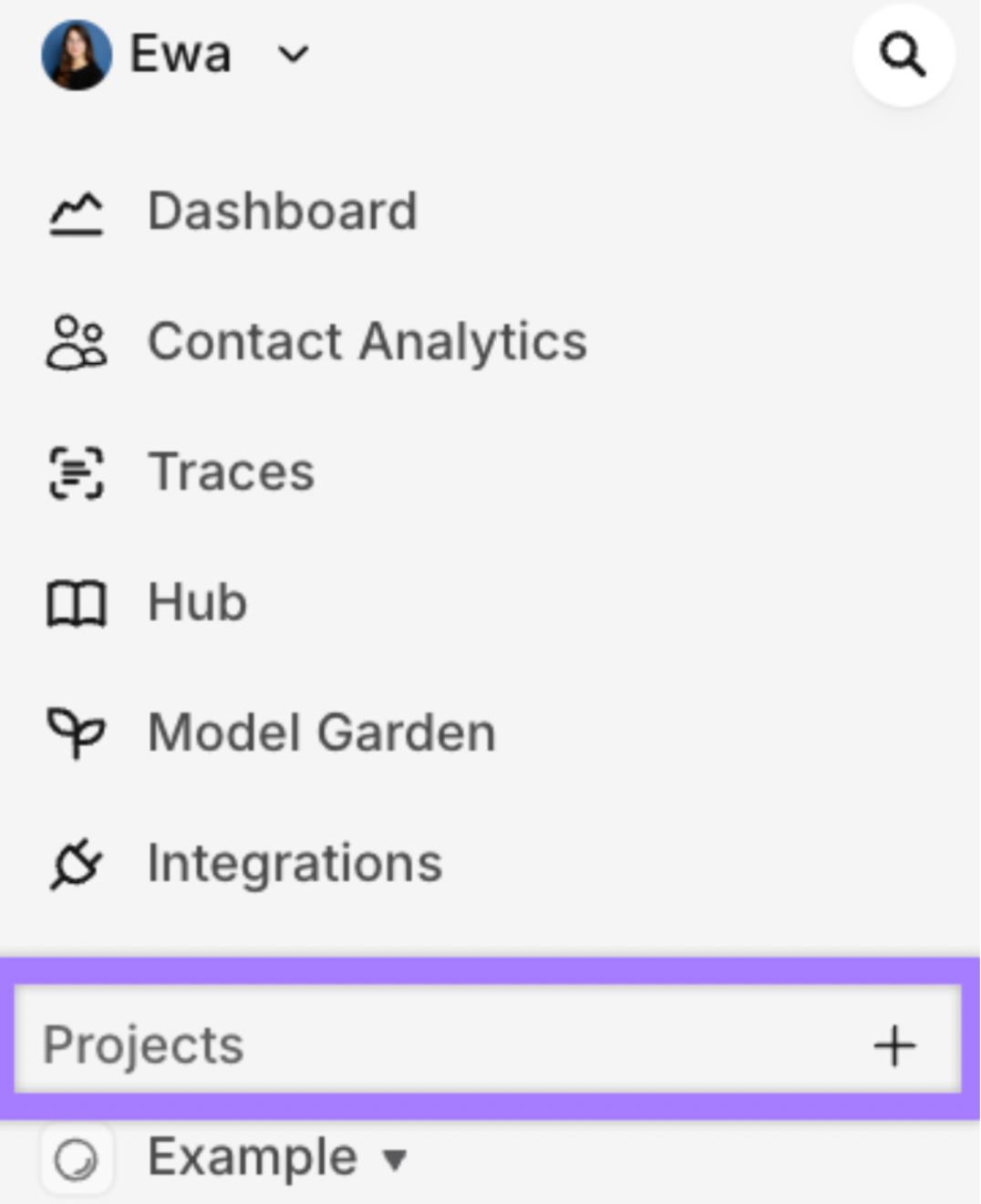 Create a new project named `CustomerSupport`
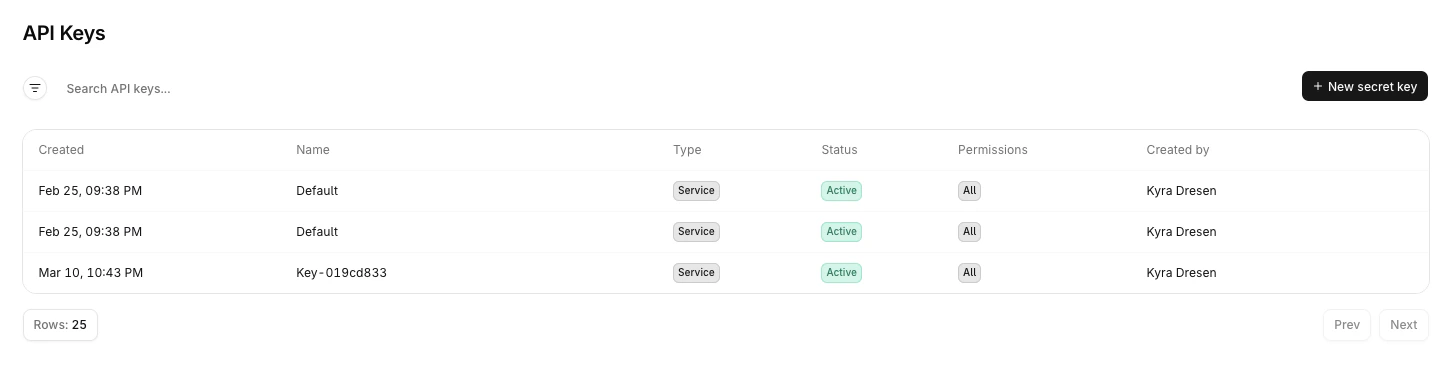
 To find the API key, navigate to **Organization > API Keys** and copy the key.
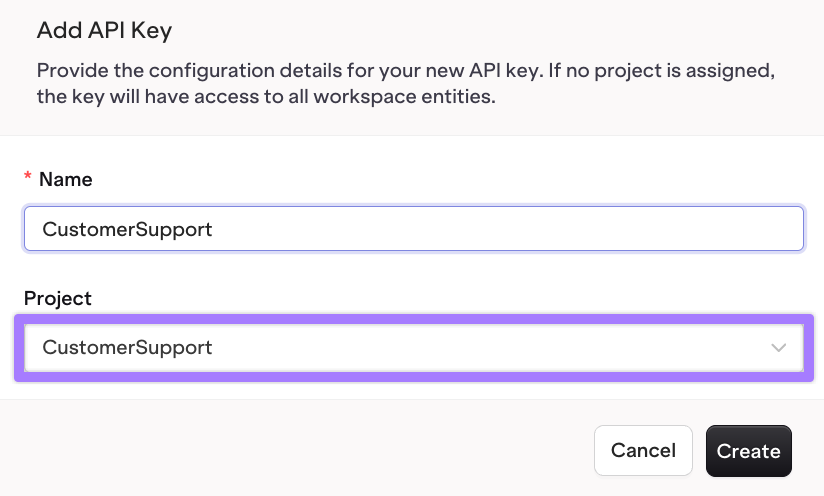
 From the dropdown, select the CustomerSupport project to assign the API key to:
 Create a `.env` file with the following content, replacing the placeholder with the actual API key:
```
ORQ_API_KEY=your-orq-api-key-here
```
Add `.env` to your `.gitignore`
```
echo ".env" >> .gitignore
```
Create the `customer-support.ts` file with a Hello World example:
```typescript customer-support.ts theme={"theme":{"light":"github-light","dark":"github-dark"}}
import 'dotenv/config';
import OpenAI from 'openai';
const client = new OpenAI({
apiKey: process.env.ORQ_API_KEY,
baseURL: 'https://api.orq.ai/v3/router'
});
async function main() {
const response = await client.chat.completions.create({
model: 'openai/gpt-5',
messages: [
{
role: 'user',
content: 'Hello, world!'
}
]
});
console.log(response.choices[0].message.content);
}
main().catch(console.error);
```
To execute the file from the terminal run:
```
npx tsx customer-support.ts
```
Create a `.env` file with the following content, replacing the placeholder with the actual API key:
```
ORQ_API_KEY=your-orq-api-key-here
```
Add `.env` to your `.gitignore`
```
echo ".env" >> .gitignore
```
Create the `customer-support.ts` file with a Hello World example:
```typescript customer-support.ts theme={"theme":{"light":"github-light","dark":"github-dark"}}
import 'dotenv/config';
import OpenAI from 'openai';
const client = new OpenAI({
apiKey: process.env.ORQ_API_KEY,
baseURL: 'https://api.orq.ai/v3/router'
});
async function main() {
const response = await client.chat.completions.create({
model: 'openai/gpt-5',
messages: [
{
role: 'user',
content: 'Hello, world!'
}
]
});
console.log(response.choices[0].message.content);
}
main().catch(console.error);
```
To execute the file from the terminal run:
```
npx tsx customer-support.ts
```
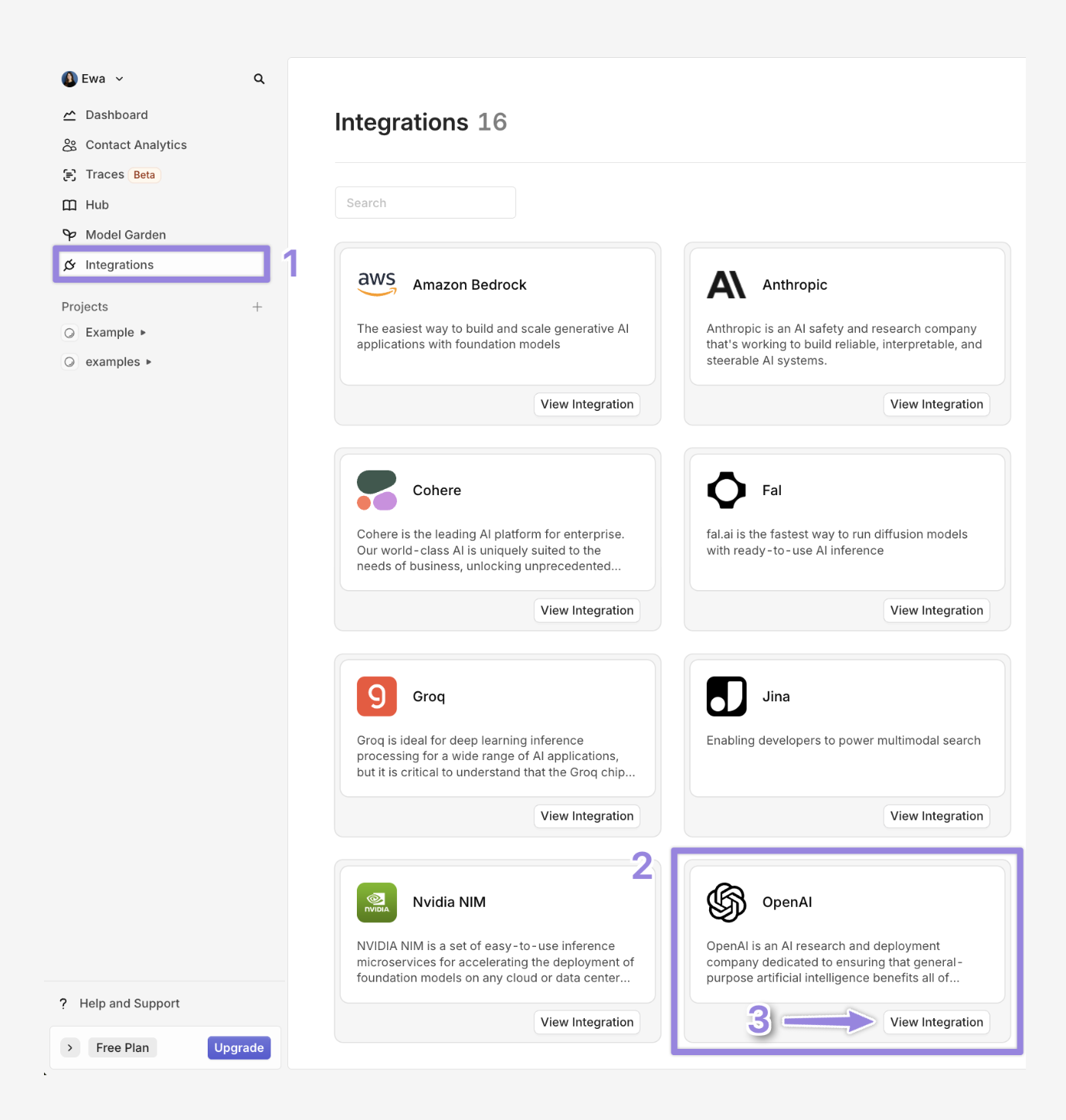
 This step uses the OpenAI `gpt-4o` model to generate responses. To connect any other model such as `claude-sonnet-4-6`, follow the same steps. To enable models in **AI Gateway**:
1. Navigate to Integrations
2. Select OpenAI
3. Click on View integration
This step uses the OpenAI `gpt-4o` model to generate responses. To connect any other model such as `claude-sonnet-4-6`, follow the same steps. To enable models in **AI Gateway**:
1. Navigate to Integrations
2. Select OpenAI
3. Click on View integration
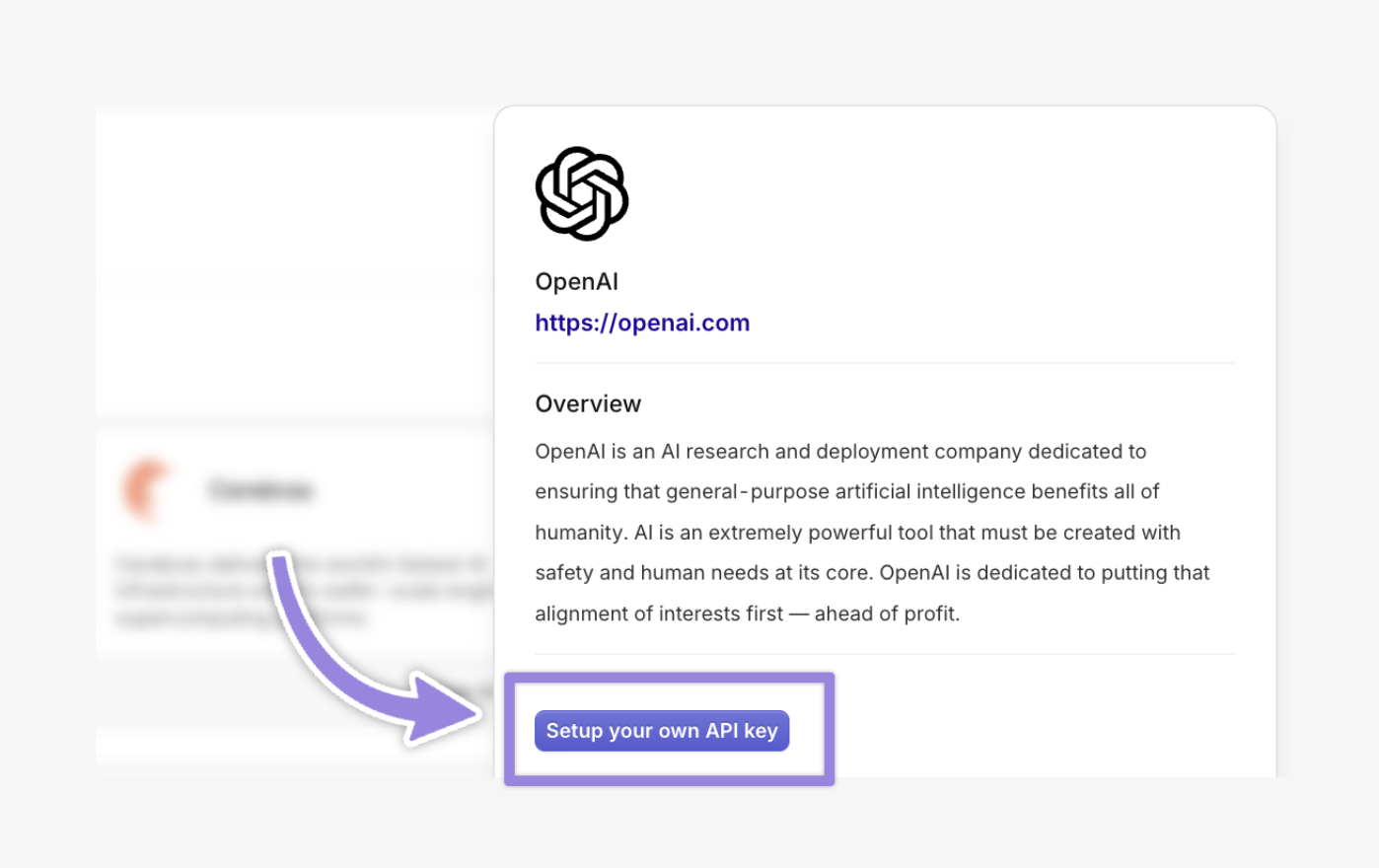
 Click on Setup your own API key
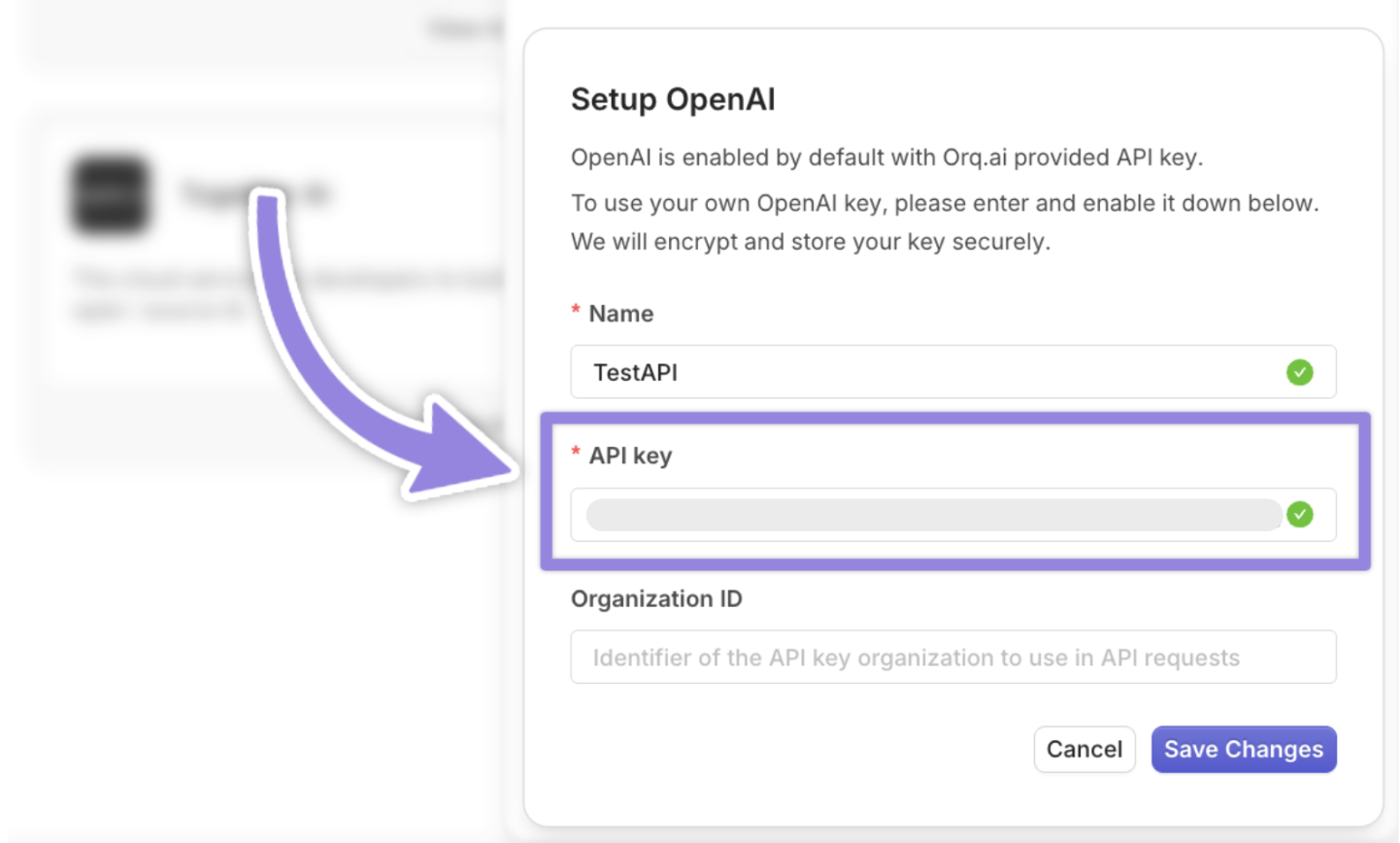
 Log in to [OpenAI's API platform](https://openai.com/) and copy your secret key:
 Navigate back to the [Orq.ai](http://Orq.ai) dashboard and paste the API keys inside the pop-up window that appears after clicking the Setup your own API key button
 By default, when you make a POST request, the connection remains open until the entire response is ready, and then it closes.
However, when you use streaming, the API switches to a Server-Sent Events (SSE) connection. This keeps the HTTP connection open and sends the response in small, real-time chunks as the data becomes available and is essential for real-time customer chat interactions.
```typescript customer-support.ts theme={"theme":{"light":"github-light","dark":"github-dark"}}
import 'dotenv/config';
import { OpenAI } from 'openai';
// Use OpenAI SDK with Orq AI Gateway proxy
const client = new OpenAI({
baseURL: "https://api.orq.ai/v3/router",
apiKey: process.env.ORQ_API_KEY ?? '',
});
async function main() {
try {
console.log('--- Streaming started ---');
let stream: any;
try {
// Use OpenAI SDK with Orq router for streaming
stream = await client.chat.completions.create({
model: 'openai/gpt-5', // Use provider/model format
messages: [{
role: 'user',
content: 'What are chunks in AI?'
}],
stream: true
});
console.log('Stream established successfully');
} catch (e: any) {
// Fallback for non-streaming
console.log('Stream not available, falling back to non-streaming response');
console.log('Error:', e?.message || e);
const resp = await client.chat.completions.create({
model: 'openai/gpt-5',
messages: [{
role: 'user',
content: 'What are chunks in AI?'
}],
stream: false
});
const content = resp.choices?.[0]?.message?.content ?? '';
if (content) {
process.stdout.write(String(content));
console.log('\n--- Streaming finished ---');
return;
}
console.log('\n(No content)');
return;
}
// Iterate async chunks - router uses OpenAI-compatible format
for await (const chunk of stream as any) {
const content = chunk?.choices?.[0]?.delta?.content ?? '';
if (content) {
process.stdout.write(content);
}
if (process.env.VERBOSE_STREAM === 'true') {
console.log('\n[chunk]', JSON.stringify(chunk, null, 2));
}
}
console.log('\n--- Streaming finished ---');
} catch (err: any) {
console.error('Error:', err.message ?? err);
}
}
main();
```
Streaming is ideal for applications that display text as it is generated, such as chat interfaces or live assistants, improving perceived responsiveness:
**Orq.ai** allows automatic fallback to alternative models if the primary fails. If `gpt-4o` hits a rate limit or downtime, the request automatically retries and may fall back to Anthropic `claude-sonnet-4-6` or `gpt-5-mini`. Make sure the models are enabled in **Orq.ai**.
```typescript theme={"theme":{"light":"github-light","dark":"github-dark"}}
import 'dotenv/config';
import OpenAI from 'openai';
import type { Stream } from 'openai/streaming';
import type { ChatCompletionChunk } from 'openai/resources/chat/completions';
const client = new OpenAI({
apiKey: process.env.ORQ_API_KEY!,
baseURL: 'https://api.orq.ai/v3/router',
});
async function main() {
const stream = await client.chat.completions.create({
model: 'openai/gpt-5',
stream: true,
messages: [
{ role: 'user', content: 'Explain what Streaming in Orq.ai is?' },
],
orq: {
retry: { count: 3, on_codes: [429, 500, 502, 503, 504] },
fallbacks: [
{ model: 'openai/gpt-5-mini' },
{ model: 'anthropic/claude-sonnet-4-6' },
],
},
});
for await (const chunk of stream) {
const content = chunk.choices[0]?.delta?.content || '';
process.stdout.write(content);
}
console.log('\n');
}
main().catch(console.error);
```
**Orq.ai** supports response caching to reduce latency and API usage for repeated requests. It uses `exact_match` caching, where the cache key is generated from the exact model, messages, and all parameters, ensuring identical requests hit the cache. The TTL (time-to-live) specifies how long the response is cached (e.g., 3600 seconds for 1 hour, max 86400 seconds). Below is a TypeScript implementation with caching, retries, and fallbacks:
```typescript theme={"theme":{"light":"github-light","dark":"github-dark"}}
import 'dotenv/config';
import OpenAI from 'openai';
interface OrqConfig {
retry?: {
count: number;
on_codes: number[];
};
fallbacks?: Array<{ model: string }>;
cache?: {
type: 'exact_match';
ttl: number;
};
}
const client = new OpenAI({
apiKey: process.env.ORQ_API_KEY ?? '',
baseURL: 'https://api.orq.ai/v3/router',
});
async function main(): Promise {
try {
const params = {
model: 'openai/gpt-5',
stream: true as const,
messages: [
{
role: 'user' as const,
content: 'Explain what Streaming in Orq.ai is?',
},
],
orq: {
retry: {
count: 3,
on_codes: [429, 500, 502, 503, 504],
},
fallbacks: [
{ model: 'anthropic/claude-sonnet-4-6' },
{ model: 'openai/gpt-5-mini' },
],
cache: {
type: 'exact_match' as const,
ttl: 3600, // 1 hour
},
},
};
const stream = await client.chat.completions.create(
params as OpenAI.Chat.Completions.ChatCompletionCreateParamsStreaming
);
for await (const chunk of stream) {
const content = chunk.choices[0]?.delta?.content ?? '';
process.stdout.write(content);
}
console.log('\n');
} catch (error: unknown) {
console.error('Error:', error instanceof Error ? error.message : String(error));
}
}
main();
```
On the first run, the request shows `cache-miss` inside Traces.
By default, when you make a POST request, the connection remains open until the entire response is ready, and then it closes.
However, when you use streaming, the API switches to a Server-Sent Events (SSE) connection. This keeps the HTTP connection open and sends the response in small, real-time chunks as the data becomes available and is essential for real-time customer chat interactions.
```typescript customer-support.ts theme={"theme":{"light":"github-light","dark":"github-dark"}}
import 'dotenv/config';
import { OpenAI } from 'openai';
// Use OpenAI SDK with Orq AI Gateway proxy
const client = new OpenAI({
baseURL: "https://api.orq.ai/v3/router",
apiKey: process.env.ORQ_API_KEY ?? '',
});
async function main() {
try {
console.log('--- Streaming started ---');
let stream: any;
try {
// Use OpenAI SDK with Orq router for streaming
stream = await client.chat.completions.create({
model: 'openai/gpt-5', // Use provider/model format
messages: [{
role: 'user',
content: 'What are chunks in AI?'
}],
stream: true
});
console.log('Stream established successfully');
} catch (e: any) {
// Fallback for non-streaming
console.log('Stream not available, falling back to non-streaming response');
console.log('Error:', e?.message || e);
const resp = await client.chat.completions.create({
model: 'openai/gpt-5',
messages: [{
role: 'user',
content: 'What are chunks in AI?'
}],
stream: false
});
const content = resp.choices?.[0]?.message?.content ?? '';
if (content) {
process.stdout.write(String(content));
console.log('\n--- Streaming finished ---');
return;
}
console.log('\n(No content)');
return;
}
// Iterate async chunks - router uses OpenAI-compatible format
for await (const chunk of stream as any) {
const content = chunk?.choices?.[0]?.delta?.content ?? '';
if (content) {
process.stdout.write(content);
}
if (process.env.VERBOSE_STREAM === 'true') {
console.log('\n[chunk]', JSON.stringify(chunk, null, 2));
}
}
console.log('\n--- Streaming finished ---');
} catch (err: any) {
console.error('Error:', err.message ?? err);
}
}
main();
```
Streaming is ideal for applications that display text as it is generated, such as chat interfaces or live assistants, improving perceived responsiveness:
**Orq.ai** allows automatic fallback to alternative models if the primary fails. If `gpt-4o` hits a rate limit or downtime, the request automatically retries and may fall back to Anthropic `claude-sonnet-4-6` or `gpt-5-mini`. Make sure the models are enabled in **Orq.ai**.
```typescript theme={"theme":{"light":"github-light","dark":"github-dark"}}
import 'dotenv/config';
import OpenAI from 'openai';
import type { Stream } from 'openai/streaming';
import type { ChatCompletionChunk } from 'openai/resources/chat/completions';
const client = new OpenAI({
apiKey: process.env.ORQ_API_KEY!,
baseURL: 'https://api.orq.ai/v3/router',
});
async function main() {
const stream = await client.chat.completions.create({
model: 'openai/gpt-5',
stream: true,
messages: [
{ role: 'user', content: 'Explain what Streaming in Orq.ai is?' },
],
orq: {
retry: { count: 3, on_codes: [429, 500, 502, 503, 504] },
fallbacks: [
{ model: 'openai/gpt-5-mini' },
{ model: 'anthropic/claude-sonnet-4-6' },
],
},
});
for await (const chunk of stream) {
const content = chunk.choices[0]?.delta?.content || '';
process.stdout.write(content);
}
console.log('\n');
}
main().catch(console.error);
```
**Orq.ai** supports response caching to reduce latency and API usage for repeated requests. It uses `exact_match` caching, where the cache key is generated from the exact model, messages, and all parameters, ensuring identical requests hit the cache. The TTL (time-to-live) specifies how long the response is cached (e.g., 3600 seconds for 1 hour, max 86400 seconds). Below is a TypeScript implementation with caching, retries, and fallbacks:
```typescript theme={"theme":{"light":"github-light","dark":"github-dark"}}
import 'dotenv/config';
import OpenAI from 'openai';
interface OrqConfig {
retry?: {
count: number;
on_codes: number[];
};
fallbacks?: Array<{ model: string }>;
cache?: {
type: 'exact_match';
ttl: number;
};
}
const client = new OpenAI({
apiKey: process.env.ORQ_API_KEY ?? '',
baseURL: 'https://api.orq.ai/v3/router',
});
async function main(): Promise {
try {
const params = {
model: 'openai/gpt-5',
stream: true as const,
messages: [
{
role: 'user' as const,
content: 'Explain what Streaming in Orq.ai is?',
},
],
orq: {
retry: {
count: 3,
on_codes: [429, 500, 502, 503, 504],
},
fallbacks: [
{ model: 'anthropic/claude-sonnet-4-6' },
{ model: 'openai/gpt-5-mini' },
],
cache: {
type: 'exact_match' as const,
ttl: 3600, // 1 hour
},
},
};
const stream = await client.chat.completions.create(
params as OpenAI.Chat.Completions.ChatCompletionCreateParamsStreaming
);
for await (const chunk of stream) {
const content = chunk.choices[0]?.delta?.content ?? '';
process.stdout.write(content);
}
console.log('\n');
} catch (error: unknown) {
console.error('Error:', error instanceof Error ? error.message : String(error));
}
}
main();
```
On the first run, the request shows `cache-miss` inside Traces.
 The cache is stored after the command runs for the first time. The reason for `cache-miss` on the first run is that **Orq.ai** has no prior response stored for that exact cache key. Read more about cache [here](https://docs.orq.ai/docs/ai-gateway-cache#/).
Running the same request a second time within the TTL shows `cache-hit` inside Traces, meaning **Orq.ai** retrieved the cached response.
The cache is stored after the command runs for the first time. The reason for `cache-miss` on the first run is that **Orq.ai** has no prior response stored for that exact cache key. Read more about cache [here](https://docs.orq.ai/docs/ai-gateway-cache#/).
Running the same request a second time within the TTL shows `cache-hit` inside Traces, meaning **Orq.ai** retrieved the cached response.
 **When to use**:
* When you want to enhance a foundational model's responses with custom, domain-specific knowledge using Retrieval-Augmented Generation (RAG).
* **Orq.ai**'s built-in RAG feature enables creation of a Knowledge Base from documents (e.g., FAQs, manuals, or PDFs)
* When you want to add a Vector Database (e.g., Pinecone, Qdrant) for control over embeddings and retrieval. For more see [Using Vector databases with Orq ](https://docs.orq.ai/docs/using-thirdparty-vectordbs-with-orq#/)
**Orq.ai** Knowledge Bases support the following file types: pdf, txt, docx, csv, xls (10 MB max). Encrypted files are not supported.
The following parameters control Knowledge Base creation:
| `embeddingModel` | Select the embedding model from [supported models](https://docs.orq.ai/docs/ai-gateway-supported-models#/). This model converts input data into vector embeddings (e.g. `openai/text-embedding-3-large`). |
| --------------------------------- | --------------------------------------------------------------------------------------------------------------------------------------------------------------------------------------------------------- |
| `path` | Project name (e.g. `CustomerSupport`) |
| `key` | Unique key for the Knowledge Base (e.g. `Customer`) |
| `retrievalSettings.topK` | Maximum number of relevant chunks to retrieve (e.g. `5` retrieves up to 5 chunks) |
| `retrievalSettings.threshold` | Minimum relevance score (0.0 to 1.0) for retrieved chunks (e.g. `0.7` filters out chunks below that score) |
| `retrievalSettings.retrievalType` | Retrieval method: `hybrid_search`, `vector_search`, or `keyword_search` |
Run the code to create a Knowledge Base:
```typescript customer-support.ts theme={"theme":{"light":"github-light","dark":"github-dark"}}
import 'dotenv/config';
import { Orq } from '@orq-ai/node';
const orq = new Orq({
apiKey: process.env.ORQ_API_KEY!,
});
async function createCustomerSupportKnowledge() {
try {
const result = await orq.knowledge.create({
embeddingModel: 'openai/text-embedding-3-large',
path: 'CustomerSupport', // Name of your project
key: 'Customer', // Needs to be a unique key
retrievalSettings: {
retrievalType: 'hybrid_search', // Search method: 'hybrid_search', 'vector_search', or 'keyword_search'
topK: 5, // Maximum number of relevant chunks to retrieve
threshold: 0.7, // Minimum relevance score (0.0 to 1.0)
},
});
console.log('Knowledge base created successfully:', result);
return result;
} catch (error: any) {
if (error.statusCode === 400 && error.body?.includes('already exists')) {
console.log('Knowledge base "Customer" already exists. Retrieving existing knowledge base...');
const list = await orq.knowledge.list({ limit: 50 });
const existing = list.data.find((kb) => kb.key === 'Customer');
if (existing) {
console.log('Using existing knowledge base:', existing);
return existing;
}
// If not found on the first page, the workspace may have more than 50 knowledge bases.
// In that case, retrieve the ID from the Orq.ai dashboard and set it in .env directly.
throw new Error('Knowledge base "Customer" not found. Check your Orq.ai dashboard for the ID.');
}
console.error('Error creating knowledge base:', error);
throw error;
}
}
createCustomerSupportKnowledge();
```
This is how a successful response should look like:
```
{
_id: '$YOUR_KNOWLEDGE_ID',
created: '2025-10-29T10:44:10.011Z',
created_by_id: null,
key: 'Customer',
model: 'openai/text-embedding-3-large',
domain_id: 'domain-id',
path: 'CustomerSupport',
retrieval_settings: { retrieval_type: 'hybrid_search', top_k: 5, threshold: 0.7 },
updated_by_id: null,
updated: '2025-10-29T10:44:10.011Z'
}
```
Save the Knowledge Base ID `_id` as `YOUR_KNOWLEDGE_ID` in the `.env` file, replacing the placeholder with the actual value from the response above:
```
YOUR_KNOWLEDGE_ID=
```
To complete this step with the GUI, see [Create a Knowledge Base](https://docs.orq.ai/reference/knowledge-bases/create-a-knowledge).
Inside the main repository create a `documents` directory and place the documents to upload there. **Orq.ai** supports document types: pdf, txt, docx, csv, xls (10 MB max).
Run the following code to upload the documents:
```typescript customer-support.ts theme={"theme":{"light":"github-light","dark":"github-dark"}}
import 'dotenv/config';
import { Orq } from '@orq-ai/node';
import fs from 'fs';
import path from 'path';
import { fileURLToPath } from 'url';
const __filename = fileURLToPath(import.meta.url);
const __dirname = path.dirname(__filename);
const orq = new Orq({
apiKey: process.env.ORQ_API_KEY!
});
const filePath = path.join(__dirname, 'documents', 'CustomerSupportDoc.pdf');
const fileBuffer = fs.readFileSync(filePath);
async function uploadFile() {
try {
const data = await orq.files.create({
filename: 'CustomerSupportDoc.pdf',
content: fileBuffer.toString('base64'),
contentType: 'application/pdf',
purpose: 'FILE_PURPOSE_RETRIEVAL',
});
console.log(data);
} catch (err) {
console.error(err);
}
}
uploadFile();
```
This is how a successful response should look like:
```
{
_id: '$FILE_ID',
object_name: 'files-api/workspaces/workspace-id/retrieval/$FILE_ID.pdf',
purpose: 'retrieval',
file_name: '$FILE_ID.pdf',
workspace_id: 'workspace-id',
bytes: 118199,
created: '2025-10-29T11:22:56.732Z'
}
```
Add the file ID `_id` to the `.env` file, replacing the placeholder with the actual value from the response above:
```
FILE_ID=
```
To complete this step with the GUI, see [Upload a file](https://docs.orq.ai/reference/files/upload-a-file).
```typescript theme={"theme":{"light":"github-light","dark":"github-dark"}}
import 'dotenv/config';
import { Orq } from '@orq-ai/node';
const orq = new Orq({ apiKey: process.env.ORQ_API_KEY! });
// Create datasource and search functions
const createDatasource = () => orq.knowledge.createDatasource({
knowledgeId: process.env.YOUR_KNOWLEDGE_ID!,
requestBody: { fileId: process.env.FILE_ID!, displayName: 'CustomerSupportDocs' }
});
const searchKnowledge = (question: string) => orq.knowledge.search({
knowledgeId: process.env.YOUR_KNOWLEDGE_ID!,
requestBody: { query: question, topK: 5 }
});
// Execute
createDatasource()
.then(result => console.log('Datasource created successfully:', result))
.catch(console.error);
export { createDatasource, searchKnowledge };
```
This is how a successful response looks like:
```
{
_id: '$YOUR_KNOWLEDGE_ID',
display_name: 'CustomerSupportDocs',
file_id: '$FILE_ID',
knowledge_id: '$YOUR_KNOWLEDGE_ID',
status: 'queued',
created: '2025-10-29T11:36:43.916Z',
updated: '2025-10-29T11:36:43.916Z',
created_by_id: null,
update_by_id: null,
chunks_count: 0
}
```
Confirm `YOUR_KNOWLEDGE_ID` is present in `.env` from the previous step.
The uploaded file is now visible under the Knowledge Base:
**When to use**:
* When you want to enhance a foundational model's responses with custom, domain-specific knowledge using Retrieval-Augmented Generation (RAG).
* **Orq.ai**'s built-in RAG feature enables creation of a Knowledge Base from documents (e.g., FAQs, manuals, or PDFs)
* When you want to add a Vector Database (e.g., Pinecone, Qdrant) for control over embeddings and retrieval. For more see [Using Vector databases with Orq ](https://docs.orq.ai/docs/using-thirdparty-vectordbs-with-orq#/)
**Orq.ai** Knowledge Bases support the following file types: pdf, txt, docx, csv, xls (10 MB max). Encrypted files are not supported.
The following parameters control Knowledge Base creation:
| `embeddingModel` | Select the embedding model from [supported models](https://docs.orq.ai/docs/ai-gateway-supported-models#/). This model converts input data into vector embeddings (e.g. `openai/text-embedding-3-large`). |
| --------------------------------- | --------------------------------------------------------------------------------------------------------------------------------------------------------------------------------------------------------- |
| `path` | Project name (e.g. `CustomerSupport`) |
| `key` | Unique key for the Knowledge Base (e.g. `Customer`) |
| `retrievalSettings.topK` | Maximum number of relevant chunks to retrieve (e.g. `5` retrieves up to 5 chunks) |
| `retrievalSettings.threshold` | Minimum relevance score (0.0 to 1.0) for retrieved chunks (e.g. `0.7` filters out chunks below that score) |
| `retrievalSettings.retrievalType` | Retrieval method: `hybrid_search`, `vector_search`, or `keyword_search` |
Run the code to create a Knowledge Base:
```typescript customer-support.ts theme={"theme":{"light":"github-light","dark":"github-dark"}}
import 'dotenv/config';
import { Orq } from '@orq-ai/node';
const orq = new Orq({
apiKey: process.env.ORQ_API_KEY!,
});
async function createCustomerSupportKnowledge() {
try {
const result = await orq.knowledge.create({
embeddingModel: 'openai/text-embedding-3-large',
path: 'CustomerSupport', // Name of your project
key: 'Customer', // Needs to be a unique key
retrievalSettings: {
retrievalType: 'hybrid_search', // Search method: 'hybrid_search', 'vector_search', or 'keyword_search'
topK: 5, // Maximum number of relevant chunks to retrieve
threshold: 0.7, // Minimum relevance score (0.0 to 1.0)
},
});
console.log('Knowledge base created successfully:', result);
return result;
} catch (error: any) {
if (error.statusCode === 400 && error.body?.includes('already exists')) {
console.log('Knowledge base "Customer" already exists. Retrieving existing knowledge base...');
const list = await orq.knowledge.list({ limit: 50 });
const existing = list.data.find((kb) => kb.key === 'Customer');
if (existing) {
console.log('Using existing knowledge base:', existing);
return existing;
}
// If not found on the first page, the workspace may have more than 50 knowledge bases.
// In that case, retrieve the ID from the Orq.ai dashboard and set it in .env directly.
throw new Error('Knowledge base "Customer" not found. Check your Orq.ai dashboard for the ID.');
}
console.error('Error creating knowledge base:', error);
throw error;
}
}
createCustomerSupportKnowledge();
```
This is how a successful response should look like:
```
{
_id: '$YOUR_KNOWLEDGE_ID',
created: '2025-10-29T10:44:10.011Z',
created_by_id: null,
key: 'Customer',
model: 'openai/text-embedding-3-large',
domain_id: 'domain-id',
path: 'CustomerSupport',
retrieval_settings: { retrieval_type: 'hybrid_search', top_k: 5, threshold: 0.7 },
updated_by_id: null,
updated: '2025-10-29T10:44:10.011Z'
}
```
Save the Knowledge Base ID `_id` as `YOUR_KNOWLEDGE_ID` in the `.env` file, replacing the placeholder with the actual value from the response above:
```
YOUR_KNOWLEDGE_ID=
```
To complete this step with the GUI, see [Create a Knowledge Base](https://docs.orq.ai/reference/knowledge-bases/create-a-knowledge).
Inside the main repository create a `documents` directory and place the documents to upload there. **Orq.ai** supports document types: pdf, txt, docx, csv, xls (10 MB max).
Run the following code to upload the documents:
```typescript customer-support.ts theme={"theme":{"light":"github-light","dark":"github-dark"}}
import 'dotenv/config';
import { Orq } from '@orq-ai/node';
import fs from 'fs';
import path from 'path';
import { fileURLToPath } from 'url';
const __filename = fileURLToPath(import.meta.url);
const __dirname = path.dirname(__filename);
const orq = new Orq({
apiKey: process.env.ORQ_API_KEY!
});
const filePath = path.join(__dirname, 'documents', 'CustomerSupportDoc.pdf');
const fileBuffer = fs.readFileSync(filePath);
async function uploadFile() {
try {
const data = await orq.files.create({
filename: 'CustomerSupportDoc.pdf',
content: fileBuffer.toString('base64'),
contentType: 'application/pdf',
purpose: 'FILE_PURPOSE_RETRIEVAL',
});
console.log(data);
} catch (err) {
console.error(err);
}
}
uploadFile();
```
This is how a successful response should look like:
```
{
_id: '$FILE_ID',
object_name: 'files-api/workspaces/workspace-id/retrieval/$FILE_ID.pdf',
purpose: 'retrieval',
file_name: '$FILE_ID.pdf',
workspace_id: 'workspace-id',
bytes: 118199,
created: '2025-10-29T11:22:56.732Z'
}
```
Add the file ID `_id` to the `.env` file, replacing the placeholder with the actual value from the response above:
```
FILE_ID=
```
To complete this step with the GUI, see [Upload a file](https://docs.orq.ai/reference/files/upload-a-file).
```typescript theme={"theme":{"light":"github-light","dark":"github-dark"}}
import 'dotenv/config';
import { Orq } from '@orq-ai/node';
const orq = new Orq({ apiKey: process.env.ORQ_API_KEY! });
// Create datasource and search functions
const createDatasource = () => orq.knowledge.createDatasource({
knowledgeId: process.env.YOUR_KNOWLEDGE_ID!,
requestBody: { fileId: process.env.FILE_ID!, displayName: 'CustomerSupportDocs' }
});
const searchKnowledge = (question: string) => orq.knowledge.search({
knowledgeId: process.env.YOUR_KNOWLEDGE_ID!,
requestBody: { query: question, topK: 5 }
});
// Execute
createDatasource()
.then(result => console.log('Datasource created successfully:', result))
.catch(console.error);
export { createDatasource, searchKnowledge };
```
This is how a successful response looks like:
```
{
_id: '$YOUR_KNOWLEDGE_ID',
display_name: 'CustomerSupportDocs',
file_id: '$FILE_ID',
knowledge_id: '$YOUR_KNOWLEDGE_ID',
status: 'queued',
created: '2025-10-29T11:36:43.916Z',
updated: '2025-10-29T11:36:43.916Z',
created_by_id: null,
update_by_id: null,
chunks_count: 0
}
```
Confirm `YOUR_KNOWLEDGE_ID` is present in `.env` from the previous step.
The uploaded file is now visible under the Knowledge Base:
 To complete this step with the GUI, see [Creating a new Datasource](https://docs.orq.ai/reference/knowledge-bases/create-a-new-datasource).
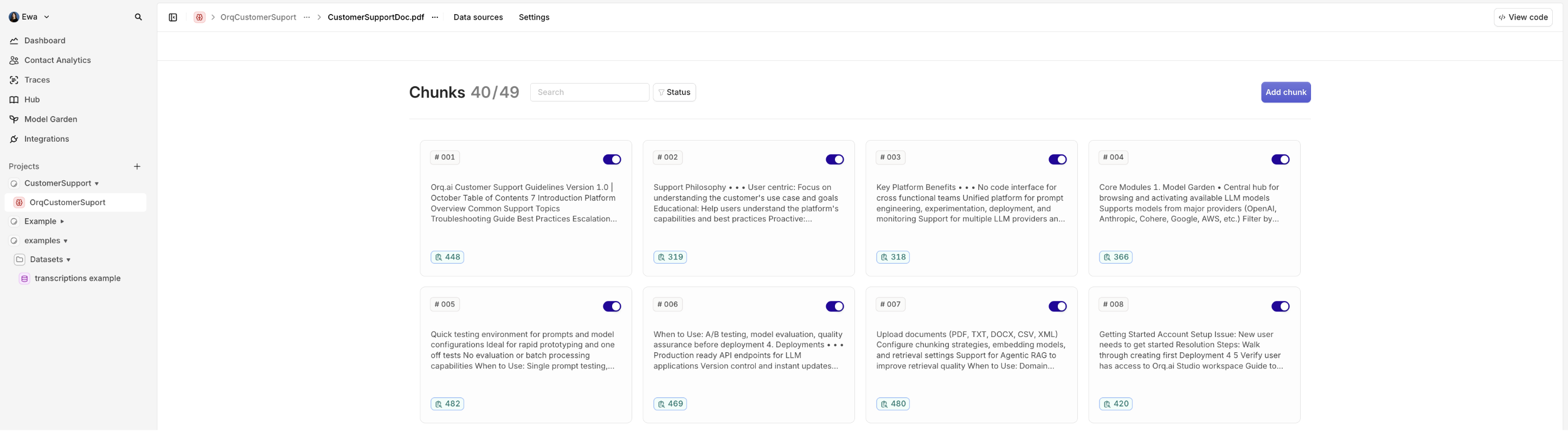
When documents are uploaded to a Knowledge Base, **Orq.ai** breaks them into smaller pieces of text called chunks. Think of it like dividing a book into manageable paragraphs or sections rather than trying to process the entire book at once.
To complete this step with the GUI, see [Creating a new Datasource](https://docs.orq.ai/reference/knowledge-bases/create-a-new-datasource).
When documents are uploaded to a Knowledge Base, **Orq.ai** breaks them into smaller pieces of text called chunks. Think of it like dividing a book into manageable paragraphs or sections rather than trying to process the entire book at once.
 This is the customer support chat with connected Knowledge Base:
```typescript theme={"theme":{"light":"github-light","dark":"github-dark"}}
import 'dotenv/config';
import OpenAI from 'openai';
interface OrqConfig {
retry?: { count: number; on_codes: number[] };
fallbacks?: Array<{ model: string }>;
cache?: { type: 'exact_match'; ttl: number };
knowledge_bases?: Array<{
knowledge_id: string;
top_k: number;
threshold: number;
search_type: 'hybrid_search';
}>;
}
// Initialize the OpenAI client
const client = new OpenAI({
apiKey: process.env.ORQ_API_KEY ?? '',
baseURL: 'https://api.orq.ai/v3/router',
});
async function main(): Promise {
try {
const requestParams = {
model: 'openai/gpt-5',
stream: true,
messages: [
{ role: 'user' as const, content: 'What are the best practices for customer support?' },
],
orq: {
retry: { count: 3, on_codes: [429, 500, 502, 503, 504] },
fallbacks: [
{ model: 'anthropic/claude-sonnet-4-6' },
{ model: 'openai/gpt-5-mini' },
],
cache: { type: 'exact_match' as const, ttl: 3600 },
knowledge_bases: [
{
knowledge_id: process.env.YOUR_KNOWLEDGE_ID!,
top_k: 5,
threshold: 0.7,
search_type: 'hybrid_search' as const,
},
],
},
};
console.log('Request:', JSON.stringify(requestParams, null, 2));
const start = Date.now();
const stream = await client.chat.completions.create(
requestParams as OpenAI.Chat.Completions.ChatCompletionCreateParamsStreaming
);
let chunkCount = 0;
for await (const chunk of stream) {
chunkCount++;
const content = chunk.choices[0]?.delta?.content ?? '';
process.stdout.write(content);
}
console.log(`\n\nTime taken: ${Date.now() - start}ms, Chunks: ${chunkCount}`);
console.log('Cache status: First run is always a cache miss; run again to check for hit.');
} catch (error: unknown) {
console.error('Error:', error instanceof Error ? error.message : String(error));
}
}
main();
```
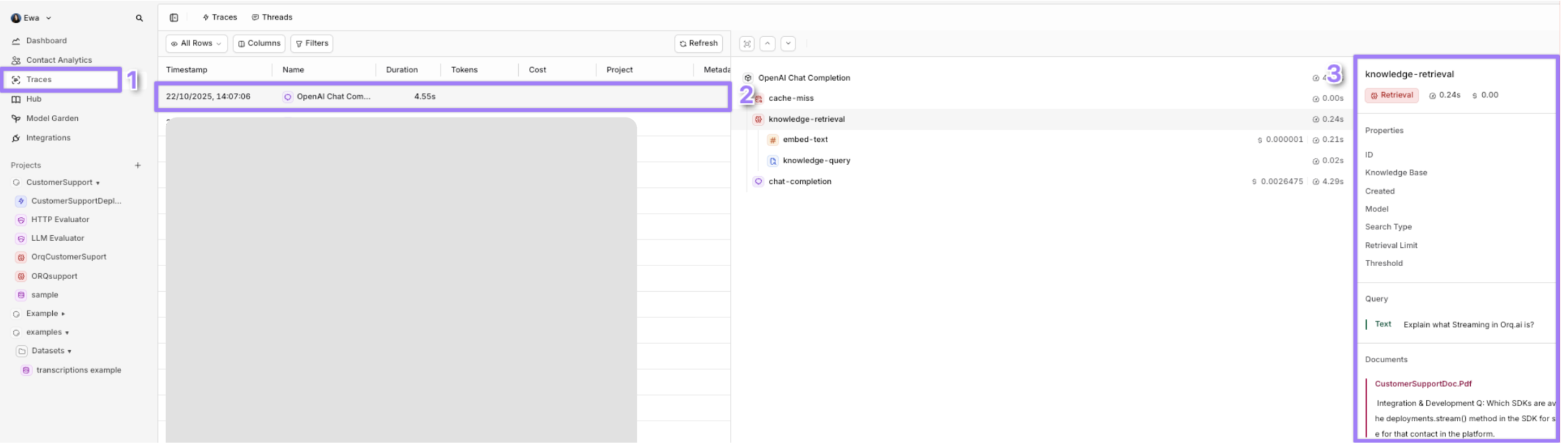
After running the code, the Knowledge Base retrieval is visible on the **Orq.ai** dashboard.
This is the customer support chat with connected Knowledge Base:
```typescript theme={"theme":{"light":"github-light","dark":"github-dark"}}
import 'dotenv/config';
import OpenAI from 'openai';
interface OrqConfig {
retry?: { count: number; on_codes: number[] };
fallbacks?: Array<{ model: string }>;
cache?: { type: 'exact_match'; ttl: number };
knowledge_bases?: Array<{
knowledge_id: string;
top_k: number;
threshold: number;
search_type: 'hybrid_search';
}>;
}
// Initialize the OpenAI client
const client = new OpenAI({
apiKey: process.env.ORQ_API_KEY ?? '',
baseURL: 'https://api.orq.ai/v3/router',
});
async function main(): Promise {
try {
const requestParams = {
model: 'openai/gpt-5',
stream: true,
messages: [
{ role: 'user' as const, content: 'What are the best practices for customer support?' },
],
orq: {
retry: { count: 3, on_codes: [429, 500, 502, 503, 504] },
fallbacks: [
{ model: 'anthropic/claude-sonnet-4-6' },
{ model: 'openai/gpt-5-mini' },
],
cache: { type: 'exact_match' as const, ttl: 3600 },
knowledge_bases: [
{
knowledge_id: process.env.YOUR_KNOWLEDGE_ID!,
top_k: 5,
threshold: 0.7,
search_type: 'hybrid_search' as const,
},
],
},
};
console.log('Request:', JSON.stringify(requestParams, null, 2));
const start = Date.now();
const stream = await client.chat.completions.create(
requestParams as OpenAI.Chat.Completions.ChatCompletionCreateParamsStreaming
);
let chunkCount = 0;
for await (const chunk of stream) {
chunkCount++;
const content = chunk.choices[0]?.delta?.content ?? '';
process.stdout.write(content);
}
console.log(`\n\nTime taken: ${Date.now() - start}ms, Chunks: ${chunkCount}`);
console.log('Cache status: First run is always a cache miss; run again to check for hit.');
} catch (error: unknown) {
console.error('Error:', error instanceof Error ? error.message : String(error));
}
}
main();
```
After running the code, the Knowledge Base retrieval is visible on the **Orq.ai** dashboard.
 **When to use:**
* You want to identify and remember the user between chats or sessions.
* You need to audit who asked what (e.g., Alice Smith asked about "refunds").
* You're building user profiles, dashboards, or integrating with a CRM (e.g., Salesforce, HubSpot).
* When the application involves external B2B clients and monitoring call volume and cost per client is required
For more details see [Identity Tracking](/docs/ai-studio/ai-gateway/identity-tracking)
When prototyping with cURL, paste the code snippet with `YOUR_API_KEY`, `YOUR_IDENTITY_ID` and `YOUR_DEPLOYMENT_KEY` variables:
```typescript theme={"theme":{"light":"github-light","dark":"github-dark"}}
import 'dotenv/config';
import OpenAI from 'openai';
// Define the custom `orq` interface for TypeScript
interface OrqConfig {
retry?: { count: number; on_codes: number[] };
fallbacks?: Array<{ model: string }>;
cache?: { enabled: boolean; type: 'exact_match'; ttl: number };
knowledge_bases?: Array<{
knowledge_id: string;
top_k: number;
threshold: number;
search_type: 'hybrid_search';
}>;
identity?: {
id: string;
display_name?: string;
email?: string;
metadata?: Array<{ key: string; value: any }>; // Array of key-value pairs
tags?: string[];
};
}
// Initialize the OpenAI client
const client = new OpenAI({
apiKey: process.env.ORQ_API_KEY ?? '',
baseURL: 'https://api.orq.ai/v3/router',
});
async function main(): Promise {
try {
if (!process.env.YOUR_KNOWLEDGE_ID) {
throw new Error('YOUR_KNOWLEDGE_ID not set in .env');
}
const requestParams = {
model: 'openai/gpt-5',
stream: true,
messages: [
{ role: 'user' as const, content: 'How do I upgrade my account?' },
],
orq: {
retry: { count: 3, on_codes: [429, 500, 502, 503, 504] },
fallbacks: [
{ model: 'anthropic/claude-sonnet-4-6' },
{ model: 'google/gemini-3.5-flash' },
{ model: 'openai/gpt-5-mini' },
],
cache: { enabled: true, type: 'exact_match', ttl: 3600 },
knowledge_bases: [
{
knowledge_id: process.env.YOUR_KNOWLEDGE_ID, // e.g., ID for "ORQsupport"
top_k: 5,
threshold: 0.7,
search_type: 'hybrid_search',
},
],
identity: {
id: 'support-TICKET-789', // Unique ticket ID
display_name: 'John Smith',
email: 'john@company.com',
metadata: [
{ key: 'ticket_id', value: 'TICKET-789' },
{ key: 'customer_tier', value: 'premium' },
{ key: 'issue_category', value: 'billing' },
{ key: 'created_at', value: new Date().toISOString() },
],
tags: ['support', 'billing-issue', 'premium-user'],
},
},
};
console.log('Request:', JSON.stringify(requestParams, null, 2));
const start = Date.now();
const stream = await client.chat.completions.create(
requestParams as OpenAI.Chat.Completions.ChatCompletionCreateParamsStreaming
);
let responseText = '';
let chunkCount = 0;
for await (const chunk of stream) {
chunkCount++;
const content = chunk.choices[0]?.delta?.content ?? '';
responseText += content;
process.stdout.write(content);
}
console.log(`\nTime taken: ${Date.now() - start}ms, Chunks: ${chunkCount}`);
console.log('Full Response:', responseText);
console.log('Cache status: First run is always a cache miss; run again to check for hit.');
} catch (error: unknown) {
console.error('Error:', error instanceof Error ? error.message : String(error));
}
}
main();
```
After the code snippet runs successfully, the number of requests sent by the selected Identity is visible under Identity Analytics. See also [budget control](/docs/ai-studio/observability/identities#budget-control).
**When to use:**
* You want to identify and remember the user between chats or sessions.
* You need to audit who asked what (e.g., Alice Smith asked about "refunds").
* You're building user profiles, dashboards, or integrating with a CRM (e.g., Salesforce, HubSpot).
* When the application involves external B2B clients and monitoring call volume and cost per client is required
For more details see [Identity Tracking](/docs/ai-studio/ai-gateway/identity-tracking)
When prototyping with cURL, paste the code snippet with `YOUR_API_KEY`, `YOUR_IDENTITY_ID` and `YOUR_DEPLOYMENT_KEY` variables:
```typescript theme={"theme":{"light":"github-light","dark":"github-dark"}}
import 'dotenv/config';
import OpenAI from 'openai';
// Define the custom `orq` interface for TypeScript
interface OrqConfig {
retry?: { count: number; on_codes: number[] };
fallbacks?: Array<{ model: string }>;
cache?: { enabled: boolean; type: 'exact_match'; ttl: number };
knowledge_bases?: Array<{
knowledge_id: string;
top_k: number;
threshold: number;
search_type: 'hybrid_search';
}>;
identity?: {
id: string;
display_name?: string;
email?: string;
metadata?: Array<{ key: string; value: any }>; // Array of key-value pairs
tags?: string[];
};
}
// Initialize the OpenAI client
const client = new OpenAI({
apiKey: process.env.ORQ_API_KEY ?? '',
baseURL: 'https://api.orq.ai/v3/router',
});
async function main(): Promise {
try {
if (!process.env.YOUR_KNOWLEDGE_ID) {
throw new Error('YOUR_KNOWLEDGE_ID not set in .env');
}
const requestParams = {
model: 'openai/gpt-5',
stream: true,
messages: [
{ role: 'user' as const, content: 'How do I upgrade my account?' },
],
orq: {
retry: { count: 3, on_codes: [429, 500, 502, 503, 504] },
fallbacks: [
{ model: 'anthropic/claude-sonnet-4-6' },
{ model: 'google/gemini-3.5-flash' },
{ model: 'openai/gpt-5-mini' },
],
cache: { enabled: true, type: 'exact_match', ttl: 3600 },
knowledge_bases: [
{
knowledge_id: process.env.YOUR_KNOWLEDGE_ID, // e.g., ID for "ORQsupport"
top_k: 5,
threshold: 0.7,
search_type: 'hybrid_search',
},
],
identity: {
id: 'support-TICKET-789', // Unique ticket ID
display_name: 'John Smith',
email: 'john@company.com',
metadata: [
{ key: 'ticket_id', value: 'TICKET-789' },
{ key: 'customer_tier', value: 'premium' },
{ key: 'issue_category', value: 'billing' },
{ key: 'created_at', value: new Date().toISOString() },
],
tags: ['support', 'billing-issue', 'premium-user'],
},
},
};
console.log('Request:', JSON.stringify(requestParams, null, 2));
const start = Date.now();
const stream = await client.chat.completions.create(
requestParams as OpenAI.Chat.Completions.ChatCompletionCreateParamsStreaming
);
let responseText = '';
let chunkCount = 0;
for await (const chunk of stream) {
chunkCount++;
const content = chunk.choices[0]?.delta?.content ?? '';
responseText += content;
process.stdout.write(content);
}
console.log(`\nTime taken: ${Date.now() - start}ms, Chunks: ${chunkCount}`);
console.log('Full Response:', responseText);
console.log('Cache status: First run is always a cache miss; run again to check for hit.');
} catch (error: unknown) {
console.error('Error:', error instanceof Error ? error.message : String(error));
}
}
main();
```
After the code snippet runs successfully, the number of requests sent by the selected Identity is visible under Identity Analytics. See also [budget control](/docs/ai-studio/observability/identities#budget-control).
 **When to use:**
* Understand the back-and-forth between the user and the assistant
* Track context drift in long conversations
* Make sense of multi-step conversations at a glance
To enable Thread tracking, use this version of the customer support app. To learn more, see [Threads](/docs/ai-studio/observability/threads).
```typescript theme={"theme":{"light":"github-light","dark":"github-dark"}}
import 'dotenv/config';
import OpenAI from 'openai';
// Define the custom `orq` interface for TypeScript
interface OrqConfig {
retry?: { count: number; on_codes: number[] };
fallbacks?: Array<{ model: string }>;
cache?: { enabled: boolean; type: 'exact_match'; ttl: number };
knowledge_bases?: Array<{
knowledge_id: string;
top_k: number;
threshold: number;
search_type: 'hybrid_search';
}>;
identity?: {
id: string;
display_name?: string;
email?: string;
metadata?: Array<{ key: string; value: any }>;
tags?: string[];
};
thread?: {
id: string;
tags?: string[];
};
}
// Initialize the OpenAI client
const client = new OpenAI({
apiKey: process.env.ORQ_API_KEY ?? '',
baseURL: 'https://api.orq.ai/v3/router',
});
async function main(): Promise {
try {
if (!process.env.YOUR_KNOWLEDGE_ID) {
throw new Error('YOUR_KNOWLEDGE_ID not set in .env');
}
const ticketId = 'TICKET-789';
const threadId = `support-${ticketId}-${Date.now()}`; // Unique thread ID
const requestParams = {
model: 'openai/gpt-5',
stream: true,
messages: [
{ role: 'user' as const, content: 'How do I upgrade my account?' },
],
orq: {
retry: { count: 3, on_codes: [429, 500, 502, 503, 504] },
fallbacks: [
{ model: 'openai/gpt-5-mini' },
{ model: 'anthropic/claude-sonnet-4-6' },
{ model: 'google/gemini-3.5-flash' },
],
cache: { enabled: true, type: 'exact_match', ttl: 3600 },
knowledge_bases: [
{
knowledge_id: process.env.YOUR_KNOWLEDGE_ID, // e.g., ID for "ORQsupport"
top_k: 5,
threshold: 0.7,
search_type: 'hybrid_search',
},
],
identity: {
id: `support-${ticketId}`,
display_name: 'John Smith',
email: 'john@company.com',
metadata: [
{ key: 'ticket_id', value: ticketId },
{ key: 'customer_tier', value: 'premium' },
{ key: 'issue_category', value: 'billing' },
{ key: 'created_at', value: new Date().toISOString() },
],
tags: ['support', 'billing-issue', 'premium-user'],
},
thread: {
id: threadId,
tags: ['support', 'billing', 'user-interaction'],
},
},
};
console.log('Request:', JSON.stringify(requestParams, null, 2));
const start = Date.now();
const stream = await client.chat.completions.create(
requestParams as OpenAI.Chat.Completions.ChatCompletionCreateParamsStreaming
);
let responseText = '';
let chunkCount = 0;
for await (const chunk of stream) {
chunkCount++;
const content = chunk.choices[0]?.delta?.content ?? '';
responseText += content;
process.stdout.write(content);
}
console.log(`\nTime taken: ${Date.now() - start}ms, Chunks: ${chunkCount}`);
console.log('Full Response:', responseText);
console.log('Cache status: First run is always a cache miss; run again to check for hit.');
console.log(`Thread ID: ${threadId}, Identity ID: support-${ticketId}`);
} catch (error: unknown) {
console.error('Error:', error instanceof Error ? error.message : String(error));
}
}
main();
```
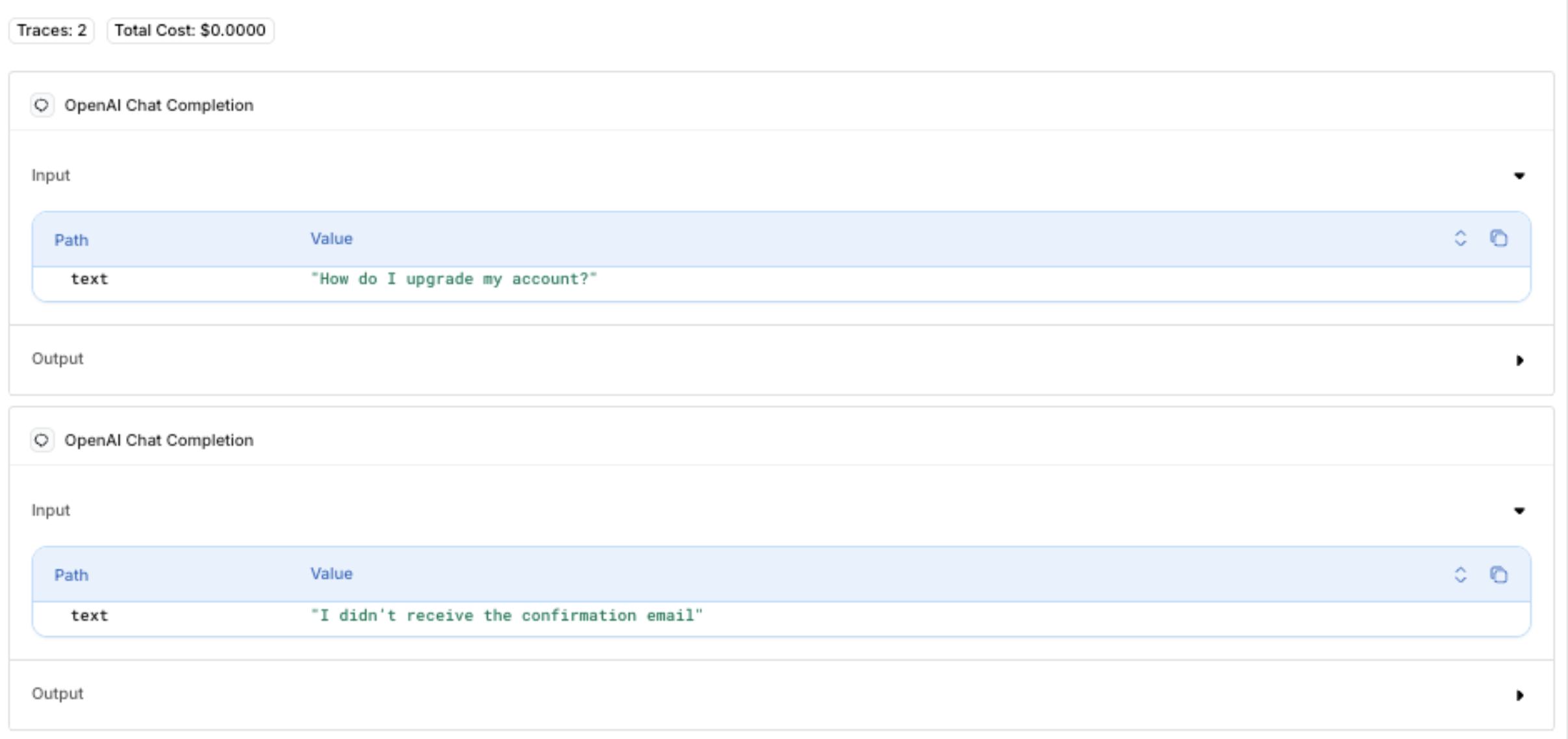
After the code snippet runs successfully, a detailed breakdown of the API call is visible under Traces > Threads.
**When to use:**
* Understand the back-and-forth between the user and the assistant
* Track context drift in long conversations
* Make sense of multi-step conversations at a glance
To enable Thread tracking, use this version of the customer support app. To learn more, see [Threads](/docs/ai-studio/observability/threads).
```typescript theme={"theme":{"light":"github-light","dark":"github-dark"}}
import 'dotenv/config';
import OpenAI from 'openai';
// Define the custom `orq` interface for TypeScript
interface OrqConfig {
retry?: { count: number; on_codes: number[] };
fallbacks?: Array<{ model: string }>;
cache?: { enabled: boolean; type: 'exact_match'; ttl: number };
knowledge_bases?: Array<{
knowledge_id: string;
top_k: number;
threshold: number;
search_type: 'hybrid_search';
}>;
identity?: {
id: string;
display_name?: string;
email?: string;
metadata?: Array<{ key: string; value: any }>;
tags?: string[];
};
thread?: {
id: string;
tags?: string[];
};
}
// Initialize the OpenAI client
const client = new OpenAI({
apiKey: process.env.ORQ_API_KEY ?? '',
baseURL: 'https://api.orq.ai/v3/router',
});
async function main(): Promise {
try {
if (!process.env.YOUR_KNOWLEDGE_ID) {
throw new Error('YOUR_KNOWLEDGE_ID not set in .env');
}
const ticketId = 'TICKET-789';
const threadId = `support-${ticketId}-${Date.now()}`; // Unique thread ID
const requestParams = {
model: 'openai/gpt-5',
stream: true,
messages: [
{ role: 'user' as const, content: 'How do I upgrade my account?' },
],
orq: {
retry: { count: 3, on_codes: [429, 500, 502, 503, 504] },
fallbacks: [
{ model: 'openai/gpt-5-mini' },
{ model: 'anthropic/claude-sonnet-4-6' },
{ model: 'google/gemini-3.5-flash' },
],
cache: { enabled: true, type: 'exact_match', ttl: 3600 },
knowledge_bases: [
{
knowledge_id: process.env.YOUR_KNOWLEDGE_ID, // e.g., ID for "ORQsupport"
top_k: 5,
threshold: 0.7,
search_type: 'hybrid_search',
},
],
identity: {
id: `support-${ticketId}`,
display_name: 'John Smith',
email: 'john@company.com',
metadata: [
{ key: 'ticket_id', value: ticketId },
{ key: 'customer_tier', value: 'premium' },
{ key: 'issue_category', value: 'billing' },
{ key: 'created_at', value: new Date().toISOString() },
],
tags: ['support', 'billing-issue', 'premium-user'],
},
thread: {
id: threadId,
tags: ['support', 'billing', 'user-interaction'],
},
},
};
console.log('Request:', JSON.stringify(requestParams, null, 2));
const start = Date.now();
const stream = await client.chat.completions.create(
requestParams as OpenAI.Chat.Completions.ChatCompletionCreateParamsStreaming
);
let responseText = '';
let chunkCount = 0;
for await (const chunk of stream) {
chunkCount++;
const content = chunk.choices[0]?.delta?.content ?? '';
responseText += content;
process.stdout.write(content);
}
console.log(`\nTime taken: ${Date.now() - start}ms, Chunks: ${chunkCount}`);
console.log('Full Response:', responseText);
console.log('Cache status: First run is always a cache miss; run again to check for hit.');
console.log(`Thread ID: ${threadId}, Identity ID: support-${ticketId}`);
} catch (error: unknown) {
console.error('Error:', error instanceof Error ? error.message : String(error));
}
}
main();
```
After the code snippet runs successfully, a detailed breakdown of the API call is visible under Traces > Threads.
 Sending a request again with the same `thread.id` (`support-TICKET-789-`) for both initial and follow-up requests groups them in the same Thread:
 **When to use:**
* Whenever you want your script, program, or tool to handle variable data at runtime instead of hardcoding values [Using Third Party Vector Databases with Orq.ai](https://docs.orq.ai/docs/ai-studio/cookbooks/integrations-tooling/using-thirdparty-vectordbs-with-orq)
```typescript theme={"theme":{"light":"github-light","dark":"github-dark"}}
import 'dotenv/config';
import OpenAI from 'openai';
import * as readline from 'readline/promises';
import { stdin as input, stdout as output } from 'process';
// Define the custom `orq` interface for TypeScript
interface OrqConfig {
retry?: { count: number; on_codes: number[] };
fallbacks?: Array<{ model: string }>;
cache?: { enabled: boolean; type: 'exact_match'; ttl: number };
knowledge_bases?: Array<{
knowledge_id: string;
top_k: number;
threshold: number;
search_type: 'hybrid_search';
}>;
identity?: {
id: string;
display_name?: string;
email?: string;
metadata?: Array<{ key: string; value: any }>;
tags?: string[];
};
thread?: {
id: string;
tags?: string[];
};
}
// Initialize the OpenAI client
const client = new OpenAI({
apiKey: process.env.ORQ_API_KEY ?? '',
baseURL: 'https://api.orq.ai/v3/router',
});
// Initialize readline for dynamic input
const rl = readline.createInterface({ input, output });
// Base configuration
const ticketId = 'TICKET-789';
const threadId = `support-${ticketId}-${Date.now()}`; // Unique thread ID
const identityId = `support-${ticketId}`;
const baseParams = {
model: 'openai/gpt-5',
stream: true,
orq: {
retry: { count: 3, on_codes: [429, 500, 502, 503, 504] },
fallbacks: [
{ model: 'openai/gpt-5-mini' },
{ model: 'anthropic/claude-sonnet-4-6' },
{ model: 'google/gemini-3.5-flash' },
],
cache: { enabled: true, type: 'exact_match', ttl: 3600 },
knowledge_bases: [
{
knowledge_id: process.env.YOUR_KNOWLEDGE_ID ?? '',
top_k: 5,
threshold: 0.7,
search_type: 'hybrid_search',
},
],
identity: {
id: identityId,
display_name: 'John Smith',
email: 'john@company.com',
metadata: [
{ key: 'ticket_id', value: ticketId },
{ key: 'customer_tier', value: 'premium' },
{ key: 'issue_category', value: 'billing' },
{ key: 'created_at', value: new Date().toISOString() },
],
tags: ['support', 'billing-issue', 'premium-user'],
},
thread: {
id: threadId,
tags: ['support', 'billing', 'user-interaction'],
},
},
};
async function sendRequest(
params: OpenAI.Chat.Completions.ChatCompletionCreateParamsStreaming,
requestLabel: string
): Promise {
console.log(`\n--- ${requestLabel} ---`);
console.log('Request:', JSON.stringify(params, null, 2));
const start = Date.now();
const stream = await client.chat.completions.create(params);
let responseText = '';
let chunkCount = 0;
for await (const chunk of stream) {
chunkCount++;
const content = chunk.choices[0]?.delta?.content ?? '';
responseText += content;
process.stdout.write(content);
}
console.log(`\nTime taken: ${Date.now() - start}ms, Chunks: ${chunkCount}`);
console.log('Full Response:', responseText);
console.log(`Thread ID: ${threadId}, Identity ID: ${identityId}`);
return responseText;
}
async function main(): Promise {
try {
if (!process.env.YOUR_KNOWLEDGE_ID) {
throw new Error('YOUR_KNOWLEDGE_ID not set in .env');
}
// Store conversation history
const conversationHistory: Array<{ role: 'user' | 'assistant'; content: string }> = [];
// First dynamic input
let userInput = await rl.question('Enter your first question (e.g., "How do I upgrade my account?"): ');
if (!userInput.trim()) {
throw new Error('First input cannot be empty');
}
const initialParams = {
...baseParams,
messages: [{ role: 'user' as const, content: userInput }],
};
const initialResponse = await sendRequest(initialParams, 'First Request');
conversationHistory.push(
{ role: 'user', content: userInput },
{ role: 'assistant', content: initialResponse }
);
console.log('Cache status: First run is always a cache miss; run again to check for hit.');
// Second dynamic input
userInput = await rl.question('Enter your follow-up question (e.g., "I didn’t receive the confirmation email"): ');
if (!userInput.trim()) {
throw new Error('Follow-up input cannot be empty');
}
const followUpParams = {
...baseParams,
messages: [...conversationHistory, { role: 'user' as const, content: userInput }],
orq: {
...baseParams.orq,
thread: {
id: threadId, // Same thread ID
tags: ['support', 'billing', 'user-interaction', 'follow-up'],
},
},
};
const followUpResponse = await sendRequest(followUpParams, 'Follow-up Request');
conversationHistory.push(
{ role: 'user', content: userInput },
{ role: 'assistant', content: followUpResponse }
);
console.log('Cache status: Check if cached (if messages match previous run).');
} catch (error: unknown) {
console.error('Error:', error instanceof Error ? error.message : String(error));
} finally {
rl.close();
}
}
main();
```
## Advanced framework integrations
**Orq.ai**'s **AI Gateway** integrates with popular AI development frameworks, allowing existing tools and workflows to benefit from gateway features like fallbacks, caching, and observability.
## LangChain Integration
**Orq.ai** works natively with LangChain by simply pointing to the **AI Gateway** endpoint. This gives access to fallback models, caching, and Knowledge Base retrieval while using LangChain's abstractions. For a more detailed guide, see [LangChain integration](https://docs.orq.ai/docs/langchain-1#/).
```typescript theme={"theme":{"light":"github-light","dark":"github-dark"}}
import { ChatOpenAI } from "@langchain/openai";
// Configure LangChain to use Orq.ai gateway
const llm = new ChatOpenAI({
configuration: {
baseURL: "https://api.orq.ai/v3/router",
},
openAIApiKey: process.env.ORQ_API_KEY,
modelName: "openai/gpt-5",
});
const response = await llm.invoke("How do I reset my password?");
```
## DSPy
DSPy programs can route through **Orq.ai** to gain automatic prompt optimization alongside gateway reliability features. For a more detailed guide, see [DSPy Integration](https://docs.orq.ai/docs/dspy-gateway#/).
```typescript theme={"theme":{"light":"github-light","dark":"github-dark"}}
import * as dspy from "dspy-ai";
// Configure DSPy with Orq.ai gateway
const lm = new dspy.OpenAI({
apiBase: "https://api.orq.ai/v3/router",
apiKey: process.env.ORQ_API_KEY,
model: "openai/gpt-5"
});
dspy.settings.configure({ lm: lm });
```
## Base URL configuration
```
# Orq.ai Cloud (default)
https://api.orq.ai/v3/router
# Your on-premises deployment
https://your-domain.com/v3/router
```
## Conclusion
**Orq.ai**'s **AI Gateway** provides a unified, scalable, and production-ready solution for building reliable AI applications. By routing through a single API endpoint, the application gains:
1. **Unified access**: Connect to multiple AI providers (OpenAI, Anthropic, AWS) through one API
2. **High availability**: Automatic fallbacks and retries ensure the application stays online
3. **Cost efficiency**: Response caching reduces API costs and latency
4. **Smart context**: Built-in Knowledge Base integration for domain-specific answers
5. **Production observability**: Comprehensive Traces and OTEL compatibility for monitoring
6. **Flexible deployment**: Cloud, on-premises, or edge options to meet deployment needs
**When to use:**
* Whenever you want your script, program, or tool to handle variable data at runtime instead of hardcoding values [Using Third Party Vector Databases with Orq.ai](https://docs.orq.ai/docs/ai-studio/cookbooks/integrations-tooling/using-thirdparty-vectordbs-with-orq)
```typescript theme={"theme":{"light":"github-light","dark":"github-dark"}}
import 'dotenv/config';
import OpenAI from 'openai';
import * as readline from 'readline/promises';
import { stdin as input, stdout as output } from 'process';
// Define the custom `orq` interface for TypeScript
interface OrqConfig {
retry?: { count: number; on_codes: number[] };
fallbacks?: Array<{ model: string }>;
cache?: { enabled: boolean; type: 'exact_match'; ttl: number };
knowledge_bases?: Array<{
knowledge_id: string;
top_k: number;
threshold: number;
search_type: 'hybrid_search';
}>;
identity?: {
id: string;
display_name?: string;
email?: string;
metadata?: Array<{ key: string; value: any }>;
tags?: string[];
};
thread?: {
id: string;
tags?: string[];
};
}
// Initialize the OpenAI client
const client = new OpenAI({
apiKey: process.env.ORQ_API_KEY ?? '',
baseURL: 'https://api.orq.ai/v3/router',
});
// Initialize readline for dynamic input
const rl = readline.createInterface({ input, output });
// Base configuration
const ticketId = 'TICKET-789';
const threadId = `support-${ticketId}-${Date.now()}`; // Unique thread ID
const identityId = `support-${ticketId}`;
const baseParams = {
model: 'openai/gpt-5',
stream: true,
orq: {
retry: { count: 3, on_codes: [429, 500, 502, 503, 504] },
fallbacks: [
{ model: 'openai/gpt-5-mini' },
{ model: 'anthropic/claude-sonnet-4-6' },
{ model: 'google/gemini-3.5-flash' },
],
cache: { enabled: true, type: 'exact_match', ttl: 3600 },
knowledge_bases: [
{
knowledge_id: process.env.YOUR_KNOWLEDGE_ID ?? '',
top_k: 5,
threshold: 0.7,
search_type: 'hybrid_search',
},
],
identity: {
id: identityId,
display_name: 'John Smith',
email: 'john@company.com',
metadata: [
{ key: 'ticket_id', value: ticketId },
{ key: 'customer_tier', value: 'premium' },
{ key: 'issue_category', value: 'billing' },
{ key: 'created_at', value: new Date().toISOString() },
],
tags: ['support', 'billing-issue', 'premium-user'],
},
thread: {
id: threadId,
tags: ['support', 'billing', 'user-interaction'],
},
},
};
async function sendRequest(
params: OpenAI.Chat.Completions.ChatCompletionCreateParamsStreaming,
requestLabel: string
): Promise {
console.log(`\n--- ${requestLabel} ---`);
console.log('Request:', JSON.stringify(params, null, 2));
const start = Date.now();
const stream = await client.chat.completions.create(params);
let responseText = '';
let chunkCount = 0;
for await (const chunk of stream) {
chunkCount++;
const content = chunk.choices[0]?.delta?.content ?? '';
responseText += content;
process.stdout.write(content);
}
console.log(`\nTime taken: ${Date.now() - start}ms, Chunks: ${chunkCount}`);
console.log('Full Response:', responseText);
console.log(`Thread ID: ${threadId}, Identity ID: ${identityId}`);
return responseText;
}
async function main(): Promise {
try {
if (!process.env.YOUR_KNOWLEDGE_ID) {
throw new Error('YOUR_KNOWLEDGE_ID not set in .env');
}
// Store conversation history
const conversationHistory: Array<{ role: 'user' | 'assistant'; content: string }> = [];
// First dynamic input
let userInput = await rl.question('Enter your first question (e.g., "How do I upgrade my account?"): ');
if (!userInput.trim()) {
throw new Error('First input cannot be empty');
}
const initialParams = {
...baseParams,
messages: [{ role: 'user' as const, content: userInput }],
};
const initialResponse = await sendRequest(initialParams, 'First Request');
conversationHistory.push(
{ role: 'user', content: userInput },
{ role: 'assistant', content: initialResponse }
);
console.log('Cache status: First run is always a cache miss; run again to check for hit.');
// Second dynamic input
userInput = await rl.question('Enter your follow-up question (e.g., "I didn’t receive the confirmation email"): ');
if (!userInput.trim()) {
throw new Error('Follow-up input cannot be empty');
}
const followUpParams = {
...baseParams,
messages: [...conversationHistory, { role: 'user' as const, content: userInput }],
orq: {
...baseParams.orq,
thread: {
id: threadId, // Same thread ID
tags: ['support', 'billing', 'user-interaction', 'follow-up'],
},
},
};
const followUpResponse = await sendRequest(followUpParams, 'Follow-up Request');
conversationHistory.push(
{ role: 'user', content: userInput },
{ role: 'assistant', content: followUpResponse }
);
console.log('Cache status: Check if cached (if messages match previous run).');
} catch (error: unknown) {
console.error('Error:', error instanceof Error ? error.message : String(error));
} finally {
rl.close();
}
}
main();
```
## Advanced framework integrations
**Orq.ai**'s **AI Gateway** integrates with popular AI development frameworks, allowing existing tools and workflows to benefit from gateway features like fallbacks, caching, and observability.
## LangChain Integration
**Orq.ai** works natively with LangChain by simply pointing to the **AI Gateway** endpoint. This gives access to fallback models, caching, and Knowledge Base retrieval while using LangChain's abstractions. For a more detailed guide, see [LangChain integration](https://docs.orq.ai/docs/langchain-1#/).
```typescript theme={"theme":{"light":"github-light","dark":"github-dark"}}
import { ChatOpenAI } from "@langchain/openai";
// Configure LangChain to use Orq.ai gateway
const llm = new ChatOpenAI({
configuration: {
baseURL: "https://api.orq.ai/v3/router",
},
openAIApiKey: process.env.ORQ_API_KEY,
modelName: "openai/gpt-5",
});
const response = await llm.invoke("How do I reset my password?");
```
## DSPy
DSPy programs can route through **Orq.ai** to gain automatic prompt optimization alongside gateway reliability features. For a more detailed guide, see [DSPy Integration](https://docs.orq.ai/docs/dspy-gateway#/).
```typescript theme={"theme":{"light":"github-light","dark":"github-dark"}}
import * as dspy from "dspy-ai";
// Configure DSPy with Orq.ai gateway
const lm = new dspy.OpenAI({
apiBase: "https://api.orq.ai/v3/router",
apiKey: process.env.ORQ_API_KEY,
model: "openai/gpt-5"
});
dspy.settings.configure({ lm: lm });
```
## Base URL configuration
```
# Orq.ai Cloud (default)
https://api.orq.ai/v3/router
# Your on-premises deployment
https://your-domain.com/v3/router
```
## Conclusion
**Orq.ai**'s **AI Gateway** provides a unified, scalable, and production-ready solution for building reliable AI applications. By routing through a single API endpoint, the application gains:
1. **Unified access**: Connect to multiple AI providers (OpenAI, Anthropic, AWS) through one API
2. **High availability**: Automatic fallbacks and retries ensure the application stays online
3. **Cost efficiency**: Response caching reduces API costs and latency
4. **Smart context**: Built-in Knowledge Base integration for domain-specific answers
5. **Production observability**: Comprehensive Traces and OTEL compatibility for monitoring
6. **Flexible deployment**: Cloud, on-premises, or edge options to meet deployment needs