> ## Documentation Index
> Fetch the complete documentation index at: https://docs.orq.ai/llms.txt
> Use this file to discover all available pages before exploring further.
# Integrate LangGraph with Orq.ai
> Add Orq.ai to an existing LangGraph agent: route models through the AI Gateway, ground responses with a Knowledge Base, and capture Traces.
## Objective
Start with a working LangGraph agent and put **Orq.ai** behind it: route its model calls through the **AI Gateway**, ground its answers in a **Knowledge Base**, and record each run in **Traces**. The agent logic itself barely changes.
## Use Case
Reach for this pattern when:
* An agent is already built on LangChain or LangGraph.
* Standing up a vector database and juggling provider API keys is not worth the overhead.
* Seeing what the agent actually did at runtime matters for debugging.
## Prerequisites
* **Orq.ai Account**: Active workspace in the **AI Studio**. [Create an account](https://my.orq.ai/auth/signup) to get started.
* **API Access**: Valid API key from [Workspace Settings > API Keys](/docs/ai-studio/organization/api-keys).
* **Model Access**: At least one model enabled in the [AI Gateway](/docs/ai-studio/ai-gateway/add-models), see [Using the AI Gateway](/docs/ai-studio/ai-gateway/add-models).
* **Python**: Version 3.9 or higher.
## Step 1: Install and set up the SDK
Install **Orq.ai** alongside LangGraph and the LangChain packages.
```bash Shell theme={"theme":{"light":"github-light","dark":"github-dark"}}
pip install orq-ai-sdk langgraph langchain langchain-openai openai python-dotenv
```
```python Python theme={"theme":{"light":"github-light","dark":"github-dark"}}
import os
from dotenv import load_dotenv
from orq_ai_sdk import Orq
load_dotenv()
ORQ_API_KEY = os.environ["ORQ_API_KEY"]
orq = Orq(
api_key=ORQ_API_KEY
)
```
## Step 2: Turn on tracing
Tracing is one call. `orq_tracing_setup` hooks into LangChain's callback system, so every agent run, tool call, and model response streams to **Orq.ai** with no further changes to the agent.
```python Python theme={"theme":{"light":"github-light","dark":"github-dark"}}
from orq_ai_sdk.langchain import setup as orq_tracing_setup
orq_tracing_setup(api_key=ORQ_API_KEY)
```
## Step 3: Create a LangGraph agent with the router
Point a standard LangChain `ChatOpenAI` model at the **Orq.ai** router by overriding `base_url`. From there the agent is ordinary LangGraph: `create_agent` is LangChain's prebuilt constructor that compiles a LangGraph agent under the hood, here wired with one example tool.
```python Python theme={"theme":{"light":"github-light","dark":"github-dark"}}
from langchain_openai import ChatOpenAI
from langchain_core.tools import tool
from langchain.agents import create_agent
# Router: a LangChain model pointed at Orq
model = ChatOpenAI(
model="openai/gpt-5.4-mini",
base_url="https://api.orq.ai/v3/router",
api_key=ORQ_API_KEY,
)
## Example tool
@tool
def get_order_count(city: str) -> str:
"""Get the number of orders for a given city."""
return f"{city} had 1,240 orders last month."
tools = [get_order_count]
agent_prompt = "You are a helpful assistant."
agent = create_agent(model, tools=tools, system_prompt=agent_prompt)
```
## Step 4: Test the agent
A small helper wraps the agent call so the later steps stay short. The agent picks the tool, runs it, and returns the answer.
```python Python theme={"theme":{"light":"github-light","dark":"github-dark"}}
def ask_agent(message, agent):
messages = {"messages": [{"role": "user", "content": message}]}
res = agent.invoke(messages)
print(res["messages"][-1].content)
```
```python Python theme={"theme":{"light":"github-light","dark":"github-dark"}}
ask_agent("How many orders in Amsterdam?", agent)
```
The agent responds:
```
Amsterdam had 1,240 orders last month.
```
## Step 5: Switch models through the router
The router addresses models with a `provider/model` string, so switching providers is a one-line change. Nothing else moves: the agent, tools, and prompt all stay as they were.
```python Python theme={"theme":{"light":"github-light","dark":"github-dark"}}
# The router means switching providers is a one-line change —
# same agent, same code, different model behind it.
model = ChatOpenAI(
model="anthropic/claude-sonnet-4-6",
base_url="https://api.orq.ai/v3/router",
api_key=ORQ_API_KEY,
)
agent = create_agent(model, tools=tools, system_prompt=agent_prompt)
ask_agent("How many orders in Amsterdam?", agent)
```
The same agent now answers through a different provider:
```
There were **1,240 orders** in Amsterdam last month! Let me know if you need any further details or want to check other cities.
```
## Step 6: Set up the Knowledge Base
Ground the agent in real documents with a [Knowledge Base](/docs/ai-studio/ai-engineering/knowledge-bases-memory-stores). This takes three calls: create the **Knowledge Base**, upload the source file, then create a datasource that chunks and indexes it.
Create the **Knowledge Base** and keep its `id` to reference it later.
```python Python theme={"theme":{"light":"github-light","dark":"github-dark"}}
res = orq.knowledge.create(
request={
"key": "CustomerServicePolicies",
#embedding model in "provider/model" format
"embedding_model": "openai/text-embedding-3-small",
#folder path in the orq UI (auto-created if it doesn't exist)
"path": "customerService",
"description": "Customer service documentation",
}
)
knowledge_id = res.id
print("Knowledge created")
```
Upload the source document. The file is sent as base64-encoded content.
```python Python theme={"theme":{"light":"github-light","dark":"github-dark"}}
import base64
# ↓ path to the document you want to index
FILE_PATH = "files/refundpolicy.pdf"
with open(FILE_PATH, "rb") as f:
encoded = base64.b64encode(f.read()).decode("utf-8")
res = orq.files.create(
filename=os.path.basename(FILE_PATH),
content=encoded,
content_type="application/pdf",
)
file_id = res.file.file_id
print("File added")
```
Create a datasource to chunk and embed the file. Chunking runs asynchronously, so poll the datasource until its status is `completed`. To tune chunk size and overlap, see [Chunking Strategy](/docs/ai-studio/ai-engineering/knowledge-bases-memory-stores#datasource-and-chunking).
```python Python theme={"theme":{"light":"github-light","dark":"github-dark"}}
import time
res = orq.knowledge.create_datasource(
knowledge_id=knowledge_id,
file_id=file_id,
chunking_options={
# "default" uses orq's automatic chunking strategy
# switch to "advanced" to control chunk_max_characters and chunk_overlap
"chunking_configuration": {"type": "default"}
},
)
datasource_id = res.id
# Poll until indexing finishes
while True:
ds = orq.knowledge.retrieve_datasource(
knowledge_id=knowledge_id,
datasource_id=datasource_id,
)
print(f" status: {ds.status}")
if ds.status in ("completed", "failed"):
break
time.sleep(2)
print(f"Done — {int(ds.chunks_count)} chunks indexed")
```
The poll reports each status until indexing completes:
```
status: queued
status: queued
status: completed
Done — 19 chunks indexed
```
## Step 7: Add the Knowledge Base search tool
Expose the **Knowledge Base** to the agent as a tool. `search_policy` runs a retrieval query and returns the matching chunks, and the system prompt forces the agent to call it before answering.
```python Python theme={"theme":{"light":"github-light","dark":"github-dark"}}
@tool
def search_policy(query: str) -> str:
"""Search the company policy knowledge base for relevant passages."""
results = orq.knowledge.search(knowledge_id=knowledge_id, query=query)
relevant_chunks = []
for match in results.matches:
relevant_chunks.append(match.text)
output = "\n\n".join(relevant_chunks) if len(relevant_chunks) > 0 else "No relevant policy found."
return output
tools.append(search_policy)
agent_prompt = "You are a customer support assistant, and will help customers with any questions. Before responding you must use the search_policy tool to ground your answer."
agent = create_agent(model, tools=tools, system_prompt=agent_prompt)
```
## Step 8: Ask a grounded question
Ask something that can only be answered from the uploaded policy. The agent calls `search_policy` first, then answers from the chunks it retrieves.
```python Python theme={"theme":{"light":"github-light","dark":"github-dark"}}
ask_agent("I got delivered the wrong item, can I get a refund?", agent)
```
The agent answers from the policy document:
```
Yes, absolutely! Based on our policy, you are eligible for a **full refund** for the wrong item. Here's what you need to know:
**Eligibility Requirements:**
1. You must report the wrong item **within 45 minutes of delivery**.
2. You'll need to **provide a photo** of the delivered item showing the discrepancy.
3. The item must differ from your order in a material way (e.g., you received a Margherita pizza instead of a Pepperoni pizza).
**What You'll Receive:**
- A **full refund** to your original payment method.
- Optionally, a **replacement delivery at no extra cost** if you'd prefer that and the restaurant is still open.
To get the process started, could you please share:
- A **photo of the wrong item** you received.
- Confirmation that you're reporting this **within 45 minutes of delivery**.
Once we have that, we'll get your refund sorted right away! 😊
```
## Step 9: Check the Traces
Open **AI Studio** > **Observability** > **Traces** to inspect any run: the user message, the tool calls, the retrieved chunks, the model responses, and the timings. The setup from Step 2 already captures all of it, with nothing else to add.
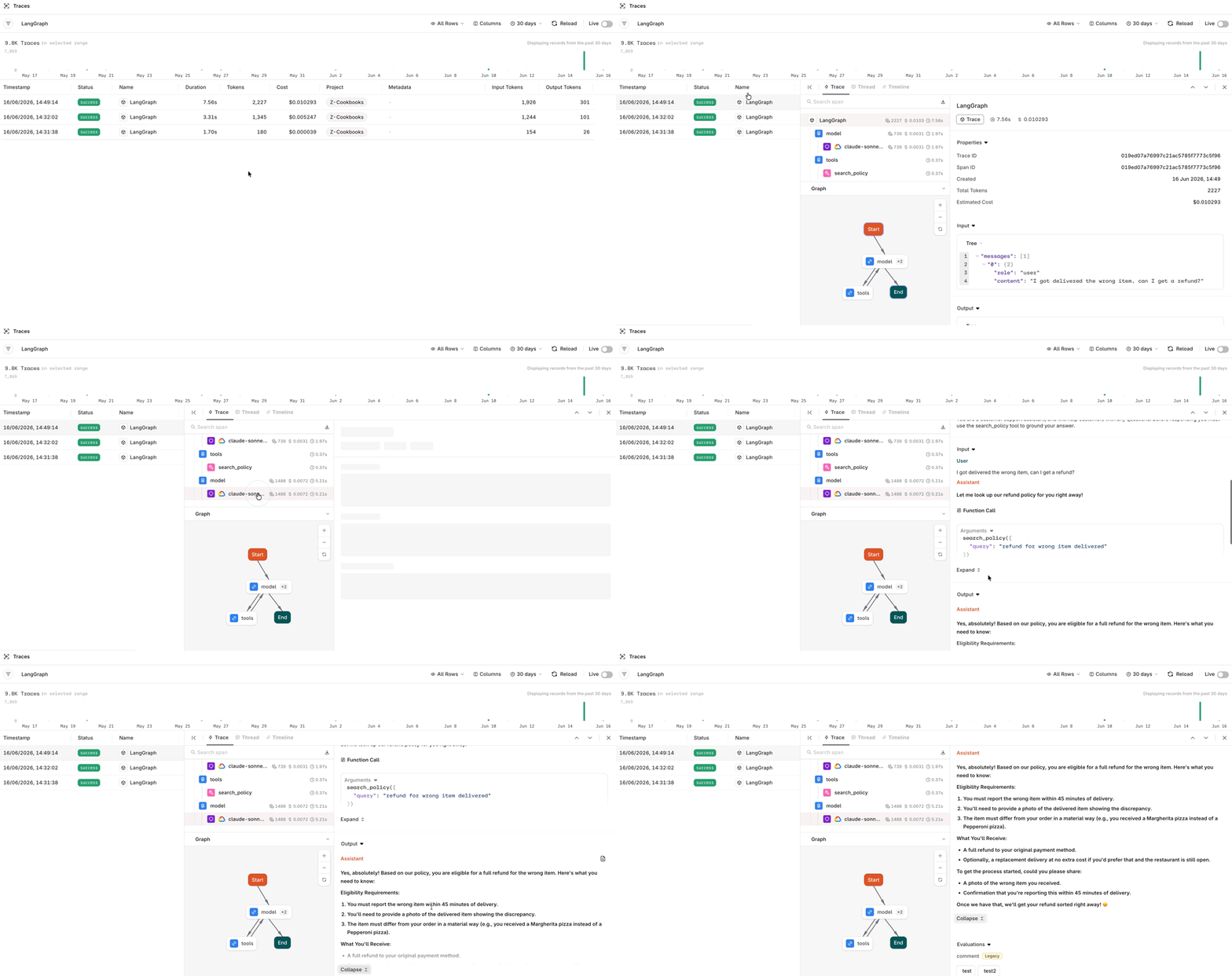 To learn more about **Traces** see [Traces](/docs/observability/traces).
The LangGraph agent now runs on **Orq.ai** for routing, retrieval, and observability. Swap the model, the **Knowledge Base**, or the prompt without rewriting the agent loop.
## Related
Build the same retrieval flow as a standalone deployment, without a framework.
Layer more retrieval techniques on top of a Knowledge Base.
AI Gateway and OpenTelemetry observability details for LangGraph.
To learn more about **Traces** see [Traces](/docs/observability/traces).
The LangGraph agent now runs on **Orq.ai** for routing, retrieval, and observability. Swap the model, the **Knowledge Base**, or the prompt without rewriting the agent loop.
## Related
Build the same retrieval flow as a standalone deployment, without a framework.
Layer more retrieval techniques on top of a Knowledge Base.
AI Gateway and OpenTelemetry observability details for LangGraph.