> ## Documentation Index
> Fetch the complete documentation index at: https://docs.orq.ai/llms.txt
> Use this file to discover all available pages before exploring further.
# GitHub Copilot | AI Gateway
> Route GitHub Copilot Chat through the Orq.ai AI Gateway using its Bring Your Own Key (BYOK) Custom Endpoint provider. Reach the full model catalog with unified tracing and cost tracking.
[GitHub Copilot Chat](https://code.visualstudio.com/docs/agent-customization/language-models) in VS Code supports [Bring Your Own Key (BYOK)](https://code.visualstudio.com/docs/agent-customization/language-models#_bring-your-own-language-model-key) through a **Custom Endpoint** provider. Pointing it at the **AI Gateway** routes Chat requests through **Orq.ai**, reaching the full model catalog with unified tracing, cost tracking, and access controls.
Always use the `provider/model_id` format for the model `id` value (e.g. `anthropic/claude-sonnet-4-6`, not `claude-sonnet-4-6`). Bare IDs return a `400 invalid model format` error.
## Prerequisites
* VS Code 1.122 or later (the Custom Endpoint provider graduated from Insiders to stable in this release) with the GitHub Copilot Chat extension installed
* Active **Orq.ai** account
* [Orq.ai API key](/docs/ai-studio/organization/api-keys)
* Copilot Business or Enterprise orgs: an administrator must enable **Bring Your Own Language Model Key in VS Code** in the Copilot policy settings on GitHub.com
BYOK covers Chat and tool calls only. Inline suggestions, next-edit suggestions, and semantic search still require GitHub sign-in and are not routed through **Orq.ai**.
## Setup
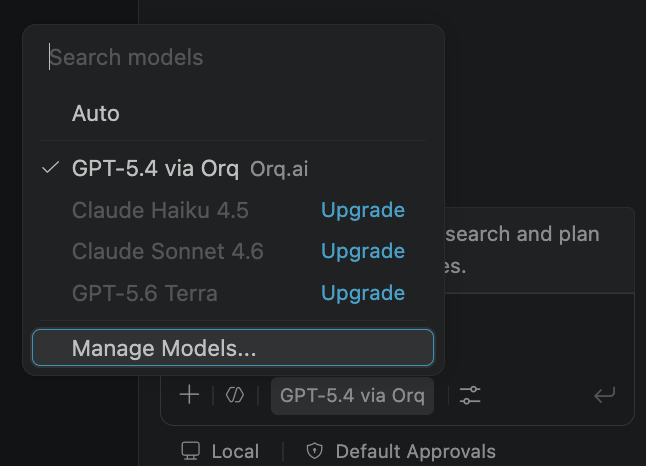
Run **Chat: Manage Language Models** from the Command Palette, or select the gear icon labeled **Manage Language Models** in the Chat model picker.
Select **Add Models**, then choose **Custom Endpoint** from the provider list. VS Code prompts for three things in sequence:
* **Group name**: any label, e.g. `Orq.ai`.
* **API key**: the **Orq.ai** [API key](/docs/ai-studio/organization/api-keys).
* **API Type**: **Responses**, **Chat Completions**, or **Messages**, matching one of the tabs below.
VS Code then opens the global `chatLanguageModels.json` file, in the VS Code user data directory, not the project workspace, with the group already scaffolded. The API key is stored as a secret reference (`"apiKey": "${input:chat.lm.secret...}"`), not the raw key; leave that field as generated.
`chatLanguageModels.json` is an array of groups. Add an entry to the scaffolded group's `models` array:
Matches the API Type selected as **Responses**. Reaches the full **AI Gateway** catalog through **Orq.ai**'s primary API.
```json theme={"theme":{"light":"github-light","dark":"github-dark"}}
[
{
"name": "Orq.ai",
"vendor": "customendpoint",
"apiKey": "${input:chat.lm.secret...}",
"apiType": "responses",
"models": [
{
"id": "openai/gpt-5.4",
"name": "GPT-5.4 via Orq",
"url": "https://api.orq.ai/v3/router/responses",
"toolCalling": true,
"vision": true,
"maxInputTokens": 1050000,
"maxOutputTokens": 128000
}
]
}
]
```
Replace `openai/gpt-5.4` with any identifier from the **AI Gateway** catalog (e.g. `anthropic/claude-sonnet-4-6`, `google/gemini-2.0-flash-001`), and adjust `maxInputTokens`/`maxOutputTokens` to match the chosen model.
Matches the API Type selected as **Chat Completions**. Reaches the full **AI Gateway** catalog through the OpenAI-compatible router.
```json theme={"theme":{"light":"github-light","dark":"github-dark"}}
[
{
"name": "Orq.ai",
"vendor": "customendpoint",
"apiKey": "${input:chat.lm.secret...}",
"apiType": "chat-completions",
"models": [
{
"id": "openai/gpt-5.4",
"name": "GPT-5.4 via Orq",
"url": "https://api.orq.ai/v3/router/chat/completions",
"toolCalling": true,
"vision": true,
"maxInputTokens": 1050000,
"maxOutputTokens": 128000
}
]
}
]
```
Matches the API Type selected as **Messages**. Routes Claude models through the Anthropic-compatible endpoint.
```json theme={"theme":{"light":"github-light","dark":"github-dark"}}
[
{
"name": "Orq.ai Anthropic",
"vendor": "customendpoint",
"apiKey": "${input:chat.lm.secret...}",
"apiType": "messages",
"models": [
{
"id": "anthropic/claude-sonnet-4-6",
"name": "Claude Sonnet 4.6 via Orq",
"url": "https://api.orq.ai/v3/anthropic/v1/messages",
"toolCalling": true,
"vision": true,
"maxInputTokens": 200000,
"maxOutputTokens": 64000
}
]
}
]
```
Replace `anthropic/claude-sonnet-4-6` with any Claude identifier from the **AI Gateway** catalog.
Open the Chat model picker and select a model from the new group to start using it.
 ## Configuration Reference
`chatLanguageModels.json` is an array of provider groups.
| Field | Level | Description |
| ------------------------------------ | ----- | --------------------------------------------------------------------------------------------------------------------------------------------------------------------------------------------------- |
| `vendor` | Group | Must be `"customendpoint"` to enable BYOK. |
| `apiKey` | Group | Set automatically to a secret reference when the **Orq.ai** [API key](/docs/ai-studio/organization/api-keys) is entered in the Add Models prompt. Do not paste the raw key here. |
| `apiType` | Group | `"responses"` for **Orq.ai**'s primary API, `"chat-completions"` for the OpenAI-compatible router, or `"messages"` for the Anthropic endpoint. |
| `id` | Model | **AI Gateway** model identifier in `provider/model_id` format. |
| `url` | Model | Full endpoint URL, not a base URL: `https://api.orq.ai/v3/router/responses`, `https://api.orq.ai/v3/router/chat/completions`, or `https://api.orq.ai/v3/anthropic/v1/messages`, matching `apiType`. |
| `toolCalling` | Model | Set to `true` for models that support function calling. |
| `vision` | Model | Set to `true` for models that accept image input. |
| `maxInputTokens` / `maxOutputTokens` | Model | Context window limits for the selected model. |
## Troubleshooting
The secret behind `apiKey` is likely wrong or expired. Reopen **Manage Language Models**, remove the group, and re-add it, pasting a valid **Orq.ai** [API key](/docs/ai-studio/organization/api-keys) (not a GitHub, OpenAI, or Anthropic key) at the prompt.
Set the model `id` to the `provider/model_id` format (e.g. `anthropic/claude-sonnet-4-6`). Bare model IDs are rejected by the router.
Confirm `url` points to a full endpoint path, not just a base URL. `https://api.orq.ai/v3/router` alone is rejected; use `https://api.orq.ai/v3/router/responses` or `https://api.orq.ai/v3/router/chat/completions`.
Confirm `url` matches `apiType`: `responses` must point to `https://api.orq.ai/v3/router/responses`, `chat-completions` must point to `https://api.orq.ai/v3/router/chat/completions`, `messages` must point to `https://api.orq.ai/v3/anthropic/v1/messages`. Requests sent to the wrong endpoint will not appear in [**Orq.ai** Traces](/docs/ai-studio/observability/traces).
BYOK only applies to Chat and tool calls. Inline suggestions, next-edit suggestions, and semantic search continue to require GitHub sign-in and are not affected by the Custom Endpoint configuration.
On a Copilot Business or Enterprise account, **Manage Language Models** does not exist as a command until an administrator enables **Bring Your Own Language Model Key in VS Code** in the Copilot policy settings on GitHub.com. The Command Palette falls back to the similarly named **Manage Language Model Access** command instead, which controls extension permissions and is unrelated to BYOK. Ask a workspace administrator to enable the policy, then reload VS Code.
The Custom Endpoint provider requires VS Code 1.122 or later; earlier versions only show built-in providers (Anthropic, Azure, Google, Ollama, OpenAI, OpenRouter, xAI). Update VS Code via **Code → Check for Updates** (macOS) or **Help → Check for Updates**, then reopen **Manage Language Models**.
Expected the first time a BYOK model is used as the active main model. Open Settings (Cmd+,), search **utility**, and set **Chat: Byok Utility Model Default** to one of the configured Custom Endpoint models.
## Verification
Select the configured model in the Chat model picker and send a message. The response appears in Copilot Chat and the trace appears in [**Orq.ai** Traces](/docs/ai-studio/observability/traces) with the model identifier set in `id`.
## Configuration Reference
`chatLanguageModels.json` is an array of provider groups.
| Field | Level | Description |
| ------------------------------------ | ----- | --------------------------------------------------------------------------------------------------------------------------------------------------------------------------------------------------- |
| `vendor` | Group | Must be `"customendpoint"` to enable BYOK. |
| `apiKey` | Group | Set automatically to a secret reference when the **Orq.ai** [API key](/docs/ai-studio/organization/api-keys) is entered in the Add Models prompt. Do not paste the raw key here. |
| `apiType` | Group | `"responses"` for **Orq.ai**'s primary API, `"chat-completions"` for the OpenAI-compatible router, or `"messages"` for the Anthropic endpoint. |
| `id` | Model | **AI Gateway** model identifier in `provider/model_id` format. |
| `url` | Model | Full endpoint URL, not a base URL: `https://api.orq.ai/v3/router/responses`, `https://api.orq.ai/v3/router/chat/completions`, or `https://api.orq.ai/v3/anthropic/v1/messages`, matching `apiType`. |
| `toolCalling` | Model | Set to `true` for models that support function calling. |
| `vision` | Model | Set to `true` for models that accept image input. |
| `maxInputTokens` / `maxOutputTokens` | Model | Context window limits for the selected model. |
## Troubleshooting
The secret behind `apiKey` is likely wrong or expired. Reopen **Manage Language Models**, remove the group, and re-add it, pasting a valid **Orq.ai** [API key](/docs/ai-studio/organization/api-keys) (not a GitHub, OpenAI, or Anthropic key) at the prompt.
Set the model `id` to the `provider/model_id` format (e.g. `anthropic/claude-sonnet-4-6`). Bare model IDs are rejected by the router.
Confirm `url` points to a full endpoint path, not just a base URL. `https://api.orq.ai/v3/router` alone is rejected; use `https://api.orq.ai/v3/router/responses` or `https://api.orq.ai/v3/router/chat/completions`.
Confirm `url` matches `apiType`: `responses` must point to `https://api.orq.ai/v3/router/responses`, `chat-completions` must point to `https://api.orq.ai/v3/router/chat/completions`, `messages` must point to `https://api.orq.ai/v3/anthropic/v1/messages`. Requests sent to the wrong endpoint will not appear in [**Orq.ai** Traces](/docs/ai-studio/observability/traces).
BYOK only applies to Chat and tool calls. Inline suggestions, next-edit suggestions, and semantic search continue to require GitHub sign-in and are not affected by the Custom Endpoint configuration.
On a Copilot Business or Enterprise account, **Manage Language Models** does not exist as a command until an administrator enables **Bring Your Own Language Model Key in VS Code** in the Copilot policy settings on GitHub.com. The Command Palette falls back to the similarly named **Manage Language Model Access** command instead, which controls extension permissions and is unrelated to BYOK. Ask a workspace administrator to enable the policy, then reload VS Code.
The Custom Endpoint provider requires VS Code 1.122 or later; earlier versions only show built-in providers (Anthropic, Azure, Google, Ollama, OpenAI, OpenRouter, xAI). Update VS Code via **Code → Check for Updates** (macOS) or **Help → Check for Updates**, then reopen **Manage Language Models**.
Expected the first time a BYOK model is used as the active main model. Open Settings (Cmd+,), search **utility**, and set **Chat: Byok Utility Model Default** to one of the configured Custom Endpoint models.
## Verification
Select the configured model in the Chat model picker and send a message. The response appears in Copilot Chat and the trace appears in [**Orq.ai** Traces](/docs/ai-studio/observability/traces) with the model identifier set in `id`.