> ## Documentation Index
> Fetch the complete documentation index at: https://docs.orq.ai/llms.txt
> Use this file to discover all available pages before exploring further.
# Annotations
> Define annotation schemas and apply structured feedback to traces and spans in AI Studio, through the API and SDK, or the CLI.
After observing an application in production, the next step is annotating and curating that data to build evaluation datasets. This process turns raw production logs into high-quality test cases that drive systematic improvement.
**Use Cases**
Capture thumbs up/down ratings, custom scores, or categorical labels on AI responses. Build a feedback loop that surfaces low-quality generations for review.
Flag responses with specific defects (hallucination, off-topic, inappropriate content) using structured annotation keys shared across the team.
Annotate Traces with corrections and quality labels, then export curated subsets as training datasets for future experiments.
Route Traces to Annotation Queues for systematic expert review. Combine with Trace Automations to automatically surface Traces that meet specific criteria.
**Concepts**
Three concepts work together to form the annotations system:
* **Annotations**: the feedback categories configured for a project, such as a quality rating or a defect tag
* **Annotation Queues**: organized workflows for reviewing Traces in bulk via **AI Studio**
* **Annotations API**: the API and SDK for applying feedback values to a Trace or span programmatically
Define annotation schemas: keys, value types, and validation rules. Available on chat completion and responses spans once created.
Organize annotation review workflows. Filter and present relevant Traces for review in bulk.
Apply structured human feedback to Traces and spans programmatically via the API and SDK.
## Create Annotations
Each annotation must be defined in the project before it can be used. The definition sets the key, title, and value type; applying an annotation to a Trace requires matching one of these definitions.
To create an annotation, head to **Optimization > Annotations** and press the button. Annotations can also be created directly from an [Annotation Queue](/docs/ai-studio/observability/annotation-queues#use-annotation-queues).
 Each annotation uses one of three value types:
* **Categorical**: button options with custom labels, such as good/bad or saved/deleted
* **Range**: a custom scoring slider, for example a scale from 0 to 100
* **Open field**: free-form text input for detailed comments
Once created, an annotation is available on all chat completion spans and responses spans in the project. No additional configuration or filtering required.
Deleting an annotation removes it from any Annotation Queues and Experiments that use it, so it no longer appears as a review option there. Annotations already recorded on a Trace are preserved: every annotated data point remains stored and queryable.
### Common Annotations Legacy
Rate the overall quality of AI responses:
| Rating | Description |
| -------- | ----------------------------------------- |
| **good** | The response was helpful and accurate. |
| **bad** | The response was unhelpful or inaccurate. |
Identify specific issues with AI responses:
| Defect | Description |
| ------------------ | ------------------------------------------------------------- |
| **grammatical** | Responses that contain grammatical errors |
| **spelling** | Responses that contain spelling errors |
| **hallucination** | Responses that contain hallucinations or factual inaccuracies |
| **repetition** | Responses that contain unnecessary repetition |
| **inappropriate** | Responses that are deemed inappropriate or offensive |
| **off\_topic** | Responses that do not address the user's query |
| **incompleteness** | Responses that are incomplete or partially address the query |
| **ambiguity** | Responses that are vague or unclear |
Multiple defects can be selected for one response using an annotation configured with an array value.
## Use Annotations
Annotations can be applied wherever a Trace or span is reviewed:
* **Directly on a Trace or Log**: open a single Trace or Log in the [Traces](/docs/ai-studio/observability/traces) or [Logs](/docs/ai-studio/observability/logs) view and use the **Annotations** panel.
* **In an [Annotation Queue](/docs/ai-studio/observability/annotation-queues#use-annotation-queues)**: review a curated set of Traces in bulk. Fill a queue with [Trace Automations](/docs/ai-studio/observability/automations) or by manually adding individual Traces or Logs.
* **Programmatically**: apply feedback through the API and SDK using the **API & SDK** tab below.
* **In an [Experiment](#annotations-in-experiments)**: apply annotations while reviewing experiment outputs.
Every annotation applied in an Annotation Queue is written back to its originating Trace. Because the values live on the Trace, they can be queried with the [**Orq MCP**](/docs/ai-studio/get-started/orq-mcp) and used to run analysis across reviewed data.
The annotation capabilities differ between [Logs](/docs/ai-studio/observability/logs) and [Traces](/docs/ai-studio/observability/traces). Logs support human feedback and text corrections to the AI response. Traces support human feedback and [correcting an evaluator result](/docs/ai-studio/observability/traces#correct-an-evaluator-result).
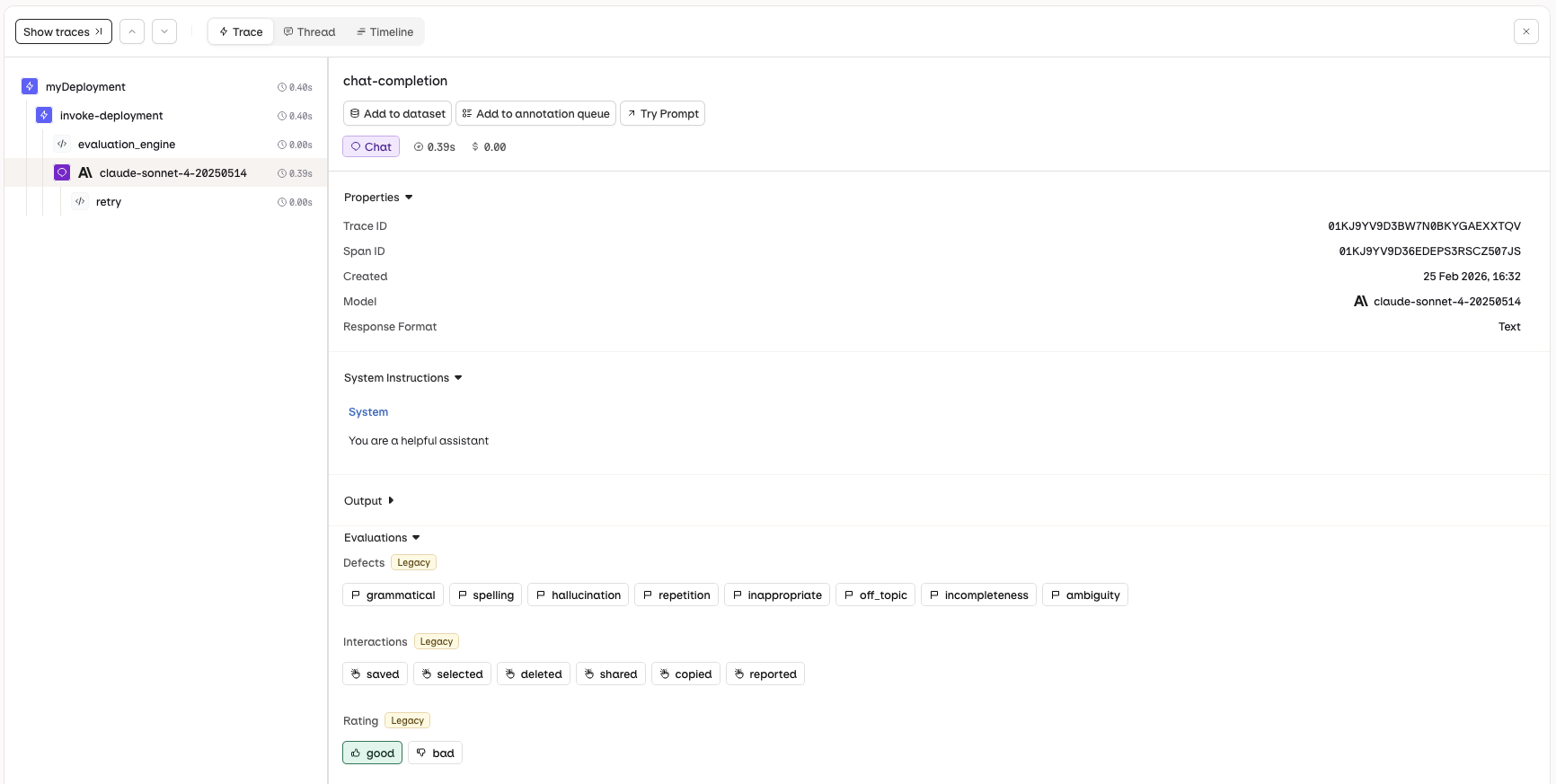
Navigate to the [Traces](/docs/ai-studio/observability/traces) view and select a single trace. The **Annotations** panel will be displayed, allowing you to apply human feedback to the AI response.
Each annotation uses one of three value types:
* **Categorical**: button options with custom labels, such as good/bad or saved/deleted
* **Range**: a custom scoring slider, for example a scale from 0 to 100
* **Open field**: free-form text input for detailed comments
Once created, an annotation is available on all chat completion spans and responses spans in the project. No additional configuration or filtering required.
Deleting an annotation removes it from any Annotation Queues and Experiments that use it, so it no longer appears as a review option there. Annotations already recorded on a Trace are preserved: every annotated data point remains stored and queryable.
### Common Annotations Legacy
Rate the overall quality of AI responses:
| Rating | Description |
| -------- | ----------------------------------------- |
| **good** | The response was helpful and accurate. |
| **bad** | The response was unhelpful or inaccurate. |
Identify specific issues with AI responses:
| Defect | Description |
| ------------------ | ------------------------------------------------------------- |
| **grammatical** | Responses that contain grammatical errors |
| **spelling** | Responses that contain spelling errors |
| **hallucination** | Responses that contain hallucinations or factual inaccuracies |
| **repetition** | Responses that contain unnecessary repetition |
| **inappropriate** | Responses that are deemed inappropriate or offensive |
| **off\_topic** | Responses that do not address the user's query |
| **incompleteness** | Responses that are incomplete or partially address the query |
| **ambiguity** | Responses that are vague or unclear |
Multiple defects can be selected for one response using an annotation configured with an array value.
## Use Annotations
Annotations can be applied wherever a Trace or span is reviewed:
* **Directly on a Trace or Log**: open a single Trace or Log in the [Traces](/docs/ai-studio/observability/traces) or [Logs](/docs/ai-studio/observability/logs) view and use the **Annotations** panel.
* **In an [Annotation Queue](/docs/ai-studio/observability/annotation-queues#use-annotation-queues)**: review a curated set of Traces in bulk. Fill a queue with [Trace Automations](/docs/ai-studio/observability/automations) or by manually adding individual Traces or Logs.
* **Programmatically**: apply feedback through the API and SDK using the **API & SDK** tab below.
* **In an [Experiment](#annotations-in-experiments)**: apply annotations while reviewing experiment outputs.
Every annotation applied in an Annotation Queue is written back to its originating Trace. Because the values live on the Trace, they can be queried with the [**Orq MCP**](/docs/ai-studio/get-started/orq-mcp) and used to run analysis across reviewed data.
The annotation capabilities differ between [Logs](/docs/ai-studio/observability/logs) and [Traces](/docs/ai-studio/observability/traces). Logs support human feedback and text corrections to the AI response. Traces support human feedback and [correcting an evaluator result](/docs/ai-studio/observability/traces#correct-an-evaluator-result).
Navigate to the [Traces](/docs/ai-studio/observability/traces) view and select a single trace. The **Annotations** panel will be displayed, allowing you to apply human feedback to the AI response.
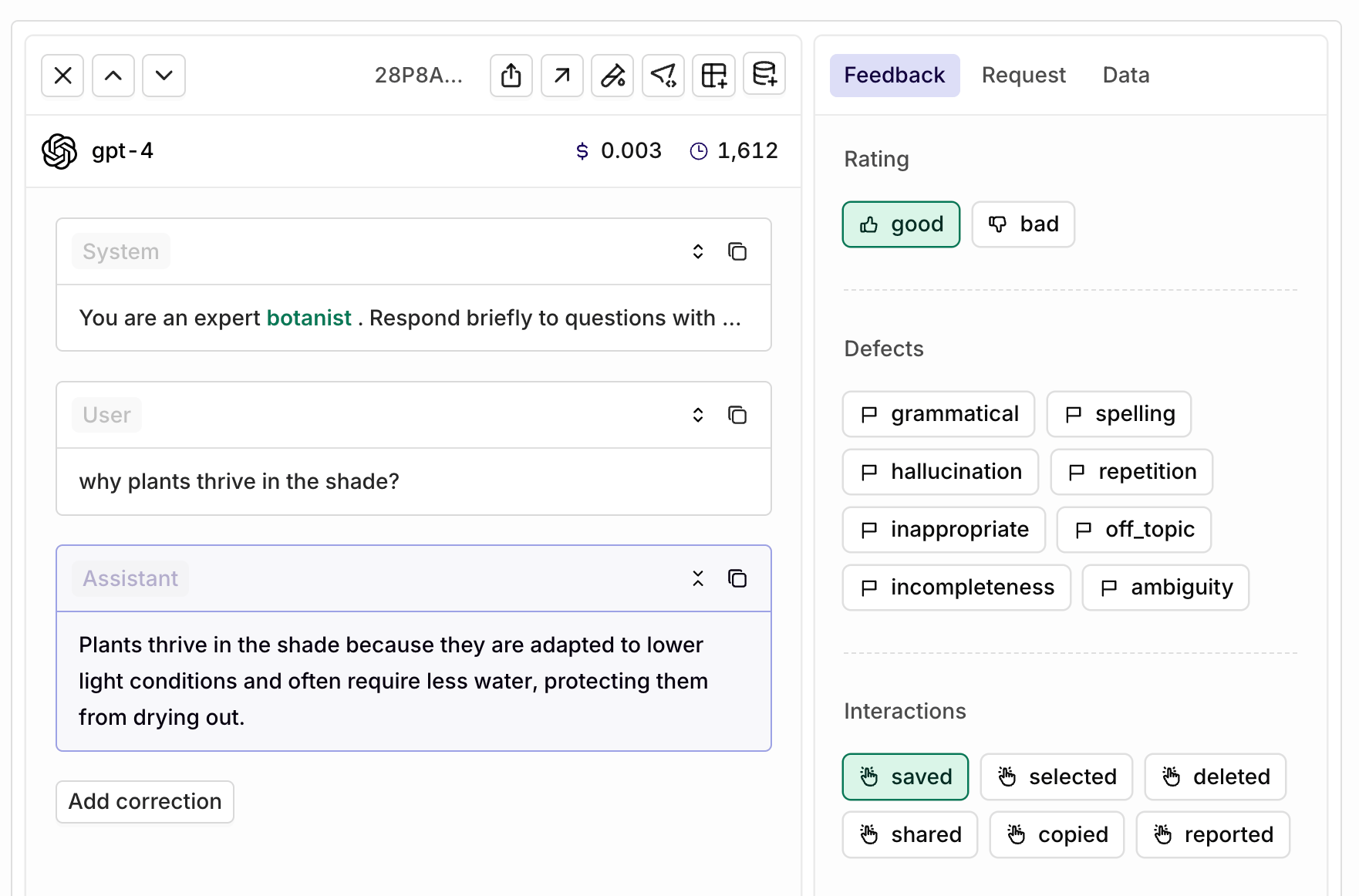
 Navigate to the [Logs](/docs/ai-studio/observability/logs) view and select a single log. The **Annotations** panel will be displayed, allowing you to apply human feedback and provide corrections to the AI response.
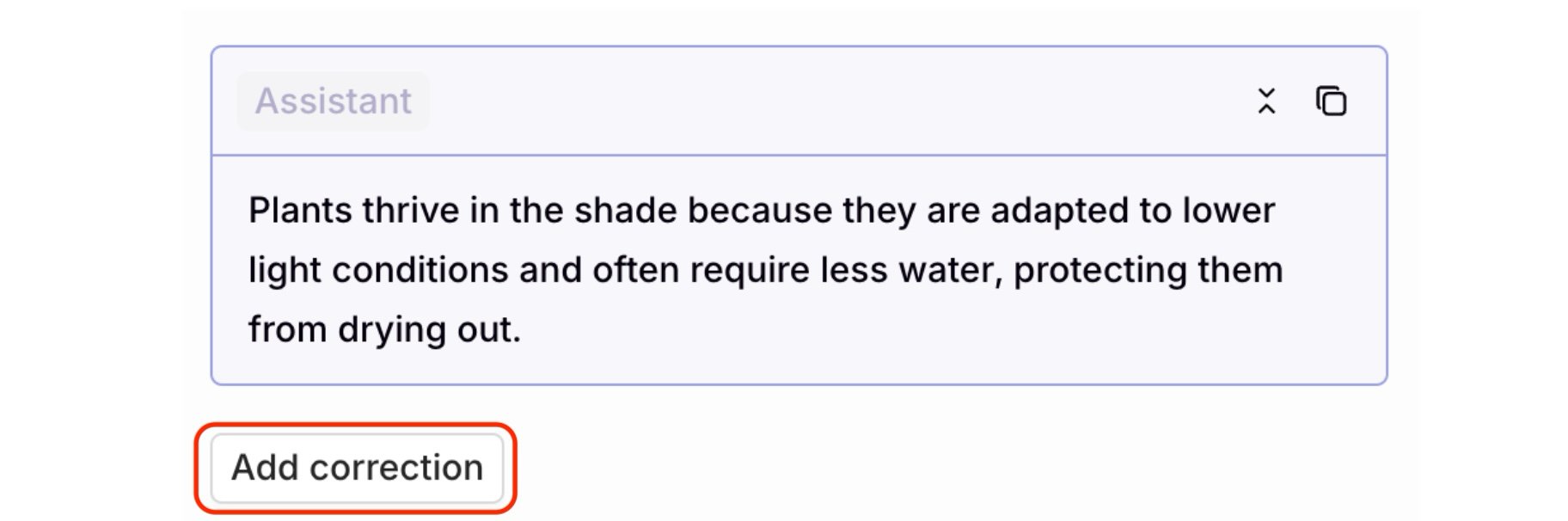
 To make a correction, use the **Add correction** button below the AI-generated response:
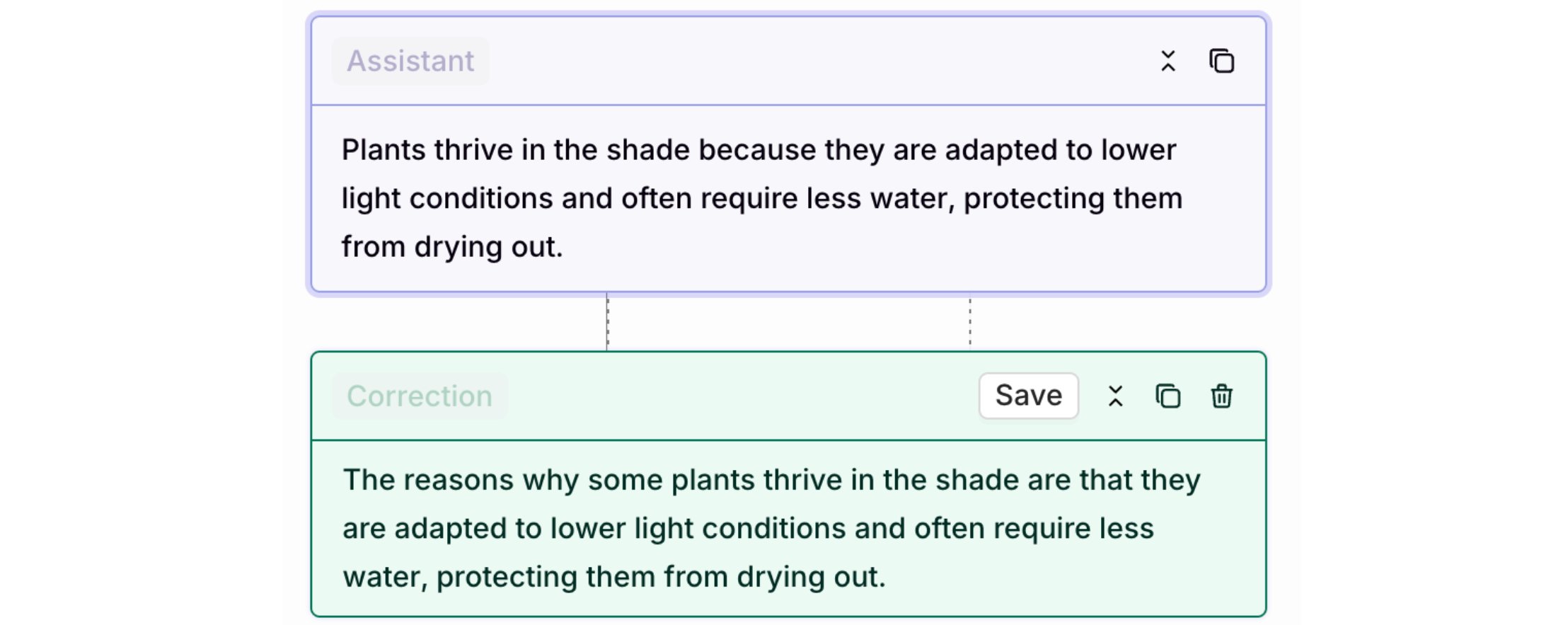
 Click to add a correction, which opens an editor for manually revising the model's response. Select **Save** to store the correction.
 Corrections are valuable for building curated datasets. Learn more in [Creating a Curated Dataset](/docs/datasets/creating).
Here are examples on how to use the API to annotate LLM responses.
```bash cURL theme={"theme":{"light":"github-light","dark":"github-dark"}}
curl -X POST "https://api.orq.ai/v2/traces/{trace_id}/spans/{span_id}/annotation" \
-H "Authorization: Bearer $ORQ_API_KEY" \
-H "Content-Type: application/json" \
-d '{
"annotations": [
{
"key": "rating",
"value": "good"
}
]
}'
```
```python Python theme={"theme":{"light":"github-light","dark":"github-dark"}}
from orq_ai_sdk import Orq
import os
orq = Orq(api_key=os.getenv("ORQ_API_KEY"))
result = orq.annotations.create(
trace_id="",
span_id="",
annotations=[
{
"key": "rating",
"value": "good"
}
]
)
print(result)
```
```typescript TypeScript theme={"theme":{"light":"github-light","dark":"github-dark"}}
import { Orq } from "@orq-ai/node";
const orq = new Orq({
apiKey: process.env.ORQ_API_KEY,
});
const result = await orq.annotations.create({
traceId: "",
spanId: "",
annotations: [
{
key: "rating",
value: "good"
}
]
});
console.log(result);
```
```bash cURL theme={"theme":{"light":"github-light","dark":"github-dark"}}
curl -X POST "https://api.orq.ai/v2/traces/{trace_id}/spans/{span_id}/annotation" \
-H "Authorization: Bearer $ORQ_API_KEY" \
-H "Content-Type: application/json" \
-d '{
"annotations": [
{
"key": "defects",
"value": ["grammatical", "spelling", "ambiguity"]
}
]
}'
```
```python Python theme={"theme":{"light":"github-light","dark":"github-dark"}}
from orq_ai_sdk import Orq
import os
orq = Orq(api_key=os.getenv("ORQ_API_KEY"))
result = orq.annotations.create(
trace_id="",
span_id="",
annotations=[
{
"key": "defects",
"value": ["grammatical", "spelling", "ambiguity"]
}
]
)
print(result)
```
```typescript TypeScript theme={"theme":{"light":"github-light","dark":"github-dark"}}
import { Orq } from "@orq-ai/node";
const orq = new Orq({
apiKey: process.env.ORQ_API_KEY,
});
const result = await orq.annotations.create({
traceId: "",
spanId: "",
annotations: [
{
key: "defects",
value: ["grammatical", "spelling", "ambiguity"]
}
]
});
console.log(result);
```
```bash cURL theme={"theme":{"light":"github-light","dark":"github-dark"}}
curl -X POST "https://api.orq.ai/v2/traces/{trace_id}/spans/{span_id}/annotation" \
-H "Authorization: Bearer $ORQ_API_KEY" \
-H "Content-Type: application/json" \
-d '{
"annotations": [
{
"key": "confidence_score",
"value": 0.95
}
],
"metadata": {
"identityId": "user-123"
}
}'
```
```python Python theme={"theme":{"light":"github-light","dark":"github-dark"}}
from orq_ai_sdk import Orq
import os
orq = Orq(api_key=os.getenv("ORQ_API_KEY"))
result = orq.annotations.create(
trace_id="",
span_id="",
annotations=[
{
"key": "confidence_score",
"value": 0.95
}
],
metadata={
"identityId": "user-123"
}
)
print(result)
```
```typescript TypeScript theme={"theme":{"light":"github-light","dark":"github-dark"}}
import { Orq } from "@orq-ai/node";
const orq = new Orq({
apiKey: process.env.ORQ_API_KEY,
});
const result = await orq.annotations.create({
traceId: "",
spanId: "",
annotations: [
{
key: "confidence_score",
value: 0.95
}
],
metadata: {
identityId: "user-123"
}
});
console.log(result);
```
```bash cURL theme={"theme":{"light":"github-light","dark":"github-dark"}}
curl -X POST "https://api.orq.ai/v2/traces/{trace_id}/spans/{span_id}/annotation" \
-H "Authorization: Bearer $ORQ_API_KEY" \
-H "Content-Type: application/json" \
-d '{
"annotations": [
{
"key": "correction",
"value": "The correct answer should emphasize scalability and fault tolerance."
}
]
}'
```
```python Python theme={"theme":{"light":"github-light","dark":"github-dark"}}
from orq_ai_sdk import Orq
import os
orq = Orq(api_key=os.getenv("ORQ_API_KEY"))
result = orq.annotations.create(
trace_id="",
span_id="",
annotations=[
{
"key": "correction",
"value": "The correct answer should emphasize scalability and fault tolerance."
}
]
)
print(result)
```
```typescript TypeScript theme={"theme":{"light":"github-light","dark":"github-dark"}}
import { Orq } from "@orq-ai/node";
const orq = new Orq({
apiKey: process.env.ORQ_API_KEY,
});
const result = await orq.annotations.create({
traceId: "",
spanId: "",
annotations: [
{
key: "correction",
value: "The correct answer should emphasize scalability and fault tolerance."
}
]
});
console.log(result);
```
```bash cURL theme={"theme":{"light":"github-light","dark":"github-dark"}}
curl -X POST "https://api.orq.ai/v2/traces/{trace_id}/spans/{span_id}/annotation" \
-H "Authorization: Bearer $ORQ_API_KEY" \
-H "Content-Type: application/json" \
-d '{
"annotations": [
{
"parent_annotation_id": "",
"value": false,
"explanation": "The response omitted a required disclaimer."
}
]
}'
```
```python Python theme={"theme":{"light":"github-light","dark":"github-dark"}}
from orq_ai_sdk import Orq
import os
orq = Orq(api_key=os.getenv("ORQ_API_KEY"))
result = orq.annotations.create(
trace_id="",
span_id="",
annotations=[
{
"parent_annotation_id": "",
"value": False,
"explanation": "The response omitted a required disclaimer."
}
]
)
print(result)
```
```typescript TypeScript theme={"theme":{"light":"github-light","dark":"github-dark"}}
import { Orq } from "@orq-ai/node";
const orq = new Orq({
apiKey: process.env.ORQ_API_KEY,
});
const result = await orq.annotations.create({
traceId: "",
spanId: "",
annotations: [
{
parentAnnotationId: "",
value: false,
explanation: "The response omitted a required disclaimer."
}
]
});
console.log(result);
```
A correction uses `parent_annotation_id` in place of `key`: it's the id of the Evaluator annotation being corrected. The corrected `value` must match that Evaluator's own output type. See [Correct an Evaluator Result](/docs/ai-studio/observability/traces#correct-an-evaluator-result) on the Traces page for the UI equivalent.
```bash cURL theme={"theme":{"light":"github-light","dark":"github-dark"}}
curl -X POST "https://api.orq.ai/v2/traces/{trace_id}/spans/{span_id}/annotation" \
-H "Authorization: Bearer $ORQ_API_KEY" \
-H "Content-Type: application/json" \
-d '{
"annotations": [
{
"key": "rating",
"value": "good"
},
{
"key": "confidence_score",
"value": 0.92
},
{
"key": "categories",
"value": ["helpful", "accurate", "concise"]
}
]
}'
```
```python Python theme={"theme":{"light":"github-light","dark":"github-dark"}}
from orq_ai_sdk import Orq
import os
orq = Orq(api_key=os.getenv("ORQ_API_KEY"))
result = orq.annotations.create(
trace_id="",
span_id="",
annotations=[
{"key": "rating", "value": "good"},
{"key": "confidence_score", "value": 0.92},
{"key": "categories", "value": ["helpful", "accurate", "concise"]}
]
)
print(result)
```
```typescript TypeScript theme={"theme":{"light":"github-light","dark":"github-dark"}}
import { Orq } from "@orq-ai/node";
const orq = new Orq({
apiKey: process.env.ORQ_API_KEY,
});
const result = await orq.annotations.create({
traceId: "",
spanId: "",
annotations: [
{ key: "rating", value: "good" },
{ key: "confidence_score", value: 0.92 },
{ key: "categories", value: ["helpful", "accurate", "concise"] }
]
});
console.log(result);
```
```bash cURL theme={"theme":{"light":"github-light","dark":"github-dark"}}
curl -X DELETE "https://api.orq.ai/v2/traces/{trace_id}/spans/{span_id}/annotation" \
-H "Authorization: Bearer $ORQ_API_KEY" \
-H "Content-Type: application/json" \
-d '{
"keys": ["rating", "defects"]
}'
```
```python Python theme={"theme":{"light":"github-light","dark":"github-dark"}}
from orq_ai_sdk import Orq
import os
orq = Orq(api_key=os.getenv("ORQ_API_KEY"))
result = orq.annotations.delete(
trace_id="",
span_id="",
keys=["rating", "defects"]
)
print(result)
```
```typescript TypeScript theme={"theme":{"light":"github-light","dark":"github-dark"}}
import { Orq } from "@orq-ai/node";
const orq = new Orq({
apiKey: process.env.ORQ_API_KEY,
});
const result = await orq.annotations.delete({
traceId: "",
spanId: "",
keys: ["rating", "defects"]
});
console.log(result);
```
**API Error Handling**
| Status Code | Error | Example Message | Solution |
| ----------- | -------------------- | ---------------------------------------------------------------------- | ---------------------------------------------------------------------------- |
| **404** | Annotation Not Found | `The annotation with key "rating" for workspace abc123 was not found.` | Create an Annotation with the specified key before annotating. |
| **404** | Span Not Found | `Span with id xyz789 for workspace abc123 was not found.` | Verify the `trace_id` and `span_id` are correct and belong to the workspace. |
| **400** | Invalid Value | `Invalid value: poor. Valid options are: good, bad.` | Ensure the value matches the options defined in the Annotation. |
| **400** | Value Out of Range | `Value 15 is out of range [0, 10].` | Provide a number within the defined min/max range for the Annotation. |
| **400** | String Too Long | `String value exceeds maximum length of 200 characters.` | Shorten the string annotation to 200 characters or less. |
See a complete feedback loop implemented from scratch. Read our cookbook [Capturing User Feedback](/docs/ai-studio/cookbooks/integrations-tooling/capturing-feedback-with-orq).
**Constraints**
* **Batch Limits**: up to 10 annotations per create request, up to 10 keys per delete request
* **String Length**: string values are limited to 200 characters maximum
* **Deployment Span Propagation**: when annotating a deployment span, the associated log is automatically annotated with the same values
* **Metadata Fields**: optional `metadata` object supports `identityId`, `source`, and `reviewerId` for tracking and attribution
Annotate and remove annotations from a span using [`orq traces create`](/reference/cli) and [`orq traces delete`](/reference/cli). The `orq traces` group manages annotations on existing traces and spans; there is no separate `orq annotations` group.
```bash theme={"theme":{"light":"github-light","dark":"github-dark"}}
orq traces create \
--annotations '[{"key": "rating", "value": "good"}]'
```
```bash theme={"theme":{"light":"github-light","dark":"github-dark"}}
orq traces create \
--annotations '[{"key": "defects", "value": ["grammatical", "spelling", "ambiguity"]}]'
```
```bash theme={"theme":{"light":"github-light","dark":"github-dark"}}
orq traces create \
--annotations '[{"key": "confidence_score", "value": 0.95}]' \
--metadata '{"identityId": "user-123"}'
```
```bash theme={"theme":{"light":"github-light","dark":"github-dark"}}
orq traces create \
--annotations '[{"key": "correction", "value": "The correct answer should emphasize scalability and fault tolerance."}]'
```
```bash theme={"theme":{"light":"github-light","dark":"github-dark"}}
orq traces create \
--annotations '[{"key": "rating", "value": "good"}, {"key": "confidence_score", "value": 0.92}, {"key": "categories", "value": ["helpful", "accurate", "concise"]}]'
```
`--keys` takes a comma-separated list, not a JSON array like the API.
```bash theme={"theme":{"light":"github-light","dark":"github-dark"}}
orq traces delete \
--keys rating,defects
```
Batch limits: up to 10 annotations per `create` call, up to 10 keys per `delete` call. String values are capped at 200 characters.
See [install and setup](/reference/cli) to get started with the CLI. Run `orq traces create --help` or `orq traces delete --help` for the full flag reference.
## Annotations in Experiments
Annotations can also be applied outside of Annotation Queues, while reviewing the outputs of an [Experiment](/docs/ai-studio/optimize/experiments). In the experiment review screen, the annotations defined for the project appear alongside Evaluator scores, so outputs can be annotated manually as part of an evaluation run.
Corrections are valuable for building curated datasets. Learn more in [Creating a Curated Dataset](/docs/datasets/creating).
Here are examples on how to use the API to annotate LLM responses.
```bash cURL theme={"theme":{"light":"github-light","dark":"github-dark"}}
curl -X POST "https://api.orq.ai/v2/traces/{trace_id}/spans/{span_id}/annotation" \
-H "Authorization: Bearer $ORQ_API_KEY" \
-H "Content-Type: application/json" \
-d '{
"annotations": [
{
"key": "rating",
"value": "good"
}
]
}'
```
```python Python theme={"theme":{"light":"github-light","dark":"github-dark"}}
from orq_ai_sdk import Orq
import os
orq = Orq(api_key=os.getenv("ORQ_API_KEY"))
result = orq.annotations.create(
trace_id="",
span_id="",
annotations=[
{
"key": "rating",
"value": "good"
}
]
)
print(result)
```
```typescript TypeScript theme={"theme":{"light":"github-light","dark":"github-dark"}}
import { Orq } from "@orq-ai/node";
const orq = new Orq({
apiKey: process.env.ORQ_API_KEY,
});
const result = await orq.annotations.create({
traceId: "",
spanId: "",
annotations: [
{
key: "rating",
value: "good"
}
]
});
console.log(result);
```
```bash cURL theme={"theme":{"light":"github-light","dark":"github-dark"}}
curl -X POST "https://api.orq.ai/v2/traces/{trace_id}/spans/{span_id}/annotation" \
-H "Authorization: Bearer $ORQ_API_KEY" \
-H "Content-Type: application/json" \
-d '{
"annotations": [
{
"key": "defects",
"value": ["grammatical", "spelling", "ambiguity"]
}
]
}'
```
```python Python theme={"theme":{"light":"github-light","dark":"github-dark"}}
from orq_ai_sdk import Orq
import os
orq = Orq(api_key=os.getenv("ORQ_API_KEY"))
result = orq.annotations.create(
trace_id="",
span_id="",
annotations=[
{
"key": "defects",
"value": ["grammatical", "spelling", "ambiguity"]
}
]
)
print(result)
```
```typescript TypeScript theme={"theme":{"light":"github-light","dark":"github-dark"}}
import { Orq } from "@orq-ai/node";
const orq = new Orq({
apiKey: process.env.ORQ_API_KEY,
});
const result = await orq.annotations.create({
traceId: "",
spanId: "",
annotations: [
{
key: "defects",
value: ["grammatical", "spelling", "ambiguity"]
}
]
});
console.log(result);
```
```bash cURL theme={"theme":{"light":"github-light","dark":"github-dark"}}
curl -X POST "https://api.orq.ai/v2/traces/{trace_id}/spans/{span_id}/annotation" \
-H "Authorization: Bearer $ORQ_API_KEY" \
-H "Content-Type: application/json" \
-d '{
"annotations": [
{
"key": "confidence_score",
"value": 0.95
}
],
"metadata": {
"identityId": "user-123"
}
}'
```
```python Python theme={"theme":{"light":"github-light","dark":"github-dark"}}
from orq_ai_sdk import Orq
import os
orq = Orq(api_key=os.getenv("ORQ_API_KEY"))
result = orq.annotations.create(
trace_id="",
span_id="",
annotations=[
{
"key": "confidence_score",
"value": 0.95
}
],
metadata={
"identityId": "user-123"
}
)
print(result)
```
```typescript TypeScript theme={"theme":{"light":"github-light","dark":"github-dark"}}
import { Orq } from "@orq-ai/node";
const orq = new Orq({
apiKey: process.env.ORQ_API_KEY,
});
const result = await orq.annotations.create({
traceId: "",
spanId: "",
annotations: [
{
key: "confidence_score",
value: 0.95
}
],
metadata: {
identityId: "user-123"
}
});
console.log(result);
```
```bash cURL theme={"theme":{"light":"github-light","dark":"github-dark"}}
curl -X POST "https://api.orq.ai/v2/traces/{trace_id}/spans/{span_id}/annotation" \
-H "Authorization: Bearer $ORQ_API_KEY" \
-H "Content-Type: application/json" \
-d '{
"annotations": [
{
"key": "correction",
"value": "The correct answer should emphasize scalability and fault tolerance."
}
]
}'
```
```python Python theme={"theme":{"light":"github-light","dark":"github-dark"}}
from orq_ai_sdk import Orq
import os
orq = Orq(api_key=os.getenv("ORQ_API_KEY"))
result = orq.annotations.create(
trace_id="",
span_id="",
annotations=[
{
"key": "correction",
"value": "The correct answer should emphasize scalability and fault tolerance."
}
]
)
print(result)
```
```typescript TypeScript theme={"theme":{"light":"github-light","dark":"github-dark"}}
import { Orq } from "@orq-ai/node";
const orq = new Orq({
apiKey: process.env.ORQ_API_KEY,
});
const result = await orq.annotations.create({
traceId: "",
spanId: "",
annotations: [
{
key: "correction",
value: "The correct answer should emphasize scalability and fault tolerance."
}
]
});
console.log(result);
```
```bash cURL theme={"theme":{"light":"github-light","dark":"github-dark"}}
curl -X POST "https://api.orq.ai/v2/traces/{trace_id}/spans/{span_id}/annotation" \
-H "Authorization: Bearer $ORQ_API_KEY" \
-H "Content-Type: application/json" \
-d '{
"annotations": [
{
"parent_annotation_id": "",
"value": false,
"explanation": "The response omitted a required disclaimer."
}
]
}'
```
```python Python theme={"theme":{"light":"github-light","dark":"github-dark"}}
from orq_ai_sdk import Orq
import os
orq = Orq(api_key=os.getenv("ORQ_API_KEY"))
result = orq.annotations.create(
trace_id="",
span_id="",
annotations=[
{
"parent_annotation_id": "",
"value": False,
"explanation": "The response omitted a required disclaimer."
}
]
)
print(result)
```
```typescript TypeScript theme={"theme":{"light":"github-light","dark":"github-dark"}}
import { Orq } from "@orq-ai/node";
const orq = new Orq({
apiKey: process.env.ORQ_API_KEY,
});
const result = await orq.annotations.create({
traceId: "",
spanId: "",
annotations: [
{
parentAnnotationId: "",
value: false,
explanation: "The response omitted a required disclaimer."
}
]
});
console.log(result);
```
A correction uses `parent_annotation_id` in place of `key`: it's the id of the Evaluator annotation being corrected. The corrected `value` must match that Evaluator's own output type. See [Correct an Evaluator Result](/docs/ai-studio/observability/traces#correct-an-evaluator-result) on the Traces page for the UI equivalent.
```bash cURL theme={"theme":{"light":"github-light","dark":"github-dark"}}
curl -X POST "https://api.orq.ai/v2/traces/{trace_id}/spans/{span_id}/annotation" \
-H "Authorization: Bearer $ORQ_API_KEY" \
-H "Content-Type: application/json" \
-d '{
"annotations": [
{
"key": "rating",
"value": "good"
},
{
"key": "confidence_score",
"value": 0.92
},
{
"key": "categories",
"value": ["helpful", "accurate", "concise"]
}
]
}'
```
```python Python theme={"theme":{"light":"github-light","dark":"github-dark"}}
from orq_ai_sdk import Orq
import os
orq = Orq(api_key=os.getenv("ORQ_API_KEY"))
result = orq.annotations.create(
trace_id="",
span_id="",
annotations=[
{"key": "rating", "value": "good"},
{"key": "confidence_score", "value": 0.92},
{"key": "categories", "value": ["helpful", "accurate", "concise"]}
]
)
print(result)
```
```typescript TypeScript theme={"theme":{"light":"github-light","dark":"github-dark"}}
import { Orq } from "@orq-ai/node";
const orq = new Orq({
apiKey: process.env.ORQ_API_KEY,
});
const result = await orq.annotations.create({
traceId: "",
spanId: "",
annotations: [
{ key: "rating", value: "good" },
{ key: "confidence_score", value: 0.92 },
{ key: "categories", value: ["helpful", "accurate", "concise"] }
]
});
console.log(result);
```
```bash cURL theme={"theme":{"light":"github-light","dark":"github-dark"}}
curl -X DELETE "https://api.orq.ai/v2/traces/{trace_id}/spans/{span_id}/annotation" \
-H "Authorization: Bearer $ORQ_API_KEY" \
-H "Content-Type: application/json" \
-d '{
"keys": ["rating", "defects"]
}'
```
```python Python theme={"theme":{"light":"github-light","dark":"github-dark"}}
from orq_ai_sdk import Orq
import os
orq = Orq(api_key=os.getenv("ORQ_API_KEY"))
result = orq.annotations.delete(
trace_id="",
span_id="",
keys=["rating", "defects"]
)
print(result)
```
```typescript TypeScript theme={"theme":{"light":"github-light","dark":"github-dark"}}
import { Orq } from "@orq-ai/node";
const orq = new Orq({
apiKey: process.env.ORQ_API_KEY,
});
const result = await orq.annotations.delete({
traceId: "",
spanId: "",
keys: ["rating", "defects"]
});
console.log(result);
```
**API Error Handling**
| Status Code | Error | Example Message | Solution |
| ----------- | -------------------- | ---------------------------------------------------------------------- | ---------------------------------------------------------------------------- |
| **404** | Annotation Not Found | `The annotation with key "rating" for workspace abc123 was not found.` | Create an Annotation with the specified key before annotating. |
| **404** | Span Not Found | `Span with id xyz789 for workspace abc123 was not found.` | Verify the `trace_id` and `span_id` are correct and belong to the workspace. |
| **400** | Invalid Value | `Invalid value: poor. Valid options are: good, bad.` | Ensure the value matches the options defined in the Annotation. |
| **400** | Value Out of Range | `Value 15 is out of range [0, 10].` | Provide a number within the defined min/max range for the Annotation. |
| **400** | String Too Long | `String value exceeds maximum length of 200 characters.` | Shorten the string annotation to 200 characters or less. |
See a complete feedback loop implemented from scratch. Read our cookbook [Capturing User Feedback](/docs/ai-studio/cookbooks/integrations-tooling/capturing-feedback-with-orq).
**Constraints**
* **Batch Limits**: up to 10 annotations per create request, up to 10 keys per delete request
* **String Length**: string values are limited to 200 characters maximum
* **Deployment Span Propagation**: when annotating a deployment span, the associated log is automatically annotated with the same values
* **Metadata Fields**: optional `metadata` object supports `identityId`, `source`, and `reviewerId` for tracking and attribution
Annotate and remove annotations from a span using [`orq traces create`](/reference/cli) and [`orq traces delete`](/reference/cli). The `orq traces` group manages annotations on existing traces and spans; there is no separate `orq annotations` group.
```bash theme={"theme":{"light":"github-light","dark":"github-dark"}}
orq traces create \
--annotations '[{"key": "rating", "value": "good"}]'
```
```bash theme={"theme":{"light":"github-light","dark":"github-dark"}}
orq traces create \
--annotations '[{"key": "defects", "value": ["grammatical", "spelling", "ambiguity"]}]'
```
```bash theme={"theme":{"light":"github-light","dark":"github-dark"}}
orq traces create \
--annotations '[{"key": "confidence_score", "value": 0.95}]' \
--metadata '{"identityId": "user-123"}'
```
```bash theme={"theme":{"light":"github-light","dark":"github-dark"}}
orq traces create \
--annotations '[{"key": "correction", "value": "The correct answer should emphasize scalability and fault tolerance."}]'
```
```bash theme={"theme":{"light":"github-light","dark":"github-dark"}}
orq traces create \
--annotations '[{"key": "rating", "value": "good"}, {"key": "confidence_score", "value": 0.92}, {"key": "categories", "value": ["helpful", "accurate", "concise"]}]'
```
`--keys` takes a comma-separated list, not a JSON array like the API.
```bash theme={"theme":{"light":"github-light","dark":"github-dark"}}
orq traces delete \
--keys rating,defects
```
Batch limits: up to 10 annotations per `create` call, up to 10 keys per `delete` call. String values are capped at 200 characters.
See [install and setup](/reference/cli) to get started with the CLI. Run `orq traces create --help` or `orq traces delete --help` for the full flag reference.
## Annotations in Experiments
Annotations can also be applied outside of Annotation Queues, while reviewing the outputs of an [Experiment](/docs/ai-studio/optimize/experiments). In the experiment review screen, the annotations defined for the project appear alongside Evaluator scores, so outputs can be annotated manually as part of an evaluation run.
 [Correcting an Evaluator result](/docs/ai-studio/observability/traces#correct-an-evaluator-result) is not available in the experiment review screen. Annotations and Evaluator scores still display as described above.