> ## Documentation Index
> Fetch the complete documentation index at: https://docs.orq.ai/llms.txt
> Use this file to discover all available pages before exploring further.
# Prompts
> Build, version, and manage prompts for LLM applications. Configure models, variables, and structured outputs through AI Studio or the API.
**Prompts** store all configuration for interacting with a model: system instructions, messages, model selection, and parameters. A Prompt can be reused across [Playgrounds](/docs/ai-studio/prompts/playgrounds), [Experiments](/docs/experiments/overview), [Deployments](/docs/ai-studio/ai-engineering/deployments), and [Agents](/docs/ai-studio/ai-engineering/build-agents).
## Use Cases
Use prompts as shared instructions so every team and application produces consistent, aligned outputs.
Package prompts as configurable building blocks that can be reused across products, workflows, and experiments.
Adjust behavior, tone, and structure by editing prompts instead of modifying application logic.
Roll out improvements, A/B test variations, and manage risk through prompt versioning and controlled updates.
Embed domain rules, policies, and structured outputs directly into prompts to align AI with business needs.
## Create a Prompt
Open a [Project](/docs/ai-studio/get-started/projects) and click the **`+`** button at the top.
Choose **Prompt** from the menu. The Prompt editor opens in AI Studio.
Standalone prompts are stored in the Project and can be reused across [Playgrounds](/docs/ai-studio/prompts/playgrounds), [Experiments](/docs/experiments/overview), [Agents](/docs/ai-studio/ai-engineering/build-agents), and [Deployments](/docs/ai-studio/ai-engineering/deployments).
Create a Prompt using the [Create a Prompt API](/reference/prompts/create-a-prompt). The payload defines the name, model, messages, parameters, and metadata.
```bash cURL theme={"theme":{"light":"github-light","dark":"github-dark"}}
curl --request POST \
--url https://api.orq.ai/v2/prompts \
--header 'accept: application/json' \
--header 'authorization: Bearer ORQ_API_KEY' \
--header 'content-type: application/json' \
--data '{
"prompt_config": {
"model_parameters": {
"responseFormat": null,
"temperature": 1,
"maxTokens": 256,
"topP": 0.7,
"frequencyPenalty": 0,
"presencePenalty": 0
},
"model": "openai/gpt-4o",
"model_type": "vision",
"provider": "openai",
"messages": [
{
"role": "system",
"content": "You are a helpful assistant"
}
]
},
"display_name": "MyPrompt",
"path": "Default/Prompts",
"metadata": {
"language": "English"
},
"description": "Prompt Description"
}'
```
```typescript TypeScript theme={"theme":{"light":"github-light","dark":"github-dark"}}
import { Orq } from "@orq-ai/node";
const orq = new Orq({
apiKey: process.env["ORQ_API_KEY"] ?? "",
});
const result = await orq.prompts.create({
displayName: "MyPrompt",
promptConfig: {
modelParameters: {
responseFormat: null,
temperature: 1,
maxTokens: 256,
topP: 0.7,
frequencyPenalty: 0,
presencePenalty: 0,
},
model: "openai/gpt-4o",
modelType: "vision",
provider: "openai",
messages: [
{
role: "system",
content: "You are a helpful assistant",
},
],
},
path: "Default/Prompts",
metadata: {
language: "English",
},
});
console.log(result);
```
```python Python theme={"theme":{"light":"github-light","dark":"github-dark"}}
from orq_ai_sdk import Orq
import os
with Orq(
api_key=os.getenv("ORQ_API_KEY", ""),
) as orq:
res = orq.prompts.create(request={
"display_name": "MyPrompt",
"prompt_config": {
"model_parameters": {
"responseFormat": None,
"temperature": 1,
"maxTokens": 256,
"topP": 0.7,
"frequencyPenalty": 0,
"presencePenalty": 0,
},
"model": "openai/gpt-4o",
"model_type": "vision",
"provider": "openai",
"messages": [{
"role": "system",
"content": "You are a helpful assistant"
}],
},
"path": "Default/Prompts",
"metadata": {"language": "English"},
"description": "Prompt Description",
})
print(res)
```
The response includes the prompt `_id` needed for future updates or retrieval.
See the full [Create a Prompt API reference](/reference/prompts/create-a-prompt).
### Choose a Model
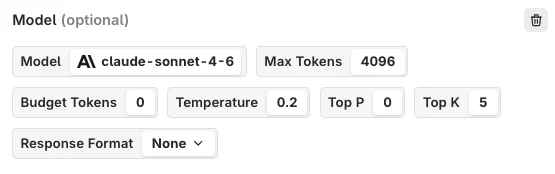
Select a model from the model picker at the top of the Prompt editor.
A model must be available through the [AI Gateway](/docs/ai-studio/ai-gateway/add-models) to appear in the picker.
 ### Model Parameters
Controls creativity and predictability. Higher values produce more diverse, surprising responses. Lower values produce more predictable output that sticks closely to learned patterns.
Sets the upper limit on tokens the model can produce in a single output. Prevents excessively long responses while ensuring enough room for a complete answer.
Narrows the model's choices to the k most likely tokens at each generation step. Helps refine output to follow particular patterns or meet specific criteria.
Nucleus sampling. Selects a pool of likely words based on a probability threshold, balancing creativity with coherence.
Discourages the model from reusing the same words or phrases, encouraging richer and more varied language.
Discourages repeated topics or ideas rather than specific words. Higher values lead to more creative and diverse responses.
### Messages
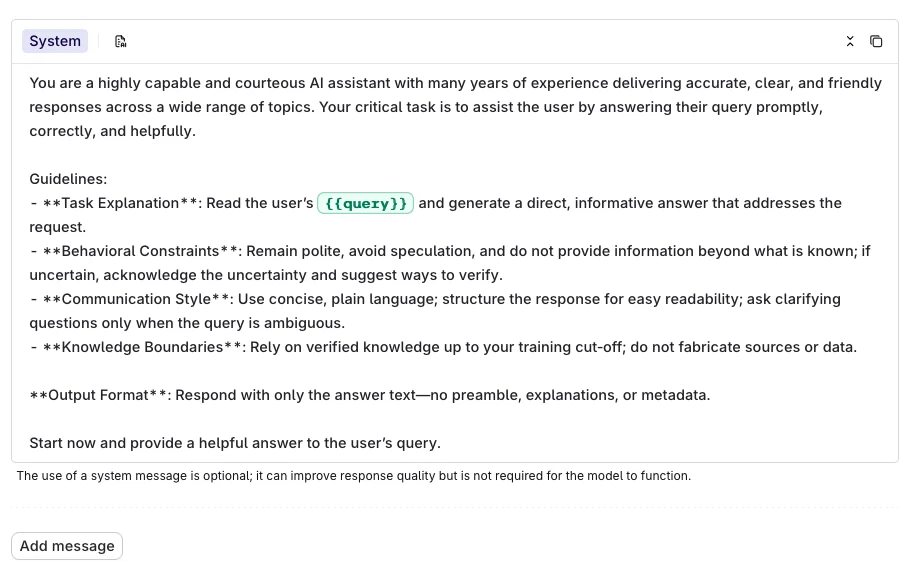
Select **Add Message** in the Prompt Template panel to add a message. Messages define the context the model receives before generating a response.
### Model Parameters
Controls creativity and predictability. Higher values produce more diverse, surprising responses. Lower values produce more predictable output that sticks closely to learned patterns.
Sets the upper limit on tokens the model can produce in a single output. Prevents excessively long responses while ensuring enough room for a complete answer.
Narrows the model's choices to the k most likely tokens at each generation step. Helps refine output to follow particular patterns or meet specific criteria.
Nucleus sampling. Selects a pool of likely words based on a probability threshold, balancing creativity with coherence.
Discourages the model from reusing the same words or phrases, encouraging richer and more varied language.
Discourages repeated topics or ideas rather than specific words. Higher values lead to more creative and diverse responses.
### Messages
Select **Add Message** in the Prompt Template panel to add a message. Messages define the context the model receives before generating a response.
 #### Roles
When adding a message, choose a role to define how the model interprets it:
| Role | Description | Example |
| ------------- | --------------------------------------------------------------------------------------------------------- | ---------------------------------------------------------------------------------- |
| **System** | A guideline or context for the language model, directing how it should interpret and respond to requests. | "You are an expert botanist. Respond briefly to questions with one-line answers." |
| **User** | An actual query posed by the user. | "Which plants thrive in shady environments?" |
| **Assistant** | Responses to user queries by the language model. | "Ferns, Hostas, and Hydrangeas are some plants that thrive in shady environments." |
#### Variables
Use `{{variable_name}}` syntax inside a message to declare a dynamic input. All declared inputs appear in the **Inputs** block at the top-right of the page, where default values can be set for testing.
The example below shows the inputs being set while running the prompt in the Playground.
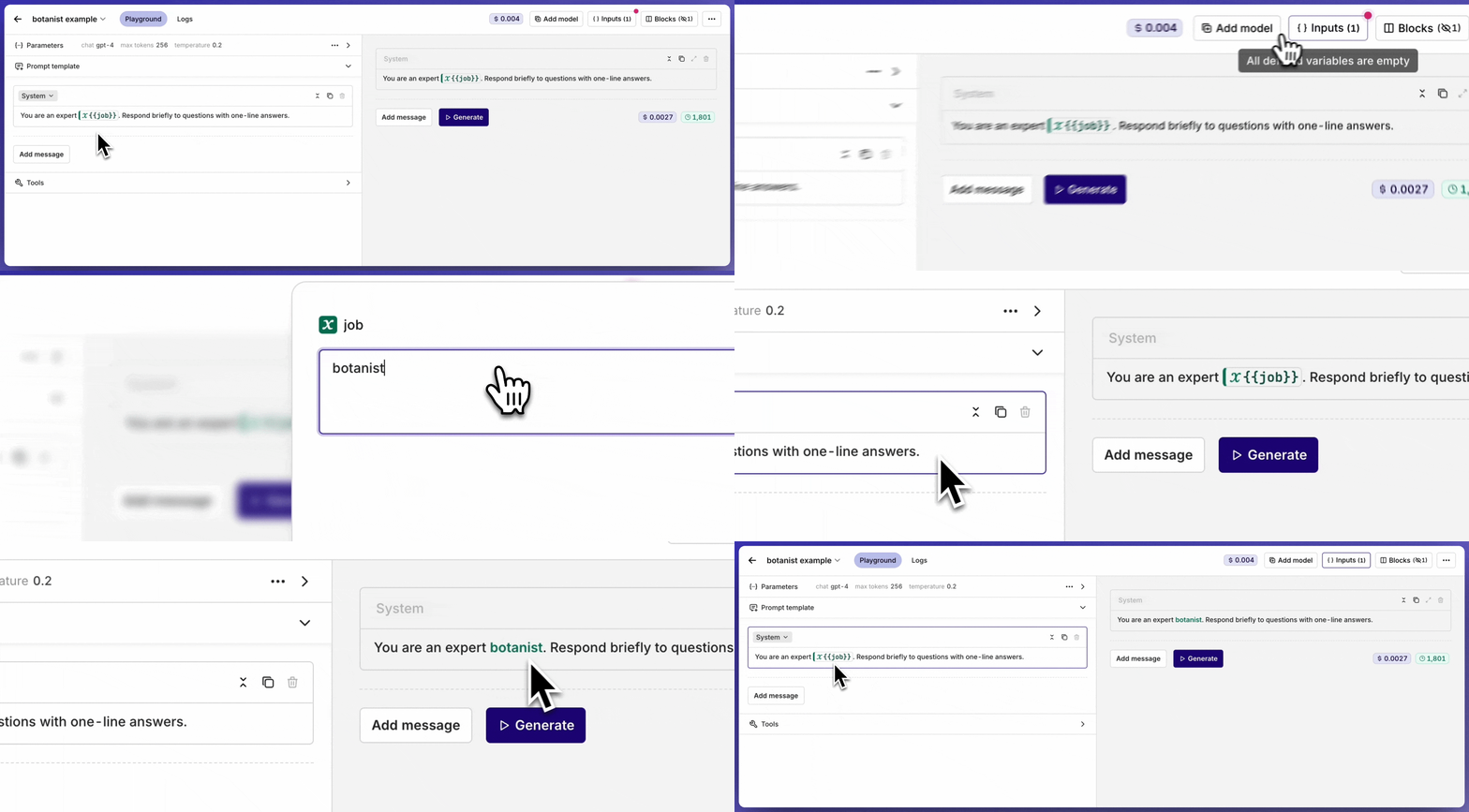
To pass values at runtime in a **Deployment**, see [Variables and Prompt Templating](/docs/ai-studio/ai-engineering/deployments#variables-and-prompt-templating).
### Prompt Generator
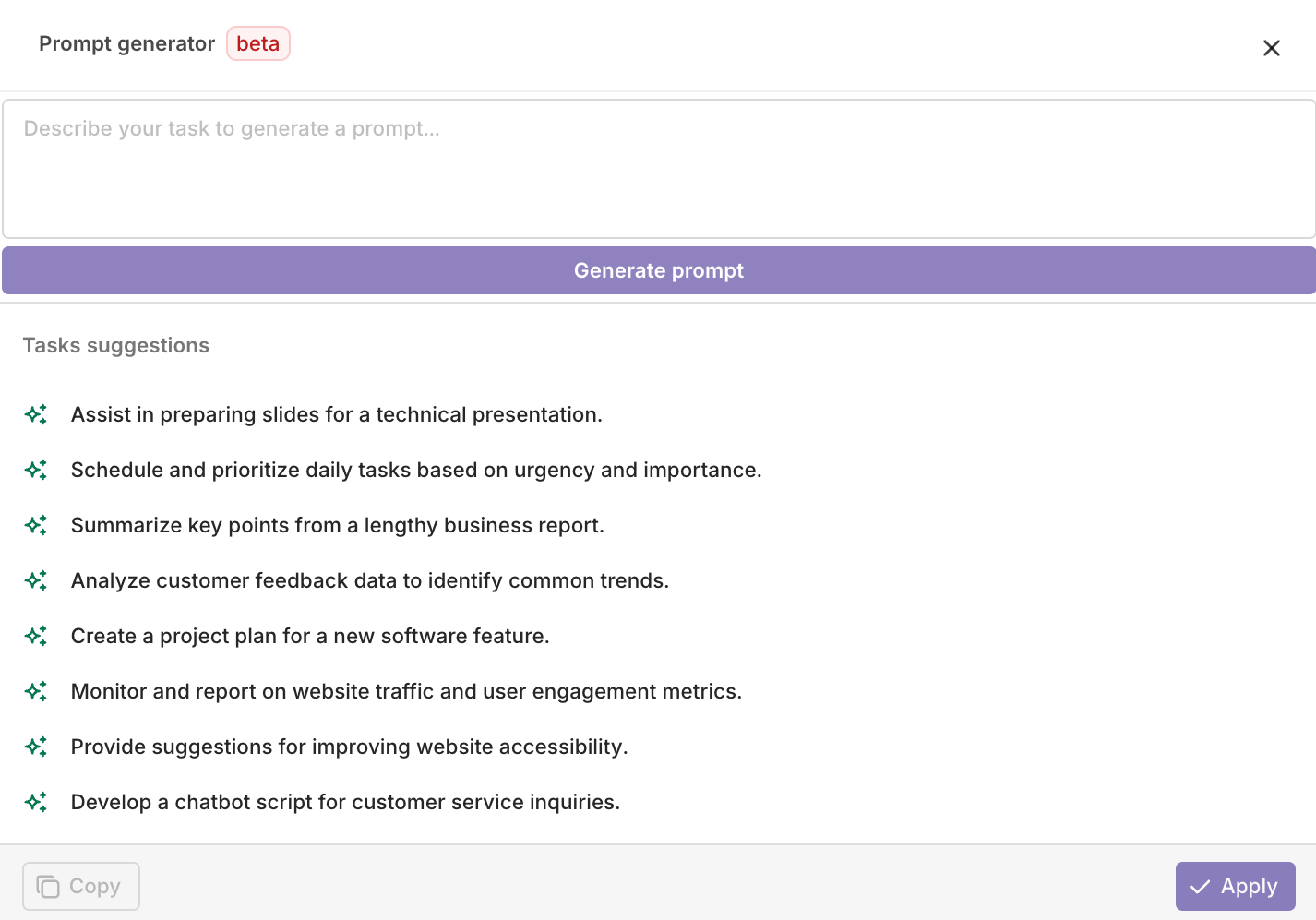
Select the **Generate Prompt** button next to the Role Selector to open the prompt generation assistant.
#### Roles
When adding a message, choose a role to define how the model interprets it:
| Role | Description | Example |
| ------------- | --------------------------------------------------------------------------------------------------------- | ---------------------------------------------------------------------------------- |
| **System** | A guideline or context for the language model, directing how it should interpret and respond to requests. | "You are an expert botanist. Respond briefly to questions with one-line answers." |
| **User** | An actual query posed by the user. | "Which plants thrive in shady environments?" |
| **Assistant** | Responses to user queries by the language model. | "Ferns, Hostas, and Hydrangeas are some plants that thrive in shady environments." |
#### Variables
Use `{{variable_name}}` syntax inside a message to declare a dynamic input. All declared inputs appear in the **Inputs** block at the top-right of the page, where default values can be set for testing.
The example below shows the inputs being set while running the prompt in the Playground.

To pass values at runtime in a **Deployment**, see [Variables and Prompt Templating](/docs/ai-studio/ai-engineering/deployments#variables-and-prompt-templating).
### Prompt Generator
Select the **Generate Prompt** button next to the Role Selector to open the prompt generation assistant.
 * Select **Copy** to copy the generated prompt to the clipboard.
* Select **Apply** to overwrite the current prompt with the generated one.
* Select **Copy** to copy the generated prompt to the clipboard.
* Select **Apply** to overwrite the current prompt with the generated one.
 ## Fetch a Prompt
Retrieve a Prompt by its ID using the [Retrieve a Prompt API](/reference/prompts/retrieve-a-prompt).
```bash cURL theme={"theme":{"light":"github-light","dark":"github-dark"}}
curl --request GET \
--url https://api.orq.ai/v2/prompts/PROMPT_ID \
--header 'accept: application/json' \
--header 'authorization: Bearer ORQ_API_KEY'
```
```typescript TypeScript theme={"theme":{"light":"github-light","dark":"github-dark"}}
import { Orq } from "@orq-ai/node";
const orq = new Orq({
apiKey: process.env["ORQ_API_KEY"] ?? "",
});
const result = await orq.prompts.retrieve({
id: "",
});
console.log(result);
```
```python Python theme={"theme":{"light":"github-light","dark":"github-dark"}}
from orq_ai_sdk import Orq
import os
with Orq(
api_key=os.getenv("ORQ_API_KEY", ""),
) as orq:
res = orq.prompts.retrieve(id="")
print(res)
```
See the full [Retrieve a Prompt API reference](/reference/prompts/retrieve-a-prompt).
## Fetch a Prompt
Retrieve a Prompt by its ID using the [Retrieve a Prompt API](/reference/prompts/retrieve-a-prompt).
```bash cURL theme={"theme":{"light":"github-light","dark":"github-dark"}}
curl --request GET \
--url https://api.orq.ai/v2/prompts/PROMPT_ID \
--header 'accept: application/json' \
--header 'authorization: Bearer ORQ_API_KEY'
```
```typescript TypeScript theme={"theme":{"light":"github-light","dark":"github-dark"}}
import { Orq } from "@orq-ai/node";
const orq = new Orq({
apiKey: process.env["ORQ_API_KEY"] ?? "",
});
const result = await orq.prompts.retrieve({
id: "",
});
console.log(result);
```
```python Python theme={"theme":{"light":"github-light","dark":"github-dark"}}
from orq_ai_sdk import Orq
import os
with Orq(
api_key=os.getenv("ORQ_API_KEY", ""),
) as orq:
res = orq.prompts.retrieve(id="")
print(res)
```
See the full [Retrieve a Prompt API reference](/reference/prompts/retrieve-a-prompt).