> ## Documentation Index
> Fetch the complete documentation index at: https://docs.orq.ai/llms.txt
> Use this file to discover all available pages before exploring further.
# Release 4.12
> Release 4.12 alerts admins on budget spend, lets admins set which models each project can use, brings Eval corrections to Traces, and adds the Orq.ai CLI.
## AI Gateway
Available to all customers.
Get notified as a **Budget** is consumed, before its limit is reached. Set thresholds on any budget and receive an alert as consumption approaches the cap, so overspend is caught early instead of after the fact.
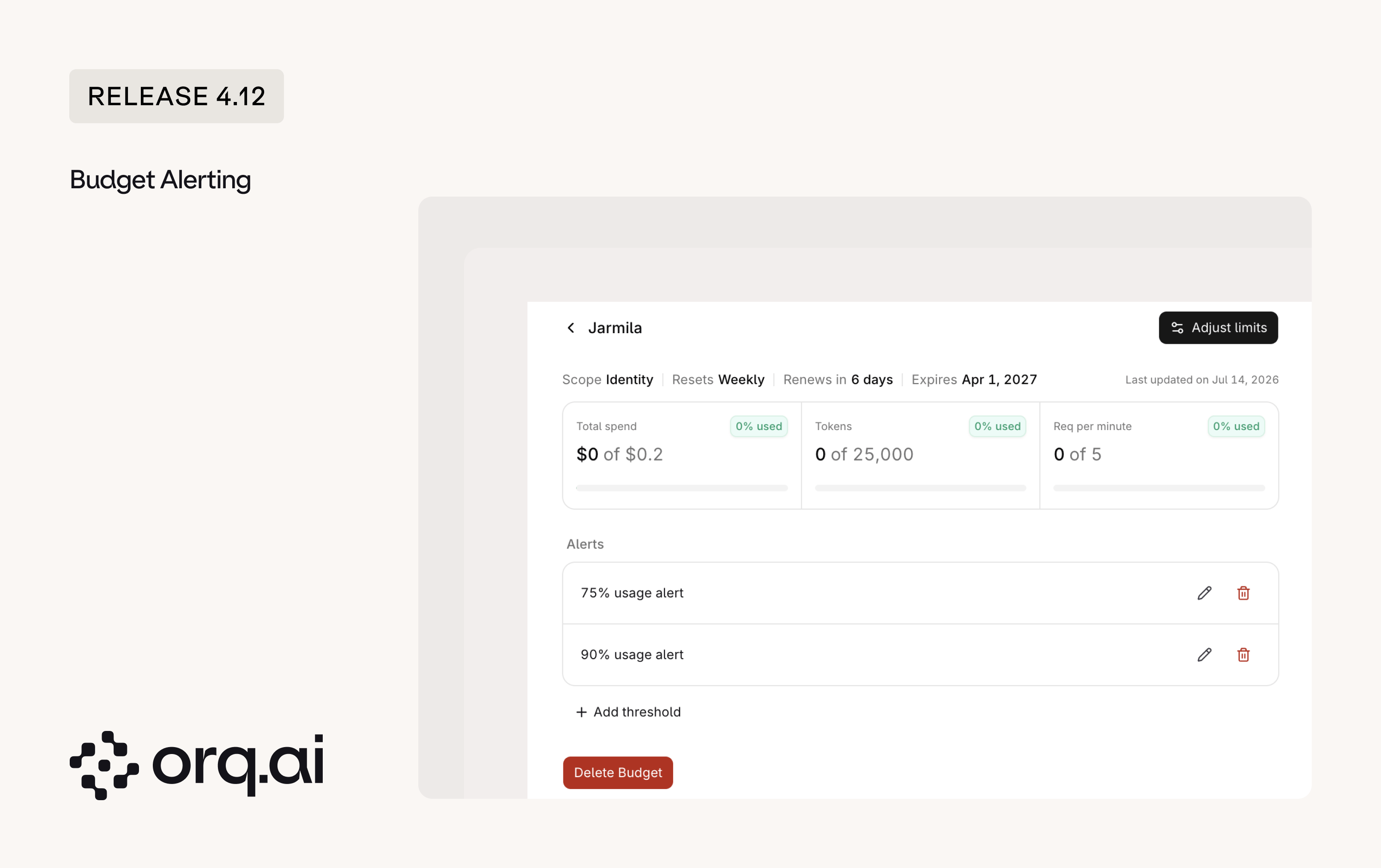 * **[Budget](https://docs.orq.ai/docs/ai-studio/organization/budgets) detail pages**: A detail view to see alert configuration, adjust limits, and track live consumption, refreshed automatically after a limit is adjusted.
* **Threshold alerts**: Configure alerts that fire before a budget's limit is reached.
* **Six scopes**: Attach a budget to a workspace, project, **Identity**, API key, provider, or model.
* **Notifiers**: Route alerts to reusable destinations for email, Slack, or webhooks, for example a shared team inbox or a `#budgets` Slack channel. Create and test a destination once, then reuse it across **AI Studio** and **AI Gateway** settings.
Set spend limits and alerts from the [Budgets guide](https://docs.orq.ai/docs/ai-studio/organization/budgets).
Previously, admins could only set which models a team could use across the whole workspace. Now that control can be isolated to the project level, and the rest of the platform respects those boundaries automatically. This keeps unapproved or costly models out of projects that should not reach them, without relying on manual review.
* **[Budget](https://docs.orq.ai/docs/ai-studio/organization/budgets) detail pages**: A detail view to see alert configuration, adjust limits, and track live consumption, refreshed automatically after a limit is adjusted.
* **Threshold alerts**: Configure alerts that fire before a budget's limit is reached.
* **Six scopes**: Attach a budget to a workspace, project, **Identity**, API key, provider, or model.
* **Notifiers**: Route alerts to reusable destinations for email, Slack, or webhooks, for example a shared team inbox or a `#budgets` Slack channel. Create and test a destination once, then reuse it across **AI Studio** and **AI Gateway** settings.
Set spend limits and alerts from the [Budgets guide](https://docs.orq.ai/docs/ai-studio/organization/budgets).
Previously, admins could only set which models a team could use across the whole workspace. Now that control can be isolated to the project level, and the rest of the platform respects those boundaries automatically. This keeps unapproved or costly models out of projects that should not reach them, without relying on manual review.
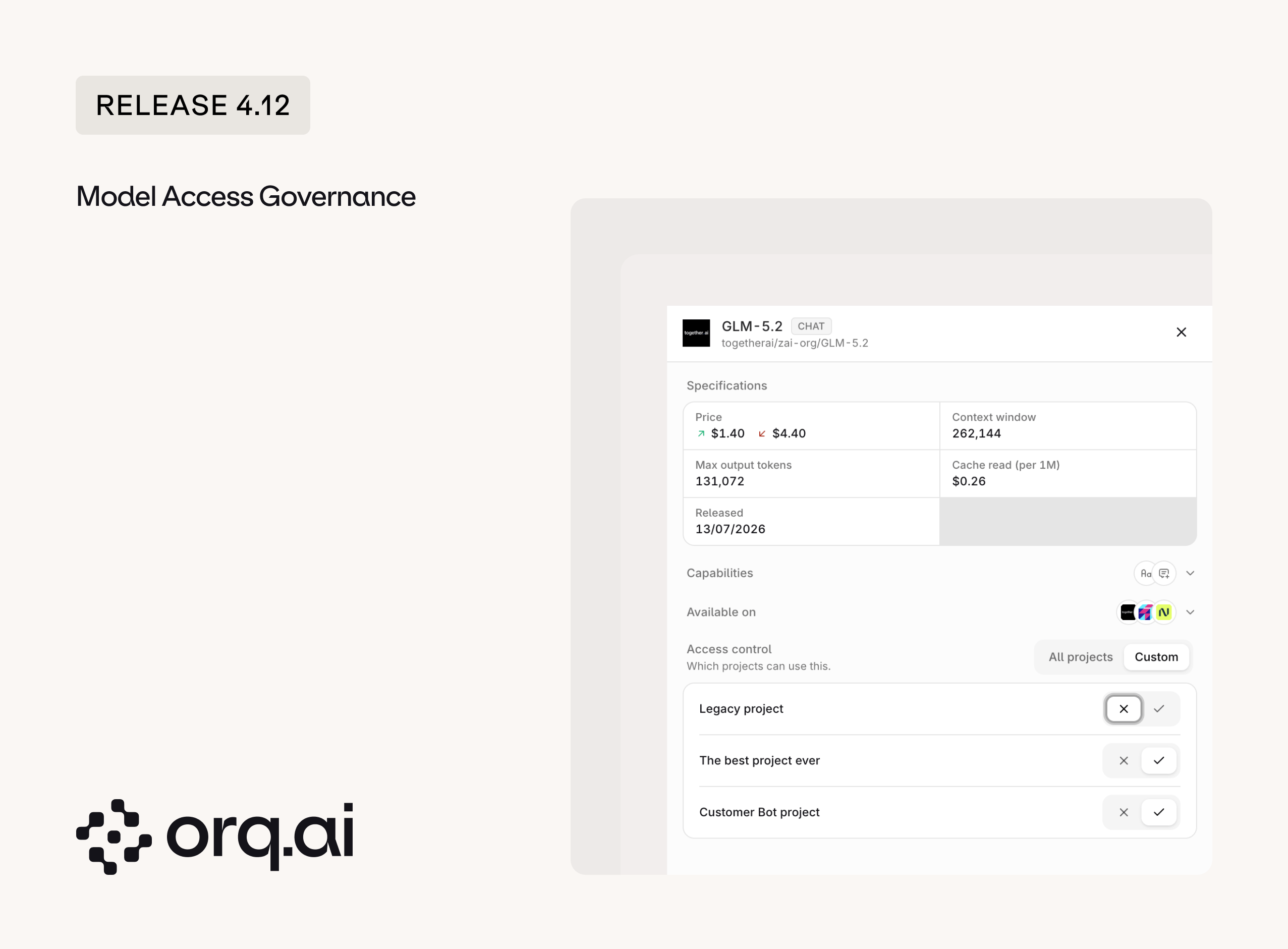 * **[Per-project model access](https://docs.orq.ai/docs/ai-studio/ai-gateway/add-models)**: Control which projects can use each model from a central place.
* **Scoped model pickers**: Model dropdowns in **Deployments** and **Agents** are scoped to the active project, so users only see models the project can actually use.
Set model access from the [Add Models](https://docs.orq.ai/docs/ai-studio/ai-gateway/add-models) page.
**Orq.ai** now has a command-line interface. Install `@orq-ai/cli` and drive the platform straight from the terminal or CI, without wiring up an SDK. The CLI is generated from the **Orq.ai** API, so its command surface tracks the API.
```bash theme={"theme":{"light":"github-light","dark":"github-dark"}}
npm install -g @orq-ai/cli
orq auth login
```
* **Install from [npm](https://www.npmjs.com/package/@orq-ai/cli)**: Published automatically for every release as `@orq-ai/cli`.
* **Browser-based login**: `orq auth login` authenticates through the browser with a device flow, so there is no API key to copy and paste.
* **Command surface tracks the API**: Manage **Agents**, **Deployments**, **Prompts**, **Datasets**, **Evaluators**, **Experiments**, **Annotations**, and **Identities**, each as its own command group.
* **Gateway from the terminal**: Call the router, chat, and completions endpoints and list models without leaving the shell.
See every command in the [Orq.ai CLI reference](https://docs.orq.ai/reference/cli).
**Chat** is now available in the **AI Gateway**, bringing the conversational surface that was previously only in **AI Studio** to Gateway users. It includes a dedicated editor for chat variables in a dockable side panel, so prompts can be adjusted without losing the conversation.
* **[Per-project model access](https://docs.orq.ai/docs/ai-studio/ai-gateway/add-models)**: Control which projects can use each model from a central place.
* **Scoped model pickers**: Model dropdowns in **Deployments** and **Agents** are scoped to the active project, so users only see models the project can actually use.
Set model access from the [Add Models](https://docs.orq.ai/docs/ai-studio/ai-gateway/add-models) page.
**Orq.ai** now has a command-line interface. Install `@orq-ai/cli` and drive the platform straight from the terminal or CI, without wiring up an SDK. The CLI is generated from the **Orq.ai** API, so its command surface tracks the API.
```bash theme={"theme":{"light":"github-light","dark":"github-dark"}}
npm install -g @orq-ai/cli
orq auth login
```
* **Install from [npm](https://www.npmjs.com/package/@orq-ai/cli)**: Published automatically for every release as `@orq-ai/cli`.
* **Browser-based login**: `orq auth login` authenticates through the browser with a device flow, so there is no API key to copy and paste.
* **Command surface tracks the API**: Manage **Agents**, **Deployments**, **Prompts**, **Datasets**, **Evaluators**, **Experiments**, **Annotations**, and **Identities**, each as its own command group.
* **Gateway from the terminal**: Call the router, chat, and completions endpoints and list models without leaving the shell.
See every command in the [Orq.ai CLI reference](https://docs.orq.ai/reference/cli).
**Chat** is now available in the **AI Gateway**, bringing the conversational surface that was previously only in **AI Studio** to Gateway users. It includes a dedicated editor for chat variables in a dockable side panel, so prompts can be adjusted without losing the conversation.
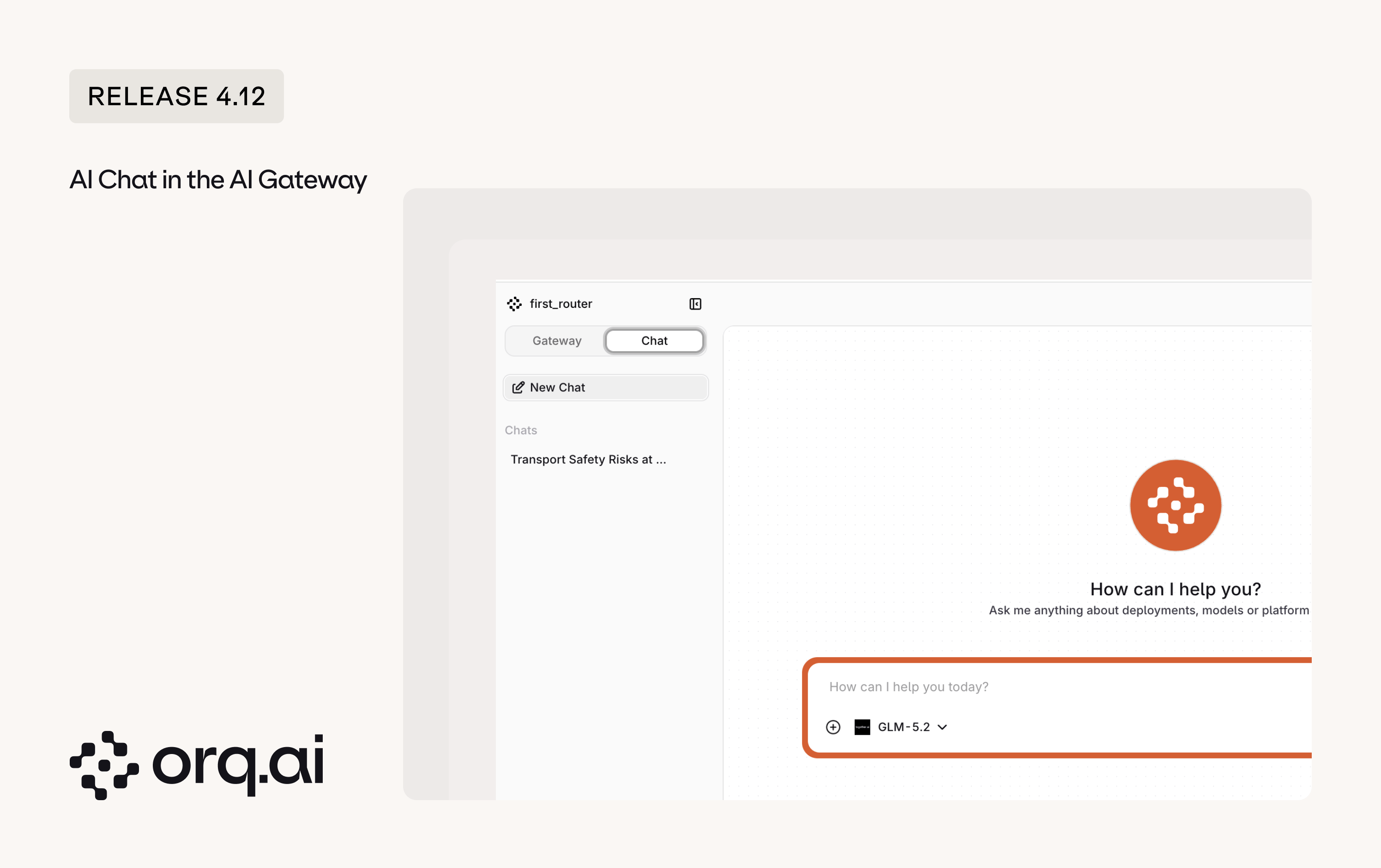 * **[Chat](https://docs.orq.ai/docs/ai-studio/ai-chat/using-the-ai-chat) in the Gateway**: The Chat surface is now available in the **AI Gateway**.
* **Any model, no lock-in**: Chat with any model available in the gateway and switch models mid-conversation, so a team gets the power of a consumer chat app without being tied to a single vendor.
* **Variables editor**: Edit chat variables in a dockable panel.
* **New place in AI Studio**: In **AI Studio**, **Chat** moves out of the main navigation dropdown to a toggle at the top, following the same pattern as Settings.
* **[System guardrails](https://docs.orq.ai/docs/ai-studio/ai-gateway/guardrail-rules#system-guardrails)**: Built-in System PII and Secret Detection guardrails are always available and can be added to any guardrail rule without setup.
* **[Faster PII redaction](https://docs.orq.ai/docs/ai-studio/ai-gateway/features/plugins/pii-redaction)**: PII redaction is now much faster, up to 10x on large inputs.
* **[Annotations](https://docs.orq.ai/docs/ai-studio/observability/annotation-queues) in the Gateway**: The annotation experience now extends to the **AI Gateway**.
* **Activity overview**: Clearer model and API key usage, with an error-rate view, sorting on model usage, and reorganized usage charts.
## AI Studio
Reviewers can now correct an **Evaluator** judgment, turning LLM-as-a-judge output into a human-verified signal. Corrections use one unified annotation model, so feedback captured on a trace is consistent with the rest of the annotation flow.
* **[Chat](https://docs.orq.ai/docs/ai-studio/ai-chat/using-the-ai-chat) in the Gateway**: The Chat surface is now available in the **AI Gateway**.
* **Any model, no lock-in**: Chat with any model available in the gateway and switch models mid-conversation, so a team gets the power of a consumer chat app without being tied to a single vendor.
* **Variables editor**: Edit chat variables in a dockable panel.
* **New place in AI Studio**: In **AI Studio**, **Chat** moves out of the main navigation dropdown to a toggle at the top, following the same pattern as Settings.
* **[System guardrails](https://docs.orq.ai/docs/ai-studio/ai-gateway/guardrail-rules#system-guardrails)**: Built-in System PII and Secret Detection guardrails are always available and can be added to any guardrail rule without setup.
* **[Faster PII redaction](https://docs.orq.ai/docs/ai-studio/ai-gateway/features/plugins/pii-redaction)**: PII redaction is now much faster, up to 10x on large inputs.
* **[Annotations](https://docs.orq.ai/docs/ai-studio/observability/annotation-queues) in the Gateway**: The annotation experience now extends to the **AI Gateway**.
* **Activity overview**: Clearer model and API key usage, with an error-rate view, sorting on model usage, and reorganized usage charts.
## AI Studio
Reviewers can now correct an **Evaluator** judgment, turning LLM-as-a-judge output into a human-verified signal. Corrections use one unified annotation model, so feedback captured on a trace is consistent with the rest of the annotation flow.
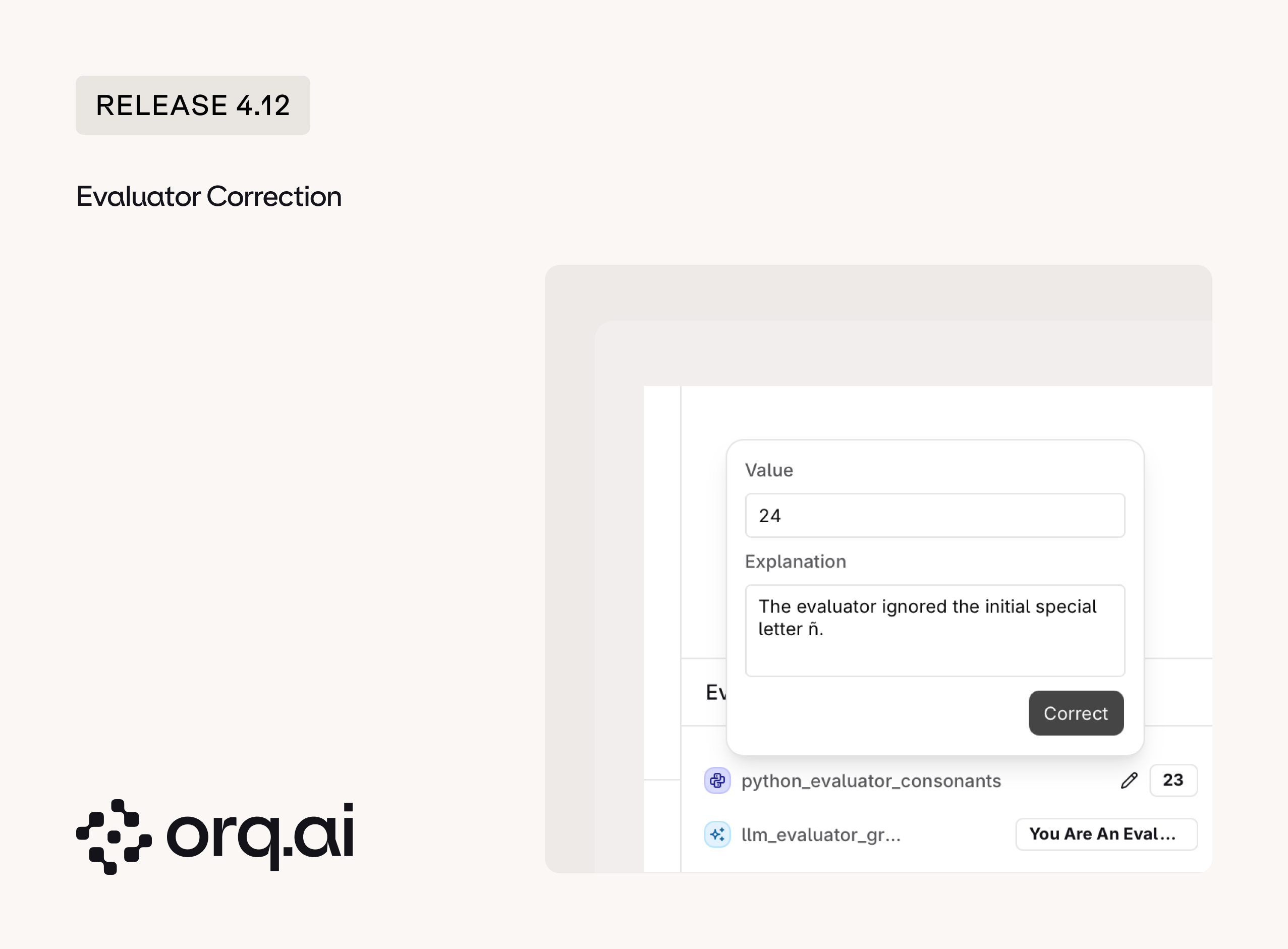 * **[Two entry points](https://docs.orq.ai/docs/ai-studio/observability/traces#correct-an-evaluator-result)**: Correct evaluations directly on a **Trace** or from the **Annotation Queues**.
* **Eval alignment**: Correcting the judge builds a labeled set of ground-truth cases, so an evaluator can be measured and tuned against human judgment instead of being trusted blindly.
* **Unified annotations**: One annotation schema spans the queue, **Experiments**, the API, and **Traces**.
* **Review everywhere**: The review screen is enabled across all trace entry points.
See how corrections fit the review flow in the [Annotation Queues guide](https://docs.orq.ai/docs/ai-studio/observability/annotation-queues).
* **Message metadata on Traces**: Filter **Traces** by the number of turns an agent took, so it is easy to see how many steps a high-scoring agent needed to reach its output. `turns` is now `# messages`.
* **Configurable tool timeout**: Set a timeout per agent tool through the API.
* **Refreshed sidebar**: The **Organization** entry is removed from the sidebar dropdown and its configuration now lives in a consolidated Settings menu, with consistent project scoping across entity tables.
New additions to the **Model Garden** across **OpenAI**, **Mistral**, and **Tensorix**, plus four new providers: **Nebius**, **Poolside**, **Tencent**, and **Reson8**. Browse details on the [Supported Models](https://docs.orq.ai/docs/ai-studio/ai-gateway/supported-models) page.
| Provider | Models |
| ------------ | ----------------------------------------------------------------------------------------------------------------------------------------------------------------------------------------------------------------------------------- |
| **OpenAI** | GPT-5.6 Luna, GPT-5.6 Sol, GPT-5.6 Terra |
| **Mistral** | Codestral 2508, Codestral Embed 2505, Ministral 8B 2512, Mistral Tiny 2407, Open Mistral Nemo, Voxtral Small 2507, Mistral Moderation 2603 |
| **Nebius** | Hermes 4 405B, Hermes 4 70B, Qwen3 235B A22B Instruct 2507, Qwen3 30B A3B Instruct 2507, Llama 3.1 Nemotron Ultra 253B, Nemotron 3 Ultra 550B, Nemotron 3 Nano 30B A3B, Nemotron 3 Nano Omni, Cosmos3 Super Reasoner, MiniCPM-V 4.5 |
| **Poolside** | Laguna M.1, Laguna XS 2.1 |
| **Tencent** | Hy-MT2-Plus |
| **Tensorix** | MiMo v2.5 |
| **Reson8** | Prerecorded (audio transcription) |
* **Router provider errors**: Fixed Claude Opus 4.7 errors in playgrounds and deployments, empty **Gemini** completions returning as successful responses, latency-based load balancing that ignored latency, and invalid image-generation sizes leaking as streamed errors.
* **Agents reliability**: Newly created **Agents** no longer go missing from the studio, guardrail blocks now name the guardrail that failed, memory-document deletion reports its true result, multi-agent history no longer becomes corrupted, and agents save with **Gemini** minimal thinking.
* **Traces and Evaluators**: Reasoning-token and cost mapping on OpenTelemetry ingest is corrected, **Evaluator** output renders in the configured type, and **Trace** metadata filters work again.
* **AI Chat**: Variables no longer reset after sending or publishing, the variables modal is no longer cut off, and variables display in order.
* **Knowledge**: File ingestion no longer hangs in a queued state, and the real error surfaces instead of a generic message.
* **Log masking**: Deployment logs now respect input and output masking as intended, so masked values are no longer returned in plaintext.
* **[Two entry points](https://docs.orq.ai/docs/ai-studio/observability/traces#correct-an-evaluator-result)**: Correct evaluations directly on a **Trace** or from the **Annotation Queues**.
* **Eval alignment**: Correcting the judge builds a labeled set of ground-truth cases, so an evaluator can be measured and tuned against human judgment instead of being trusted blindly.
* **Unified annotations**: One annotation schema spans the queue, **Experiments**, the API, and **Traces**.
* **Review everywhere**: The review screen is enabled across all trace entry points.
See how corrections fit the review flow in the [Annotation Queues guide](https://docs.orq.ai/docs/ai-studio/observability/annotation-queues).
* **Message metadata on Traces**: Filter **Traces** by the number of turns an agent took, so it is easy to see how many steps a high-scoring agent needed to reach its output. `turns` is now `# messages`.
* **Configurable tool timeout**: Set a timeout per agent tool through the API.
* **Refreshed sidebar**: The **Organization** entry is removed from the sidebar dropdown and its configuration now lives in a consolidated Settings menu, with consistent project scoping across entity tables.
New additions to the **Model Garden** across **OpenAI**, **Mistral**, and **Tensorix**, plus four new providers: **Nebius**, **Poolside**, **Tencent**, and **Reson8**. Browse details on the [Supported Models](https://docs.orq.ai/docs/ai-studio/ai-gateway/supported-models) page.
| Provider | Models |
| ------------ | ----------------------------------------------------------------------------------------------------------------------------------------------------------------------------------------------------------------------------------- |
| **OpenAI** | GPT-5.6 Luna, GPT-5.6 Sol, GPT-5.6 Terra |
| **Mistral** | Codestral 2508, Codestral Embed 2505, Ministral 8B 2512, Mistral Tiny 2407, Open Mistral Nemo, Voxtral Small 2507, Mistral Moderation 2603 |
| **Nebius** | Hermes 4 405B, Hermes 4 70B, Qwen3 235B A22B Instruct 2507, Qwen3 30B A3B Instruct 2507, Llama 3.1 Nemotron Ultra 253B, Nemotron 3 Ultra 550B, Nemotron 3 Nano 30B A3B, Nemotron 3 Nano Omni, Cosmos3 Super Reasoner, MiniCPM-V 4.5 |
| **Poolside** | Laguna M.1, Laguna XS 2.1 |
| **Tencent** | Hy-MT2-Plus |
| **Tensorix** | MiMo v2.5 |
| **Reson8** | Prerecorded (audio transcription) |
* **Router provider errors**: Fixed Claude Opus 4.7 errors in playgrounds and deployments, empty **Gemini** completions returning as successful responses, latency-based load balancing that ignored latency, and invalid image-generation sizes leaking as streamed errors.
* **Agents reliability**: Newly created **Agents** no longer go missing from the studio, guardrail blocks now name the guardrail that failed, memory-document deletion reports its true result, multi-agent history no longer becomes corrupted, and agents save with **Gemini** minimal thinking.
* **Traces and Evaluators**: Reasoning-token and cost mapping on OpenTelemetry ingest is corrected, **Evaluator** output renders in the configured type, and **Trace** metadata filters work again.
* **AI Chat**: Variables no longer reset after sending or publishing, the variables modal is no longer cut off, and variables display in order.
* **Knowledge**: File ingestion no longer hangs in a queued state, and the real error surfaces instead of a generic message.
* **Log masking**: Deployment logs now respect input and output masking as intended, so masked values are no longer returned in plaintext.