> ## Documentation Index
> Fetch the complete documentation index at: https://docs.orq.ai/llms.txt
> Use this file to discover all available pages before exploring further.
# AI agent lead qualification pattern
> Build multi-agent systems with Orq.ai. Create specialized agents for lead qualification, CRM integration, and automated workflows using the A2A Protocol.
## Objective
An AI Agent system provides intelligent prospect qualification and lead generation through a multi-step, orchestrated workflow using multiple specialized agents.
This architecture demonstrates how to build a comprehensive lead generation pipeline where different AI agents handle specific stages: conversation, qualification, and CRM insertion.
Built on the modern Agents API framework with the A2A Protocol, each agent is independently configured with its own role, instructions, tools, and memory. Conversation context is maintained across turns using `previous_response_id`.
## Use Case
AI Agent is ideal for applications that need:
* **Multi-Stage Lead Processing**: Break down prospect qualification into specialized steps handled by different agents
* **Automated Prospect Qualification**: Systematically collect prospect information and score leads based on qualification criteria
* **CRM Integration**: Automatically insert qualified leads directly into your sales pipeline
* **Intelligent Routing**: Route prospects through different workflows based on their responses and qualification level
* **Sales Process Automation**: Reduce manual lead processing while maintaining high-quality prospect data
## Prerequisite
Before configuring an AI Agent, ensure you have:
* **Orq.ai Account**: Active workspace in the AI Studio.
* **API Access**: Valid API key from [Workspace Settings > API Keys](/docs/ai-studio/organization/api-keys).
* **Model Access**: At least one text generation model enabled in the [AI Gateway](/docs/ai-studio/ai-gateway/add-models), such as `gpt-4`, `claude-sonnet-4-6`, or `gpt-5-mini`.
* **CRM API**: Access to your CRM system API (Salesforce, HubSpot, Pipedrive, etc.) with authentication credentials for inserting new leads.
## Multi-Agent Workflow Architecture
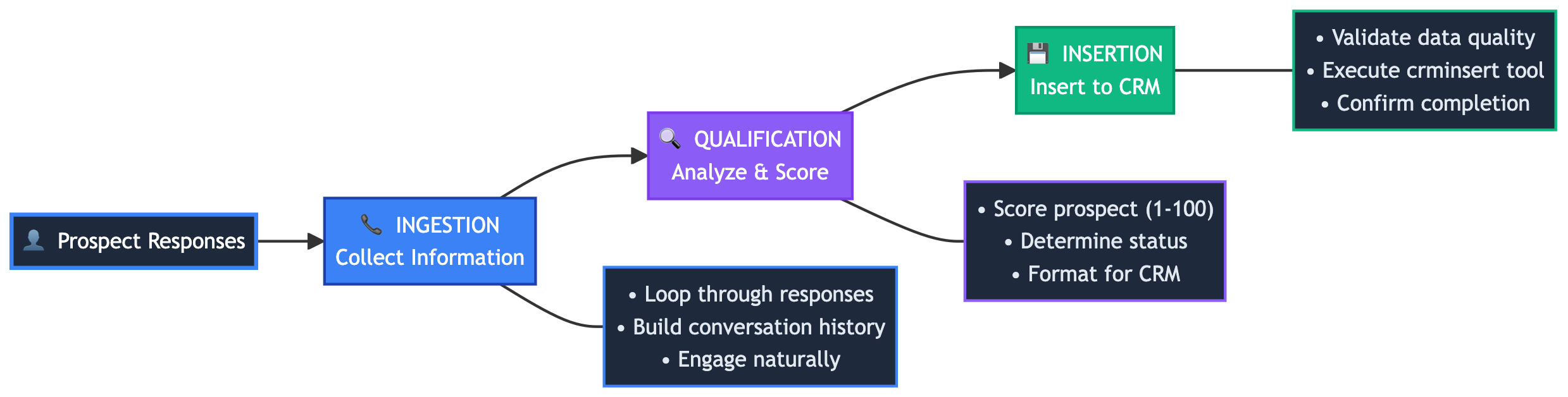 **Three Specialized Agents (Created via Agents API):**
| Agent | Purpose | Tools | Key Feature |
| ----------------- | -------------------------------------- | ----------- | --------------------------------------------- |
| **Ingestion** | Natural conversation & data collection | None | Multi-turn context via `previous_response_id` |
| **Qualification** | Analyze conversation & score prospect | None | Stateless analysis |
| **Insertion** | Validate data & insert into CRM | `crminsert` | Tool-enabled automation |
> These agents are created using the modern **Agents API** framework with support for memory stores, knowledge bases, streaming, and the A2A Protocol for standardized communication.
## Creating a CRM Insert Tool
First, create a tool for adding prospects to your CRM system. Head to the AI Studio:
* Choose a [Project](/docs/ai-studio/get-started/projects) and Folder and select the button.
* Choose **Tool**.
* Create a `crminsert` tool for adding prospects to your CRM
### CRM Insert Tool Configuration
Configure the CRM tool with JSON schema for function calling:
```json JSON theme={"theme":{"light":"github-light","dark":"github-dark"}}
{
"type": "object",
"properties": {
"company_name": {"type": "string", "description": "Name of the prospect's company"},
"contact_name": {"type": "string", "description": "Full name of the primary contact"},
"contact_email": {"type": "string", "description": "Email address of the primary contact"},
"contact_phone": {"type": "string", "description": "Phone number of the primary contact"},
"company_size": {"type": "string", "enum": ["1-10", "11-50", "51-200", "201-1000", "1000+"], "description": "Number of employees in the company"},
"industry": {"type": "string", "description": "Industry or sector the company operates in"},
"use_case": {"type": "string", "description": "Specific use case or problem they want to solve"},
"timeline": {"type": "string", "enum": ["Immediate", "1-3 months", "3-6 months", "6+ months"], "description": "Timeline for implementation"},
"budget_range": {"type": "string", "enum": ["Under $10k", "$10k-$50k", "$50k-$100k", "$100k+"], "description": "Approximate budget range"},
"lead_score": {"type": "integer", "minimum": 1, "maximum": 100, "description": "Qualification score (1-100)"},
"qualification_status": {"type": "string", "enum": ["qualified", "nurture", "disqualified"], "description": "Lead qualification status"},
"lead_source": {"type": "string", "default": "AI Agent Qualification"},
"notes": {"type": "string", "description": "Additional notes from the qualification conversation"}
},
"required": ["company_name", "contact_name", "contact_email", "use_case", "lead_score", "qualification_status"]
}
```
The tool configuration defines the function signature that the AI model will call. Your code needs to handle the actual execution of this function and make the appropriate CRM API calls when the tool is invoked.
The JSON schema above defines the function signature. Tool execution requires a two-step workflow:
**Step 1: Receive tool calls** - Agent returns with `tool_calls` array and enters "Input Required" state, pausing execution
**Step 2: Execute and resume** - Your code executes the tool, then calls the agent again with the same `previous_response_id` and tool result to let the agent continue
This allows your code to integrate with external systems (CRM APIs, webhooks, databases) and feed results back to the agent for completion.
### Handling Tool Calls
When an agent needs to use a tool (like inserting a prospect into CRM), it pauses and returns a response with `tool_calls`. Your code must execute the tool and send the result back via the continuation API:
```python Python theme={"theme":{"light":"github-light","dark":"github-dark"}}
from orq_ai_sdk import Orq
import os
import json
client = Orq(api_key=os.getenv("ORQ_API_KEY", ""))
# Step 1: Call agent (agent may call tools and pause)
response = client.responses.create(
model="agent/insertion-agent",
input="Insert this prospect data into CRM",
)
# Step 2: Check if agent made tool calls (function_call items in output)
tool_calls = [item for item in (response.output or []) if item.get("type") == "function_call"]
if tool_calls:
for tool_call in tool_calls:
if tool_call.get("name") == "crminsert":
try:
# Parse arguments (handle both string and dict)
args = tool_call.get("arguments", "{}")
if isinstance(args, str):
args = json.loads(args)
# Execute the CRM insertion
crm_result = insert_to_crm(
company_name=args.get("company_name"),
contact_name=args.get("contact_name"),
contact_email=args.get("contact_email"),
# ... other fields
)
print(f"✓ Prospect inserted: {crm_result['id']}")
# Step 3: Send result back to agent to resume
continuation = client.responses.create(
model="agent/insertion-agent",
previous_response_id=response.id,
input=f"Successfully inserted prospect with ID: {crm_result['id']}",
)
print(f"Agent continued and completed workflow")
except json.JSONDecodeError as e:
print(f"✗ Failed to parse tool arguments: {e}")
except Exception as e:
print(f"✗ CRM insertion failed: {e}")
```
```typescript TypeScript theme={"theme":{"light":"github-light","dark":"github-dark"}}
import { Orq } from "@orq-ai/node";
const client = new Orq({
apiKey: process.env.ORQ_API_KEY ?? "",
});
async function handleToolCalls() {
// Step 1: Call agent (agent may call tools and pause)
const response = await client.responses.create({
model: "agent/insertion-agent",
input: "Insert this prospect data into CRM",
});
// Step 2: Check if agent made tool calls (function_call items in output)
const toolCalls = (response.output ?? []).filter((item: any) => item.type === "function_call");
if (toolCalls.length > 0) {
for (const toolCall of toolCalls) {
if (toolCall.name === "crminsert") {
try {
// Parse arguments (may be string or already parsed object)
const args = typeof toolCall.arguments === 'string'
? JSON.parse(toolCall.arguments)
: toolCall.arguments;
if (!args) {
console.log("✗ No arguments provided for tool call");
continue;
}
// Execute the CRM insertion
const crmResult = await insertToCRM({
companyName: args.company_name,
contactName: args.contact_name,
contactEmail: args.contact_email,
// ... other fields
});
console.log(`✓ Prospect inserted: ${crmResult.id}`);
// Step 3: Send result back to agent to resume
const continuation = await client.responses.create({
model: "agent/insertion-agent",
previousResponseId: response.id,
input: `Successfully inserted prospect with ID: ${crmResult.id}`,
});
console.log("Agent continued and completed workflow");
} catch (error) {
if (error instanceof SyntaxError) {
console.error(`✗ Failed to parse tool arguments:`, error);
} else {
console.error(`✗ CRM insertion failed:`, error);
}
}
}
}
}
}
```
**Complete Tool Workflow:**
1. **Agent calls tool**: Agent decides it needs a tool and returns with `tool_calls` array
2. **Your code executes**: Parse arguments and execute the actual business logic (CRM API call, database insert, external webhook, etc.)
3. **Agent resumes**: Call the agent again with the same `previous_response_id` and pass the result back as input
4. **Agent completes**: With the tool result, the agent continues processing and provides its final response
**Key Implementation Details:**
* Tool arguments may be a JSON string or object - handle both with `isinstance()` (Python) or `typeof` checks (TypeScript)
* Always use the response `id` as `previous_response_id` when continuing the conversation after tool execution
* Send tool results back as a user message to resume the agent
* The agent maintains full context - it remembers the tool call and your provided result
***
## Creating Three Specialized Agents
Create three specialized agents using the Agents API. You can create agents via the Studio UI or programmatically via API.
### 1. Create the Ingestion Agent
You can create the ingestion agent either programmatically via the Agents API or using the Studio UI. Choose your preferred approach below:
#### Option A: Using the Agents API
```bash cURL theme={"theme":{"light":"github-light","dark":"github-dark"}}
curl -X POST https://api.orq.ai/v2/agents \
-H "Authorization: Bearer $ORQ_API_KEY" \
-H "Content-Type: application/json" \
-d '{
"key": "ingestion-agent",
"role": "Prospect Ingestion Specialist",
"description": "Collects prospect information through natural conversation",
"instructions": "You are a friendly sales assistant gathering prospect information through natural conversation. Collect their company name, size, and industry, along with their contact details, use case, budget, and timeline. Be conversational and helpful, ask follow-up questions to get complete information, and signal when ready: \"Thank you for sharing all that information. Let me review everything and connect you with the next step.\"",
"settings": {
"max_iterations": 15,
"max_execution_time": 300,
"tools": [
{
"type": "current_date"
}
]
},
"model": "openai/gpt-4o",
"path": "Default/agents"
}'
```
```python Python theme={"theme":{"light":"github-light","dark":"github-dark"}}
from orq_ai_sdk import Orq
import os
client = Orq(
api_key=os.getenv("ORQ_API_KEY", ""),
)
instructions = """You are a friendly sales assistant gathering prospect information through natural conversation. Collect their company name, size, and industry, along with their contact details, use case, budget, and timeline. Be conversational and helpful, ask follow-up questions to get complete information, and signal when ready: "Thank you for sharing all that information. Let me review everything and connect you with the next step.\""""
agent = client.agents.create(
key="ingestion-agent",
role="Prospect Ingestion Specialist",
description="Collects prospect information through natural conversation",
instructions=instructions,
path="Default/agents",
model="openai/gpt-4o",
settings={
"max_iterations": 15,
"max_execution_time": 300,
"tools": [
{
"type": "current_date"
}
]
}
)
print(f"Ingestion Agent created: {agent.key}")
```
```typescript TypeScript theme={"theme":{"light":"github-light","dark":"github-dark"}}
import { Orq } from "@orq-ai/node";
const client = new Orq({
apiKey: process.env.ORQ_API_KEY ?? "",
});
async function createIngestionAgent() {
const instructions = `You are a friendly sales assistant gathering prospect information through natural conversation. Collect their company name, size, and industry, along with their contact details, use case, budget, and timeline. Be conversational and helpful, ask follow-up questions to get complete information, and signal when ready: "Thank you for sharing all that information. Let me review everything and connect you with the next step."`;
const agent = await client.agents.create({
key: "ingestion-agent",
role: "Prospect Ingestion Specialist",
description: "Collects prospect information through natural conversation",
instructions: instructions,
path: "Default/agents",
model: "openai/gpt-4o",
settings: {
maxIterations: 15,
maxExecutionTime: 300,
tools: [
{
type: "current_date"
}
]
}
});
console.log(`Ingestion Agent created: ${agent.key}`);
}
createIngestionAgent();
```
#### Option B: Using the Studio UI
Alternatively, create the ingestion agent directly in the AI Studio:
1. **Navigate to Agents**: Open the AI Studio and go to your project
2. **Create New Agent**: Click the button and select **Agent**
3. **Configure Agent**:
* **Key**: `ingestion-agent`
* **Role**: `Prospect Ingestion Specialist`
* **Description**: `Collects prospect information through natural conversation`
* **Model**: Select `gpt-4o` (or your preferred model)
4. **Add Instructions**: Copy the system instructions from the section below into the **Instructions** field
5. **Configure Settings**:
* **Max Iterations**: 15
* **Max Execution Time**: 300 seconds
6. **Add Tools**: Include the `Current Date` tool for context awareness
7. **Save**: Click **Create Agent**
**System Instructions for Ingestion Agent:**
```
You are a friendly sales assistant gathering prospect information through natural conversation. Collect their company name, size, and industry, along with their contact details, use case, budget, and timeline. Be conversational and helpful, ask follow-up questions to get complete information, and signal when ready: "Thank you for sharing all that information. Let me review everything and connect you with the next step."
```
### 2. Create the Qualification Agent
You can create the qualification agent either programmatically via the Agents API or using the Studio UI. Choose your preferred approach below:
#### Option A: Using the Agents API
```bash cURL theme={"theme":{"light":"github-light","dark":"github-dark"}}
curl -X POST https://api.orq.ai/v2/agents \
-H "Authorization: Bearer $ORQ_API_KEY" \
-H "Content-Type: application/json" \
-d '{
"key": "qualification-agent",
"role": "Lead Qualification Specialist",
"description": "Analyzes prospect conversations and scores leads",
"instructions": "Analyze the prospect conversation and score the lead from 1-100 based on company size, budget, timeline, decision authority, and use case fit. Output a lead score and qualification status (qualified if 70+, nurture if 40-69, disqualified if below 40). Provide a brief analysis with a recommendation for next steps.",
"settings": {
"max_iterations": 5,
"max_execution_time": 300,
"tools": []
},
"model": "openai/gpt-4o",
"path": "Default/agents"
}'
```
```python Python theme={"theme":{"light":"github-light","dark":"github-dark"}}
from orq_ai_sdk import Orq
import os
client = Orq(
api_key=os.getenv("ORQ_API_KEY", ""),
)
instructions = """Analyze the prospect conversation and score the lead from 1-100 based on company size, budget, timeline, decision authority, and use case fit. Output a lead score and qualification status (qualified if 70+, nurture if 40-69, disqualified if below 40). Provide a brief analysis with a recommendation for next steps."""
agent = client.agents.create(
key="qualification-agent",
role="Lead Qualification Specialist",
description="Analyzes prospect conversations and scores leads",
instructions=instructions,
path="Default/agents",
model="openai/gpt-4o",
settings={
"max_iterations": 5,
"max_execution_time": 300,
"tools": []
}
)
print(f"Qualification Agent created: {agent.key}")
```
```typescript TypeScript theme={"theme":{"light":"github-light","dark":"github-dark"}}
import { Orq } from "@orq-ai/node";
const client = new Orq({
apiKey: process.env.ORQ_API_KEY ?? "",
});
async function createQualificationAgent() {
const instructions = `Analyze the prospect conversation and score the lead from 1-100 based on company size, budget, timeline, decision authority, and use case fit. Output a lead score and qualification status (qualified if 70+, nurture if 40-69, disqualified if below 40). Provide a brief analysis with a recommendation for next steps.`;
const agent = await client.agents.create({
key: "qualification-agent",
role: "Lead Qualification Specialist",
description: "Analyzes prospect conversations and scores leads",
instructions: instructions,
path: "Default/agents",
model: "openai/gpt-4o",
settings: {
maxIterations: 5,
maxExecutionTime: 300,
tools: []
}
});
console.log(`Qualification Agent created: ${agent.key}`);
}
createQualificationAgent();
```
#### Option B: Using the Studio UI
Alternatively, create the qualification agent directly in the AI Studio:
1. **Navigate to Agents**: Go to your project in the AI Studio
2. **Create New Agent**: Click the button and select **Agent**
3. **Configure Agent**:
* **Key**: `qualification-agent`
* **Role**: `Lead Qualification Specialist`
* **Description**: `Analyzes prospect conversations and scores leads`
* **Model**: Select `gpt-4o` (or your preferred model)
4. **Add Instructions**: Copy the system instructions from the section below into the **Instructions** field
5. **Configure Settings**:
* **Max Iterations**: 5
* **Max Execution Time**: 300 seconds
6. **Tools**: No tools needed for this agent (leave empty)
7. **Save**: Click **Create Agent**
**System Instructions for Qualification Agent:**
```
Analyze the prospect conversation and score the lead from 1-100 based on company size, budget, timeline, decision authority, and use case fit. Output a lead score and qualification status (qualified if 70+, nurture if 40-69, disqualified if below 40). Provide a brief analysis with a recommendation for next steps.
```
### 3. Create the Insertion Agent
You can create the insertion agent either programmatically via the Agents API or using the Studio UI. Choose your preferred approach below:
#### Option A: Using the Agents API
```bash cURL theme={"theme":{"light":"github-light","dark":"github-dark"}}
curl -X POST https://api.orq.ai/v2/agents \
-H "Authorization: Bearer $ORQ_API_KEY" \
-H "Content-Type: application/json" \
-d '{
"key": "insertion-agent",
"role": "CRM Insertion Specialist",
"description": "Validates and inserts qualified prospects into the CRM",
"instructions": "Validate the prospect data for completeness and quality. Check that required fields are present and the lead score is 70 or higher. Use the crminsert tool to add qualified prospects to the CRM. If validation fails, report the issues instead of inserting incomplete records.",
"settings": {
"max_iterations": 3,
"max_execution_time": 300,
"tools": [
{
"type": "function",
"key": "crminsert",
"display_name": "CRM Insert",
"description": "Insert qualified prospect into CRM",
"function": {
"name": "crminsert",
"parameters": {
"type": "object",
"properties": {
"company_name": {"type": "string"},
"contact_name": {"type": "string"},
"contact_email": {"type": "string"},
"contact_phone": {"type": "string"},
"company_size": {"type": "string", "enum": ["1-10", "11-50", "51-200", "201-1000", "1000+"]},
"industry": {"type": "string"},
"use_case": {"type": "string"},
"timeline": {"type": "string", "enum": ["Immediate", "1-3 months", "3-6 months", "6+ months"]},
"budget_range": {"type": "string", "enum": ["Under $10k", "$10k-$50k", "$50k-$100k", "$100k+"]},
"lead_score": {"type": "integer", "minimum": 1, "maximum": 100},
"qualification_status": {"type": "string", "enum": ["qualified", "nurture", "disqualified"]},
"lead_source": {"type": "string"},
"notes": {"type": "string"}
},
"required": ["company_name", "contact_name", "contact_email", "use_case", "lead_score", "qualification_status"]
}
}
}
]
},
"model": "openai/gpt-4o",
"path": "Default/agents"
}'
```
```python Python theme={"theme":{"light":"github-light","dark":"github-dark"}}
from orq_ai_sdk import Orq
import os
client = Orq(
api_key=os.getenv("ORQ_API_KEY", ""),
)
instructions = """Validate the prospect data for completeness and quality. Check that required fields are present and the lead score is 70 or higher. Use the crminsert tool to add qualified prospects to the CRM. If validation fails, report the issues instead of inserting incomplete records."""
agent = client.agents.create(
key="insertion-agent",
role="CRM Insertion Specialist",
description="Validates and inserts qualified prospects into the CRM",
instructions=instructions,
path="Default/agents",
model="openai/gpt-4o",
settings={
"max_iterations": 3,
"max_execution_time": 300,
"tools": [
{
"type": "function",
"key": "crminsert",
"display_name": "CRM Insert",
"description": "Insert qualified prospect into CRM",
"function": {
"name": "crminsert",
"parameters": {
"type": "object",
"properties": {
"company_name": {"type": "string"},
"contact_name": {"type": "string"},
"contact_email": {"type": "string"},
"contact_phone": {"type": "string"},
"company_size": {"type": "string", "enum": ["1-10", "11-50", "51-200", "201-1000", "1000+"]},
"industry": {"type": "string"},
"use_case": {"type": "string"},
"timeline": {"type": "string", "enum": ["Immediate", "1-3 months", "3-6 months", "6+ months"]},
"budget_range": {"type": "string", "enum": ["Under $10k", "$10k-$50k", "$50k-$100k", "$100k+"]},
"lead_score": {"type": "integer", "minimum": 1, "maximum": 100},
"qualification_status": {"type": "string", "enum": ["qualified", "nurture", "disqualified"]},
"lead_source": {"type": "string"},
"notes": {"type": "string"}
},
"required": ["company_name", "contact_name", "contact_email", "use_case", "lead_score", "qualification_status"]
}
}
}
]
}
)
print(f"Insertion Agent created: {agent.key}")
```
```typescript TypeScript theme={"theme":{"light":"github-light","dark":"github-dark"}}
import { Orq } from "@orq-ai/node";
const client = new Orq({
apiKey: process.env.ORQ_API_KEY ?? "",
});
async function createInsertionAgent() {
const instructions = `Validate the prospect data for completeness and quality. Check that required fields are present and the lead score is 70 or higher. Use the crminsert tool to add qualified prospects to the CRM. If validation fails, report the issues instead of inserting incomplete records.`;
const agent = await client.agents.create({
key: "insertion-agent",
role: "CRM Insertion Specialist",
description: "Validates and inserts qualified prospects into the CRM",
instructions: instructions,
path: "Default/agents",
model: "openai/gpt-4o",
settings: {
maxIterations: 3,
maxExecutionTime: 300,
tools: [
{
type: "function",
key: "crminsert",
displayName: "CRM Insert",
description: "Insert qualified prospect into CRM",
function: {
name: "crminsert",
parameters: {
type: "object",
properties: {
company_name: { type: "string" },
contact_name: { type: "string" },
contact_email: { type: "string" },
contact_phone: { type: "string" },
company_size: { type: "string", enum: ["1-10", "11-50", "51-200", "201-1000", "1000+"] },
industry: { type: "string" },
use_case: { type: "string" },
timeline: { type: "string", enum: ["Immediate", "1-3 months", "3-6 months", "6+ months"] },
budget_range: { type: "string", enum: ["Under $10k", "$10k-$50k", "$50k-$100k", "$100k+"] },
lead_score: { type: "integer", minimum: 1, maximum: 100 },
qualification_status: { type: "string", enum: ["qualified", "nurture", "disqualified"] },
lead_source: { type: "string" },
notes: { type: "string" }
},
required: ["company_name", "contact_name", "contact_email", "use_case", "lead_score", "qualification_status"]
}
}
}
]
}
});
console.log(`Insertion Agent created: ${agent.key}`);
}
createInsertionAgent();
```
#### Option B: Using the Studio UI
Alternatively, create the insertion agent directly in the AI Studio:
1. **Navigate to Agents**: Go to your project in the AI Studio
2. **Create New Agent**: Click the button and select **Agent**
3. **Configure Agent**:
* **Key**: `insertion-agent`
* **Role**: `CRM Insertion Specialist`
* **Description**: `Validates and inserts qualified prospects into the CRM`
* **Model**: Select `gpt-4o` (or your preferred model)
4. **Add Instructions**: Copy the system instructions from the section below into the **Instructions** field
5. **Configure Settings**:
* **Max Iterations**: 3
* **Max Execution Time**: 300 seconds
6. **Add the CRM Insert Tool**:
* Click **Add Tool** and select **Function**
* **Tool Name**: `crminsert`
* **Description**: `Insert qualified prospect into CRM`
* **Function Parameters**: Add the schema fields (company\_name, contact\_name, contact\_email, etc.)
* See the [CRM Insert Tool Configuration](#crm-insert-tool-configuration) section above for the complete JSON schema
7. **Save**: Click **Create Agent**
**System Instructions for Insertion Agent:**
```
Validate the prospect data for completeness and quality. Check that required fields are present and the lead score is 70 or higher. Use the crminsert tool to add qualified prospects to the CRM. If validation fails, report the issues instead of inserting incomplete records.
```
Learn more about tool configuration in [Creating a Tool](/docs/ai-studio/ai-engineering/create-tools), and agent setup in [Creating an Agent](/reference/agents/create-agent).
## Integrating with the SDK
Choose your preferred programming language and install the corresponding SDK:
```bash Bash theme={"theme":{"light":"github-light","dark":"github-dark"}}
pip install orq-ai-sdk
```
```bash Bash theme={"theme":{"light":"github-light","dark":"github-dark"}}
npm install @orq-ai/node
```
Get your integration ready by initializing the SDK as follows:
```python Python theme={"theme":{"light":"github-light","dark":"github-dark"}}
import os
from orq_ai_sdk import Orq
client = Orq(
api_key=os.environ.get("ORQ_API_KEY", "__API_KEY__"),
)
```
```typescript TypeScript theme={"theme":{"light":"github-light","dark":"github-dark"}}
import { Orq } from "@orq-ai/node";
const client = new Orq({
apiKey: process.env.ORQ_API_KEY || "__API_KEY__",
});
```
To implement the simplified 3-agent prospect qualification system:
```python Python theme={"theme":{"light":"github-light","dark":"github-dark"}}
import os
from orq_ai_sdk import Orq
import json
class ProspectQualificationSystem:
def __init__(self, client: Orq):
self.client = client
# Agent keys
self.agents = {
"ingestion": "ingestion-agent",
"qualification": "qualification-agent",
"insertion": "insertion-agent"
}
def run_prospect_qualification(self, prospect_responses: list) -> dict:
"""Run complete prospect qualification workflow using Agents API"""
print("🚀 Starting 3-Agent Prospect Qualification")
print("=" * 50)
# Step 1: Ingestion Loop with previous_response_id for context persistence
print("📞 INGESTION PHASE")
print("-" * 30)
previous_response_id = None
full_conversation_transcript = ""
for user_message in prospect_responses:
print(f"👤 Prospect: {user_message}")
# Call ingestion agent using Responses API with previous_response_id for multi-turn context
response = self.client.responses.create(
model=f"agent/{self.agents['ingestion']}",
previous_response_id=previous_response_id,
input=user_message,
)
# Store response id for next iteration to maintain context
previous_response_id = response.id
# Extract agent response
if response.output and len(response.output) > 0:
content = response.output[0].get("content", [])
if content:
agent_response = content[0].get("text", "")
full_conversation_transcript += f"User: {user_message}\nAgent: {agent_response}\n\n"
# Step 2: Qualification Call
qualification_message = f"""
Analyze this complete prospect conversation and provide qualification analysis:
{full_conversation_transcript}
Provide your analysis including lead score and qualification status.
"""
qualification_response = self.client.responses.create(
model=f"agent/{self.agents['qualification']}",
input=qualification_message,
)
qualification_analysis = ""
if qualification_response.output and len(qualification_response.output) > 0:
content = qualification_response.output[0].get("content", [])
if content:
qualification_analysis = content[0].get("text", "")
# Step 3: Insertion Call with tool execution
insertion_message = f"""
Based on this conversation and qualification analysis, extract the prospect data and insert into CRM:
{full_conversation_transcript}
Qualification Analysis: {qualification_analysis}
Use the crminsert tool to add this prospect to the CRM system.
"""
insertion_response = self.client.responses.create(
model=f"agent/{self.agents['insertion']}",
input=insertion_message,
)
insertion_result = ""
if insertion_response.output and len(insertion_response.output) > 0:
content = insertion_response.output[0].get("content", [])
if content:
insertion_result = content[0].get("text", "")
# Step 4: Extract insertion payload from tool calls (function_call items)
insertion_payload = None
for item in (insertion_response.output or []):
if item.get("type") == "function_call" and item.get("name") == "crminsert":
args = item.get("arguments", "{}")
insertion_payload = json.loads(args) if isinstance(args, str) else args
break
if insertion_payload:
print(json.dumps(insertion_payload, indent=2))
else:
print("No CRM insertion payload found")
return {
"conversation": full_conversation_transcript,
"qualification_analysis": qualification_analysis,
"insertion_result": insertion_result,
"insertion_payload": insertion_payload
}
# Initialize the system
client = Orq(
api_key=os.environ.get("ORQ_API_KEY", "__API_KEY__"),
)
prospect_system = ProspectQualificationSystem(client)
# Example prospect responses for the ingestion loop
prospect_responses = [
"Hi, I'm exploring AI solutions for our customer support team.",
"We're TechCorp, a B2B SaaS company with about 200 employees in the healthcare tech space.",
"I'm Sarah Johnson, VP of Customer Success. You can reach me at [email protected] or 555-0123.",
"We're handling 1000+ support tickets daily and our team is overwhelmed. We need AI to handle tier-1 inquiries automatically and escalate complex issues to human agents.",
"We're looking to implement within 3 months and have allocated $75,000 annually for this type of solution.",
"Yes, I'm the final decision maker for customer success tools under $100k.",
"We currently use Zendesk and have a team of 12 support agents. Our main pain point is response time - currently averaging 4 hours."
]
# Run the complete workflow
result = prospect_system.run_prospect_qualification(prospect_responses)
```
```typescript TypeScript theme={"theme":{"light":"github-light","dark":"github-dark"}}
import { Orq } from "@orq-ai/node";
class ProspectQualificationSystem {
constructor(client) {
this.client = client;
// Agent keys
this.agents = {
ingestion: "ingestion-agent",
qualification: "qualification-agent",
insertion: "insertion-agent"
};
}
async runProspectQualification(prospectResponses) {
console.log("🚀 Starting 3-Agent Prospect Qualification");
console.log("=".repeat(50));
// Step 1: Ingestion Loop with previousResponseId for context persistence
console.log("📞 INGESTION PHASE");
console.log("-".repeat(30));
let previousResponseId: string | null = null;
let fullConversationTranscript = "";
for (const userMessage of prospectResponses) {
console.log(`👤 Prospect: ${userMessage}`);
// Call ingestion agent using Responses API with previousResponseId for multi-turn context
const response = await this.client.responses.create({
model: `agent/${this.agents.ingestion}`,
previousResponseId: previousResponseId ?? undefined,
input: userMessage,
});
// Store response id for next iteration to maintain context
previousResponseId = response.id;
// Extract agent response
if (response?.output && response.output.length > 0) {
const content = response.output[0]?.content;
if (content && content.length > 0) {
const agentResponse = content[0]?.text;
fullConversationTranscript += `User: ${userMessage}\nAgent: ${agentResponse}\n\n`;
}
}
}
// Step 2: Qualification Call
const qualificationMessage = `
Analyze this complete prospect conversation and provide qualification analysis:
${fullConversationTranscript}
Provide your analysis including lead score and qualification status.
`;
const qualificationResponse = await this.client.responses.create({
model: `agent/${this.agents.qualification}`,
input: qualificationMessage,
});
let qualificationAnalysis = "";
if (qualificationResponse?.output?.[0]?.content?.[0]) {
qualificationAnalysis = qualificationResponse.output[0].content[0].text ?? "";
}
// Step 3: Insertion Call with tool execution
const insertionMessage = `
Based on this conversation and qualification analysis, extract the prospect data and insert into CRM:
${fullConversationTranscript}
Qualification Analysis: ${qualificationAnalysis}
Use the crminsert tool to add this prospect to the CRM system.
`;
const insertionResponse = await this.client.responses.create({
model: `agent/${this.agents.insertion}`,
input: insertionMessage,
});
let insertionResult = "";
if (insertionResponse?.output?.[0]?.content?.[0]) {
insertionResult = insertionResponse.output[0].content[0].text ?? "";
}
// Step 4: Extract insertion payload from tool calls (function_call items)
let insertionPayload = null;
for (const item of (insertionResponse.output ?? [])) {
if (item.type === "function_call" && item.name === "crminsert") {
insertionPayload = typeof item.arguments === "string"
? JSON.parse(item.arguments)
: item.arguments;
break;
}
}
if (insertionPayload) {
console.log(JSON.stringify(insertionPayload, null, 2));
} else {
console.log("No CRM insertion payload found");
}
return {
conversation: fullConversationTranscript,
qualificationAnalysis,
insertionResult,
insertionPayload
};
}
}
// Initialize the system
const client = new Orq({
apiKey: process.env.ORQ_API_KEY || "__API_KEY__",
});
const prospectSystem = new ProspectQualificationSystem(client);
// Example prospect responses for the ingestion loop
const prospectResponses = [
"Hi, I'm exploring AI solutions for our customer support team.",
"We're TechCorp, a B2B SaaS company with about 200 employees in the healthcare tech space.",
"I'm Sarah Johnson, VP of Customer Success. You can reach me at [email protected] or 555-0123.",
"We're handling 1000+ support tickets daily and our team is overwhelmed. We need AI to handle tier-1 inquiries automatically and escalate complex issues to human agents.",
"We're looking to implement within 3 months and have allocated $75,000 annually for this type of solution.",
"Yes, I'm the final decision maker for customer success tools under $100k.",
"We currently use Zendesk and have a team of 12 support agents. Our main pain point is response time - currently averaging 4 hours."
];
// Run the complete workflow
const result = await prospectSystem.runProspectQualification(prospectResponses);
```
### Output
When going through the process, you'll see the 3 agents at work:
* The ingestion agent is progressively ingesting the conversation.
* The qualifying agent transforms and validates all the conversation.
* The insertion agent generates the correct payload.
**Extract of the output at qualification and insertion time**:
```
## Recommendation: **ROUTE TO IMMEDIATE SALES ENGAGEMENT**
This is a high-quality lead that should be prioritized for immediate sales engagement. Sarah has the authority, budget, timeline, and clear pain points that align perfectly with an AI customer support solution. The next step should be scheduling a product demonstration focused on:
1. Zendesk integration capabilities
2. ROI calculation based on reducing response time from 4 hours
3. Healthcare compliance features
4. Implementation timeline to meet their 3-month requirement
The sales team should be prepared to discuss specific tier-1 automation scenarios and provide case studies from similar B2B SaaS companies in the healthcare space.
------------------------------
💾 INSERTION PHASE
------------------------------
🤖 Insertion Agent: I'll validate and insert this high-quality prospect into the CRM system. Let me process the data from the conversation and qualification analysis.
🎯 FINAL INSERTION PAYLOAD
==================================================
{
"company_name": "TechCorp",
"contact_name": "Sarah Johnson",
"contact_email": "[email protected]",
"contact_phone": "555-0123",
"industry": "B2B SaaS - Healthcare Technology",
"company_size": "201-1000",
"use_case": "AI-powered tier-1 customer support automation to handle 1000+ daily tickets and reduce 4-hour average response time",
"budget_range": "$50k-$100k",
"timeline": "1-3 months",
"lead_score": 88,
"qualification_status": "qualified",
"lead_source": "Inbound conversation",
"notes": "VP of Customer Success with final decision authority for tools under $100k. TechCorp has 12 support agents overwhelmed with 1000+ daily tickets (85+ per agent). Current 4-hour response time needs improvement. Uses Zendesk for ticketing. Healthcare tech SaaS company requiring compliance considerations. Strong ROI potential with clear pain points and immediate implementation need within 3 months. Annual budget of $75,000 allocated. Recommend immediate product demo focusing on Zendesk integration and healthcare compliance features."
}
```
## Viewing Logs
In the AI Studio, you can view the execution logs for each agent in your 3-agent prospect qualification system. Navigate to the Agents section and select each agent to view detailed logs of all runs, including:
* **Ingestion Agent Logs**: View all multi-turn conversations with context preservation via `previous_response_id`
* **Qualification Agent Logs**: Analyze the qualification analysis and scoring results
* **Insertion Agent Logs**: Monitor tool execution and CRM insertion attempts
You can click on any log entry to view detailed information about the execution, including input parameters, agent responses, and any tool calls made during the run.
**Three Specialized Agents (Created via Agents API):**
| Agent | Purpose | Tools | Key Feature |
| ----------------- | -------------------------------------- | ----------- | --------------------------------------------- |
| **Ingestion** | Natural conversation & data collection | None | Multi-turn context via `previous_response_id` |
| **Qualification** | Analyze conversation & score prospect | None | Stateless analysis |
| **Insertion** | Validate data & insert into CRM | `crminsert` | Tool-enabled automation |
> These agents are created using the modern **Agents API** framework with support for memory stores, knowledge bases, streaming, and the A2A Protocol for standardized communication.
## Creating a CRM Insert Tool
First, create a tool for adding prospects to your CRM system. Head to the AI Studio:
* Choose a [Project](/docs/ai-studio/get-started/projects) and Folder and select the button.
* Choose **Tool**.
* Create a `crminsert` tool for adding prospects to your CRM
### CRM Insert Tool Configuration
Configure the CRM tool with JSON schema for function calling:
```json JSON theme={"theme":{"light":"github-light","dark":"github-dark"}}
{
"type": "object",
"properties": {
"company_name": {"type": "string", "description": "Name of the prospect's company"},
"contact_name": {"type": "string", "description": "Full name of the primary contact"},
"contact_email": {"type": "string", "description": "Email address of the primary contact"},
"contact_phone": {"type": "string", "description": "Phone number of the primary contact"},
"company_size": {"type": "string", "enum": ["1-10", "11-50", "51-200", "201-1000", "1000+"], "description": "Number of employees in the company"},
"industry": {"type": "string", "description": "Industry or sector the company operates in"},
"use_case": {"type": "string", "description": "Specific use case or problem they want to solve"},
"timeline": {"type": "string", "enum": ["Immediate", "1-3 months", "3-6 months", "6+ months"], "description": "Timeline for implementation"},
"budget_range": {"type": "string", "enum": ["Under $10k", "$10k-$50k", "$50k-$100k", "$100k+"], "description": "Approximate budget range"},
"lead_score": {"type": "integer", "minimum": 1, "maximum": 100, "description": "Qualification score (1-100)"},
"qualification_status": {"type": "string", "enum": ["qualified", "nurture", "disqualified"], "description": "Lead qualification status"},
"lead_source": {"type": "string", "default": "AI Agent Qualification"},
"notes": {"type": "string", "description": "Additional notes from the qualification conversation"}
},
"required": ["company_name", "contact_name", "contact_email", "use_case", "lead_score", "qualification_status"]
}
```
The tool configuration defines the function signature that the AI model will call. Your code needs to handle the actual execution of this function and make the appropriate CRM API calls when the tool is invoked.
The JSON schema above defines the function signature. Tool execution requires a two-step workflow:
**Step 1: Receive tool calls** - Agent returns with `tool_calls` array and enters "Input Required" state, pausing execution
**Step 2: Execute and resume** - Your code executes the tool, then calls the agent again with the same `previous_response_id` and tool result to let the agent continue
This allows your code to integrate with external systems (CRM APIs, webhooks, databases) and feed results back to the agent for completion.
### Handling Tool Calls
When an agent needs to use a tool (like inserting a prospect into CRM), it pauses and returns a response with `tool_calls`. Your code must execute the tool and send the result back via the continuation API:
```python Python theme={"theme":{"light":"github-light","dark":"github-dark"}}
from orq_ai_sdk import Orq
import os
import json
client = Orq(api_key=os.getenv("ORQ_API_KEY", ""))
# Step 1: Call agent (agent may call tools and pause)
response = client.responses.create(
model="agent/insertion-agent",
input="Insert this prospect data into CRM",
)
# Step 2: Check if agent made tool calls (function_call items in output)
tool_calls = [item for item in (response.output or []) if item.get("type") == "function_call"]
if tool_calls:
for tool_call in tool_calls:
if tool_call.get("name") == "crminsert":
try:
# Parse arguments (handle both string and dict)
args = tool_call.get("arguments", "{}")
if isinstance(args, str):
args = json.loads(args)
# Execute the CRM insertion
crm_result = insert_to_crm(
company_name=args.get("company_name"),
contact_name=args.get("contact_name"),
contact_email=args.get("contact_email"),
# ... other fields
)
print(f"✓ Prospect inserted: {crm_result['id']}")
# Step 3: Send result back to agent to resume
continuation = client.responses.create(
model="agent/insertion-agent",
previous_response_id=response.id,
input=f"Successfully inserted prospect with ID: {crm_result['id']}",
)
print(f"Agent continued and completed workflow")
except json.JSONDecodeError as e:
print(f"✗ Failed to parse tool arguments: {e}")
except Exception as e:
print(f"✗ CRM insertion failed: {e}")
```
```typescript TypeScript theme={"theme":{"light":"github-light","dark":"github-dark"}}
import { Orq } from "@orq-ai/node";
const client = new Orq({
apiKey: process.env.ORQ_API_KEY ?? "",
});
async function handleToolCalls() {
// Step 1: Call agent (agent may call tools and pause)
const response = await client.responses.create({
model: "agent/insertion-agent",
input: "Insert this prospect data into CRM",
});
// Step 2: Check if agent made tool calls (function_call items in output)
const toolCalls = (response.output ?? []).filter((item: any) => item.type === "function_call");
if (toolCalls.length > 0) {
for (const toolCall of toolCalls) {
if (toolCall.name === "crminsert") {
try {
// Parse arguments (may be string or already parsed object)
const args = typeof toolCall.arguments === 'string'
? JSON.parse(toolCall.arguments)
: toolCall.arguments;
if (!args) {
console.log("✗ No arguments provided for tool call");
continue;
}
// Execute the CRM insertion
const crmResult = await insertToCRM({
companyName: args.company_name,
contactName: args.contact_name,
contactEmail: args.contact_email,
// ... other fields
});
console.log(`✓ Prospect inserted: ${crmResult.id}`);
// Step 3: Send result back to agent to resume
const continuation = await client.responses.create({
model: "agent/insertion-agent",
previousResponseId: response.id,
input: `Successfully inserted prospect with ID: ${crmResult.id}`,
});
console.log("Agent continued and completed workflow");
} catch (error) {
if (error instanceof SyntaxError) {
console.error(`✗ Failed to parse tool arguments:`, error);
} else {
console.error(`✗ CRM insertion failed:`, error);
}
}
}
}
}
}
```
**Complete Tool Workflow:**
1. **Agent calls tool**: Agent decides it needs a tool and returns with `tool_calls` array
2. **Your code executes**: Parse arguments and execute the actual business logic (CRM API call, database insert, external webhook, etc.)
3. **Agent resumes**: Call the agent again with the same `previous_response_id` and pass the result back as input
4. **Agent completes**: With the tool result, the agent continues processing and provides its final response
**Key Implementation Details:**
* Tool arguments may be a JSON string or object - handle both with `isinstance()` (Python) or `typeof` checks (TypeScript)
* Always use the response `id` as `previous_response_id` when continuing the conversation after tool execution
* Send tool results back as a user message to resume the agent
* The agent maintains full context - it remembers the tool call and your provided result
***
## Creating Three Specialized Agents
Create three specialized agents using the Agents API. You can create agents via the Studio UI or programmatically via API.
### 1. Create the Ingestion Agent
You can create the ingestion agent either programmatically via the Agents API or using the Studio UI. Choose your preferred approach below:
#### Option A: Using the Agents API
```bash cURL theme={"theme":{"light":"github-light","dark":"github-dark"}}
curl -X POST https://api.orq.ai/v2/agents \
-H "Authorization: Bearer $ORQ_API_KEY" \
-H "Content-Type: application/json" \
-d '{
"key": "ingestion-agent",
"role": "Prospect Ingestion Specialist",
"description": "Collects prospect information through natural conversation",
"instructions": "You are a friendly sales assistant gathering prospect information through natural conversation. Collect their company name, size, and industry, along with their contact details, use case, budget, and timeline. Be conversational and helpful, ask follow-up questions to get complete information, and signal when ready: \"Thank you for sharing all that information. Let me review everything and connect you with the next step.\"",
"settings": {
"max_iterations": 15,
"max_execution_time": 300,
"tools": [
{
"type": "current_date"
}
]
},
"model": "openai/gpt-4o",
"path": "Default/agents"
}'
```
```python Python theme={"theme":{"light":"github-light","dark":"github-dark"}}
from orq_ai_sdk import Orq
import os
client = Orq(
api_key=os.getenv("ORQ_API_KEY", ""),
)
instructions = """You are a friendly sales assistant gathering prospect information through natural conversation. Collect their company name, size, and industry, along with their contact details, use case, budget, and timeline. Be conversational and helpful, ask follow-up questions to get complete information, and signal when ready: "Thank you for sharing all that information. Let me review everything and connect you with the next step.\""""
agent = client.agents.create(
key="ingestion-agent",
role="Prospect Ingestion Specialist",
description="Collects prospect information through natural conversation",
instructions=instructions,
path="Default/agents",
model="openai/gpt-4o",
settings={
"max_iterations": 15,
"max_execution_time": 300,
"tools": [
{
"type": "current_date"
}
]
}
)
print(f"Ingestion Agent created: {agent.key}")
```
```typescript TypeScript theme={"theme":{"light":"github-light","dark":"github-dark"}}
import { Orq } from "@orq-ai/node";
const client = new Orq({
apiKey: process.env.ORQ_API_KEY ?? "",
});
async function createIngestionAgent() {
const instructions = `You are a friendly sales assistant gathering prospect information through natural conversation. Collect their company name, size, and industry, along with their contact details, use case, budget, and timeline. Be conversational and helpful, ask follow-up questions to get complete information, and signal when ready: "Thank you for sharing all that information. Let me review everything and connect you with the next step."`;
const agent = await client.agents.create({
key: "ingestion-agent",
role: "Prospect Ingestion Specialist",
description: "Collects prospect information through natural conversation",
instructions: instructions,
path: "Default/agents",
model: "openai/gpt-4o",
settings: {
maxIterations: 15,
maxExecutionTime: 300,
tools: [
{
type: "current_date"
}
]
}
});
console.log(`Ingestion Agent created: ${agent.key}`);
}
createIngestionAgent();
```
#### Option B: Using the Studio UI
Alternatively, create the ingestion agent directly in the AI Studio:
1. **Navigate to Agents**: Open the AI Studio and go to your project
2. **Create New Agent**: Click the button and select **Agent**
3. **Configure Agent**:
* **Key**: `ingestion-agent`
* **Role**: `Prospect Ingestion Specialist`
* **Description**: `Collects prospect information through natural conversation`
* **Model**: Select `gpt-4o` (or your preferred model)
4. **Add Instructions**: Copy the system instructions from the section below into the **Instructions** field
5. **Configure Settings**:
* **Max Iterations**: 15
* **Max Execution Time**: 300 seconds
6. **Add Tools**: Include the `Current Date` tool for context awareness
7. **Save**: Click **Create Agent**
**System Instructions for Ingestion Agent:**
```
You are a friendly sales assistant gathering prospect information through natural conversation. Collect their company name, size, and industry, along with their contact details, use case, budget, and timeline. Be conversational and helpful, ask follow-up questions to get complete information, and signal when ready: "Thank you for sharing all that information. Let me review everything and connect you with the next step."
```
### 2. Create the Qualification Agent
You can create the qualification agent either programmatically via the Agents API or using the Studio UI. Choose your preferred approach below:
#### Option A: Using the Agents API
```bash cURL theme={"theme":{"light":"github-light","dark":"github-dark"}}
curl -X POST https://api.orq.ai/v2/agents \
-H "Authorization: Bearer $ORQ_API_KEY" \
-H "Content-Type: application/json" \
-d '{
"key": "qualification-agent",
"role": "Lead Qualification Specialist",
"description": "Analyzes prospect conversations and scores leads",
"instructions": "Analyze the prospect conversation and score the lead from 1-100 based on company size, budget, timeline, decision authority, and use case fit. Output a lead score and qualification status (qualified if 70+, nurture if 40-69, disqualified if below 40). Provide a brief analysis with a recommendation for next steps.",
"settings": {
"max_iterations": 5,
"max_execution_time": 300,
"tools": []
},
"model": "openai/gpt-4o",
"path": "Default/agents"
}'
```
```python Python theme={"theme":{"light":"github-light","dark":"github-dark"}}
from orq_ai_sdk import Orq
import os
client = Orq(
api_key=os.getenv("ORQ_API_KEY", ""),
)
instructions = """Analyze the prospect conversation and score the lead from 1-100 based on company size, budget, timeline, decision authority, and use case fit. Output a lead score and qualification status (qualified if 70+, nurture if 40-69, disqualified if below 40). Provide a brief analysis with a recommendation for next steps."""
agent = client.agents.create(
key="qualification-agent",
role="Lead Qualification Specialist",
description="Analyzes prospect conversations and scores leads",
instructions=instructions,
path="Default/agents",
model="openai/gpt-4o",
settings={
"max_iterations": 5,
"max_execution_time": 300,
"tools": []
}
)
print(f"Qualification Agent created: {agent.key}")
```
```typescript TypeScript theme={"theme":{"light":"github-light","dark":"github-dark"}}
import { Orq } from "@orq-ai/node";
const client = new Orq({
apiKey: process.env.ORQ_API_KEY ?? "",
});
async function createQualificationAgent() {
const instructions = `Analyze the prospect conversation and score the lead from 1-100 based on company size, budget, timeline, decision authority, and use case fit. Output a lead score and qualification status (qualified if 70+, nurture if 40-69, disqualified if below 40). Provide a brief analysis with a recommendation for next steps.`;
const agent = await client.agents.create({
key: "qualification-agent",
role: "Lead Qualification Specialist",
description: "Analyzes prospect conversations and scores leads",
instructions: instructions,
path: "Default/agents",
model: "openai/gpt-4o",
settings: {
maxIterations: 5,
maxExecutionTime: 300,
tools: []
}
});
console.log(`Qualification Agent created: ${agent.key}`);
}
createQualificationAgent();
```
#### Option B: Using the Studio UI
Alternatively, create the qualification agent directly in the AI Studio:
1. **Navigate to Agents**: Go to your project in the AI Studio
2. **Create New Agent**: Click the button and select **Agent**
3. **Configure Agent**:
* **Key**: `qualification-agent`
* **Role**: `Lead Qualification Specialist`
* **Description**: `Analyzes prospect conversations and scores leads`
* **Model**: Select `gpt-4o` (or your preferred model)
4. **Add Instructions**: Copy the system instructions from the section below into the **Instructions** field
5. **Configure Settings**:
* **Max Iterations**: 5
* **Max Execution Time**: 300 seconds
6. **Tools**: No tools needed for this agent (leave empty)
7. **Save**: Click **Create Agent**
**System Instructions for Qualification Agent:**
```
Analyze the prospect conversation and score the lead from 1-100 based on company size, budget, timeline, decision authority, and use case fit. Output a lead score and qualification status (qualified if 70+, nurture if 40-69, disqualified if below 40). Provide a brief analysis with a recommendation for next steps.
```
### 3. Create the Insertion Agent
You can create the insertion agent either programmatically via the Agents API or using the Studio UI. Choose your preferred approach below:
#### Option A: Using the Agents API
```bash cURL theme={"theme":{"light":"github-light","dark":"github-dark"}}
curl -X POST https://api.orq.ai/v2/agents \
-H "Authorization: Bearer $ORQ_API_KEY" \
-H "Content-Type: application/json" \
-d '{
"key": "insertion-agent",
"role": "CRM Insertion Specialist",
"description": "Validates and inserts qualified prospects into the CRM",
"instructions": "Validate the prospect data for completeness and quality. Check that required fields are present and the lead score is 70 or higher. Use the crminsert tool to add qualified prospects to the CRM. If validation fails, report the issues instead of inserting incomplete records.",
"settings": {
"max_iterations": 3,
"max_execution_time": 300,
"tools": [
{
"type": "function",
"key": "crminsert",
"display_name": "CRM Insert",
"description": "Insert qualified prospect into CRM",
"function": {
"name": "crminsert",
"parameters": {
"type": "object",
"properties": {
"company_name": {"type": "string"},
"contact_name": {"type": "string"},
"contact_email": {"type": "string"},
"contact_phone": {"type": "string"},
"company_size": {"type": "string", "enum": ["1-10", "11-50", "51-200", "201-1000", "1000+"]},
"industry": {"type": "string"},
"use_case": {"type": "string"},
"timeline": {"type": "string", "enum": ["Immediate", "1-3 months", "3-6 months", "6+ months"]},
"budget_range": {"type": "string", "enum": ["Under $10k", "$10k-$50k", "$50k-$100k", "$100k+"]},
"lead_score": {"type": "integer", "minimum": 1, "maximum": 100},
"qualification_status": {"type": "string", "enum": ["qualified", "nurture", "disqualified"]},
"lead_source": {"type": "string"},
"notes": {"type": "string"}
},
"required": ["company_name", "contact_name", "contact_email", "use_case", "lead_score", "qualification_status"]
}
}
}
]
},
"model": "openai/gpt-4o",
"path": "Default/agents"
}'
```
```python Python theme={"theme":{"light":"github-light","dark":"github-dark"}}
from orq_ai_sdk import Orq
import os
client = Orq(
api_key=os.getenv("ORQ_API_KEY", ""),
)
instructions = """Validate the prospect data for completeness and quality. Check that required fields are present and the lead score is 70 or higher. Use the crminsert tool to add qualified prospects to the CRM. If validation fails, report the issues instead of inserting incomplete records."""
agent = client.agents.create(
key="insertion-agent",
role="CRM Insertion Specialist",
description="Validates and inserts qualified prospects into the CRM",
instructions=instructions,
path="Default/agents",
model="openai/gpt-4o",
settings={
"max_iterations": 3,
"max_execution_time": 300,
"tools": [
{
"type": "function",
"key": "crminsert",
"display_name": "CRM Insert",
"description": "Insert qualified prospect into CRM",
"function": {
"name": "crminsert",
"parameters": {
"type": "object",
"properties": {
"company_name": {"type": "string"},
"contact_name": {"type": "string"},
"contact_email": {"type": "string"},
"contact_phone": {"type": "string"},
"company_size": {"type": "string", "enum": ["1-10", "11-50", "51-200", "201-1000", "1000+"]},
"industry": {"type": "string"},
"use_case": {"type": "string"},
"timeline": {"type": "string", "enum": ["Immediate", "1-3 months", "3-6 months", "6+ months"]},
"budget_range": {"type": "string", "enum": ["Under $10k", "$10k-$50k", "$50k-$100k", "$100k+"]},
"lead_score": {"type": "integer", "minimum": 1, "maximum": 100},
"qualification_status": {"type": "string", "enum": ["qualified", "nurture", "disqualified"]},
"lead_source": {"type": "string"},
"notes": {"type": "string"}
},
"required": ["company_name", "contact_name", "contact_email", "use_case", "lead_score", "qualification_status"]
}
}
}
]
}
)
print(f"Insertion Agent created: {agent.key}")
```
```typescript TypeScript theme={"theme":{"light":"github-light","dark":"github-dark"}}
import { Orq } from "@orq-ai/node";
const client = new Orq({
apiKey: process.env.ORQ_API_KEY ?? "",
});
async function createInsertionAgent() {
const instructions = `Validate the prospect data for completeness and quality. Check that required fields are present and the lead score is 70 or higher. Use the crminsert tool to add qualified prospects to the CRM. If validation fails, report the issues instead of inserting incomplete records.`;
const agent = await client.agents.create({
key: "insertion-agent",
role: "CRM Insertion Specialist",
description: "Validates and inserts qualified prospects into the CRM",
instructions: instructions,
path: "Default/agents",
model: "openai/gpt-4o",
settings: {
maxIterations: 3,
maxExecutionTime: 300,
tools: [
{
type: "function",
key: "crminsert",
displayName: "CRM Insert",
description: "Insert qualified prospect into CRM",
function: {
name: "crminsert",
parameters: {
type: "object",
properties: {
company_name: { type: "string" },
contact_name: { type: "string" },
contact_email: { type: "string" },
contact_phone: { type: "string" },
company_size: { type: "string", enum: ["1-10", "11-50", "51-200", "201-1000", "1000+"] },
industry: { type: "string" },
use_case: { type: "string" },
timeline: { type: "string", enum: ["Immediate", "1-3 months", "3-6 months", "6+ months"] },
budget_range: { type: "string", enum: ["Under $10k", "$10k-$50k", "$50k-$100k", "$100k+"] },
lead_score: { type: "integer", minimum: 1, maximum: 100 },
qualification_status: { type: "string", enum: ["qualified", "nurture", "disqualified"] },
lead_source: { type: "string" },
notes: { type: "string" }
},
required: ["company_name", "contact_name", "contact_email", "use_case", "lead_score", "qualification_status"]
}
}
}
]
}
});
console.log(`Insertion Agent created: ${agent.key}`);
}
createInsertionAgent();
```
#### Option B: Using the Studio UI
Alternatively, create the insertion agent directly in the AI Studio:
1. **Navigate to Agents**: Go to your project in the AI Studio
2. **Create New Agent**: Click the button and select **Agent**
3. **Configure Agent**:
* **Key**: `insertion-agent`
* **Role**: `CRM Insertion Specialist`
* **Description**: `Validates and inserts qualified prospects into the CRM`
* **Model**: Select `gpt-4o` (or your preferred model)
4. **Add Instructions**: Copy the system instructions from the section below into the **Instructions** field
5. **Configure Settings**:
* **Max Iterations**: 3
* **Max Execution Time**: 300 seconds
6. **Add the CRM Insert Tool**:
* Click **Add Tool** and select **Function**
* **Tool Name**: `crminsert`
* **Description**: `Insert qualified prospect into CRM`
* **Function Parameters**: Add the schema fields (company\_name, contact\_name, contact\_email, etc.)
* See the [CRM Insert Tool Configuration](#crm-insert-tool-configuration) section above for the complete JSON schema
7. **Save**: Click **Create Agent**
**System Instructions for Insertion Agent:**
```
Validate the prospect data for completeness and quality. Check that required fields are present and the lead score is 70 or higher. Use the crminsert tool to add qualified prospects to the CRM. If validation fails, report the issues instead of inserting incomplete records.
```
Learn more about tool configuration in [Creating a Tool](/docs/ai-studio/ai-engineering/create-tools), and agent setup in [Creating an Agent](/reference/agents/create-agent).
## Integrating with the SDK
Choose your preferred programming language and install the corresponding SDK:
```bash Bash theme={"theme":{"light":"github-light","dark":"github-dark"}}
pip install orq-ai-sdk
```
```bash Bash theme={"theme":{"light":"github-light","dark":"github-dark"}}
npm install @orq-ai/node
```
Get your integration ready by initializing the SDK as follows:
```python Python theme={"theme":{"light":"github-light","dark":"github-dark"}}
import os
from orq_ai_sdk import Orq
client = Orq(
api_key=os.environ.get("ORQ_API_KEY", "__API_KEY__"),
)
```
```typescript TypeScript theme={"theme":{"light":"github-light","dark":"github-dark"}}
import { Orq } from "@orq-ai/node";
const client = new Orq({
apiKey: process.env.ORQ_API_KEY || "__API_KEY__",
});
```
To implement the simplified 3-agent prospect qualification system:
```python Python theme={"theme":{"light":"github-light","dark":"github-dark"}}
import os
from orq_ai_sdk import Orq
import json
class ProspectQualificationSystem:
def __init__(self, client: Orq):
self.client = client
# Agent keys
self.agents = {
"ingestion": "ingestion-agent",
"qualification": "qualification-agent",
"insertion": "insertion-agent"
}
def run_prospect_qualification(self, prospect_responses: list) -> dict:
"""Run complete prospect qualification workflow using Agents API"""
print("🚀 Starting 3-Agent Prospect Qualification")
print("=" * 50)
# Step 1: Ingestion Loop with previous_response_id for context persistence
print("📞 INGESTION PHASE")
print("-" * 30)
previous_response_id = None
full_conversation_transcript = ""
for user_message in prospect_responses:
print(f"👤 Prospect: {user_message}")
# Call ingestion agent using Responses API with previous_response_id for multi-turn context
response = self.client.responses.create(
model=f"agent/{self.agents['ingestion']}",
previous_response_id=previous_response_id,
input=user_message,
)
# Store response id for next iteration to maintain context
previous_response_id = response.id
# Extract agent response
if response.output and len(response.output) > 0:
content = response.output[0].get("content", [])
if content:
agent_response = content[0].get("text", "")
full_conversation_transcript += f"User: {user_message}\nAgent: {agent_response}\n\n"
# Step 2: Qualification Call
qualification_message = f"""
Analyze this complete prospect conversation and provide qualification analysis:
{full_conversation_transcript}
Provide your analysis including lead score and qualification status.
"""
qualification_response = self.client.responses.create(
model=f"agent/{self.agents['qualification']}",
input=qualification_message,
)
qualification_analysis = ""
if qualification_response.output and len(qualification_response.output) > 0:
content = qualification_response.output[0].get("content", [])
if content:
qualification_analysis = content[0].get("text", "")
# Step 3: Insertion Call with tool execution
insertion_message = f"""
Based on this conversation and qualification analysis, extract the prospect data and insert into CRM:
{full_conversation_transcript}
Qualification Analysis: {qualification_analysis}
Use the crminsert tool to add this prospect to the CRM system.
"""
insertion_response = self.client.responses.create(
model=f"agent/{self.agents['insertion']}",
input=insertion_message,
)
insertion_result = ""
if insertion_response.output and len(insertion_response.output) > 0:
content = insertion_response.output[0].get("content", [])
if content:
insertion_result = content[0].get("text", "")
# Step 4: Extract insertion payload from tool calls (function_call items)
insertion_payload = None
for item in (insertion_response.output or []):
if item.get("type") == "function_call" and item.get("name") == "crminsert":
args = item.get("arguments", "{}")
insertion_payload = json.loads(args) if isinstance(args, str) else args
break
if insertion_payload:
print(json.dumps(insertion_payload, indent=2))
else:
print("No CRM insertion payload found")
return {
"conversation": full_conversation_transcript,
"qualification_analysis": qualification_analysis,
"insertion_result": insertion_result,
"insertion_payload": insertion_payload
}
# Initialize the system
client = Orq(
api_key=os.environ.get("ORQ_API_KEY", "__API_KEY__"),
)
prospect_system = ProspectQualificationSystem(client)
# Example prospect responses for the ingestion loop
prospect_responses = [
"Hi, I'm exploring AI solutions for our customer support team.",
"We're TechCorp, a B2B SaaS company with about 200 employees in the healthcare tech space.",
"I'm Sarah Johnson, VP of Customer Success. You can reach me at [email protected] or 555-0123.",
"We're handling 1000+ support tickets daily and our team is overwhelmed. We need AI to handle tier-1 inquiries automatically and escalate complex issues to human agents.",
"We're looking to implement within 3 months and have allocated $75,000 annually for this type of solution.",
"Yes, I'm the final decision maker for customer success tools under $100k.",
"We currently use Zendesk and have a team of 12 support agents. Our main pain point is response time - currently averaging 4 hours."
]
# Run the complete workflow
result = prospect_system.run_prospect_qualification(prospect_responses)
```
```typescript TypeScript theme={"theme":{"light":"github-light","dark":"github-dark"}}
import { Orq } from "@orq-ai/node";
class ProspectQualificationSystem {
constructor(client) {
this.client = client;
// Agent keys
this.agents = {
ingestion: "ingestion-agent",
qualification: "qualification-agent",
insertion: "insertion-agent"
};
}
async runProspectQualification(prospectResponses) {
console.log("🚀 Starting 3-Agent Prospect Qualification");
console.log("=".repeat(50));
// Step 1: Ingestion Loop with previousResponseId for context persistence
console.log("📞 INGESTION PHASE");
console.log("-".repeat(30));
let previousResponseId: string | null = null;
let fullConversationTranscript = "";
for (const userMessage of prospectResponses) {
console.log(`👤 Prospect: ${userMessage}`);
// Call ingestion agent using Responses API with previousResponseId for multi-turn context
const response = await this.client.responses.create({
model: `agent/${this.agents.ingestion}`,
previousResponseId: previousResponseId ?? undefined,
input: userMessage,
});
// Store response id for next iteration to maintain context
previousResponseId = response.id;
// Extract agent response
if (response?.output && response.output.length > 0) {
const content = response.output[0]?.content;
if (content && content.length > 0) {
const agentResponse = content[0]?.text;
fullConversationTranscript += `User: ${userMessage}\nAgent: ${agentResponse}\n\n`;
}
}
}
// Step 2: Qualification Call
const qualificationMessage = `
Analyze this complete prospect conversation and provide qualification analysis:
${fullConversationTranscript}
Provide your analysis including lead score and qualification status.
`;
const qualificationResponse = await this.client.responses.create({
model: `agent/${this.agents.qualification}`,
input: qualificationMessage,
});
let qualificationAnalysis = "";
if (qualificationResponse?.output?.[0]?.content?.[0]) {
qualificationAnalysis = qualificationResponse.output[0].content[0].text ?? "";
}
// Step 3: Insertion Call with tool execution
const insertionMessage = `
Based on this conversation and qualification analysis, extract the prospect data and insert into CRM:
${fullConversationTranscript}
Qualification Analysis: ${qualificationAnalysis}
Use the crminsert tool to add this prospect to the CRM system.
`;
const insertionResponse = await this.client.responses.create({
model: `agent/${this.agents.insertion}`,
input: insertionMessage,
});
let insertionResult = "";
if (insertionResponse?.output?.[0]?.content?.[0]) {
insertionResult = insertionResponse.output[0].content[0].text ?? "";
}
// Step 4: Extract insertion payload from tool calls (function_call items)
let insertionPayload = null;
for (const item of (insertionResponse.output ?? [])) {
if (item.type === "function_call" && item.name === "crminsert") {
insertionPayload = typeof item.arguments === "string"
? JSON.parse(item.arguments)
: item.arguments;
break;
}
}
if (insertionPayload) {
console.log(JSON.stringify(insertionPayload, null, 2));
} else {
console.log("No CRM insertion payload found");
}
return {
conversation: fullConversationTranscript,
qualificationAnalysis,
insertionResult,
insertionPayload
};
}
}
// Initialize the system
const client = new Orq({
apiKey: process.env.ORQ_API_KEY || "__API_KEY__",
});
const prospectSystem = new ProspectQualificationSystem(client);
// Example prospect responses for the ingestion loop
const prospectResponses = [
"Hi, I'm exploring AI solutions for our customer support team.",
"We're TechCorp, a B2B SaaS company with about 200 employees in the healthcare tech space.",
"I'm Sarah Johnson, VP of Customer Success. You can reach me at [email protected] or 555-0123.",
"We're handling 1000+ support tickets daily and our team is overwhelmed. We need AI to handle tier-1 inquiries automatically and escalate complex issues to human agents.",
"We're looking to implement within 3 months and have allocated $75,000 annually for this type of solution.",
"Yes, I'm the final decision maker for customer success tools under $100k.",
"We currently use Zendesk and have a team of 12 support agents. Our main pain point is response time - currently averaging 4 hours."
];
// Run the complete workflow
const result = await prospectSystem.runProspectQualification(prospectResponses);
```
### Output
When going through the process, you'll see the 3 agents at work:
* The ingestion agent is progressively ingesting the conversation.
* The qualifying agent transforms and validates all the conversation.
* The insertion agent generates the correct payload.
**Extract of the output at qualification and insertion time**:
```
## Recommendation: **ROUTE TO IMMEDIATE SALES ENGAGEMENT**
This is a high-quality lead that should be prioritized for immediate sales engagement. Sarah has the authority, budget, timeline, and clear pain points that align perfectly with an AI customer support solution. The next step should be scheduling a product demonstration focused on:
1. Zendesk integration capabilities
2. ROI calculation based on reducing response time from 4 hours
3. Healthcare compliance features
4. Implementation timeline to meet their 3-month requirement
The sales team should be prepared to discuss specific tier-1 automation scenarios and provide case studies from similar B2B SaaS companies in the healthcare space.
------------------------------
💾 INSERTION PHASE
------------------------------
🤖 Insertion Agent: I'll validate and insert this high-quality prospect into the CRM system. Let me process the data from the conversation and qualification analysis.
🎯 FINAL INSERTION PAYLOAD
==================================================
{
"company_name": "TechCorp",
"contact_name": "Sarah Johnson",
"contact_email": "[email protected]",
"contact_phone": "555-0123",
"industry": "B2B SaaS - Healthcare Technology",
"company_size": "201-1000",
"use_case": "AI-powered tier-1 customer support automation to handle 1000+ daily tickets and reduce 4-hour average response time",
"budget_range": "$50k-$100k",
"timeline": "1-3 months",
"lead_score": 88,
"qualification_status": "qualified",
"lead_source": "Inbound conversation",
"notes": "VP of Customer Success with final decision authority for tools under $100k. TechCorp has 12 support agents overwhelmed with 1000+ daily tickets (85+ per agent). Current 4-hour response time needs improvement. Uses Zendesk for ticketing. Healthcare tech SaaS company requiring compliance considerations. Strong ROI potential with clear pain points and immediate implementation need within 3 months. Annual budget of $75,000 allocated. Recommend immediate product demo focusing on Zendesk integration and healthcare compliance features."
}
```
## Viewing Logs
In the AI Studio, you can view the execution logs for each agent in your 3-agent prospect qualification system. Navigate to the Agents section and select each agent to view detailed logs of all runs, including:
* **Ingestion Agent Logs**: View all multi-turn conversations with context preservation via `previous_response_id`
* **Qualification Agent Logs**: Analyze the qualification analysis and scoring results
* **Insertion Agent Logs**: Monitor tool execution and CRM insertion attempts
You can click on any log entry to view detailed information about the execution, including input parameters, agent responses, and any tool calls made during the run.
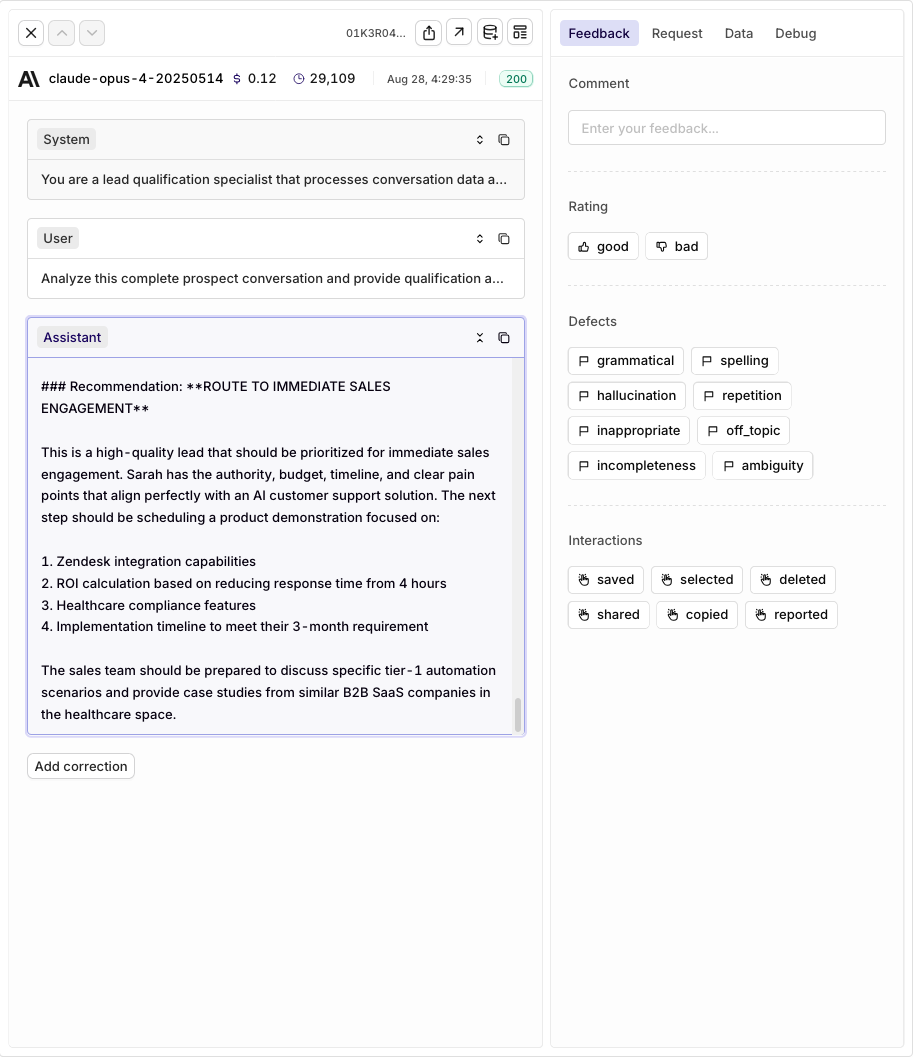 To learn more about agents and their capabilities, see [Agents API Documentation](/docs/ai-studio/ai-engineering/run-agents).
## Key Benefits
* **Context Persistence**: `previous_response_id` maintains conversation state across multiple turns without passing full history
* **Specialized Agents**: Each agent optimized for its specific role (ingestion, qualification, insertion)
* **Modern Framework**: Built on A2A Protocol for standardized agent-to-agent communication
* **Tool Integration**: Seamless function tool integration for CRM and external system operations
* **Scalable Architecture**: Independent agents enable parallel processing and easy optimization
**Next Steps**: Learn about [Multi-Agent Workflows](/docs/ai-studio/ai-engineering/run-agents#multi-agent-workflows) and [Tool Support](/docs/ai-studio/ai-engineering/build-agents#add-tools) to expand your pipeline capabilities.
To learn more about agents and their capabilities, see [Agents API Documentation](/docs/ai-studio/ai-engineering/run-agents).
## Key Benefits
* **Context Persistence**: `previous_response_id` maintains conversation state across multiple turns without passing full history
* **Specialized Agents**: Each agent optimized for its specific role (ingestion, qualification, insertion)
* **Modern Framework**: Built on A2A Protocol for standardized agent-to-agent communication
* **Tool Integration**: Seamless function tool integration for CRM and external system operations
* **Scalable Architecture**: Independent agents enable parallel processing and easy optimization
**Next Steps**: Learn about [Multi-Agent Workflows](/docs/ai-studio/ai-engineering/run-agents#multi-agent-workflows) and [Tool Support](/docs/ai-studio/ai-engineering/build-agents#add-tools) to expand your pipeline capabilities.