> ## Documentation Index
> Fetch the complete documentation index at: https://docs.orq.ai/llms.txt
> Use this file to discover all available pages before exploring further.
# Auto Router | Intelligent routing in AI Gateway
> Automatically route each request to the optimal model based on your optimization strategy. Reduce costs without sacrificing the quality that matters.
Not every request needs your most expensive model. The **Auto Router** automatically routes each request to the optimal model based on your chosen profile, so you can reduce costs without sacrificing the quality that matters.
You configure a **Strong Model** and an **Economical Model**, then choose how aggressively to route between them. The Auto Router evaluates each incoming request and sends it to whichever model best matches the task complexity and your optimization goal.
Two directions are supported:
* **Optimize for cost**: set a high-quality model as your baseline. The Auto Router routes simpler requests to the cheaper model and escalates only when complexity warrants it. You save on the requests that don't need your most powerful model.
* **Optimize for quality**: start with a cost-efficient model and let the Auto Router escalate to the more capable model only when the task demands it. Get the best output for every request without overspending.
## Use Cases
| Scenario | Setup | Outcome |
| ----------------------------------- | ------------------------------------------------ | -------------------------------------------------------------------------------------------------------------------------------------- |
| **Customer support chatbot** | Strong: Claude Opus / Economical: Gemini Flash | Simple FAQs and acknowledgements go to the fast model; nuanced complaints or policy questions escalate automatically |
| **Document summarization pipeline** | Strong: GPT-4o / Economical: GPT-4o Mini | Short documents with clear structure route to the mini model; long, dense, or ambiguous documents go to the full model |
| **Code assistant** | Strong: Claude Sonnet / Economical: Gemini Flash | Autocomplete and boilerplate generation stay cheap; debugging, architecture questions, and multi-file reasoning escalate |
| **Content generation at scale** | Strong: GPT-5.1 / Economical: GPT-4o Mini | High-volume social copy and templated content uses the cheaper model; long-form articles or brand-sensitive copy uses the stronger one |
| **Internal Q\&A over documents** | Strong: Claude Opus / Economical: Claude Haiku | Retrieval-augmented lookups with clear answers route to Haiku; open-ended synthesis or conflicting sources escalate to Opus |
## How It Works
The Auto Router sits between your application and two models you configure: a **Strong Model** for complex requests and an **Economical Model** for simpler ones. When a request comes in, it analyzes the task complexity and routes it to the appropriate model based on your profile.
## Set Up the Auto Router
1. Navigate to the **AI Gateway** section in **AI Studio** and open the **Models** page.
2. Click Add Model.
3. Select **Auto Router** from the dropdown.
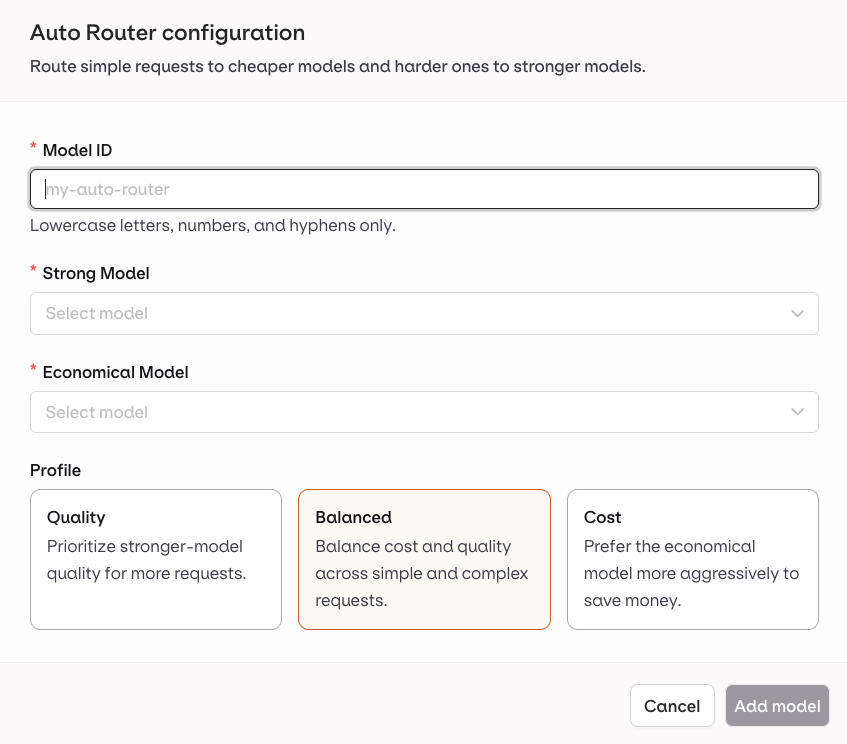
4. Fill in the configuration:
* **Model ID**: a unique identifier for this router (lowercase letters, numbers, and hyphens only).
* **Strong Model**: the more capable model, used for complex requests.
* **Economical Model**: the cheaper model, used for simpler requests.
* **Profile**: choose how aggressively to route between the two models.
5. Click **Add model**.
 ## Profiles
| Profile | Behavior |
| ------------ | ------------------------------------------------------------ |
| **Quality** | Prioritizes the Strong Model for more requests |
| **Balanced** | Balances cost and quality across simple and complex requests |
| **Cost** | Prefers the Economical Model more aggressively to save money |
## Recommended model pairs
These pairs combine high routing accuracy with significant cost ratios (over 10x), making them effective starting points.
| Strong Model | Economical Model |
| ----------------------- | ----------------------- |
| Google Gemini 2.5 Pro | Google Gemini 2.5 Flash |
| OpenAI GPT-5.1 | OpenAI GPT-4o Mini |
| Anthropic Claude Opus 4 | Google Gemini 3 Flash |
| OpenAI GPT-4o | OpenAI GPT-4o Mini |
Models from the same family or tier work well together (e.g. Claude Sonnet and Gemini Flash). Very large capability gaps reduce the effectiveness of routing.
You can combine models from different providers in a single Auto Router configuration.
## Use the Auto Router
Once created, the **Auto Router** appears in your **AI Gateway** and can be selected anywhere a model is accepted: [Deployments](/docs/deployments/overview), [Agents](/docs/agents/overview), [Playground](/docs/ai-studio/prompts/playgrounds), and [Experiments](/docs/experiments/overview).
### Reference in code
When using an **Auto Router** through the SDKs, API, or [Supported Libraries](/docs/proxy/frameworks/overview), reference it by the string `@orq/`.
> Example: `acme@orq/my-auto-router`
## Profiles
| Profile | Behavior |
| ------------ | ------------------------------------------------------------ |
| **Quality** | Prioritizes the Strong Model for more requests |
| **Balanced** | Balances cost and quality across simple and complex requests |
| **Cost** | Prefers the Economical Model more aggressively to save money |
## Recommended model pairs
These pairs combine high routing accuracy with significant cost ratios (over 10x), making them effective starting points.
| Strong Model | Economical Model |
| ----------------------- | ----------------------- |
| Google Gemini 2.5 Pro | Google Gemini 2.5 Flash |
| OpenAI GPT-5.1 | OpenAI GPT-4o Mini |
| Anthropic Claude Opus 4 | Google Gemini 3 Flash |
| OpenAI GPT-4o | OpenAI GPT-4o Mini |
Models from the same family or tier work well together (e.g. Claude Sonnet and Gemini Flash). Very large capability gaps reduce the effectiveness of routing.
You can combine models from different providers in a single Auto Router configuration.
## Use the Auto Router
Once created, the **Auto Router** appears in your **AI Gateway** and can be selected anywhere a model is accepted: [Deployments](/docs/deployments/overview), [Agents](/docs/agents/overview), [Playground](/docs/ai-studio/prompts/playgrounds), and [Experiments](/docs/experiments/overview).
### Reference in code
When using an **Auto Router** through the SDKs, API, or [Supported Libraries](/docs/proxy/frameworks/overview), reference it by the string `@orq/`.
> Example: `acme@orq/my-auto-router`