> ## Documentation Index
> Fetch the complete documentation index at: https://docs.orq.ai/llms.txt
> Use this file to discover all available pages before exploring further.
# Prompt management tutorial
> Use Orq.ai as a prompt manager for your LLM calls. Fetch deployment configurations at runtime while keeping control over your infrastructure.
## Configuration Management
You can decide to use **orq.ai** only as configuration management for your various LLM backend.
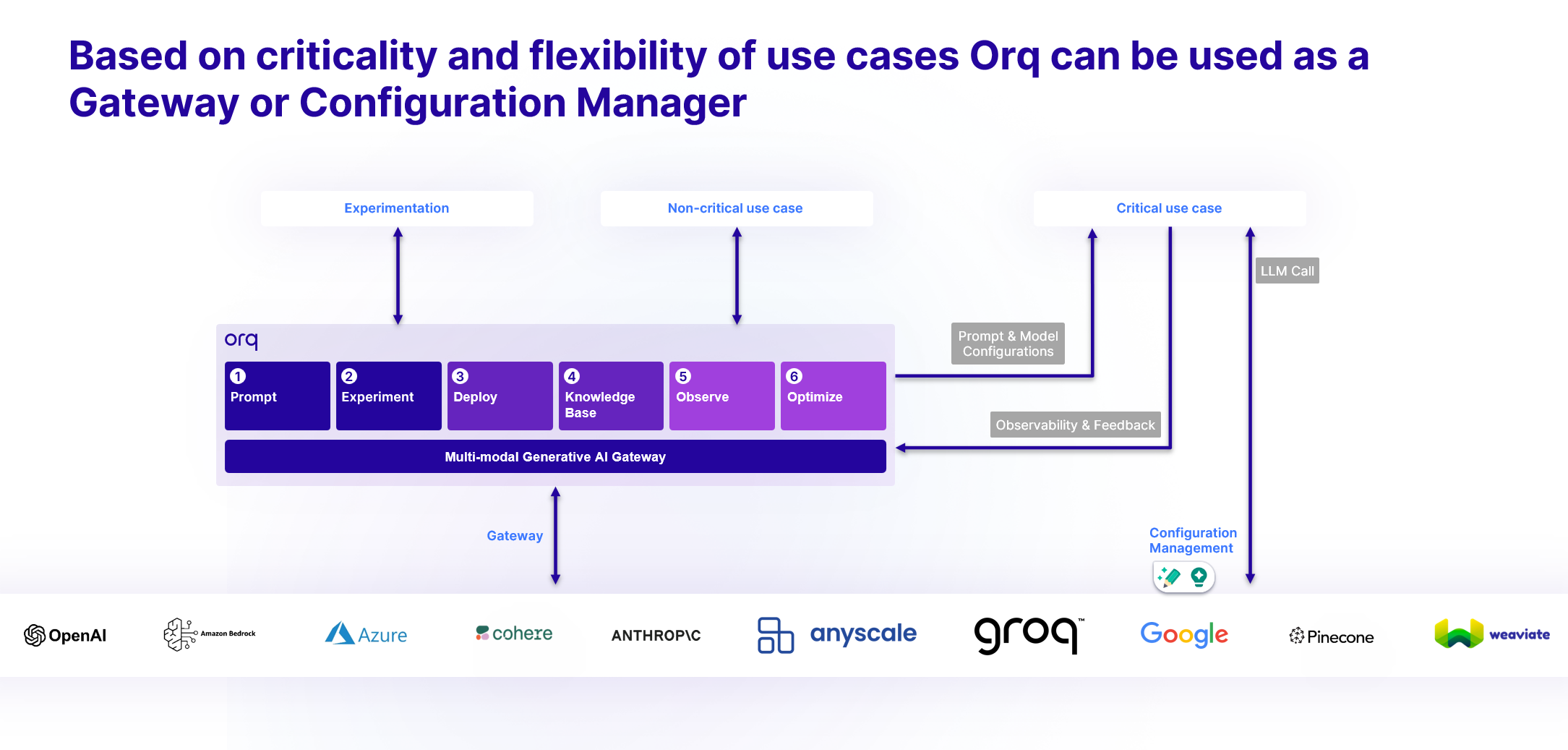 This has some advantages over using AI Gateway:
* You manage **the calls to LLM Models end-to-end**, this lets you keep control over the integration and manage its lifecycle, ensuring data stays within your infrastructure before reaching LLM backends.
* You still benefit from the configuration management on **orq.ai** side and can fetch at runtime the latest configuration from your Deployment.
* You still benefit from [Deployment Routing](/docs/ai-studio/ai-engineering/deployments#routing), ensuring your users reach the model you desire, using dynamic Context Attributes.
## Using get\_config
Our API and SDK offer a way to invoke a [Deployment](/docs/deployments/overview) but also a way to fetch its Configuration: **get\_config**
To lean more about get\_config, see its [API Reference](/reference/deployments/get-config).
By using this method you will benefit from [Deployment Routing](/docs/ai-studio/ai-engineering/deployments#routing) as well all the configurations stored within the Deployment. You can then use this object to call any LLM provider directly from your application.
### Example Call
The following is an example call using our SDKs, the call is similar to the `invoke` call. Its difference is that it returns a configuration object and doesn't execute calls to LLM providers.
```python Python theme={"theme":{"light":"github-light","dark":"github-dark"}}
import os
from orq_ai_sdk import Orq
client = Orq(api_key=os.environ.get("ORQ_API_KEY"))
config = client.deployments.get_config(
key="Deployment-configuration",
context={"environments": ["production"], "locale": ["en"]},
inputs={"country": "Netherlands"},
metadata={"custom-field-name": "custom-metadata-value"},
)
print(config.to_dict())
```
```typescript TypeScript theme={"theme":{"light":"github-light","dark":"github-dark"}}
import { Orq } from "@orq-ai/node";
const client = new Orq({ apiKey: process.env.ORQ_API_KEY });
const deploymentConfig = await client.deployments.getConfig({
key: "Deployment-configuration",
context: { environments: ["production"], locale: ["en"] },
inputs: { country: "Netherlands" },
metadata: { "custom-field-name": "custom-metadata-value" }
});
```
> `key`: The deployment to invoke.
>
> `inputs`: The key-value pair of variables to replace in your prompts. Default variables are used if not provided.
>
> `context`: This key-value pair that match your data model and fields declared in your Variant Routing Configuration matrix.
>
> `metadata`: This key-value pairs that you want to attach to the log generated by this request.
When using **get\_config**, you won't benefit from retries and fallbacks as your calls to LLM providers will be made outside of our Platform.
### Configuration Caching
When using **get\_config**, [Deployment](/docs/deployments/overview) configurations are automatically cached to minimize latency.
The cache is invalidated whenever you make changes to a deployment, ensuring your application always receives the most up-to-date configuration.
This caching mechanism provides fast configuration retrieval while maintaining consistency across your infrastructure.
### Metrics & Logging
By using the `id` returned from your **get\_config** call, you can also add logs back to your deployment and benefit from the [Dashboard](/docs/ai-studio/observability/quickstart).
To do so, use the `add_metrics` call (see [Add metrics](/reference/deployments/add-metrics). **add\_metrics** lets you track various metrics, including but not limited to chain ID, conversation ID, user ID, feedback (scores), custom metadata, and performance-related statistics.
***
This has some advantages over using AI Gateway:
* You manage **the calls to LLM Models end-to-end**, this lets you keep control over the integration and manage its lifecycle, ensuring data stays within your infrastructure before reaching LLM backends.
* You still benefit from the configuration management on **orq.ai** side and can fetch at runtime the latest configuration from your Deployment.
* You still benefit from [Deployment Routing](/docs/ai-studio/ai-engineering/deployments#routing), ensuring your users reach the model you desire, using dynamic Context Attributes.
## Using get\_config
Our API and SDK offer a way to invoke a [Deployment](/docs/deployments/overview) but also a way to fetch its Configuration: **get\_config**
To lean more about get\_config, see its [API Reference](/reference/deployments/get-config).
By using this method you will benefit from [Deployment Routing](/docs/ai-studio/ai-engineering/deployments#routing) as well all the configurations stored within the Deployment. You can then use this object to call any LLM provider directly from your application.
### Example Call
The following is an example call using our SDKs, the call is similar to the `invoke` call. Its difference is that it returns a configuration object and doesn't execute calls to LLM providers.
```python Python theme={"theme":{"light":"github-light","dark":"github-dark"}}
import os
from orq_ai_sdk import Orq
client = Orq(api_key=os.environ.get("ORQ_API_KEY"))
config = client.deployments.get_config(
key="Deployment-configuration",
context={"environments": ["production"], "locale": ["en"]},
inputs={"country": "Netherlands"},
metadata={"custom-field-name": "custom-metadata-value"},
)
print(config.to_dict())
```
```typescript TypeScript theme={"theme":{"light":"github-light","dark":"github-dark"}}
import { Orq } from "@orq-ai/node";
const client = new Orq({ apiKey: process.env.ORQ_API_KEY });
const deploymentConfig = await client.deployments.getConfig({
key: "Deployment-configuration",
context: { environments: ["production"], locale: ["en"] },
inputs: { country: "Netherlands" },
metadata: { "custom-field-name": "custom-metadata-value" }
});
```
> `key`: The deployment to invoke.
>
> `inputs`: The key-value pair of variables to replace in your prompts. Default variables are used if not provided.
>
> `context`: This key-value pair that match your data model and fields declared in your Variant Routing Configuration matrix.
>
> `metadata`: This key-value pairs that you want to attach to the log generated by this request.
When using **get\_config**, you won't benefit from retries and fallbacks as your calls to LLM providers will be made outside of our Platform.
### Configuration Caching
When using **get\_config**, [Deployment](/docs/deployments/overview) configurations are automatically cached to minimize latency.
The cache is invalidated whenever you make changes to a deployment, ensuring your application always receives the most up-to-date configuration.
This caching mechanism provides fast configuration retrieval while maintaining consistency across your infrastructure.
### Metrics & Logging
By using the `id` returned from your **get\_config** call, you can also add logs back to your deployment and benefit from the [Dashboard](/docs/ai-studio/observability/quickstart).
To do so, use the `add_metrics` call (see [Add metrics](/reference/deployments/add-metrics). **add\_metrics** lets you track various metrics, including but not limited to chain ID, conversation ID, user ID, feedback (scores), custom metadata, and performance-related statistics.
***