

Introducing Evaluatorq
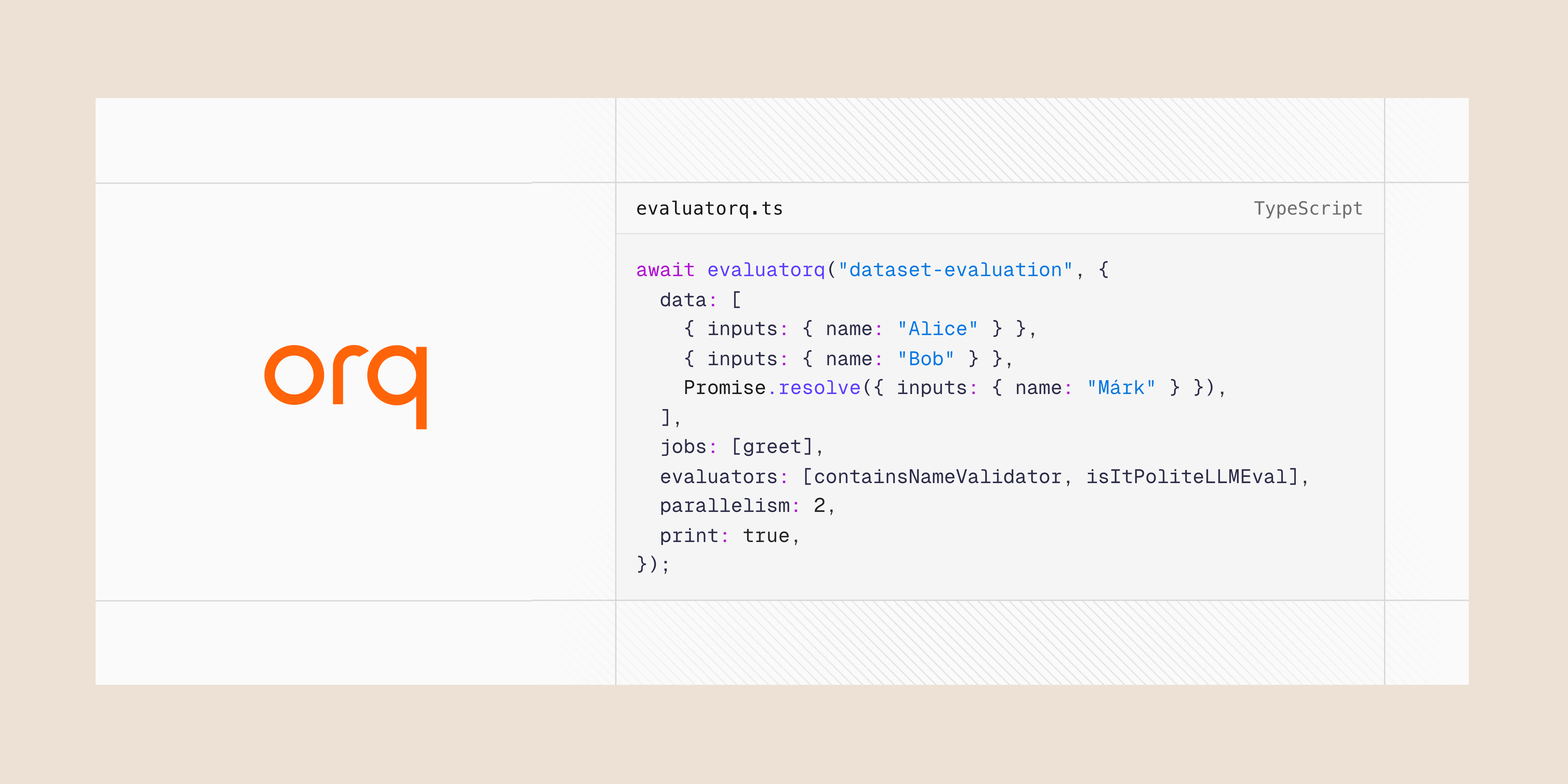
- Parallel Execution: Run multiple evaluation jobs concurrently with progress tracking
- Flexible Data Sources: Support for inline data, promises, and Orq platform datasets
- Type-safe: Fully written in TypeScript
- Orq Platform Integration: Seamlessly fetch and evaluate datasets from Orq AI (optional)
npm install @orq-ai/evaluatorqBasic UsageTypescript
Native support for Gemini models - URL Context Tool
The new URL context tool enables models to access content directly from provided URLs, enhancing responses with external information for tasks like extracting data, comparing documents, synthesizing content, and analyzing code or documentation.Key Features- Two-step retrieval: internal index cache first, live fetch if unavailable.
- Returns url_context_metadata with retrieval details and safety checks.
- Supports up to 20 URLs per request, max 34MB per URL.
- Retrieved content counts toward input tokens (tracked in usage_metadata).
- gemini-2.5-pro
- gemini-2.5-flash
- gemini-2.5-flash-lite
- Use direct, specific, fully qualified URLs (https://…).
- Avoid login-restricted or paywalled content.
- Combine with Google Search grounding for broader workflows.
OpenTelemetry Tracing Support
- Native OpenTelemetry (OTel) export for traces.
- Send spans directly to our OTLP/HTTP collector at
https://my.orq.ai/v2/otel. - Works with standard OTel SDKs and exporters (Python, Node.js).
- Supports custom headers (e.g., bearer tokens) and resource attributes (e.g., service.name).
Python
TypeScript
Knowledge API: New Parameters
Newsearch_type field with options:vector_search: Semantic similarity searchkeyword_search: Exact text matchinghybrid_search: Combined approach (default)- Separated Top-K Controls:
top_k: Controls initial document retrieval (1-100)rerank_config.top_k: Controls final result count after reranking (1-100)
- New agentic_rag_config parameter to customize AI-driven search behavior per request
- Flexible Search Strategy: Choose optimal search method per query
- Fine-tuned Relevance: Retrieve broadly, return precisely with independent top-k settings
- Performance Optimization: Better control over retrieval vs. quality trade-offs
- Users can now choose specific search strategies instead of relying on knowledge base defaults
- Better control over the retrieval-rerank pipeline allows for more relevant results by retrieving more documents initially but returning fewer, higher-quality results
Support for OpenAI’s image edit and variation APIs
Image Edit and Image Variation are now supported in our AI Proxy. This comes with complete trace monitoring and cost tracking.Also, all the images are stored in our Orq with the same expirations as the retention period of your workspace.cURL
Python
Typescript
File Uploads for Anthropic Models
PDF support is currently supported via direct API access and Google Vertex AI on:- Claude Opus 4.1 (claude-opus-4-1-20250805)
- Claude Opus 4 (claude-opus-4-20250514)
- Claude Sonnet 4 (claude-sonnet-4-20250514)
- Claude Sonnet 3.7 (claude-3-7-sonnet-20250219)
- Claude Haiku 3.5 (claude-3-5-haiku-20241022)
Comprehensive Budget Controls & Cost Management
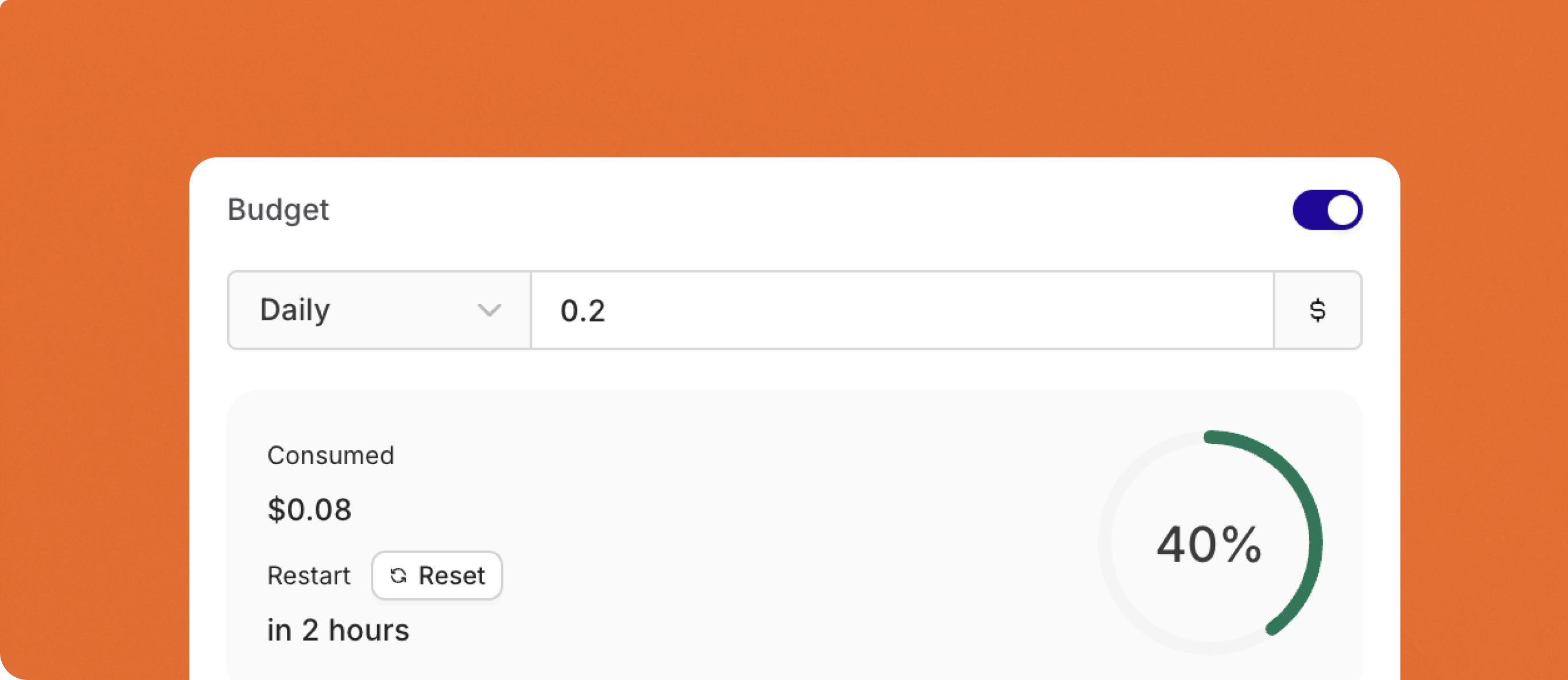
- Configure budgets with daily, weekly, monthly, or yearly reset cycles
- Automatic period boundary calculation with UTC timezone standardization
- Period-aligned cache TTL for optimal performance
- New Budgets API to create budgets programmatically
- Prevent individual users from exceeding allocated AI budgets
- Set department-level spending limits for enterprise teams
- Control costs across multiple AI models and services
For more on using Contacts, see Creating a Contact.

Preview Model Support
We will no longer support experimental and preview models by default in the AI Router.Going forward, access to preview or experimental models will only be granted upon request. Many of these models are unreliable in production, they regularly fail or become unavailable without notice, which leads to a poor experience and extra maintenance overhead.If you have a use case that specifically requires an experimental or preview model, please reach out to support@orq.aiThree new RAGAS Evaluators for enhanced RAG Experiments
We’ve added three new RAGAS evaluators to the Orq.ai platform, giving you deeper insights into your retrieval-augmented generation (RAG) workflows. These evaluators help you understand not just if the right information was retrieved, but how well your system handles noisy data and captures key context.Here’s what’s new:1. Context Recall
Measure how much of the relevant reference information your retrieval pipeline actually brings into context. This evaluator compares the retrieved text to the reference for each user query, helping you identify if important facts are missing. Use context recall to improve your retrieval strategy and ensure your LLM responses are always well-supported.Entities used:- Reference (ground truth)
- Retrieved text
- When you want to know if your retrieval step is actually surfacing all necessary information for the LLM to answer correctly.
2. Noise Sensitivity
Understand how your RAG system performs when irrelevant or “noisy” information is mixed into the retrieved context. This evaluator tests the robustness of your model by introducing noise and measuring the impact on your outputs. It’s a great way to benchmark reliability in real-world scenarios where retrieval isn’t always perfect.Entities used:- User message
- Reference (ground truth)
- Retrieved text (with added noise)
- When you want to see if your LLM can still provide accurate answers, even when extra, unrelated information appears in the context.
3. Context Entities Recall
Check whether the most important entities (names, places, organizations, etc.) present in your reference are also present in the retrieved context. This evaluator goes beyond text overlap and focuses on the coverage of key information units, helping you catch subtle gaps in your retrieval pipeline.Entities used:- Reference (ground truth)
- Retrieved text
- When you want to be sure your retrieval is capturing and surfacing all the essential entities needed to answer user queries correctly.
Use these new RAGAS evaluators to systematically assess and improve the quality, completeness, and reliability of your RAG pipelines right from within Orq.ai.
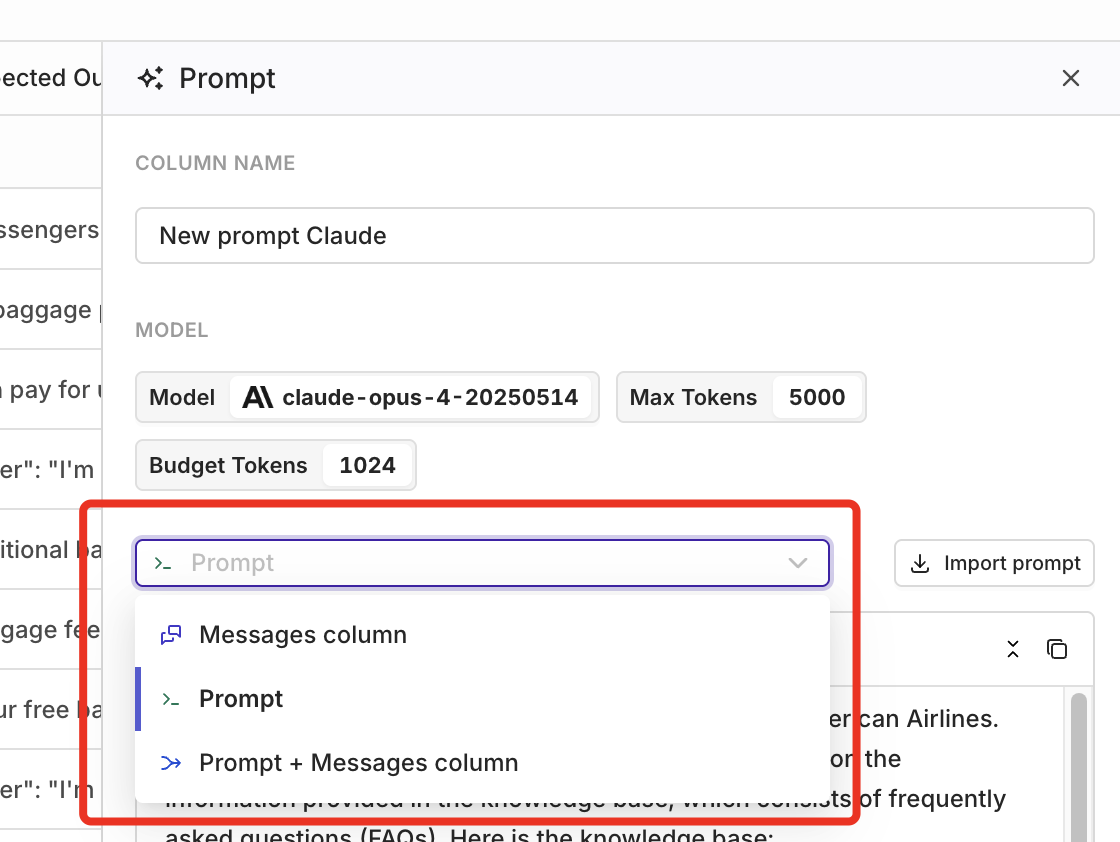
Flexible Prompt Configuration for Experiments
Configuring Experiments just got more flexible.Previously, when setting up an Experiment, you could only use the prompt from your dataset (themessage column), or you had to set up your prompt manually in the prompt template. With this update, you can now combine both approaches, giving you far more control over your Experiments.This is especially useful if your application logs real user input from your AI features in production. Those logs often contain valuable user messages you want to test against different system prompts. With this update, you can easily combine actual user messages from your dataset with new or imported system prompts directly in your prompt template configuration. This allows you to experiment and see which prompt produces the best response, without needing to restructure your data.This improved flexibility makes it much easier to:- Systematically validate regression, improvements, and guardrail compliance
- Compare outputs for cost, latency, and consistency
- Run more realistic and effective experiments based on actual user input
Chunking API
The Chunking API is now live - the final building block for fully programmatic knowledge base workflows. With this new API, you can automatically split (“chunk”) your text data in the way that best fits your needs, all without leaving your workflow.The Chunking API supports six different chunking strategies, each suited to a different kind of content:- Token chunker: Splits your text based on token count. Great for keeping chunks small enough for LLMs and for consistent embedding sizes.
- Sentence chunker: Breaks your text at sentence boundaries, so each chunk stays readable and sentences remain intact.
- Recursive chunker: Chunks text by working down a hierarchy (paragraphs, then sentences, then words) to maintain document structure.
- Semantic chunker: Groups together sentences that are topically related, so each chunk makes sense on its own.
- SDPM chunker: Uses advanced skip-gram patterns to find natural split points, especially helpful for technical or structured documents.
- Agentic chunker: Uses an LLM to determine the best split points, ideal for complex documents that need intelligent segmentation.
📘 Try the Chunking API out for yourself: the Chunking API reference
Evaluators API
We’ve expanded evaluator support with two new APIs, enabling much more flexible, code-driven workflows:- Evaluators Hub API: Run any evaluator on demand via API, without needing to attach it to an experiment or deployment. Ideal for integrating evaluator runs into your own pipelines or automated tools.
- Evaluators API: Create, retrieve, update, and delete evaluators directly via API. This allows you to fully manage your evaluators programmatically, instead of only through the UI.
- Decoupled Evaluation: Run and manage evaluators without relying on experiments or deployments.
- Full API Control: Create, update, and remove evaluators as your evaluation needs evolve.
- Pipeline Integration: Integrate both evaluator management and execution into your own data pipelines or CI/CD workflows.
- Faster Iteration: Quickly test, refine, and iterate on evaluators using code.
- Automation: Scale evaluations and management as needed for batch operations or continuous quality monitoring.
Connect LiteLLM models to Orq
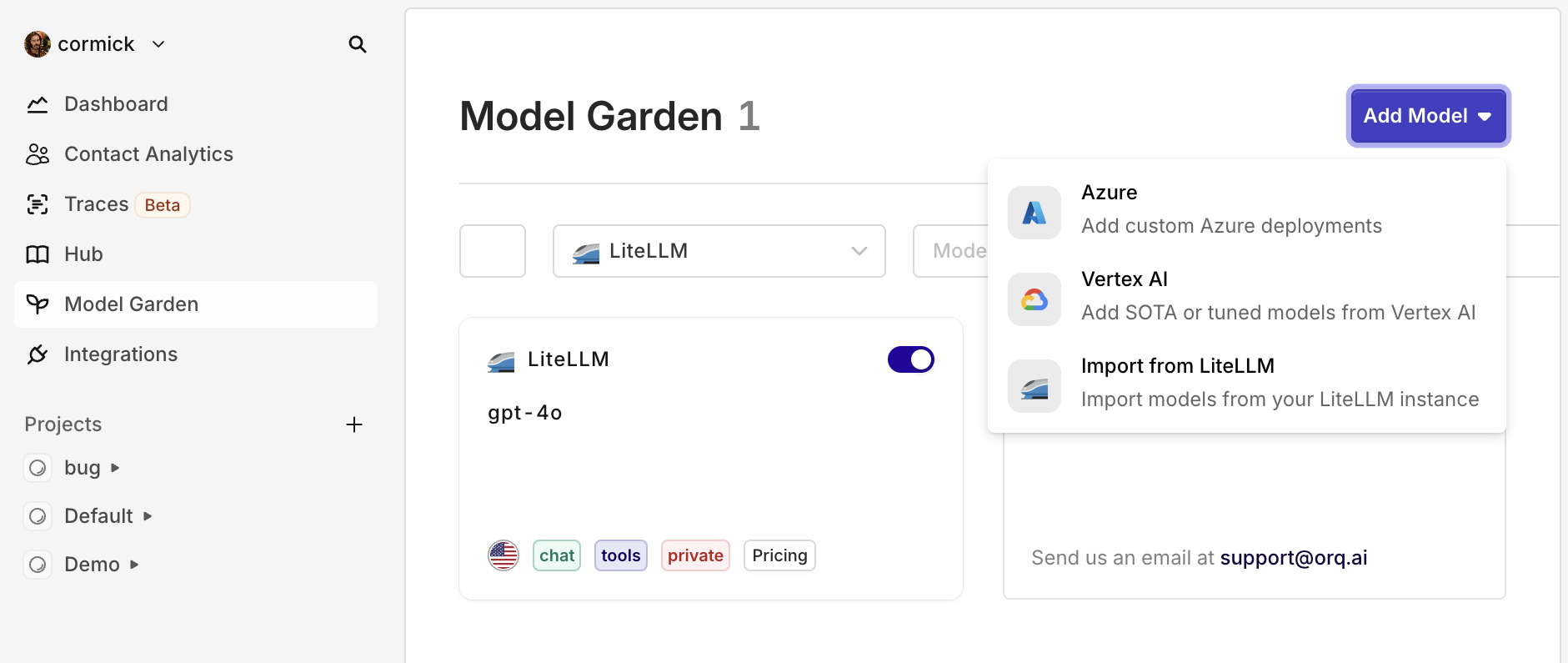
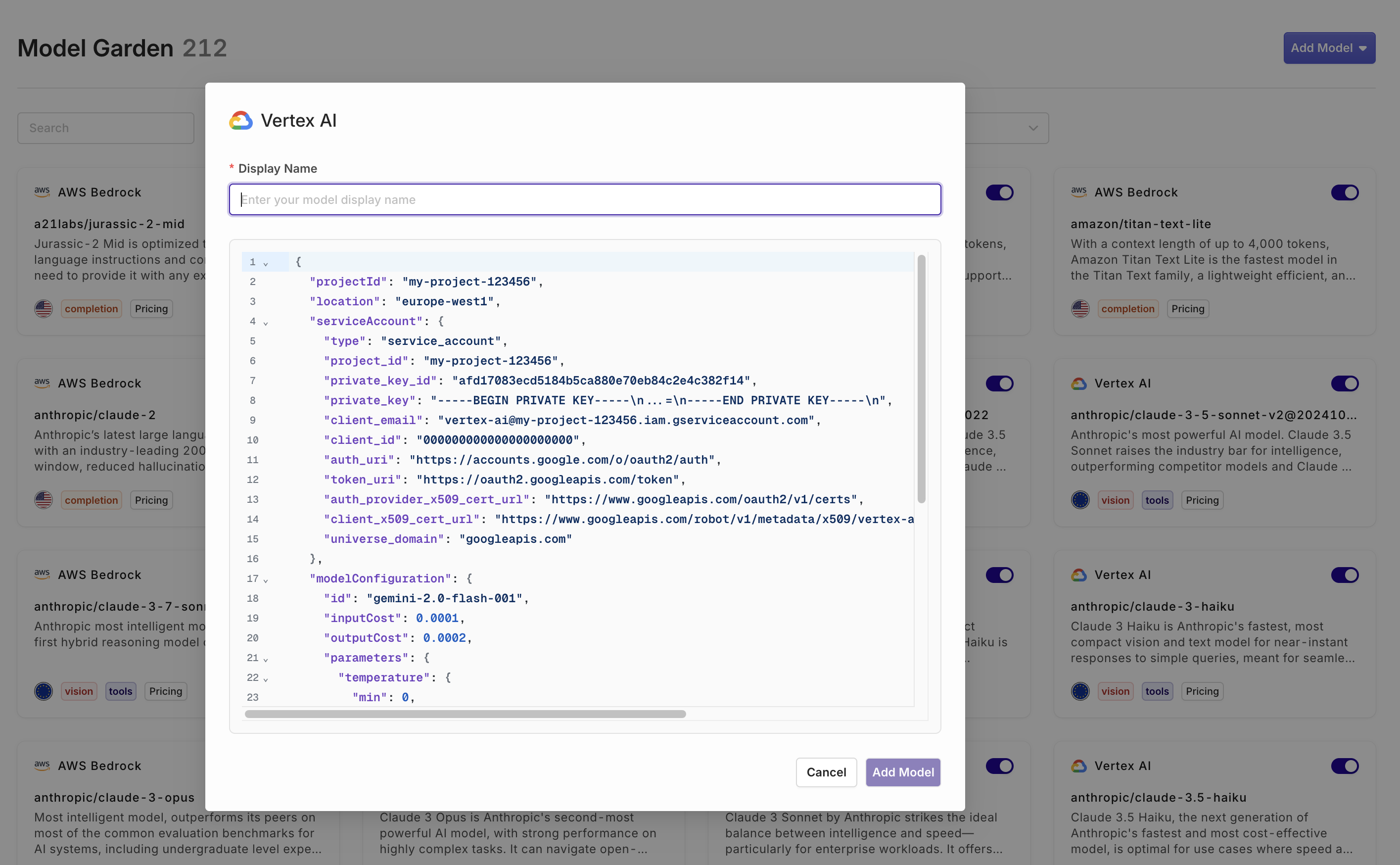
You can now connect your LiteLLM-managed models directly to Orq.ai, making it even easier for teams already using LiteLLM to get started with Orq—without having to change your LLM gateway.Who is this for?This integration is ideal for teams who have standardized on LiteLLM for unified API access, flexible model management, or cost control—but want to benefit from Orq’s full platform for everything beyond just model access.How to get started:
- Go to the Integrations tab, click LiteLLM, and enter your base URL and API keys.
- In the AI Router, click Add Model, select Import from LiteLLM, and choose your model(s).
- No migration pain: Instantly connect your existing LiteLLM models, no rework needed.
- Keep your infra, add new superpowers: Keep LiteLLM as your gateway while gaining everything Orq offers for GenAI ops.
- Best of both worlds: For teams already invested in LiteLLM, this means you get prompt management, deployments, evaluation, and observability—on top of your existing setup.
Custom Human Review
Today we’re introducing Custom human review, a major update that gives teams full flexibility in collecting and structuring human feedback in Orq.ai.With this release, you’re no longer limited to predefined review types. Now, you can create your own feedback forms tailored to your workflow and use case. Choose from three flexible input types:- Categorical: Create button options with your own labels, such as good/bad or saved/deleted.
- Range: Set up a custom scoring slider (for example, a scale from 0 to 100).
- Open field: Allow users to enter free-form feedback, perfect for more detailed comments.
How to collect feedback
There are two ways to collect feedback:- Orq Studio: Custom human review templates can be used directly within the Orq.ai platform, where colleagues and domain experts review AI outputs and provide structured feedback.
- API: Alternatively, developers can leverage the Orq API to expose these custom feedback forms in their own applications or products, allowing end users to submit feedback seamlessly.
Why this matters
Collecting high-quality, relevant human review is crucial for improving AI features. Teams can structure feedback in a way that makes sense for them, whether for quality control, prompt iteration, or continuous evaluation. All feedback is attached to the log, including prompts and outputs, making it easy for prompt engineers to refine configurations based on real-world usage.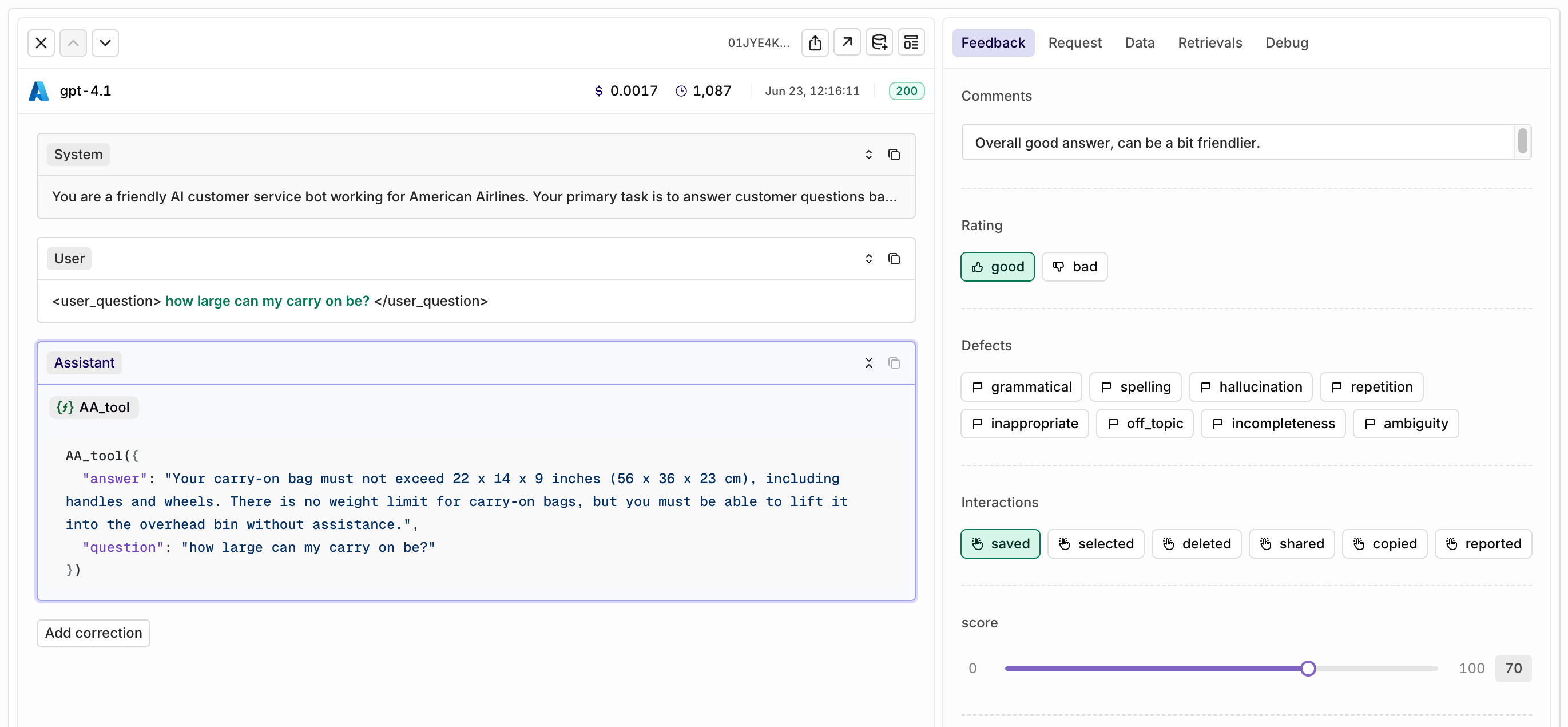
How to create custom Human Review
Evaluator playground
We’ve added a new way to quickly test your evaluators directly within the evaluator configuration screen.Previously, testing an evaluator meant attaching it to a deployment or running an experiment, often more work than needed for a quick check. With the new Test Your Evaluator playground, you can now try out your evaluator on the spot, using custom queries and responses.This makes it easier to iterate, validate, and fine-tune your evaluators, without leaving the configuration screen or disrupting your workflows.Attach files directly to the model
With our latest update, you can now attach PDF files directly to Gemini and OpenAI models. Simply include the encoded file in your deployment invocation, and the model will natively process the PDF - no more manual file uploads or bloated prompts.Why this matters- Better File Understanding: Models can directly analyze the content and structure of your PDFs—including text, images, tables, and diagrams - improving extraction quality and structured outputs.
- Cleaner Prompts: File data is no longer dumped into your system or user message, resulting in faster, less error-prone requests.
file_data should be using the standard data URI scheme (data:content/type;base64). See an example API call below:cURL
Python
Typescript
Evaluator runs without new generation
You can now evaluate existing LLM outputs without generating new responses. Previously, running an evaluator required creating a new output every time. With this update, you can retroactively score any response already stored in your dataset.Why this matters- Quality: Evaluate historical responses to ensure you’re assessing the true source of truth, not just new outputs.
- Flexibility: Apply evaluations to both single responses and full conversation chains, adapting to your specific review needs.
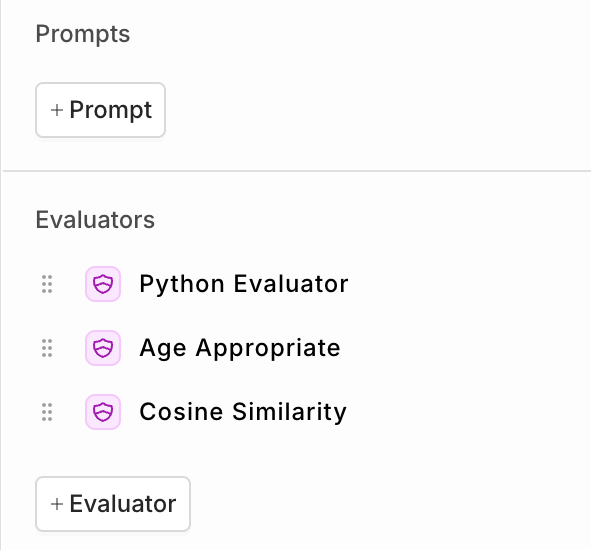
- Prepare your dataset including LLM outputs in the messages column.
- Set up an experiment and select one or more evaluators - do not select a prompt.
- The evaluator will analyze the responses already present in the “messages” column of your dataset.
Experiment Runs overview
You can now compare different Experiment runs in a single overview using the new Runs tab.Previously, reviewing the results of multiple experiment runs required clicking into each run individually and manually comparing scores. This made it harder to spot improvements or regressions at a glance.With the new Runs overview, you get a clear, side-by-side comparison of all your experiment runs, including all your evaluator scores. This makes it much easier to see if recent changes to your prompt or model setup have led to measurable improvements, or unexpected regressions.Example:In the screenshot below, you can see that both Experiment Run #1 and #2 achieved a perfect score on the JSON Schema Evaluator (100), while Cosine Similarity improved from 0.65 to 0.69.No more clicking back and forth between runs, get instant insight into your progress in one place.
Improved Experiment configuration panel
Configuring your experiments just got a lot easier. The new side panel gives you a clear and organized overview of everything in your experiment, making setup and adjustments faster and more intuitive.With the improved configuration panel, you can instantly see:\- Which prompts, models, and evaluators are included in your experiment
- The status and details of each prompt and evaluator
- A simple way to add or edit prompts and evaluators directly from the side panel
Metadata filter on Knowledge Base Chunks
Knowledge Base chunks can now be enriched with metadata during creation via the Chunks API. When searching your Knowledge Base, you can filter results by metadata to target only the most relevant chunks—improving both accuracy and efficiency in retrieval.Highlights:- Add custom metadata to each Knowledge Base chunk at creation.
- Search using metadata filters to refine results.
Why this matters
As your Knowledge Base grows, searching through every chunk for every query can slow things down and introduce noise in responses. By tagging each chunk with metadata—such as document type, source, department, date, or custom tags—you gain precise control over what information gets retrieved. This ensures users and AI models only access the most relevant information, leading to faster, higher-quality answers and improved user experience.Example
If your company stores support articles in the Knowledge Base for multiple products, you can now instantly filter retrieval to only include articles for a specific product, version, or language—removing irrelevant matches and streamlining customer support.cURL
Python
Typescript
📘 To learn more about search, see Searching a knowledge base and the related API.
Claude Sonnet 4 & Opus 4
With the launch of Claude Sonnet 4 and Opus 4, Anthropic has introduced its most advanced AI models yet.Both models share the same large 200k token context window and up-to-date training data (March 2025), but they are designed for slightly different needs.Claude Sonnet 4 is the best choice for most users. It offers excellent reasoning, strong tool use, and great overall performance at a much lower price. For 95% of typical use cases—including content generation, Q&A, code review, and day-to-day tasks—Sonnet provides the best balance of speed, capability, and cost.Claude Opus 4 is Anthropic’s top-tier model. It delivers the highest level of reasoning and intelligence and outperforms other models on complex or nuanced tasks. Opus is ideal for scenarios where accuracy and depth matter more than speed or cost, such as advanced research, detailed data analysis, and orchestrating multi-step workflows. However, it is slower and significantly more expensive.Both models represent a significant leap over previous versions, with better reasoning, improved tool use, and more robust handling of longer or more complex inputs. Choose Sonnet for value and everyday performance, and Opus for your most demanding AI workloads.
Tool response in Playground
We’ve enhanced the Playground experience by introducing interactive tool responses. When you’re using tools (also known as function calls) within your workflow, you can now seamlessly provide the tool response back to the model, enabling continuous and efficient testing of your workflows.How it works:Invoke Tools: When your model calls a tool (e.g.,get_weather), it provides the tool name and relevant arguments.Interactive Response: Previously, your workflow paused here, requiring manual intervention. Now, you can directly give the tool response back to the model or use the handy Tab shortcut to auto-generate a suggested response.Continue Workflow: With the tool response provided, the model can continue, generating a final, context-aware response.This new capability simplifies debugging and allows you to rapidly prototype sophisticated workflows without interruption. See an example below.OpenAI’s new o3, o4-mini, GPT-4.1 models
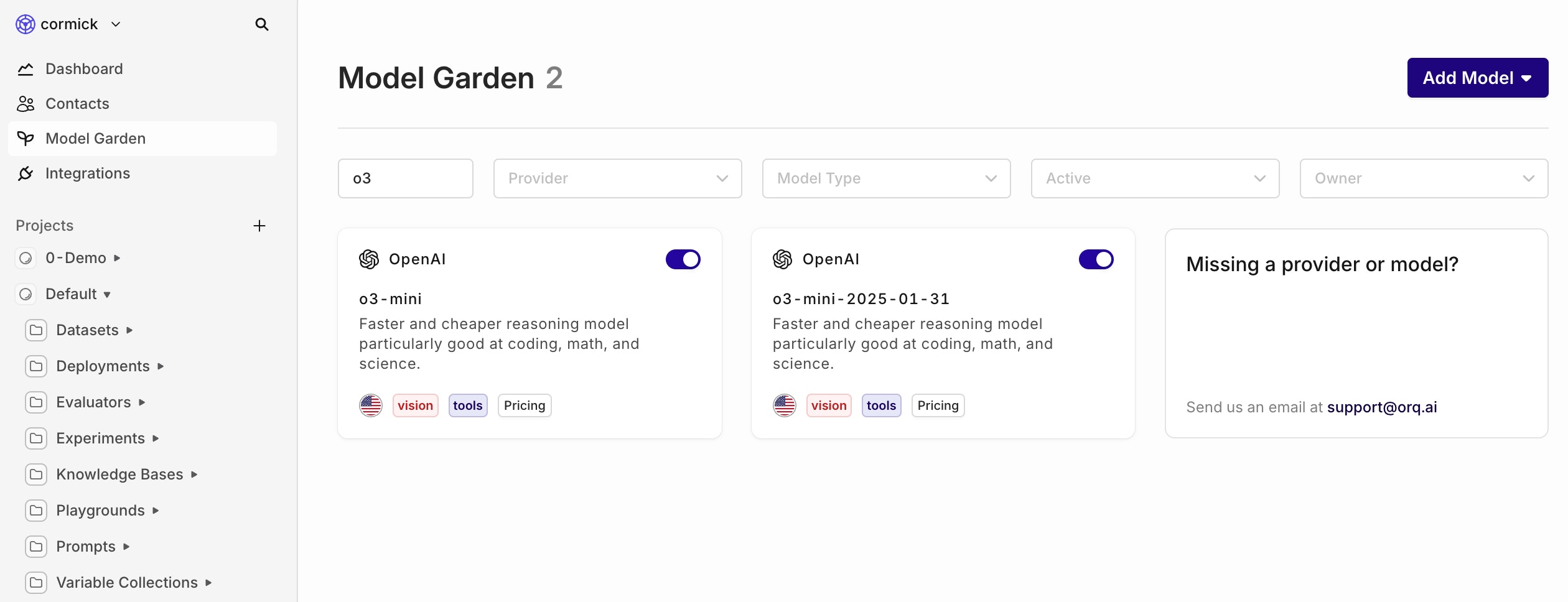
OpenAI’s latest models can be found in the AI Router.When to use what model
- o-series models are purpose-built for reasoning and tool-use. Choose o3 when raw capability beats everything else; use o4-mini when you still need strong reasoning but want 10× cheaper tokens and snappier replies.
- GPT-4.1 family is the evolution of the “generalist” GPT line. The full model gives you 1 M-token context with strong instruction following; mini trims cost/latency for mainstream workloads; nano pushes pricing and speed to the floor for simple or massive-scale tasks.
Rate Limits
To ensure fair usage and consistent performance, we’ve introduced rate limits for all Orq.ai APIs on a per-account basis. This helps prevent server overload, reduces risk of abuse, and keeps costs manageable.If your account exceeds its rate limit, you’ll receive a429 Too Many Requests response.Rate limits vary by subscription tier:For more details, refer to our pricing page.
Agentic RAG
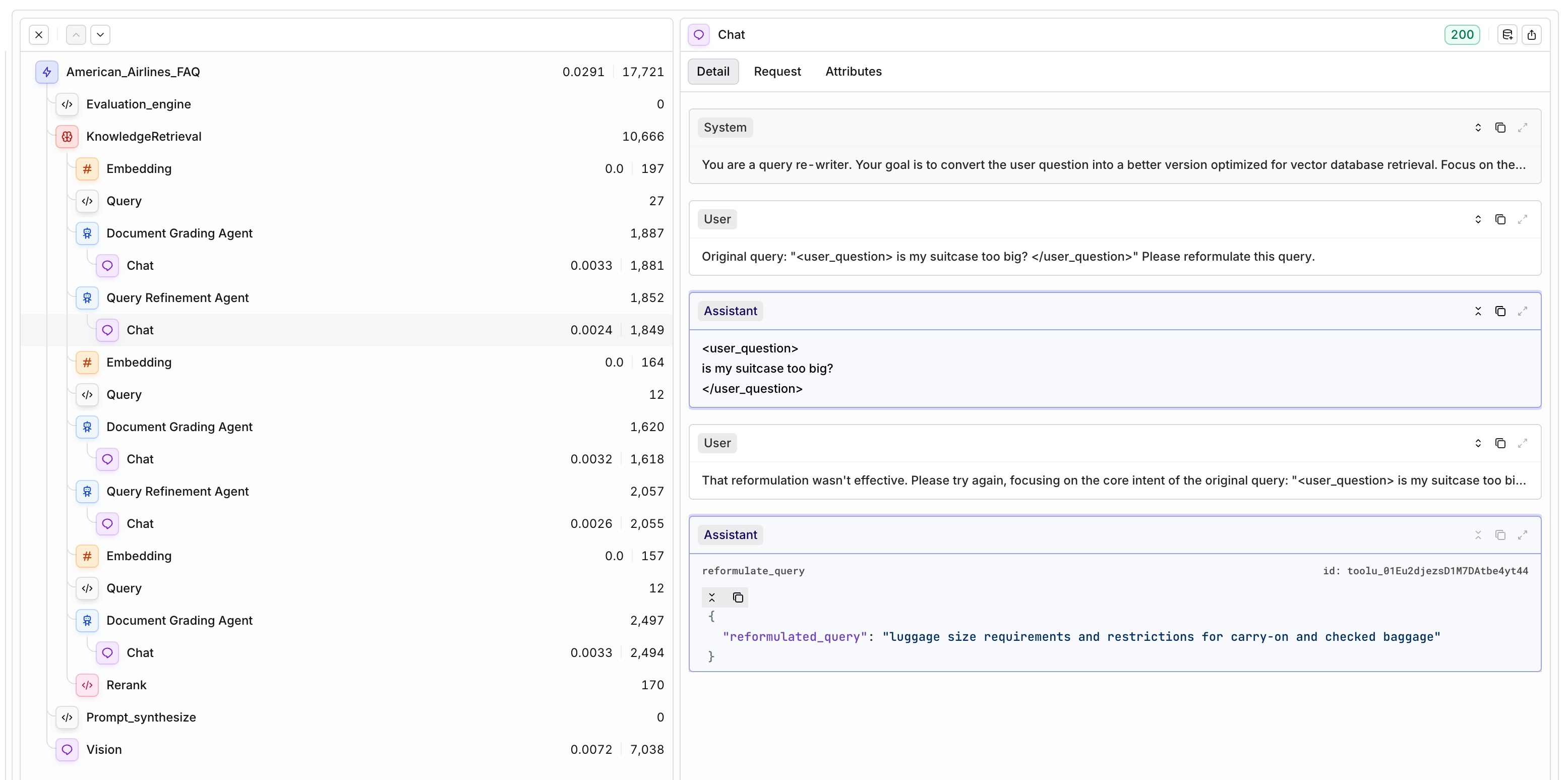
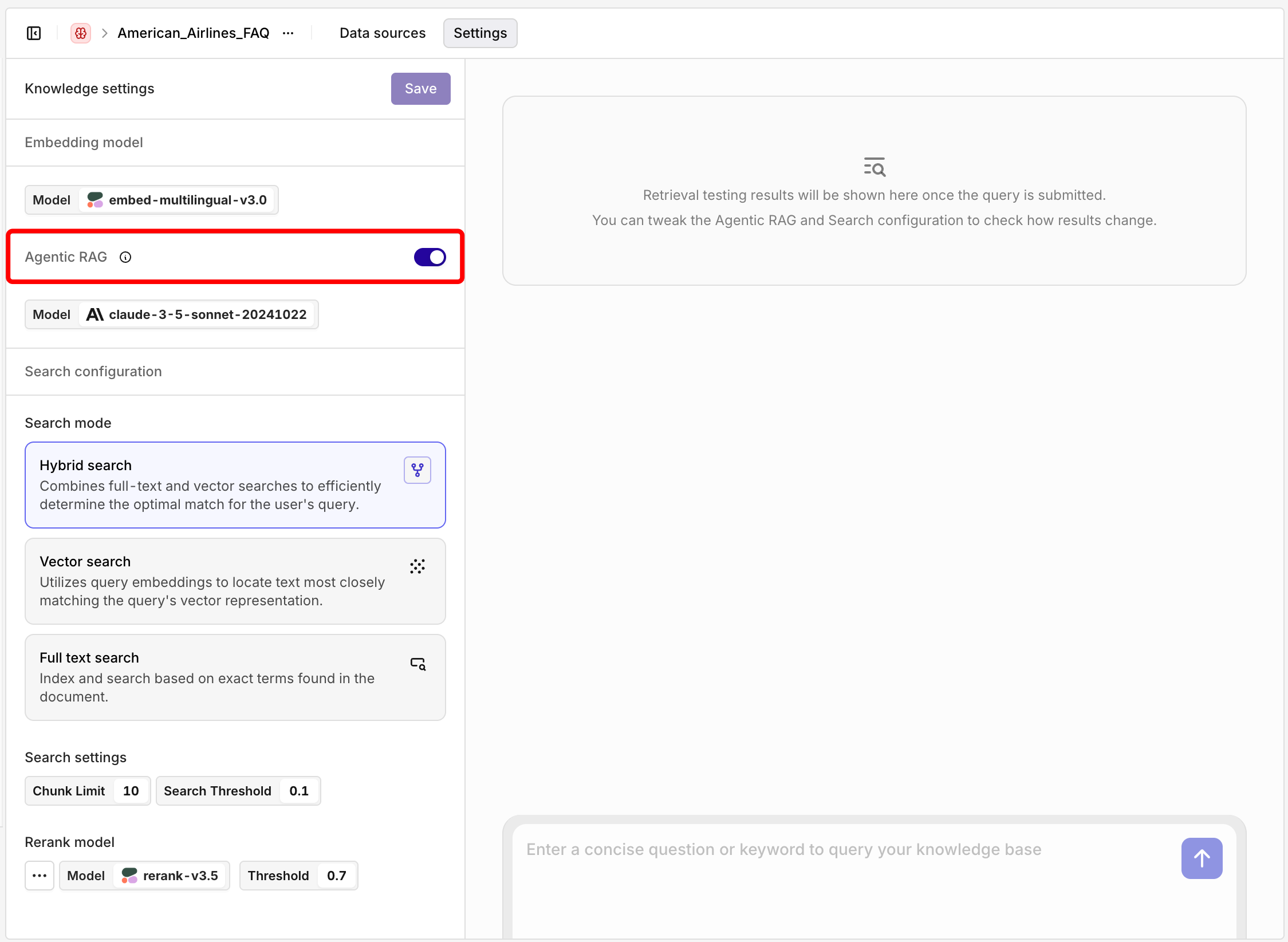
You can now enable Agentic RAG in your deployments to improve the relevance of retrieved context and the overall output quality.Once toggled on, simply select a model to act as the agent. The agent will automatically check if the retrieved knowledge chunks are relevant to the user query. If they aren’t, it rewrites the query — preserving the original intent — to improve retrieval results.This iterative refinement loop increases the chance of surfacing useful context from your Knowledge Base, giving the language model better grounding to generate high-quality, reliable responses. The setup includes two key components:- Document Grading Agent – determines if relevant chunks were retrieved.
- Query Refinement Agent – rewrites the query if needed.
Threads
We’ve added a new Threads view to help you make sense of multi-step conversations at a glance.Each thread captures the full back-and-forth between the user and the assistant, showing just the inputs and outputs per step—without the technical breakdowns like embeddings, rerankers, or guardrails. It’s ideal for reviewing how the conversation unfolds across multiple steps.The Thread Overview includes:- Start time and last update
- Total duration
- Number of traces (steps)
- Total cost and tokens used
- Project name and session ID
- Custom tags to help categorize threads
- Project
- Tags
- Start date
📘 To start using the Threads function add a thread id during the deployment invocation, to learn more, see Threads.
Jina AI - new embedding and rerank models
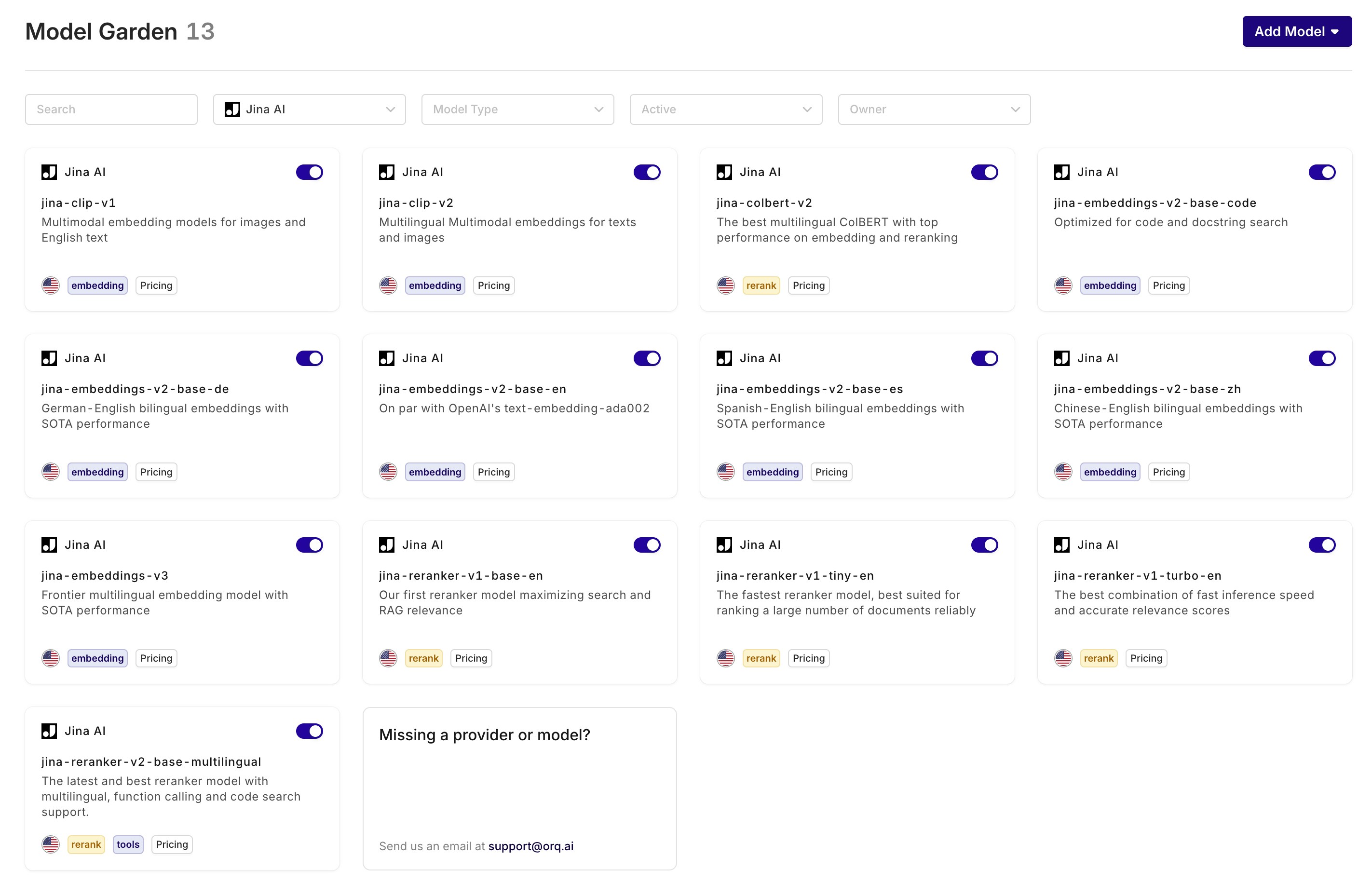
We’ve added Jina AI as a new provider, bringing a suite of high-performance models to the platform:- Multilingual Embedding Models: Use Jina AI’s embedding models—like jina-embeddings-v3, supporting 89 languages and sequences up to 8,192 tokens.
- Efficient Rerank Models: Choose from three reranker variations:
- Tiny – optimized for speed and low memory use.
- Turbo – a balance between speed and accuracy.
- Base – best-in-class accuracy for critical use cases.
Knowledge Base API
Previously, creating and managing a knowledge base required using the Orq UI. Users had to manually create a knowledge base, upload one file at a time, and define a chunking strategy per datasource. While simple, this process was time-consuming, especially for developers looking to scale or automate their workflows.With the new Knowledge Base API, all major operations are now available programmatically. You can create and manage knowledge bases, upload datasources, generate or manage chunks, and perform retrieval-related actions, all through code.This opens up much more flexibility, especially for teams working on complex chunks. You can now:\- Perform chunking on your own side, tailored to your data structure
- Bring your own chunks—and even include your own embeddings
- Let Orq embed the chunks if embeddings aren’t provided, using the model specified in your API call
- Knowledge bases: create, list, retrieve, update, delete
- Datasources: create, list, retrieve, update, delete
- Chunks: create, list, retrieve, update, delete
- Search: inspect what’s being retrieved
📘 Read more on the Knowledge API in our docs or in the SDKs
Hub
We’ve added a new feature called the Hub — a library where you can browse and reuse common evaluators and prompts for your projects.Instead of starting from a blank screen, you can now add ready-made components with one click. Some can be fully customized after adding them to your project (like prompts or classification evaluators), while others — such as traditional NLP metrics like cosine similarity — are fixed by design.The goal: make it easier to start with off-the-shelf evals and prompts.At launch, the Hub includes prompts and evaluators. Soon, you’ll also find datasets, tools, and other entities here to further speed up your workflow.You can find the Hub in the left-hand menu of your workspace.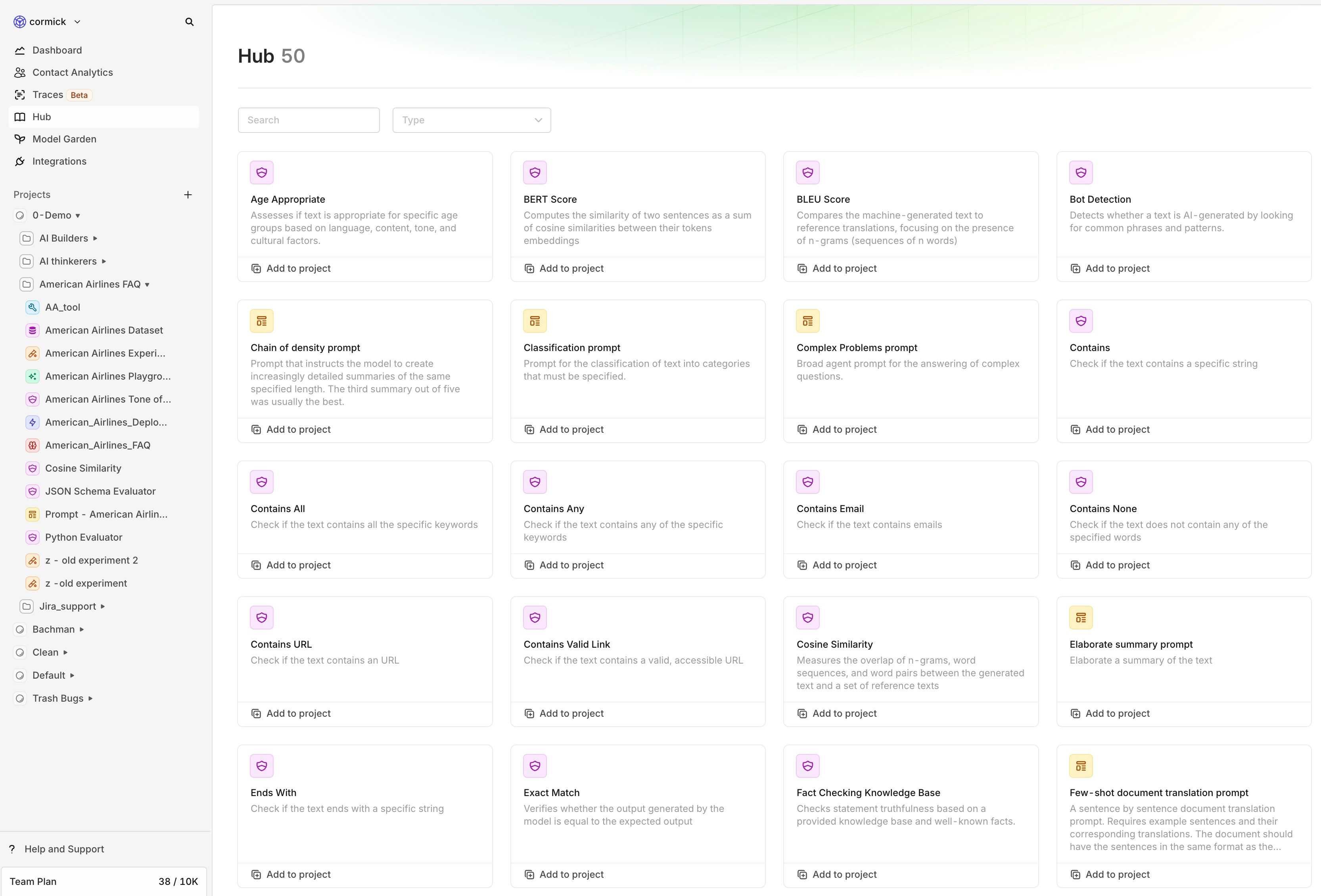
Tracing
AI workflows can feel like a black box—when something goes wrong, it’s hard to know why. Tracing changes that by giving you full visibility into every step of your workflow. Instead of guessing why an LLM output is wrong, you can quickly check every step in the workflow—saving time and reducing frustration.With this release, you can inspect all events that occur within a trace, including:- Retrieval – See which knowledge chunks were fetched.
- Embedding & Reranking – Understand how inputs are processed and prioritized.
- LLM Calls – Track prompts, responses, and latency.
- Evaluation & Guardrails – Ensure quality control in real time.
- Cache Usage – Spot inefficiencies in repeated queries.
- Fallbacks & Retries – Detect when your system auto-recovers from failures.
Billing impact - Event count
With the introduction of Traces, all the events seen in the overview will count towards the number of events. This has direct impact on the billing.An example: A chat request with 2 evaluators was historically counted as 1 request but will now be counted as 3 events.Python Evaluators
When building AI features, ensuring high-quality and reliable outputs is crucial. Orq.ai allows you to implement custom evaluators in Python, giving you full control over how AI-generated content is assessed and validated.Benefits of Using Python for Evaluators
- Flexibility & Customization
- Seamless Integration
- Preloaded with NumPy
- Automated & Scalable
📘 Read here how to set up a custom Python Evaluator, see our docs
Move entities
Previously, once an entity was created, it was locked in place—you couldn’t move it to another project or directory. Now, you finally can.With this new feature, users can seamlessly move entities and directories to different projects and directories, ensuring better organization and flexibility in managing data.Key Details:
- Move entities and directories freely between projects and directories.
- Maintain project-level permissions—entities will only be visible to the selected teams assigned to that project.
- Improve workflow efficiency by keeping related entities together where they belong.
How It Works
This update gives you more control over your workspace, making it easier to structure your data the way you need it.Try it out and optimize your project structure today!GPT 4.5
OpenAI has unveiled GPT-4.5, its latest and most advanced AI language model to date. Building upon the foundation of GPT-4o, GPT-4.5 offers enhanced pattern recognition, deeper world knowledge, and a more refined conversational experience. This release aims to provide users with a more intuitive and reliable AI assistant for a variety of applications.Why It Matters
GPT-4.5 represents a significant step forward in AI-human interaction. By reducing instances of AI “hallucinations” and improving emotional intelligence, users can expect more accurate and contextually appropriate responses. These enhancements are particularly beneficial for tasks requiring creativity, empathy, and nuanced understanding, such as content creation, customer support, and personal assistance.What’s New?
Enhanced Knowledge: GPT-4.5 has been trained on a broader dataset, resulting in a more comprehensive understanding of various topics and improved factual accuracy.Improved Conversational Abilities: The model now exhibits a more natural and emotionally nuanced conversational style, making interactions feel more like engaging with a thoughtful human.Reduced Hallucinations: Through advanced training techniques, GPT-4.5 significantly lowers the occurrence of generating incorrect or fabricated information, enhancing user trust.Additional Enhancements
- Training Innovations: GPT-4.5 combines traditional supervised fine-tuning with scalable alignment, where smaller models generate high-quality training data for larger models. This approach accelerates training and improves the model’s ability to follow nuanced instructions.
- Multilingual and Multimodal Support: The model shows moderate gains in understanding multiple languages and processing various data types, making it versatile for global applications.
Performance & Analysis Tools
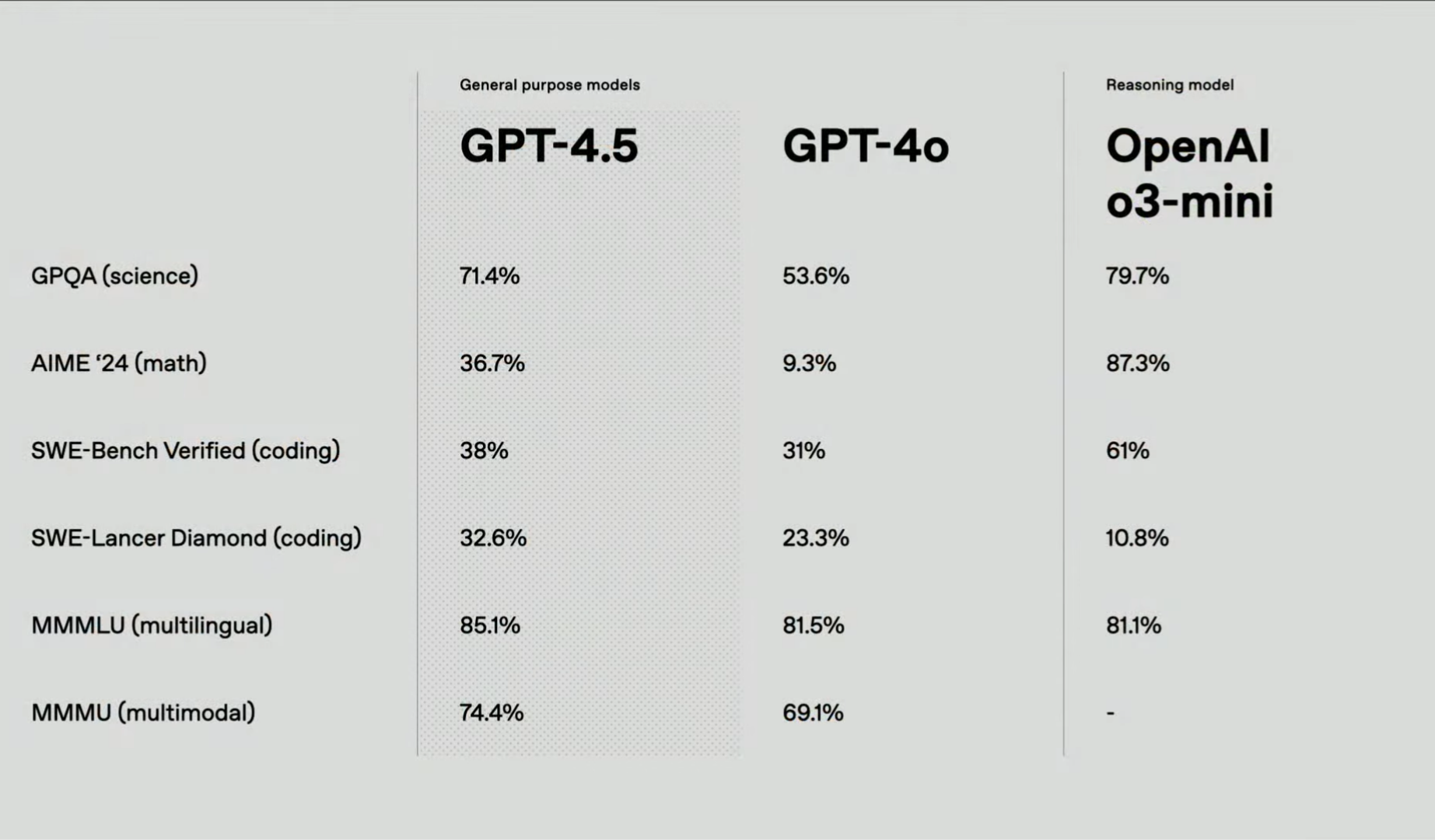
- Benchmark Evaluations: GPT-4.5 demonstrates solid improvements over GPT-4o, especially in math (+27.4%) and science (+17.8%), making it more reliable for factual reasoning.
- User Feedback Integration: OpenAI encourages users to engage with GPT-4.5 and provide feedback to further refine its capabilities and address any limitations.
-
Complex reasoning: Even though GPT-4.5 is an improvement over GPT-4.o, for more complex reasoning tasks, you should use o3-mini.
Claude 3.7 Sonnet
Claude 3.7 Sonnet is Anthropic’s most intelligent AI model yet, introducing hybrid reasoning, fine-tuned for business use cases, and an extended 200K context window.🚧 We don’t return the thinking message yet, only the final output will be shown
📘 The model is available through Anthropic and Vertex AI
🚧 In AWS, the model is only available in the US region
Thinking - Budget tokens Parameter
With the introduction of the new model, we also introduce a new parameter with it: Thinking - budget tokensUsing this parameter users can enable/ disable the models reasoning capabilities. Additionally, you can set how many tokens should be dedicated for its ‘thinking’ step. We do recommend a minimum of 1024 budget tokens. A value of 0 means the thinking is disabled. The budget tokens should never exceed the Max Tokens parameter because it still needs tokens to generate a final answer.Key highlights
🧠 Hybrid Reasoning Model- First-of-its-kind AI that can provide instant responses or extended, step-by-step reasoning based on user preference.
- API users can control “thinking time” to balance speed, accuracy, and cost.
- Improved ability to analyze charts, graphs, and complex diagrams, making it ideal for data science, analytics, and business intelligence.
- Enhanced reasoning and natural conversation flow make it ideal for interactive AI assistants that connect data, make decisions, and take actions.
- Automate complex workflows and repetitive tasks with industry-leading instruction following and tool integration.
- Supports a 200K context window for deep comprehension of long documents, knowledge bases, and large datasets.
- 128K output tokens (beta)—15x longer responses, enabling extensive code generation, planning, and detailed analysis.
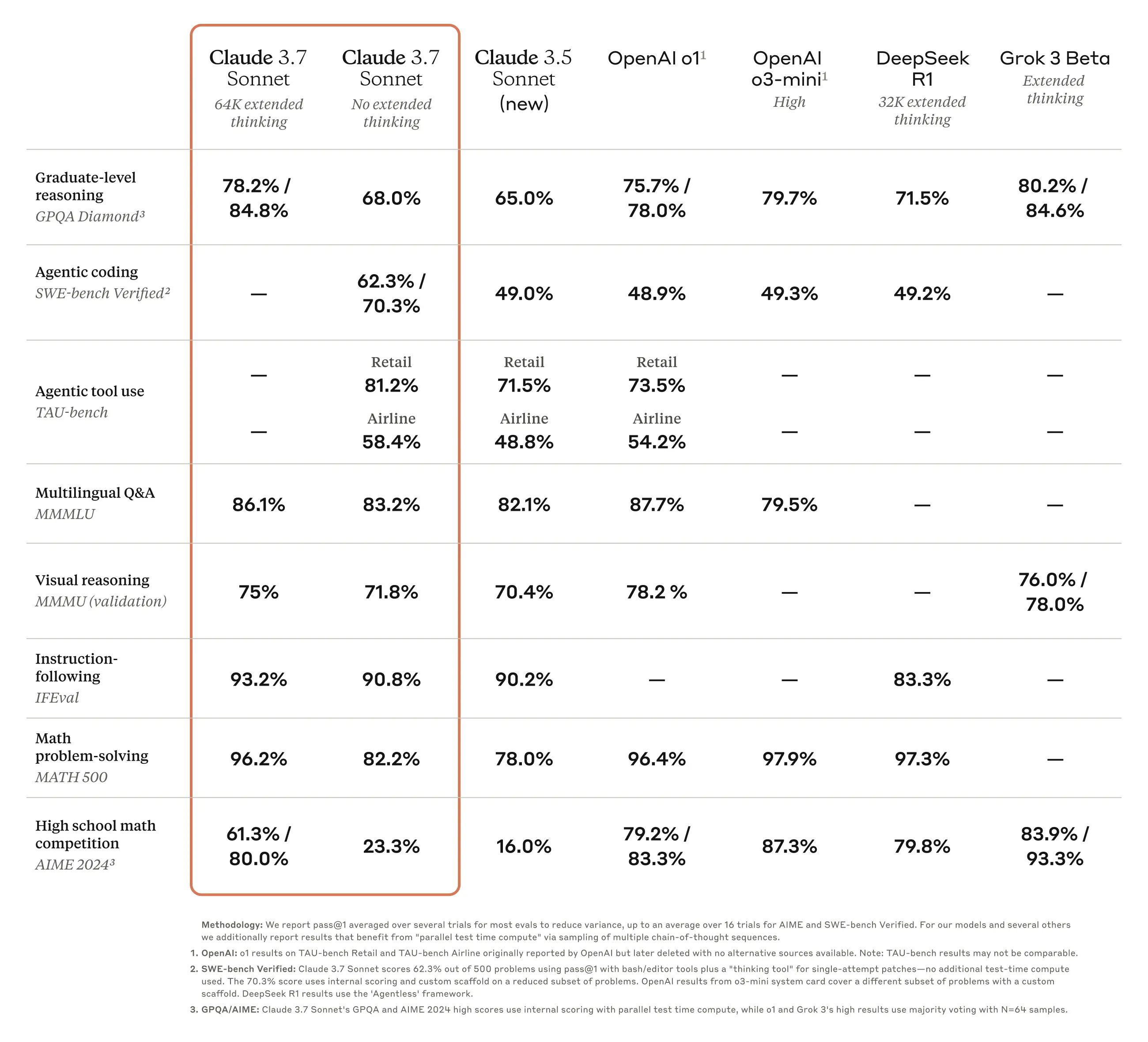
Benchmarks and performance
Increased fallbacks
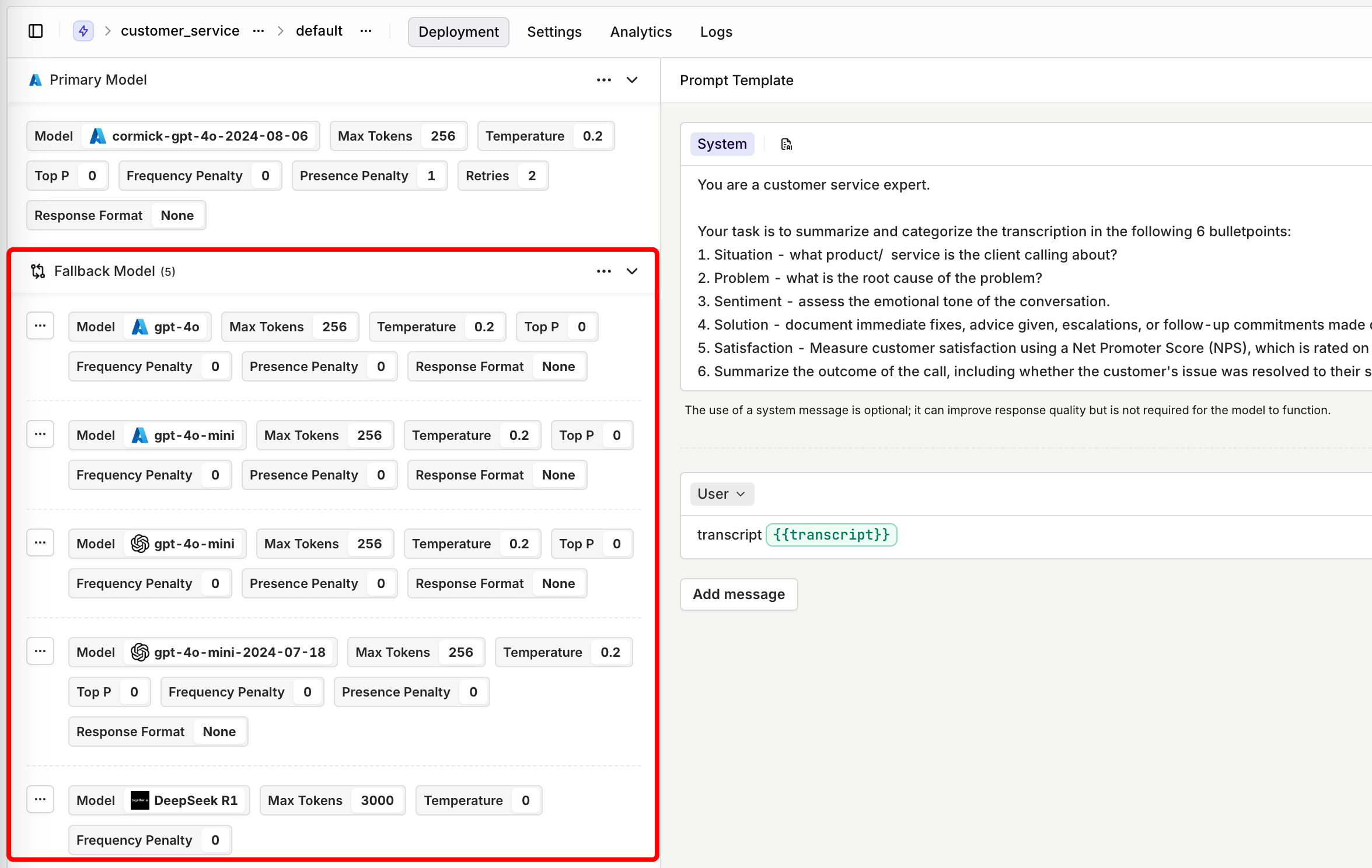
We’ve enhanced our fallback and retry system to provide even greater reliability and flexibility in production use cases. Previously, Orq.ai allowed users to define a single fallback model if the primary model failed to generate a satisfactory output. Now, we’ve increased the number of fallback models to five, giving users even more control over model orchestration without additional coding.What’s New?
- Up to Five Fallback Models – Previously limited to one fallback model, users can now configure up to five fallback models for increased reliability.
- Flexible Fallback Configuration – The ability to define multiple fallback models allows for more advanced use cases, such as distributing API requests across different endpoints. For example:
- Azure provides different regional deployments for models like GPT-4o. If a user is making a large number of API calls through the Sweden Central region, they can configure their first fallback to West Europe, and subsequent fallbacks to other locations if rate limits are hit.
- If a primary model encounters rate limits, Orq can seamlessly transition requests to alternative endpoints, ensuring uninterrupted performance.
Importing prompts
We’ve introduced a new feature that makes it easier than ever to reuse your prompts within Orq.ai. With the import functionality, you can seamlessly integrate your already created, version-controlled prompts into your Playgrounds, Experiments, and Deployments.What’s New?
- Seamless Importing – Users can now import their saved prompts directly into their workspace.
- Version Control – Select the specific version of a prompt to use.
- Model Configuration – You can import your prompt including the optional model config.
Datasets v2
We’ve made a significant update to how datasets work in Orq.ai with the release of Datasets v2. This update merges variable collections into datasets, streamlining the structure and eliminating confusion between the two concepts.What’s Changed?
Previously, variable collections only contained input variables, while Datasets v1 stored message arrays and optional references. With Datasets v2, we now combine everything into a single entity. This provides a single source of truth, making it clearer what constitutes a dataset and simplifying how datasets are used.Why This Change?
- Eliminates confusion between datasets and variable collections.
- Creates a unified structure for better dataset management.
- Ensures consistency for experiments and historical logging.
Why use Datasets v2?
- Upload a dataset to evaluate your use case in an Experiment
- Save human-curated logs into curated datasets, which you can use to fine-tune your model.
- Save bad-rated logs, crucial for prompt engineers looking to refine prompts and improve output quality.
Experiments v2 - Evaluate your LLM Config
We’re excited to introduce Experiments V2, a major upgrade to our Experiments module that makes testing, evaluating, and benchmarking models and prompts more intuitive and flexible than ever before.Why Experiments Matter
The Experiments module allows users to analyze model performance systematically without manually reviewing logs one by one. It leverages evaluators—such as JSON schema validators, LLM-as-a-judge, and functions like cosine similarity —to automate the scoring process and assess output quality. This ensures users can confidently measure effectiveness and make data-driven improvements.Additionally, Experiments enable benchmarking through:- A/B testing – Compare different prompts or model configurations to determine what works best.
- Regression testing – Detect unintended changes in outputs after modifying prompts or configurations.
- Backtesting – Assess how new setups would have performed on historical data.
What’s New in Experiments V2?
We listened to your feedback and made significant improvements:- Compare Prompts Side by Side – Users can now directly compare multiple prompts within an experiment, making it easier to test variations and find the most effective approach.
- Intuitive and Flexible UI – The new interface is streamlined for ease of use, making configuration and analysis smoother than ever.
- Merged Data Sets and Variable Collections – Previously separate, these have now been combined to simplify workflows. We appreciate all the feedback on this and have made it clearer: when setting up an experiment, users now upload a data set containing input variables, messages (prompts), and expected outputs (if evaluators require a reference).
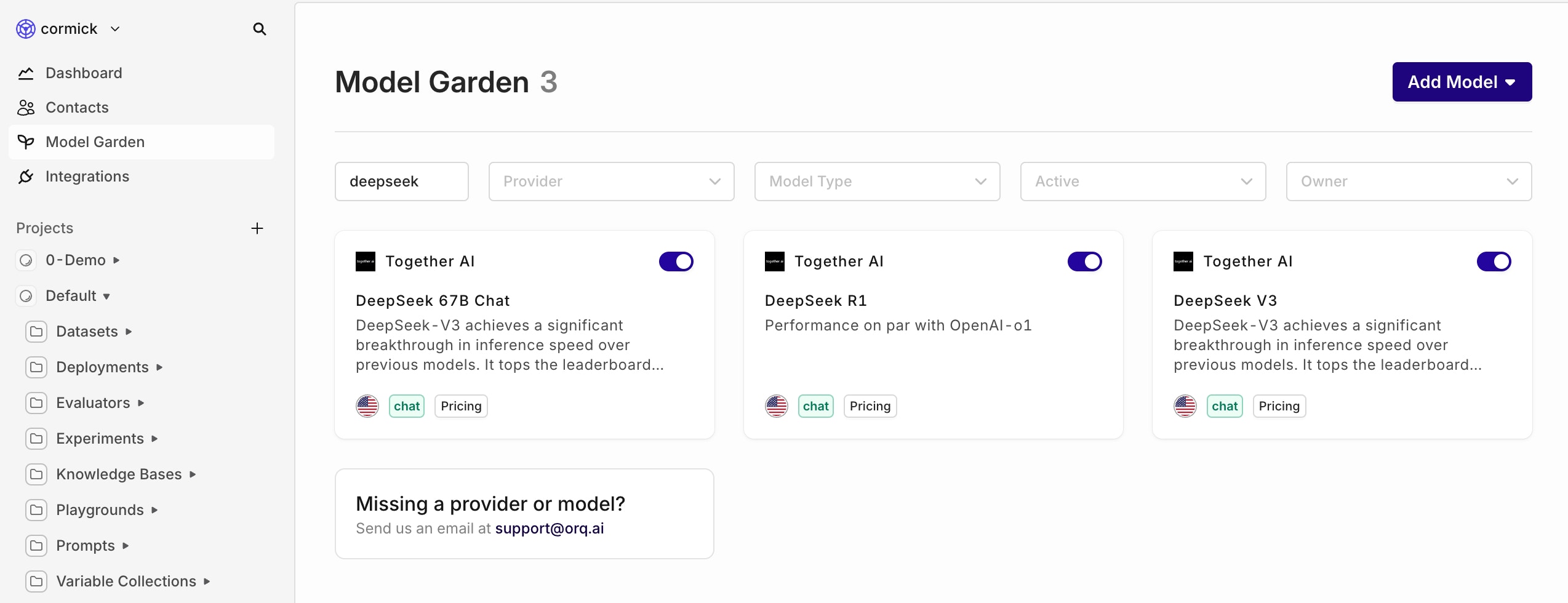
DeepSeek Models Now Available: 67B Chat, R1, and V3
We are excited to announce the integration of DeepSeek’s latest AI models—67B Chat, R1, and V3—into our platform.What model should I use?
- Choose 67B Chat for fast everyday conversations
- Pick R1 when you need deeper thinking and logic for complex tasks
-
Use V3 as a starting point to create your own specialized AI model
Llama 3.3 70b & Llama Guard 3 are now available through Together AI
Experience the power of the latest Llama 3.3 70b and Llama Guard 3 models on Orq, integrated via Together AI.Together AI
With the deprecation of Anyscale, we’ve been looking for a good alternative, and that’s where Together AI comes in. Together AI allows you to start using the latest Llama models with more open source models to come.Llama Guard 8b
In addition to our latest big release featuring Evaluators & Guardrails, we also added the Llama Guard model to make your AI feature even more secure.Llama Guard 3 is built to protect AI systems from common prompt hijacking attacks and misuse of LLMs.- How it works: It evaluates inputs and outputs for safety, returning a simple
safeorunsafeverdict. - Key feature: When flagged as unsafe, it identifies the violated content categories, offering clear insights.
- Why use it: Ideal for organizations exposing AI features to external users, it prevents misuse and ensures secure, compliant interactions.
Llama 3.3 70b
For users building with Llama 3.1, you can now switch to the improved Llama 3.3 70b. You can use the same prompt as with Llama 3.1 since the prompt format remains the same. Also, the 3.3 70b model is similar in performance to the 3.1 405b model, meaning you can save cost and time by switching to the newer model.New Layout with Project Structure
We’re introducing a new project structure UI to help you organize and manage your resources more effectively. With projects, you can group your work by use case, environment, or any logical structure that suits your needs.What are the benefits of the new Project Structure UI?
- Easier grouping of resources that you’re working on as a team
- Less clutter when working on multiple use cases
- Better incorporation of teams and roles within a project
Where are my old resources?
Your old resources are automatically grouped per entity of your project. For example: all your deployments within the same project are moved to the deployments folder of that project.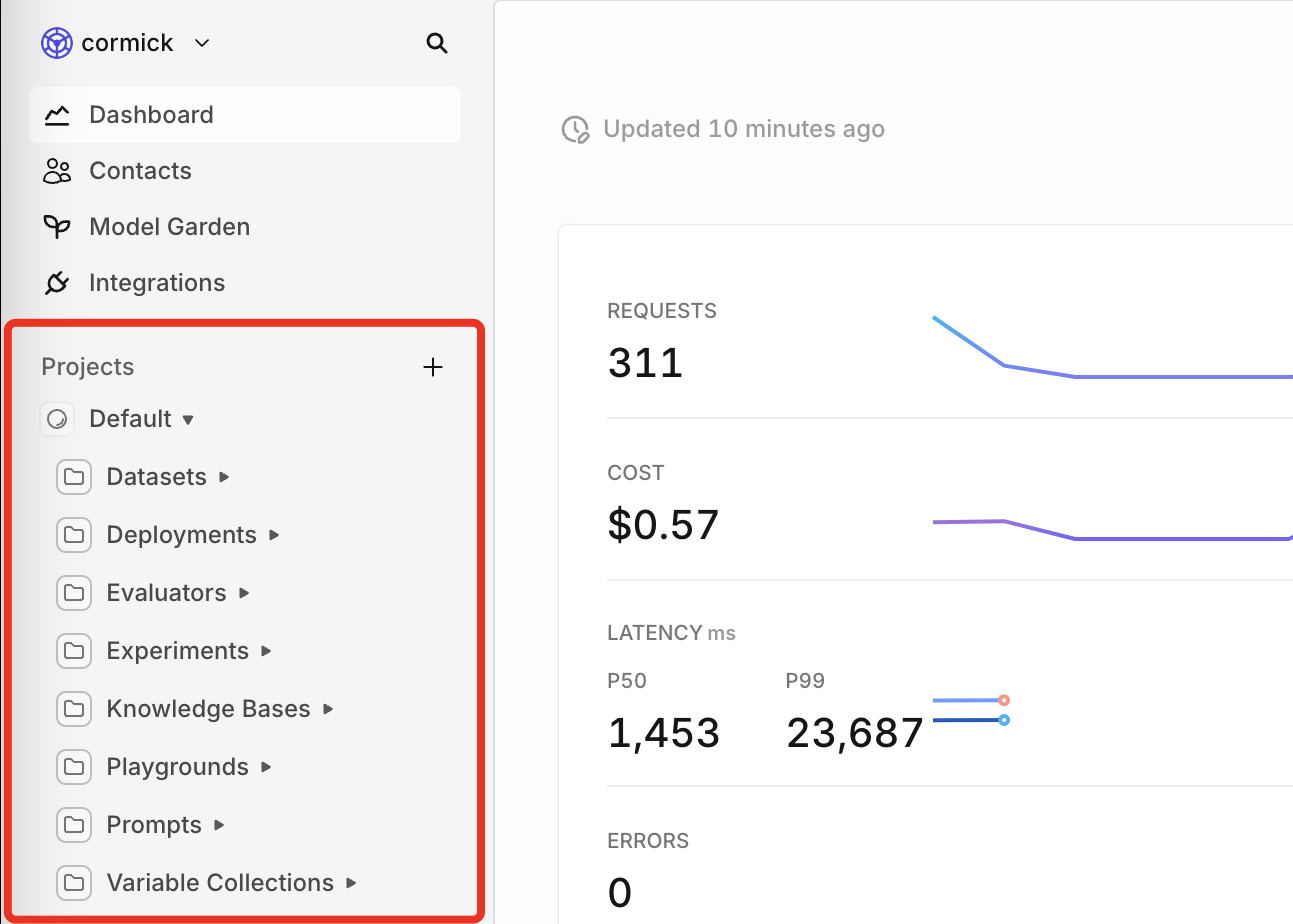
Example structure
In the example image below, you can see that you’ll have the ability to group multiple entities within the same folder. This allows you to have a production folder of a specific use case, and keep your other projects separate.Can I move my entities to a different project or directory?
Unfortunately not yet. We’re working on this feature, but until then, make sure you are working in the right place.Search your entities
To find the right entity you want to work on, we added a global search function.You can filter on project and creator, as seen in the gif below.📘 To read more about our new project structure, please visit our documentation.