Use Cases
  • Per-user cost attribution and cross-charging to tenants or customers.
  • Enforcing per-user rate limits to prevent abuse.
  • Identifying which users generate the most load or cost.
  • Linking LLM usage to your existing user analytics for cohort analysis.

Associate requests with Identity identifiers for user-level observability and analytics.
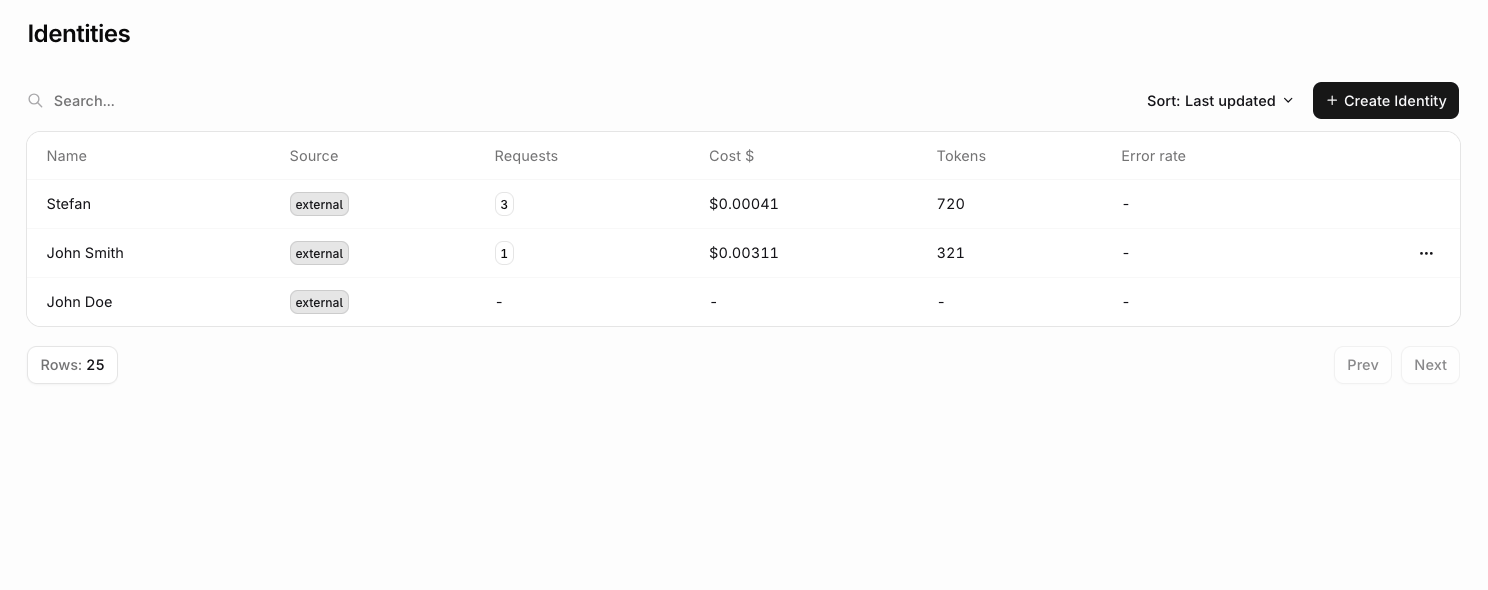
Identities are orq.ai entities used to track project expenses, token usage, to learn more, see Identity Tracking.

Quick Start

curl -X POST https://api.orq.ai/v3/router/responses \
  -H "Authorization: Bearer $ORQ_API_KEY" \
  -H "Content-Type: application/json" \
  -d '{
    "model": "openai/gpt-4o",
    "input": "How can I upgrade my account?",
    "identity": {
      "id": "user-12345",
      "display_name": "John Smith",
      "email": "[email protected]",
      "metadata": [{"plan": "premium", "signup_date": "2024-01-15"}]
    }
  }'

Configuration

ParameterTypeRequiredDescription
idstringYesUnique identity identifier
display_namestringNoHuman-readable identity name
emailstringNoIdentity email address
metadataobject[]NoArray of objects with custom key-value pairs
logo_urlstringNoURL to identity’s profile image
tagsstring[]NoClassification tags for identity segmentation

Use Cases

ScenarioIdentity ID StrategyMetadata Example
User Analyticsuser-{userId}[{"plan": "pro", "usage_tier": "high"}]
Customer Supportsupport-{ticketId}[{"priority": "high", "issue_type": "billing"}]
A/B Testingtest-{userId}-{variant}[{"experiment": "pricing-v2", "variant": "b"}]
Multi-tenanttenant-{orgId}-{userId}[{"org": "acme-corp", "role": "admin"}]

Implementation Examples

User Session Tracking

import OpenAI from "openai";

const client = new OpenAI({
  apiKey: process.env.ORQ_API_KEY,
  baseURL: "https://api.orq.ai/v3/router",
});

const getUserProfile = async (userId: string) => ({ name: "Jane Doe", email: "jane@example.com", plan: "pro", lastLogin: new Date(), orderCount: 42 }); // replace with your user lookup

// Track authenticated user interactions
const userId = "user-12345";
const userSession = {
  userId,
  userProfile: await getUserProfile(userId),
};

const response = await client.chat.completions.create({
  model: "openai/gpt-4o",
  messages: [{ role: "user", content: "Show me my recent orders" }],
  identity: {
    id: userSession.userId,
    display_name: userSession.userProfile.name,
    email: userSession.userProfile.email,
    metadata: [{
      plan: userSession.userProfile.plan,
      last_login: userSession.userProfile.lastLogin,
      total_orders: userSession.userProfile.orderCount,
    }],
    tags: [
      "authenticated",
      `plan-${userSession.userProfile.plan}`,
    ],
  },
});

Support Ticket Integration

import OpenAI from "openai";

const client = new OpenAI({
  apiKey: process.env.ORQ_API_KEY,
  baseURL: "https://api.orq.ai/v3/router",
});

const getCustomerInfo = async (customerId: string) => ({ company: "Acme Corp", name: "Jane Smith", email: "jane@acme.com", tier: "enterprise", accountManager: "Alice" }); // replace with your customer lookup

// Associate AI interactions with support tickets
const customerId = "customer-456";
const supportContext = {
  ticketId: "TICKET-789",
  customerId,
  customerInfo: await getCustomerInfo(customerId),
};

const response = await client.chat.completions.create({
  model: "openai/gpt-4o",
  messages: [{ role: "user", content: "I need help with my billing issue" }],
  identity: {
    id: `support-${supportContext.ticketId}`,
    display_name: supportContext.customerInfo.name,
    email: supportContext.customerInfo.email,
    metadata: [{
      ticket_id: supportContext.ticketId,
      customer_tier: supportContext.customerInfo.tier,
      issue_category: "billing",
      created_at: new Date().toISOString(),
    }],
    tags: [
      "support",
      "billing-issue",
      `tier-${supportContext.customerInfo.tier}`,
    ],
  },
});

Multi-Language Support

curl -X POST https://api.orq.ai/v3/router/chat/completions \
  -H "Authorization: Bearer $ORQ_API_KEY" \
  -H "Content-Type: application/json" \
  -d '{
    "model": "openai/gpt-4o",
    "messages": [{"role": "user", "content": "I need technical assistance"}],
    "identity": {
      "id": "enterprise-user-001",
      "display_name": "Alex Johnson",
      "email": "[email protected]",
      "metadata": [{
        "company": "Enterprise Corp",
        "role": "technical_lead",
        "contract_tier": "enterprise"
      }],
      "tags": ["enterprise", "technical"]
    }
  }'

Advanced Patterns

Dynamic Identity Resolution

import OpenAI from "openai";

const client = new OpenAI({
  apiKey: process.env.ORQ_API_KEY,
  baseURL: "https://api.orq.ai/v3/router",
});

interface IdentityProfile {
  id: string;
  display_name: string;
  email: string;
  plan: "free" | "pro" | "enterprise";
  metadata?: Record<string, any>[];
}

// Stub dependencies: replace with your actual data layer
const database = {
  users: { findById: async (id: string) => ({ fullName: "Jane Doe", email: "jane@example.com", createdAt: new Date(), lastActiveAt: new Date(), featureFlags: [] }) },
  subscriptions: { findByUserId: async (id: string) => ({ plan: "pro" as const }) },
};
const getUsageMetrics = async (userId: string) => 0;
const getUserProfile = async (userId: string) => ({ name: "Jane Doe", email: "jane@example.com", plan: "pro", lastLogin: new Date(), orderCount: 42 });
const getCustomerInfo = async (customerId: string) => ({ company: "Acme Corp", plan: "enterprise", accountManager: "Alice" });
const currentUserId = "user-123";
const userMessage = "What is my current plan?";

async function resolveIdentity(userId: string): Promise<IdentityProfile> {
  const user = await database.users.findById(userId);
  const subscription = await database.subscriptions.findByUserId(userId);

  return {
    id: `user-${userId}`,
    display_name: user.fullName,
    email: user.email,
    plan: subscription.plan,
    metadata: [{
      signup_date: user.createdAt,
      last_active: user.lastActiveAt,
      feature_flags: user.featureFlags,
      usage_this_month: await getUsageMetrics(userId),
    }],
  };
}

const identity = await resolveIdentity(currentUserId);

const response = await client.chat.completions.create({
  model: "openai/gpt-4o",
  messages: [{ role: "user", content: userMessage }],
  identity,
});

Batch Identity Processing

import OpenAI from "openai";

const client = new OpenAI({
  apiKey: process.env.ORQ_API_KEY,
  baseURL: "https://api.orq.ai/v3/router",
});

const getUserProfile = async (userId: string) => ({ name: "Jane Doe", email: "jane@example.com", plan: "pro" }); // replace with your user lookup

const batchRequests = [
  { userId: "user1", message: "How do I reset my password?" },
  { userId: "user2", message: "What's my current usage?" },
  { userId: "user3", message: "Can I upgrade my plan?" },
];

const responses = await Promise.all(
  batchRequests.map(async (req) => {
    const userProfile = await getUserProfile(req.userId);

    return client.chat.completions.create({
      model: "openai/gpt-4o",
      messages: [{ role: "user", content: req.message }],
      identity: {
        id: req.userId,
        display_name: userProfile.name,
        email: userProfile.email,
        metadata: [{
          request_batch: "batch-001",
          processed_at: new Date().toISOString(),
        }],
        tags: ["batch-processing", `plan-${userProfile.plan}`],
      },
    });
  }),
);

Identity Analytics

Usage Tracking

import OpenAI from "openai";

const client = new OpenAI({
  apiKey: process.env.ORQ_API_KEY,
  baseURL: "https://api.orq.ai/v3/router",
});

// Stub: replace with your actual session ID generator
const generateSessionId = () => `session-${Date.now()}-${Math.random().toString(36).slice(2)}`;

// Track feature usage per identity
const trackFeatureUsage = async (identityId, feature, context = {}) => {
  const response = await client.chat.completions.create({
    model: "openai/gpt-4o",
    messages: [{ role: "user", content: "Analyze my data" }],
    identity: {
      id: identityId,
      metadata: [{
        feature_used: feature,
        usage_context: context,
        session_id: generateSessionId(),
        timestamp: new Date().toISOString(),
      }],
      tags: ["feature-tracking", `feature-${feature}`],
    },
  });

  return response;
};

// Usage
await trackFeatureUsage("user-123", "data-analysis", {
  dataset_size: "large",
  complexity: "medium",
});

Personalization Context

import OpenAI from "openai";

const client = new OpenAI({
  apiKey: process.env.ORQ_API_KEY,
  baseURL: "https://api.orq.ai/v3/router",
});

// Stub: replace with your actual identity data layer
const getIdentityProfile = async (id: string) => ({
  display_name: "Jane Doe",
  email: "jane@example.com",
  metadata: [{ plan: "pro", preferences: { language: "en", theme: "dark" } }],
});

// Provide personalized responses based on identity data
const getPersonalizedResponse = async (identityId, query) => {
  const identity = await getIdentityProfile(identityId);
  const meta = identity.metadata[0];

  const systemPrompt = `
    You are assisting ${identity.display_name}, a ${meta.plan} plan user.
    Their preferences: ${JSON.stringify(meta.preferences)}
    Tailor your response to their experience level and subscription benefits.
  `;

  return await client.chat.completions.create({
    model: "openai/gpt-4o",
    messages: [
      { role: "system", content: systemPrompt },
      { role: "user", content: query },
    ],
    identity: {
      id: identityId,
      display_name: identity.display_name,
      email: identity.email,
      metadata: [{ ...meta, personalization_enabled: true }],
      tags: ["personalized", `plan-${meta.plan}`],
    },
  });
};

Performance Optimization

Identity Data Caching

// Cache identity profiles to reduce database calls
const identityCache = new Map();
const CACHE_TTL = 5 * 60 * 1000; // 5 minutes

// Stub: replace with your resolveIdentity implementation (see Dynamic Identity Resolution above)
async function resolveIdentity(identityId: string) { /* ... */ }

async function getCachedIdentity(identityId) {
  const cached = identityCache.get(identityId);

  if (cached && Date.now() - cached.timestamp < CACHE_TTL) {
    return cached.data;
  }

  const identity = await resolveIdentity(identityId);
  identityCache.set(identityId, {
    data: identity,
    timestamp: Date.now(),
  });

  return identity;
}

Metadata Optimization

// Optimize metadata for frequently accessed fields
const optimizeIdentityMetadata = (fullProfile) => {
  // Only include essential metadata to reduce payload size
  return [{
    plan: fullProfile.subscription.plan,
    tier: fullProfile.subscription.tier,
    features: fullProfile.enabledFeatures.slice(0, 5), // Limit array size
    last_active: fullProfile.lastActiveAt,
  }];
};

const userId = "user-123"; // replace with your user ID
const user = { name: "Jane Doe", email: "jane@example.com" }; // replace with your user lookup
const userProfile = { subscription: { plan: "pro", tier: "standard" }, enabledFeatures: [], lastActiveAt: new Date() }; // replace with your profile lookup

const identity = {
  id: userId,
  display_name: user.name,
  email: user.email,
  metadata: optimizeIdentityMetadata(userProfile),
  tags: [`plan-${userProfile.subscription.plan}`, "active-user"],
};

Troubleshooting

IssueCauseSolution
Identity not appearing in analyticsMissing or invalid identity IDEnsure identity.id is provided and unique
Metadata not updatingIdentity cache not refreshedClear identity cache or reduce TTL
Performance degradationToo much metadata per requestLimit metadata to essential fields only
Duplicate identitiesInconsistent ID formatStandardize identity ID generation

Validation Examples

const isValidEmail = (email: string) => /^[^\s@]+@[^\s@]+\.[^\s@]+$/.test(email);

// Validate identity configuration
function validateIdentity(identity) {
  const errors = [];

  if (!identity.id) {
    errors.push("Identity ID is required");
  }

  if (identity.id.length > 255) {
    errors.push("Identity ID too long (max 255 chars)");
  }

  if (identity.email && !isValidEmail(identity.email)) {
    errors.push("Invalid email format");
  }

  if (identity.metadata && identity.metadata.length > 0 && Object.keys(identity.metadata[0]).length > 20) {
    errors.push("Too many metadata fields (max 20)");
  }

  if (identity.tags && identity.tags.length > 10) {
    errors.push("Too many tags (max 10)");
  }

  return errors;
}

// Usage
const identity = { id: "user-123", display_name: "John" };
const errors = validateIdentity(identity);

if (errors.length > 0) {
  throw new Error(`Identity validation failed: ${errors.join(", ")}`);
}

Best Practices

  1. Consistent IDs: Use predictable identity ID patterns across your application
  2. Essential Metadata: Include only relevant metadata to minimize payload size
  3. Tag Strategy: Use tags for filtering and segmentation, not detailed data
  4. Privacy Compliance: Ensure identity data handling meets privacy requirements
  5. Performance: Cache identity profiles to reduce database lookups
  6. Validation: Always validate identity data before sending requests

Limitations

LimitationDescriptionWorkaround
Identity ID LengthMaximum 255 charactersUse shorter, meaningful identifiers
Metadata SizeRecommended maximum 20 fieldsGroup related data into nested objects
Tag CountMaximum 10 tags per identityUse hierarchical tagging strategy
Email ValidationBasic format validation onlyImplement additional validation client-side
Data PersistenceIdentity data not stored permanentlyMaintain identity profiles in your system

Integration Examples

CRM Integration

import OpenAI from "openai";

const client = new OpenAI({
  apiKey: process.env.ORQ_API_KEY,
  baseURL: "https://api.orq.ai/v3/router",
});

// Sync with CRM systems
const getCrmClient = () => ({
  contacts: {
    get: async (id: string) => ({
      name: "Jane Smith",
      email: "jane@example.com",
      id,
      leadScore: 85,
      lastInteraction: "2024-01-15",
      currentDealStage: "negotiation",
    }),
  },
  activities: {
    create: async (activity: Record<string, unknown>) => activity,
  },
}); // replace with your actual CRM client
const crm = getCrmClient();
const syncWithCRM = async (identityId, interactions) => {
  const crmContact = await crm.contacts.get(identityId);

  const response = await client.chat.completions.create({
    model: "openai/gpt-4o",
    messages: [{ role: "user", content: "Update my preferences" }],
    identity: {
      id: identityId,
      display_name: crmContact.name,
      email: crmContact.email,
      metadata: [{
        crm_id: crmContact.id,
        lead_score: crmContact.leadScore,
        last_interaction: crmContact.lastInteraction,
        deal_stage: crmContact.currentDealStage,
      }],
      tags: ["crm-synced", `stage-${crmContact.currentDealStage}`],
    },
  });

  // Update CRM with AI interaction
  await crm.activities.create({
    contactId: crmContact.id,
    type: "ai_interaction",
    description: "AI assistant interaction",
    timestamp: new Date(),
  });

  return response;
};