

- a User
- a Team
- a Project
- a Client
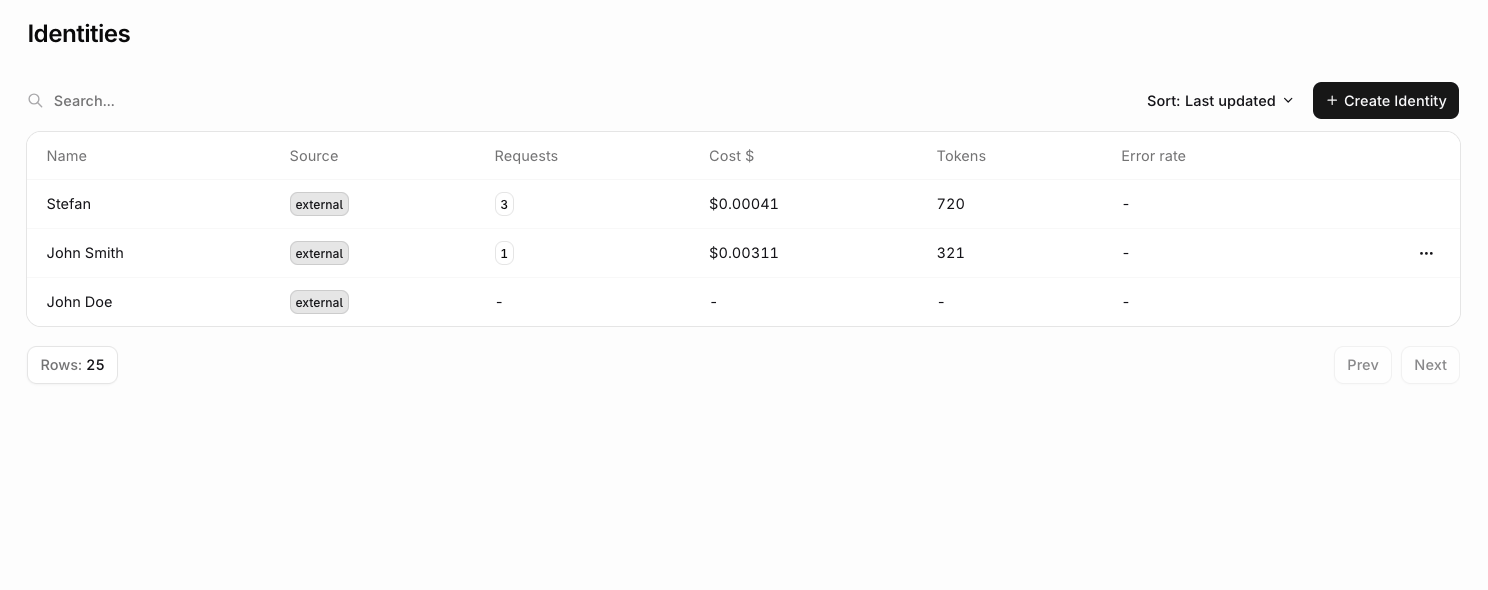
- Per-user cost attribution and cross-charging to tenants or customers.
- Enforcing per-user rate limits to prevent abuse.
- Identifying which users generate the most load or cost.
- Linking LLM usage to existing user analytics for cohort analysis.
Creating an identity
- AI Gateway
- API / SDK
- CLI
 AI Gateway
In the AI Gateway sidebar, go to Identities and click New Identity. Fill in the external ID and any optional fields (display name, email, metadata), then click Create.The identity is available immediately and can be attached to requests using its external ID.
Attaching an identity to a request
Every AI Gateway request can be attributed to a specific user, team, or client. The gateway checks each of the following sources in order and uses the first match found:- Body
- X-ORQ-IDENTITY-ID Header
- API Key Owner
Pass the identity’s Orq SDKOpenAI SDK
external_id in the identity.id field on any AI Gateway request. If no identity with that external_id exists, one is created automatically; if it does exist, its record is updated with any display_name, email, or metadata provided.The
identityId / identity_id constructor option was removed in SDK v4.10.0. Pass identity on each request instead.Retrieving an identity via the API
Once an identity is in use, fetch its full record at any time using its_id (ULID) or external_id.
See the API Reference for the full parameter and response specification.
Listing identities with metrics
Passinclude_metrics=true to retrieve 30-day usage metrics for each identity.
metrics object covering the last 30 days:
See the API Reference for pagination, search, and tag filtering parameters.
Identity field reference
Fields accepted on theidentity object for any AI Gateway request:
Best practices
- Consistent IDs: Use predictable identity ID patterns (e.g.
user-{userId},tenant-{orgId}-{userId}) across the application. - Essential metadata only: Include only relevant metadata fields to minimize payload size.
- Tag strategy: Use tags for filtering and segmentation rather than storing detailed data.
- Privacy compliance: Ensure identity data handling meets applicable privacy requirements.
- Validation: Validate
idformat and length before sending requests.