Claude Desktop integrates with Orq.ai in two ways: connect the MCP server for workspace access, or route Cowork inference through the AI Gateway.

MCP

Query traces, models, and analytics from Claude Desktop using natural language.

Third-party inference (Cowork)

Route Cowork inference through the AI Gateway for fallbacks, EU residency, and cost control.

MCP

Claude Desktop is Anthropic’s desktop application that supports Model Context Protocol (MCP) integrations. By configuring the Orq MCP server, you can access all Orq.ai features directly in your Claude Desktop conversations.

Prerequisites

Installation

You can configure the Orq MCP server through Claude Desktop Settings or using the Terminal.
If you prefer using the terminal, you can directly edit the config file:macOS:Run these commands in your terminal:
# Open the config file in your default text editor
open ~/Library/Application\ Support/Claude/claude_desktop_config.json
Windows:Run this command in your Command Prompt or PowerShell:
# Open the config file in Notepad
notepad %APPDATA%\Claude\claude_desktop_config.json
Linux:Run this command in your terminal:
# Open the config file in nano (or use your preferred editor)
nano ~/.config/Claude/claude_desktop_config.json
Then paste the following configuration:
{
  "preferences": {
    "sidebarMode": "chat",
    "coworkScheduledTasksEnabled": false
  },
  "mcpServers": {
    "orq": {
      "command": "npx",
      "args": [
        "-y",
        "mcp-remote",
        "https://my.orq.ai/v2/mcp",
        "--header",
        "Authorization:${ORQ_AUTH_HEADER}"
      ],
      "env": {
        "ORQ_AUTH_HEADER": "Bearer <ORQ_API_TOKEN>"
      }
    }
  }
}
Replace <ORQ_API_TOKEN> with your actual API key, save the file, and restart Claude Desktop.
If the file doesn’t exist, the command will create it. Make sure to use valid JSON formatting.

Verify Installation

After restarting Claude Desktop, start a new conversation and ask:
Can you list the available models from Orq?
Claude will use the Orq MCP integration to fetch and display your available AI models.
Claude Desktop MCP Success

What You Can Do

Once connected, you can use natural language in Claude Desktop to perform these operations:
  • Get analytics overview for my workspace
  • Show me workspace metrics for the last 7 days
  • Query analytics filtered by deployment ID
  • List all available chat models
  • List all available embedding models
  • Invoke model [model-id] with prompt [message]
  • List traces from the last 24 hours
  • Show me traces with errors
  • Get span details for trace [trace-id]
  • Find the slowest traces from today
  • Show all traces for thread [thread-id]

Usage Examples

Analyze Traces

Show me all errors from my Orq traces in the last 24 hours
Claude will:
  1. Calculate the time range for the last 24 hours
  2. Use list_traces with error status filter
  3. Analyze the trace data
  4. Provide error count and types, affected deployments, time distribution, and suggested fixes based on error patterns

Performance Analysis

Has my system's performance improved over the last week?
Show latency trends and cost metrics from Orq analytics.
Claude will:
  1. Use query_analytics with a 7-day time range
  2. Analyze average latency changes over the week
  3. Review token usage patterns and cost trends
  4. Examine error rate fluctuations
  5. Compare performance across different models
  6. Provide a summary report with insights on whether performance has improved or decreased

Troubleshooting

  1. Verify the config file path is correct for your OS
  2. Check the JSON syntax is valid (no trailing commas, proper quotes)
  3. Ensure your API key is valid and has the required permissions
  4. Restart Claude Desktop after making config changes
  5. Check the Claude Desktop logs for error messages
  1. Confirm your API key is active in Orq.ai Settings
  2. Make sure the API key has workspace access permissions
  3. Verify the Authorization header format: Bearer YOUR_KEY
  4. Try generating a new API key if the current one is expired
MCP operations over HTTP can take a few seconds:
  • Be patient with large trace queries and model operations
  • Break complex workflows into smaller steps
  • Check Orq.ai service status at status.orq.ai
  1. Verify the Orq MCP server is properly configured in your config file
  2. Restart Claude Desktop to reload the Orq MCP configuration
  3. Try rephrasing your request
  4. Check the MCP tools list

Additional Configuration

Multiple Workspaces

If you work with multiple Orq.ai workspaces, you can configure multiple MCP servers:
{
  "mcpServers": {
    "orq-production": {
      "command": "npx",
      "args": [
        "-y",
        "mcp-remote",
        "https://my.orq.ai/v2/mcp",
        "--header",
        "Authorization:${ORQ_PROD_AUTH_HEADER}"
      ],
      "env": {
        "ORQ_PROD_AUTH_HEADER": "Bearer <PRODUCTION_API_TOKEN>"
      }
    },
    "orq-staging": {
      "command": "npx",
      "args": [
        "-y",
        "mcp-remote",
        "https://my.orq.ai/v2/mcp",
        "--header",
        "Authorization:${ORQ_STAGING_AUTH_HEADER}"
      ],
      "env": {
        "ORQ_STAGING_AUTH_HEADER": "Bearer <STAGING_API_TOKEN>"
      }
    }
  }
}

Third-party inference (Cowork)

Claude Cowork’s third-party inference mode routes all model inference through a configured gateway instead of Anthropic’s first-party infrastructure. Orq.ai’s AI Gateway speaks the Anthropic Messages API and is fully compatible.

EU data residency

Pin traffic to EU-hosted models to meet data residency requirements.

Provider fallback

Route across providers automatically to avoid rate limits and outages.

Cost control

Route to cheaper models for routine tasks by configuring them in Cowork.

Prerequisites

  • Claude Desktop installed with a Pro, Max, Team, or Enterprise plan
  • Active Orq.ai account with an API key

Setup

1

Enable Developer Mode

  1. Open Claude Desktop
  2. Click Help in the menu bar
  3. Hover over Troubleshooting
  4. Select Enable Developer Mode
  5. Restart Claude Desktop
A Developer menu appears in the menu bar after restart.
2

Open Gateway Configuration

  1. Click Developer in the menu bar
  2. Select Configure Third-party inference
  3. Select Gateway (Anthropic-compatible)
3

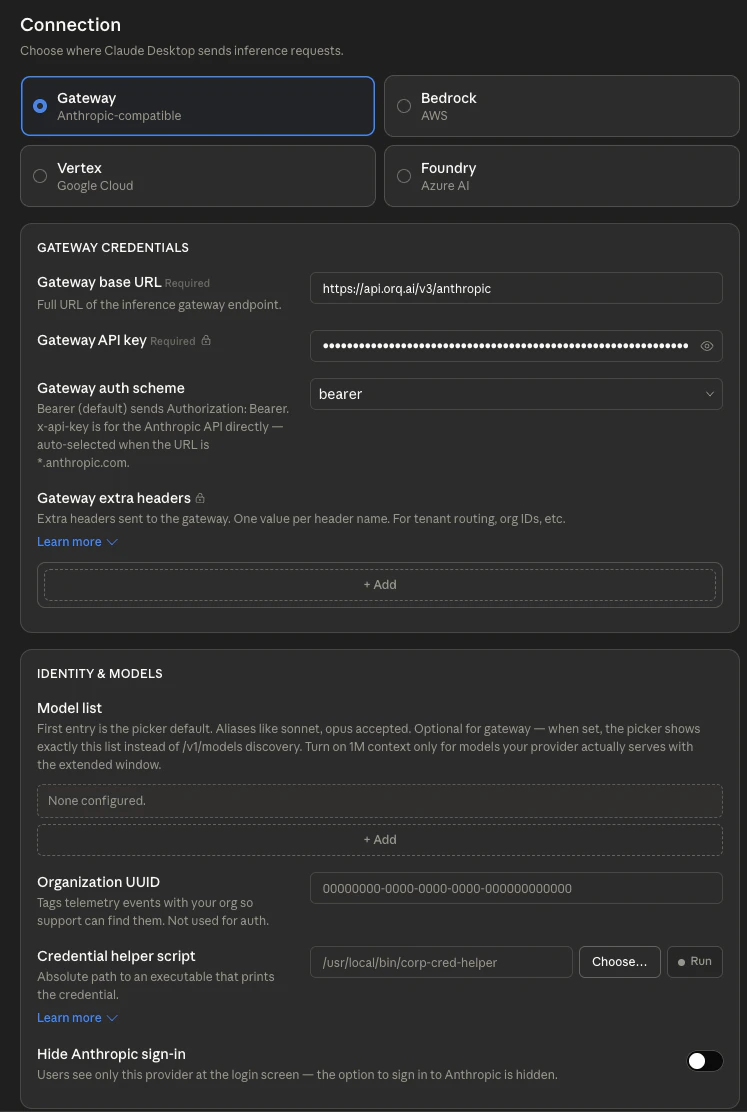
Enter Gateway Details

Fill in the three fields:
FieldValue
Gateway base URLhttps://api.orq.ai/v3/anthropic
Gateway API keyThe Orq.ai API key
Gateway auth schemebearer
Cowork 3P inference gateway configuration screen showing Gateway selected as the connection type, with the Orq.ai base URL, API key, and bearer auth scheme filled in
Click Apply locally to apply the configuration to this machine, or Export as MDM profile to deploy across an organization.
Get the API key from Orq.ai Settings under API Keys.
4

Add Models (optional)

Cowork automatically fetches available models from Orq.ai via the /v1/models endpoint, so no manual configuration is required. To pin a specific subset, add model slugs using the provider/model-name format:
Model slugDescription
anthropic/claude-sonnet-4-6Claude Sonnet via Anthropic direct
aws/anthropic/claude-sonnet-4-6Claude Sonnet via AWS Bedrock
google/anthropic/claude-opus-4-7Claude Opus via Google Vertex AI
openai/gpt-4oGPT-4o for routine tasks
For the full catalog, see Supported Models.
5

Verify the Connection

A successful connection shows Cowork 3P | Gateway in the Cowork status indicator. All inference now routes through Orq.ai.

See Also

API Keys

Create and manage Orq.ai API keys.

Supported Models

Full catalog of models available through the AI Gateway.

AI Gateway

Get started with the AI Gateway for routing, fallbacks, and cost control.
https://mintcdn.com/orqai/d-t0Z04KwFlGVsS1/images/logos/anthropic.svg?fit=max&auto=format&n=d-t0Z04KwFlGVsS1&q=85&s=b097662b141ad6f89f0c8d039ae241dc

Anthropic Provider

Configure the Anthropic API key and explore Claude model options.