

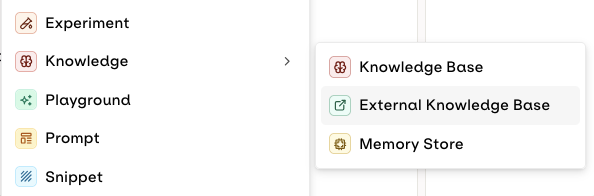
Choose External when connecting your Knowledge Base
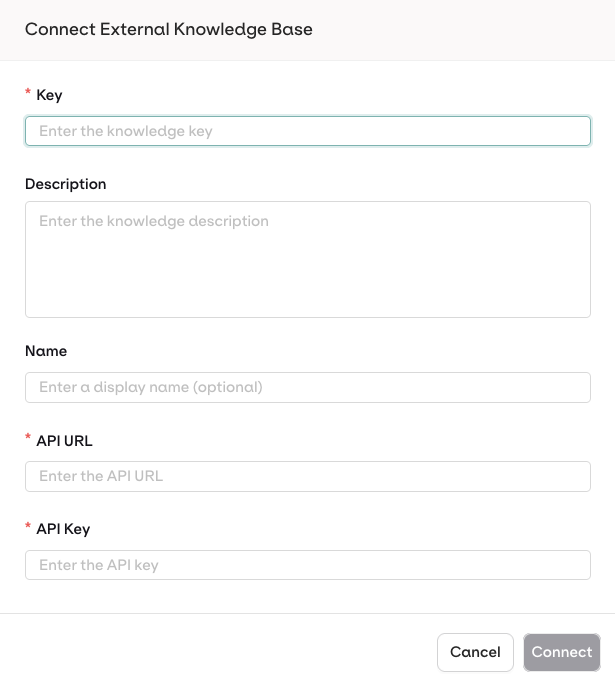
Configuration Modal
Orq.ai includes the API Key in the
Authorization: Bearer <API_KEY> header when calling your endpoint.API keys are encrypted using workspace-specific keys (AES-256-GCM).
API Payloads
Example payloads for the request and response expected from your external API:Request Payload
Request Payload
Response Payload
Response Payload
The API must respond like a standard Knowledge Base search. See our Search API for the expected payload format.
Example Implementations
Python Implementation
An Example Python Server for External Knowledge Base
Python Implementation
An Example Python Server for External Knowledge Base
Get the Code
Clone the Python example Server
Install Dependencies
Run the Server
Test the API
The API is running at
http://localhost:8000Dynamic Documentation is available at http://localhost:8000/docsNode.js Implementation
An Example Node Server for External Knowledge Base
Node.js Implementation
An Example Node Server for External Knowledge Base
Get the Code
Clone the Node example Server
Install Dependencies
Run the Server
Test the API
The API is running at
http://localhost:8000Dynamic Documentation is available at http://localhost:8000/docIntegrate Vector Database Providers
Orq.ai supports providers like Weaviate and Pinecone, as both platforms expose REST APIs that conform to the expected payload format.Troubleshoot Common Errors
Cannot connect to external API
- Verify your API endpoint is publicly accessible via HTTPS.
- Check your API logs for incoming requests from Orq.ai IP addresses.
- Verify your firewall/security groups allow inbound HTTPS traffic.
- Verify the API key is correct and has not expired.
- Check that your API expects Bearer authentication in the
Authorizationheader. - Confirm your API key has the necessary permissions to perform searches.
- Verify your API returns the expected response format (see Response Payload above).
- Check that
scores.search_scorevalues are between 0 and 1. - Test with different
thresholdvalues (lower threshold = more results). - If using reranking, ensure both
search_scoreandrerank_scoreare provided. - Verify your external vector database has sufficient indexed documents.
- Monitor your external API response times.
- Consider implementing caching for frequently searched queries.
- Optimize your vector database indexes.
- Check if your external API is rate limiting requests.
Configure your External Knowledge Base
Datasource configuration is not accessible within External Knowledge Bases, as data is hosted outside of Orq.ai.
- Agentic RAG
- Search retrieval parameters: Chunk Limit, Search Threshold
- Rerank Model
Your External Knowledge Base is connected:
- Use it just like any other Knowledge Base. See Search a Knowledge Base.
- Your knowledge base can also be used with Agents. See Connect Knowledge Bases.
- Your API is called at runtime when the model needs to perform a search.