

Installation
Install the@orq-ai/n8n-nodes-orq package through the n8n Community Nodes manager:
- Open n8n and go to Settings
- Select Community Nodes
- Click Install a community node
- Enter
@orq-ai/n8n-nodes-orqand click Install
Credentials
- In n8n, go to Credentials and click New
- Search for Orq API
- Paste your API key from Workspace Settings
- Name the credential and save
Quick Start
- Add a Manual Trigger node
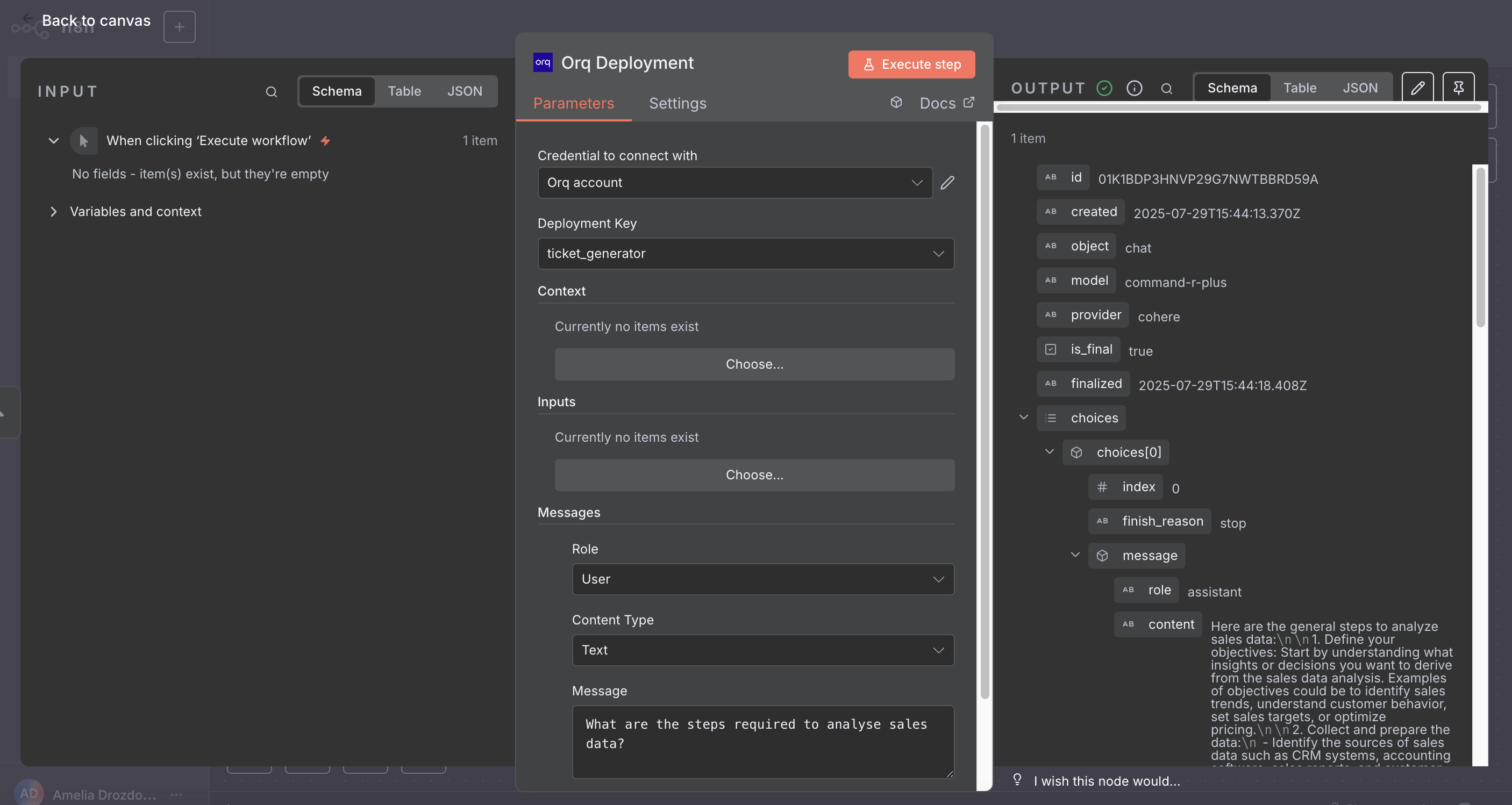
- Add an Orq Deployment node and connect it
- Select a deployment, add a message with role
userand your prompt text - Click Execute Workflow
Nodes Reference
Three nodes are available:- Orq Agent: Run an Agent for multi-step tasks with tools and autonomous reasoning.
- Orq Deployment: Invoke a Deployment for direct, single LLM calls with prompt templates.
- Orq Knowledge Base Search: Search an Orq.ai Knowledge Base for RAG and context retrieval.
Orq Agent
Run an Orq.ai Agent for complex, multi-step tasks. The node sends a message to the agent, waits for it to complete (including any tool calls), and returns the final response.Additional Fields
Output
The node branches on the agent’s final status:
completed routes to the success branch, incomplete returns a partial response with incomplete: true, and failed throws with the server error message.Orq Deployment
Invoke an Orq.ai Deployment with messages, routing context, and variable inputs.Messages
Each message has a Role (User, System, or Assistant). System and Assistant messages take plain text. User messages support two content types:Some models require text alongside images. Check your model’s documentation if image-only messages return errors.
Output
Orq Knowledge Base Search
Run semantic, keyword, or hybrid search over an Orq.ai Knowledge Base.
When AND or OR is selected, add one or more conditions. Each condition takes:
When Custom JSON is selected, provide a recursive filter structure directly:
Additional Options
Output
array
Array of matching chunks. Use
{{ $json.matches[0].text }} in downstream nodes to get the top result.OpenTelemetry Observability
n8n (v2.19.0+) exports OpenTelemetry traces for every workflow execution. Point n8n at the Orq.ai OTLP collector to see workflow runs, node performance, and agent invocations in Traces.OpenTelemetry tracing in n8n is in Preview. Metrics export is not yet supported.
Prerequisites
- n8n v2.19.0 or later
- An API key with trace ingestion permissions
Configure the OTLP exporter
Option 1: Settings UI (n8n v2.27.0+)- Open Settings > OpenTelemetry
- Turn on Enable OpenTelemetry
- Under Collector connection, set the OTLP endpoint to
https://my.orq.ai/v2/oteland add the headerauthorization=Bearer <YOUR_ORQ_API_KEY> - Select Save settings, then run Send test trace under Verify configuration to confirm the collector accepts the export
.env all work:
n8n appends
/v1/traces to the endpoint automatically. Point it at the base URL (https://my.orq.ai/v2/otel), not at /v2/otel/v1/traces.What n8n sends
n8n exports standard OTLP HTTP traces (Protobuf encoding) with three span types:
Resource attributes include
service.name (default n8n), service.version, and n8n.instance.id.
By default n8n exports traces for production executions only. Set
N8N_OTEL_TRACES_PRODUCTION_ONLY=false to include manual test runs.Agent spans require n8n v2.33.0+ and the Agents feature. Older n8n versions export only
workflow.execute and node.execute spans.What appears in Orq.ai
- Workflow and node spans land as generic traces named
workflow.executewith childnode.executespans. Inspect trace status, timing, and node-level attributes, but no model or cost data is available. - Agent spans use GenAI semantic conventions and render with model, token usage, and cost data in the Traces UI.
Custom attributes
n8n supports custom attributes on workflows, nodes, and projects vian8n.workflow.custom.*, n8n.node.custom.*, and n8n.project.custom.*. Node-level attributes appear in span details in Orq.ai.
Workflow and project custom attributes are part of the n8n export but are not exposed in Orq.ai.