

Setup Your API Key
To use Vertex AI with Orq.ai, you need to create a service account with appropriate permissions:1
Create Service Account
- Go to Google Cloud Console
- Navigate to IAM & Admin > Service Accounts
- Click Create Service Account
- Enter a name (e.g., “orq-vertex-ai”)
- Grant the following roles:
- Service Account Token Creator
- Vertex AI User
- Click Create and Continue
- Click Done
2
Create Service Account Key
- Find your service account in the list
- Click the Actions menu (three dots)
- Select Manage Keys
- Click Add Key > Create New Key
- Select JSON format
- Click Create to download the key file
3
Configure in Orq.ai
- Navigate to AI Gateway > BYOK
- Find Google Vertex AI in the list
- Click the Configure button
- Select Setup your own API Key
- Enter configuration name (e.g., “Vertex AI Production”)
- Paste your service account JSON in the Deployment JSON field (see format below)
- Click Save to complete the setup
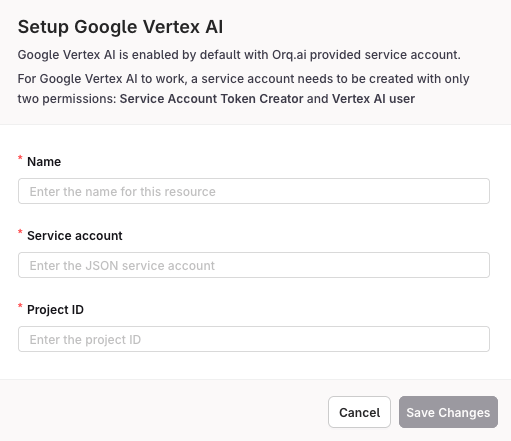
Vertex AI configuration modal
Deployment JSON Format
Your deployment JSON should include the service account credentials, project ID, and region:Project ID: Find your Google Cloud Project ID at the top of the Google Cloud Console.Location: Common regions include
us-central1, europe-west1, asia-northeast1. Choose based on your data residency requirements.Available Models
The AI Gateway supports all current Vertex AI Gemini models. Here are the most commonly used:Recommended Models
For a complete and up-to-date list of all available Vertex AI models, see Supported Models.
Quick Start
Access Vertex AI Gemini models through the AI Gateway.Using the AI Gateway
Access Vertex AI Gemini models through the AI Gateway with enterprise-grade security, advanced chat completions, streaming, and intelligent model routing. All Vertex AI models are available with consistent formatting and automatic request logging.Vertex AI models use the provider slug format:
google/model-name. For example: google/gemini-2.5-proPrerequisites
Before making requests to the AI Gateway, you need to configure your environment and install the SDKs if you choose to use them. Endpoint- Go to API Keys
- Click Create API Key and copy it
- Store it in your environment as
ORQ_API_KEY
Basic Usage
Send messages to Vertex AI Gemini models and get intelligent responses:Streaming
Stream responses for real-time output and improved user experience:Function Calling
Vertex AI Gemini models support function calling for structured interactions:Automatic Request Logging
All requests made through the AI Gateway are automatically logged to your dashboard. You can view:- Request details: Model used, tokens, latency
- Cost tracking: Per-request and aggregate costs
- Error monitoring: Failed requests with error messages
- Performance metrics: Response times and throughput