Hermes Agent is a self-improving agent from Nous Research with a built-in MCP client. Route its model calls through the AI Gateway, then connect it to the Orq MCP server for agentic access to the workspace.

AI Gateway

Route Hermes’s model calls through the AI Gateway for unified tracing and cost tracking.

MCP

Manage Agents, experiments, and Traces from natural language.

Prerequisites

AI Gateway

Hermes is OpenAI-compatible, so it routes through the AI Gateway by pointing the OpenAI provider at the router. Configure it in the desktop app or the CLI. Changes made in the desktop app apply to the CLI as well, since both share the same configuration.

Setup

1

Open provider settings

Open the Hermes desktop app. On first launch, skip provider selection to set it later. Open Settings in the top right, then go to Providers > API keys.
2

Set the OpenAI API key and base URL

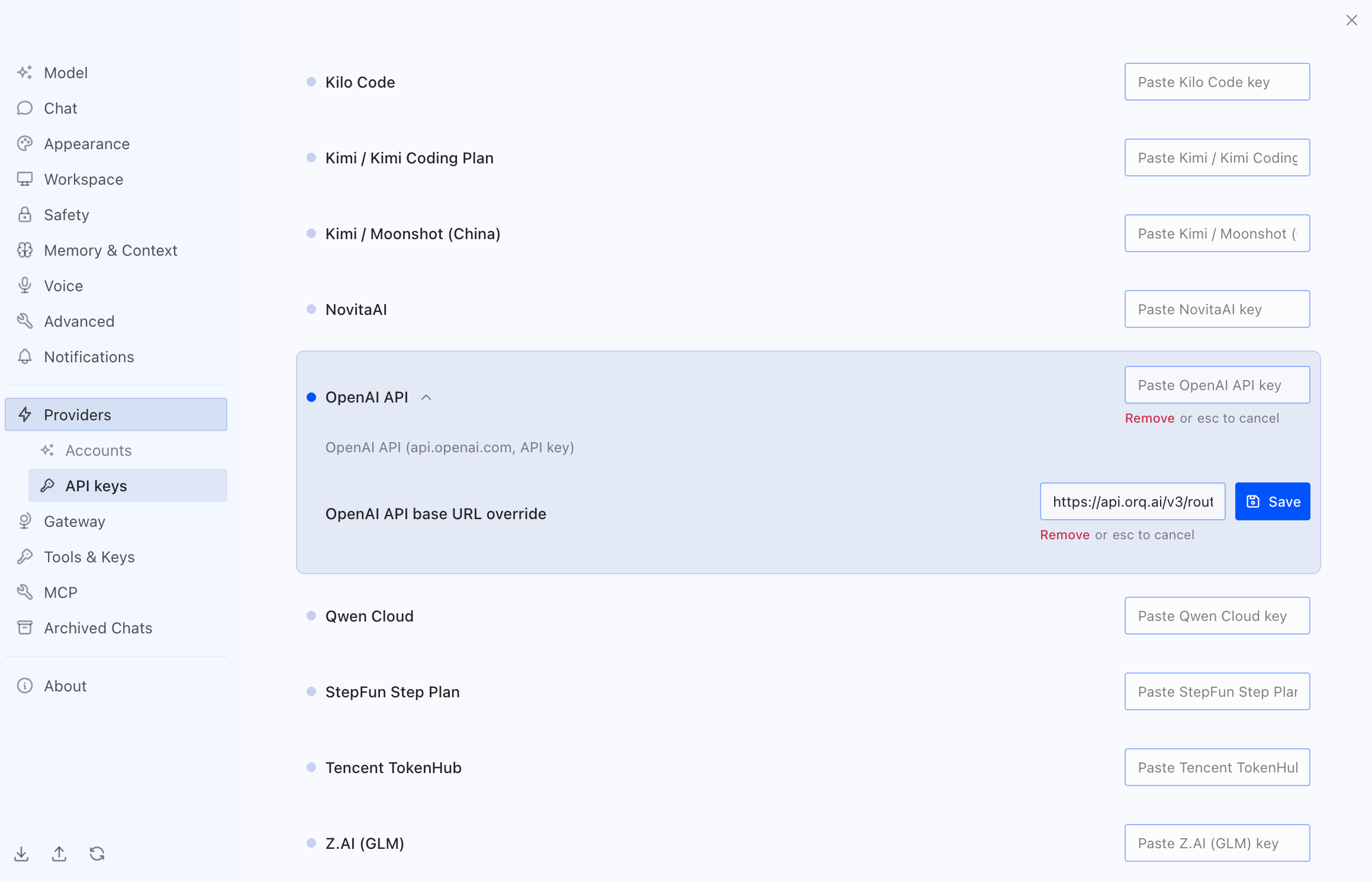
Scroll to OpenAI API and expand it. Paste the Orq.ai API key into the OpenAI API key field and click Save. Then paste the router URL into the OpenAI API base URL override field and click Save:
Hermes API keys settings with the OpenAI API entry expanded, the Orq.ai key in the OpenAI API key field, and the router URL in the base URL override field

Overriding the OpenAI provider base URL with the Orq.ai router in Hermes

3

Select a model

Hermes now routes through the AI Gateway. Pick a model from the recommended list, or search by name for any other model from the AI Gateway catalog that is not shown.

Verification

Send a prompt in Hermes. The response appears in Hermes and the request appears in Orq.ai Traces with the selected model identifier.

MCP

The Orq MCP server exposes the Orq.ai platform as MCP tools. Hermes’s built-in MCP client connects to it and uses those tools to manage Agents, run experiments, and query Traces from natural language.

Installation

1

Open MCP settings

In Settings, go to MCP and click New server in the top right.
2

Add the Orq MCP server

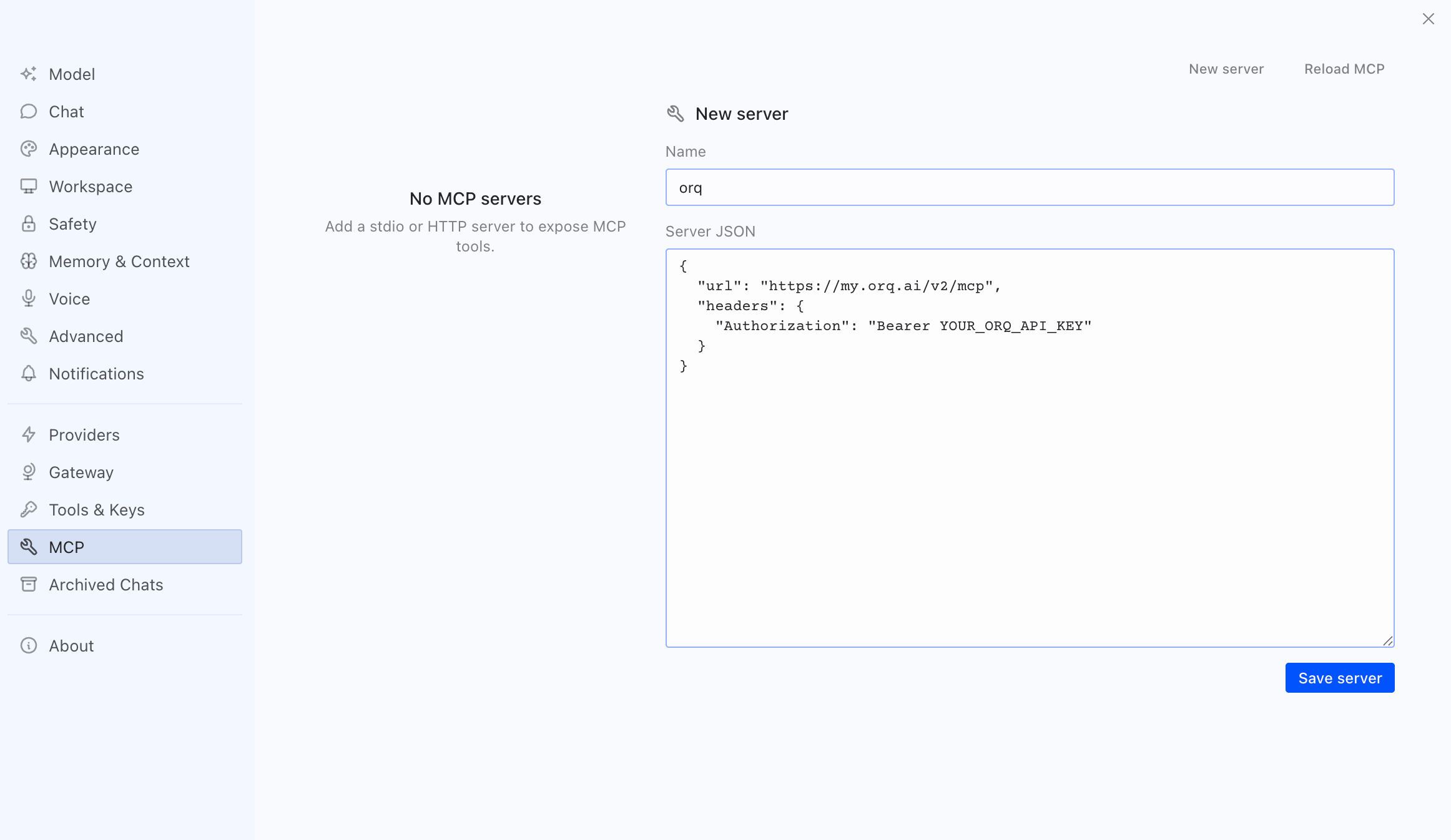
Set the Name to orq and paste the following into the Server JSON field, then click Save server:
Replace YOUR_ORQ_API_KEY with an Orq.ai API key.
Hermes MCP settings showing a new server named orq with the Orq MCP URL and a bearer Authorization header in the Server JSON field

Adding the Orq MCP server in the Hermes desktop app

3

Reload MCP

Click Reload MCP in the top right. Hermes connects to the Orq MCP server and its tools become available.

Available Commands

Once connected, ask Hermes to perform operations across the workspace:
  • Create an agent with custom instructions and tools
  • Get agent configuration for [agent-key]
  • Update agent [agent-key] with new instructions or model
  • Configure agent with evaluators and guardrails
  • Invoke agent [agent-key] with input [message]
  • Retrieve agent response [response-id]
  • Create a deployment called [deployment-key]
  • Get deployment configuration for [deployment-key]
  • Create a skill called [skill-key]
  • List all skills in my workspace
  • Get skill [skill-key]
  • Update skill [skill-key]
  • Delete skill [skill-key]
  • Get analytics overview for my workspace
  • Show me workspace metrics for the last 7 days
  • Query analytics filtered by deployment ID
  • Create a dataset called "customer-queries"
  • List all datapoints in dataset [dataset-key]
  • Add datapoints to dataset [dataset-key]
  • Update datapoint [datapoint-id]
  • Delete specific datapoints in dataset [dataset-key]
  • Delete dataset [dataset-key]
  • Create an experiment from dataset [dataset-key]
  • List all experiment runs
  • Export experiment run [run-id] as CSV
  • Run experiment and auto-evaluate results
  • Get evaluator configuration for [evaluator-key]
  • Create an LLM-as-a-Judge evaluator for tone
  • Create a Python evaluator to check response length
  • Add evaluator to experiment [experiment-key]
  • Update evaluator [evaluator-key] with a new prompt
  • Update Python evaluator [evaluator-key] with revised code
  • List traces from the last 24 hours
  • Show me traces with errors
  • Get span details for trace [trace-id]
  • Find the slowest traces from today
  • Show all traces for thread [thread-id]
  • List all available chat models
  • List all available embedding models
  • Invoke model [model-id] with prompt [message]
  • Search for datasets named "customer"
  • Find experiments in project [project-id]
  • List directories in project [project-id]
  • Search the Orq.ai docs for [topic]
  • Delete agent [agent-key]
  • Delete experiment [experiment-key]
  • Delete evaluator [evaluator-key]
  • Delete prompt [prompt-key]
  • Delete knowledge base [knowledge-base-key]
Use delete_dataset to delete a dataset along with all its datapoints.
See the MCP Quickstart for the full tool reference and examples.

See Also

Orq MCP Quickstart

The full Orq MCP tool reference.

API Keys

Create and manage Orq.ai API keys.