

TL;DR
- Advisor: the Agent asks a stronger model for guidance, sends the conversation transcript, and still writes the answer itself
- Sidekick: the Agent hands off a self-contained task, sends only that task, and gets back a finished artifact
- Read the split: one trace shows what the escalation costs relative to the rest of the run
What you’ll build
An incident triage Agent on a cheap model that consults an expensive model for one high-stakes judgement, hands a formatting job to a third model, and produces a trace where the cost of each choice sits side by side. Incident triage is the first pass after a monitoring alert fires: decide how bad it is, what is affected, whether to roll back, and what to tell customers. It suits this pattern because those steps differ sharply in difficulty. Classification is mechanical, the rollback call is a judgement worth paying for, and the status note is formatting.Prerequisites
- An Orq.ai workspace with a project to build in. See Projects
- An API key from Workspace Settings > API Keys, exported as
ORQ_API_KEY - Three chat models enabled in the AI Gateway: a cheap one for the Agent, a strong one for the Advisor, and a cheap one for the Sidekick. This cookbook uses
anthropic/claude-haiku-4-5,anthropic/claude-opus-4-8, andopenai/gpt-4o-mini - For the SDK snippets, the Python or Node SDK installed:
pip install orq-ai-sdkornpm install @orq-ai/node
Choose which tool each step needs
Decide this first, because the two tools carry different information and that is what limits which steps they can serve.
Ask whether the step needs history. A rollback decision is worthless without the evidence gathered so far, so it needs an Advisor. A status update needs only the facts that go in it, so it goes to a Sidekick, and sending the transcript would just be waste.
The two tools are independent, and most Agents need only one. A support Agent that escalates nothing but refund approvals needs an Advisor and no Sidekick. A research Agent that does its own analysis and only wants the summary formatted needs a Sidekick and no Advisor. This cookbook uses both because incident triage happens to have both kinds of step: a judgement that depends on the history, and a self-contained job that does not.
Step 1: Create the Agent
Both tools are declared insettings.tools, each with its secondary model in configuration. The instructions matter more than the configuration: a tool the instructions never mention is rarely called, so name each tool at the step it belongs to and say explicitly that the routine work stays on the Agent’s own model.
201 with the stored configuration echoed back. Set path to a project in the target workspace. The output shown in the next steps is the same whichever tab is used.
Two tabs need a note of their own:
- CLI: reads
ORQ_API_KEYfrom the environment and keeps the instructions in a file, which avoids quoting a multi-line string on the command line. Write the same instructions used in the other tabs toinstructions.txtfirst. See install and setup to get started with the CLI. - Node.js: top-level fields are camelCase (
displayName,maxIterations) while the keys insideconfigurationstay snake_case (max_uses,system_prompt), because that object is passed through untouched and keeps the API’s naming.
Step 2: Confirm the configuration in AI Studio
Open the Agent and select the Advisor tool. This dialog is where the secondary model and its parameters are edited.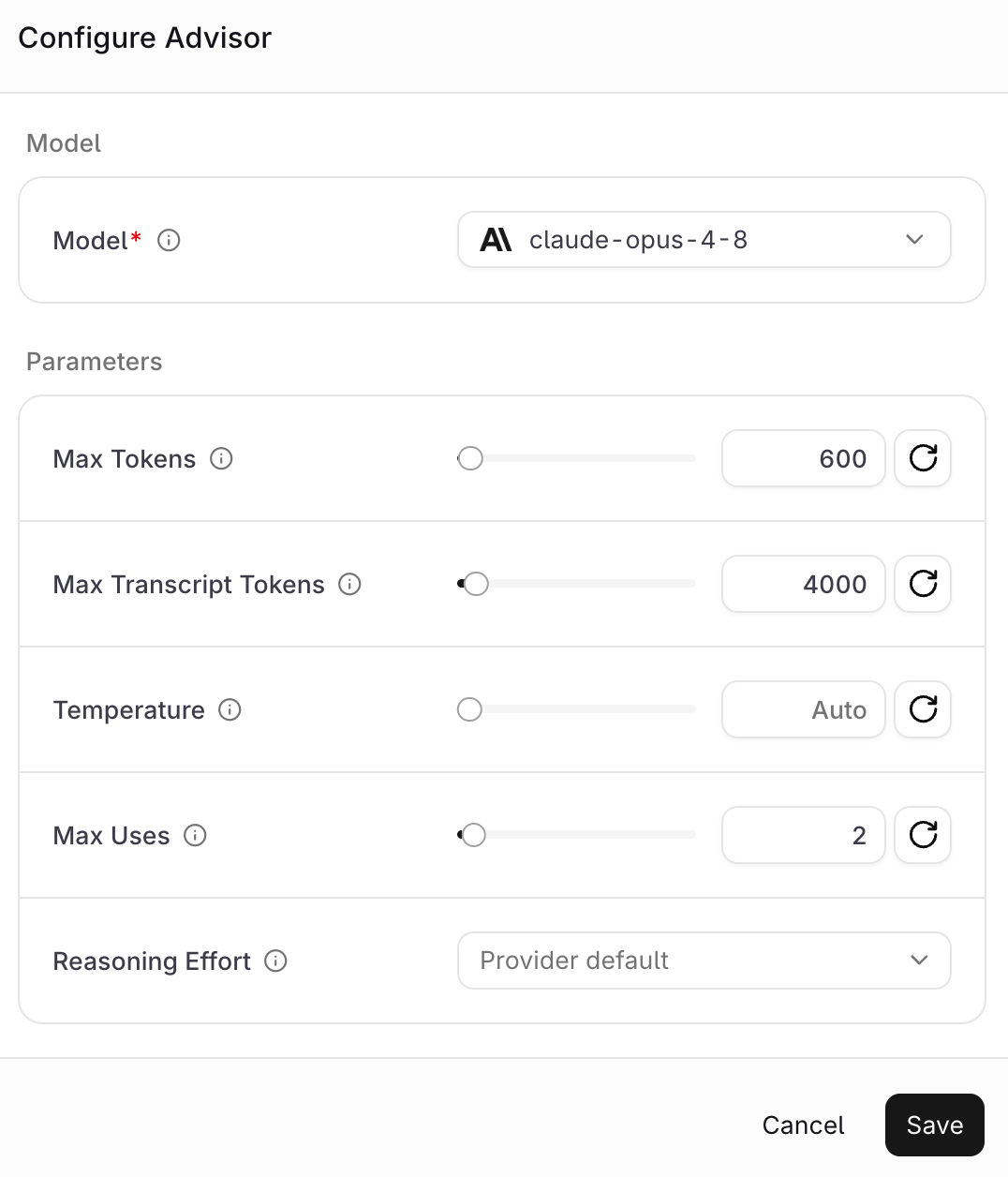
Max Transcript Tokens caps how much conversation history reaches the Advisor and is specific to it. Max Uses caps calls per run, which matters because an escalation the model can trigger freely is one that will show up on the bill. Unset numeric fields read Auto, and Reasoning Effort reads Provider default.
The Sidekick dialog drops the transcript control and adds the two fields that shape its output.
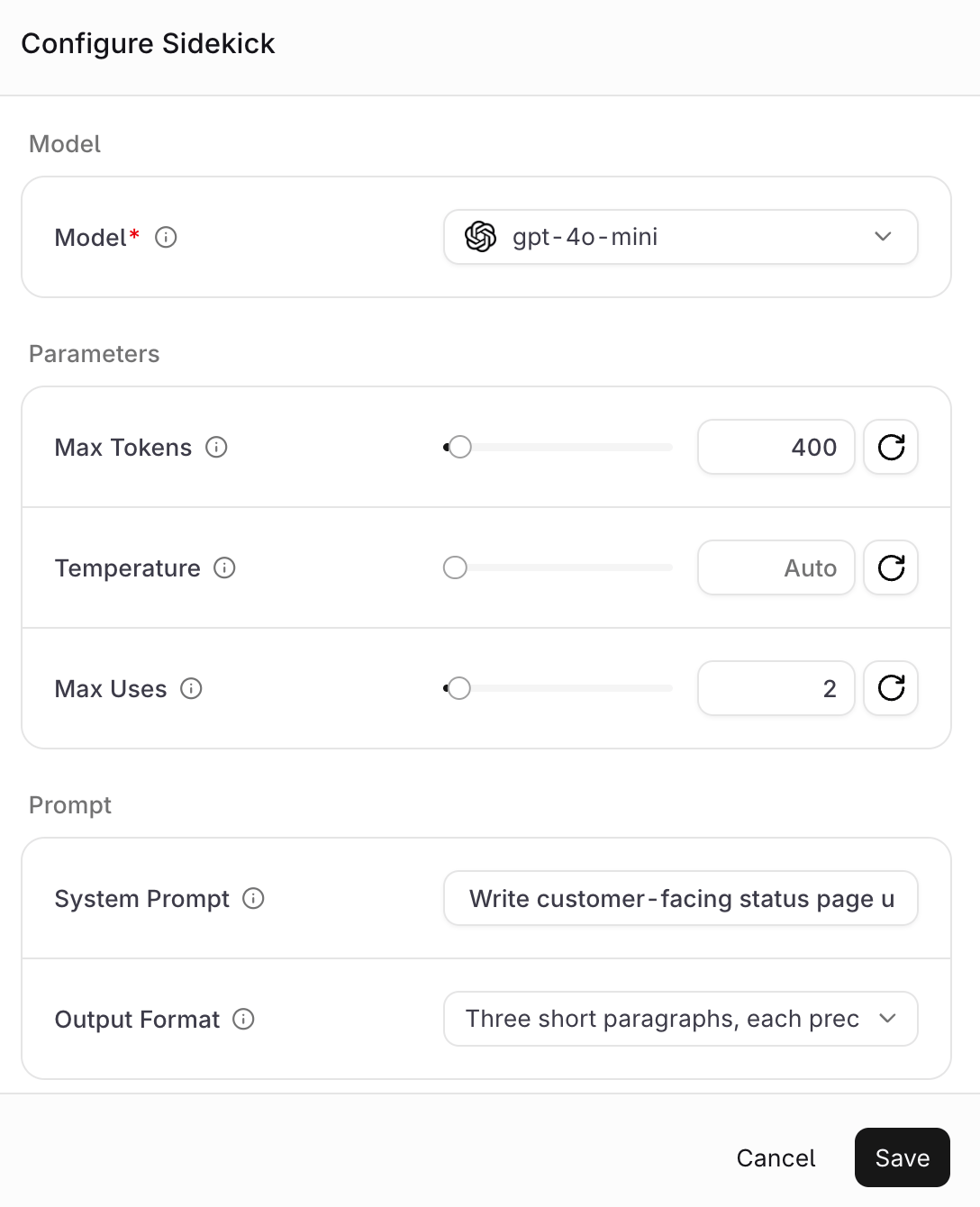
System Prompt replaces the platform default for the Sidekick and Output Format describes the shape of the result in plain language. Together they make the Sidekick result usable verbatim, with no cleanup turn on the Agent.
Step 3: Run the Agent
Send an alert with enough evidence to classify and enough ambiguity to be worth escalating.Run the agent
status: "completed" and the output array carries the delegation in order:
Output item sequence
function_call followed by a completed orq:advisor or orq:sidekick item holding the second model’s result, then the Agent continues.
Step 4: Read what each tool returned
The Advisor received a question and context, and returned a recommendation with reasoning:Advisor result
Sidekick result
Impact / Current status / Next update structure came from output_format and the plain register came from system_prompt.
Step 5: Read the cost split in the trace
Open the run in Traces and expand the waterfall.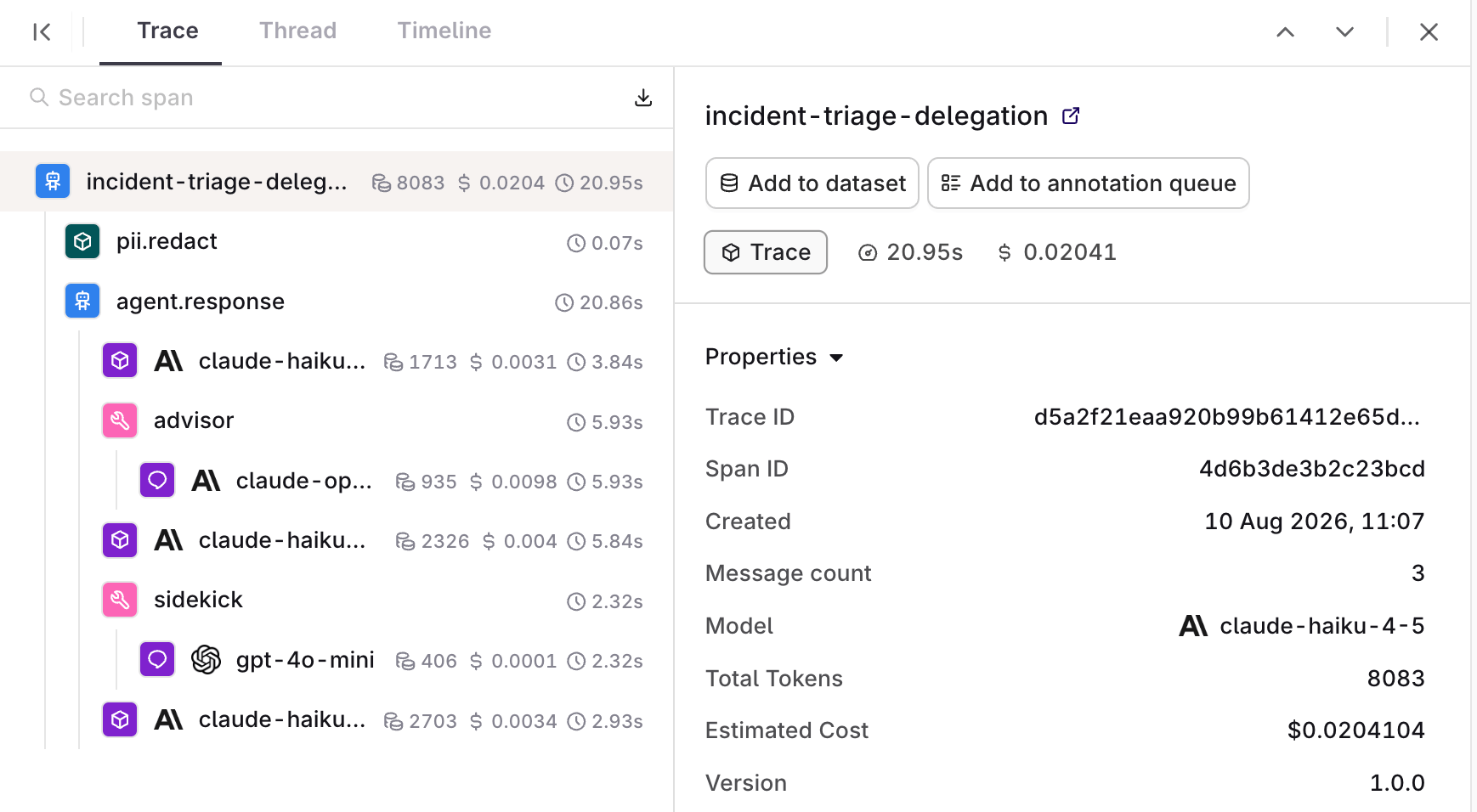
Span tree
When the secondary model fails
A failing secondary model does not fail the run. Pointing the Advisor at a model that does not exist still returns200 with status: "completed", and the Agent answers without the guidance it asked for. The error arrives as text inside the tool item’s result:
Failed secondary call
When to use this pattern, and when not to
Use it when a run has one or two steps that are genuinely harder than the rest. The saving comes from the ratio of many cheap steps to few expensive ones. An Agent where every step is the hard step should just run on the stronger model, and one that calls the Advisor every turn has bought the expensive model with extra latency attached. Setmax_uses deliberately. It caps how often the model can reach for the expensive path, and leaving it unlimited on a strong secondary model gives up the cost control that makes the pattern worth using. For a ceiling on the run as a whole, pair it with max_cost and max_iterations in the Agent settings.