

trace_scrubbing plugin selects what the AI Gateway writes to stored traces. It changes only the stored copy, never the live request, the response, or the payload the provider receives. See Trace Data Masking for the per-request security field, which feeds the same masking.
Use cases
- Keeping prompt content, model output, or template variables out of trace storage without changing what the model receives.
- Retaining latency, token, and cost data on a trace while removing the text that produced it.
- Enforcing one masking policy for every request in a workspace instead of adding
security.maskto each call.
Quick start
Add atrace_scrubbing entry to the plugins array with at least one mask value.
mask value is required. The What each value masks table lists the accepted values and what each one removes from a stored trace.
Enable for a workspace
Turn on Trace Scrubbing under Settings > Plugins to apply a mask to every request, without passing aplugins array on each call. Once the toggle is on, a icon appears next to it; click it to choose the surfaces to mask. Enabling the plugin without choosing any masks everything.
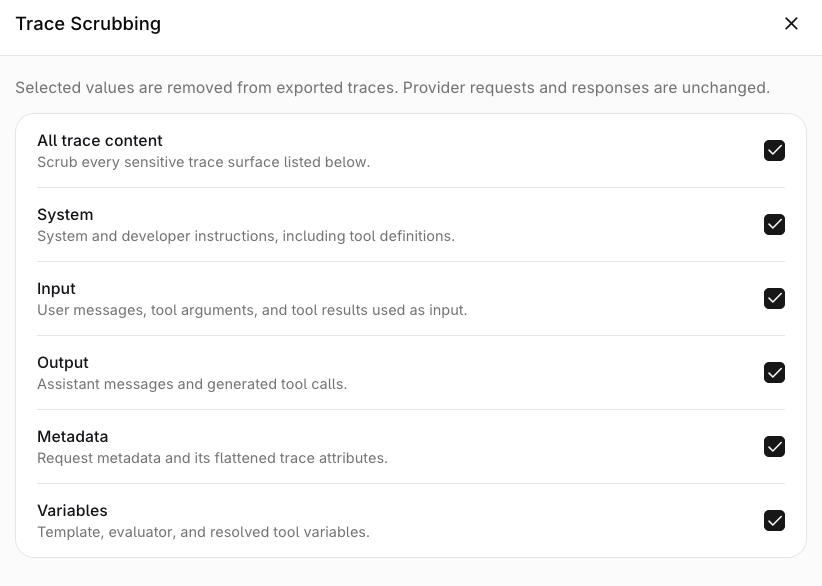
The Trace Scrubbing configuration panel, with every trace surface selected.
all wins over any narrower selection, so a request can mask more but never less. This matches how workspace-level PII redaction behaves.
Apply per routing rule
Attach Trace Scrubbing to a routing rule to mask traffic that matches the rule, with the fields chosen on the rule. An MCP gateway takes the same plugin for the tool-call traces it stores.Combine with security.mask
A request that carriessecurity.mask has those values merged with the plugin’s before the trace is written, so the two compose rather than override. The plugin is the way to mask traffic that omits security.mask, because only the plugin can be set for a whole workspace. See Coverage.
What it does not do
- It does not remove anything from the live request or response, or from the payload the provider receives.
- It does not change the data an Evaluator or Guardrail processes: the check still receives the original runtime input, output, instructions, and variables, and only the persisted span is scrubbed. See Trace scrubbing and evaluator data.
- It does not redact PII before the provider sees it. Use PII Redaction for that.
Supported endpoints
Theplugins entry is accepted on the same endpoints as the other plugins; see Supported endpoints. The workspace setting and a routing-rule attachment reach further: their mask is written to the stored trace of any request the AI Gateway traces, including deployment invokes and traffic matched by a routing rule.