

Prerequisites
- VS Code 1.122 or later (the Custom Endpoint provider graduated from Insiders to stable in this release) with the GitHub Copilot Chat extension installed
- Active Orq.ai account
- Orq.ai API key
- Copilot Business or Enterprise orgs: an administrator must enable Bring Your Own Language Model Key in VS Code in the Copilot policy settings on GitHub.com
BYOK covers Chat and tool calls only. Inline suggestions, next-edit suggestions, and semantic search still require GitHub sign-in and are not routed through Orq.ai.
Setup
1
Open Manage Language Models
Run Chat: Manage Language Models from the Command Palette, or select the gear icon labeled Manage Language Models in the Chat model picker.
2
Add a Custom Endpoint provider
Select Add Models, then choose Custom Endpoint from the provider list. VS Code prompts for three things in sequence:
- Group name: any label, e.g.
Orq.ai. - API key: the Orq.ai API key.
- API Type: Responses, Chat Completions, or Messages, matching one of the tabs below.
chatLanguageModels.json file, in the VS Code user data directory, not the project workspace, with the group already scaffolded. The API key is stored as a secret reference ("apiKey": "${input:chat.lm.secret...}"), not the raw key; leave that field as generated.3
Add a model to the group
chatLanguageModels.json is an array of groups. Add an entry to the scaffolded group’s models array: Responses (recommended)
- Chat Completions
 Messages
Matches the API Type selected as Responses. Reaches the full AI Gateway catalog through Orq.ai’s primary API.Replace
openai/gpt-5.4 with any identifier from the AI Gateway catalog (e.g. anthropic/claude-sonnet-4-6, google/gemini-2.0-flash-001), and adjust maxInputTokens/maxOutputTokens to match the chosen model.4
Select the model in Copilot Chat
Open the Chat model picker and select a model from the new group to start using it.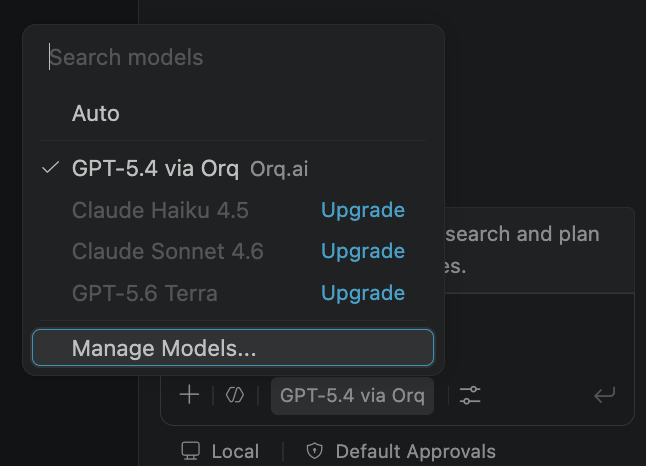
Configuration Reference
chatLanguageModels.json is an array of provider groups.
Troubleshooting
400 invalid model format
400 invalid model format
Set the model
id to the provider/model_id format (e.g. anthropic/claude-sonnet-4-6). Bare model IDs are rejected by the router.Custom Endpoint model does not appear in the picker
Custom Endpoint model does not appear in the picker
Confirm
url points to a full endpoint path, not just a base URL. https://api.orq.ai/v3/router alone is rejected; use https://api.orq.ai/v3/router/responses or https://api.orq.ai/v3/router/chat/completions.No Traces appearing in Orq.ai
No Traces appearing in Orq.ai
Confirm
url matches apiType: responses must point to https://api.orq.ai/v3/router/responses, chat-completions must point to https://api.orq.ai/v3/router/chat/completions, messages must point to https://api.orq.ai/v3/anthropic/v1/messages. Requests sent to the wrong endpoint will not appear in Orq.ai Traces.Inline suggestions still use a different model
Inline suggestions still use a different model
BYOK only applies to Chat and tool calls. Inline suggestions, next-edit suggestions, and semantic search continue to require GitHub sign-in and are not affected by the Custom Endpoint configuration.
Command Palette opens 'Manage Language Model Access' instead of the Custom Endpoint editor
Command Palette opens 'Manage Language Model Access' instead of the Custom Endpoint editor
On a Copilot Business or Enterprise account, Manage Language Models does not exist as a command until an administrator enables Bring Your Own Language Model Key in VS Code in the Copilot policy settings on GitHub.com. The Command Palette falls back to the similarly named Manage Language Model Access command instead, which controls extension permissions and is unrelated to BYOK. Ask a workspace administrator to enable the policy, then reload VS Code.
Custom Endpoint is missing from the Add Models list
Custom Endpoint is missing from the Add Models list
The Custom Endpoint provider requires VS Code 1.122 or later; earlier versions only show built-in providers (Anthropic, Azure, Google, Ollama, OpenAI, OpenRouter, xAI). Update VS Code via Code → Check for Updates (macOS) or Help → Check for Updates, then reopen Manage Language Models.
'No utility model is configured' error when sending a message
'No utility model is configured' error when sending a message
Expected the first time a BYOK model is used as the active main model. Open Settings (Cmd+,), search utility, and set Chat: Byok Utility Model Default to one of the configured Custom Endpoint models.
Verification
Select the configured model in the Chat model picker and send a message. The response appears in Copilot Chat and the trace appears in Orq.ai Traces with the model identifier set inid.