

/v3/router/batches. Batch requests, response objects, status values, and result files follow the OpenAI batch format, with Orq.ai additions for the endpoint list, listing filters, and project scoping.
Provider batches run against models that declare batch support for the endpoint and are priced at the provider’s batch rates. Check batch support for a model on the Models page.
Supported endpoints
Provider batches run through the provider’s batch service. Decisions batches run on Orq.ai workers, which pace the lines and check budgets per line.
The OpenAI SDK type definitions declare
/v1/responses, /v1/chat/completions, /v1/embeddings, and /v1/completions. Send /v1/moderations and /v3/router/decisions with the HTTP API.
Run a batch
Create a batch from the console or the API.- AI Studio
- API & SDK
 AI Studio
- Open Batches under AI Gateway. The list shows one row per batch with its ID, status, model, endpoint, request counts, and creation time.
- Click Batch.
- Choose the JSONL file, pick the endpoint, add metadata when needed, and click Create batch. The completion window is
24hand the field is not editable. - Follow the request counts, files, and status timeline in the list or the batch detail drawer. Filter by Status and Endpoint, or search by batch ID, model, or endpoint.
- Download the output or errors file from the detail drawer, or cancel a running batch from the row actions or the detail drawer.
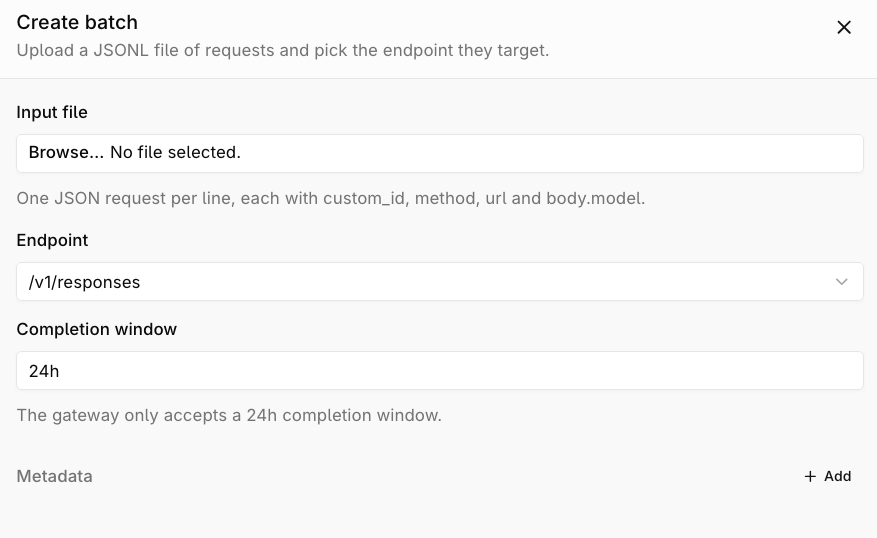
Create a batch from the Batches screen.
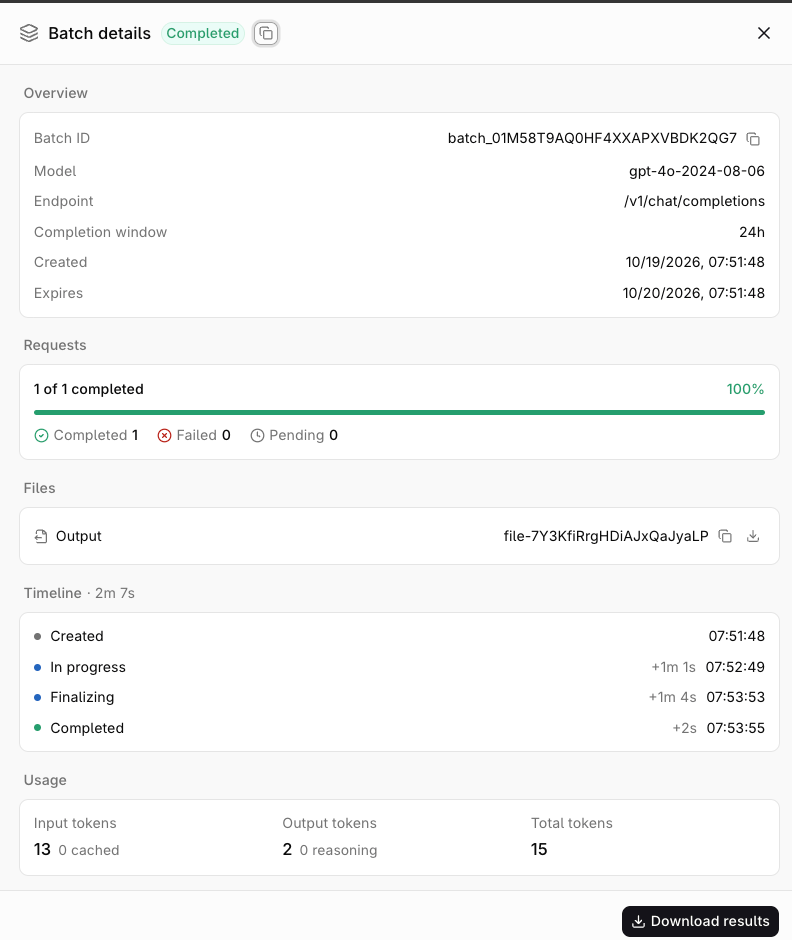
Batch details drawer with request progress, files, and the status timeline.
Input file
Each line follows the OpenAI batch input format.
Limits apply to the whole file and to each line.
All lines in a provider batch must resolve to the same provider, and each model must declare batch support for the endpoint. Lines can use different models only when they share a provider and support the endpoint.
Batch statuses
List and filter batches
GET /v3/router/batches returns batches in the caller’s projects, newest first.
list method sends limit and after. Send before, status, endpoint, and search over the HTTP API:
cURL
JSON
Results
Each result line follows the OpenAI batch output format.response.body is the endpoint response for that line, and response.request_id is the trace ID of the line.
JSON
error object instead of a response:
JSON
Provider batches can also return provider-specific error codes for lines the provider rejected.
Behaviour
- Validation up front: every line is checked before the batch is created, including the model and its access checks. An invalid line rejects the whole file with
400and names the line. - Tracing and billing: a provider batch records one trace with the batch’s aggregate usage when it reaches a terminal state, priced at the provider’s batch rates. A Decisions batch runs on Orq.ai workers, and each line is traced and billed like a single request.
- Budgets: Decisions batches check budgets per line. A line that hits a cost or token budget fails with
429in its result; a requests-per-minute budget delays the line for up to two minutes before failing it. - Project scoping: a batch belongs to the project of its input file. List, retrieve, download, and cancel only reach batches in the caller’s projects.
- Permissions: the API key needs the
batchespermission. A Decisions batch also needs theclassifypermission. - Rate limits: creating a batch counts as one request against plan rate limits. See Rate limits and quotas.
- Cancel:
POST /v3/router/batches/{batch_id}/cancelstops the lines that have not run. Calling it on a terminal batch returns the stored batch unchanged.
Related
Files API
Upload the JSONL input file with the batch purpose.
Decisions
Batch classification requests against a Decisions model.
Background Responses
Run a single long-running response without batching.