API Keys are tokens that authenticate requests to Orq.ai. A key covers one project, or every project in the workspace when created without one through the API. Its permissions limit what it can do.Two key types are available, chosen by the key’s owner.
Tied to a specific user account. Automatically revoked if the user is removed from the organization or the project one of their keys is bound to. Use user keys for personal use and local development.
Not tied to any individual user, with a lifecycle independent of user membership. Only workspace admins can create service account keys. Use service account keys for production systems, so access does not break when a team member leaves.
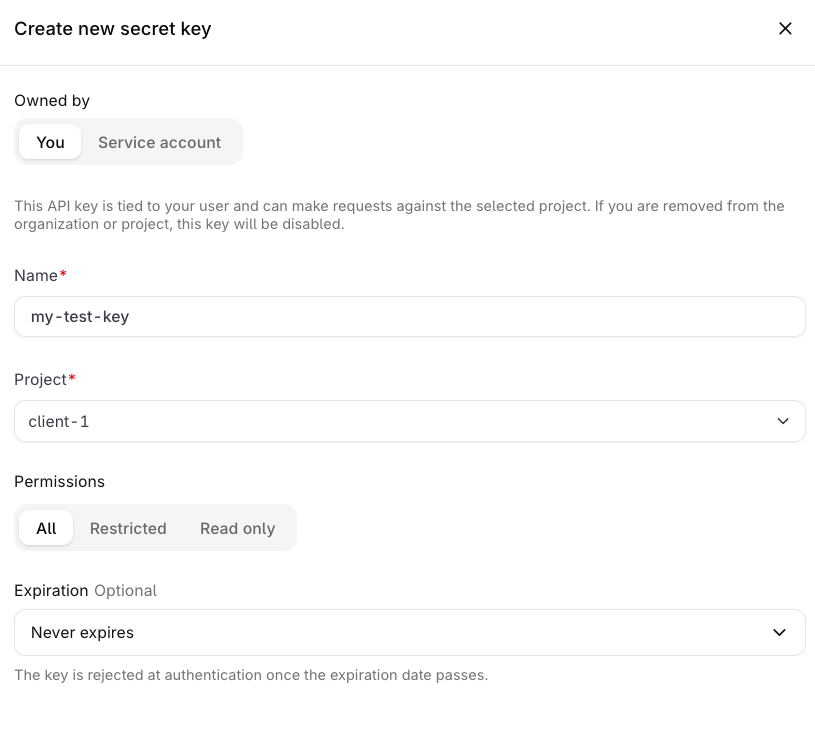
Navigate to Settings > API Keys and select Secret key. The Create new secret key sheet opens with Owned by, Name, Project, Permissions, and Expiration.
The Create new secret key sheet.
2
Choose an owner
Under Owned by, select You to create a User key, or Service account to create a key not tied to any individual user.
3
Set name and project
Enter a Name for the key and select the Project it will have access to.
4
Set permissions
Choose a permission preset. See Permissions below.
5
Set expiration (optional)
Set an Expiration date if the key should automatically become inactive after a certain date.
6
Create and copy the key
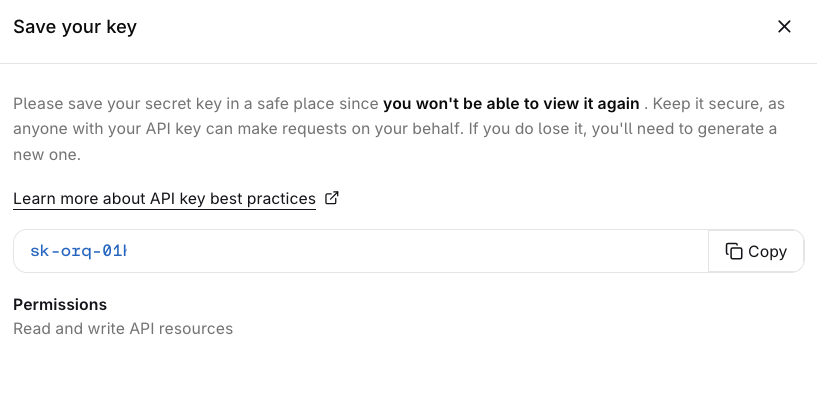
Select Create secret key. A Save your key dialog appears showing the token and its permissions summary.
The Save your key dialog appears once after creation.
Click Copy to copy the token.
The token is only shown once. Store it securely before closing this dialog. It cannot be retrieved afterwards.
To cap a key’s cost, token, or requests-per-minute usage, attach a Budget to it. Budget limits reset on the configured period. See Rate limits & quotas for what the gateway enforces at each layer.
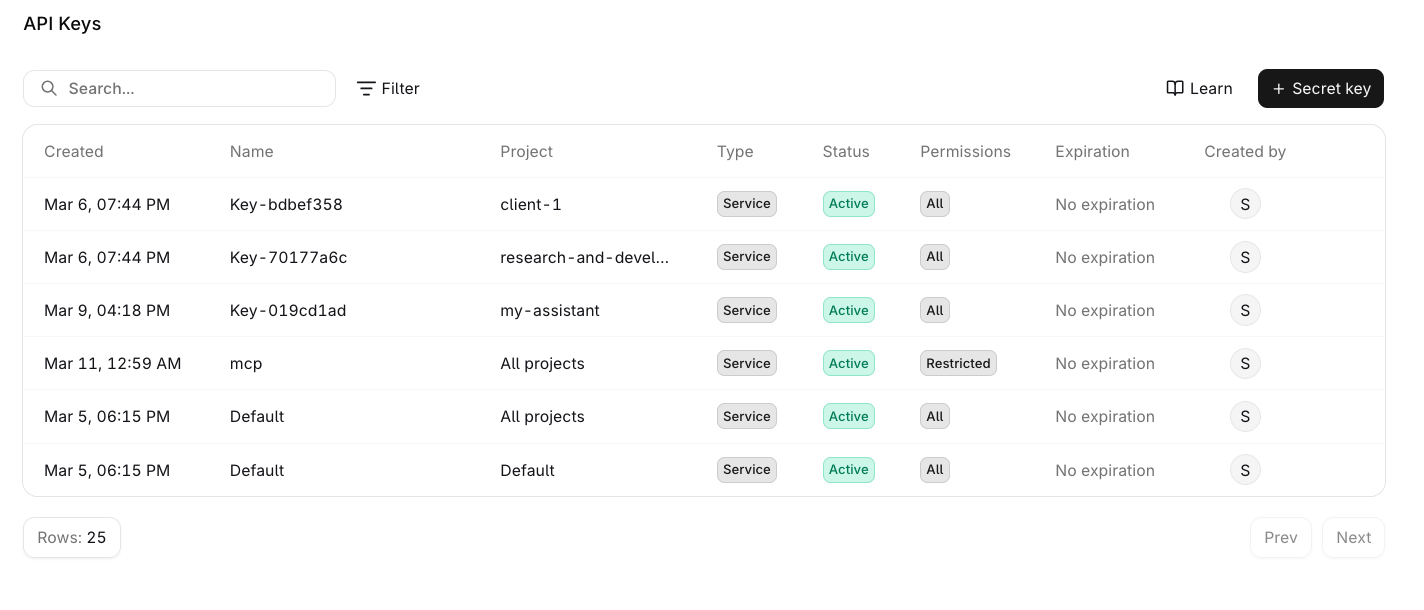
The API Keys management table showing all keys, their type, status, permissions, and actions.
Select the menu on any key to access the following actions:
Edit: update the name, permissions, or expiration date. The owner type cannot be changed after creation.
Duplicate: opens the creation panel pre-filled with the key’s current settings.
Delete: permanently removes the key. This cannot be undone.
A Revoked status means the key belonged to a user who was removed from the organization or project, or it has been revoked manually. Revocation is permanent.
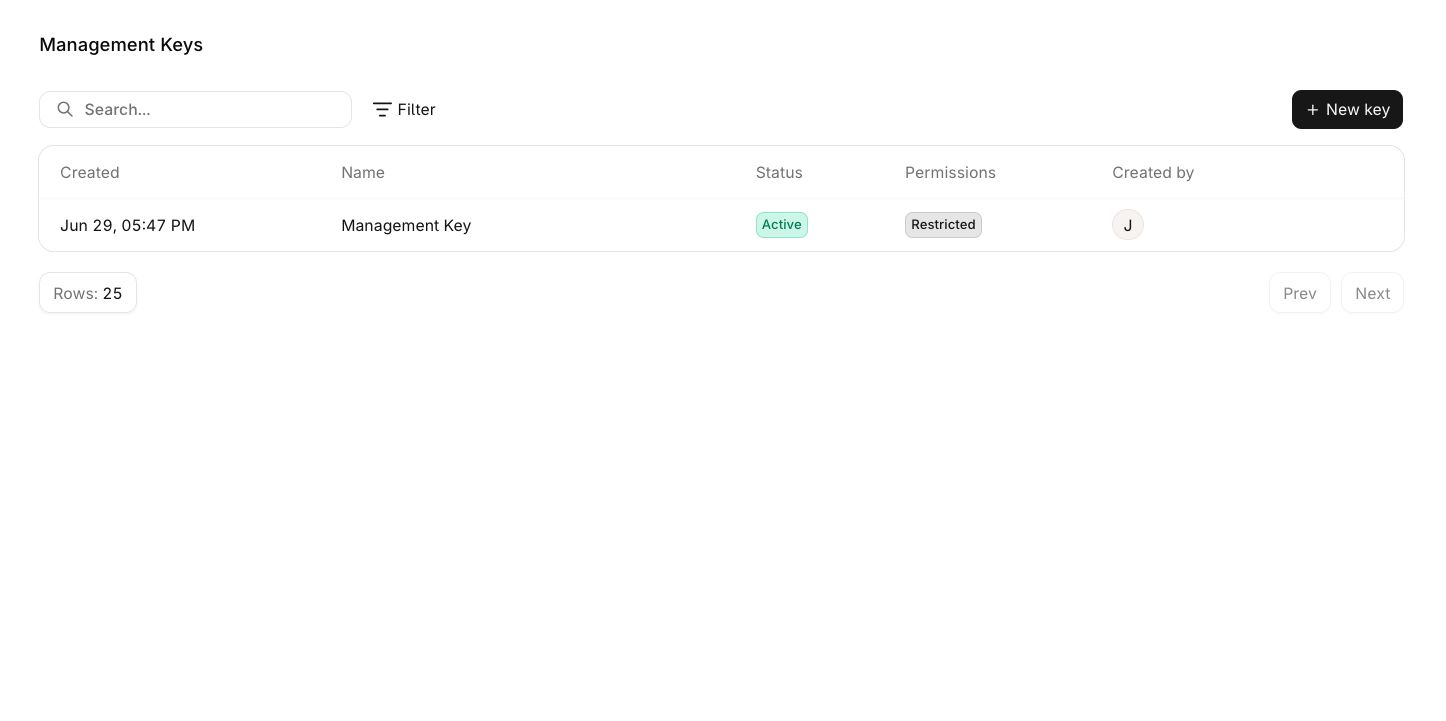
Management Keys are only available to workspace admins. The Management Keys page is not visible to non-admin members.
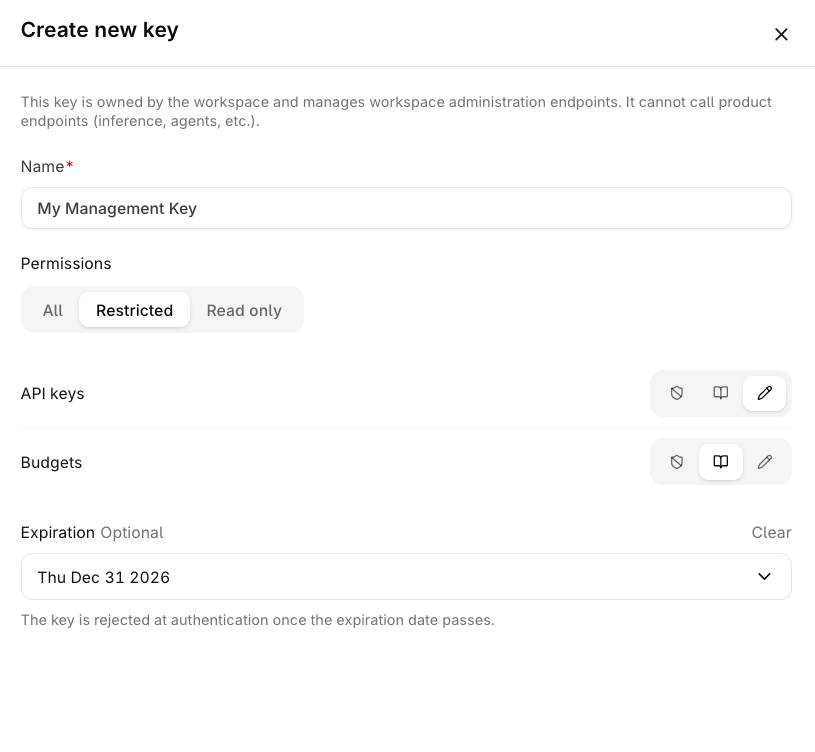
Management Keys are workspace-scoped tokens for authenticating workspace administration operations. Each key grants read or write access to every capability in Capabilities.
Management Keys cannot be used to query models or agents. Use a standard API Key for inference and product endpoints.
API keys cannot administer API keys or Budgets, so those two families need a Management Key. Project and Smart Router management follows the key’s scope: an all-projects key can create, update, and delete them, a single-project key cannot.
Endpoint family
Access
/v2/api-keys*
List, retrieve, create, update, and delete API keys. /v2/api-keys/capabilities is public.
/v2/budgets*
List, retrieve, create, update, reset, and delete Budgets.
/v2/projects*
An all-projects API key manages Projects across the workspace; a single-project key can only list or retrieve its own Project.
/v2/smart-routers*
An all-projects API key lists, creates, updates, enables, disables, and deletes Smart Routers across the workspace.
The Restricted mode shows one row per capability. None grants no access to that capability, Read lists and views its resources, and Write also creates, updates, and deletes them. A ✗ marks a level the picker omits for that capability, which then takes only None or Read.
Capability
Read
Write
API keys
✓
✓
Audit logs
✓
✗
Budgets
✓
✓
Environments
✓
✓
Evaluators
✓
✓
Guardrail rules
✓
✓
Hub
✓
✗
Logs
✓
✗
Management keys
✓
✓
MCP gateways
✓
✓
MCP servers
✓
✓
Model fusions
✓
✓
Models
✓
✓
Notifiers
✓
✓
Policies
✓
✓
Projects
✓
✓
Reporting
✓
✗
Routing rules
✓
✓
Secrets
✓
✓
Smart routers
✓
✓
Teams
✓
✓
Traces
✓
✗
Users
✓
✓
Vaults
✓
✓
Workspace
✓
✓
Workspace models
✓
✓
Management Keys are not available through MCP. Use the REST API to manage keys programmatically.
Key management requests authenticate with a Management Key, never an API key. API Keys are inference credentials scoped to project resources and cannot administer keys.
Pass a Management Key as the bearer token, or as the SDK API key.
A Management Key with the api-key write grant can list, create, update, revoke, and delete API Keys.
The SDK exposes these operations as api_keys / apiKeys and management_keys / managementKeys: API Keys SDK, Management Keys SDK.
These examples use a Management Key as ORQ_API_KEY.
Operation
Endpoint
Notes
Create
POST /v2/api-keys
name is required; scope, permissions, and expiration are optional. An omitted permission_mode defaults to all, which grants read and write access to every capability
Disable
PATCH /v2/api-keys/{api_key_id}
Set status to disabled; reversible
Revoke
PATCH /v2/api-keys/{api_key_id}
Set status to revoked; permanent
Delete
DELETE /v2/api-keys/{api_key_id}
Permanently removes the key
List
GET /v2/api-keys
Paginated; never returns the secret
Retrieve
GET /v2/api-keys/{api_key_id}
Never returns the secret
Create a project-scoped key with restricted permissions:
To rotate a key, create a replacement key with the same configuration, then revoke the old one. Rotation is create followed by revoke; there is no dedicated rotate endpoint.
Read and write access to all domains in the API key capability catalog
read_only
Read access to all domains in the API key capability catalog
restricted
Per-domain access via the access map
With restricted, the access map assigns a level to each domain. Write includes read:
Level
Access
none
No access
read
Read access
write
Read and write access
The capability catalog lists the domains a key can be granted: GET /v2/api-keys/capabilities returns each domain with its id, display name, group, and read / write availability. Use the catalog to discover grantable domains at runtime instead of hard-coding the list.
The create response returns the raw token exactly once, in the sk-orq-<id>-<secret> format. Store it immediately: the API stores only a displayable token_prefix and a hash of the secret, so list and retrieve responses never include the token.
The token is only returned in the create response. Store it securely and treat it like a password; it cannot be retrieved afterwards.
For how every other kind of secret is stored, read, and rotated, see Secrets management.
Keys do not carry limit fields. Attach cost, token, and requests-per-minute limits with a Budget scoped to the key.Budgets are workspace resources and require a Management Key; regular API Keys cannot manage them.
{"docsConfig":{"theme":"aspen","$schema":"https://mintlify.com/docs.json","name":"Orq.ai Documentation","description":"Documentation for Orq.ai, the EU-built control plane for enterprise AI: govern every LLM and MCP call with the AI Gateway, and ship backlog work with the Software Factory.","colors":{"primary":"#027f6b","light":"#00d2b5","dark":"#027f6b"},"logo":{"light":"https://mintcdn.com/orqai/OG_14djpK9Yasgfk/images/Orq_ai_Symbol_Dark.svg?fit=max\u0026auto=format\u0026n=OG_14djpK9Yasgfk\u0026q=85\u0026s=d01651850182afdbc6309808b688d470","dark":"https://mintcdn.com/orqai/BYq_L5I_ZDBWL_Pf/images/Orq_ai_Symbol_Light.svg?fit=max\u0026auto=format\u0026n=BYq_L5I_ZDBWL_Pf\u0026q=85\u0026s=3e372f93174202f20c31d2c045af92b9","href":"/ai-gateway/get-started/introduction"},"favicon":"https://mintcdn.com/orqai/rmwcfFw4PPljHRCz/favicon.svg?fit=max\u0026auto=format\u0026n=rmwcfFw4PPljHRCz\u0026q=85\u0026s=1827beca4e1fb46e074d8bda067f3fb1","api":{"openapi":"openapi.json","examples":{"languages":["curl","typescript","python"]}},"background":{"color":{"light":"#f7f6f5","dark":"#171717"}},"navbar":{"links":[],"primary":{"type":"button","label":"Get Started","href":"https://my.orq.ai/auth/signup"}},"footer":{"socials":{"github":"https://github.com/orq-ai","x":"https://x.com/orq_ai","linkedin":"https://www.linkedin.com/company/orqai","website":"https://orq.ai"}},"seo":{"metatags":{"author":"Orq.ai","og:type":"website","og:site_name":"Orq.ai Documentation","og:locale":"en_US","twitter:card":"summary_large_image","twitter:site":"@orq_ai","twitter:creator":"@orq_ai","viewport":"width=device-width, initial-scale=1.0","robots":"index, follow","language":"English"},"organization":{"id":"https://docs.orq.ai/#organization","name":"Orq.ai","legalName":"Orq.AI Holding B.V.","url":"https://orq.ai","logo":"https://docs.orq.ai/images/Orq_ai_Symbol_Dark.svg","sameAs":["https://github.com/orq-ai","https://x.com/orq_ai","https://www.linkedin.com/company/orqai/"]},"indexing":"all"},"fonts":{"heading":{"family":"ES Klarheit Kurrent Semibold","weight":600,"source":"https://framerusercontent.com/assets/HiovZWjG27S5NQhE8dyeECDMc.woff2","format":"woff2"},"body":{"family":"Inter","weight":400,"source":"fonts/inter-latin-400-normal.woff2","format":"woff2"}},"styling":{"codeblocks":{"theme":{"light":"github-light","dark":"github-dark"}},"latex":true},"contextual":{"options":["copy","download-spec","chatgpt","claude","view"],"display":"header"},"interaction":{"drilldown":true},"navigation":{"pages":[]}},"deployment":{"deploymentMetadataValue":{"subdomain":"orqai","hasAudioNarration":false,"actualSubdomain":"orqai","customDomains":["docs.orq.ai"],"gitSource":{"type":"github","owner":"orq-ai","repo":"orquesta-web","deployBranch":"main","contentDirectory":"documentation/mintlify","isPrivate":true,"mountPath":"","label":""},"chroma":{"liveDeploymentHistoryId":"6aec613bada4d37850e27e55","collectionId":"97d33066-b9a1-4280-87e1-bbb0adeceadf","schemaVersion":"v3","latestBuiltDeploymentHistoryId":"6aec613bada4d37850e27e55"},"feedback":{"thumbs":true,"agentFeedback":true},"entitlements":{"AI_CHAT":{"status":"ENABLED"},"WEB_MCP":{"status":"ENABLED"},"NARRATION":{"status":"ENABLED"}},"buildId":"6aec613bada4d37850e27e55","clientVersion":"0.0.4074","searchFilterCounts":[{"language":"default","tag":"API Reference","count":404},{"language":"default","tag":"Platform APIs","count":258},{"language":"default","tag":"Integrations","count":93},{"language":"default","tag":"Orq SDK","count":70},{"language":"default","tag":"AI Gateway","count":69},{"language":"default","tag":"Management APIs","count":68},{"language":"default","tag":"SDK Reference","count":67},{"language":"default","tag":"Cookbooks","count":34},{"language":"default","tag":"Model Providers","count":31},{"language":"default","tag":"Frameworks \u0026 SDKs","count":30}],"searchSettings":{"maxResults":15}},"assistantConfig":{"enableStarterQuestions":true,"enableContextualStarterQuestions":true,"deflection":{"enabled":true,"email":"support@orq.ai","showHelpButton":true}},"basePath":"","hasChatPermissions":true,"hasWebMcpPermissions":true,"toggles":[{"name":"kill-isr","enabled":true,"variant":{"name":"disabled","enabled":false,"feature_enabled":true},"impressionData":false},{"name":"agent-mintlify-slack","enabled":true,"variant":{"name":"disabled","enabled":false,"feature_enabled":true},"impressionData":false},{"name":"agent-integrations-settings","enabled":true,"variant":{"name":"disabled","enabled":false,"feature_enabled":true},"impressionData":false},{"name":"rbac-expansion","enabled":true,"variant":{"name":"disabled","enabled":false,"feature_enabled":true},"impressionData":false},{"name":"automations-pr-grouping","enabled":true,"variant":{"name":"disabled","enabled":false,"feature_enabled":true},"impressionData":false},{"name":"custom-prefix","enabled":true,"variant":{"name":"disabled","enabled":false,"feature_enabled":true},"impressionData":false},{"name":"analytics-v7","enabled":true,"variant":{"name":"disabled","enabled":false,"feature_enabled":true},"impressionData":false},{"name":"user-flows-analytics","enabled":true,"variant":{"name":"disabled","enabled":false,"feature_enabled":true},"impressionData":false},{"name":"no-publish-flow","enabled":true,"variant":{"name":"disabled","enabled":false,"feature_enabled":true},"impressionData":false},{"name":"workos-onboarding","enabled":true,"variant":{"name":"disabled","enabled":false,"feature_enabled":true},"impressionData":false},{"name":"llms-txt-v2","enabled":true,"variant":{"name":"disabled","enabled":false,"feature_enabled":true},"impressionData":false},{"name":"snapshot-serving-live","enabled":true,"variant":{"name":"disabled","enabled":false,"feature_enabled":true},"impressionData":false},{"name":"stripTemperatureMiddleware","enabled":true,"variant":{"name":"disabled","enabled":false,"feature_enabled":true},"impressionData":false},{"name":"support-platform-pylon-zendesk","enabled":true,"variant":{"name":"disabled","enabled":false,"feature_enabled":true},"impressionData":false},{"name":"snapshot-serving","enabled":true,"variant":{"name":"disabled","enabled":false,"feature_enabled":true},"impressionData":false},{"name":"instant-rollback","enabled":true,"variant":{"name":"disabled","enabled":false,"feature_enabled":true},"impressionData":false},{"name":"granular-notifications-server","enabled":true,"variant":{"name":"disabled","enabled":false,"feature_enabled":true},"impressionData":false},{"name":"granular-notifications","enabled":true,"variant":{"name":"disabled","enabled":false,"feature_enabled":true},"impressionData":false},{"name":"automations-fable","enabled":true,"variant":{"name":"disabled","enabled":false,"feature_enabled":true},"impressionData":false},{"name":"fixed-ai-action-pricing","enabled":true,"variant":{"name":"disabled","enabled":false,"feature_enabled":true},"impressionData":false},{"name":"automation-resolve-merge-conflict","enabled":true,"variant":{"name":"disabled","enabled":false,"feature_enabled":true},"impressionData":false},{"name":"scoped-publishing","enabled":true,"variant":{"name":"disabled","enabled":false,"feature_enabled":true},"impressionData":false},{"name":"mintql","enabled":true,"variant":{"name":"disabled","enabled":false,"feature_enabled":true},"impressionData":false},{"name":"page-level-analytics","enabled":true,"variant":{"name":"disabled","enabled":false,"feature_enabled":true},"impressionData":false},{"name":"editor-version-history-v2","enabled":true,"variant":{"name":"disabled","enabled":false,"feature_enabled":true},"impressionData":false},{"name":"billing-page-v2","enabled":true,"variant":{"name":"disabled","enabled":false,"feature_enabled":true},"impressionData":false},{"name":"full-page-search","enabled":true,"variant":{"name":"disabled","enabled":false,"feature_enabled":true},"impressionData":false},{"name":"workspace-projects","enabled":true,"variant":{"name":"disabled","enabled":false,"feature_enabled":true},"impressionData":false},{"name":"assistant-v5","enabled":true,"variant":{"name":"disabled","enabled":false,"feature_enabled":true},"impressionData":false},{"name":"fork-pr-previews","enabled":true,"variant":{"name":"disabled","enabled":false,"feature_enabled":true},"impressionData":false},{"name":"revalidation-jwt","enabled":true,"variant":{"name":"disabled","enabled":false,"feature_enabled":true},"impressionData":false},{"name":"vite-origin","enabled":true,"variant":{"name":"disabled","enabled":false,"feature_enabled":true},"impressionData":false},{"name":"workos-sso-scim","enabled":true,"variant":{"name":"disabled","enabled":false,"feature_enabled":true},"impressionData":false},{"name":"hobby-abuse-scan","enabled":true,"variant":{"name":"disabled","enabled":false,"feature_enabled":true},"impressionData":false},{"name":"dashboard-inbox","enabled":true,"variant":{"name":"disabled","enabled":false,"feature_enabled":true},"impressionData":false},{"name":"workos-signup","enabled":true,"variant":{"name":"disabled","enabled":false,"feature_enabled":true},"impressionData":false},{"name":"turbopuffer-dual-write","enabled":true,"variant":{"name":"disabled","enabled":false,"feature_enabled":true},"impressionData":false},{"name":"workos-enabled","enabled":true,"variant":{"name":"disabled","enabled":false,"feature_enabled":true},"impressionData":false},{"name":"approve-review-flow","enabled":true,"variant":{"name":"disabled","enabled":false,"feature_enabled":true},"impressionData":false},{"name":"sso-setup-deadline-banner","enabled":true,"variant":{"name":"disabled","enabled":false,"feature_enabled":true},"impressionData":false},{"name":"turbopuffer-serve","enabled":true,"variant":{"name":"disabled","enabled":false,"feature_enabled":true},"impressionData":false},{"name":"live-agents","enabled":true,"variant":{"name":"disabled","enabled":false,"feature_enabled":true},"impressionData":false},{"name":"comment-mode","enabled":true,"variant":{"name":"disabled","enabled":false,"feature_enabled":true},"impressionData":false}],"googleFontsInlined":false},"customCss":[{"filePath":"custom.css","content":".nav-anchor img{border-radius:50%}.ig-root{scroll-margin-top:6rem}.ig-search{width:100%;padding:10px 14px 10px 38px;border-radius:8px;border:1px solid rgba(0, 0, 0, 0.15);font-size:14px;outline:none;margin-bottom:20px;background:transparent;box-sizing:border-box;background-image:url(\"data:image/svg+xml,%3Csvg xmlns='http://www.w3.org/2000/svg' width='16' height='16' fill='none' viewBox='0 0 24 24'%3E%3Cpath stroke='%23999' stroke-linecap='round' stroke-linejoin='round' stroke-width='2' d='m21 21-4.35-4.35M17 11A6 6 0 1 1 5 11a6 6 0 0 1 12 0Z'/%3E%3C/svg%3E\");background-repeat:no-repeat;background-position:12px center}.dark .ig-search{border-color:rgba(255, 255, 255, 0.15)}.ig-search:focus{border-color:#027f6b}.ig-tabs{display:flex;border-bottom:1px solid rgba(0, 0, 0, 0.1);margin-bottom:20px;gap:0}.dark .ig-tabs{border-bottom-color:rgba(255, 255, 255, 0.1)}.ig-tab{padding:8px 16px;background:none;border:none;border-bottom:2px solid transparent;margin-bottom:-1px;cursor:pointer;font-size:14px;font-weight:500;color:#888;white-space:nowrap}.ig-tab:hover{color:#027f6b}.dark .ig-tab:hover{color:#677F78}.ig-tab-active{border-bottom-color:#027f6b!important;color:#027f6b!important}.dark .ig-tab-active{border-bottom-color:#677F78!important;color:#677F78!important}.ig-grid{display:grid;grid-template-columns:repeat(4, 1fr);gap:6px}@media (max-width: 768px){.ig-grid{grid-template-columns:repeat(3, 1fr)}}@media (max-width: 480px){.ig-grid{grid-template-columns:repeat(2, 1fr)}}.ig-card{display:flex;align-items:center;gap:8px;padding:10px 14px;border:1px solid rgba(0, 0, 0, 0.1);border-radius:6px;text-decoration:none!important;color:inherit!important;font-size:14px;font-weight:500;transition:background 0.12s, border-color 0.12s}.ig-card:hover{background:rgba(2, 127, 107, 0.05);border-color:rgba(2, 127, 107, 0.25)}.dark .ig-card{border-color:rgba(255, 255, 255, 0.1)}.dark .ig-card:hover{background:rgba(103, 127, 120, 0.1);border-color:rgba(103, 127, 120, 0.3)}.ig-card-icon{width:20px;height:20px;object-fit:contain;flex-shrink:0}.ig-tab-count{display:inline-flex;align-items:center;justify-content:center;margin-left:6px;padding:0 5px;min-width:18px;height:18px;border-radius:9px;font-size:11px;font-weight:600;background:rgba(0, 0, 0, 0.08);color:inherit}.dark .ig-tab-count{background:rgba(255, 255, 255, 0.12)}.ig-tab-active .ig-tab-count{background:rgba(2, 127, 107, 0.15)}.dark .ig-tab-active .ig-tab-count{background:rgba(103, 127, 120, 0.25)}.ig-empty{text-align:center;padding:48px 24px;color:#999;font-size:14px;grid-column:1 / -1}kbd.key,kbd.key *{color:#fff!important}kbd.key{background:#242424;border-radius:5px;padding:2px 8px;font-size:0.85em;display:inline-flex;align-items:center;gap:6px;border:1px solid #3a3a3a;font-family:inherit;white-space:nowrap}#sidebar-content .flex-1:has(>svg.flex-shrink-0){flex:none!important}#sidebar-content{width:16rem!important;min-width:16rem!important}@media (min-width: 1024px){.lg\\:pl-56{padding-left:16rem!important}}.topbar-right-container nav[aria-label=\"Main\"] .navbar-link a,.topbar-right-container nav[aria-label=\"Main\"] .navbar-link a:hover{background-color:transparent!important}@media (min-width: 1024px){.topbar-right-container nav[aria-label=\"Main\"] ul{gap:1rem!important}.topbar-right-container nav[aria-label=\"Main\"] .navbar-link a{padding-left:0!important;padding-right:0!important}#page-title{font-size:2rem!important;line-height:1.2!important}}.nav-tabs-item:has(a[href^=\"/reference\"]){display:none!important}#navbar .nav-tabs-item[href=\"/ai-studio/integrations/overview\"]{position:relative}#navbar .nav-tabs-item[href=\"/ai-studio/integrations/overview\"]::before{content:'';position:absolute;top:50%;left:-12px;transform:translateY(-50%);height:55%;width:1px;background:rgba(0, 0, 0, 0.15)}.dark #navbar .nav-tabs-item[href=\"/ai-studio/integrations/overview\"]::before{background:rgba(255, 255, 255, 0.15)}@media (min-width: 1280px){#content-container{padding-left:3rem!important;padding-right:2rem!important}#content-side-layout{max-width:20rem!important}#content-area{width:calc(100% - 20rem)!important}}.md-export-list{display:none}@font-face{font-family:'Inter';src:url('/fonts/inter-latin-400-normal.woff2') format('woff2');font-style:normal;font-weight:400;font-display:optional}"}],"page":{"pagePath":"ai-gateway/configuration/api-keys","slug":"/ai-gateway/configuration/api-keys","pageMetadata":{"title":"API Keys and Management Keys","sidebarTitle":"API Keys \u0026 Management Keys","description":"Create and manage API keys and workspace-scoped management keys in Orq.ai with granular permissions for users and service accounts.","href":"/ai-gateway/configuration/api-keys"},"description":{"compiledSource":"\"use strict\";\nconst {jsx: _jsx} = arguments[0];\nconst {useMDXComponents: _provideComponents} = arguments[0];\nfunction _createMdxContent(props) {\n const _components = {\n p: \"p\",\n ..._provideComponents(),\n ...props.components\n };\n return _jsx(_components.p, {\n children: \"Create and manage API keys and workspace-scoped management keys in Orq.ai with granular permissions for users and service accounts.\"\n });\n}\nfunction MDXContent(props = {}) {\n const {wrapper: MDXLayout} = {\n ..._provideComponents(),\n ...props.components\n };\n return MDXLayout ? _jsx(MDXLayout, {\n ...props,\n children: _jsx(_createMdxContent, {\n ...props\n })\n }) : _createMdxContent(props);\n}\nreturn {\n default: MDXContent\n};\n","frontmatter":{},"scope":{}},"pageType":"default","mdx":{"mdxSource":{"compiledSource":"\"use strict\";const{Fragment:_Fragment,jsx:_jsx,jsxs:_jsxs}=arguments[0];const{useMDXComponents:_provideComponents}=arguments[0];function _createMdxContent(props){const _components={a:`a`,code:`code`,li:`li`,p:`p`,pre:`pre`,span:`span`,strong:`strong`,tbody:`tbody`,td:`td`,th:`th`,thead:`thead`,tr:`tr`,ul:`ul`,..._provideComponents(),...props.components},{Accordion,CodeBlock,CodeGroup,Frame,Heading,Icon,Info,Note,OptimizedImage,Step,Steps,Table,Tip,Warning}=_components;if(!Accordion)_missingMdxReference(`Accordion`,true);if(!CodeBlock)_missingMdxReference(`CodeBlock`,true);if(!CodeGroup)_missingMdxReference(`CodeGroup`,true);if(!Frame)_missingMdxReference(`Frame`,true);if(!Heading)_missingMdxReference(`Heading`,true);if(!Icon)_missingMdxReference(`Icon`,true);if(!Info)_missingMdxReference(`Info`,true);if(!Note)_missingMdxReference(`Note`,true);if(!OptimizedImage)_missingMdxReference(`OptimizedImage`,true);if(!Step)_missingMdxReference(`Step`,true);if(!Steps)_missingMdxReference(`Steps`,true);if(!Table)_missingMdxReference(`Table`,true);if(!Tip)_missingMdxReference(`Tip`,true);if(!Warning)_missingMdxReference(`Warning`,true);return _jsxs(_Fragment,{children:[_jsx(Heading,{level:`2`,id:`api-keys`,children:`API Keys`}),`\n`,_jsx(Heading,{level:`3`,id:`what-are-api-keys`,children:`What are API Keys`}),`\n`,_jsxs(_components.p,{children:[`API Keys are tokens that authenticate requests to `,_jsx(_components.strong,{children:`Orq.ai`}),`. A key covers one project, or every project in the workspace when created without one through the `,_jsx(_components.a,{href:`/reference/api-keys/create-a-new-api-key`,children:`API`}),`. Its permissions limit what it can do.`]}),`\n`,_jsx(_components.p,{children:`Two key types are available, chosen by the key’s owner.`}),`\n`,_jsx(Heading,{level:`4`,id:`user-keys`,children:`User keys`}),`\n`,_jsx(_components.p,{children:`Tied to a specific user account. Automatically revoked if the user is removed from the organization or the project one of their keys is bound to. Use user keys for personal use and local development.`}),`\n`,_jsx(Heading,{level:`4`,id:`service-account-keys`,children:`Service account keys`}),`\n`,_jsx(_components.p,{children:`Not tied to any individual user, with a lifecycle independent of user membership. Only workspace admins can create service account keys. Use service account keys for production systems, so access does not break when a team member leaves.`}),`\n`,_jsx(Heading,{level:`3`,id:`viewing-api-keys`,children:`Viewing API Keys`}),`\n`,_jsxs(_components.p,{children:[`Navigate to `,_jsx(_components.strong,{children:`Settings > API Keys`}),` to see all keys across projects.`]}),`\n`,_jsx(_components.p,{children:`The table shows the following columns:`}),`\n`,_jsxs(Table,{children:[_jsx(_components.thead,{children:_jsxs(_components.tr,{children:[_jsx(_components.th,{children:`Column`}),_jsx(_components.th,{children:`Description`})]})}),_jsxs(_components.tbody,{children:[_jsxs(_components.tr,{children:[_jsx(_components.td,{children:_jsx(_components.strong,{children:`Created`})}),_jsx(_components.td,{children:`Date the key was created`})]}),_jsxs(_components.tr,{children:[_jsx(_components.td,{children:_jsx(_components.strong,{children:`Name`})}),_jsx(_components.td,{children:`Key label`})]}),_jsxs(_components.tr,{children:[_jsx(_components.td,{children:_jsx(_components.strong,{children:`Project`})}),_jsx(_components.td,{children:`The project the key can reach`})]}),_jsxs(_components.tr,{children:[_jsx(_components.td,{children:_jsx(_components.strong,{children:`Type`})}),_jsxs(_components.td,{children:[_jsx(_components.code,{children:`User`}),` or `,_jsx(_components.code,{children:`Service`})]})]}),_jsxs(_components.tr,{children:[_jsx(_components.td,{children:_jsx(_components.strong,{children:`Status`})}),_jsxs(_components.td,{children:[_jsx(_components.code,{children:`Active`}),`, `,_jsx(_components.code,{children:`Disabled`}),`, or `,_jsx(_components.code,{children:`Revoked`})]})]}),_jsxs(_components.tr,{children:[_jsx(_components.td,{children:_jsx(_components.strong,{children:`Permissions`})}),_jsxs(_components.td,{children:[_jsx(_components.code,{children:`All`}),`, `,_jsx(_components.code,{children:`Read only`}),`, or `,_jsx(_components.code,{children:`Restricted`})]})]}),_jsxs(_components.tr,{children:[_jsx(_components.td,{children:_jsx(_components.strong,{children:`Expiration`})}),_jsxs(_components.td,{children:[`When the key stops authenticating, or `,_jsx(_components.code,{children:`No expiration`})]})]}),_jsxs(_components.tr,{children:[_jsx(_components.td,{children:_jsx(_components.strong,{children:`Created by`})}),_jsx(_components.td,{children:`User who created the key`})]})]})]}),`\n`,_jsxs(_components.p,{children:[`Use the `,_jsx(`kbd`,{children:_jsx(Icon,{icon:`bars-filter`})}),` menu to filter by `,_jsxs(`kbd`,{children:[_jsx(Icon,{icon:`user`}),` Type`]}),` or `,_jsxs(`kbd`,{children:[_jsx(Icon,{icon:`shield-slash`}),` Permissions`]}),`.`]}),`\n`,_jsx(Heading,{level:`3`,id:`creating-an-api-key`,children:`Creating an API Key`}),`\n`,_jsxs(Steps,{children:[_jsxs(Step,{title:`Open the creation panel`,children:[_jsxs(_components.p,{children:[`Navigate to `,_jsx(_components.strong,{children:`Settings > API Keys`}),` and select `,_jsxs(`kbd`,{className:`key`,children:[_jsx(Icon,{icon:`plus`}),` Secret key`]}),`. The `,_jsx(_components.strong,{children:`Create new secret key`}),` sheet opens with `,_jsx(_components.strong,{children:`Owned by`}),`, `,_jsx(_components.strong,{children:`Name`}),`, `,_jsx(_components.strong,{children:`Project`}),`, `,_jsx(_components.strong,{children:`Permissions`}),`, and `,_jsx(_components.strong,{children:`Expiration`}),`.`]}),_jsx(Frame,{caption:`The Create new secret key sheet.`,children:_jsx(OptimizedImage,{src:`https://mintcdn.com/orqai/R0k7lBBcZmk-Dpwq/images/api-key-creation-413.png?fit=max\u0026auto=format\u0026n=R0k7lBBcZmk-Dpwq\u0026q=85\u0026s=ad7ad2097878c0883899e1fdce2400b6`,alt:`Create new secret key sheet showing Owned by You and Service account, Name, Project, the Permissions presets All, Restricted, and Read only, and an Expiration field defaulting to Never expires.`,\"data-og-width\":`815`,width:`815`,\"data-og-height\":`746`,height:`746`,\"data-path\":`images/api-key-creation-413.png`,\"data-optimize\":`true`,\"data-opv\":`3`,srcset:`https://mintcdn.com/orqai/R0k7lBBcZmk-Dpwq/images/api-key-creation-413.png?w=280\u0026fit=max\u0026auto=format\u0026n=R0k7lBBcZmk-Dpwq\u0026q=85\u0026s=d4f5d4d4c31a71c72fb6db2122d3b14c 280w, https://mintcdn.com/orqai/R0k7lBBcZmk-Dpwq/images/api-key-creation-413.png?w=560\u0026fit=max\u0026auto=format\u0026n=R0k7lBBcZmk-Dpwq\u0026q=85\u0026s=93080f8f52bdf97a6cfc85702eabbd6b 560w, https://mintcdn.com/orqai/R0k7lBBcZmk-Dpwq/images/api-key-creation-413.png?w=840\u0026fit=max\u0026auto=format\u0026n=R0k7lBBcZmk-Dpwq\u0026q=85\u0026s=fffbe0bd6d332a267f9f159323480a98 840w, https://mintcdn.com/orqai/R0k7lBBcZmk-Dpwq/images/api-key-creation-413.png?w=1100\u0026fit=max\u0026auto=format\u0026n=R0k7lBBcZmk-Dpwq\u0026q=85\u0026s=a27a7728537bfcd0c9c71d463a0597ef 1100w, https://mintcdn.com/orqai/R0k7lBBcZmk-Dpwq/images/api-key-creation-413.png?w=1650\u0026fit=max\u0026auto=format\u0026n=R0k7lBBcZmk-Dpwq\u0026q=85\u0026s=ec6515da8d2f751b3e5476657e2eebde 1650w, https://mintcdn.com/orqai/R0k7lBBcZmk-Dpwq/images/api-key-creation-413.png?w=2500\u0026fit=max\u0026auto=format\u0026n=R0k7lBBcZmk-Dpwq\u0026q=85\u0026s=32b63d6c29d7d480b87ce6099408f292 2500w`})})]}),_jsx(Step,{title:`Choose an owner`,children:_jsxs(_components.p,{children:[`Under `,_jsx(_components.strong,{children:`Owned by`}),`, select `,_jsx(`kbd`,{children:`You`}),` to create a User key, or `,_jsx(`kbd`,{children:`Service account`}),` to create a key not tied to any individual user.`]})}),_jsx(Step,{title:`Set name and project`,children:_jsxs(_components.p,{children:[`Enter a `,_jsx(_components.strong,{children:`Name`}),` for the key and select the `,_jsx(_components.a,{href:`/ai-studio/get-started/projects`,children:_jsx(_components.strong,{children:`Project`})}),` it will have access to.`]})}),_jsx(Step,{title:`Set permissions`,children:_jsxs(_components.p,{children:[`Choose a permission preset. See `,_jsx(_components.a,{href:`#permissions`,children:`Permissions`}),` below.`]})}),_jsx(Step,{title:`Set expiration (optional)`,children:_jsxs(_components.p,{children:[`Set an `,_jsx(_components.strong,{children:`Expiration`}),` date if the key should automatically become inactive after a certain date.`]})}),_jsxs(Step,{title:`Create and copy the key`,children:[_jsxs(_components.p,{children:[`Select `,_jsx(_components.strong,{children:`Create secret key`}),`. A `,_jsx(_components.strong,{children:`Save your key`}),` dialog appears showing the token and its permissions summary.`]}),_jsx(Frame,{caption:`The Save your key dialog appears once after creation.`,children:_jsx(OptimizedImage,{src:`https://mintcdn.com/orqai/R0k7lBBcZmk-Dpwq/images/api-key-save-413.png?fit=max\u0026auto=format\u0026n=R0k7lBBcZmk-Dpwq\u0026q=85\u0026s=c4105ef4543788f38feca118433d03bc`,alt:`Save your key dialog showing the API key token with a Copy button and a Permissions summary reading Read and write API resources.`,\"data-og-width\":`817`,width:`817`,\"data-og-height\":`409`,height:`409`,\"data-path\":`images/api-key-save-413.png`,\"data-optimize\":`true`,\"data-opv\":`3`,srcset:`https://mintcdn.com/orqai/R0k7lBBcZmk-Dpwq/images/api-key-save-413.png?w=280\u0026fit=max\u0026auto=format\u0026n=R0k7lBBcZmk-Dpwq\u0026q=85\u0026s=9b4ff117277aa22a0a867bab708f323e 280w, https://mintcdn.com/orqai/R0k7lBBcZmk-Dpwq/images/api-key-save-413.png?w=560\u0026fit=max\u0026auto=format\u0026n=R0k7lBBcZmk-Dpwq\u0026q=85\u0026s=8b7b462c1540ac28059a86793b6db4c4 560w, https://mintcdn.com/orqai/R0k7lBBcZmk-Dpwq/images/api-key-save-413.png?w=840\u0026fit=max\u0026auto=format\u0026n=R0k7lBBcZmk-Dpwq\u0026q=85\u0026s=263e897c5b950ff57d4d63a26443a7c8 840w, https://mintcdn.com/orqai/R0k7lBBcZmk-Dpwq/images/api-key-save-413.png?w=1100\u0026fit=max\u0026auto=format\u0026n=R0k7lBBcZmk-Dpwq\u0026q=85\u0026s=64b00cd1038d48a003e19cf3a9efbcd1 1100w, https://mintcdn.com/orqai/R0k7lBBcZmk-Dpwq/images/api-key-save-413.png?w=1650\u0026fit=max\u0026auto=format\u0026n=R0k7lBBcZmk-Dpwq\u0026q=85\u0026s=a695b1bd3ba19681a5a3f36435f3b469 1650w, https://mintcdn.com/orqai/R0k7lBBcZmk-Dpwq/images/api-key-save-413.png?w=2500\u0026fit=max\u0026auto=format\u0026n=R0k7lBBcZmk-Dpwq\u0026q=85\u0026s=e42228f89c27ae2e7327a832ec3a0180 2500w`})}),_jsxs(_components.p,{children:[`Click `,_jsxs(`kbd`,{children:[_jsx(Icon,{icon:`copy`}),` Copy`]}),` to copy the token.`]}),_jsx(Warning,{children:_jsx(_components.p,{children:`The token is only shown once. Store it securely before closing this dialog. It cannot be retrieved afterwards.`})})]})]}),`\n`,_jsx(Info,{children:_jsxs(_components.p,{children:[`To cap a key’s `,_jsx(_components.strong,{children:`cost`}),`, `,_jsx(_components.strong,{children:`token`}),`, or `,_jsx(_components.strong,{children:`requests-per-minute`}),` usage, attach a `,_jsx(_components.a,{href:`/ai-gateway/budgets`,children:`Budget`}),` to it. Budget limits reset on the configured period. See `,_jsx(_components.a,{href:`/ai-gateway/features/rate-limits`,children:`Rate limits \u0026 quotas`}),` for what the gateway enforces at each layer.`]})}),`\n`,_jsx(Heading,{level:`3`,id:`permissions`,children:`Permissions`}),`\n`,_jsxs(Table,{children:[_jsx(_components.thead,{children:_jsxs(_components.tr,{children:[_jsx(_components.th,{children:`Preset`}),_jsx(_components.th,{children:`Description`})]})}),_jsxs(_components.tbody,{children:[_jsxs(_components.tr,{children:[_jsx(_components.td,{children:_jsx(_components.strong,{children:`All`})}),_jsx(_components.td,{children:`Read and write access to all API resources`})]}),_jsxs(_components.tr,{children:[_jsx(_components.td,{children:_jsx(_components.strong,{children:`Read only`})}),_jsx(_components.td,{children:`Read access to all API resources`})]}),_jsxs(_components.tr,{children:[_jsx(_components.td,{children:_jsx(_components.strong,{children:`Restricted`})}),_jsx(_components.td,{children:`Custom per-resource access`})]})]})]}),`\n`,_jsxs(_components.p,{children:[`With `,_jsx(_components.strong,{children:`Restricted`}),`, set the permission for each resource individually: `,_jsx(Icon,{icon:`shield-slash`}),` `,_jsx(_components.strong,{children:`None`}),`, `,_jsx(Icon,{icon:`book-open`}),` `,_jsx(_components.strong,{children:`Read`}),`, or `,_jsx(Icon,{icon:`pen`}),` `,_jsx(_components.strong,{children:`Write`}),`.`]}),`\n`,_jsx(Info,{children:_jsxs(_components.p,{children:[_jsx(_components.strong,{children:`Write`}),` permission automatically includes `,_jsx(_components.strong,{children:`Read`}),` where Read is available for the endpoint.`]})}),`\n`,_jsx(Accordion,{title:`Restricted permission resources`,id:`restricted-permission-resources`,children:_jsxs(Table,{children:[_jsx(_components.thead,{children:_jsxs(_components.tr,{children:[_jsx(_components.th,{children:`Resource`}),_jsxs(_components.th,{style:{textAlign:`center`},children:[_jsx(Icon,{icon:`shield-slash`}),` None`]}),_jsxs(_components.th,{style:{textAlign:`center`},children:[_jsx(Icon,{icon:`book-open`}),` Read`]}),_jsxs(_components.th,{style:{textAlign:`center`},children:[_jsx(Icon,{icon:`pen`}),` Write`]})]})}),_jsxs(_components.tbody,{children:[_jsxs(_components.tr,{children:[_jsx(_components.td,{children:`Agent schedules`}),_jsx(_components.td,{style:{textAlign:`center`},children:`✓`}),_jsx(_components.td,{style:{textAlign:`center`},children:`✓`}),_jsx(_components.td,{style:{textAlign:`center`},children:`✓`})]}),_jsxs(_components.tr,{children:[_jsx(_components.td,{children:`Agents`}),_jsx(_components.td,{style:{textAlign:`center`},children:`✓`}),_jsx(_components.td,{style:{textAlign:`center`},children:`✓`}),_jsx(_components.td,{style:{textAlign:`center`},children:`✓`})]}),_jsxs(_components.tr,{children:[_jsx(_components.td,{children:`Annotations`}),_jsx(_components.td,{style:{textAlign:`center`},children:`✓`}),_jsx(_components.td,{style:{textAlign:`center`},children:`✓`}),_jsx(_components.td,{style:{textAlign:`center`},children:`✓`})]}),_jsxs(_components.tr,{children:[_jsx(_components.td,{children:`Chunking`}),_jsx(_components.td,{style:{textAlign:`center`},children:`✓`}),_jsx(_components.td,{style:{textAlign:`center`},children:`✓`}),_jsx(_components.td,{style:{textAlign:`center`},children:`✓`})]}),_jsxs(_components.tr,{children:[_jsx(_components.td,{children:`Datasets`}),_jsx(_components.td,{style:{textAlign:`center`},children:`✓`}),_jsx(_components.td,{style:{textAlign:`center`},children:`✓`}),_jsx(_components.td,{style:{textAlign:`center`},children:`✓`})]}),_jsxs(_components.tr,{children:[_jsx(_components.td,{children:`Deployments`}),_jsx(_components.td,{style:{textAlign:`center`},children:`✓`}),_jsx(_components.td,{style:{textAlign:`center`},children:`✓`}),_jsx(_components.td,{style:{textAlign:`center`},children:`✓`})]}),_jsxs(_components.tr,{children:[_jsx(_components.td,{children:`Evaluators`}),_jsx(_components.td,{style:{textAlign:`center`},children:`✓`}),_jsx(_components.td,{style:{textAlign:`center`},children:`✓`}),_jsx(_components.td,{style:{textAlign:`center`},children:`✓`})]}),_jsxs(_components.tr,{children:[_jsx(_components.td,{children:`Feedback`}),_jsx(_components.td,{style:{textAlign:`center`},children:`✓`}),_jsx(_components.td,{style:{textAlign:`center`},children:`✓`}),_jsx(_components.td,{style:{textAlign:`center`},children:`✓`})]}),_jsxs(_components.tr,{children:[_jsx(_components.td,{children:`Files`}),_jsx(_components.td,{style:{textAlign:`center`},children:`✓`}),_jsx(_components.td,{style:{textAlign:`center`},children:`✓`}),_jsx(_components.td,{style:{textAlign:`center`},children:`✓`})]}),_jsxs(_components.tr,{children:[_jsx(_components.td,{children:`Guardrail rules`}),_jsx(_components.td,{style:{textAlign:`center`},children:`✓`}),_jsx(_components.td,{style:{textAlign:`center`},children:`✓`}),_jsx(_components.td,{style:{textAlign:`center`},children:`✓`})]}),_jsxs(_components.tr,{children:[_jsx(_components.td,{children:`Human evaluations`}),_jsx(_components.td,{style:{textAlign:`center`},children:`✓`}),_jsx(_components.td,{style:{textAlign:`center`},children:`✓`}),_jsx(_components.td,{style:{textAlign:`center`},children:`✓`})]}),_jsxs(_components.tr,{children:[_jsx(_components.td,{children:`Identities`}),_jsx(_components.td,{style:{textAlign:`center`},children:`✓`}),_jsx(_components.td,{style:{textAlign:`center`},children:`✓`}),_jsx(_components.td,{style:{textAlign:`center`},children:`✓`})]}),_jsxs(_components.tr,{children:[_jsx(_components.td,{children:`Knowledge bases`}),_jsx(_components.td,{style:{textAlign:`center`},children:`✓`}),_jsx(_components.td,{style:{textAlign:`center`},children:`✓`}),_jsx(_components.td,{style:{textAlign:`center`},children:`✓`})]}),_jsxs(_components.tr,{children:[_jsx(_components.td,{children:`Memory stores`}),_jsx(_components.td,{style:{textAlign:`center`},children:`✓`}),_jsx(_components.td,{style:{textAlign:`center`},children:`✓`}),_jsx(_components.td,{style:{textAlign:`center`},children:`✓`})]}),_jsxs(_components.tr,{children:[_jsx(_components.td,{children:`Policies`}),_jsx(_components.td,{style:{textAlign:`center`},children:`✓`}),_jsx(_components.td,{style:{textAlign:`center`},children:`✓`}),_jsx(_components.td,{style:{textAlign:`center`},children:`✓`})]}),_jsxs(_components.tr,{children:[_jsx(_components.td,{children:`Projects`}),_jsx(_components.td,{style:{textAlign:`center`},children:`✓`}),_jsx(_components.td,{style:{textAlign:`center`},children:`✓`}),_jsx(_components.td,{style:{textAlign:`center`},children:`✓`})]}),_jsxs(_components.tr,{children:[_jsx(_components.td,{children:`Prompts`}),_jsx(_components.td,{style:{textAlign:`center`},children:`✓`}),_jsx(_components.td,{style:{textAlign:`center`},children:`✓`}),_jsx(_components.td,{style:{textAlign:`center`},children:`✓`})]}),_jsxs(_components.tr,{children:[_jsx(_components.td,{children:`Reporting`}),_jsx(_components.td,{style:{textAlign:`center`},children:`✓`}),_jsx(_components.td,{style:{textAlign:`center`},children:`✓`}),_jsx(_components.td,{style:{textAlign:`center`}})]}),_jsxs(_components.tr,{children:[_jsx(_components.td,{children:`Routing rules`}),_jsx(_components.td,{style:{textAlign:`center`},children:`✓`}),_jsx(_components.td,{style:{textAlign:`center`},children:`✓`}),_jsx(_components.td,{style:{textAlign:`center`},children:`✓`})]}),_jsxs(_components.tr,{children:[_jsx(_components.td,{children:`Skills`}),_jsx(_components.td,{style:{textAlign:`center`},children:`✓`}),_jsx(_components.td,{style:{textAlign:`center`},children:`✓`}),_jsx(_components.td,{style:{textAlign:`center`},children:`✓`})]}),_jsxs(_components.tr,{children:[_jsx(_components.td,{children:`Tools`}),_jsx(_components.td,{style:{textAlign:`center`},children:`✓`}),_jsx(_components.td,{style:{textAlign:`center`},children:`✓`}),_jsx(_components.td,{style:{textAlign:`center`},children:`✓`})]}),_jsxs(_components.tr,{children:[_jsx(_components.td,{children:_jsx(_components.strong,{children:`Gateway`})}),_jsx(_components.td,{style:{textAlign:`center`}}),_jsx(_components.td,{style:{textAlign:`center`}}),_jsx(_components.td,{style:{textAlign:`center`}})]}),_jsxs(_components.tr,{children:[_jsx(_components.td,{children:`Chat completions`}),_jsx(_components.td,{style:{textAlign:`center`},children:`✓`}),_jsx(_components.td,{style:{textAlign:`center`}}),_jsx(_components.td,{style:{textAlign:`center`},children:`✓`})]}),_jsxs(_components.tr,{children:[_jsx(_components.td,{children:`Classify`}),_jsx(_components.td,{style:{textAlign:`center`},children:`✓`}),_jsx(_components.td,{style:{textAlign:`center`}}),_jsx(_components.td,{style:{textAlign:`center`},children:`✓`})]}),_jsxs(_components.tr,{children:[_jsx(_components.td,{children:`Embeddings`}),_jsx(_components.td,{style:{textAlign:`center`},children:`✓`}),_jsx(_components.td,{style:{textAlign:`center`}}),_jsx(_components.td,{style:{textAlign:`center`},children:`✓`})]}),_jsxs(_components.tr,{children:[_jsx(_components.td,{children:`Images`}),_jsx(_components.td,{style:{textAlign:`center`},children:`✓`}),_jsx(_components.td,{style:{textAlign:`center`}}),_jsx(_components.td,{style:{textAlign:`center`},children:`✓`})]}),_jsxs(_components.tr,{children:[_jsx(_components.td,{children:`Models`}),_jsx(_components.td,{style:{textAlign:`center`},children:`✓`}),_jsx(_components.td,{style:{textAlign:`center`},children:`✓`}),_jsx(_components.td,{style:{textAlign:`center`}})]}),_jsxs(_components.tr,{children:[_jsx(_components.td,{children:`Moderations`}),_jsx(_components.td,{style:{textAlign:`center`},children:`✓`}),_jsx(_components.td,{style:{textAlign:`center`}}),_jsx(_components.td,{style:{textAlign:`center`},children:`✓`})]}),_jsxs(_components.tr,{children:[_jsx(_components.td,{children:`OCR`}),_jsx(_components.td,{style:{textAlign:`center`},children:`✓`}),_jsx(_components.td,{style:{textAlign:`center`}}),_jsx(_components.td,{style:{textAlign:`center`},children:`✓`})]}),_jsxs(_components.tr,{children:[_jsx(_components.td,{children:`Rerank`}),_jsx(_components.td,{style:{textAlign:`center`},children:`✓`}),_jsx(_components.td,{style:{textAlign:`center`}}),_jsx(_components.td,{style:{textAlign:`center`},children:`✓`})]}),_jsxs(_components.tr,{children:[_jsx(_components.td,{children:`Responses`}),_jsx(_components.td,{style:{textAlign:`center`},children:`✓`}),_jsx(_components.td,{style:{textAlign:`center`},children:`✓`}),_jsx(_components.td,{style:{textAlign:`center`},children:`✓`})]}),_jsxs(_components.tr,{children:[_jsx(_components.td,{children:`Speech`}),_jsx(_components.td,{style:{textAlign:`center`},children:`✓`}),_jsx(_components.td,{style:{textAlign:`center`}}),_jsx(_components.td,{style:{textAlign:`center`},children:`✓`})]}),_jsxs(_components.tr,{children:[_jsx(_components.td,{children:`Transcriptions`}),_jsx(_components.td,{style:{textAlign:`center`},children:`✓`}),_jsx(_components.td,{style:{textAlign:`center`}}),_jsx(_components.td,{style:{textAlign:`center`},children:`✓`})]})]})]})}),`\n`,_jsx(Heading,{level:`3`,id:`managing-keys`,children:`Managing Keys`}),`\n`,_jsx(Frame,{caption:`The API Keys management table showing all keys, their type, status, permissions, and actions.`,children:_jsx(OptimizedImage,{src:`https://mintcdn.com/orqai/R0k7lBBcZmk-Dpwq/images/api-key-list-413.png?fit=max\u0026auto=format\u0026n=R0k7lBBcZmk-Dpwq\u0026q=85\u0026s=7c6f3bc230d5aec446f674efd10761d7`,alt:`API Keys management table listing keys with columns for name, type, status, permissions, and created by.`,\"data-og-width\":`1424`,width:`1424`,\"data-og-height\":`610`,height:`610`,\"data-path\":`images/api-key-list-413.png`,\"data-optimize\":`true`,\"data-opv\":`3`,srcset:`https://mintcdn.com/orqai/R0k7lBBcZmk-Dpwq/images/api-key-list-413.png?w=280\u0026fit=max\u0026auto=format\u0026n=R0k7lBBcZmk-Dpwq\u0026q=85\u0026s=e21c9808dccb69601ce9ddd0ab8e1bdb 280w, https://mintcdn.com/orqai/R0k7lBBcZmk-Dpwq/images/api-key-list-413.png?w=560\u0026fit=max\u0026auto=format\u0026n=R0k7lBBcZmk-Dpwq\u0026q=85\u0026s=5e81c9d549538574ddbfd93e46055abe 560w, https://mintcdn.com/orqai/R0k7lBBcZmk-Dpwq/images/api-key-list-413.png?w=840\u0026fit=max\u0026auto=format\u0026n=R0k7lBBcZmk-Dpwq\u0026q=85\u0026s=9534bea3b79d234f387053b50a580589 840w, https://mintcdn.com/orqai/R0k7lBBcZmk-Dpwq/images/api-key-list-413.png?w=1100\u0026fit=max\u0026auto=format\u0026n=R0k7lBBcZmk-Dpwq\u0026q=85\u0026s=0a3b6bdfe6fd736285808626c1d52c50 1100w, https://mintcdn.com/orqai/R0k7lBBcZmk-Dpwq/images/api-key-list-413.png?w=1650\u0026fit=max\u0026auto=format\u0026n=R0k7lBBcZmk-Dpwq\u0026q=85\u0026s=6580405bc5ae435730fda94a35656d0e 1650w, https://mintcdn.com/orqai/R0k7lBBcZmk-Dpwq/images/api-key-list-413.png?w=2500\u0026fit=max\u0026auto=format\u0026n=R0k7lBBcZmk-Dpwq\u0026q=85\u0026s=c41dd946c7a6db1c017d55eceff246ab 2500w`})}),`\n`,_jsxs(_components.p,{children:[`Select the `,_jsx(`kbd`,{children:_jsx(Icon,{icon:`ellipsis`})}),` menu on any key to access the following actions:`]}),`\n`,_jsxs(_components.ul,{children:[`\n`,_jsxs(_components.li,{children:[_jsxs(`kbd`,{children:[_jsx(Icon,{icon:`pen`}),` Edit`]}),`: update the name, permissions, or expiration date. The owner type cannot be changed after creation.`]}),`\n`,_jsxs(_components.li,{children:[_jsxs(`kbd`,{children:[_jsx(Icon,{icon:`copy`}),` Duplicate`]}),`: opens the creation panel pre-filled with the key’s current settings.`]}),`\n`,_jsxs(_components.li,{children:[_jsxs(`kbd`,{children:[_jsx(Icon,{icon:`trash`,color:`red`}),` `,_jsx(`span`,{style:{color:`red`},children:`Delete`})]}),`: permanently removes the key. This cannot be undone.`]}),`\n`]}),`\n`,_jsx(Info,{children:_jsxs(_components.p,{children:[`A `,_jsx(_components.strong,{children:`Revoked`}),` status means the key belonged to a user who was removed from the organization or project, or it has been revoked manually. Revocation is permanent.`]})}),`\n`,_jsx(Heading,{level:`2`,id:`management-keys`,children:`Management Keys`}),`\n`,_jsx(Heading,{level:`3`,id:`overview`,children:`Overview`}),`\n`,_jsx(Info,{children:_jsxs(_components.p,{children:[`Management Keys are only available to workspace admins. The `,_jsx(_components.strong,{children:`Management Keys`}),` page is not visible to non-admin members.`]})}),`\n`,_jsxs(_components.p,{children:[_jsx(_components.strong,{children:`Management Keys`}),` are workspace-scoped tokens for authenticating workspace administration operations. Each key grants read or write access to every capability in `,_jsx(_components.a,{href:`#capabilities`,children:`Capabilities`}),`.`]}),`\n`,_jsx(Tip,{children:_jsxs(_components.p,{children:[`Management Keys cannot be used to query models or agents. Use a standard `,_jsx(_components.a,{href:`/ai-studio/organization/api-keys`,children:`API Key`}),` for inference and product endpoints.`]})}),`\n`,_jsx(Heading,{level:`4`,id:`use-cases`,children:`Use cases`}),`\n`,_jsxs(_components.ul,{children:[`\n`,_jsx(_components.li,{children:`Automating workspace provisioning via the API.`}),`\n`,_jsx(_components.li,{children:`Delegating API key rotation to a deployment pipeline without granting full admin access.`}),`\n`,_jsx(_components.li,{children:`Letting a billing automation script read and update Budgets without exposing API key management.`}),`\n`]}),`\n`,_jsx(Heading,{level:`4`,id:`workspace-administration-endpoints`,children:`Workspace administration endpoints`}),`\n`,_jsx(_components.p,{children:`API keys cannot administer API keys or Budgets, so those two families need a Management Key. Project and Smart Router management follows the key’s scope: an all-projects key can create, update, and delete them, a single-project key cannot.`}),`\n`,_jsxs(Table,{children:[_jsx(_components.thead,{children:_jsxs(_components.tr,{children:[_jsx(_components.th,{children:`Endpoint family`}),_jsx(_components.th,{children:`Access`})]})}),_jsxs(_components.tbody,{children:[_jsxs(_components.tr,{children:[_jsx(_components.td,{children:_jsx(_components.code,{children:`/v2/api-keys*`})}),_jsxs(_components.td,{children:[`List, retrieve, create, update, and delete API keys. `,_jsx(_components.code,{children:`/v2/api-keys/capabilities`}),` is public.`]})]}),_jsxs(_components.tr,{children:[_jsx(_components.td,{children:_jsx(_components.code,{children:`/v2/budgets*`})}),_jsx(_components.td,{children:`List, retrieve, create, update, reset, and delete Budgets.`})]}),_jsxs(_components.tr,{children:[_jsx(_components.td,{children:_jsx(_components.code,{children:`/v2/projects*`})}),_jsx(_components.td,{children:`An all-projects API key manages Projects across the workspace; a single-project key can only list or retrieve its own Project.`})]}),_jsxs(_components.tr,{children:[_jsx(_components.td,{children:_jsx(_components.code,{children:`/v2/smart-routers*`})}),_jsx(_components.td,{children:`An all-projects API key lists, creates, updates, enables, disables, and deletes Smart Routers across the workspace.`})]})]})]}),`\n`,_jsx(Heading,{level:`3`,id:`view-management-keys`,children:`View Management Keys`}),`\n`,_jsxs(_components.p,{children:[`Open `,_jsx(_components.strong,{children:`Management Keys`}),` in the `,_jsx(_components.strong,{children:`Settings`}),` sidebar, under `,_jsx(_components.strong,{children:`Organization`}),`, to view all keys in the workspace.`]}),`\n`,_jsx(Frame,{caption:`The Management Keys list showing key name, status, permission mode, and creator.`,children:_jsx(OptimizedImage,{src:`https://mintcdn.com/orqai/K6sTaJb5h4tCQHNp/images/management-key-overview-411.png?fit=max\u0026auto=format\u0026n=K6sTaJb5h4tCQHNp\u0026q=85\u0026s=97564ebb62278b7db50badb166b3392c`,alt:`Management Keys list with columns for Created date, Name, Status, Permissions, and Created by.`,\"data-og-width\":`1446`,width:`1446`,\"data-og-height\":`721`,height:`721`,\"data-path\":`images/management-key-overview-411.png`,\"data-optimize\":`true`,\"data-opv\":`3`,srcset:`https://mintcdn.com/orqai/K6sTaJb5h4tCQHNp/images/management-key-overview-411.png?w=280\u0026fit=max\u0026auto=format\u0026n=K6sTaJb5h4tCQHNp\u0026q=85\u0026s=fd637dac916e7771de7d5ebe90734efc 280w, https://mintcdn.com/orqai/K6sTaJb5h4tCQHNp/images/management-key-overview-411.png?w=560\u0026fit=max\u0026auto=format\u0026n=K6sTaJb5h4tCQHNp\u0026q=85\u0026s=5c388b8f9192b015036067a3a17eca15 560w, https://mintcdn.com/orqai/K6sTaJb5h4tCQHNp/images/management-key-overview-411.png?w=840\u0026fit=max\u0026auto=format\u0026n=K6sTaJb5h4tCQHNp\u0026q=85\u0026s=e5b75d2ddcd7dfa35e2079d2806bc2a5 840w, https://mintcdn.com/orqai/K6sTaJb5h4tCQHNp/images/management-key-overview-411.png?w=1100\u0026fit=max\u0026auto=format\u0026n=K6sTaJb5h4tCQHNp\u0026q=85\u0026s=a524f00f4c363e088c5f69c471521a64 1100w, https://mintcdn.com/orqai/K6sTaJb5h4tCQHNp/images/management-key-overview-411.png?w=1650\u0026fit=max\u0026auto=format\u0026n=K6sTaJb5h4tCQHNp\u0026q=85\u0026s=0b7ac47ae7f543a07268e277d95ddd21 1650w, https://mintcdn.com/orqai/K6sTaJb5h4tCQHNp/images/management-key-overview-411.png?w=2500\u0026fit=max\u0026auto=format\u0026n=K6sTaJb5h4tCQHNp\u0026q=85\u0026s=c669ced8ab7f25c5f9d179d96b3e2c12 2500w`})}),`\n`,_jsxs(_components.p,{children:[`Click any row to open the edit panel and update the key’s name, permissions, or expiration date. Hover a row and click `,_jsx(`kbd`,{children:_jsx(Icon,{icon:`ellipsis`})}),` for additional options:`]}),`\n`,_jsxs(_components.ul,{children:[`\n`,_jsxs(_components.li,{children:[_jsxs(`kbd`,{children:[_jsx(Icon,{icon:`pencil`}),` Edit`]}),`: open the edit panel to update the key’s name, permissions, or expiration date.`]}),`\n`,_jsxs(_components.li,{children:[_jsxs(`kbd`,{children:[_jsx(Icon,{icon:`copy`}),` Duplicate`]}),`: create a new key with the same permissions.`]}),`\n`,_jsxs(_components.li,{children:[_jsxs(`kbd`,{style:{color:`red`},children:[_jsx(Icon,{icon:`trash`,color:`red`}),` Delete`]}),`: permanently remove the key from the workspace.`]}),`\n`]}),`\n`,_jsx(Heading,{level:`3`,id:`create-a-management-key`,children:`Create a Management Key`}),`\n`,_jsxs(Steps,{children:[_jsxs(Step,{title:`Open the creation panel`,children:[_jsxs(_components.p,{children:[`In `,_jsx(_components.strong,{children:`Settings`}),` → `,_jsx(_components.strong,{children:`Organization`}),`, open `,_jsx(_components.strong,{children:`Management Keys`}),` and click `,_jsxs(`kbd`,{children:[_jsx(Icon,{icon:`plus`}),` Key`]}),`.`]}),_jsx(Frame,{caption:`The Create new key panel with fields for name, permissions, and expiration date.`,children:_jsx(OptimizedImage,{src:`https://mintcdn.com/orqai/K6sTaJb5h4tCQHNp/images/management-key-create-411.png?fit=max\u0026auto=format\u0026n=K6sTaJb5h4tCQHNp\u0026q=85\u0026s=4fc647d11105b51d1f7ca5a273729b4c`,alt:`Create new key dialog showing Name field, Permissions toggle with All, Restricted, and Read only options, API keys and Budgets capability rows, and an Expiration date field.`,\"data-og-width\":`815`,width:`815`,\"data-og-height\":`752`,height:`752`,\"data-path\":`images/management-key-create-411.png`,\"data-optimize\":`true`,\"data-opv\":`3`,srcset:`https://mintcdn.com/orqai/K6sTaJb5h4tCQHNp/images/management-key-create-411.png?w=280\u0026fit=max\u0026auto=format\u0026n=K6sTaJb5h4tCQHNp\u0026q=85\u0026s=6a4c5faa0442a3e707ec7f1fe647af52 280w, https://mintcdn.com/orqai/K6sTaJb5h4tCQHNp/images/management-key-create-411.png?w=560\u0026fit=max\u0026auto=format\u0026n=K6sTaJb5h4tCQHNp\u0026q=85\u0026s=a6026eb4dccccb7107c27c75e1b03ec2 560w, https://mintcdn.com/orqai/K6sTaJb5h4tCQHNp/images/management-key-create-411.png?w=840\u0026fit=max\u0026auto=format\u0026n=K6sTaJb5h4tCQHNp\u0026q=85\u0026s=48bcfd45e9ae3912c621b36a053b47c6 840w, https://mintcdn.com/orqai/K6sTaJb5h4tCQHNp/images/management-key-create-411.png?w=1100\u0026fit=max\u0026auto=format\u0026n=K6sTaJb5h4tCQHNp\u0026q=85\u0026s=a6ff986306f8b453ee8607590f0d8485 1100w, https://mintcdn.com/orqai/K6sTaJb5h4tCQHNp/images/management-key-create-411.png?w=1650\u0026fit=max\u0026auto=format\u0026n=K6sTaJb5h4tCQHNp\u0026q=85\u0026s=ab8c0d2a8a143ad3a16ba8480b7ed8eb 1650w, https://mintcdn.com/orqai/K6sTaJb5h4tCQHNp/images/management-key-create-411.png?w=2500\u0026fit=max\u0026auto=format\u0026n=K6sTaJb5h4tCQHNp\u0026q=85\u0026s=c7c0457c3a35a7ff66d8241306fdca18 2500w`})})]}),_jsx(Step,{title:`Enter a name`,children:_jsxs(_components.p,{children:[`Enter a `,_jsx(_components.strong,{children:`Name`}),` for the key (required, max 128 characters).`]})}),_jsx(Step,{title:`Set permissions`,children:_jsxs(_components.p,{children:[`Select a `,_jsx(_components.strong,{children:`Permissions`}),` mode, default is All. See `,_jsx(_components.a,{href:`#permission-modes`,children:`Permission modes`}),` below.`]})}),_jsx(Step,{title:`Set expiration (optional)`,children:_jsxs(_components.p,{children:[`Set an `,_jsx(_components.strong,{children:`Expiration`}),` date if the key should stop authenticating after a certain date.`]})}),_jsxs(Step,{title:`Create and copy the key`,children:[_jsxs(_components.p,{children:[`Click `,_jsx(`kbd`,{children:`Create key`}),`. A `,_jsx(_components.strong,{children:`Save your key`}),` panel appears showing the token.`]}),_jsx(Warning,{children:_jsx(_components.p,{children:`The token is only shown once. Store it securely before closing this panel. It cannot be retrieved afterwards.`})})]})]}),`\n`,_jsx(Heading,{level:`4`,id:`permission-modes`,children:`Permission modes`}),`\n`,_jsxs(Table,{children:[_jsx(_components.thead,{children:_jsxs(_components.tr,{children:[_jsx(_components.th,{children:`Mode`}),_jsx(_components.th,{children:`Description`})]})}),_jsxs(_components.tbody,{children:[_jsxs(_components.tr,{children:[_jsx(_components.td,{children:_jsx(_components.strong,{children:`All`})}),_jsx(_components.td,{children:`Full read and write access to all capabilities.`})]}),_jsxs(_components.tr,{children:[_jsx(_components.td,{children:_jsx(_components.strong,{children:`Restricted`})}),_jsx(_components.td,{children:`Configure access per capability. Each capability can be set to None, Read, or Write independently.`})]}),_jsxs(_components.tr,{children:[_jsx(_components.td,{children:_jsx(_components.strong,{children:`Read only`})}),_jsx(_components.td,{children:`Read access to all capabilities.`})]})]})]}),`\n`,_jsx(Heading,{level:`4`,id:`capabilities`,children:`Capabilities`}),`\n`,_jsxs(_components.p,{children:[`The `,_jsx(_components.strong,{children:`Restricted`}),` mode shows one row per capability. `,_jsx(_components.strong,{children:`None`}),` grants no access to that capability, `,_jsx(_components.strong,{children:`Read`}),` lists and views its resources, and `,_jsx(_components.strong,{children:`Write`}),` also creates, updates, and deletes them. A ✗ marks a level the picker omits for that capability, which then takes only None or Read.`]}),`\n`,_jsxs(Table,{children:[_jsx(_components.thead,{children:_jsxs(_components.tr,{children:[_jsx(_components.th,{children:`Capability`}),_jsx(_components.th,{style:{textAlign:`center`},children:`Read`}),_jsx(_components.th,{style:{textAlign:`center`},children:`Write`})]})}),_jsxs(_components.tbody,{children:[_jsxs(_components.tr,{children:[_jsx(_components.td,{children:`API keys`}),_jsx(_components.td,{style:{textAlign:`center`},children:`✓`}),_jsx(_components.td,{style:{textAlign:`center`},children:`✓`})]}),_jsxs(_components.tr,{children:[_jsx(_components.td,{children:`Audit logs`}),_jsx(_components.td,{style:{textAlign:`center`},children:`✓`}),_jsx(_components.td,{style:{textAlign:`center`},children:`✗`})]}),_jsxs(_components.tr,{children:[_jsx(_components.td,{children:`Budgets`}),_jsx(_components.td,{style:{textAlign:`center`},children:`✓`}),_jsx(_components.td,{style:{textAlign:`center`},children:`✓`})]}),_jsxs(_components.tr,{children:[_jsx(_components.td,{children:`Environments`}),_jsx(_components.td,{style:{textAlign:`center`},children:`✓`}),_jsx(_components.td,{style:{textAlign:`center`},children:`✓`})]}),_jsxs(_components.tr,{children:[_jsx(_components.td,{children:`Evaluators`}),_jsx(_components.td,{style:{textAlign:`center`},children:`✓`}),_jsx(_components.td,{style:{textAlign:`center`},children:`✓`})]}),_jsxs(_components.tr,{children:[_jsx(_components.td,{children:`Guardrail rules`}),_jsx(_components.td,{style:{textAlign:`center`},children:`✓`}),_jsx(_components.td,{style:{textAlign:`center`},children:`✓`})]}),_jsxs(_components.tr,{children:[_jsx(_components.td,{children:`Hub`}),_jsx(_components.td,{style:{textAlign:`center`},children:`✓`}),_jsx(_components.td,{style:{textAlign:`center`},children:`✗`})]}),_jsxs(_components.tr,{children:[_jsx(_components.td,{children:`Logs`}),_jsx(_components.td,{style:{textAlign:`center`},children:`✓`}),_jsx(_components.td,{style:{textAlign:`center`},children:`✗`})]}),_jsxs(_components.tr,{children:[_jsx(_components.td,{children:`Management keys`}),_jsx(_components.td,{style:{textAlign:`center`},children:`✓`}),_jsx(_components.td,{style:{textAlign:`center`},children:`✓`})]}),_jsxs(_components.tr,{children:[_jsx(_components.td,{children:`MCP gateways`}),_jsx(_components.td,{style:{textAlign:`center`},children:`✓`}),_jsx(_components.td,{style:{textAlign:`center`},children:`✓`})]}),_jsxs(_components.tr,{children:[_jsx(_components.td,{children:`MCP servers`}),_jsx(_components.td,{style:{textAlign:`center`},children:`✓`}),_jsx(_components.td,{style:{textAlign:`center`},children:`✓`})]}),_jsxs(_components.tr,{children:[_jsx(_components.td,{children:`Model fusions`}),_jsx(_components.td,{style:{textAlign:`center`},children:`✓`}),_jsx(_components.td,{style:{textAlign:`center`},children:`✓`})]}),_jsxs(_components.tr,{children:[_jsx(_components.td,{children:`Models`}),_jsx(_components.td,{style:{textAlign:`center`},children:`✓`}),_jsx(_components.td,{style:{textAlign:`center`},children:`✓`})]}),_jsxs(_components.tr,{children:[_jsx(_components.td,{children:`Notifiers`}),_jsx(_components.td,{style:{textAlign:`center`},children:`✓`}),_jsx(_components.td,{style:{textAlign:`center`},children:`✓`})]}),_jsxs(_components.tr,{children:[_jsx(_components.td,{children:`Policies`}),_jsx(_components.td,{style:{textAlign:`center`},children:`✓`}),_jsx(_components.td,{style:{textAlign:`center`},children:`✓`})]}),_jsxs(_components.tr,{children:[_jsx(_components.td,{children:`Projects`}),_jsx(_components.td,{style:{textAlign:`center`},children:`✓`}),_jsx(_components.td,{style:{textAlign:`center`},children:`✓`})]}),_jsxs(_components.tr,{children:[_jsx(_components.td,{children:`Reporting`}),_jsx(_components.td,{style:{textAlign:`center`},children:`✓`}),_jsx(_components.td,{style:{textAlign:`center`},children:`✗`})]}),_jsxs(_components.tr,{children:[_jsx(_components.td,{children:`Routing rules`}),_jsx(_components.td,{style:{textAlign:`center`},children:`✓`}),_jsx(_components.td,{style:{textAlign:`center`},children:`✓`})]}),_jsxs(_components.tr,{children:[_jsx(_components.td,{children:`Secrets`}),_jsx(_components.td,{style:{textAlign:`center`},children:`✓`}),_jsx(_components.td,{style:{textAlign:`center`},children:`✓`})]}),_jsxs(_components.tr,{children:[_jsx(_components.td,{children:`Smart routers`}),_jsx(_components.td,{style:{textAlign:`center`},children:`✓`}),_jsx(_components.td,{style:{textAlign:`center`},children:`✓`})]}),_jsxs(_components.tr,{children:[_jsx(_components.td,{children:`Teams`}),_jsx(_components.td,{style:{textAlign:`center`},children:`✓`}),_jsx(_components.td,{style:{textAlign:`center`},children:`✓`})]}),_jsxs(_components.tr,{children:[_jsx(_components.td,{children:`Traces`}),_jsx(_components.td,{style:{textAlign:`center`},children:`✓`}),_jsx(_components.td,{style:{textAlign:`center`},children:`✗`})]}),_jsxs(_components.tr,{children:[_jsx(_components.td,{children:`Users`}),_jsx(_components.td,{style:{textAlign:`center`},children:`✓`}),_jsx(_components.td,{style:{textAlign:`center`},children:`✓`})]}),_jsxs(_components.tr,{children:[_jsx(_components.td,{children:`Vaults`}),_jsx(_components.td,{style:{textAlign:`center`},children:`✓`}),_jsx(_components.td,{style:{textAlign:`center`},children:`✓`})]}),_jsxs(_components.tr,{children:[_jsx(_components.td,{children:`Workspace`}),_jsx(_components.td,{style:{textAlign:`center`},children:`✓`}),_jsx(_components.td,{style:{textAlign:`center`},children:`✓`})]}),_jsxs(_components.tr,{children:[_jsx(_components.td,{children:`Workspace models`}),_jsx(_components.td,{style:{textAlign:`center`},children:`✓`}),_jsx(_components.td,{style:{textAlign:`center`},children:`✓`})]})]})]}),`\n`,_jsx(Note,{children:_jsx(_components.p,{children:`Management Keys are not available through MCP. Use the REST API to manage keys programmatically.`})}),`\n`,_jsx(Heading,{level:`2`,id:`manage-keys-programmatically`,children:`Manage keys programmatically`}),`\n`,_jsxs(_components.p,{children:[`Create, update, revoke, and delete API Keys and `,_jsx(_components.a,{href:`/ai-studio/organization/management-keys`,children:`Management Keys`}),` with the API instead of the console. The full endpoint reference is on the `,_jsx(_components.a,{href:`/reference/api-keys/create-a-new-api-key`,children:`API Keys reference`}),` and `,_jsx(_components.a,{href:`/reference/management-keys/create-a-new-management-key`,children:`Management Keys reference`}),` pages.`]}),`\n`,_jsx(Heading,{level:`3`,id:`authenticating-with-a-management-key`,children:`Authenticating with a Management Key`}),`\n`,_jsxs(_components.p,{children:[`Key management requests authenticate with a `,_jsx(_components.a,{href:`/ai-studio/organization/management-keys`,children:_jsx(_components.strong,{children:`Management Key`})}),`, never an API key. `,_jsx(_components.strong,{children:`API Keys`}),` are inference credentials scoped to project resources and cannot administer keys.`]}),`\n`,_jsxs(_components.ul,{children:[`\n`,_jsxs(_components.li,{children:[`Pass a `,_jsx(_components.strong,{children:`Management Key`}),` as the bearer token, or as the SDK API key.`]}),`\n`,_jsxs(_components.li,{children:[`A `,_jsx(_components.strong,{children:`Management Key`}),` with the `,_jsx(_components.code,{children:`api-key`}),` write grant can list, create, update, revoke, and delete `,_jsx(_components.strong,{children:`API Keys`}),`.`]}),`\n`]}),`\n`,_jsxs(_components.p,{children:[`The SDK exposes these operations as `,_jsx(_components.code,{children:`api_keys`}),` / `,_jsx(_components.code,{children:`apiKeys`}),` and `,_jsx(_components.code,{children:`management_keys`}),` / `,_jsx(_components.code,{children:`managementKeys`}),`: `,_jsx(_components.a,{href:`/reference/sdk/apikeys`,children:`API Keys SDK`}),`, `,_jsx(_components.a,{href:`/reference/sdk/managementkeys`,children:`Management Keys SDK`}),`.`]}),`\n`,_jsx(Heading,{level:`3`,id:`key-lifecycle-in-code`,children:`Key lifecycle in code`}),`\n`,_jsxs(_components.p,{children:[`These examples use a `,_jsx(_components.strong,{children:`Management Key`}),` as `,_jsx(_components.code,{children:`ORQ_API_KEY`}),`.`]}),`\n`,_jsxs(Table,{children:[_jsx(_components.thead,{children:_jsxs(_components.tr,{children:[_jsx(_components.th,{children:`Operation`}),_jsx(_components.th,{children:`Endpoint`}),_jsx(_components.th,{children:`Notes`})]})}),_jsxs(_components.tbody,{children:[_jsxs(_components.tr,{children:[_jsx(_components.td,{children:`Create`}),_jsx(_components.td,{children:_jsx(_components.code,{children:`POST /v2/api-keys`})}),_jsxs(_components.td,{children:[_jsx(_components.code,{children:`name`}),` is required; scope, permissions, and expiration are optional. An omitted `,_jsx(_components.code,{children:`permission_mode`}),` defaults to `,_jsx(_components.code,{children:`all`}),`, which grants read and write access to every capability`]})]}),_jsxs(_components.tr,{children:[_jsx(_components.td,{children:`Disable`}),_jsx(_components.td,{children:_jsx(_components.code,{children:`PATCH /v2/api-keys/{api_key_id}`})}),_jsxs(_components.td,{children:[`Set `,_jsx(_components.code,{children:`status`}),` to `,_jsx(_components.code,{children:`disabled`}),`; reversible`]})]}),_jsxs(_components.tr,{children:[_jsx(_components.td,{children:`Revoke`}),_jsx(_components.td,{children:_jsx(_components.code,{children:`PATCH /v2/api-keys/{api_key_id}`})}),_jsxs(_components.td,{children:[`Set `,_jsx(_components.code,{children:`status`}),` to `,_jsx(_components.code,{children:`revoked`}),`; permanent`]})]}),_jsxs(_components.tr,{children:[_jsx(_components.td,{children:`Delete`}),_jsx(_components.td,{children:_jsx(_components.code,{children:`DELETE /v2/api-keys/{api_key_id}`})}),_jsx(_components.td,{children:`Permanently removes the key`})]}),_jsxs(_components.tr,{children:[_jsx(_components.td,{children:`List`}),_jsx(_components.td,{children:_jsx(_components.code,{children:`GET /v2/api-keys`})}),_jsx(_components.td,{children:`Paginated; never returns the secret`})]}),_jsxs(_components.tr,{children:[_jsx(_components.td,{children:`Retrieve`}),_jsx(_components.td,{children:_jsx(_components.code,{children:`GET /v2/api-keys/{api_key_id}`})}),_jsx(_components.td,{children:`Never returns the secret`})]})]})]}),`\n`,_jsx(_components.p,{children:`Create a project-scoped key with restricted permissions:`}),`\n`,_jsxs(CodeGroup,{children:[_jsx(CodeBlock,{filename:`cURL`,numberOfLines:`15`,language:`shellscript`,children:_jsx(_components.pre,{className:`shiki shiki-themes github-light github-dark`,style:{backgroundColor:`#fff`,\"--shiki-dark-bg\":`#24292e`,color:`#24292e`,\"--shiki-dark\":`#e1e4e8`},language:`shellscript`,children:_jsxs(_components.code,{language:`shellscript`,numberOfLines:`15`,children:[_jsxs(_components.span,{className:`line`,children:[_jsx(_components.span,{style:{color:`#6F42C1`,\"--shiki-dark\":`#B392F0`},children:`curl`}),_jsx(_components.span,{style:{color:`#005CC5`,\"--shiki-dark\":`#79B8FF`},children:` -X`}),_jsx(_components.span,{style:{color:`#032F62`,\"--shiki-dark\":`#9ECBFF`},children:` POST`}),_jsx(_components.span,{style:{color:`#032F62`,\"--shiki-dark\":`#9ECBFF`},children:` https://my.orq.ai/v2/api-keys`}),_jsx(_components.span,{style:{color:`#005CC5`,\"--shiki-dark\":`#79B8FF`},children:` \\\\`})]}),`\n`,_jsxs(_components.span,{className:`line`,children:[_jsx(_components.span,{style:{color:`#005CC5`,\"--shiki-dark\":`#79B8FF`},children:` -H`}),_jsx(_components.span,{style:{color:`#032F62`,\"--shiki-dark\":`#9ECBFF`},children:` \"Authorization: Bearer `}),_jsx(_components.span,{style:{color:`#24292E`,\"--shiki-dark\":`#E1E4E8`},children:`$ORQ_API_KEY`}),_jsx(_components.span,{style:{color:`#032F62`,\"--shiki-dark\":`#9ECBFF`},children:`\"`}),_jsx(_components.span,{style:{color:`#005CC5`,\"--shiki-dark\":`#79B8FF`},children:` \\\\`})]}),`\n`,_jsxs(_components.span,{className:`line`,children:[_jsx(_components.span,{style:{color:`#005CC5`,\"--shiki-dark\":`#79B8FF`},children:` -H`}),_jsx(_components.span,{style:{color:`#032F62`,\"--shiki-dark\":`#9ECBFF`},children:` \"Content-Type: application/json\"`}),_jsx(_components.span,{style:{color:`#005CC5`,\"--shiki-dark\":`#79B8FF`},children:` \\\\`})]}),`\n`,_jsxs(_components.span,{className:`line`,children:[_jsx(_components.span,{style:{color:`#005CC5`,\"--shiki-dark\":`#79B8FF`},children:` -d`}),_jsx(_components.span,{style:{color:`#032F62`,\"--shiki-dark\":`#9ECBFF`},children:` '{`})]}),`\n`,_jsx(_components.span,{className:`line`,children:_jsx(_components.span,{style:{color:`#032F62`,\"--shiki-dark\":`#9ECBFF`},children:` \"name\": \"Support automation key\",`})}),`\n`,_jsx(_components.span,{className:`line`,children:_jsx(_components.span,{style:{color:`#032F62`,\"--shiki-dark\":`#9ECBFF`},children:` \"project_scope\": {`})}),`\n`,_jsx(_components.span,{className:`line`,children:_jsx(_components.span,{style:{color:`#032F62`,\"--shiki-dark\":`#9ECBFF`},children:` \"mode\": \"single\",`})}),`\n`,_jsx(_components.span,{className:`line`,children:_jsx(_components.span,{style:{color:`#032F62`,\"--shiki-dark\":`#9ECBFF`},children:` \"project_id\": \"proj_01HZXW2K7Y8Q9M0N1P2R3S4T5V\"`})}),`\n`,_jsx(_components.span,{className:`line`,children:_jsx(_components.span,{style:{color:`#032F62`,\"--shiki-dark\":`#9ECBFF`},children:` },`})}),`\n`,_jsx(_components.span,{className:`line`,children:_jsx(_components.span,{style:{color:`#032F62`,\"--shiki-dark\":`#9ECBFF`},children:` \"permission_mode\": \"restricted\",`})}),`\n`,_jsx(_components.span,{className:`line`,children:_jsx(_components.span,{style:{color:`#032F62`,\"--shiki-dark\":`#9ECBFF`},children:` \"access\": {`})}),`\n`,_jsx(_components.span,{className:`line`,children:_jsx(_components.span,{style:{color:`#032F62`,\"--shiki-dark\":`#9ECBFF`},children:` \"agent\": \"write\",`})}),`\n`,_jsx(_components.span,{className:`line`,children:_jsx(_components.span,{style:{color:`#032F62`,\"--shiki-dark\":`#9ECBFF`},children:` \"deployment\": \"read\"`})}),`\n`,_jsx(_components.span,{className:`line`,children:_jsx(_components.span,{style:{color:`#032F62`,\"--shiki-dark\":`#9ECBFF`},children:` }`})}),`\n`,_jsx(_components.span,{className:`line`,children:_jsx(_components.span,{style:{color:`#032F62`,\"--shiki-dark\":`#9ECBFF`},children:` }'`})}),`\n`]})})}),_jsx(CodeBlock,{filename:`TypeScript`,numberOfLines:`21`,language:`typescript`,children:_jsx(_components.pre,{className:`shiki shiki-themes github-light github-dark`,style:{backgroundColor:`#fff`,\"--shiki-dark-bg\":`#24292e`,color:`#24292e`,\"--shiki-dark\":`#e1e4e8`},language:`typescript`,children:_jsxs(_components.code,{language:`typescript`,numberOfLines:`21`,children:[_jsxs(_components.span,{className:`line`,children:[_jsx(_components.span,{style:{color:`#D73A49`,\"--shiki-dark\":`#F97583`},children:`import`}),_jsx(_components.span,{style:{color:`#24292E`,\"--shiki-dark\":`#E1E4E8`},children:` { Orq } `}),_jsx(_components.span,{style:{color:`#D73A49`,\"--shiki-dark\":`#F97583`},children:`from`}),_jsx(_components.span,{style:{color:`#032F62`,\"--shiki-dark\":`#9ECBFF`},children:` \"@orq-ai/node\"`}),_jsx(_components.span,{style:{color:`#24292E`,\"--shiki-dark\":`#E1E4E8`},children:`;`})]}),`\n`,_jsx(_components.span,{className:`line`}),`\n`,_jsxs(_components.span,{className:`line`,children:[_jsx(_components.span,{style:{color:`#D73A49`,\"--shiki-dark\":`#F97583`},children:`const`}),_jsx(_components.span,{style:{color:`#005CC5`,\"--shiki-dark\":`#79B8FF`},children:` client`}),_jsx(_components.span,{style:{color:`#D73A49`,\"--shiki-dark\":`#F97583`},children:` =`}),_jsx(_components.span,{style:{color:`#D73A49`,\"--shiki-dark\":`#F97583`},children:` new`}),_jsx(_components.span,{style:{color:`#6F42C1`,\"--shiki-dark\":`#B392F0`},children:` Orq`}),_jsx(_components.span,{style:{color:`#24292E`,\"--shiki-dark\":`#E1E4E8`},children:`({`})]}),`\n`,_jsxs(_components.span,{className:`line`,children:[_jsx(_components.span,{style:{color:`#24292E`,\"--shiki-dark\":`#E1E4E8`},children:` apiKey: process.env.`}),_jsx(_components.span,{style:{color:`#005CC5`,\"--shiki-dark\":`#79B8FF`},children:`ORQ_API_KEY`}),_jsx(_components.span,{style:{color:`#24292E`,\"--shiki-dark\":`#E1E4E8`},children:`,`})]}),`\n`,_jsx(_components.span,{className:`line`,children:_jsx(_components.span,{style:{color:`#24292E`,\"--shiki-dark\":`#E1E4E8`},children:`});`})}),`\n`,_jsx(_components.span,{className:`line`}),`\n`,_jsxs(_components.span,{className:`line`,children:[_jsx(_components.span,{style:{color:`#D73A49`,\"--shiki-dark\":`#F97583`},children:`const`}),_jsx(_components.span,{style:{color:`#005CC5`,\"--shiki-dark\":`#79B8FF`},children:` result`}),_jsx(_components.span,{style:{color:`#D73A49`,\"--shiki-dark\":`#F97583`},children:` =`}),_jsx(_components.span,{style:{color:`#D73A49`,\"--shiki-dark\":`#F97583`},children:` await`}),_jsx(_components.span,{style:{color:`#24292E`,\"--shiki-dark\":`#E1E4E8`},children:` client.apiKeys.`}),_jsx(_components.span,{style:{color:`#6F42C1`,\"--shiki-dark\":`#B392F0`},children:`create`}),_jsx(_components.span,{style:{color:`#24292E`,\"--shiki-dark\":`#E1E4E8`},children:`({`})]}),`\n`,_jsxs(_components.span,{className:`line`,children:[_jsx(_components.span,{style:{color:`#24292E`,\"--shiki-dark\":`#E1E4E8`},children:` name: `}),_jsx(_components.span,{style:{color:`#032F62`,\"--shiki-dark\":`#9ECBFF`},children:`\"Support automation key\"`}),_jsx(_components.span,{style:{color:`#24292E`,\"--shiki-dark\":`#E1E4E8`},children:`,`})]}),`\n`,_jsx(_components.span,{className:`line`,children:_jsx(_components.span,{style:{color:`#24292E`,\"--shiki-dark\":`#E1E4E8`},children:` projectScope: {`})}),`\n`,_jsxs(_components.span,{className:`line`,children:[_jsx(_components.span,{style:{color:`#24292E`,\"--shiki-dark\":`#E1E4E8`},children:` mode: `}),_jsx(_components.span,{style:{color:`#032F62`,\"--shiki-dark\":`#9ECBFF`},children:`\"single\"`}),_jsx(_components.span,{style:{color:`#24292E`,\"--shiki-dark\":`#E1E4E8`},children:`,`})]}),`\n`,_jsxs(_components.span,{className:`line`,children:[_jsx(_components.span,{style:{color:`#24292E`,\"--shiki-dark\":`#E1E4E8`},children:` projectId: `}),_jsx(_components.span,{style:{color:`#032F62`,\"--shiki-dark\":`#9ECBFF`},children:`\"proj_01HZXW2K7Y8Q9M0N1P2R3S4T5V\"`}),_jsx(_components.span,{style:{color:`#24292E`,\"--shiki-dark\":`#E1E4E8`},children:`,`})]}),`\n`,_jsx(_components.span,{className:`line`,children:_jsx(_components.span,{style:{color:`#24292E`,\"--shiki-dark\":`#E1E4E8`},children:` },`})}),`\n`,_jsxs(_components.span,{className:`line`,children:[_jsx(_components.span,{style:{color:`#24292E`,\"--shiki-dark\":`#E1E4E8`},children:` permissionMode: `}),_jsx(_components.span,{style:{color:`#032F62`,\"--shiki-dark\":`#9ECBFF`},children:`\"restricted\"`}),_jsx(_components.span,{style:{color:`#24292E`,\"--shiki-dark\":`#E1E4E8`},children:`,`})]}),`\n`,_jsx(_components.span,{className:`line`,children:_jsx(_components.span,{style:{color:`#24292E`,\"--shiki-dark\":`#E1E4E8`},children:` access: {`})}),`\n`,_jsxs(_components.span,{className:`line`,children:[_jsx(_components.span,{style:{color:`#24292E`,\"--shiki-dark\":`#E1E4E8`},children:` agent: `}),_jsx(_components.span,{style:{color:`#032F62`,\"--shiki-dark\":`#9ECBFF`},children:`\"write\"`}),_jsx(_components.span,{style:{color:`#24292E`,\"--shiki-dark\":`#E1E4E8`},children:`,`})]}),`\n`,_jsxs(_components.span,{className:`line`,children:[_jsx(_components.span,{style:{color:`#24292E`,\"--shiki-dark\":`#E1E4E8`},children:` deployment: `}),_jsx(_components.span,{style:{color:`#032F62`,\"--shiki-dark\":`#9ECBFF`},children:`\"read\"`}),_jsx(_components.span,{style:{color:`#24292E`,\"--shiki-dark\":`#E1E4E8`},children:`,`})]}),`\n`,_jsx(_components.span,{className:`line`,children:_jsx(_components.span,{style:{color:`#24292E`,\"--shiki-dark\":`#E1E4E8`},children:` },`})}),`\n`,_jsx(_components.span,{className:`line`,children:_jsx(_components.span,{style:{color:`#24292E`,\"--shiki-dark\":`#E1E4E8`},children:`});`})}),`\n`,_jsx(_components.span,{className:`line`}),`\n`,_jsxs(_components.span,{className:`line`,children:[_jsx(_components.span,{style:{color:`#24292E`,\"--shiki-dark\":`#E1E4E8`},children:`console.`}),_jsx(_components.span,{style:{color:`#6F42C1`,\"--shiki-dark\":`#B392F0`},children:`log`}),_jsx(_components.span,{style:{color:`#24292E`,\"--shiki-dark\":`#E1E4E8`},children:`(result.id);`})]}),`\n`,_jsxs(_components.span,{className:`line`,children:[_jsx(_components.span,{style:{color:`#24292E`,\"--shiki-dark\":`#E1E4E8`},children:`console.`}),_jsx(_components.span,{style:{color:`#6F42C1`,\"--shiki-dark\":`#B392F0`},children:`log`}),_jsx(_components.span,{style:{color:`#24292E`,\"--shiki-dark\":`#E1E4E8`},children:`(result.token);`})]}),`\n`]})})}),_jsx(CodeBlock,{filename:`Python`,numberOfLines:`20`,language:`python`,children:_jsx(_components.pre,{className:`shiki shiki-themes github-light github-dark`,style:{backgroundColor:`#fff`,\"--shiki-dark-bg\":`#24292e`,color:`#24292e`,\"--shiki-dark\":`#e1e4e8`},language:`python`,children:_jsxs(_components.code,{language:`python`,numberOfLines:`20`,children:[_jsxs(_components.span,{className:`line`,children:[_jsx(_components.span,{style:{color:`#D73A49`,\"--shiki-dark\":`#F97583`},children:`import`}),_jsx(_components.span,{style:{color:`#24292E`,\"--shiki-dark\":`#E1E4E8`},children:` os`})]}),`\n`,_jsxs(_components.span,{className:`line`,children:[_jsx(_components.span,{style:{color:`#D73A49`,\"--shiki-dark\":`#F97583`},children:`from`}),_jsx(_components.span,{style:{color:`#24292E`,\"--shiki-dark\":`#E1E4E8`},children:` orq_ai_sdk `}),_jsx(_components.span,{style:{color:`#D73A49`,\"--shiki-dark\":`#F97583`},children:`import`}),_jsx(_components.span,{style:{color:`#24292E`,\"--shiki-dark\":`#E1E4E8`},children:` Orq`})]}),`\n`,_jsx(_components.span,{className:`line`}),`\n`,_jsxs(_components.span,{className:`line`,children:[_jsx(_components.span,{style:{color:`#24292E`,\"--shiki-dark\":`#E1E4E8`},children:`client `}),_jsx(_components.span,{style:{color:`#D73A49`,\"--shiki-dark\":`#F97583`},children:`=`}),_jsx(_components.span,{style:{color:`#24292E`,\"--shiki-dark\":`#E1E4E8`},children:` Orq(`}),_jsx(_components.span,{style:{color:`#E36209`,\"--shiki-dark\":`#FFAB70`},children:`api_key`}),_jsx(_components.span,{style:{color:`#D73A49`,\"--shiki-dark\":`#F97583`},children:`=`}),_jsx(_components.span,{style:{color:`#24292E`,\"--shiki-dark\":`#E1E4E8`},children:`os.environ[`}),_jsx(_components.span,{style:{color:`#032F62`,\"--shiki-dark\":`#9ECBFF`},children:`\"ORQ_API_KEY\"`}),_jsx(_components.span,{style:{color:`#24292E`,\"--shiki-dark\":`#E1E4E8`},children:`])`})]}),`\n`,_jsx(_components.span,{className:`line`}),`\n`,_jsxs(_components.span,{className:`line`,children:[_jsx(_components.span,{style:{color:`#24292E`,\"--shiki-dark\":`#E1E4E8`},children:`result `}),_jsx(_components.span,{style:{color:`#D73A49`,\"--shiki-dark\":`#F97583`},children:`=`}),_jsx(_components.span,{style:{color:`#24292E`,\"--shiki-dark\":`#E1E4E8`},children:` client.api_keys.create(`})]}),`\n`,_jsxs(_components.span,{className:`line`,children:[_jsx(_components.span,{style:{color:`#E36209`,\"--shiki-dark\":`#FFAB70`},children:` name`}),_jsx(_components.span,{style:{color:`#D73A49`,\"--shiki-dark\":`#F97583`},children:`=`}),_jsx(_components.span,{style:{color:`#032F62`,\"--shiki-dark\":`#9ECBFF`},children:`\"Support automation key\"`}),_jsx(_components.span,{style:{color:`#24292E`,\"--shiki-dark\":`#E1E4E8`},children:`,`})]}),`\n`,_jsxs(_components.span,{className:`line`,children:[_jsx(_components.span,{style:{color:`#E36209`,\"--shiki-dark\":`#FFAB70`},children:` project_scope`}),_jsx(_components.span,{style:{color:`#D73A49`,\"--shiki-dark\":`#F97583`},children:`=`}),_jsx(_components.span,{style:{color:`#24292E`,\"--shiki-dark\":`#E1E4E8`},children:`{`})]}),`\n`,_jsxs(_components.span,{className:`line`,children:[_jsx(_components.span,{style:{color:`#032F62`,\"--shiki-dark\":`#9ECBFF`},children:` \"mode\"`}),_jsx(_components.span,{style:{color:`#24292E`,\"--shiki-dark\":`#E1E4E8`},children:`: `}),_jsx(_components.span,{style:{color:`#032F62`,\"--shiki-dark\":`#9ECBFF`},children:`\"single\"`}),_jsx(_components.span,{style:{color:`#24292E`,\"--shiki-dark\":`#E1E4E8`},children:`,`})]}),`\n`,_jsxs(_components.span,{className:`line`,children:[_jsx(_components.span,{style:{color:`#032F62`,\"--shiki-dark\":`#9ECBFF`},children:` \"project_id\"`}),_jsx(_components.span,{style:{color:`#24292E`,\"--shiki-dark\":`#E1E4E8`},children:`: `}),_jsx(_components.span,{style:{color:`#032F62`,\"--shiki-dark\":`#9ECBFF`},children:`\"proj_01HZXW2K7Y8Q9M0N1P2R3S4T5V\"`}),_jsx(_components.span,{style:{color:`#24292E`,\"--shiki-dark\":`#E1E4E8`},children:`,`})]}),`\n`,_jsx(_components.span,{className:`line`,children:_jsx(_components.span,{style:{color:`#24292E`,\"--shiki-dark\":`#E1E4E8`},children:` },`})}),`\n`,_jsxs(_components.span,{className:`line`,children:[_jsx(_components.span,{style:{color:`#E36209`,\"--shiki-dark\":`#FFAB70`},children:` permission_mode`}),_jsx(_components.span,{style:{color:`#D73A49`,\"--shiki-dark\":`#F97583`},children:`=`}),_jsx(_components.span,{style:{color:`#032F62`,\"--shiki-dark\":`#9ECBFF`},children:`\"restricted\"`}),_jsx(_components.span,{style:{color:`#24292E`,\"--shiki-dark\":`#E1E4E8`},children:`,`})]}),`\n`,_jsxs(_components.span,{className:`line`,children:[_jsx(_components.span,{style:{color:`#E36209`,\"--shiki-dark\":`#FFAB70`},children:` access`}),_jsx(_components.span,{style:{color:`#D73A49`,\"--shiki-dark\":`#F97583`},children:`=`}),_jsx(_components.span,{style:{color:`#24292E`,\"--shiki-dark\":`#E1E4E8`},children:`{`})]}),`\n`,_jsxs(_components.span,{className:`line`,children:[_jsx(_components.span,{style:{color:`#032F62`,\"--shiki-dark\":`#9ECBFF`},children:` \"agent\"`}),_jsx(_components.span,{style:{color:`#24292E`,\"--shiki-dark\":`#E1E4E8`},children:`: `}),_jsx(_components.span,{style:{color:`#032F62`,\"--shiki-dark\":`#9ECBFF`},children:`\"write\"`}),_jsx(_components.span,{style:{color:`#24292E`,\"--shiki-dark\":`#E1E4E8`},children:`,`})]}),`\n`,_jsxs(_components.span,{className:`line`,children:[_jsx(_components.span,{style:{color:`#032F62`,\"--shiki-dark\":`#9ECBFF`},children:` \"deployment\"`}),_jsx(_components.span,{style:{color:`#24292E`,\"--shiki-dark\":`#E1E4E8`},children:`: `}),_jsx(_components.span,{style:{color:`#032F62`,\"--shiki-dark\":`#9ECBFF`},children:`\"read\"`}),_jsx(_components.span,{style:{color:`#24292E`,\"--shiki-dark\":`#E1E4E8`},children:`,`})]}),`\n`,_jsx(_components.span,{className:`line`,children:_jsx(_components.span,{style:{color:`#24292E`,\"--shiki-dark\":`#E1E4E8`},children:` },`})}),`\n`,_jsx(_components.span,{className:`line`,children:_jsx(_components.span,{style:{color:`#24292E`,\"--shiki-dark\":`#E1E4E8`},children:`)`})}),`\n`,_jsx(_components.span,{className:`line`}),`\n`,_jsxs(_components.span,{className:`line`,children:[_jsx(_components.span,{style:{color:`#005CC5`,\"--shiki-dark\":`#79B8FF`},children:`print`}),_jsx(_components.span,{style:{color:`#24292E`,\"--shiki-dark\":`#E1E4E8`},children:`(result.id)`})]}),`\n`,_jsxs(_components.span,{className:`line`,children:[_jsx(_components.span,{style:{color:`#005CC5`,\"--shiki-dark\":`#79B8FF`},children:`print`}),_jsx(_components.span,{style:{color:`#24292E`,\"--shiki-dark\":`#E1E4E8`},children:`(result.token)`})]}),`\n`]})})})]}),`\n`,_jsx(_components.p,{children:`Disable, revoke, or delete an existing key:`}),`\n`,_jsxs(CodeGroup,{children:[_jsx(CodeBlock,{filename:`cURL`,numberOfLines:`15`,language:`shellscript`,children:_jsx(_components.pre,{className:`shiki shiki-themes github-light github-dark`,style:{backgroundColor:`#fff`,\"--shiki-dark-bg\":`#24292e`,color:`#24292e`,\"--shiki-dark\":`#e1e4e8`},language:`shellscript`,children:_jsxs(_components.code,{language:`shellscript`,numberOfLines:`15`,children:[_jsx(_components.span,{className:`line`,children:_jsx(_components.span,{style:{color:`#6A737D`,\"--shiki-dark\":`#6A737D`},children:`# Disable (reversible)`})}),`\n`,_jsxs(_components.span,{className:`line`,children:[_jsx(_components.span,{style:{color:`#6F42C1`,\"--shiki-dark\":`#B392F0`},children:`curl`}),_jsx(_components.span,{style:{color:`#005CC5`,\"--shiki-dark\":`#79B8FF`},children:` -X`}),_jsx(_components.span,{style:{color:`#032F62`,\"--shiki-dark\":`#9ECBFF`},children:` PATCH`}),_jsx(_components.span,{style:{color:`#032F62`,\"--shiki-dark\":`#9ECBFF`},children:` https://my.orq.ai/v2/api-keys/01HZXW2K7Y8Q9M0N1P2R3S4T5V`}),_jsx(_components.span,{style:{color:`#005CC5`,\"--shiki-dark\":`#79B8FF`},children:` \\\\`})]}),`\n`,_jsxs(_components.span,{className:`line`,children:[_jsx(_components.span,{style:{color:`#005CC5`,\"--shiki-dark\":`#79B8FF`},children:` -H`}),_jsx(_components.span,{style:{color:`#032F62`,\"--shiki-dark\":`#9ECBFF`},children:` \"Authorization: Bearer `}),_jsx(_components.span,{style:{color:`#24292E`,\"--shiki-dark\":`#E1E4E8`},children:`$ORQ_API_KEY`}),_jsx(_components.span,{style:{color:`#032F62`,\"--shiki-dark\":`#9ECBFF`},children:`\"`}),_jsx(_components.span,{style:{color:`#005CC5`,\"--shiki-dark\":`#79B8FF`},children:` \\\\`})]}),`\n`,_jsxs(_components.span,{className:`line`,children:[_jsx(_components.span,{style:{color:`#005CC5`,\"--shiki-dark\":`#79B8FF`},children:` -H`}),_jsx(_components.span,{style:{color:`#032F62`,\"--shiki-dark\":`#9ECBFF`},children:` \"Content-Type: application/json\"`}),_jsx(_components.span,{style:{color:`#005CC5`,\"--shiki-dark\":`#79B8FF`},children:` \\\\`})]}),`\n`,_jsxs(_components.span,{className:`line`,children:[_jsx(_components.span,{style:{color:`#005CC5`,\"--shiki-dark\":`#79B8FF`},children:` -d`}),_jsx(_components.span,{style:{color:`#032F62`,\"--shiki-dark\":`#9ECBFF`},children:` '{\"status\": \"disabled\"}'`})]}),`\n`,_jsx(_components.span,{className:`line`}),`\n`,_jsx(_components.span,{className:`line`,children:_jsx(_components.span,{style:{color:`#6A737D`,\"--shiki-dark\":`#6A737D`},children:`# Revoke (permanent)`})}),`\n`,_jsxs(_components.span,{className:`line`,children:[_jsx(_components.span,{style:{color:`#6F42C1`,\"--shiki-dark\":`#B392F0`},children:`curl`}),_jsx(_components.span,{style:{color:`#005CC5`,\"--shiki-dark\":`#79B8FF`},children:` -X`}),_jsx(_components.span,{style:{color:`#032F62`,\"--shiki-dark\":`#9ECBFF`},children:` PATCH`}),_jsx(_components.span,{style:{color:`#032F62`,\"--shiki-dark\":`#9ECBFF`},children:` https://my.orq.ai/v2/api-keys/01HZXW2K7Y8Q9M0N1P2R3S4T5V`}),_jsx(_components.span,{style:{color:`#005CC5`,\"--shiki-dark\":`#79B8FF`},children:` \\\\`})]}),`\n`,_jsxs(_components.span,{className:`line`,children:[_jsx(_components.span,{style:{color:`#005CC5`,\"--shiki-dark\":`#79B8FF`},children:` -H`}),_jsx(_components.span,{style:{color:`#032F62`,\"--shiki-dark\":`#9ECBFF`},children:` \"Authorization: Bearer `}),_jsx(_components.span,{style:{color:`#24292E`,\"--shiki-dark\":`#E1E4E8`},children:`$ORQ_API_KEY`}),_jsx(_components.span,{style:{color:`#032F62`,\"--shiki-dark\":`#9ECBFF`},children:`\"`}),_jsx(_components.span,{style:{color:`#005CC5`,\"--shiki-dark\":`#79B8FF`},children:` \\\\`})]}),`\n`,_jsxs(_components.span,{className:`line`,children:[_jsx(_components.span,{style:{color:`#005CC5`,\"--shiki-dark\":`#79B8FF`},children:` -H`}),_jsx(_components.span,{style:{color:`#032F62`,\"--shiki-dark\":`#9ECBFF`},children:` \"Content-Type: application/json\"`}),_jsx(_components.span,{style:{color:`#005CC5`,\"--shiki-dark\":`#79B8FF`},children:` \\\\`})]}),`\n`,_jsxs(_components.span,{className:`line`,children:[_jsx(_components.span,{style:{color:`#005CC5`,\"--shiki-dark\":`#79B8FF`},children:` -d`}),_jsx(_components.span,{style:{color:`#032F62`,\"--shiki-dark\":`#9ECBFF`},children:` '{\"status\": \"revoked\"}'`})]}),`\n`,_jsx(_components.span,{className:`line`}),`\n`,_jsx(_components.span,{className:`line`,children:_jsx(_components.span,{style:{color:`#6A737D`,\"--shiki-dark\":`#6A737D`},children:`# Delete`})}),`\n`,_jsxs(_components.span,{className:`line`,children:[_jsx(_components.span,{style:{color:`#6F42C1`,\"--shiki-dark\":`#B392F0`},children:`curl`}),_jsx(_components.span,{style:{color:`#005CC5`,\"--shiki-dark\":`#79B8FF`},children:` -X`}),_jsx(_components.span,{style:{color:`#032F62`,\"--shiki-dark\":`#9ECBFF`},children:` DELETE`}),_jsx(_components.span,{style:{color:`#032F62`,\"--shiki-dark\":`#9ECBFF`},children:` https://my.orq.ai/v2/api-keys/01HZXW2K7Y8Q9M0N1P2R3S4T5V`}),_jsx(_components.span,{style:{color:`#005CC5`,\"--shiki-dark\":`#79B8FF`},children:` \\\\`})]}),`\n`,_jsxs(_components.span,{className:`line`,children:[_jsx(_components.span,{style:{color:`#005CC5`,\"--shiki-dark\":`#79B8FF`},children:` -H`}),_jsx(_components.span,{style:{color:`#032F62`,\"--shiki-dark\":`#9ECBFF`},children:` \"Authorization: Bearer `}),_jsx(_components.span,{style:{color:`#24292E`,\"--shiki-dark\":`#E1E4E8`},children:`$ORQ_API_KEY`}),_jsx(_components.span,{style:{color:`#032F62`,\"--shiki-dark\":`#9ECBFF`},children:`\"`})]}),`\n`]})})}),_jsx(CodeBlock,{filename:`TypeScript`,numberOfLines:`14`,language:`typescript`,children:_jsx(_components.pre,{className:`shiki shiki-themes github-light github-dark`,style:{backgroundColor:`#fff`,\"--shiki-dark-bg\":`#24292e`,color:`#24292e`,\"--shiki-dark\":`#e1e4e8`},language:`typescript`,children:_jsxs(_components.code,{language:`typescript`,numberOfLines:`14`,children:[_jsx(_components.span,{className:`line`,children:_jsx(_components.span,{style:{color:`#6A737D`,\"--shiki-dark\":`#6A737D`},children:`// Disable (reversible)`})}),`\n`,_jsxs(_components.span,{className:`line`,children:[_jsx(_components.span,{style:{color:`#D73A49`,\"--shiki-dark\":`#F97583`},children:`await`}),_jsx(_components.span,{style:{color:`#24292E`,\"--shiki-dark\":`#E1E4E8`},children:` client.apiKeys.`}),_jsx(_components.span,{style:{color:`#6F42C1`,\"--shiki-dark\":`#B392F0`},children:`update`}),_jsx(_components.span,{style:{color:`#24292E`,\"--shiki-dark\":`#E1E4E8`},children:`({`})]}),`\n`,_jsxs(_components.span,{className:`line`,children:[_jsx(_components.span,{style:{color:`#24292E`,\"--shiki-dark\":`#E1E4E8`},children:` apiKeyId: `}),_jsx(_components.span,{style:{color:`#032F62`,\"--shiki-dark\":`#9ECBFF`},children:`\"01HZXW2K7Y8Q9M0N1P2R3S4T5V\"`}),_jsx(_components.span,{style:{color:`#24292E`,\"--shiki-dark\":`#E1E4E8`},children:`,`})]}),`\n`,_jsxs(_components.span,{className:`line`,children:[_jsx(_components.span,{style:{color:`#24292E`,\"--shiki-dark\":`#E1E4E8`},children:` updateApiKeyRequest: { status: `}),_jsx(_components.span,{style:{color:`#032F62`,\"--shiki-dark\":`#9ECBFF`},children:`\"disabled\"`}),_jsx(_components.span,{style:{color:`#24292E`,\"--shiki-dark\":`#E1E4E8`},children:` },`})]}),`\n`,_jsx(_components.span,{className:`line`,children:_jsx(_components.span,{style:{color:`#24292E`,\"--shiki-dark\":`#E1E4E8`},children:`});`})}),`\n`,_jsx(_components.span,{className:`line`}),`\n`,_jsx(_components.span,{className:`line`,children:_jsx(_components.span,{style:{color:`#6A737D`,\"--shiki-dark\":`#6A737D`},children:`// Revoke (permanent)`})}),`\n`,_jsxs(_components.span,{className:`line`,children:[_jsx(_components.span,{style:{color:`#D73A49`,\"--shiki-dark\":`#F97583`},children:`await`}),_jsx(_components.span,{style:{color:`#24292E`,\"--shiki-dark\":`#E1E4E8`},children:` client.apiKeys.`}),_jsx(_components.span,{style:{color:`#6F42C1`,\"--shiki-dark\":`#B392F0`},children:`update`}),_jsx(_components.span,{style:{color:`#24292E`,\"--shiki-dark\":`#E1E4E8`},children:`({`})]}),`\n`,_jsxs(_components.span,{className:`line`,children:[_jsx(_components.span,{style:{color:`#24292E`,\"--shiki-dark\":`#E1E4E8`},children:` apiKeyId: `}),_jsx(_components.span,{style:{color:`#032F62`,\"--shiki-dark\":`#9ECBFF`},children:`\"01HZXW2K7Y8Q9M0N1P2R3S4T5V\"`}),_jsx(_components.span,{style:{color:`#24292E`,\"--shiki-dark\":`#E1E4E8`},children:`,`})]}),`\n`,_jsxs(_components.span,{className:`line`,children:[_jsx(_components.span,{style:{color:`#24292E`,\"--shiki-dark\":`#E1E4E8`},children:` updateApiKeyRequest: { status: `}),_jsx(_components.span,{style:{color:`#032F62`,\"--shiki-dark\":`#9ECBFF`},children:`\"revoked\"`}),_jsx(_components.span,{style:{color:`#24292E`,\"--shiki-dark\":`#E1E4E8`},children:` },`})]}),`\n`,_jsx(_components.span,{className:`line`,children:_jsx(_components.span,{style:{color:`#24292E`,\"--shiki-dark\":`#E1E4E8`},children:`});`})}),`\n`,_jsx(_components.span,{className:`line`}),`\n`,_jsx(_components.span,{className:`line`,children:_jsx(_components.span,{style:{color:`#6A737D`,\"--shiki-dark\":`#6A737D`},children:`// Delete`})}),`\n`,_jsxs(_components.span,{className:`line`,children:[_jsx(_components.span,{style:{color:`#D73A49`,\"--shiki-dark\":`#F97583`},children:`await`}),_jsx(_components.span,{style:{color:`#24292E`,\"--shiki-dark\":`#E1E4E8`},children:` client.apiKeys.`}),_jsx(_components.span,{style:{color:`#6F42C1`,\"--shiki-dark\":`#B392F0`},children:`delete`}),_jsx(_components.span,{style:{color:`#24292E`,\"--shiki-dark\":`#E1E4E8`},children:`({ apiKeyId: `}),_jsx(_components.span,{style:{color:`#032F62`,\"--shiki-dark\":`#9ECBFF`},children:`\"01HZXW2K7Y8Q9M0N1P2R3S4T5V\"`}),_jsx(_components.span,{style:{color:`#24292E`,\"--shiki-dark\":`#E1E4E8`},children:` });`})]}),`\n`]})})}),_jsx(CodeBlock,{filename:`Python`,numberOfLines:`14`,language:`python`,children:_jsx(_components.pre,{className:`shiki shiki-themes github-light github-dark`,style:{backgroundColor:`#fff`,\"--shiki-dark-bg\":`#24292e`,color:`#24292e`,\"--shiki-dark\":`#e1e4e8`},language:`python`,children:_jsxs(_components.code,{language:`python`,numberOfLines:`14`,children:[_jsx(_components.span,{className:`line`,children:_jsx(_components.span,{style:{color:`#6A737D`,\"--shiki-dark\":`#6A737D`},children:`# Disable (reversible)`})}),`\n`,_jsx(_components.span,{className:`line`,children:_jsx(_components.span,{style:{color:`#24292E`,\"--shiki-dark\":`#E1E4E8`},children:`client.api_keys.update(`})}),`\n`,_jsxs(_components.span,{className:`line`,children:[_jsx(_components.span,{style:{color:`#E36209`,\"--shiki-dark\":`#FFAB70`},children:` api_key_id`}),_jsx(_components.span,{style:{color:`#D73A49`,\"--shiki-dark\":`#F97583`},children:`=`}),_jsx(_components.span,{style:{color:`#032F62`,\"--shiki-dark\":`#9ECBFF`},children:`\"01HZXW2K7Y8Q9M0N1P2R3S4T5V\"`}),_jsx(_components.span,{style:{color:`#24292E`,\"--shiki-dark\":`#E1E4E8`},children:`,`})]}),`\n`,_jsxs(_components.span,{className:`line`,children:[_jsx(_components.span,{style:{color:`#E36209`,\"--shiki-dark\":`#FFAB70`},children:` status`}),_jsx(_components.span,{style:{color:`#D73A49`,\"--shiki-dark\":`#F97583`},children:`=`}),_jsx(_components.span,{style:{color:`#032F62`,\"--shiki-dark\":`#9ECBFF`},children:`\"disabled\"`}),_jsx(_components.span,{style:{color:`#24292E`,\"--shiki-dark\":`#E1E4E8`},children:`,`})]}),`\n`,_jsx(_components.span,{className:`line`,children:_jsx(_components.span,{style:{color:`#24292E`,\"--shiki-dark\":`#E1E4E8`},children:`)`})}),`\n`,_jsx(_components.span,{className:`line`}),`\n`,_jsx(_components.span,{className:`line`,children:_jsx(_components.span,{style:{color:`#6A737D`,\"--shiki-dark\":`#6A737D`},children:`# Revoke (permanent)`})}),`\n`,_jsx(_components.span,{className:`line`,children:_jsx(_components.span,{style:{color:`#24292E`,\"--shiki-dark\":`#E1E4E8`},children:`client.api_keys.update(`})}),`\n`,_jsxs(_components.span,{className:`line`,children:[_jsx(_components.span,{style:{color:`#E36209`,\"--shiki-dark\":`#FFAB70`},children:` api_key_id`}),_jsx(_components.span,{style:{color:`#D73A49`,\"--shiki-dark\":`#F97583`},children:`=`}),_jsx(_components.span,{style:{color:`#032F62`,\"--shiki-dark\":`#9ECBFF`},children:`\"01HZXW2K7Y8Q9M0N1P2R3S4T5V\"`}),_jsx(_components.span,{style:{color:`#24292E`,\"--shiki-dark\":`#E1E4E8`},children:`,`})]}),`\n`,_jsxs(_components.span,{className:`line`,children:[_jsx(_components.span,{style:{color:`#E36209`,\"--shiki-dark\":`#FFAB70`},children:` status`}),_jsx(_components.span,{style:{color:`#D73A49`,\"--shiki-dark\":`#F97583`},children:`=`}),_jsx(_components.span,{style:{color:`#032F62`,\"--shiki-dark\":`#9ECBFF`},children:`\"revoked\"`}),_jsx(_components.span,{style:{color:`#24292E`,\"--shiki-dark\":`#E1E4E8`},children:`,`})]}),`\n`,_jsx(_components.span,{className:`line`,children:_jsx(_components.span,{style:{color:`#24292E`,\"--shiki-dark\":`#E1E4E8`},children:`)`})}),`\n`,_jsx(_components.span,{className:`line`}),`\n`,_jsx(_components.span,{className:`line`,children:_jsx(_components.span,{style:{color:`#6A737D`,\"--shiki-dark\":`#6A737D`},children:`# Delete`})}),`\n`,_jsxs(_components.span,{className:`line`,children:[_jsx(_components.span,{style:{color:`#24292E`,\"--shiki-dark\":`#E1E4E8`},children:`client.api_keys.delete(`}),_jsx(_components.span,{style:{color:`#E36209`,\"--shiki-dark\":`#FFAB70`},children:`api_key_id`}),_jsx(_components.span,{style:{color:`#D73A49`,\"--shiki-dark\":`#F97583`},children:`=`}),_jsx(_components.span,{style:{color:`#032F62`,\"--shiki-dark\":`#9ECBFF`},children:`\"01HZXW2K7Y8Q9M0N1P2R3S4T5V\"`}),_jsx(_components.span,{style:{color:`#24292E`,\"--shiki-dark\":`#E1E4E8`},children:`)`})]}),`\n`]})})})]}),`\n`,_jsx(_components.p,{children:`To rotate a key, create a replacement key with the same configuration, then revoke the old one. Rotation is create followed by revoke; there is no dedicated rotate endpoint.`}),`\n`,_jsx(Heading,{level:`3`,id:`permission-model`,children:`Permission model`}),`\n`,_jsxs(_components.p,{children:[_jsx(_components.code,{children:`permission_mode`}),` selects the preset:`]}),`\n`,_jsxs(Table,{children:[_jsx(_components.thead,{children:_jsxs(_components.tr,{children:[_jsx(_components.th,{children:`Mode`}),_jsx(_components.th,{children:`Description`})]})}),_jsxs(_components.tbody,{children:[_jsxs(_components.tr,{children:[_jsx(_components.td,{children:_jsx(_components.code,{children:`all`})}),_jsx(_components.td,{children:`Read and write access to all domains in the API key capability catalog`})]}),_jsxs(_components.tr,{children:[_jsx(_components.td,{children:_jsx(_components.code,{children:`read_only`})}),_jsx(_components.td,{children:`Read access to all domains in the API key capability catalog`})]}),_jsxs(_components.tr,{children:[_jsx(_components.td,{children:_jsx(_components.code,{children:`restricted`})}),_jsxs(_components.td,{children:[`Per-domain access via the `,_jsx(_components.code,{children:`access`}),` map`]})]})]})]}),`\n`,_jsxs(_components.p,{children:[`With `,_jsx(_components.code,{children:`restricted`}),`, the `,_jsx(_components.code,{children:`access`}),` map assigns a level to each domain. Write includes read:`]}),`\n`,_jsxs(Table,{children:[_jsx(_components.thead,{children:_jsxs(_components.tr,{children:[_jsx(_components.th,{children:`Level`}),_jsx(_components.th,{children:`Access`})]})}),_jsxs(_components.tbody,{children:[_jsxs(_components.tr,{children:[_jsx(_components.td,{children:_jsx(_components.code,{children:`none`})}),_jsx(_components.td,{children:`No access`})]}),_jsxs(_components.tr,{children:[_jsx(_components.td,{children:_jsx(_components.code,{children:`read`})}),_jsx(_components.td,{children:`Read access`})]}),_jsxs(_components.tr,{children:[_jsx(_components.td,{children:_jsx(_components.code,{children:`write`})}),_jsx(_components.td,{children:`Read and write access`})]})]})]}),`\n`,_jsxs(_components.p,{children:[`The capability catalog lists the domains a key can be granted: `,_jsx(_components.code,{children:`GET /v2/api-keys/capabilities`}),` returns each domain with its id, display name, group, and read / write availability. Use the catalog to discover grantable domains at runtime instead of hard-coding the list.`]}),`\n`,_jsx(Heading,{level:`3`,id:`the-secret-is-returned-once`,children:`The secret is returned once`}),`\n`,_jsxs(_components.p,{children:[`The create response returns the raw token exactly once, in the `,_jsx(_components.code,{children:`sk-orq-\u003cid>-\u003csecret>`}),` format. Store it immediately: the API stores only a displayable `,_jsx(_components.code,{children:`token_prefix`}),` and a hash of the secret, so list and retrieve responses never include the token.`]}),`\n`,_jsx(Warning,{children:_jsx(_components.p,{children:`The token is only returned in the create response. Store it securely and treat it like a password; it cannot be retrieved afterwards.`})}),`\n`,_jsxs(_components.p,{children:[`For how every other kind of secret is stored, read, and rotated, see `,_jsx(_components.a,{href:`/ai-studio/organization/secrets`,children:`Secrets management`}),`.`]}),`\n`,_jsx(Heading,{level:`3`,id:`cost-token-and-rate-limits`,children:`Cost, token, and rate limits`}),`\n`,_jsxs(_components.p,{children:[`Keys do not carry limit fields. Attach cost, token, and requests-per-minute limits with a `,_jsx(_components.a,{href:`/ai-gateway/budgets`,children:`Budget`}),` scoped to the key.`]}),`\n`,_jsxs(_components.p,{children:[_jsx(_components.strong,{children:`Budgets`}),` are workspace resources and require a `,_jsx(_components.a,{href:`/ai-studio/organization/management-keys`,children:_jsx(_components.strong,{children:`Management Key`})}),`; regular `,_jsx(_components.strong,{children:`API Keys`}),` cannot manage them.`]}),`\n`,_jsx(Heading,{level:`3`,id:`example-provision-a-per-customer-key-with-a-spend-cap`,children:`Example: provision a per-customer key with a spend cap`}),`\n`,_jsx(_components.p,{children:`Create a key scoped to the customer’s project, then attach a monthly spend cap as a Budget scoped to that key:`}),`\n`,_jsxs(CodeGroup,{children:[_jsx(CodeBlock,{filename:`cURL`,numberOfLines:`29`,language:`shellscript`,children:_jsx(_components.pre,{className:`shiki shiki-themes github-light github-dark`,style:{backgroundColor:`#fff`,\"--shiki-dark-bg\":`#24292e`,color:`#24292e`,\"--shiki-dark\":`#e1e4e8`},language:`shellscript`,children:_jsxs(_components.code,{language:`shellscript`,numberOfLines:`29`,children:[_jsx(_components.span,{className:`line`,children:_jsx(_components.span,{style:{color:`#6A737D`,\"--shiki-dark\":`#6A737D`},children:`# Create the customer key; capture the key id and token from the response`})}),`\n`,_jsxs(_components.span,{className:`line`,children:[_jsx(_components.span,{style:{color:`#6F42C1`,\"--shiki-dark\":`#B392F0`},children:`curl`}),_jsx(_components.span,{style:{color:`#005CC5`,\"--shiki-dark\":`#79B8FF`},children:` -X`}),_jsx(_components.span,{style:{color:`#032F62`,\"--shiki-dark\":`#9ECBFF`},children:` POST`}),_jsx(_components.span,{style:{color:`#032F62`,\"--shiki-dark\":`#9ECBFF`},children:` https://my.orq.ai/v2/api-keys`}),_jsx(_components.span,{style:{color:`#005CC5`,\"--shiki-dark\":`#79B8FF`},children:` \\\\`})]}),`\n`,_jsxs(_components.span,{className:`line`,children:[_jsx(_components.span,{style:{color:`#005CC5`,\"--shiki-dark\":`#79B8FF`},children:` -H`}),_jsx(_components.span,{style:{color:`#032F62`,\"--shiki-dark\":`#9ECBFF`},children:` \"Authorization: Bearer `}),_jsx(_components.span,{style:{color:`#24292E`,\"--shiki-dark\":`#E1E4E8`},children:`$ORQ_API_KEY`}),_jsx(_components.span,{style:{color:`#032F62`,\"--shiki-dark\":`#9ECBFF`},children:`\"`}),_jsx(_components.span,{style:{color:`#005CC5`,\"--shiki-dark\":`#79B8FF`},children:` \\\\`})]}),`\n`,_jsxs(_components.span,{className:`line`,children:[_jsx(_components.span,{style:{color:`#005CC5`,\"--shiki-dark\":`#79B8FF`},children:` -H`}),_jsx(_components.span,{style:{color:`#032F62`,\"--shiki-dark\":`#9ECBFF`},children:` \"Content-Type: application/json\"`}),_jsx(_components.span,{style:{color:`#005CC5`,\"--shiki-dark\":`#79B8FF`},children:` \\\\`})]}),`\n`,_jsxs(_components.span,{className:`line`,children:[_jsx(_components.span,{style:{color:`#005CC5`,\"--shiki-dark\":`#79B8FF`},children:` -d`}),_jsx(_components.span,{style:{color:`#032F62`,\"--shiki-dark\":`#9ECBFF`},children:` '{`})]}),`\n`,_jsx(_components.span,{className:`line`,children:_jsx(_components.span,{style:{color:`#032F62`,\"--shiki-dark\":`#9ECBFF`},children:` \"name\": \"Customer Acme key\",`})}),`\n`,_jsx(_components.span,{className:`line`,children:_jsx(_components.span,{style:{color:`#032F62`,\"--shiki-dark\":`#9ECBFF`},children:` \"project_scope\": {`})}),`\n`,_jsx(_components.span,{className:`line`,children:_jsx(_components.span,{style:{color:`#032F62`,\"--shiki-dark\":`#9ECBFF`},children:` \"mode\": \"single\",`})}),`\n`,_jsx(_components.span,{className:`line`,children:_jsx(_components.span,{style:{color:`#032F62`,\"--shiki-dark\":`#9ECBFF`},children:` \"project_id\": \"proj_01HZXW2K7Y8Q9M0N1P2R3S4T5V\"`})}),`\n`,_jsx(_components.span,{className:`line`,children:_jsx(_components.span,{style:{color:`#032F62`,\"--shiki-dark\":`#9ECBFF`},children:` },`})}),`\n`,_jsx(_components.span,{className:`line`,children:_jsx(_components.span,{style:{color:`#032F62`,\"--shiki-dark\":`#9ECBFF`},children:` \"permission_mode\": \"restricted\",`})}),`\n`,_jsx(_components.span,{className:`line`,children:_jsx(_components.span,{style:{color:`#032F62`,\"--shiki-dark\":`#9ECBFF`},children:` \"access\": {`})}),`\n`,_jsx(_components.span,{className:`line`,children:_jsx(_components.span,{style:{color:`#032F62`,\"--shiki-dark\":`#9ECBFF`},children:` \"agent\": \"write\"`})}),`\n`,_jsx(_components.span,{className:`line`,children:_jsx(_components.span,{style:{color:`#032F62`,\"--shiki-dark\":`#9ECBFF`},children:` }`})}),`\n`,_jsx(_components.span,{className:`line`,children:_jsx(_components.span,{style:{color:`#032F62`,\"--shiki-dark\":`#9ECBFF`},children:` }'`})}),`\n`,_jsx(_components.span,{className:`line`}),`\n`,_jsx(_components.span,{className:`line`,children:_jsx(_components.span,{style:{color:`#6A737D`,\"--shiki-dark\":`#6A737D`},children:`# Cap cost, tokens, and rate with a Budget scoped to the key`})}),`\n`,_jsxs(_components.span,{className:`line`,children:[_jsx(_components.span,{style:{color:`#6F42C1`,\"--shiki-dark\":`#B392F0`},children:`curl`}),_jsx(_components.span,{style:{color:`#005CC5`,\"--shiki-dark\":`#79B8FF`},children:` -X`}),_jsx(_components.span,{style:{color:`#032F62`,\"--shiki-dark\":`#9ECBFF`},children:` POST`}),_jsx(_components.span,{style:{color:`#032F62`,\"--shiki-dark\":`#9ECBFF`},children:` https://my.orq.ai/v2/budgets`}),_jsx(_components.span,{style:{color:`#005CC5`,\"--shiki-dark\":`#79B8FF`},children:` \\\\`})]}),`\n`,_jsxs(_components.span,{className:`line`,children:[_jsx(_components.span,{style:{color:`#005CC5`,\"--shiki-dark\":`#79B8FF`},children:` -H`}),_jsx(_components.span,{style:{color:`#032F62`,\"--shiki-dark\":`#9ECBFF`},children:` \"Authorization: Bearer `}),_jsx(_components.span,{style:{color:`#24292E`,\"--shiki-dark\":`#E1E4E8`},children:`$ORQ_API_KEY`}),_jsx(_components.span,{style:{color:`#032F62`,\"--shiki-dark\":`#9ECBFF`},children:`\"`}),_jsx(_components.span,{style:{color:`#005CC5`,\"--shiki-dark\":`#79B8FF`},children:` \\\\`})]}),`\n`,_jsxs(_components.span,{className:`line`,children:[_jsx(_components.span,{style:{color:`#005CC5`,\"--shiki-dark\":`#79B8FF`},children:` -H`}),_jsx(_components.span,{style:{color:`#032F62`,\"--shiki-dark\":`#9ECBFF`},children:` \"Content-Type: application/json\"`}),_jsx(_components.span,{style:{color:`#005CC5`,\"--shiki-dark\":`#79B8FF`},children:` \\\\`})]}),`\n`,_jsxs(_components.span,{className:`line`,children:[_jsx(_components.span,{style:{color:`#005CC5`,\"--shiki-dark\":`#79B8FF`},children:` -d`}),_jsx(_components.span,{style:{color:`#032F62`,\"--shiki-dark\":`#9ECBFF`},children:` '{`})]}),`\n`,_jsx(_components.span,{className:`line`,children:_jsx(_components.span,{style:{color:`#032F62`,\"--shiki-dark\":`#9ECBFF`},children:` \"scope\": { \"api_key\": { \"api_key_id\": \"\u003ckey id from create>\" } },`})}),`\n`,_jsx(_components.span,{className:`line`,children:_jsx(_components.span,{style:{color:`#032F62`,\"--shiki-dark\":`#9ECBFF`},children:` \"limits\": {`})}),`\n`,_jsx(_components.span,{className:`line`,children:_jsx(_components.span,{style:{color:`#032F62`,\"--shiki-dark\":`#9ECBFF`},children:` \"period\": \"BUDGET_PERIOD_MONTHLY\",`})}),`\n`,_jsx(_components.span,{className:`line`,children:_jsx(_components.span,{style:{color:`#032F62`,\"--shiki-dark\":`#9ECBFF`},children:` \"amount\": 100,`})}),`\n`,_jsx(_components.span,{className:`line`,children:_jsx(_components.span,{style:{color:`#032F62`,\"--shiki-dark\":`#9ECBFF`},children:` \"token_limit\": 1000000`})}),`\n`,_jsx(_components.span,{className:`line`,children:_jsx(_components.span,{style:{color:`#032F62`,\"--shiki-dark\":`#9ECBFF`},children:` },`})}),`\n`,_jsx(_components.span,{className:`line`,children:_jsx(_components.span,{style:{color:`#032F62`,\"--shiki-dark\":`#9ECBFF`},children:` \"rate_limit\": { \"requests_per_minute\": 60 }`})}),`\n`,_jsx(_components.span,{className:`line`,children:_jsx(_components.span,{style:{color:`#032F62`,\"--shiki-dark\":`#9ECBFF`},children:` }'`})}),`\n`]})})}),_jsx(CodeBlock,{filename:`TypeScript`,numberOfLines:`23`,language:`typescript`,children:_jsx(_components.pre,{className:`shiki shiki-themes github-light github-dark`,style:{backgroundColor:`#fff`,\"--shiki-dark-bg\":`#24292e`,color:`#24292e`,\"--shiki-dark\":`#e1e4e8`},language:`typescript`,children:_jsxs(_components.code,{language:`typescript`,numberOfLines:`23`,children:[_jsxs(_components.span,{className:`line`,children:[_jsx(_components.span,{style:{color:`#D73A49`,\"--shiki-dark\":`#F97583`},children:`const`}),_jsx(_components.span,{style:{color:`#005CC5`,\"--shiki-dark\":`#79B8FF`},children:` key`}),_jsx(_components.span,{style:{color:`#D73A49`,\"--shiki-dark\":`#F97583`},children:` =`}),_jsx(_components.span,{style:{color:`#D73A49`,\"--shiki-dark\":`#F97583`},children:` await`}),_jsx(_components.span,{style:{color:`#24292E`,\"--shiki-dark\":`#E1E4E8`},children:` client.apiKeys.`}),_jsx(_components.span,{style:{color:`#6F42C1`,\"--shiki-dark\":`#B392F0`},children:`create`}),_jsx(_components.span,{style:{color:`#24292E`,\"--shiki-dark\":`#E1E4E8`},children:`({`})]}),`\n`,_jsxs(_components.span,{className:`line`,children:[_jsx(_components.span,{style:{color:`#24292E`,\"--shiki-dark\":`#E1E4E8`},children:` name: `}),_jsx(_components.span,{style:{color:`#032F62`,\"--shiki-dark\":`#9ECBFF`},children:`\"Customer Acme key\"`}),_jsx(_components.span,{style:{color:`#24292E`,\"--shiki-dark\":`#E1E4E8`},children:`,`})]}),`\n`,_jsx(_components.span,{className:`line`,children:_jsx(_components.span,{style:{color:`#24292E`,\"--shiki-dark\":`#E1E4E8`},children:` projectScope: {`})}),`\n`,_jsxs(_components.span,{className:`line`,children:[_jsx(_components.span,{style:{color:`#24292E`,\"--shiki-dark\":`#E1E4E8`},children:` mode: `}),_jsx(_components.span,{style:{color:`#032F62`,\"--shiki-dark\":`#9ECBFF`},children:`\"single\"`}),_jsx(_components.span,{style:{color:`#24292E`,\"--shiki-dark\":`#E1E4E8`},children:`,`})]}),`\n`,_jsxs(_components.span,{className:`line`,children:[_jsx(_components.span,{style:{color:`#24292E`,\"--shiki-dark\":`#E1E4E8`},children:` projectId: `}),_jsx(_components.span,{style:{color:`#032F62`,\"--shiki-dark\":`#9ECBFF`},children:`\"proj_01HZXW2K7Y8Q9M0N1P2R3S4T5V\"`}),_jsx(_components.span,{style:{color:`#24292E`,\"--shiki-dark\":`#E1E4E8`},children:`,`})]}),`\n`,_jsx(_components.span,{className:`line`,children:_jsx(_components.span,{style:{color:`#24292E`,\"--shiki-dark\":`#E1E4E8`},children:` },`})}),`\n`,_jsxs(_components.span,{className:`line`,children:[_jsx(_components.span,{style:{color:`#24292E`,\"--shiki-dark\":`#E1E4E8`},children:` permissionMode: `}),_jsx(_components.span,{style:{color:`#032F62`,\"--shiki-dark\":`#9ECBFF`},children:`\"restricted\"`}),_jsx(_components.span,{style:{color:`#24292E`,\"--shiki-dark\":`#E1E4E8`},children:`,`})]}),`\n`,_jsx(_components.span,{className:`line`,children:_jsx(_components.span,{style:{color:`#24292E`,\"--shiki-dark\":`#E1E4E8`},children:` access: {`})}),`\n`,_jsxs(_components.span,{className:`line`,children:[_jsx(_components.span,{style:{color:`#24292E`,\"--shiki-dark\":`#E1E4E8`},children:` agent: `}),_jsx(_components.span,{style:{color:`#032F62`,\"--shiki-dark\":`#9ECBFF`},children:`\"write\"`}),_jsx(_components.span,{style:{color:`#24292E`,\"--shiki-dark\":`#E1E4E8`},children:`,`})]}),`\n`,_jsx(_components.span,{className:`line`,children:_jsx(_components.span,{style:{color:`#24292E`,\"--shiki-dark\":`#E1E4E8`},children:` },`})}),`\n`,_jsx(_components.span,{className:`line`,children:_jsx(_components.span,{style:{color:`#24292E`,\"--shiki-dark\":`#E1E4E8`},children:`});`})}),`\n`,_jsx(_components.span,{className:`line`}),`\n`,_jsxs(_components.span,{className:`line`,children:[_jsx(_components.span,{style:{color:`#24292E`,\"--shiki-dark\":`#E1E4E8`},children:`console.`}),_jsx(_components.span,{style:{color:`#6F42C1`,\"--shiki-dark\":`#B392F0`},children:`log`}),_jsx(_components.span,{style:{color:`#24292E`,\"--shiki-dark\":`#E1E4E8`},children:`(key.token);`})]}),`\n`,_jsx(_components.span,{className:`line`}),`\n`,_jsxs(_components.span,{className:`line`,children:[_jsx(_components.span,{style:{color:`#D73A49`,\"--shiki-dark\":`#F97583`},children:`await`}),_jsx(_components.span,{style:{color:`#24292E`,\"--shiki-dark\":`#E1E4E8`},children:` client.budgets.`}),_jsx(_components.span,{style:{color:`#6F42C1`,\"--shiki-dark\":`#B392F0`},children:`create`}),_jsx(_components.span,{style:{color:`#24292E`,\"--shiki-dark\":`#E1E4E8`},children:`({`})]}),`\n`,_jsx(_components.span,{className:`line`,children:_jsx(_components.span,{style:{color:`#24292E`,\"--shiki-dark\":`#E1E4E8`},children:` scope: { apiKey: { apiKeyId: key.id } },`})}),`\n`,_jsx(_components.span,{className:`line`,children:_jsx(_components.span,{style:{color:`#24292E`,\"--shiki-dark\":`#E1E4E8`},children:` limits: {`})}),`\n`,_jsxs(_components.span,{className:`line`,children:[_jsx(_components.span,{style:{color:`#24292E`,\"--shiki-dark\":`#E1E4E8`},children:` period: `}),_jsx(_components.span,{style:{color:`#032F62`,\"--shiki-dark\":`#9ECBFF`},children:`\"BUDGET_PERIOD_MONTHLY\"`}),_jsx(_components.span,{style:{color:`#24292E`,\"--shiki-dark\":`#E1E4E8`},children:`,`})]}),`\n`,_jsxs(_components.span,{className:`line`,children:[_jsx(_components.span,{style:{color:`#24292E`,\"--shiki-dark\":`#E1E4E8`},children:` amount: `}),_jsx(_components.span,{style:{color:`#005CC5`,\"--shiki-dark\":`#79B8FF`},children:`100`}),_jsx(_components.span,{style:{color:`#24292E`,\"--shiki-dark\":`#E1E4E8`},children:`,`})]}),`\n`,_jsxs(_components.span,{className:`line`,children:[_jsx(_components.span,{style:{color:`#24292E`,\"--shiki-dark\":`#E1E4E8`},children:` tokenLimit: `}),_jsx(_components.span,{style:{color:`#005CC5`,\"--shiki-dark\":`#79B8FF`},children:`1000000`}),_jsx(_components.span,{style:{color:`#24292E`,\"--shiki-dark\":`#E1E4E8`},children:`,`})]}),`\n`,_jsx(_components.span,{className:`line`,children:_jsx(_components.span,{style:{color:`#24292E`,\"--shiki-dark\":`#E1E4E8`},children:` },`})}),`\n`,_jsxs(_components.span,{className:`line`,children:[_jsx(_components.span,{style:{color:`#24292E`,\"--shiki-dark\":`#E1E4E8`},children:` rateLimit: { requestsPerMinute: `}),_jsx(_components.span,{style:{color:`#005CC5`,\"--shiki-dark\":`#79B8FF`},children:`60`}),_jsx(_components.span,{style:{color:`#24292E`,\"--shiki-dark\":`#E1E4E8`},children:` },`})]}),`\n`,_jsx(_components.span,{className:`line`,children:_jsx(_components.span,{style:{color:`#24292E`,\"--shiki-dark\":`#E1E4E8`},children:`});`})}),`\n`]})})}),_jsx(CodeBlock,{filename:`Python`,numberOfLines:`23`,language:`python`,children:_jsx(_components.pre,{className:`shiki shiki-themes github-light github-dark`,style:{backgroundColor:`#fff`,\"--shiki-dark-bg\":`#24292e`,color:`#24292e`,\"--shiki-dark\":`#e1e4e8`},language:`python`,children:_jsxs(_components.code,{language:`python`,numberOfLines:`23`,children:[_jsxs(_components.span,{className:`line`,children:[_jsx(_components.span,{style:{color:`#24292E`,\"--shiki-dark\":`#E1E4E8`},children:`key `}),_jsx(_components.span,{style:{color:`#D73A49`,\"--shiki-dark\":`#F97583`},children:`=`}),_jsx(_components.span,{style:{color:`#24292E`,\"--shiki-dark\":`#E1E4E8`},children:` client.api_keys.create(`})]}),`\n`,_jsxs(_components.span,{className:`line`,children:[_jsx(_components.span,{style:{color:`#E36209`,\"--shiki-dark\":`#FFAB70`},children:` name`}),_jsx(_components.span,{style:{color:`#D73A49`,\"--shiki-dark\":`#F97583`},children:`=`}),_jsx(_components.span,{style:{color:`#032F62`,\"--shiki-dark\":`#9ECBFF`},children:`\"Customer Acme key\"`}),_jsx(_components.span,{style:{color:`#24292E`,\"--shiki-dark\":`#E1E4E8`},children:`,`})]}),`\n`,_jsxs(_components.span,{className:`line`,children:[_jsx(_components.span,{style:{color:`#E36209`,\"--shiki-dark\":`#FFAB70`},children:` project_scope`}),_jsx(_components.span,{style:{color:`#D73A49`,\"--shiki-dark\":`#F97583`},children:`=`}),_jsx(_components.span,{style:{color:`#24292E`,\"--shiki-dark\":`#E1E4E8`},children:`{`})]}),`\n`,_jsxs(_components.span,{className:`line`,children:[_jsx(_components.span,{style:{color:`#032F62`,\"--shiki-dark\":`#9ECBFF`},children:` \"mode\"`}),_jsx(_components.span,{style:{color:`#24292E`,\"--shiki-dark\":`#E1E4E8`},children:`: `}),_jsx(_components.span,{style:{color:`#032F62`,\"--shiki-dark\":`#9ECBFF`},children:`\"single\"`}),_jsx(_components.span,{style:{color:`#24292E`,\"--shiki-dark\":`#E1E4E8`},children:`,`})]}),`\n`,_jsxs(_components.span,{className:`line`,children:[_jsx(_components.span,{style:{color:`#032F62`,\"--shiki-dark\":`#9ECBFF`},children:` \"project_id\"`}),_jsx(_components.span,{style:{color:`#24292E`,\"--shiki-dark\":`#E1E4E8`},children:`: `}),_jsx(_components.span,{style:{color:`#032F62`,\"--shiki-dark\":`#9ECBFF`},children:`\"proj_01HZXW2K7Y8Q9M0N1P2R3S4T5V\"`}),_jsx(_components.span,{style:{color:`#24292E`,\"--shiki-dark\":`#E1E4E8`},children:`,`})]}),`\n`,_jsx(_components.span,{className:`line`,children:_jsx(_components.span,{style:{color:`#24292E`,\"--shiki-dark\":`#E1E4E8`},children:` },`})}),`\n`,_jsxs(_components.span,{className:`line`,children:[_jsx(_components.span,{style:{color:`#E36209`,\"--shiki-dark\":`#FFAB70`},children:` permission_mode`}),_jsx(_components.span,{style:{color:`#D73A49`,\"--shiki-dark\":`#F97583`},children:`=`}),_jsx(_components.span,{style:{color:`#032F62`,\"--shiki-dark\":`#9ECBFF`},children:`\"restricted\"`}),_jsx(_components.span,{style:{color:`#24292E`,\"--shiki-dark\":`#E1E4E8`},children:`,`})]}),`\n`,_jsxs(_components.span,{className:`line`,children:[_jsx(_components.span,{style:{color:`#E36209`,\"--shiki-dark\":`#FFAB70`},children:` access`}),_jsx(_components.span,{style:{color:`#D73A49`,\"--shiki-dark\":`#F97583`},children:`=`}),_jsx(_components.span,{style:{color:`#24292E`,\"--shiki-dark\":`#E1E4E8`},children:`{`})]}),`\n`,_jsxs(_components.span,{className:`line`,children:[_jsx(_components.span,{style:{color:`#032F62`,\"--shiki-dark\":`#9ECBFF`},children:` \"agent\"`}),_jsx(_components.span,{style:{color:`#24292E`,\"--shiki-dark\":`#E1E4E8`},children:`: `}),_jsx(_components.span,{style:{color:`#032F62`,\"--shiki-dark\":`#9ECBFF`},children:`\"write\"`}),_jsx(_components.span,{style:{color:`#24292E`,\"--shiki-dark\":`#E1E4E8`},children:`,`})]}),`\n`,_jsx(_components.span,{className:`line`,children:_jsx(_components.span,{style:{color:`#24292E`,\"--shiki-dark\":`#E1E4E8`},children:` },`})}),`\n`,_jsx(_components.span,{className:`line`,children:_jsx(_components.span,{style:{color:`#24292E`,\"--shiki-dark\":`#E1E4E8`},children:`)`})}),`\n`,_jsx(_components.span,{className:`line`}),`\n`,_jsxs(_components.span,{className:`line`,children:[_jsx(_components.span,{style:{color:`#005CC5`,\"--shiki-dark\":`#79B8FF`},children:`print`}),_jsx(_components.span,{style:{color:`#24292E`,\"--shiki-dark\":`#E1E4E8`},children:`(key.token)`})]}),`\n`,_jsx(_components.span,{className:`line`}),`\n`,_jsx(_components.span,{className:`line`,children:_jsx(_components.span,{style:{color:`#24292E`,\"--shiki-dark\":`#E1E4E8`},children:`client.budgets.create(`})}),`\n`,_jsxs(_components.span,{className:`line`,children:[_jsx(_components.span,{style:{color:`#E36209`,\"--shiki-dark\":`#FFAB70`},children:` scope`}),_jsx(_components.span,{style:{color:`#D73A49`,\"--shiki-dark\":`#F97583`},children:`=`}),_jsx(_components.span,{style:{color:`#24292E`,\"--shiki-dark\":`#E1E4E8`},children:`{`}),_jsx(_components.span,{style:{color:`#032F62`,\"--shiki-dark\":`#9ECBFF`},children:`\"api_key\"`}),_jsx(_components.span,{style:{color:`#24292E`,\"--shiki-dark\":`#E1E4E8`},children:`: {`}),_jsx(_components.span,{style:{color:`#032F62`,\"--shiki-dark\":`#9ECBFF`},children:`\"api_key_id\"`}),_jsx(_components.span,{style:{color:`#24292E`,\"--shiki-dark\":`#E1E4E8`},children:`: key.id}},`})]}),`\n`,_jsxs(_components.span,{className:`line`,children:[_jsx(_components.span,{style:{color:`#E36209`,\"--shiki-dark\":`#FFAB70`},children:` limits`}),_jsx(_components.span,{style:{color:`#D73A49`,\"--shiki-dark\":`#F97583`},children:`=`}),_jsx(_components.span,{style:{color:`#24292E`,\"--shiki-dark\":`#E1E4E8`},children:`{`})]}),`\n`,_jsxs(_components.span,{className:`line`,children:[_jsx(_components.span,{style:{color:`#032F62`,\"--shiki-dark\":`#9ECBFF`},children:` \"period\"`}),_jsx(_components.span,{style:{color:`#24292E`,\"--shiki-dark\":`#E1E4E8`},children:`: `}),_jsx(_components.span,{style:{color:`#032F62`,\"--shiki-dark\":`#9ECBFF`},children:`\"BUDGET_PERIOD_MONTHLY\"`}),_jsx(_components.span,{style:{color:`#24292E`,\"--shiki-dark\":`#E1E4E8`},children:`,`})]}),`\n`,_jsxs(_components.span,{className:`line`,children:[_jsx(_components.span,{style:{color:`#032F62`,\"--shiki-dark\":`#9ECBFF`},children:` \"amount\"`}),_jsx(_components.span,{style:{color:`#24292E`,\"--shiki-dark\":`#E1E4E8`},children:`: `}),_jsx(_components.span,{style:{color:`#005CC5`,\"--shiki-dark\":`#79B8FF`},children:`100`}),_jsx(_components.span,{style:{color:`#24292E`,\"--shiki-dark\":`#E1E4E8`},children:`,`})]}),`\n`,_jsxs(_components.span,{className:`line`,children:[_jsx(_components.span,{style:{color:`#032F62`,\"--shiki-dark\":`#9ECBFF`},children:` \"token_limit\"`}),_jsx(_components.span,{style:{color:`#24292E`,\"--shiki-dark\":`#E1E4E8`},children:`: `}),_jsx(_components.span,{style:{color:`#005CC5`,\"--shiki-dark\":`#79B8FF`},children:`1000000`}),_jsx(_components.span,{style:{color:`#24292E`,\"--shiki-dark\":`#E1E4E8`},children:`,`})]}),`\n`,_jsx(_components.span,{className:`line`,children:_jsx(_components.span,{style:{color:`#24292E`,\"--shiki-dark\":`#E1E4E8`},children:` },`})}),`\n`,_jsxs(_components.span,{className:`line`,children:[_jsx(_components.span,{style:{color:`#E36209`,\"--shiki-dark\":`#FFAB70`},children:` rate_limit`}),_jsx(_components.span,{style:{color:`#D73A49`,\"--shiki-dark\":`#F97583`},children:`=`}),_jsx(_components.span,{style:{color:`#24292E`,\"--shiki-dark\":`#E1E4E8`},children:`{`}),_jsx(_components.span,{style:{color:`#032F62`,\"--shiki-dark\":`#9ECBFF`},children:`\"requests_per_minute\"`}),_jsx(_components.span,{style:{color:`#24292E`,\"--shiki-dark\":`#E1E4E8`},children:`: `}),_jsx(_components.span,{style:{color:`#005CC5`,\"--shiki-dark\":`#79B8FF`},children:`60`}),_jsx(_components.span,{style:{color:`#24292E`,\"--shiki-dark\":`#E1E4E8`},children:`},`})]}),`\n`,_jsx(_components.span,{className:`line`,children:_jsx(_components.span,{style:{color:`#24292E`,\"--shiki-dark\":`#E1E4E8`},children:`)`})}),`\n`]})})})]})]})}function MDXContent(props={}){const{wrapper:MDXLayout}={..._provideComponents(),...props.components};return MDXLayout?_jsx(MDXLayout,{...props,children:_jsx(_createMdxContent,{...props})}):_createMdxContent(props)}return{default:MDXContent};function _missingMdxReference(id,component){throw new Error(`Expected `+(component?`component`:`object`)+\" `\"+id+\"` to be defined: you likely forgot to import, pass, or provide it.\")}","frontmatter":{},"scope":{"codeStyling":{"theme":{"light":"github-light","dark":"github-dark"}},"config":{},"pageMetadata":{"title":"API Keys and Management Keys","sidebarTitle":"API Keys \u0026 Management Keys","description":"Create and manage API keys and workspace-scoped management keys in Orq.ai with granular permissions for users and service accounts.","href":"/ai-gateway/configuration/api-keys"}}},"mdxSourceWithNoJs":null},"mdxExtracts":{"tableOfContents":[{"title":"API Keys","slug":"api-keys","depth":2,"children":[{"title":"What are API Keys","slug":"what-are-api-keys","depth":3,"children":[]},{"title":"User keys","slug":"user-keys","depth":4,"children":[]},{"title":"Service account keys","slug":"service-account-keys","depth":4,"children":[]},{"title":"Viewing API Keys","slug":"viewing-api-keys","depth":3,"children":[]},{"title":"Creating an API Key","slug":"creating-an-api-key","depth":3,"children":[]},{"title":"Permissions","slug":"permissions","depth":3,"children":[]},{"title":"Managing Keys","slug":"managing-keys","depth":3,"children":[]}]},{"title":"Management Keys","slug":"management-keys","depth":2,"children":[{"title":"Overview","slug":"overview","depth":3,"children":[]},{"title":"Use cases","slug":"use-cases","depth":4,"children":[]},{"title":"Workspace administration endpoints","slug":"workspace-administration-endpoints","depth":4,"children":[]},{"title":"View Management Keys","slug":"view-management-keys","depth":3,"children":[]},{"title":"Create a Management Key","slug":"create-a-management-key","depth":3,"children":[]},{"title":"Permission modes","slug":"permission-modes","depth":4,"children":[]},{"title":"Capabilities","slug":"capabilities","depth":4,"children":[]}]},{"title":"Manage keys programmatically","slug":"manage-keys-programmatically","depth":2,"children":[{"title":"Authenticating with a Management Key","slug":"authenticating-with-a-management-key","depth":3,"children":[]},{"title":"Key lifecycle in code","slug":"key-lifecycle-in-code","depth":3,"children":[]},{"title":"Permission model","slug":"permission-model","depth":3,"children":[]},{"title":"The secret is returned once","slug":"the-secret-is-returned-once","depth":3,"children":[]},{"title":"Cost, token, and rate limits","slug":"cost-token-and-rate-limits","depth":3,"children":[]},{"title":"Example: provision a per-customer key with a spend cap","slug":"example-provision-a-per-customer-key-with-a-spend-cap","depth":3,"children":[]}]}],"codeExamples":{}},"jsLinks":["/_mintlify/custom/orqai/19ee3574279bbaa0/gtm.js","/_mintlify/custom/orqai/1f1a49b99957b631/commonroom-signals.js"],"subdomain":"orqai","siteName":"Orq.ai Documentation","title":"API Keys and Management Keys - Orq.ai Documentation","contextualStarterQuestions":[{"_id":"6ae9d2287741dfb635347950","deploymentId":"68c9bcd7a1b07562da8b036b","questionText":"How do I create an API key?","status":"active","generatedBy":"contextual","path":"ai-gateway/configuration/api-keys","createdAt":"2026-11-03T12:23:04.657Z","updatedAt":"2026-11-03T12:23:04.657Z","__v":0},{"_id":"6ae9d2287741dfb635347952","deploymentId":"68c9bcd7a1b07562da8b036b","questionText":"How do I manage key permissions?","status":"active","generatedBy":"contextual","path":"ai-gateway/configuration/api-keys","createdAt":"2026-11-03T12:23:04.657Z","updatedAt":"2026-11-03T12:23:04.657Z","__v":0},{"_id":"6ae9d2287741dfb635347951","deploymentId":"68c9bcd7a1b07562da8b036b","questionText":"What's the difference between key types?","status":"active","generatedBy":"contextual","path":"ai-gateway/configuration/api-keys","createdAt":"2026-11-03T12:23:04.657Z","updatedAt":"2026-11-03T12:23:04.657Z","__v":0}],"navMaps":{"firstHrefInVersion":{},"firstHrefInLanguage":{}},"lastModified":"2026-11-03T12:22:58.508Z","originalFileLocation":"ai-gateway/configuration/api-keys.mdx"},"headHtml":"\u003cscript data-mint-head>(function(){var d=document.documentElement,p=null;if(!p){try{p=localStorage.getItem(\"isDarkMode\")}catch(e){}if(p==='true')p='dark';else if(p==='false')p='light';if(p!=='light'\u0026\u0026p!=='dark'\u0026\u0026p!=='system')p=\"system\"}var r=p==='system'?(matchMedia(\"(prefers-color-scheme: dark)\").matches?'dark':'light'):p;d.classList.remove(r==='dark'?'light':'dark');d.classList.add(r);d.setAttribute(\"data-theme-preference\",p)})();\u003c/script>\u003cmeta data-mint-head name=\"description\" content=\"Create and manage API keys and workspace-scoped management keys in Orq.ai with granular permissions for users and service accounts.\">\u003cmeta data-mint-head name=\"application-name\" content=\"Orq.ai Documentation\">\u003cmeta data-mint-head name=\"generator\" content=\"Mintlify\">\u003cmeta data-mint-head name=\"robots\" content=\"index, follow\">\u003clink data-mint-head rel=\"icon\" type=\"image/png\" sizes=\"192x192\" href=\"/mintlify-assets/_mintlify/favicons/orqai/5zquLIiRlftT1q7X/_generated/favicon/android-chrome-192x192.png\" media=\"(prefers-color-scheme: light)\">\u003clink data-mint-head rel=\"apple-touch-icon\" type=\"image/png\" sizes=\"180x180\" href=\"/mintlify-assets/_mintlify/favicons/orqai/5zquLIiRlftT1q7X/_generated/favicon/apple-touch-icon.png\">\u003clink data-mint-head rel=\"icon\" type=\"image/png\" sizes=\"16x16\" href=\"/mintlify-assets/_mintlify/favicons/orqai/5zquLIiRlftT1q7X/_generated/favicon/favicon-16x16.png\" media=\"(prefers-color-scheme: light)\">\u003clink data-mint-head rel=\"icon\" type=\"image/png\" sizes=\"32x32\" href=\"/mintlify-assets/_mintlify/favicons/orqai/5zquLIiRlftT1q7X/_generated/favicon/favicon-32x32.png\" media=\"(prefers-color-scheme: light)\">\u003clink data-mint-head rel=\"shortcut icon\" type=\"image/x-icon\" href=\"/mintlify-assets/_mintlify/favicons/orqai/5zquLIiRlftT1q7X/_generated/favicon/favicon.ico\" media=\"(prefers-color-scheme: light)\">\u003clink data-mint-head rel=\"icon\" type=\"image/png\" sizes=\"192x192\" href=\"/mintlify-assets/_mintlify/favicons/orqai/5zquLIiRlftT1q7X/_generated/favicon-dark/android-chrome-192x192.png\" media=\"(prefers-color-scheme: dark)\">\u003clink data-mint-head rel=\"icon\" type=\"image/png\" sizes=\"16x16\" href=\"/mintlify-assets/_mintlify/favicons/orqai/5zquLIiRlftT1q7X/_generated/favicon-dark/favicon-16x16.png\" media=\"(prefers-color-scheme: dark)\">\u003clink data-mint-head rel=\"icon\" type=\"image/png\" sizes=\"32x32\" href=\"/mintlify-assets/_mintlify/favicons/orqai/5zquLIiRlftT1q7X/_generated/favicon-dark/favicon-32x32.png\" media=\"(prefers-color-scheme: dark)\">\u003clink data-mint-head rel=\"shortcut icon\" type=\"image/x-icon\" href=\"/mintlify-assets/_mintlify/favicons/orqai/5zquLIiRlftT1q7X/_generated/favicon-dark/favicon.ico\" media=\"(prefers-color-scheme: dark)\">\u003cmeta data-mint-head property=\"og:title\" content=\"API Keys and Management Keys - Orq.ai Documentation\">\u003cmeta data-mint-head property=\"og:description\" content=\"Create and manage API keys and workspace-scoped management keys in Orq.ai with granular permissions for users and service accounts.\">\u003cmeta data-mint-head property=\"og:site_name\" content=\"Orq.ai Documentation\">\u003cmeta data-mint-head property=\"og:url\" content=\"https://docs.orq.ai/ai-gateway/configuration/api-keys\">\u003cmeta data-mint-head property=\"og:type\" content=\"website\">\u003cmeta data-mint-head property=\"og:image\" content=\"https://orqai.mintlify.site/_mintlify/api/og/v2?division=Overview\u0026amp;title=API+Keys+and+Management+Keys\u0026amp;description=Create+and+manage+API+keys+and+workspace-scoped+management+keys+in+Orq.ai+with+granular+permissions+for+users+and+service+accounts.\u0026amp;theme=0116d0baa6ba6403f431e631\u0026amp;signature=f58ff8afe9b8b39bafd1adfca244e4b4220903758bb37e400e9ba601eb37e84e\">\u003cmeta data-mint-head property=\"og:image:width\" content=\"1200\">\u003cmeta data-mint-head property=\"og:image:height\" content=\"630\">\u003cmeta data-mint-head name=\"twitter:card\" content=\"summary_large_image\">\u003cmeta data-mint-head name=\"twitter:title\" content=\"API Keys and Management Keys - Orq.ai Documentation\">\u003cmeta data-mint-head name=\"twitter:description\" content=\"Create and manage API keys and workspace-scoped management keys in Orq.ai with granular permissions for users and service accounts.\">\u003cmeta data-mint-head name=\"twitter:image\" content=\"https://orqai.mintlify.site/_mintlify/api/og/v2?division=Overview\u0026amp;title=API+Keys+and+Management+Keys\u0026amp;description=Create+and+manage+API+keys+and+workspace-scoped+management+keys+in+Orq.ai+with+granular+permissions+for+users+and+service+accounts.\u0026amp;theme=0116d0baa6ba6403f431e631\u0026amp;signature=f58ff8afe9b8b39bafd1adfca244e4b4220903758bb37e400e9ba601eb37e84e\">\u003cmeta data-mint-head name=\"twitter:image:width\" content=\"1200\">\u003cmeta data-mint-head name=\"twitter:image:height\" content=\"630\">\u003cmeta data-mint-head name=\"msapplication-config\" content=\"/mintlify-assets/_mintlify/favicons/orqai/5zquLIiRlftT1q7X/_generated/favicon/browserconfig.xml\">\u003cmeta data-mint-head name=\"apple-mobile-web-app-title\" content=\"Orq.ai Documentation\">\u003cmeta data-mint-head name=\"msapplication-TileColor\" content=\"#027f6b\">\u003cmeta data-mint-head name=\"og:locale\" content=\"en_US\">\u003cmeta data-mint-head name=\"author\" content=\"Orq.ai\">\u003cmeta data-mint-head name=\"twitter:creator\" content=\"@orq_ai\">\u003cmeta data-mint-head name=\"viewport\" content=\"width=device-width, initial-scale=1.0\">\u003cmeta data-mint-head name=\"language\" content=\"English\">\u003clink data-mint-head rel=\"canonical\" href=\"https://docs.orq.ai/ai-gateway/configuration/api-keys\">\u003clink data-mint-head rel=\"alternate\" type=\"application/xml\" href=\"/sitemap.xml\">\u003clink data-mint-head rel=\"alternate\" type=\"text/markdown\" href=\"/ai-gateway/configuration/api-keys.md\">\u003cscript data-mint-head type=\"application/ld+json\">{\"@context\":\"https://schema.org\",\"@graph\":[{\"@type\":\"Organization\",\"@id\":\"https://docs.orq.ai/#organization\",\"name\":\"Orq.ai\",\"legalName\":\"Orq.AI Holding B.V.\",\"url\":\"https://orq.ai\",\"logo\":{\"@type\":\"ImageObject\",\"url\":\"https://docs.orq.ai/images/Orq_ai_Symbol_Dark.svg\"},\"sameAs\":[\"https://github.com/orq-ai\",\"https://x.com/orq_ai\",\"https://www.linkedin.com/company/orqai/\"]},{\"@type\":\"WebSite\",\"@id\":\"https://docs.orq.ai#website\",\"name\":\"Orq.ai Documentation\",\"url\":\"https://docs.orq.ai\",\"publisher\":{\"@id\":\"https://docs.orq.ai/#organization\"}},{\"@type\":\"WebPage\",\"@id\":\"https://docs.orq.ai/ai-gateway/configuration/api-keys#webpage\",\"url\":\"https://docs.orq.ai/ai-gateway/configuration/api-keys\",\"name\":\"API Keys and Management Keys\",\"description\":\"Create and manage API keys and workspace-scoped management keys in Orq.ai with granular permissions for users and service accounts.\",\"dateModified\":\"2026-11-03T12:22:58.508Z\",\"isPartOf\":{\"@id\":\"https://docs.orq.ai#website\"},\"breadcrumb\":{\"@id\":\"https://docs.orq.ai/ai-gateway/configuration/api-keys#breadcrumb\"}},{\"@type\":\"BreadcrumbList\",\"@id\":\"https://docs.orq.ai/ai-gateway/configuration/api-keys#breadcrumb\",\"itemListElement\":[{\"@type\":\"ListItem\",\"position\":1,\"name\":\"Overview\",\"item\":\"https://docs.orq.ai/ai-gateway/get-started/introduction\"},{\"@type\":\"ListItem\",\"position\":2,\"name\":\"API Keys and Management Keys\",\"item\":\"https://docs.orq.ai/ai-gateway/configuration/api-keys\"}]},{\"@type\":[\"Article\",\"TechArticle\"],\"@id\":\"https://docs.orq.ai/ai-gateway/configuration/api-keys#article\",\"headline\":\"API Keys and Management Keys\",\"name\":\"API Keys and Management Keys\",\"description\":\"Create and manage API keys and workspace-scoped management keys in Orq.ai with granular permissions for users and service accounts.\",\"url\":\"https://docs.orq.ai/ai-gateway/configuration/api-keys\",\"mainEntityOfPage\":{\"@id\":\"https://docs.orq.ai/ai-gateway/configuration/api-keys#webpage\"},\"dateModified\":\"2026-11-03T12:22:58.508Z\",\"publisher\":{\"@id\":\"https://docs.orq.ai/#organization\"},\"isPartOf\":{\"@id\":\"https://docs.orq.ai#website\"}}]}\u003c/script>\u003cscript data-mint-head type=\"application/ld+json\">{\"@context\":\"https://schema.org\",\"@type\":\"WebSite\",\"name\":\"Orq.ai Documentation\",\"creator\":{\"@type\":\"Organization\",\"name\":\"Mintlify\",\"url\":\"https://mintlify.com\"}}\u003c/script>","siteName":"Orq.ai Documentation","nav":{"global":null,"tabs":[{"tab":"AI Gateway","groups":[{"group":"Overview","icon":"compass","pages":[{"title":"AI Gateway","sidebarTitle":"Quick Start","href":"/ai-gateway/get-started/introduction"},{"title":"Migrate from OpenAI, Anthropic, OpenRouter, LiteLLM","sidebarTitle":"Migrate","description":"Move existing LLM traffic to the Orq.ai AI Gateway from the OpenAI SDK, the Anthropic SDK, OpenRouter, or LiteLLM by changing the base URL, the API key, and the model name.","href":"/ai-gateway/get-started/migrate"},{"title":"API Keys and Management Keys","sidebarTitle":"API Keys \u0026 Management Keys","href":"/ai-gateway/configuration/api-keys"},{"title":"Budgets","sidebarTitle":"Budgets","description":"Set spending limits on any scope (workspace, project, identity, API key, provider, or model) to control AI costs across the organization.","href":"/ai-gateway/budgets"},{"title":"Models","sidebarTitle":"Manage Models","href":"/ai-gateway/using-the-router"},{"title":"Supported models in AI Gateway","sidebarTitle":"Supported Models","href":"/ai-gateway/supported-models"},{"title":"Model Arena","href":"/ai-gateway/model-arena"},{"title":"Request metadata","sidebarTitle":"Request Metadata","href":"/ai-gateway/request-metadata"}]},{"group":"APIs","icon":"code","pages":[{"title":"Responses API","sidebarTitle":"Responses API","href":"/ai-gateway/features/responses-api"},{"title":"OpenAI-compatible API","sidebarTitle":"OpenAI-Compatible API","href":"/ai-gateway/features/openai-compatible-api"},{"title":"Anthropic Messages API","sidebarTitle":"Anthropic Messages API","href":"/ai-gateway/features/anthropic-messages-api"},{"title":"Connect agents through the AI Gateway","sidebarTitle":"Agents Gateway","href":"/ai-gateway/features/agents-gateway"}]},{"group":"MCP Portal","icon":"plug","pages":[{"title":"MCP Servers","sidebarTitle":"MCP Servers","href":"/ai-gateway/mcp-portal/mcp-servers"},{"title":"MCP Gateway","sidebarTitle":"MCP Gateway","href":"/ai-gateway/mcp-portal/mcp-gateways"}]},{"group":"Routing","icon":"route","pages":[{"title":"BYOK","sidebarTitle":"Bring Your Own Key (BYOK)","href":"/ai-gateway/providers-overview"},{"title":"Provider integrations","sidebarTitle":"Provider integrations","href":"/ai-gateway/features/provider-integrations"},{"title":"Smart Router","sidebarTitle":"Smart Router","href":"/ai-gateway/smart-router"},{"title":"Model Fusion","sidebarTitle":"Model Fusion","href":"/ai-gateway/model-fusion"},{"title":"Session Affinity","sidebarTitle":"Session Affinity","href":"/ai-gateway/session-affinity"},{"title":"Fallbacks and retries in the AI Gateway","sidebarTitle":"Fallbacks \u0026 Retries","href":"/ai-gateway/features/retries"},{"title":"Load balancing across providers","sidebarTitle":"Load Balancing","href":"/ai-gateway/features/load-balancing"},{"title":"Routing Rules","sidebarTitle":"Routing Rules","href":"/ai-gateway/configuration/routing-rules"},{"title":"LLM response caching","sidebarTitle":"Cache","href":"/ai-gateway/features/cache"},{"title":"Request timeouts","sidebarTitle":"Timeouts","href":"/ai-gateway/features/timeouts"},{"title":"Rate limits and quotas","sidebarTitle":"Rate limits \u0026 quotas","href":"/ai-gateway/features/rate-limits"},{"title":"Service tiers","sidebarTitle":"Service Tiers","href":"/ai-gateway/features/service-tiers"},{"title":"Response Healing","sidebarTitle":"Response Healing","tag":"Beta","href":"/ai-gateway/features/plugins/response-healing"},{"title":"Managed Prompts in router requests","sidebarTitle":"Using Prompts","href":"/ai-gateway/features/using-prompts"},{"title":"Knowledge bases via AI Gateway","sidebarTitle":"Knowledge Bases","href":"/ai-gateway/features/knowledge-bases"}]},{"group":"Security \u0026 Privacy","icon":"shield-halved","pages":[{"title":"EU data residency and model routing","sidebarTitle":"EU Routing \u0026 Data Residency","href":"/enterprise/eu-regions-faq"},{"title":"Sovereign AI and zero data retention (ZDR)","sidebarTitle":"Sovereign AI \u0026 ZDR","href":"/enterprise/sovereign-ai"},{"title":"Guardrails","sidebarTitle":"Guardrails","href":"/ai-gateway/configuration/guardrails"},{"title":"Guardrail Rules","sidebarTitle":"Guardrail Rules","href":"/ai-gateway/configuration/guardrail-rules"},{"title":"External Guardrails","sidebarTitle":"External Guardrails","href":"/ai-gateway/configuration/external-guardrails"},{"title":"Mask sensitive content in traces","sidebarTitle":"Trace Data Masking","href":"/ai-gateway/features/security"},{"title":"PII Redaction","sidebarTitle":"PII Redaction","tag":"Beta","href":"/ai-gateway/features/plugins/pii-redaction"},{"title":"Trace Scrubbing","sidebarTitle":"Trace Scrubbing","href":"/ai-gateway/features/plugins/trace-scrubbing"},{"title":"Bring Your Own Model","sidebarTitle":"Bring Your Own Model","href":"/ai-gateway/private-models"}]},{"group":"Model Capabilities","icon":"bolt","pages":[{"title":"LLM response streaming","sidebarTitle":"Streaming","href":"/ai-gateway/features/streaming"},{"title":"Structured outputs with JSON schema","sidebarTitle":"Structured Outputs","href":"/ai-gateway/features/structured-outputs"},{"title":"Image, PDF and audio generation","sidebarTitle":"Multimodal","href":"/ai-gateway/features/multimodal"},{"title":"OCR via AI Gateway","sidebarTitle":"OCR","href":"/ai-gateway/features/ocr"},{"title":"Sending files to models","sidebarTitle":"Files","href":"/ai-gateway/features/files"},{"title":"Batches","sidebarTitle":"Batches","href":"/ai-gateway/features/batches"},{"title":"Prompt caching for reduced token costs","sidebarTitle":"Prompt Caching","href":"/ai-gateway/features/prompt-caching"},{"title":"Context compaction for long conversations","sidebarTitle":"Context Compaction","href":"/ai-gateway/features/context-compaction"},{"title":"Tool calling and function execution","sidebarTitle":"Tool Calling","href":"/ai-gateway/features/tool-calling"},{"title":"Background Responses","sidebarTitle":"Background Responses","href":"/ai-gateway/features/background-responses"},{"title":"Reasoning models","sidebarTitle":"Reasoning","href":"/ai-gateway/features/reasoning"},{"title":"Web search in Responses API","sidebarTitle":"Web Search","href":"/ai-gateway/features/web-search"},{"title":"Dynamic inputs for runtime configuration","sidebarTitle":"Inputs","href":"/ai-gateway/features/inputs"},{"title":"Embeddings","sidebarTitle":"Embeddings","href":"/ai-gateway/features/embeddings"},{"title":"Rerank and Moderations","sidebarTitle":"Rerank \u0026 Moderations","href":"/ai-gateway/features/rerank-and-moderations"},{"title":"Decisions","sidebarTitle":"Decisions","href":"/ai-gateway/features/decisions"},{"title":"Model FAQ","sidebarTitle":"Model FAQ","href":"/ai-gateway/model-faq"}]},{"group":"Server Tools","icon":"toolbox","pages":[{"title":"Server tools","sidebarTitle":"Overview","href":"/ai-gateway/features/server-tools"},{"title":"Web search server tool","sidebarTitle":"Web Search","href":"/ai-gateway/features/server-tools/web-search"},{"title":"Web fetch server tool","sidebarTitle":"Web Fetch","href":"/ai-gateway/features/server-tools/web-fetch"},{"title":"Datetime server tool","sidebarTitle":"Datetime","href":"/ai-gateway/features/server-tools/datetime"},{"title":"Image generation server tool","sidebarTitle":"Image Generation","href":"/ai-gateway/features/server-tools/image-generation"},{"title":"Code interpreter server tool","sidebarTitle":"Code Interpreter","href":"/ai-gateway/features/server-tools/code-interpreter"},{"title":"Shell server tool","sidebarTitle":"Shell","href":"/ai-gateway/features/server-tools/shell"},{"title":"Apply patch server tool","sidebarTitle":"Apply Patch","href":"/ai-gateway/features/server-tools/apply-patch"},{"title":"Knowledge-base server tools","sidebarTitle":"Knowledge Bases","href":"/ai-gateway/features/server-tools/knowledge-bases"},{"title":"Search models server tool","sidebarTitle":"Search Models","href":"/ai-gateway/features/server-tools/search-models"},{"title":"Tool search server tool","sidebarTitle":"Tool Search","href":"/ai-gateway/features/server-tools/tool-search"},{"title":"Subagent server tool","sidebarTitle":"Subagent","href":"/ai-gateway/features/server-tools/subagent"},{"title":"Advisor server tool","sidebarTitle":"Advisor","href":"/ai-gateway/features/server-tools/advisor"},{"title":"Fusion server tool","sidebarTitle":"Fusion","href":"/ai-gateway/features/server-tools/fusion"}]},{"group":"Common Scenarios","icon":"book-open","pages":[{"title":"Multi-tenant setup","sidebarTitle":"Multi-tenant setup","href":"/ai-gateway/multi-tenant-setup"}]}]},{"tab":"AI Observability","pages":[{"title":"AI Observability","href":"/ai-studio/observability/quickstart"}]},{"tab":"Managed agents","pages":[{"title":"Managed agents","href":"/ai-studio/ai-engineering/quickstart"}]},{"tab":"Administration","pages":[{"title":"Administration","href":"/ai-studio/organization/workspace-settings"}]},{"tab":"Integrations","pages":[{"title":"Integrations","href":"/ai-studio/integrations/overview"}]},{"tab":"API Reference","pages":[{"title":"API Reference","href":"/reference/client-libraries"}]},{"tab":"Cookbooks","hidden":true,"pages":[{"title":"Cookbooks","href":"/ai-studio/cookbooks/cookbooks"}]},{"tab":"Changelog","pages":[{"title":"Changelog","href":"/changelog/release-4-17"}]}]},"basePath":"","title":"API Keys and Management Keys - Orq.ai Documentation","buildId":"dpl_BLQvU86QFwq3AhPofSTw6q8dGWKm","deploymentId":"dpl_BLQvU86QFwq3AhPofSTw6q8dGWKm","dynamics":["07c022d89b","a74be98ba7"],"chunks":["Frame-CK6QbnxT.js","DynamicMarkdown-BKiHAm_d.js","zoom-image-lightbox-CLQdF-Ar.js","lightbox-handle-r17bVUz3.js"]}