

Supported private model sources
OpenAI Compatible
Add models from any endpoint that implements the OpenAI API, including self-hosted and private deployments.
Azure AI Foundry
Import OpenAI-compatible and publisher model deployments from an Azure AI Foundry project.
AWS Bedrock
Add models using Amazon Bedrock inference profiles.
LiteLLM
Import self-hosted or custom models exposed through your LiteLLM instance.
Add a private model
1
Open Models
In the AI Gateway sidebar, open Models and select Model.
2
Connect the private provider
Select OpenAI Compatible, Azure, AWS Bedrock, or Import from LiteLLM, then follow the prompts for that source.
3
Import and enable models
Import or add the models to expose, then enable each model that should be available through the AI Gateway.
4
Route requests
Reference an imported model as
<workspace>@<provider>/<model>.Manage all models
Enable models, filter by capability and region, and control model access by project.
OpenAI Compatible
Choose this source for any endpoint that implements the OpenAI API, including self-hosted inference servers and private gateways.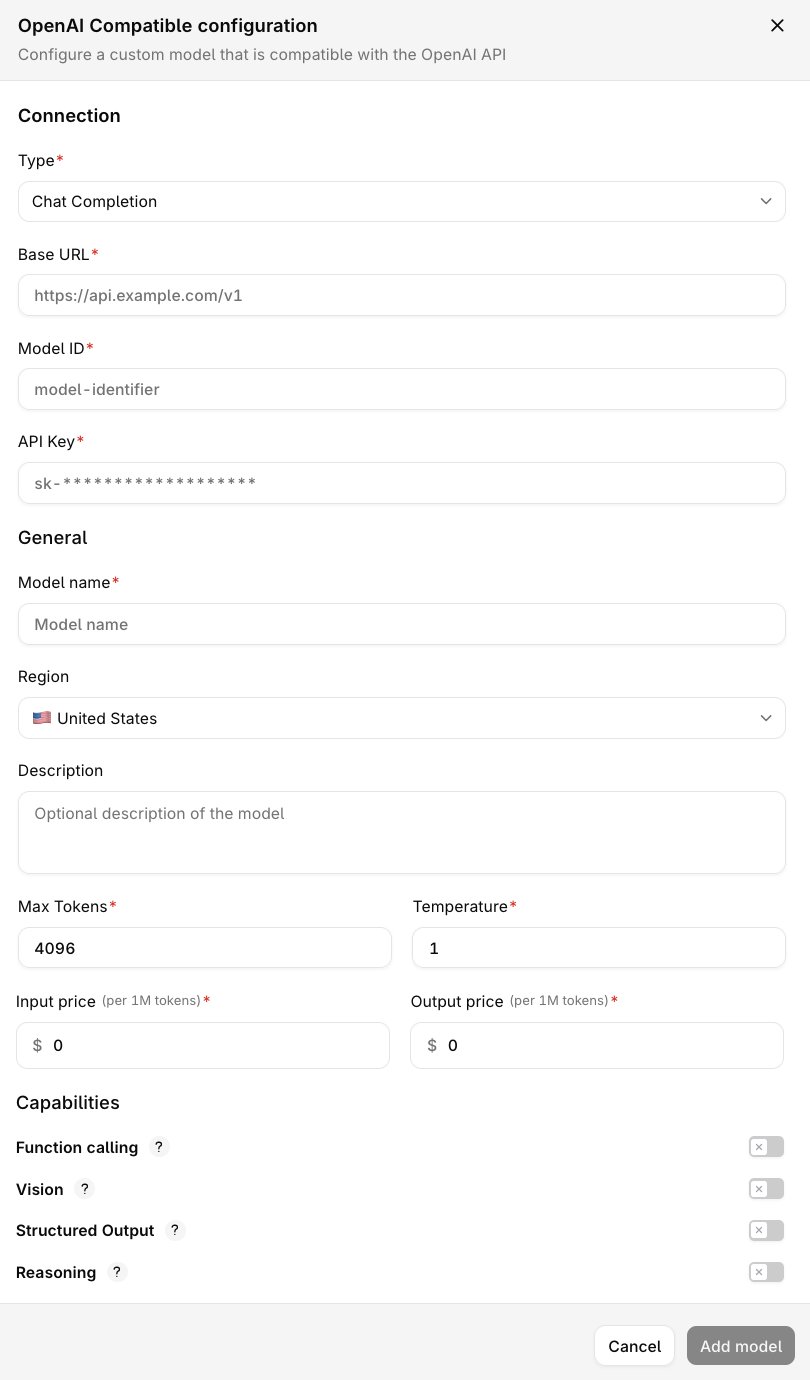
OpenAI Compatible configuration form