

Observability
Instrument your code with OpenTelemetry to capture traces, logs, and metrics for every LLM call, agent step, and tool use.
Observability
Getting Started
LiteLLM provides a unified interface for multiple LLM providers, enabling seamless switching between OpenAI, Anthropic, Cohere, and 100+ other providers. Tracing LiteLLM with Orq.ai gives you comprehensive insights into provider performance, cost optimization, routing decisions, and API reliability across your multi-provider setup.Prerequisites
Before you begin, ensure you have:- An Orq.ai account and API Key
- LiteLLM installed in the project
- Python 3.8+
- API keys for the LLM providers (OpenAI, Anthropic, Cohere, etc.)
Install Dependencies
- Via LiteLLM Proxy Server
- Standalone Scripts
pip install 'litellm[proxy]'
pip install litellm opentelemetry-sdk opentelemetry-exporter-otlp openinference-instrumentation-litellm
Configure Orq.ai
Set the following environment variables to connect to the Orq.ai OpenTelemetry collector:export ORQ_API_KEY="<YOUR_ORQ_API_KEY>"
export OTEL_EXPORTER_OTLP_ENDPOINT="https://api.orq.ai/v2/otel/v1/traces"
export OTEL_EXPORTER_OTLP_HEADERS="Authorization=Bearer $ORQ_API_KEY"
export OTEL_RESOURCE_ATTRIBUTES="service.name=litellm-app,service.version=1.0.0"
export LITELLM_MASTER_KEY="<YOUR_LITELLM_MASTER_KEY>"
# Provider API keys: add only the ones you use
export OPENAI_API_KEY="<YOUR_OPENAI_API_KEY>"
export ANTHROPIC_API_KEY="<YOUR_ANTHROPIC_API_KEY>"
export COHERE_API_KEY="<YOUR_COHERE_API_KEY>"
export GOOGLE_API_KEY="<YOUR_GOOGLE_API_KEY>"
$env:ORQ_API_KEY = "<YOUR_ORQ_API_KEY>"
$env:OTEL_EXPORTER_OTLP_ENDPOINT = "https://api.orq.ai/v2/otel/v1/traces"
$env:OTEL_EXPORTER_OTLP_HEADERS = "Authorization=Bearer $env:ORQ_API_KEY"
$env:OTEL_RESOURCE_ATTRIBUTES = "service.name=litellm-app,service.version=1.0.0"
$env:LITELLM_MASTER_KEY = "<YOUR_LITELLM_MASTER_KEY>"
# Provider API keys: add only the ones you use
$env:OPENAI_API_KEY = "<YOUR_OPENAI_API_KEY>"
$env:ANTHROPIC_API_KEY = "<YOUR_ANTHROPIC_API_KEY>"
$env:COHERE_API_KEY = "<YOUR_COHERE_API_KEY>"
$env:GOOGLE_API_KEY = "<YOUR_GOOGLE_API_KEY>"
ORQ_API_KEY=<YOUR_ORQ_API_KEY>
OTEL_EXPORTER_OTLP_ENDPOINT=https://api.orq.ai/v2/otel/v1/traces
OTEL_EXPORTER_OTLP_HEADERS=Authorization=Bearer <YOUR_ORQ_API_KEY>
OTEL_RESOURCE_ATTRIBUTES=service.name=litellm-app,service.version=1.0.0
LITELLM_MASTER_KEY=<YOUR_LITELLM_MASTER_KEY>
# Provider API keys: add only the ones you use
OPENAI_API_KEY=<YOUR_OPENAI_API_KEY>
ANTHROPIC_API_KEY=<YOUR_ANTHROPIC_API_KEY>
COHERE_API_KEY=<YOUR_COHERE_API_KEY>
GOOGLE_API_KEY=<YOUR_GOOGLE_API_KEY>
Integrations
litellm.callbacks = ["otel"] only emits spans when running inside LiteLLM Proxy Server. In a standalone Python script it logs a warning and skips OTel initialisation. No spans reach Orq.ai. Choose the setup that matches the environment below.- Via LiteLLM Proxy Server
- Standalone Scripts
Run the LiteLLM Proxy Server with the
otel callback enabled. The proxy handles all OTel export using the environment variables configured above.1
Create config.yaml
model_list:
  - model_name: gpt-4o
    litellm_params:
      model: openai/gpt-4o
      api_key: os.environ/OPENAI_API_KEY

litellm_settings:
  callbacks: ["otel"]

router_settings:
  pass_through_all_models: true

general_settings:
  master_key: os.environ/LITELLM_MASTER_KEY
2
Start the proxy
litellm --config config.yaml
3
Call the proxy from application code
from openai import OpenAI
import os

client = OpenAI(
    base_url="http://localhost:4000",
    api_key=os.getenv("LITELLM_MASTER_KEY"),
)

response = client.chat.completions.create(
    model="gpt-4o",
    messages=[{"role": "user", "content": "Hello, how are you?"}],
)
print(response.choices[0].message.content)
Use
openinference-instrumentation-litellm for automatic OpenTelemetry tracing without running a proxy:from opentelemetry.exporter.otlp.proto.http.trace_exporter import OTLPSpanExporter
from opentelemetry.sdk.resources import Resource
from opentelemetry.sdk.trace import TracerProvider
from opentelemetry.sdk.trace.export import BatchSpanProcessor
from openinference.instrumentation.litellm import LiteLLMInstrumentor
import litellm
import os
tracer_provider = TracerProvider(
resource=Resource({"service.name": "litellm-app"})
)
otlp_exporter = OTLPSpanExporter(
endpoint=os.getenv("OTEL_EXPORTER_OTLP_ENDPOINT"),
headers={"Authorization": f"Bearer {os.getenv('ORQ_API_KEY')}"},
)
tracer_provider.add_span_processor(BatchSpanProcessor(otlp_exporter))
LiteLLMInstrumentor().instrument(tracer_provider=tracer_provider)
response = litellm.completion(
model="gpt-4o",
messages=[{"role": "user", "content": "Hello, how are you?"}],
)
print(response.choices[0].message.content)
All LiteLLM calls will be automatically instrumented and exported to Orq.ai through the OTLP exporter. For more details, see Traces.
Examples
Basic Multi-Provider Usage- Via LiteLLM Proxy Server
- Standalone Scripts
from openai import OpenAI
import os

client = OpenAI(
    base_url="http://localhost:4000",
    api_key=os.getenv("LITELLM_MASTER_KEY"),
)

def basic_multi_provider_example():
    models = [
        "gpt-4o",
        "claude-opus-4-7",
        "command-r",
        "gemini/gemini-2.0-flash",
        "ollama/llama3.2",
    ]

    prompt = "Explain the benefits of microservices architecture in 2 sentences."

    results = []
    for model in models:
        try:
            print(f"Testing {model}...")
            response = client.chat.completions.create(
                model=model,
                messages=[{"role": "user", "content": prompt}],
                max_tokens=150,
                temperature=0.7,
            )

            results.append({
                "model": model,
                "content": response.choices[0].message.content,
                "tokens": response.usage.total_tokens,
                "cost": response.usage.total_tokens * 0.002,
            })

        except Exception as e:
            print(f"Error with {model}: {e}")
            results.append({"model": model, "error": str(e)})

    return results

results = basic_multi_provider_example()
for result in results:
    if "error" not in result:
        print(f"{result['model']}: {result['tokens']} tokens, ~${result['cost']:.4f}")
from opentelemetry.exporter.otlp.proto.http.trace_exporter import OTLPSpanExporter
from opentelemetry.sdk.resources import Resource
from opentelemetry.sdk.trace import TracerProvider
from opentelemetry.sdk.trace.export import BatchSpanProcessor
from openinference.instrumentation.litellm import LiteLLMInstrumentor
import litellm
import os

tracer_provider = TracerProvider(
    resource=Resource({"service.name": "litellm-app"})
)
otlp_exporter = OTLPSpanExporter(
    endpoint=os.getenv("OTEL_EXPORTER_OTLP_ENDPOINT"),
    headers={"Authorization": f"Bearer {os.getenv('ORQ_API_KEY')}"},
)
tracer_provider.add_span_processor(BatchSpanProcessor(otlp_exporter))
LiteLLMInstrumentor().instrument(tracer_provider=tracer_provider)

def basic_multi_provider_example():
    models = [
        "gpt-4o",
        "claude-opus-4-7",
        "command-r",
        "gemini/gemini-2.0-flash",
        "ollama/llama3.2",
    ]

    prompt = "Explain the benefits of microservices architecture in 2 sentences."

    results = []
    for model in models:
        try:
            print(f"Testing {model}...")
            response = litellm.completion(
                model=model,
                messages=[{"role": "user", "content": prompt}],
                max_tokens=150,
                temperature=0.7,
            )

            results.append({
                "model": model,
                "content": response.choices[0].message.content,
                "tokens": response.usage.total_tokens,
                "cost": response.usage.total_tokens * 0.002,
            })

        except Exception as e:
            print(f"Error with {model}: {e}")
            results.append({"model": model, "error": str(e)})

    return results

results = basic_multi_provider_example()
for result in results:
    if "error" not in result:
        print(f"{result['model']}: {result['tokens']} tokens, ~${result['cost']:.4f}")
- Via LiteLLM Proxy Server
- Standalone Scripts
from openai import OpenAI
from typing import List, Dict, Any
import os

client = OpenAI(
    base_url="http://localhost:4000",
    api_key=os.getenv("LITELLM_MASTER_KEY"),
)

def cost_optimized_completion(
    messages: List[Dict[str, str]],
    fallback_models: List[str] = None,
    max_tokens: int = 100,
) -> Dict[str, Any]:
    if fallback_models is None:
        fallback_models = [
            "gpt-4o-mini",
            "claude-haiku-4-5",
            "command",
            "gpt-4o",
            "claude-sonnet-4-6",
        ]

    for i, model in enumerate(fallback_models):
        try:
            print(f"Attempting {model} (priority {i+1})...")

            response = client.chat.completions.create(
                model=model,
                messages=messages,
                max_tokens=max_tokens,
                temperature=0.7,
            )

            # approximate values: check provider pricing pages for current rates
            cost_per_1k_tokens = {
                "gpt-4o-mini": 0.0015,
                "gpt-4o": 0.005,
                "claude-haiku-4-5": 0.00025,
                "claude-sonnet-4-6": 0.003,
                "command": 0.015,
            }

            estimated_cost = (response.usage.total_tokens / 1000) * cost_per_1k_tokens.get(model, 0.002)

            return {
                "success": True,
                "model_used": model,
                "content": response.choices[0].message.content,
                "tokens": response.usage.total_tokens,
                "estimated_cost": estimated_cost,
                "attempt_number": i + 1,
            }

        except Exception as e:
            print(f"Failed with {model}: {e}")
            if i == len(fallback_models) - 1:
                return {
                    "success": False,
                    "error": f"All models failed. Last error: {e}",
                    "attempts": len(fallback_models),
                }
            continue

    return {"success": False, "error": "No models available"}

result = cost_optimized_completion([
    {"role": "user", "content": "Summarize the key benefits of using Docker containers for development"}
])

if result["success"]:
    print(f"Success with {result['model_used']} on attempt {result['attempt_number']}")
    print(f"Cost: ~${result['estimated_cost']:.4f}, Tokens: {result['tokens']}")
    print(f"Response: {result['content'][:100]}...")
from opentelemetry.exporter.otlp.proto.http.trace_exporter import OTLPSpanExporter
from opentelemetry.sdk.resources import Resource
from opentelemetry.sdk.trace import TracerProvider
from opentelemetry.sdk.trace.export import BatchSpanProcessor
from openinference.instrumentation.litellm import LiteLLMInstrumentor
import litellm
from typing import List, Dict, Any
import os

tracer_provider = TracerProvider(
    resource=Resource({"service.name": "litellm-app"})
)
otlp_exporter = OTLPSpanExporter(
    endpoint=os.getenv("OTEL_EXPORTER_OTLP_ENDPOINT"),
    headers={"Authorization": f"Bearer {os.getenv('ORQ_API_KEY')}"},
)
tracer_provider.add_span_processor(BatchSpanProcessor(otlp_exporter))
LiteLLMInstrumentor().instrument(tracer_provider=tracer_provider)

def cost_optimized_completion(
    messages: List[Dict[str, str]],
    fallback_models: List[str] = None,
    max_tokens: int = 100,
) -> Dict[str, Any]:
    if fallback_models is None:
        fallback_models = [
            "gpt-4o-mini",
            "claude-haiku-4-5",
            "command",
            "gpt-4o",
            "claude-sonnet-4-6",
        ]

    for i, model in enumerate(fallback_models):
        try:
            print(f"Attempting {model} (priority {i+1})...")

            response = litellm.completion(
                model=model,
                messages=messages,
                max_tokens=max_tokens,
                temperature=0.7,
            )

            # approximate values: check provider pricing pages for current rates
            cost_per_1k_tokens = {
                "gpt-4o-mini": 0.0015,
                "gpt-4o": 0.005,
                "claude-haiku-4-5": 0.00025,
                "claude-sonnet-4-6": 0.003,
                "command": 0.015,
            }

            estimated_cost = (response.usage.total_tokens / 1000) * cost_per_1k_tokens.get(model, 0.002)

            return {
                "success": True,
                "model_used": model,
                "content": response.choices[0].message.content,
                "tokens": response.usage.total_tokens,
                "estimated_cost": estimated_cost,
                "attempt_number": i + 1,
            }

        except Exception as e:
            print(f"Failed with {model}: {e}")
            if i == len(fallback_models) - 1:
                return {
                    "success": False,
                    "error": f"All models failed. Last error: {e}",
                    "attempts": len(fallback_models),
                }
            continue

    return {"success": False, "error": "No models available"}

result = cost_optimized_completion([
    {"role": "user", "content": "Summarize the key benefits of using Docker containers for development"}
])

if result["success"]:
    print(f"Success with {result['model_used']} on attempt {result['attempt_number']}")
    print(f"Cost: ~${result['estimated_cost']:.4f}, Tokens: {result['tokens']}")
    print(f"Response: {result['content'][:100]}...")
View Traces
Head to the Traces tab to view LiteLLM traces in the AI Studio.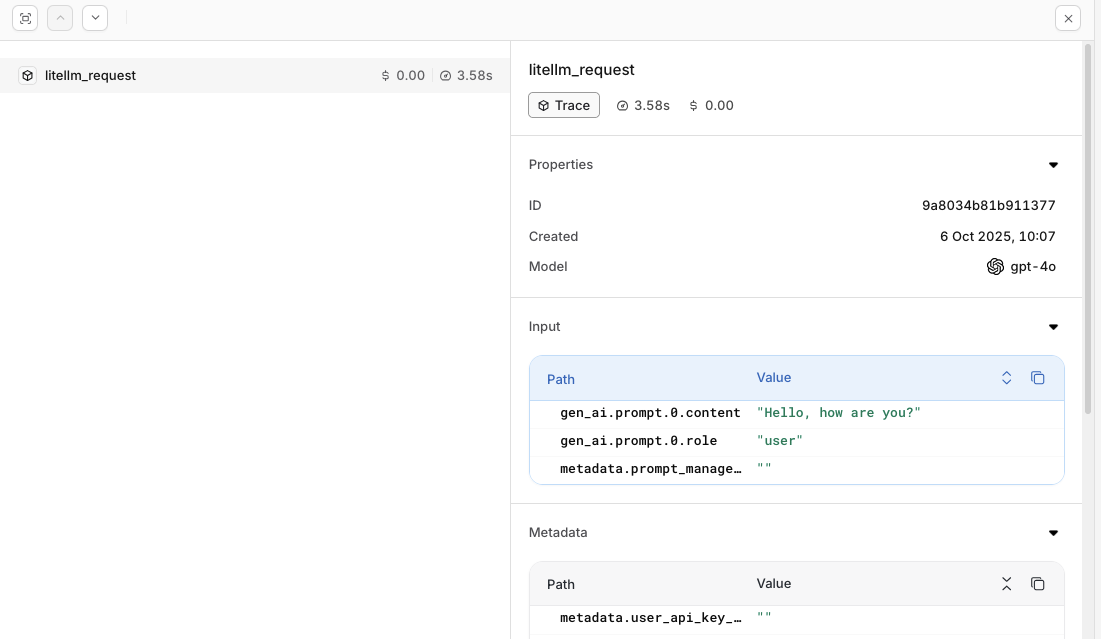
Evaluations & Experiments
Once your agents are running, use Evaluatorq to score outputs across a dataset and Experiments to compare configurations side-by-side.Run Evaluations with Evaluatorq
Run parallel evaluations across your agents and compare results.
Run Experiments via the API
Compare agent configurations and view results in the AI Studio.