Documentation Index Fetch the complete documentation index at: https://docs.orq.ai/llms.txt
Use this file to discover all available pages before exploring further.
Observability Instrument your code with OpenTelemetry to capture traces, logs, and metrics for every LLM call, agent step, and tool use.
Observability
Getting Started
Google Agent Development Kit (ADK) is a flexible, model-agnostic framework for developing and deploying AI agents. ADK simplifies building complex agent architectures with workflow orchestration, tool integration, and multi-agent collaboration. Integrate with Orq.ai to monitor agent behavior, track tool usage, analyze workflows, and optimize your agent systems.
Prerequisites
Before you begin, ensure you have:
An Orq.ai account and API Key
Google API key (for model access)
Python 3.8+
Google ADK installed in your project
Install Dependencies
Python:
# Google ADK
pip install google-adk
# OpenTelemetry packages
pip install opentelemetry-sdk opentelemetry-exporter-otlp
# OpenInference instrumentation for ADK (if available)
pip install openinference-instrumentation-google-adk
Java:
<! -- For Maven -- >
< dependency >
< groupId > com.google.ai </groupId>
< artifactId > google-adk </artifactId>
< version > latest </version>
< /dependency >
// For Gradle
implementation 'com.google.ai:google-adk:latest'
Set up your environment variables to connect to Orq.ai’s OpenTelemetry collector:
Unix/Linux/macOS:
export OTEL_EXPORTER_OTLP_ENDPOINT = "https://api.orq.ai/v2/otel"
export OTEL_EXPORTER_OTLP_HEADERS = "Authorization=Bearer <ORQ_API_KEY>"
export OTEL_RESOURCE_ATTRIBUTES = "service.name=google-adk-app,service.version=1.0.0"
export GOOGLE_API_KEY = "your-google-api-key"
Windows (PowerShell):
$env:OTEL_EXPORTER_OTLP_ENDPOINT = "https://api.orq.ai/v2/otel"
$env:OTEL_EXPORTER_OTLP_HEADERS = "Authorization=Bearer <ORQ_API_KEY>"
$env:OTEL_RESOURCE_ATTRIBUTES = "service.name=google-adk-app,service.version=1.0.0"
$env:GOOGLE_API_KEY = "your-google-api-key"
Using .env file:
OTEL_EXPORTER_OTLP_ENDPOINT = https://api.orq.ai/v2/otel
OTEL_EXPORTER_OTLP_HEADERS = Authorization = Bearer <ORQ_API_KEY>
OTEL_RESOURCE_ATTRIBUTES=service.name=google-adk-app,service.version=1.0.0
GOOGLE_API_KEY = your-google-api-key
Integrations
Choose your preferred OpenTelemetry framework for collecting traces:
OpenInference
Best for : Comprehensive ADK instrumentation with automatic tool and model tracking
from openinference.instrumentation.google_adk import GoogleADKInstrumentor
from opentelemetry import trace
from opentelemetry.exporter.otlp.proto.http.trace_exporter import OTLPSpanExporter
from opentelemetry.sdk.trace import TracerProvider
from opentelemetry.sdk.trace.export import BatchSpanProcessor
from opentelemetry.sdk.resources import Resource
import os
# Initialize OpenTelemetry
resource = Resource.create({
"service.name" : os.getenv( "OTEL_SERVICE_NAME" , "google-adk-app" ),
"service.version" : "1.0.0"
})
provider = TracerProvider( resource = resource)
processor = BatchSpanProcessor(
OTLPSpanExporter(
headers = { "Authorization" : f "Bearer { os.getenv( 'ORQ_API_KEY' ) } " }
)
)
provider.add_span_processor(processor)
trace.set_tracer_provider(provider)
# Instrument Google ADK
GoogleADKInstrumentor().instrument()
# Now use ADK normally - all agent operations will be traced
import google.adk as adk
from google.adk.runners import Runner
from google.adk.sessions import InMemorySessionService
from google.genai import types
import asyncio
async def main ():
# Create a simple agent
agent = adk.Agent(
name = "Helper" ,
instruction = "You are a helpful assistant. Give short, clear answers." ,
model = "gemini-2.5-flash"
)
# Create session and runner
session_service = InMemorySessionService()
runner = Runner(
agent = agent,
app_name = "simple-helper" ,
session_service = session_service
)
# Create a session (await the async call)
session = await session_service.create_session(
app_name = "simple-helper" ,
user_id = "user1"
)
# Simple one-shot example
question = "What is 25 + 17?"
content = types.Content( role = 'user' , parts = [types.Part( text = question)])
# Run the agent (this is also async)
events = runner.run_async(
user_id = "user1" ,
session_id = session.id,
new_message = content
)
# Get the response
async for event in events:
if event.is_final_response():
response = event.content.parts[ 0 ].text
print ( f "Q: { question } " )
print ( f "A: { response } " )
# Run the async main function
if __name__ == "__main__" :
asyncio.run(main())
Next Steps
Verify your Traces in the orq.ai Studio.
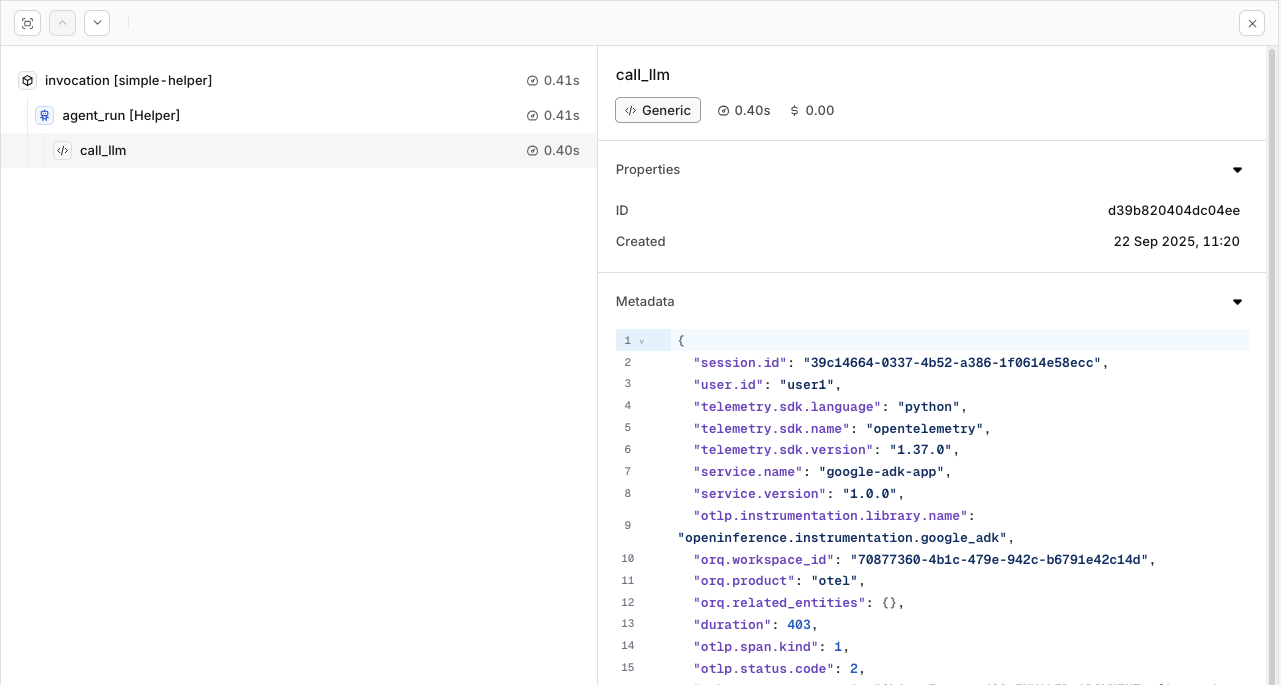
To learn more about the capabilities of Traces in orq.ai, see Traces
Evaluations & Experiments
Once your agents are running, use Evaluatorq to score outputs across a dataset and Experiments to compare configurations side-by-side.
Run Evaluations with Evaluatorq Run parallel evaluations across your agents and compare results.
Run Experiments via the API Compare agent configurations and view results in the AI Studio.