
AI Router

Overview

OpenAI Agents SDK enables powerful AI-driven automation through structured conversations and tool calling. By connecting the Agents SDK to Orq.ai’s AI Router, you transform experimental agents into production-ready systems with enterprise-grade capabilities.

Key Benefits

Orq.ai’s AI Router enhances your OpenAI Agents with:

Complete Observability

Track every agent step, tool use, and interaction with detailed traces and analytics

Built-in Reliability

Automatic fallbacks, retries, and load balancing for production resilience

Cost Optimization

Real-time cost tracking and spend management across all your AI operations

Multi-Provider Access

Access 300+ LLMs and 20+ providers through a single, unified integration

Prerequisites

Before integrating OpenAI Agents SDK with Orq.ai, ensure you have:
  • An Orq.ai account and API Key
  • Python 3.8 or higher
  • OpenAI Agents SDK installed
To setup your API key, see API keys & Endpoints.

Installation

Install the OpenAI Agents SDK:
pip install openai-agents openai

Configuration

Configure OpenAI Agents SDK to use Orq.ai’s AI Router by setting a custom AsyncOpenAI client:
Python
from openai import AsyncOpenAI
from agents import set_default_openai_client
import os

# Configure OpenAI client with Orq.ai AI Router
client = AsyncOpenAI(
    api_key=os.getenv("ORQ_API_KEY"),
    base_url="https://api.orq.ai/v2/router"
)

# Set as default client for all agents
set_default_openai_client(client)
base_url: https://api.orq.ai/v2/router

Basic Agent Example

Here’s a complete example of creating and running an OpenAI agent through Orq.ai:
Python
from openai import AsyncOpenAI
from agents import Agent, Runner, set_default_openai_client
import os

# Configure client with Orq.ai AI Router
client = AsyncOpenAI(
    api_key=os.getenv("ORQ_API_KEY"),
    base_url="https://api.orq.ai/v2/router"
)
set_default_openai_client(client)

# Create agent
agent = Agent(
    name="Assistant",
    instructions="You are a helpful assistant that explains complex concepts simply."
)

# Run the agent
result = Runner.run_sync(agent, "Explain quantum computing in simple terms")
print(result.final_output)

Agent with Tools

OpenAI Agents can use tools while routing through Orq.ai:
Python
from openai import AsyncOpenAI
from agents import Agent, Runner, set_default_openai_client, function_tool
import os

# Configure client
client = AsyncOpenAI(
    api_key=os.getenv("ORQ_API_KEY"),
    base_url="https://api.orq.ai/v2/router"
)
set_default_openai_client(client)

# Define a tool using the @function_tool decorator
@function_tool
def get_weather(location: str) -> str:
    """Get the current weather for a location."""
    return f"The weather in {location} is sunny and 72°F"

# Create agent with tools
agent = Agent(
    name="Weather Assistant",
    instructions="You are a weather assistant. Use the get_weather function to provide weather information.",
    tools=[get_weather]
)

# Run agent with tool access
result = Runner.run_sync(agent, "What's the weather in San Francisco?")
print(result.final_output)

Model Selection

With Orq.ai, you can use any supported model from 20+ providers:
Python
from openai import AsyncOpenAI
from agents import Agent, Runner, set_default_openai_client
import os

# Configure client
client = AsyncOpenAI(
    api_key=os.getenv("ORQ_API_KEY"),
    base_url="https://api.orq.ai/v2/router"
)
set_default_openai_client(client)

# Use Claude
claude_agent = Agent(
    name="Claude Assistant",
    model="claude-sonnet-4-5-20250929",
    instructions="You are a helpful assistant."
)

# Use Gemini
gemini_agent = Agent(
    name="Gemini Assistant",
    model="gemini-2.5-flash",
    instructions="You are a helpful assistant."
)

# Use any other model
groq_agent = Agent(
    name="Groq Assistant",
    model="llama-3.3-70b-versatile",
    instructions="You are a helpful assistant."
)

# Run with different models
result = Runner.run_sync(claude_agent, "Explain machine learning")
print(result.final_output)

Observability

Getting Started

Integrate OpenAI Agents with Orq.ai’s observability to gain complete insights into agent performance, token usage, tool utilization, and conversation flows using OpenTelemetry.

Prerequisites

Before you begin, ensure you have:
  • An Orq.ai account and API Key
  • OpenAI API key and access to the Assistants API
  • Python 3.8+

Install Dependencies

# Core OpenTelemetry packages
pip install opentelemetry-sdk opentelemetry-instrumentation opentelemetry-exporter-otlp

# OpenAI Agents SDK
pip install openai-agents

# Orq OpenAI Agents Instrumentation SDK
pip install orq-ai-sdk

Configure Orq.ai

Set up your environment variables to connect to Orq.ai’s OpenTelemetry collector: Unix/Linux/macOS:
export OTEL_EXPORTER_OTLP_ENDPOINT="https://api.orq.ai/v2/otel"
export OTEL_EXPORTER_OTLP_HEADERS="Authorization=Bearer $ORQ_API_KEY"
export OTEL_RESOURCE_ATTRIBUTES="service.name=openai-agents-app,service.version=1.0.0"
export OTEL_EXPORTER_OTLP_TRACES_PROTOCOL="http/json"
export OPENAI_API_KEY="<YOUR_OPENAI_API_KEY>"
Windows (PowerShell):
$env:OTEL_EXPORTER_OTLP_ENDPOINT = "https://api.orq.ai/v2/otel"
$env:OTEL_EXPORTER_OTLP_HEADERS = "Authorization=Bearer <ORQ_API_KEY>"
$env:OTEL_RESOURCE_ATTRIBUTES = "service.name=openai-agents-app,service.version=1.0.0"
$env:OTEL_EXPORTER_OTLP_TRACES_PROTOCOL="http/json"
$env:OPENAI_API_KEY = "<YOUR_OPENAI_API_KEY>"
Using .env file:
OTEL_EXPORTER_OTLP_ENDPOINT=https://api.orq.ai/v2/otel
OTEL_EXPORTER_OTLP_HEADERS=Authorization=Bearer <ORQ_API_KEY>
OTEL_RESOURCE_ATTRIBUTES=service.name=openai-agents-app,service.version=1.0.0
OTEL_EXPORTER_OTLP_TRACES_PROTOCOL=http/json
OPENAI_API_KEY=<YOUR_OPENAI_API_KEY>

Basic Example

Python
from opentelemetry.sdk.trace import TracerProvider
from opentelemetry.sdk.trace.export import BatchSpanProcessor
from opentelemetry.exporter.otlp.proto.http.trace_exporter import OTLPSpanExporter
from orq_ai_sdk.openai_agents_instrumentation import OpenAIAgentsInstrumentor
from agents import Agent, Runner

# Set up OpenTelemetry
tracer_provider = TracerProvider()
tracer_provider.add_span_processor(BatchSpanProcessor(OTLPSpanExporter()))

# Instrument OpenAI agents with Orq.ai
OpenAIAgentsInstrumentor().instrument(tracer_provider=tracer_provider)

agent = Agent(name="Assistant", instructions="You are a helpful assistant")

result = Runner.run_sync(agent, "Write a haiku about recursion in programming.")
print(result.final_output)

Advanced Example with Function Calling

Python
from opentelemetry.sdk.trace import TracerProvider
from opentelemetry.sdk.trace.export import BatchSpanProcessor
from opentelemetry.exporter.otlp.proto.http.trace_exporter import OTLPSpanExporter
from orq_ai_sdk.openai_agents_instrumentation import OpenAIAgentsInstrumentor
from agents import Agent, Runner, function_tool

# Set up OpenTelemetry
tracer_provider = TracerProvider()
tracer_provider.add_span_processor(BatchSpanProcessor(OTLPSpanExporter()))

# Instrument OpenAI agents with Orq.ai
OpenAIAgentsInstrumentor().instrument(tracer_provider=tracer_provider)

@function_tool
def get_weather(location: str) -> str:
    """Mock weather function"""
    return f"The weather in {location} is sunny, 72°F"

def advanced_assistant_with_tools():
    # Create agent with tools using Agents SDK
    agent = Agent(
        name="Weather Assistant",
        instructions="You are a weather assistant. Use the get_weather function to provide weather information.",
        # Tools parameter with the decorated function
        tools=[get_weather]
    )

    # Run the agent with user input
    result = Runner.run_sync(
        agent,
        "What's the weather like in Boston?"
    )

    return result

# Run the example
result = advanced_assistant_with_tools()
print(result.final_output)

Custom Spans for Agent Operations

Python
from opentelemetry.sdk.trace import TracerProvider
from opentelemetry.sdk.trace.export import BatchSpanProcessor
from opentelemetry.exporter.otlp.proto.http.trace_exporter import OTLPSpanExporter
from opentelemetry import trace
from orq_ai_sdk.openai_agents_instrumentation import OpenAIAgentsInstrumentor
from agents import Agent, Runner

# Set up OpenTelemetry
tracer_provider = TracerProvider()
tracer_provider.add_span_processor(BatchSpanProcessor(OTLPSpanExporter()))

trace.set_tracer_provider(tracer_provider)

# Instrument OpenAI agents with Orq.ai
OpenAIAgentsInstrumentor().instrument(tracer_provider=tracer_provider)

# Get a tracer
tracer = trace.get_tracer(__name__)

def agent_workflow_with_custom_spans():
    with tracer.start_as_current_span("agent-workflow") as span:
        span.set_attribute("workflow.type", "research_assistant")

        with tracer.start_as_current_span("agent-creation") as create_span:
            # Create agent using Agents SDK
            agent = Agent(
                name="Research Assistant",
                instructions="You are a research assistant specialized in data analysis.",
                # Note: Built-in tools work differently in Agents SDK
                # You'd need to import and use specific tools like CodeInterpreterTool, FileSearchTool
            )
            create_span.set_attribute("agent.name", "Research Assistant")
            create_span.set_attribute("agent.model", "gpt-4")  # Default model

        with tracer.start_as_current_span("agent-execution") as exec_span:
            # Execute the agent with input
            result = Runner.run_sync(
                agent,
                "Analyze the trends in the uploaded dataset"
            )

            exec_span.set_attribute("message.content_length", len("Analyze the trends in the uploaded dataset"))
            exec_span.set_attribute("execution.status", "completed")

        span.set_attribute("workflow.success", True)

        return {
            "agent_name": "Research Assistant",
            "final_output": result.final_output,
            "execution_status": "completed"
        }

# Run the workflow
result = agent_workflow_with_custom_spans()
print("Final output:", result["final_output"])

View Traces

View your traces in the AI Studio in the Traces tab.
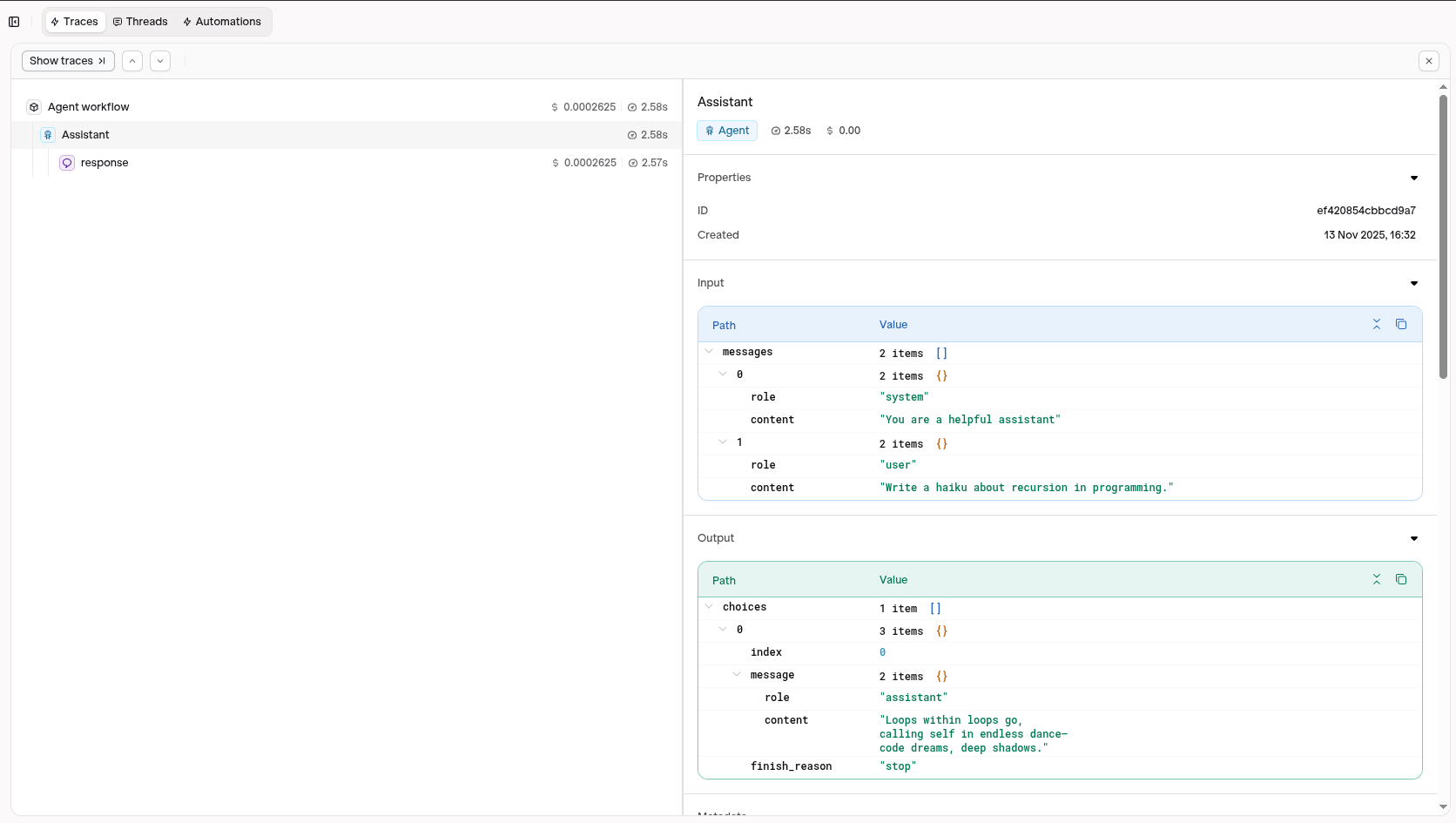
Visit your AI Studio to view real-time analytics and traces.