
AI Router

Overview

The OpenAI SDK provides powerful tools for building AI applications with GPT models. By connecting the SDK to Orq.ai’s AI Router, you transform your OpenAI integration into a production-ready system with enterprise-grade capabilities, complete observability, and access to 300+ models across 20+ providers.

Key Benefits

Orq.ai’s AI Router enhances your OpenAI SDK with:

Complete Observability

Track every API call, token usage, and model interaction with detailed traces and analytics

Built-in Reliability

Automatic fallbacks, retries, and load balancing for production resilience

Cost Optimization

Real-time cost tracking and spend management across all your AI operations

Multi-Provider Access

Access 300+ LLMs and 20+ providers through a single, unified integration

Prerequisites

Before integrating OpenAI SDK with Orq.ai, ensure you have:
  • An Orq.ai account and API Key
  • Python 3.8+ or Node.js 18+ with TypeScript support
  • OpenAI SDK installed
To setup your API key, see API keys & Endpoints.
To use libraries with private models, see Onboarding Private Models.

Installation

pip install openai

Configuration

While using the OpenAI SDK, set the Base URL to the AI Router to feed calls through our API without changing any other part of your code. Using the Orq.ai AI Router, you benefit from Platform Traces and Cost and Usage Monitoring, keeping full compatibility and a unified API with all models while using the OpenAI SDK.
base_url: https://api.orq.ai/v2/router

Text Generation

Basic text generation with the OpenAI SDK through Orq.ai:
from openai import OpenAI
import os

client = OpenAI(
  base_url="https://api.orq.ai/v2/router",
  api_key=os.getenv("ORQ_API_KEY"),
)

completion = client.chat.completions.create(
  model="openai/gpt-4o",
  messages=[
    {"role": "system", "content": "You are a helpful assistant."},
    {"role": "user", "content": "Hello!"}
  ]
)

print(completion.choices[0].message)

Streaming Responses

Stream responses for real-time output:
from openai import OpenAI
import os

client = OpenAI(
  base_url="https://api.orq.ai/v2/router",
  api_key=os.getenv("ORQ_API_KEY"),
)

stream = client.chat.completions.create(
  model="openai/gpt-4o",
  messages=[
    {"role": "user", "content": "Write a short story about robots."}
  ],
  stream=True
)

for chunk in stream:
  if chunk.choices[0].delta.content:
    print(chunk.choices[0].delta.content, end="", flush=True)

Model Selection

With Orq.ai, you can use any supported model from 20+ providers:
from openai import OpenAI
import os

client = OpenAI(
  base_url="https://api.orq.ai/v2/router",
  api_key=os.getenv("ORQ_API_KEY"),
)

# Use Claude
claude_response = client.chat.completions.create(
  model="anthropic/claude-sonnet-4-5-20250929",
  messages=[{"role": "user", "content": "Explain machine learning"}]
)

# Use Gemini
gemini_response = client.chat.completions.create(
  model="google/gemini-2.5-flash",
  messages=[{"role": "user", "content": "Explain machine learning"}]
)

# Use Groq
groq_response = client.chat.completions.create(
  model="groq/llama-3.3-70b-versatile",
  messages=[{"role": "user", "content": "Explain machine learning"}]
)

Observability

Getting Started

Integrate OpenAI SDK with Orq.ai’s observability to gain complete insights into model performance, token usage, API latency, and conversation flows using OpenTelemetry.

Prerequisites

Before you begin, ensure you have:
  • An Orq.ai account and API Key
  • Python 3.8+ or Node.js 18+
  • OpenAI SDK installed

Install Dependencies

# Core OpenTelemetry packages
pip install opentelemetry-sdk opentelemetry-instrumentation opentelemetry-exporter-otlp

# OpenAI SDK
pip install openai

# OpenAI Auto-Instrumentation
pip install opentelemetry-instrumentation-openai

Configure Orq.ai

Set up your environment variables to connect to Orq.ai’s OpenTelemetry collector: Unix/Linux/macOS:
export OTEL_EXPORTER_OTLP_ENDPOINT="https://api.orq.ai/v2/otel"
export OTEL_EXPORTER_OTLP_HEADERS="Authorization=Bearer $ORQ_API_KEY"
export OTEL_RESOURCE_ATTRIBUTES="service.name=openai-app,service.version=1.0.0"
export OTEL_EXPORTER_OTLP_TRACES_PROTOCOL="http/json"
Windows (PowerShell):
$env:OTEL_EXPORTER_OTLP_ENDPOINT = "https://api.orq.ai/v2/otel"
$env:OTEL_EXPORTER_OTLP_HEADERS = "Authorization=Bearer <ORQ_API_KEY>"
$env:OTEL_RESOURCE_ATTRIBUTES = "service.name=openai-app,service.version=1.0.0"
$env:OTEL_EXPORTER_OTLP_TRACES_PROTOCOL = "http/json"
Using .env file:
OTEL_EXPORTER_OTLP_ENDPOINT=https://api.orq.ai/v2/otel
OTEL_EXPORTER_OTLP_HEADERS=Authorization=Bearer <ORQ_API_KEY>
OTEL_RESOURCE_ATTRIBUTES=service.name=openai-app,service.version=1.0.0
OTEL_EXPORTER_OTLP_TRACES_PROTOCOL=http/json

Setup

Configure OpenTelemetry once at application startup:
from openai import OpenAI
from opentelemetry import trace
from opentelemetry.sdk.trace import TracerProvider
from opentelemetry.sdk.trace.export import BatchSpanProcessor
from opentelemetry.exporter.otlp.proto.http.trace_exporter import OTLPSpanExporter
from opentelemetry.instrumentation.openai import OpenAIInstrumentor
import os

# Configure OpenTelemetry
tracer_provider = TracerProvider()
tracer_provider.add_span_processor(BatchSpanProcessor(OTLPSpanExporter()))
trace.set_tracer_provider(tracer_provider)

# Instrument OpenAI
OpenAIInstrumentor().instrument(tracer_provider=tracer_provider)

# Create OpenAI client
client = OpenAI(
    base_url="https://api.orq.ai/v2/router",
    api_key=os.getenv("ORQ_API_KEY")
)

Examples

Basic Example

response = client.chat.completions.create(
    model="openai/gpt-4o",
    messages=[
        {"role": "system", "content": "You are a helpful assistant."},
        {"role": "user", "content": "What is quantum computing in one sentence?"}
    ]
)

print(response.choices[0].message.content)

Streaming Example

from opentelemetry import trace

tracer = trace.get_tracer(__name__)
with tracer.start_as_current_span("streaming-completion") as span:
    stream = client.chat.completions.create(
        model="openai/gpt-4o",
        messages=[{"role": "user", "content": "Write a haiku about code."}],
        stream=True
    )

    full_response = ""
    for chunk in stream:
        if chunk.choices and chunk.choices[0].delta.content:
            content = chunk.choices[0].delta.content
            full_response += content
            print(content, end="", flush=True)

    span.set_attribute("response.length", len(full_response))

Custom Spans Example

from opentelemetry import trace

tracer = trace.get_tracer(__name__)

def analyze_document(document: str):
    with tracer.start_as_current_span("document-analysis") as span:
        span.set_attribute("document.length", len(document))

        # Prepare prompt
        prompt = f"Analyze this text: {document}"
        with tracer.start_as_current_span("prepare-prompt") as prep_span:
            prep_span.set_attribute("prompt.length", len(prompt))

        # Model inference
        with tracer.start_as_current_span("model-inference") as inf_span:
            inf_span.set_attribute("model", "gpt-4o")

            response = client.chat.completions.create(
                model="openai/gpt-4o",
                messages=[{"role": "user", "content": prompt}]
            )

            inf_span.set_attribute("tokens.total", response.usage.total_tokens)

        # Process result
        with tracer.start_as_current_span("process-result") as proc_span:
            result = response.choices[0].message.content
            proc_span.set_attribute("result.length", len(result))

        return result

analysis = analyze_document("Machine learning is a subset of AI.")
print(analysis)

Advanced Workflows Example

from opentelemetry import trace

tracer = trace.get_tracer(__name__)

def content_generation_pipeline(topic: str):
    with tracer.start_as_current_span("content-pipeline") as pipeline_span:
        pipeline_span.set_attribute("pipeline.topic", topic)
        pipeline_span.set_attribute("pipeline.stages", 3)

        # Stage 1: Research
        with tracer.start_as_current_span("stage-research") as research_span:
            research_span.set_attribute("stage.name", "research")

            research = client.chat.completions.create(
                model="openai/gpt-4o",
                messages=[{"role": "user", "content": f"List 3 key facts about {topic}."}]
            )

            facts = research.choices[0].message.content
            research_span.set_attribute("facts.count", 3)
            research_span.set_attribute("tokens.used", research.usage.total_tokens)

        # Stage 2: Writing
        with tracer.start_as_current_span("stage-writing") as writing_span:
            writing_span.set_attribute("stage.name", "writing")

            writing = client.chat.completions.create(
                model="openai/gpt-4o",
                messages=[{"role": "user", "content": f"Write a brief introduction using these facts: {facts}"}]
            )

            content = writing.choices[0].message.content
            writing_span.set_attribute("content.length", len(content))

        # Stage 3: Review
        with tracer.start_as_current_span("stage-review") as review_span:
            review_span.set_attribute("stage.name", "review")

            review = client.chat.completions.create(
                model="openai/gpt-4o",
                messages=[{"role": "user", "content": f"Rate this content quality 1-10: {content}"}]
            )

            rating = review.choices[0].message.content
            review_span.set_attribute("quality.rating", rating)

        pipeline_span.set_attribute("pipeline.success", True)
        return {"content": content, "rating": rating}

result = content_generation_pipeline("neural networks")
print(f"Content: {result['content']}")
print(f"Rating: {result['rating']}")

View Traces

View your traces in the AI Studio in the Traces tab.
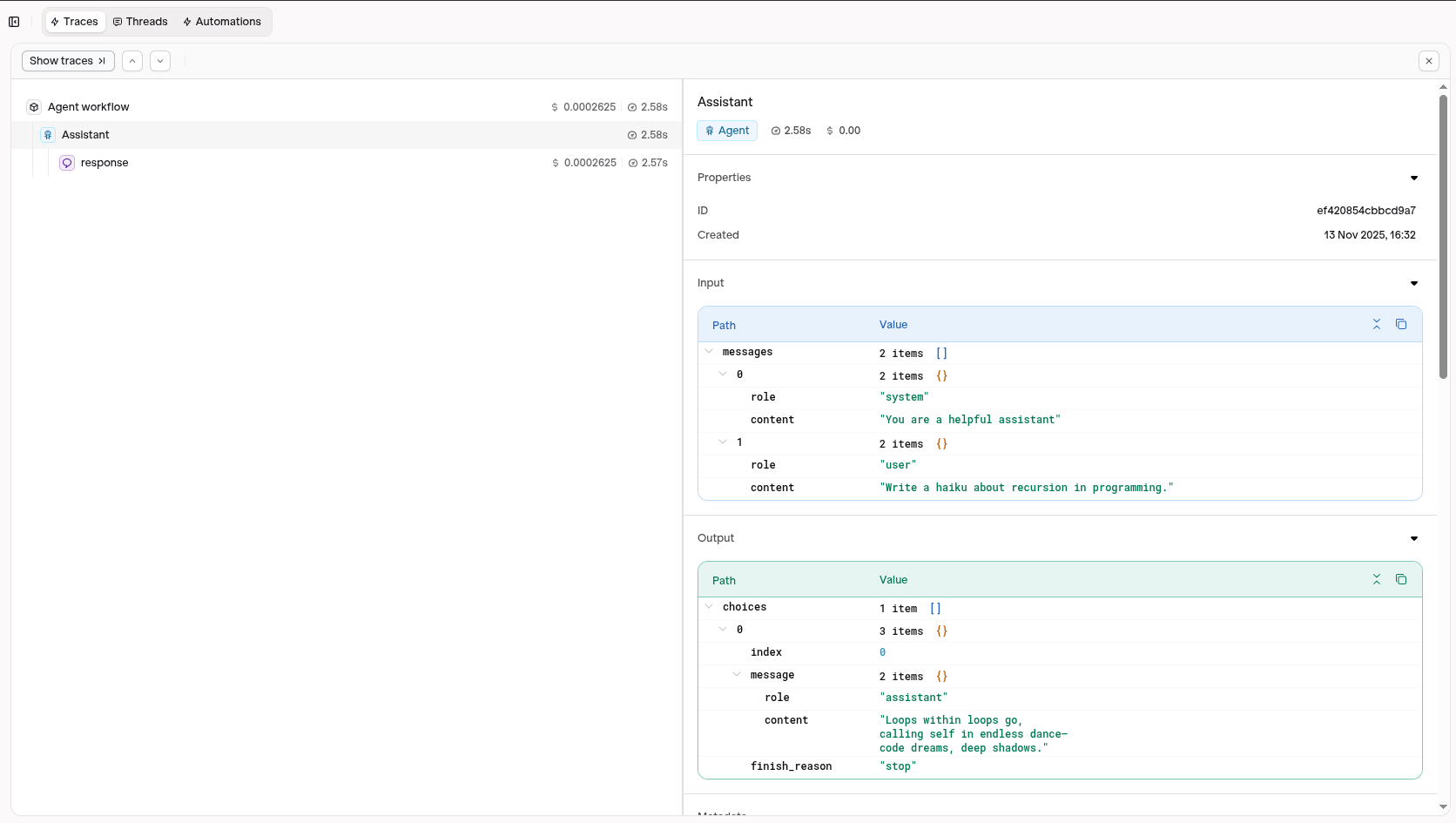
Visit your AI Studio to view real-time analytics and traces.