AI Router

Overview

CrewAI is a framework for orchestrating multi-agent teams with role-based agents, hierarchical task management, and collaborative AI workflows. By connecting CrewAI to Orq.ai’s AI Router, you get access to 300+ models for your agent crews with a single configuration change.

Key Benefits

Orq.ai’s AI Router enhances your CrewAI applications with:

Complete Observability

Track every agent task, tool use, and crew interaction with detailed traces

Built-in Reliability

Automatic fallbacks, retries, and load balancing for production resilience

Cost Optimization

Real-time cost tracking and spend management across all your AI operations

Multi-Provider Access

Access 300+ LLMs and 20+ providers through a single, unified integration

Prerequisites

Before integrating CrewAI with Orq.ai, ensure you have:
  • An Orq.ai account and API Key
  • Python 3.10 or higher
To setup your API key, see API keys & Endpoints.

Installation

pip install crewai

Configuration

Configure CrewAI to use Orq.ai’s AI Router via the LLM class with a custom base_url:
Python
from crewai import LLM
import os

llm = LLM(
    model="openai/gpt-4o",
    api_key=os.getenv("ORQ_API_KEY"),
    base_url="https://api.orq.ai/v2/router",
)
base_url: https://api.orq.ai/v2/router

Basic Agent Example

Python
from crewai import Agent, Task, Crew, LLM
import os

llm = LLM(
    model="openai/gpt-4o",
    api_key=os.getenv("ORQ_API_KEY"),
    base_url="https://api.orq.ai/v2/router",
)

researcher = Agent(
    role="Research Analyst",
    goal="Provide accurate and concise information on topics",
    backstory="Expert analyst with broad knowledge across many domains.",
    llm=llm,
)

task = Task(
    description="In two sentences, explain what machine learning is.",
    agent=researcher,
    expected_output="A concise two-sentence explanation of machine learning.",
)

crew = Crew(agents=[researcher], tasks=[task], tracing=False)
result = crew.kickoff()
print(result)

Multi-Agent Crew

Orchestrate multiple agents with specialized roles:
Python
from crewai import Agent, Task, Crew, LLM
import os

llm = LLM(
    model="openai/gpt-4o",
    api_key=os.getenv("ORQ_API_KEY"),
    base_url="https://api.orq.ai/v2/router",
)

researcher = Agent(
    role="Research Analyst",
    goal="Research topics and gather key facts",
    backstory="Expert at finding and summarizing information.",
    llm=llm,
)

writer = Agent(
    role="Content Writer",
    goal="Write clear, engaging content",
    backstory="Skilled at turning research into readable content.",
    llm=llm,
)

research_task = Task(
    description="Research the key benefits of renewable energy in 3 bullet points.",
    agent=researcher,
    expected_output="3 bullet points about renewable energy benefits.",
)

write_task = Task(
    description="Write a one-paragraph summary based on the research.",
    agent=writer,
    expected_output="A single paragraph summarizing renewable energy benefits.",
    context=[research_task],
)

crew = Crew(agents=[researcher, writer], tasks=[research_task, write_task], tracing=False)
result = crew.kickoff()
print(result)

Model Selection

With Orq.ai, you can use any supported model from 20+ providers:
Python
from crewai import LLM
import os

# Use Claude
claude_llm = LLM(
    model="anthropic/claude-sonnet-4-5-20250929",
    api_key=os.getenv("ORQ_API_KEY"),
    base_url="https://api.orq.ai/v2/router",
)

# Use Gemini
gemini_llm = LLM(
    model="google/gemini-2.5-flash",
    api_key=os.getenv("ORQ_API_KEY"),
    base_url="https://api.orq.ai/v2/router",
)

# Use Groq
groq_llm = LLM(
    model="groq/llama-3.3-70b-versatile",
    api_key=os.getenv("ORQ_API_KEY"),
    base_url="https://api.orq.ai/v2/router",
)

Observability

Getting Started

CrewAI enables powerful multi-agent coordination for complex AI workflows. Tracing CrewAI with Orq.ai provides comprehensive insights into agent interactions, task execution, tool usage, and crew performance to optimize your multi-agent systems.

Prerequisites

Before you begin, ensure you have:
  • An Orq.ai account and API Key
  • CrewAI installed in your project
  • Python 3.8+
  • OpenAI API key (or other LLM provider credentials)

Install Dependencies

# OpenTelemetry, crewai, openinference
pip install crewai openinference-instrumentation-crewai
pip install opentelemetry-sdk opentelemetry-exporter-otlp-proto-http

# LLM providers
pip install openai anthropic

# Optional: Advanced tools and integrations
pip install crewai-tools

Configure Orq.ai

Set up your environment variables to connect to Orq.ai’s OpenTelemetry collector: Unix/Linux/macOS:
export OTEL_EXPORTER_OTLP_ENDPOINT="https://api.orq.ai/v2/otel"
export OTEL_EXPORTER_OTLP_HEADERS="Authorization=Bearer <ORQ_API_KEY>"
export OTEL_RESOURCE_ATTRIBUTES="service.name=crewai-app,service.version=1.0.0"
export OPENAI_API_KEY="<YOUR_OPENAI_API_KEY>"
Windows (PowerShell):
$env:OTEL_EXPORTER_OTLP_ENDPOINT = "https://api.orq.ai/v2/otel"
$env:OTEL_EXPORTER_OTLP_HEADERS = "Authorization=Bearer <ORQ_API_KEY>"
$env:OTEL_RESOURCE_ATTRIBUTES = "service.name=crewai-app,service.version=1.0.0"
$env:OPENAI_API_KEY = "<YOUR_OPENAI_API_KEY>"
Using .env file:
OTEL_EXPORTER_OTLP_ENDPOINT=https://api.orq.ai/v2/otel
OTEL_EXPORTER_OTLP_HEADERS=Authorization=Bearer <ORQ_API_KEY>
OTEL_RESOURCE_ATTRIBUTES=service.name=crewai-app,service.version=1.0.0
OPENAI_API_KEY=<YOUR_OPENAI_API_KEY>

Integrations Example

We’ll be using OpenInference as TracerProvider with CrewAI
from openinference.instrumentation.crewai import CrewAIInstrumentor
from openinference.instrumentation.openai import OpenAIInstrumentor
from opentelemetry import trace
from opentelemetry.exporter.otlp.proto.http.trace_exporter import OTLPSpanExporter
from opentelemetry.sdk import trace as trace_sdk
from opentelemetry.sdk.trace.export import BatchSpanProcessor
from crewai import Agent, Task, Crew

# Initialize OpenTelemetry
tracer_provider = trace_sdk.TracerProvider()
tracer_provider.add_span_processor(BatchSpanProcessor(OTLPSpanExporter(
    endpoint="https://api.orq.ai/v2/otel/v1/traces",
    headers={"Authorization": "Bearer <ORQ_API_KEY>"}
)))
trace.set_tracer_provider(tracer_provider)

# Instrument CrewAI
CrewAIInstrumentor().instrument(tracer_provider=tracer_provider)
OpenAIInstrumentor().instrument(tracer_provider=tracer_provider)

# Your CrewAI code is automatically traced
researcher = Agent(
    role='Market Research Analyst',
    goal='Gather comprehensive market data and trends',
    backstory='Expert in analyzing market dynamics and consumer behavior'
)

task = Task(
    description='Research the latest trends in AI and machine learning',
    agent=researcher,
    expected_output='Comprehensive report on AI and ML trens with key insights and recommendations'
)

crew = Crew(agents=[researcher], tasks=[task], tracing=False)
result = crew.kickoff()

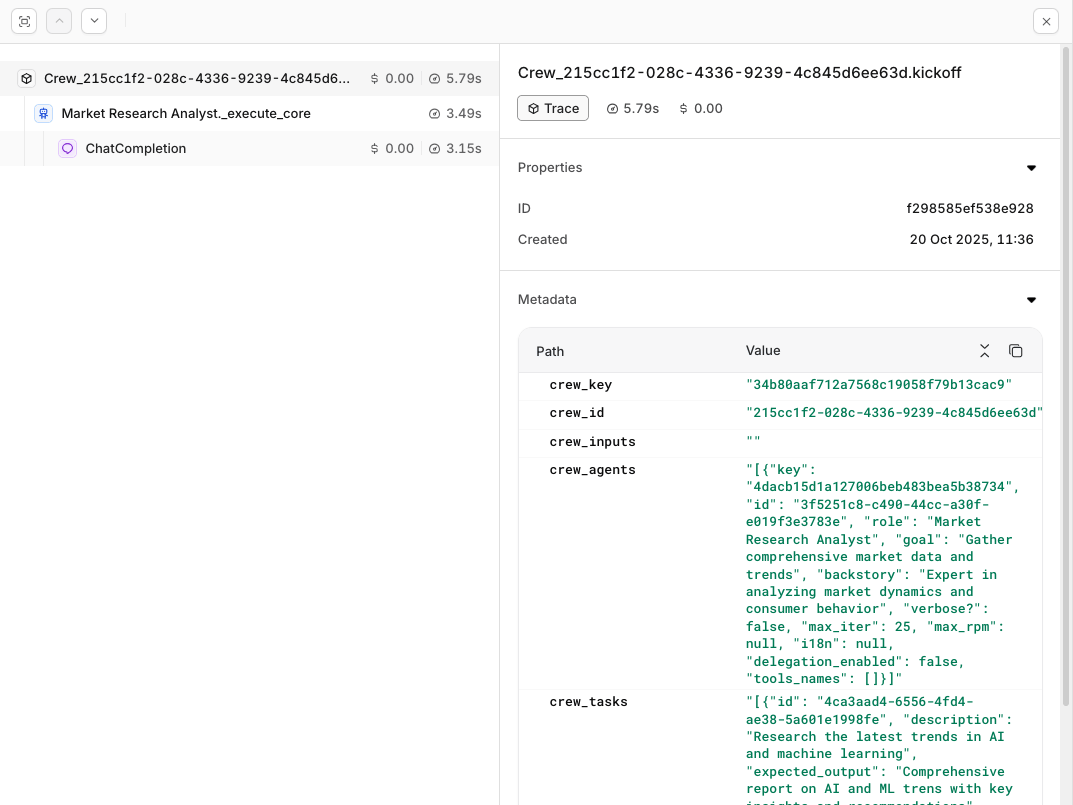
View Traces